<?xml version="1.0" encoding="utf-8"?><feed xmlns="http://www.w3.org/2005/Atom" ><generator uri="https://jekyllrb.com/" version="3.10.0">Jekyll</generator><link href="https://pawanyd.github.io/feed.xml" rel="self" type="application/atom+xml" /><link href="https://pawanyd.github.io/" rel="alternate" type="text/html" /><updated>2026-04-01T01:00:09+05:30</updated><id>https://pawanyd.github.io/feed.xml</id><title type="html">Pawan Kumar - Principal Software Developer</title><subtitle>Results-driven Principal Software Developer with 10+ years of experience in developing high-quality web applications</subtitle><author><name>Pawan Kumar</name></author><entry><title type="html">System Design Fundamentals: Building Twitter from Scratch</title><link href="https://pawanyd.github.io/blog/2026/03/22/system-design-fundamentals-building-twitter.html" rel="alternate" type="text/html" title="System Design Fundamentals: Building Twitter from Scratch" /><published>2026-03-22T00:00:00+05:30</published><updated>2026-03-22T00:00:00+05:30</updated><id>https://pawanyd.github.io/blog/2026/03/22/system-design-fundamentals-building-twitter</id><content type="html" xml:base="https://pawanyd.github.io/blog/2026/03/22/system-design-fundamentals-building-twitter.html"><![CDATA[<h1 id="system-design-fundamentals-building-twitter-from-scratch">System Design Fundamentals: Building Twitter from Scratch</h1>

<p>You’re in a system design interview. The interviewer says: “Design Twitter.”</p>

<p>Your mind races. Where do you even start? Do you jump straight to microservices? Talk about Kafka? Mention sharding? The problem isn’t that you don’t know these terms—it’s that you don’t know when to use them.</p>

<p>I’ve been there. Early in my career, I’d throw every buzzword I knew at system design problems. “We’ll use microservices with Kafka and Redis and shard the database!” The interviewer would ask, “Why?” I had no answer.</p>

<p>Here’s what changed everything for me: Stop memorizing solutions. Start understanding the journey.</p>

<p>Every massive system started simple. Twitter began as a basic web app. Instagram was just photo uploads. Netflix started by mailing DVDs. They didn’t architect for a billion users on day one—they evolved as problems emerged.</p>

<p>In this guide, we’re going to build Twitter together. We’ll start with the simplest possible design, then watch it break. Each time it breaks, we’ll introduce exactly one new concept to fix it. By the end, you’ll understand not just what each system design pattern is, but when and why you need it.</p>

<p>This is how you learn system design—by seeing problems emerge and solving them, one step at a time.</p>

<hr />

<h2 id="the-problem-design-twitter">The Problem: Design Twitter</h2>

<p>Let’s define what we’re building. Twitter lets users:</p>
<ul>
  <li>Post tweets (280 characters)</li>
  <li>Follow other users</li>
  <li>See a timeline of tweets from people they follow</li>
  <li>Like and retweet</li>
</ul>

<p>Non-functional requirements:</p>
<ul>
  <li>Fast timeline loading (under 1 second)</li>
  <li>Handle millions of users</li>
  <li>High availability (always accessible)</li>
</ul>

<p>Let’s start building.</p>

<hr />

<h2 id="version-1-the-simplest-possible-design">Version 1: The Simplest Possible Design</h2>

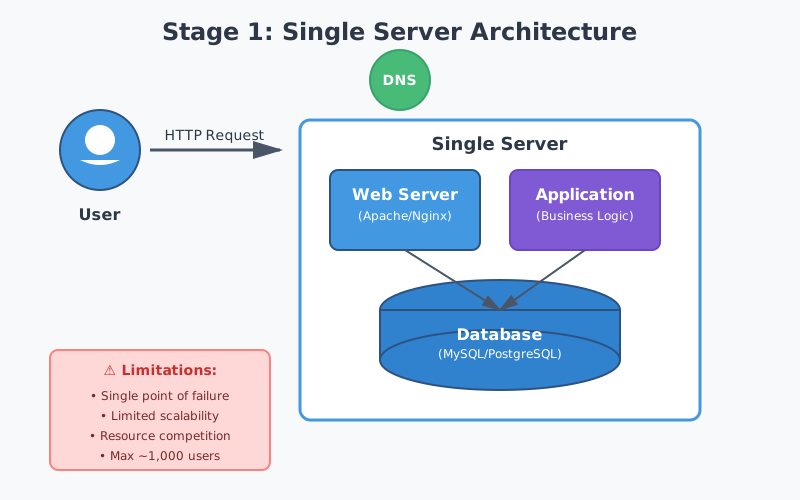
<p>When you’re starting, always begin with the absolute simplest architecture that could work.</p>

<svg role="img" aria-labelledby="v1-title v1-desc" viewBox="0 0 800 400" xmlns="http://www.w3.org/2000/svg">
  <title id="v1-title">Version 1: Simple Three-Tier Architecture</title>
  <desc id="v1-desc">Basic architecture with client, web server, and database</desc>
  
  <rect width="800" height="400" fill="#f8fafc" />
  
  <text x="400" y="30" font-family="Arial, sans-serif" font-size="20" font-weight="bold" fill="#1e293b" text-anchor="middle">Version 1: The Simplest Design</text>
  
  <!-- Client -->
  <g transform="translate(150, 200)">
    <rect x="-60" y="-40" width="120" height="80" rx="8" fill="#3b82f6" />
    <text x="0" y="-5" font-family="Arial, sans-serif" font-size="16" font-weight="bold" fill="white" text-anchor="middle">Web</text>
    <text x="0" y="15" font-family="Arial, sans-serif" font-size="16" font-weight="bold" fill="white" text-anchor="middle">Browser</text>
  </g>
  
  <!-- Web Server -->
  <g transform="translate(400, 200)">
    <rect x="-70" y="-50" width="140" height="100" rx="8" fill="#10b981" />
    <rect x="-50" y="-25" width="100" height="10" rx="2" fill="white" />
    <rect x="-50" y="-10" width="100" height="10" rx="2" fill="white" />
    <rect x="-50" y="5" width="100" height="10" rx="2" fill="white" />
    <text x="0" y="40" font-family="Arial, sans-serif" font-size="14" font-weight="bold" fill="white" text-anchor="middle">Web Server</text>
  </g>
  
  <!-- Database -->
  <g transform="translate(650, 200)">
    <ellipse cx="0" cy="-30" rx="60" ry="18" fill="#f59e0b" />
    <rect x="-60" y="-30" width="120" height="60" fill="#f59e0b" />
    <ellipse cx="0" cy="30" rx="60" ry="18" fill="#d97706" />
    <text x="0" y="65" font-family="Arial, sans-serif" font-size="14" font-weight="bold" fill="#1e293b" text-anchor="middle">Database</text>
  </g>
  
  <!-- Arrows -->
  <path d="M 210 200 L 330 200" stroke="#64748b" stroke-width="3" marker-end="url(#arrow1)" />
  <path d="M 470 200 L 590 200" stroke="#64748b" stroke-width="3" marker-end="url(#arrow1)" />
  
  <!-- Labels -->
  <text x="270" y="190" font-family="Arial, sans-serif" font-size="12" fill="#64748b" text-anchor="middle">HTTP</text>
  <text x="530" y="190" font-family="Arial, sans-serif" font-size="12" fill="#64748b" text-anchor="middle">SQL</text>
  
  <!-- Stats -->
  <text x="400" y="350" font-family="Arial, sans-serif" font-size="14" fill="#64748b" text-anchor="middle">Handles: ~1,000 users | Cost: $50/month</text>
  
  <defs>
    <marker id="arrow1" markerWidth="10" markerHeight="10" refX="9" refY="3" orient="auto">
      <polygon points="0 0, 10 3, 0 6" fill="#64748b" />
    </marker>
  </defs>
</svg>

<p><strong>Architecture:</strong></p>
<ul>
  <li>One web server running your application code</li>
  <li>One database (PostgreSQL) storing everything</li>
  <li>Users connect directly to your server</li>
</ul>

<p><strong>Database Schema:</strong></p>
<div class="language-plaintext highlighter-rouge"><div class="highlight"><pre class="highlight"><code>users: id, username, email, created_at
tweets: id, user_id, content, created_at
follows: follower_id, following_id
</code></pre></div></div>

<p><strong>How timeline works:</strong>
When a user loads their timeline, you query:</p>
<div class="language-sql highlighter-rouge"><div class="highlight"><pre class="highlight"><code><span class="k">SELECT</span> <span class="n">tweets</span><span class="p">.</span><span class="o">*</span> <span class="k">FROM</span> <span class="n">tweets</span>
<span class="k">JOIN</span> <span class="n">follows</span> <span class="k">ON</span> <span class="n">tweets</span><span class="p">.</span><span class="n">user_id</span> <span class="o">=</span> <span class="n">follows</span><span class="p">.</span><span class="n">following_id</span>
<span class="k">WHERE</span> <span class="n">follows</span><span class="p">.</span><span class="n">follower_id</span> <span class="o">=</span> <span class="n">current_user_id</span>
<span class="k">ORDER</span> <span class="k">BY</span> <span class="n">created_at</span> <span class="k">DESC</span>
<span class="k">LIMIT</span> <span class="mi">50</span>
</code></pre></div></div>

<p>This works! You launch. You get 1,000 users. Everything is fast. Life is good.</p>

<p>Then you hit 10,000 users. The server starts slowing down. Timeline queries take 3 seconds. Users complain.</p>

<p><strong>Problem #1: Single server can’t handle the load.</strong></p>

<hr />

<h2 id="concept-1-vertical-scaling">Concept #1: Vertical Scaling</h2>

<p>Your first instinct: make the server more powerful.</p>

<p><strong>Vertical Scaling</strong> means upgrading your existing server—more CPU, more RAM, faster disk.</p>

<svg role="img" aria-labelledby="vertical-title vertical-desc" viewBox="0 0 800 350" xmlns="http://www.w3.org/2000/svg">
  <title id="vertical-title">Vertical Scaling</title>
  <desc id="vertical-desc">Upgrading a single server with more resources</desc>
  
  <rect width="800" height="350" fill="#f8fafc" />
  
  <text x="400" y="30" font-family="Arial, sans-serif" font-size="20" font-weight="bold" fill="#1e293b" text-anchor="middle">Vertical Scaling: Scale Up</text>
  
  <!-- Before -->
  <g transform="translate(200, 180)">
    <rect x="-60" y="-60" width="120" height="120" rx="8" fill="#94a3b8" />
    <text x="0" y="-30" font-family="Arial, sans-serif" font-size="14" font-weight="bold" fill="white" text-anchor="middle">Server</text>
    <text x="0" y="-10" font-family="Arial, sans-serif" font-size="12" fill="white" text-anchor="middle">2 CPU</text>
    <text x="0" y="10" font-family="Arial, sans-serif" font-size="12" fill="white" text-anchor="middle">4GB RAM</text>
    <text x="0" y="30" font-family="Arial, sans-serif" font-size="12" fill="white" text-anchor="middle">100GB Disk</text>
    <text x="0" y="90" font-family="Arial, sans-serif" font-size="13" fill="#64748b" text-anchor="middle">Before</text>
  </g>
  
  <!-- Arrow -->
  <path d="M 320 180 L 480 180" stroke="#10b981" stroke-width="4" marker-end="url(#arrow-vert)" />
  <text x="400" y="170" font-family="Arial, sans-serif" font-size="14" font-weight="bold" fill="#10b981" text-anchor="middle">UPGRADE</text>
  
  <!-- After -->
  <g transform="translate(600, 180)">
    <rect x="-70" y="-70" width="140" height="140" rx="8" fill="#10b981" />
    <text x="0" y="-35" font-family="Arial, sans-serif" font-size="16" font-weight="bold" fill="white" text-anchor="middle">Server</text>
    <text x="0" y="-10" font-family="Arial, sans-serif" font-size="13" fill="white" text-anchor="middle">8 CPU</text>
    <text x="0" y="12" font-family="Arial, sans-serif" font-size="13" fill="white" text-anchor="middle">32GB RAM</text>
    <text x="0" y="34" font-family="Arial, sans-serif" font-size="13" fill="white" text-anchor="middle">1TB SSD</text>
    <text x="0" y="100" font-family="Arial, sans-serif" font-size="13" fill="#64748b" text-anchor="middle">After</text>
  </g>
  
  <!-- Stats -->
  <text x="400" y="320" font-family="Arial, sans-serif" font-size="13" fill="#64748b" text-anchor="middle">Handles: ~50,000 users | Cost: $400/month</text>
  
  <defs>
    <marker id="arrow-vert" markerWidth="12" markerHeight="12" refX="10" refY="3" orient="auto">
      <polygon points="0 0, 12 3, 0 6" fill="#10b981" />
    </marker>
  </defs>
</svg>

<p><strong>Real-world example:</strong> Stack Overflow ran on a single powerful server for years. They vertically scaled before needing multiple servers.</p>

<p><strong>Pros:</strong></p>
<ul>
  <li>Simple—no code changes needed</li>
  <li>No complexity added</li>
  <li>Works immediately</li>
</ul>

<p><strong>Cons:</strong></p>
<ul>
  <li>There’s a ceiling—you can’t infinitely upgrade one machine</li>
  <li>Expensive at high end</li>
  <li>Single point of failure</li>
</ul>

<p>You upgrade. Now you handle 50,000 users. But you’re hitting the limits. The biggest server you can buy costs $10,000/month and you’re still seeing slowdowns.</p>

<p><strong>Problem #2: One server has physical limits.</strong></p>

<hr />

<h2 id="concept-2-horizontal-scaling--load-balancing">Concept #2: Horizontal Scaling &amp; Load Balancing</h2>

<p>Instead of one big server, use many small servers.</p>

<p><strong>Horizontal Scaling</strong> means adding more servers. But now you need something to distribute traffic between them.</p>

<p><strong>Load Balancer</strong> sits in front of your servers and routes each request to an available server.</p>

<svg role="img" aria-labelledby="horizontal-title horizontal-desc" viewBox="0 0 900 500" xmlns="http://www.w3.org/2000/svg">
  <title id="horizontal-title">Horizontal Scaling with Load Balancer</title>
  <desc id="horizontal-desc">Multiple servers behind a load balancer distributing traffic</desc>
  
  <rect width="900" height="500" fill="#f8fafc" />
  
  <text x="450" y="30" font-family="Arial, sans-serif" font-size="20" font-weight="bold" fill="#1e293b" text-anchor="middle">Horizontal Scaling: Scale Out</text>
  
  <!-- Clients -->
  <g transform="translate(100, 150)">
    <circle cx="0" cy="0" r="25" fill="#3b82f6" />
    <text x="0" y="50" font-family="Arial, sans-serif" font-size="12" fill="#64748b" text-anchor="middle">User 1</text>
  </g>
  <g transform="translate(100, 250)">
    <circle cx="0" cy="0" r="25" fill="#3b82f6" />
    <text x="0" y="50" font-family="Arial, sans-serif" font-size="12" fill="#64748b" text-anchor="middle">User 2</text>
  </g>
  <g transform="translate(100, 350)">
    <circle cx="0" cy="0" r="25" fill="#3b82f6" />
    <text x="0" y="50" font-family="Arial, sans-serif" font-size="12" fill="#64748b" text-anchor="middle">User 3</text>
  </g>
  
  <!-- Load Balancer -->
  <g transform="translate(300, 250)">
    <rect x="-60" y="-70" width="120" height="140" rx="8" fill="#7c3aed" />
    <circle cx="0" cy="-35" r="12" fill="white" />
    <circle cx="-25" cy="10" r="12" fill="white" />
    <circle cx="25" cy="10" r="12" fill="white" />
    <line x1="0" y1="-23" x2="-25" y2="-2" stroke="white" stroke-width="3" />
    <line x1="0" y1="-23" x2="25" y2="-2" stroke="white" stroke-width="3" />
    <text x="0" y="95" font-family="Arial, sans-serif" font-size="13" font-weight="bold" fill="#1e293b" text-anchor="middle">Load Balancer</text>
  </g>
  
  <!-- Servers -->
  <g transform="translate(550, 120)">
    <rect x="-50" y="-40" width="100" height="80" rx="6" fill="#10b981" />
    <rect x="-35" y="-20" width="70" height="8" rx="2" fill="white" />
    <rect x="-35" y="-5" width="70" height="8" rx="2" fill="white" />
    <rect x="-35" y="10" width="70" height="8" rx="2" fill="white" />
    <text x="0" y="60" font-family="Arial, sans-serif" font-size="12" font-weight="bold" fill="#1e293b" text-anchor="middle">Server 1</text>
  </g>
  
  <g transform="translate(550, 250)">
    <rect x="-50" y="-40" width="100" height="80" rx="6" fill="#10b981" />
    <rect x="-35" y="-20" width="70" height="8" rx="2" fill="white" />
    <rect x="-35" y="-5" width="70" height="8" rx="2" fill="white" />
    <rect x="-35" y="10" width="70" height="8" rx="2" fill="white" />
    <text x="0" y="60" font-family="Arial, sans-serif" font-size="12" font-weight="bold" fill="#1e293b" text-anchor="middle">Server 2</text>
  </g>
  
  <g transform="translate(550, 380)">
    <rect x="-50" y="-40" width="100" height="80" rx="6" fill="#10b981" />
    <rect x="-35" y="-20" width="70" height="8" rx="2" fill="white" />
    <rect x="-35" y="-5" width="70" height="8" rx="2" fill="white" />
    <rect x="-35" y="10" width="70" height="8" rx="2" fill="white" />
    <text x="0" y="60" font-family="Arial, sans-serif" font-size="12" font-weight="bold" fill="#1e293b" text-anchor="middle">Server 3</text>
  </g>
  
  <!-- Database -->
  <g transform="translate(750, 250)">
    <ellipse cx="0" cy="-25" rx="50" ry="15" fill="#f59e0b" />
    <rect x="-50" y="-25" width="100" height="50" fill="#f59e0b" />
    <ellipse cx="0" cy="25" rx="50" ry="15" fill="#d97706" />
    <text x="0" y="55" font-family="Arial, sans-serif" font-size="12" font-weight="bold" fill="#1e293b" text-anchor="middle">Database</text>
  </g>
  
  <!-- Arrows: Users to LB -->
  <path d="M 130 150 L 235 210" stroke="#64748b" stroke-width="2" marker-end="url(#arrow-h)" />
  <path d="M 130 250 L 235 250" stroke="#64748b" stroke-width="2" marker-end="url(#arrow-h)" />
  <path d="M 130 350 L 235 290" stroke="#64748b" stroke-width="2" marker-end="url(#arrow-h)" />
  
  <!-- Arrows: LB to Servers -->
  <path d="M 365 210 L 495 140" stroke="#10b981" stroke-width="2" marker-end="url(#arrow-h)" />
  <path d="M 365 250 L 495 250" stroke="#10b981" stroke-width="2" marker-end="url(#arrow-h)" />
  <path d="M 365 290 L 495 360" stroke="#10b981" stroke-width="2" marker-end="url(#arrow-h)" />
  
  <!-- Arrows: Servers to DB -->
  <path d="M 605 120 L 695 225" stroke="#64748b" stroke-width="2" stroke-dasharray="4,4" />
  <path d="M 605 250 L 695 250" stroke="#64748b" stroke-width="2" stroke-dasharray="4,4" />
  <path d="M 605 380 L 695 275" stroke="#64748b" stroke-width="2" stroke-dasharray="4,4" />
  
  <!-- Stats -->
  <text x="450" y="480" font-family="Arial, sans-serif" font-size="13" fill="#64748b" text-anchor="middle">Handles: ~500,000 users | Can add more servers as needed</text>
  
  <defs>
    <marker id="arrow-h" markerWidth="10" markerHeight="10" refX="9" refY="3" orient="auto">
      <polygon points="0 0, 10 3, 0 6" fill="#64748b" />
    </marker>
  </defs>
</svg>

<p><strong>Load Balancing Algorithms:</strong></p>

<ol>
  <li><strong>Round Robin:</strong> Send request 1 to server A, request 2 to server B, request 3 to server C, repeat</li>
  <li><strong>Least Connections:</strong> Send to server with fewest active connections</li>
  <li><strong>IP Hash:</strong> Same user always goes to same server (useful for sessions)</li>
</ol>

<p><strong>Real-world example:</strong> Netflix uses Elastic Load Balancing (AWS) to distribute traffic across thousands of servers. During peak hours, they automatically add more servers.</p>

<p><strong>Pros:</strong></p>
<ul>
  <li>Nearly unlimited scaling—just add more servers</li>
  <li>Redundancy—if one server dies, others keep working</li>
  <li>Cost-effective—use many cheap servers instead of one expensive one</li>
</ul>

<p><strong>Cons:</strong></p>
<ul>
  <li>More complex—need to manage multiple servers</li>
  <li>Stateless servers required (we’ll fix this)</li>
</ul>

<p>You now have 3 servers behind a load balancer. You handle 500,000 users. But there’s a problem: users keep getting logged out randomly.</p>

<p><strong>Problem #3: User sessions are lost when load balancer sends them to different servers.</strong></p>

<hr />

<h2 id="concept-3-stateless-servers--session-storage">Concept #3: Stateless Servers &amp; Session Storage</h2>

<p>Your servers are <strong>stateful</strong>—they store user session data in memory. When a user logs in on Server 1, their session is stored there. If their next request goes to Server 2, they appear logged out.</p>

<p><strong>Solution:</strong> Make servers <strong>stateless</strong>. Store session data externally where all servers can access it.</p>

<p><strong>Session Store</strong> is a fast database (usually Redis or Memcached) that stores temporary data like user sessions.</p>

<svg role="img" aria-labelledby="session-title session-desc" viewBox="0 0 900 450" xmlns="http://www.w3.org/2000/svg">
  <title id="session-title">Stateless Servers with Session Store</title>
  <desc id="session-desc">Servers storing session data in external Redis cache</desc>
  
  <rect width="900" height="450" fill="#f8fafc" />
  
  <text x="450" y="30" font-family="Arial, sans-serif" font-size="20" font-weight="bold" fill="#1e293b" text-anchor="middle">Stateless Architecture with Session Store</text>
  
  <!-- Load Balancer -->
  <g transform="translate(150, 225)">
    <rect x="-50" y="-50" width="100" height="100" rx="8" fill="#7c3aed" />
    <text x="0" y="5" font-family="Arial, sans-serif" font-size="13" font-weight="bold" fill="white" text-anchor="middle">Load</text>
    <text x="0" y="22" font-family="Arial, sans-serif" font-size="13" font-weight="bold" fill="white" text-anchor="middle">Balancer</text>
  </g>
  
  <!-- Servers -->
  <g transform="translate(350, 120)">
    <rect x="-45" y="-35" width="90" height="70" rx="6" fill="#10b981" />
    <text x="0" y="0" font-family="Arial, sans-serif" font-size="12" font-weight="bold" fill="white" text-anchor="middle">Server 1</text>
    <text x="0" y="55" font-family="Arial, sans-serif" font-size="11" fill="#64748b" text-anchor="middle">Stateless</text>
  </g>
  
  <g transform="translate(350, 225)">
    <rect x="-45" y="-35" width="90" height="70" rx="6" fill="#10b981" />
    <text x="0" y="0" font-family="Arial, sans-serif" font-size="12" font-weight="bold" fill="white" text-anchor="middle">Server 2</text>
    <text x="0" y="55" font-family="Arial, sans-serif" font-size="11" fill="#64748b" text-anchor="middle">Stateless</text>
  </g>
  
  <g transform="translate(350, 330)">
    <rect x="-45" y="-35" width="90" height="70" rx="6" fill="#10b981" />
    <text x="0" y="0" font-family="Arial, sans-serif" font-size="12" font-weight="bold" fill="white" text-anchor="middle">Server 3</text>
    <text x="0" y="55" font-family="Arial, sans-serif" font-size="11" fill="#64748b" text-anchor="middle">Stateless</text>
  </g>
  
  <!-- Redis Session Store -->
  <g transform="translate(550, 225)">
    <rect x="-70" y="-50" width="140" height="100" rx="8" fill="#ef4444" />
    <circle cx="-30" cy="-15" r="10" fill="white" />
    <circle cx="0" cy="-15" r="10" fill="white" />
    <circle cx="30" cy="-15" r="10" fill="white" />
    <circle cx="-30" cy="15" r="10" fill="white" />
    <circle cx="0" cy="15" r="10" fill="white" />
    <circle cx="30" cy="15" r="10" fill="white" />
    <text x="0" y="70" font-family="Arial, sans-serif" font-size="13" font-weight="bold" fill="#1e293b" text-anchor="middle">Redis</text>
    <text x="0" y="88" font-family="Arial, sans-serif" font-size="11" fill="#64748b" text-anchor="middle">Session Store</text>
  </g>
  
  <!-- Database -->
  <g transform="translate(750, 225)">
    <ellipse cx="0" cy="-25" rx="50" ry="15" fill="#f59e0b" />
    <rect x="-50" y="-25" width="100" height="50" fill="#f59e0b" />
    <ellipse cx="0" cy="25" rx="50" ry="15" fill="#d97706" />
    <text x="0" y="55" font-family="Arial, sans-serif" font-size="12" font-weight="bold" fill="#1e293b" text-anchor="middle">Database</text>
  </g>
  
  <!-- Arrows -->
  <path d="M 200 225 L 300 140" stroke="#64748b" stroke-width="2" marker-end="url(#arrow-s)" />
  <path d="M 200 225 L 300 225" stroke="#64748b" stroke-width="2" marker-end="url(#arrow-s)" />
  <path d="M 200 225 L 300 310" stroke="#64748b" stroke-width="2" marker-end="url(#arrow-s)" />
  
  <path d="M 395 120 L 475 190" stroke="#ef4444" stroke-width="2" stroke-dasharray="4,4" />
  <path d="M 395 225 L 475 225" stroke="#ef4444" stroke-width="2" stroke-dasharray="4,4" />
  <path d="M 395 330 L 475 260" stroke="#ef4444" stroke-width="2" stroke-dasharray="4,4" />
  
  <path d="M 620 225 L 695 225" stroke="#64748b" stroke-width="2" />
  
  <!-- Labels -->
  <text x="550" y="140" font-family="Arial, sans-serif" font-size="11" fill="#ef4444" text-anchor="middle">Read/Write</text>
  <text x="550" y="155" font-family="Arial, sans-serif" font-size="11" fill="#ef4444" text-anchor="middle">Sessions</text>
  
  <defs>
    <marker id="arrow-s" markerWidth="10" markerHeight="10" refX="9" refY="3" orient="auto">
      <polygon points="0 0, 10 3, 0 6" fill="#64748b" />
    </marker>
  </defs>
</svg>

<p><strong>How it works:</strong></p>
<ol>
  <li>User logs in on Server 1</li>
  <li>Server 1 stores session in Redis with a key (session ID)</li>
  <li>Server 1 sends session ID to user as a cookie</li>
  <li>User’s next request goes to Server 2</li>
  <li>Server 2 reads session from Redis using the session ID</li>
  <li>User stays logged in!</li>
</ol>

<p><strong>Real-world example:</strong> Instagram uses Redis for session storage. With millions of concurrent users, any server can handle any request because sessions are centralized.</p>

<p><strong>Why Redis?</strong></p>
<ul>
  <li>In-memory = extremely fast (microseconds)</li>
  <li>Built-in expiration (sessions auto-delete after timeout)</li>
  <li>Simple key-value storage</li>
</ul>

<p>You’re now handling 1 million users. Timelines load fast. But you notice the database is struggling. Queries are slow.</p>

<p><strong>Problem #4: Database is the bottleneck.</strong></p>

<hr />

<h2 id="concept-4-database-indexing">Concept #4: Database Indexing</h2>

<p>Your timeline query scans millions of tweets to find the right ones. That’s slow.</p>

<p><strong>Database Index</strong> is like a book’s index—instead of reading every page to find “Redis,” you look it up in the index and jump to the right page.</p>

<svg role="img" aria-labelledby="index-title index-desc" viewBox="0 0 800 500" xmlns="http://www.w3.org/2000/svg">
  <title id="index-title">Database Indexing</title>
  <desc id="index-desc">How database indexes speed up queries by creating lookup structures</desc>
  
  <rect width="800" height="500" fill="#f8fafc" />
  
  <text x="400" y="30" font-family="Arial, sans-serif" font-size="20" font-weight="bold" fill="#1e293b" text-anchor="middle">Database Indexing</text>
  
  <!-- Without Index -->
  <g transform="translate(200, 100)">
    <text x="0" y="0" font-family="Arial, sans-serif" font-size="16" font-weight="bold" fill="#ef4444" text-anchor="middle">Without Index</text>
    <text x="0" y="25" font-family="Arial, sans-serif" font-size="12" fill="#64748b" text-anchor="middle">Full Table Scan</text>
    
    <!-- Table rows -->
    <rect x="-80" y="50" width="160" height="30" fill="#fee2e2" stroke="#ef4444" stroke-width="2" />
    <text x="0" y="70" font-family="monospace" font-size="11" fill="#1e293b" text-anchor="middle">user_id: 1 | tweet...</text>
    
    <rect x="-80" y="85" width="160" height="30" fill="#fee2e2" stroke="#ef4444" stroke-width="2" />
    <text x="0" y="105" font-family="monospace" font-size="11" fill="#1e293b" text-anchor="middle">user_id: 2 | tweet...</text>
    
    <rect x="-80" y="120" width="160" height="30" fill="#fee2e2" stroke="#ef4444" stroke-width="2" />
    <text x="0" y="140" font-family="monospace" font-size="11" fill="#1e293b" text-anchor="middle">user_id: 3 | tweet...</text>
    
    <rect x="-80" y="155" width="160" height="30" fill="#fee2e2" stroke="#ef4444" stroke-width="2" />
    <text x="0" y="175" font-family="monospace" font-size="11" fill="#1e293b" text-anchor="middle">user_id: 4 | tweet...</text>
    
    <text x="0" y="205" font-family="Arial, sans-serif" font-size="14" fill="#64748b" text-anchor="middle">...</text>
    
    <rect x="-80" y="220" width="160" height="30" fill="#dcfce7" stroke="#10b981" stroke-width="3" />
    <text x="0" y="240" font-family="monospace" font-size="11" fill="#1e293b" text-anchor="middle">user_id: 999 | tweet</text>
    
    <text x="0" y="280" font-family="Arial, sans-serif" font-size="13" fill="#ef4444" text-anchor="middle">Scans 1M rows</text>
    <text x="0" y="300" font-family="Arial, sans-serif" font-size="13" fill="#ef4444" text-anchor="middle">Time: 2000ms</text>
  </g>
  
  <!-- With Index -->
  <g transform="translate(600, 100)">
    <text x="0" y="0" font-family="Arial, sans-serif" font-size="16" font-weight="bold" fill="#10b981" text-anchor="middle">With Index</text>
    <text x="0" y="25" font-family="Arial, sans-serif" font-size="12" fill="#64748b" text-anchor="middle">B-Tree Lookup</text>
    
    <!-- B-Tree structure -->
    <circle cx="0" cy="80" r="25" fill="#10b981" />
    <text x="0" y="85" font-family="Arial, sans-serif" font-size="12" font-weight="bold" fill="white" text-anchor="middle">500</text>
    
    <circle cx="-50" cy="150" r="20" fill="#10b981" />
    <text x="-50" y="155" font-family="Arial, sans-serif" font-size="11" font-weight="bold" fill="white" text-anchor="middle">250</text>
    
    <circle cx="50" cy="150" r="20" fill="#10b981" />
    <text x="50" y="155" font-family="Arial, sans-serif" font-size="11" font-weight="bold" fill="white" text-anchor="middle">750</text>
    
    <circle cx="-80" cy="210" r="18" fill="#10b981" />
    <text x="-80" y="215" font-family="Arial, sans-serif" font-size="10" font-weight="bold" fill="white" text-anchor="middle">100</text>
    
    <circle cx="-20" cy="210" r="18" fill="#dcfce7" stroke="#10b981" stroke-width="3" />
    <text x="-20" y="215" font-family="Arial, sans-serif" font-size="10" font-weight="bold" fill="#10b981" text-anchor="middle">999</text>
    
    <circle cx="20" cy="210" r="18" fill="#10b981" />
    <text x="20" y="215" font-family="Arial, sans-serif" font-size="10" font-weight="bold" fill="white" text-anchor="middle">600</text>
    
    <circle cx="80" cy="210" r="18" fill="#10b981" />
    <text x="80" y="215" font-family="Arial, sans-serif" font-size="10" font-weight="bold" fill="white" text-anchor="middle">900</text>
    
    <!-- Lines -->
    <line x1="0" y1="105" x2="-50" y2="130" stroke="#10b981" stroke-width="2" />
    <line x1="0" y1="105" x2="50" y2="130" stroke="#10b981" stroke-width="2" />
    <line x1="-50" y1="170" x2="-80" y2="192" stroke="#10b981" stroke-width="2" />
    <line x1="-50" y1="170" x2="-20" y2="192" stroke="#10b981" stroke-width="2" />
    <line x1="50" y1="170" x2="20" y2="192" stroke="#10b981" stroke-width="2" />
    <line x1="50" y1="170" x2="80" y2="192" stroke="#10b981" stroke-width="2" />
    
    <text x="0" y="260" font-family="Arial, sans-serif" font-size="13" fill="#10b981" text-anchor="middle">3 lookups</text>
    <text x="0" y="280" font-family="Arial, sans-serif" font-size="13" fill="#10b981" text-anchor="middle">Time: 5ms</text>
    <text x="0" y="300" font-family="Arial, sans-serif" font-size="13" font-weight="bold" fill="#10b981" text-anchor="middle">400x faster!</text>
  </g>
  
  <!-- Query example -->
  <rect x="50" y="380" width="700" height="80" rx="8" fill="#f1f5f9" stroke="#64748b" stroke-width="2" />
  <text x="400" y="405" font-family="monospace" font-size="13" fill="#1e293b" text-anchor="middle">CREATE INDEX idx_user_id ON tweets(user_id);</text>
  <text x="400" y="430" font-family="Arial, sans-serif" font-size="12" fill="#64748b" text-anchor="middle">Now queries filtering by user_id are instant</text>
</svg>

<p><strong>Indexes to create for Twitter:</strong></p>
<div class="language-sql highlighter-rouge"><div class="highlight"><pre class="highlight"><code><span class="k">CREATE</span> <span class="k">INDEX</span> <span class="n">idx_tweets_user_id</span> <span class="k">ON</span> <span class="n">tweets</span><span class="p">(</span><span class="n">user_id</span><span class="p">);</span>
<span class="k">CREATE</span> <span class="k">INDEX</span> <span class="n">idx_tweets_created_at</span> <span class="k">ON</span> <span class="n">tweets</span><span class="p">(</span><span class="n">created_at</span><span class="p">);</span>
<span class="k">CREATE</span> <span class="k">INDEX</span> <span class="n">idx_follows_follower</span> <span class="k">ON</span> <span class="n">follows</span><span class="p">(</span><span class="n">follower_id</span><span class="p">);</span>
</code></pre></div></div>

<p><strong>Real-world example:</strong> LinkedIn indexes user profiles by name, company, location, skills. Without indexes, searching “software engineer at Google” would scan 800 million profiles. With indexes, it’s instant.</p>

<p><strong>Trade-offs:</strong></p>
<ul>
  <li>Faster reads (queries)</li>
  <li>Slower writes (must update index)</li>
  <li>More storage space</li>
</ul>

<p>Indexes help, but you’re still hitting the database for every timeline request. With 10 million users, that’s millions of database queries per minute.</p>

<p><strong>Problem #5: Database can’t handle read traffic.</strong></p>

<hr />

<h2 id="concept-5-caching">Concept #5: Caching</h2>

<p>Most users see the same tweets repeatedly. Why query the database every time?</p>

<p><strong>Cache</strong> stores frequently accessed data in memory (RAM) for instant retrieval.</p>

<svg role="img" aria-labelledby="cache-title cache-desc" viewBox="0 0 900 500" xmlns="http://www.w3.org/2000/svg">
  <title id="cache-title">Caching Layer</title>
  <desc id="cache-desc">Cache sits between application and database to serve frequent requests</desc>
  
  <rect width="900" height="500" fill="#f8fafc" />
  
  <text x="450" y="30" font-family="Arial, sans-serif" font-size="20" font-weight="bold" fill="#1e293b" text-anchor="middle">Caching Layer</text>
  
  <!-- Server -->
  <g transform="translate(200, 250)">
    <rect x="-60" y="-50" width="120" height="100" rx="8" fill="#10b981" />
    <text x="0" y="0" font-family="Arial, sans-serif" font-size="14" font-weight="bold" fill="white" text-anchor="middle">Web</text>
    <text x="0" y="18" font-family="Arial, sans-serif" font-size="14" font-weight="bold" fill="white" text-anchor="middle">Server</text>
  </g>
  
  <!-- Cache -->
  <g transform="translate(450, 250)">
    <rect x="-80" y="-60" width="160" height="120" rx="8" fill="#ef4444" />
    <circle cx="-35" cy="-20" r="12" fill="white" />
    <circle cx="0" cy="-20" r="12" fill="white" />
    <circle cx="35" cy="-20" r="12" fill="white" />
    <circle cx="-35" cy="15" r="12" fill="white" />
    <circle cx="0" cy="15" r="12" fill="white" />
    <circle cx="35" cy="15" r="12" fill="white" />
    <text x="0" y="80" font-family="Arial, sans-serif" font-size="14" font-weight="bold" fill="#1e293b" text-anchor="middle">Redis Cache</text>
    <text x="0" y="100" font-family="Arial, sans-serif" font-size="11" fill="#64748b" text-anchor="middle">In-Memory</text>
  </g>
  
  <!-- Database -->
  <g transform="translate(700, 250)">
    <ellipse cx="0" cy="-30" rx="60" ry="18" fill="#f59e0b" />
    <rect x="-60" y="-30" width="120" height="60" fill="#f59e0b" />
    <ellipse cx="0" cy="30" rx="60" ry="18" fill="#d97706" />
    <text x="0" y="70" font-family="Arial, sans-serif" font-size="14" font-weight="bold" fill="#1e293b" text-anchor="middle">Database</text>
    <text x="0" y="90" font-family="Arial, sans-serif" font-size="11" fill="#64748b" text-anchor="middle">On-Disk</text>
  </g>
  
  <!-- Flow arrows -->
  <path d="M 260 250 L 365 250" stroke="#2563eb" stroke-width="3" marker-end="url(#arrow-c)" />
  <text x="312" y="240" font-family="Arial, sans-serif" font-size="12" fill="#2563eb" text-anchor="middle">1. Check cache</text>
  
  <path d="M 535 250 L 635 250" stroke="#64748b" stroke-width="3" stroke-dasharray="5,5" marker-end="url(#arrow-c)" />
  <text x="585" y="240" font-family="Arial, sans-serif" font-size="12" fill="#64748b" text-anchor="middle">2. If miss</text>
  
  <path d="M 635 270 L 535 270" stroke="#10b981" stroke-width="3" marker-end="url(#arrow-c)" />
  <text x="585" y="290" font-family="Arial, sans-serif" font-size="12" fill="#10b981" text-anchor="middle">3. Store in cache</text>
  
  <path d="M 365 270 L 260 270" stroke="#10b981" stroke-width="3" marker-end="url(#arrow-c)" />
  <text x="312" y="290" font-family="Arial, sans-serif" font-size="12" fill="#10b981" text-anchor="middle">4. Return data</text>
  
  <!-- Performance comparison -->
  <g transform="translate(150, 400)">
    <rect x="0" y="0" width="250" height="60" rx="6" fill="#dcfce7" stroke="#10b981" stroke-width="2" />
    <text x="125" y="25" font-family="Arial, sans-serif" font-size="14" font-weight="bold" fill="#10b981" text-anchor="middle">Cache Hit</text>
    <text x="125" y="45" font-family="Arial, sans-serif" font-size="13" fill="#1e293b" text-anchor="middle">Response: 1ms</text>
  </g>
  
  <g transform="translate(500, 400)">
    <rect x="0" y="0" width="250" height="60" rx="6" fill="#fee2e2" stroke="#ef4444" stroke-width="2" />
    <text x="125" y="25" font-family="Arial, sans-serif" font-size="14" font-weight="bold" fill="#ef4444" text-anchor="middle">Cache Miss</text>
    <text x="125" y="45" font-family="Arial, sans-serif" font-size="13" fill="#1e293b" text-anchor="middle">Response: 100ms</text>
  </g>
  
  <defs>
    <marker id="arrow-c" markerWidth="10" markerHeight="10" refX="9" refY="3" orient="auto">
      <polygon points="0 0, 10 3, 0 6" fill="#64748b" />
    </marker>
  </defs>
</svg>

<p><strong>Caching Strategy for Twitter:</strong></p>

<ol>
  <li><strong>Cache user timelines:</strong> Key = <code class="language-plaintext highlighter-rouge">timeline:user_123</code>, Value = list of tweet IDs</li>
  <li><strong>Cache tweet content:</strong> Key = <code class="language-plaintext highlighter-rouge">tweet:456</code>, Value = tweet data</li>
  <li><strong>Set expiration:</strong> Timelines expire after 5 minutes</li>
</ol>

<p><strong>Cache Hit Ratio:</strong> Percentage of requests served from cache. Aim for 80%+.</p>

<p><strong>Real-world example:</strong> Reddit caches the front page in Redis. Instead of querying the database for every visitor, they serve cached results. This handles millions of requests per minute with just a few database queries.</p>

<p><strong>Cache Invalidation</strong> (the hard part):</p>
<ul>
  <li>When user posts a tweet, invalidate their followers’ timeline caches</li>
  <li>When tweet is deleted, remove from cache</li>
  <li>Use TTL (time-to-live) to auto-expire stale data</li>
</ul>

<p>You’re now handling 50 million users. But you notice writes are slow. Every new tweet takes 500ms to save.</p>

<p><strong>Problem #6: Single database can’t handle write traffic.</strong></p>

<hr />

<h2 id="concept-6-database-replication">Concept #6: Database Replication</h2>

<p>Your database is doing two things: handling reads (timeline queries) and writes (new tweets). Reads are 100x more frequent than writes.</p>

<p><strong>Database Replication</strong> creates copies of your database. One primary handles writes, multiple replicas handle reads.</p>

<svg role="img" aria-labelledby="replication-title replication-desc" viewBox="0 0 900 550" xmlns="http://www.w3.org/2000/svg">
  <title id="replication-title">Database Replication</title>
  <desc id="replication-desc">Primary database for writes, multiple read replicas for queries</desc>
  
  <rect width="900" height="550" fill="#f8fafc" />
  
  <text x="450" y="30" font-family="Arial, sans-serif" font-size="20" font-weight="bold" fill="#1e293b" text-anchor="middle">Database Replication: Primary-Replica</text>
  
  <!-- Application Servers -->
  <g transform="translate(150, 150)">
    <rect x="-50" y="-40" width="100" height="80" rx="6" fill="#10b981" />
    <text x="0" y="0" font-family="Arial, sans-serif" font-size="13" font-weight="bold" fill="white" text-anchor="middle">App</text>
    <text x="0" y="17" font-family="Arial, sans-serif" font-size="13" font-weight="bold" fill="white" text-anchor="middle">Server 1</text>
  </g>
  
  <g transform="translate(150, 280)">
    <rect x="-50" y="-40" width="100" height="80" rx="6" fill="#10b981" />
    <text x="0" y="0" font-family="Arial, sans-serif" font-size="13" font-weight="bold" fill="white" text-anchor="middle">App</text>
    <text x="0" y="17" font-family="Arial, sans-serif" font-size="13" font-weight="bold" fill="white" text-anchor="middle">Server 2</text>
  </g>
  
  <g transform="translate(150, 410)">
    <rect x="-50" y="-40" width="100" height="80" rx="6" fill="#10b981" />
    <text x="0" y="0" font-family="Arial, sans-serif" font-size="13" font-weight="bold" fill="white" text-anchor="middle">App</text>
    <text x="0" y="17" font-family="Arial, sans-serif" font-size="13" font-weight="bold" fill="white" text-anchor="middle">Server 3</text>
  </g>
  
  <!-- Primary Database -->
  <g transform="translate(450, 150)">
    <ellipse cx="0" cy="-30" rx="70" ry="20" fill="#ef4444" />
    <rect x="-70" y="-30" width="140" height="60" fill="#ef4444" />
    <ellipse cx="0" cy="30" rx="70" ry="20" fill="#dc2626" />
    <text x="0" y="10" font-family="Arial, sans-serif" font-size="14" font-weight="bold" fill="white" text-anchor="middle">PRIMARY</text>
    <text x="0" y="70" font-family="Arial, sans-serif" font-size="13" font-weight="bold" fill="#1e293b" text-anchor="middle">Write Database</text>
    <text x="0" y="88" font-family="Arial, sans-serif" font-size="11" fill="#64748b" text-anchor="middle">Handles all writes</text>
  </g>
  
  <!-- Read Replicas -->
  <g transform="translate(700, 150)">
    <ellipse cx="0" cy="-25" rx="60" ry="18" fill="#3b82f6" />
    <rect x="-60" y="-25" width="120" height="50" fill="#3b82f6" />
    <ellipse cx="0" cy="25" rx="60" ry="18" fill="#2563eb" />
    <text x="0" y="8" font-family="Arial, sans-serif" font-size="13" font-weight="bold" fill="white" text-anchor="middle">REPLICA 1</text>
    <text x="0" y="60" font-family="Arial, sans-serif" font-size="11" fill="#64748b" text-anchor="middle">Read Only</text>
  </g>
  
  <g transform="translate(700, 280)">
    <ellipse cx="0" cy="-25" rx="60" ry="18" fill="#3b82f6" />
    <rect x="-60" y="-25" width="120" height="50" fill="#3b82f6" />
    <ellipse cx="0" cy="25" rx="60" ry="18" fill="#2563eb" />
    <text x="0" y="8" font-family="Arial, sans-serif" font-size="13" font-weight="bold" fill="white" text-anchor="middle">REPLICA 2</text>
    <text x="0" y="60" font-family="Arial, sans-serif" font-size="11" fill="#64748b" text-anchor="middle">Read Only</text>
  </g>
  
  <g transform="translate(700, 410)">
    <ellipse cx="0" cy="-25" rx="60" ry="18" fill="#3b82f6" />
    <rect x="-60" y="-25" width="120" height="50" fill="#3b82f6" />
    <ellipse cx="0" cy="25" rx="60" ry="18" fill="#2563eb" />
    <text x="0" y="8" font-family="Arial, sans-serif" font-size="13" font-weight="bold" fill="white" text-anchor="middle">REPLICA 3</text>
    <text x="0" y="60" font-family="Arial, sans-serif" font-size="11" fill="#64748b" text-anchor="middle">Read Only</text>
  </g>
  
  <!-- Write arrows (red) -->
  <path d="M 200 150 L 375 150" stroke="#ef4444" stroke-width="3" marker-end="url(#arrow-rep)" />
  <path d="M 200 280 L 375 165" stroke="#ef4444" stroke-width="3" marker-end="url(#arrow-rep)" />
  <path d="M 200 410 L 375 180" stroke="#ef4444" stroke-width="3" marker-end="url(#arrow-rep)" />
  <text x="285" y="140" font-family="Arial, sans-serif" font-size="11" fill="#ef4444" text-anchor="middle">WRITE</text>
  
  <!-- Replication arrows (purple) -->
  <path d="M 525 150 L 635 150" stroke="#7c3aed" stroke-width="2" stroke-dasharray="5,5" marker-end="url(#arrow-rep)" />
  <path d="M 525 150 L 635 280" stroke="#7c3aed" stroke-width="2" stroke-dasharray="5,5" marker-end="url(#arrow-rep)" />
  <path d="M 525 150 L 635 410" stroke="#7c3aed" stroke-width="2" stroke-dasharray="5,5" marker-end="url(#arrow-rep)" />
  <text x="575" y="140" font-family="Arial, sans-serif" font-size="11" fill="#7c3aed" text-anchor="middle">Replicate</text>
  
  <!-- Read arrows (blue) -->
  <path d="M 640 150 L 200 165" stroke="#3b82f6" stroke-width="2" marker-end="url(#arrow-rep)" />
  <path d="M 640 280 L 200 280" stroke="#3b82f6" stroke-width="2" marker-end="url(#arrow-rep)" />
  <path d="M 640 410 L 200 395" stroke="#3b82f6" stroke-width="2" marker-end="url(#arrow-rep)" />
  <text x="420" y="270" font-family="Arial, sans-serif" font-size="11" fill="#3b82f6" text-anchor="middle">READ</text>
  
  <!-- Stats -->
  <text x="450" y="530" font-family="Arial, sans-serif" font-size="13" fill="#64748b" text-anchor="middle">Writes: 1 DB | Reads: 3 DBs = 3x read capacity</text>
  
  <defs>
    <marker id="arrow-rep" markerWidth="10" markerHeight="10" refX="9" refY="3" orient="auto">
      <polygon points="0 0, 10 3, 0 6" fill="#64748b" />
    </marker>
  </defs>
</svg>

<p><strong>How it works:</strong></p>
<ol>
  <li>All writes go to primary database</li>
  <li>Primary replicates changes to replicas (usually async)</li>
  <li>All reads go to replicas</li>
  <li>If primary fails, promote a replica to primary</li>
</ol>

<p><strong>Real-world example:</strong> YouTube uses primary-replica replication. Video metadata writes go to primary. Billions of video views query replicas. This separates write and read traffic.</p>

<p><strong>Replication Lag:</strong> Replicas might be slightly behind primary (milliseconds to seconds). This is <strong>eventual consistency</strong>—data will be consistent eventually, but might be temporarily out of sync.</p>

<p><strong>Trade-offs:</strong></p>
<ul>
  <li>Scales reads horizontally (add more replicas)</li>
  <li>Doesn’t scale writes (still one primary)</li>
  <li>Introduces consistency challenges</li>
</ul>

<p>You’re now at 100 million users. But you hit another wall: the primary database can’t handle write traffic. You need to split the data.</p>

<p><strong>Problem #7: Single primary database can’t handle all writes.</strong></p>

<hr />

<h2 id="concept-7-database-sharding">Concept #7: Database Sharding</h2>

<p><strong>Sharding</strong> splits your database across multiple machines. Each shard holds a subset of data.</p>

<svg role="img" aria-labelledby="sharding-title sharding-desc" viewBox="0 0 1000 600" xmlns="http://www.w3.org/2000/svg">
  <title id="sharding-title">Database Sharding</title>
  <desc id="sharding-desc">Splitting data across multiple database shards based on user ID</desc>
  
  <rect width="1000" height="600" fill="#f8fafc" />
  
  <text x="500" y="30" font-family="Arial, sans-serif" font-size="20" font-weight="bold" fill="#1e293b" text-anchor="middle">Database Sharding by User ID</text>
  
  <!-- Application Layer -->
  <g transform="translate(500, 120)">
    <rect x="-100" y="-40" width="200" height="80" rx="8" fill="#10b981" />
    <text x="0" y="-5" font-family="Arial, sans-serif" font-size="16" font-weight="bold" fill="white" text-anchor="middle">Application</text>
    <text x="0" y="15" font-family="Arial, sans-serif" font-size="14" fill="white" text-anchor="middle">Sharding Logic</text>
  </g>
  
  <!-- Shard 1 -->
  <g transform="translate(200, 350)">
    <ellipse cx="0" cy="-30" rx="70" ry="20" fill="#3b82f6" />
    <rect x="-70" y="-30" width="140" height="60" fill="#3b82f6" />
    <ellipse cx="0" cy="30" rx="70" ry="20" fill="#2563eb" />
    <text x="0" y="5" font-family="Arial, sans-serif" font-size="14" font-weight="bold" fill="white" text-anchor="middle">SHARD 1</text>
    <text x="0" y="70" font-family="Arial, sans-serif" font-size="13" font-weight="bold" fill="#1e293b" text-anchor="middle">Users 0-99M</text>
    <text x="0" y="90" font-family="Arial, sans-serif" font-size="11" fill="#64748b" text-anchor="middle">user_id % 4 == 0</text>
  </g>
  
  <!-- Shard 2 -->
  <g transform="translate(420, 350)">
    <ellipse cx="0" cy="-30" rx="70" ry="20" fill="#7c3aed" />
    <rect x="-70" y="-30" width="140" height="60" fill="#7c3aed" />
    <ellipse cx="0" cy="30" rx="70" ry="20" fill="#6d28d9" />
    <text x="0" y="5" font-family="Arial, sans-serif" font-size="14" font-weight="bold" fill="white" text-anchor="middle">SHARD 2</text>
    <text x="0" y="70" font-family="Arial, sans-serif" font-size="13" font-weight="bold" fill="#1e293b" text-anchor="middle">Users 100-199M</text>
    <text x="0" y="90" font-family="Arial, sans-serif" font-size="11" fill="#64748b" text-anchor="middle">user_id % 4 == 1</text>
  </g>
  
  <!-- Shard 3 -->
  <g transform="translate(640, 350)">
    <ellipse cx="0" cy="-30" rx="70" ry="20" fill="#f59e0b" />
    <rect x="-70" y="-30" width="140" height="60" fill="#f59e0b" />
    <ellipse cx="0" cy="30" rx="70" ry="20" fill="#d97706" />
    <text x="0" y="5" font-family="Arial, sans-serif" font-size="14" font-weight="bold" fill="white" text-anchor="middle">SHARD 3</text>
    <text x="0" y="70" font-family="Arial, sans-serif" font-size="13" font-weight="bold" fill="#1e293b" text-anchor="middle">Users 200-299M</text>
    <text x="0" y="90" font-family="Arial, sans-serif" font-size="11" fill="#64748b" text-anchor="middle">user_id % 4 == 2</text>
  </g>
  
  <!-- Shard 4 -->
  <g transform="translate(860, 350)">
    <ellipse cx="0" cy="-30" rx="70" ry="20" fill="#ef4444" />
    <rect x="-70" y="-30" width="140" height="60" fill="#ef4444" />
    <ellipse cx="0" cy="30" rx="70" ry="20" fill="#dc2626" />
    <text x="0" y="5" font-family="Arial, sans-serif" font-size="14" font-weight="bold" fill="white" text-anchor="middle">SHARD 4</text>
    <text x="0" y="70" font-family="Arial, sans-serif" font-size="13" font-weight="bold" fill="#1e293b" text-anchor="middle">Users 300-399M</text>
    <text x="0" y="90" font-family="Arial, sans-serif" font-size="11" fill="#64748b" text-anchor="middle">user_id % 4 == 3</text>
  </g>
  
  <!-- Arrows -->
  <path d="M 450 160 L 250 300" stroke="#3b82f6" stroke-width="3" marker-end="url(#arrow-sh)" />
  <path d="M 480 160 L 420 300" stroke="#7c3aed" stroke-width="3" marker-end="url(#arrow-sh)" />
  <path d="M 520 160 L 640 300" stroke="#f59e0b" stroke-width="3" marker-end="url(#arrow-sh)" />
  <path d="M 550 160 L 810 300" stroke="#ef4444" stroke-width="3" marker-end="url(#arrow-sh)" />
  
  <!-- Example -->
  <rect x="50" y="480" width="900" height="90" rx="8" fill="#f1f5f9" stroke="#64748b" stroke-width="2" />
  <text x="500" y="510" font-family="Arial, sans-serif" font-size="14" font-weight="bold" fill="#1e293b" text-anchor="middle">Example: User 12345 posts a tweet</text>
  <text x="500" y="535" font-family="monospace" font-size="12" fill="#64748b" text-anchor="middle">shard = 12345 % 4 = 1 → Route to SHARD 2</text>
  <text x="500" y="555" font-family="Arial, sans-serif" font-size="12" fill="#64748b" text-anchor="middle">Each shard handles 25% of users = 4x write capacity</text>
  
  <defs>
    <marker id="arrow-sh" markerWidth="10" markerHeight="10" refX="9" refY="3" orient="auto">
      <polygon points="0 0, 10 3, 0 6" fill="#64748b" />
    </marker>
  </defs>
</svg>

<p><strong>Sharding Strategies:</strong></p>

<ol>
  <li><strong>Hash-based:</strong> <code class="language-plaintext highlighter-rouge">shard = user_id % num_shards</code> (what we’re using)</li>
  <li><strong>Range-based:</strong> Users 0-100M on shard 1, 100-200M on shard 2</li>
  <li><strong>Geographic:</strong> US users on US shard, EU users on EU shard</li>
</ol>

<p><strong>Real-world example:</strong> Instagram shards by user ID. Each shard stores photos for a subset of users. This lets them scale writes horizontally—more shards = more write capacity.</p>

<p><strong>Challenges:</strong></p>
<ul>
  <li>Cross-shard queries are expensive (avoid if possible)</li>
  <li>Rebalancing shards is complex</li>
  <li>Hotspots if data isn’t evenly distributed</li>
</ul>

<p><strong>Problem #8: Users want to see tweets from people they follow, but those users might be on different shards.</strong></p>

<p>This is where things get interesting. You can’t efficiently query across shards. You need a different approach.</p>

<hr />

<h2 id="concept-8-denormalization--fan-out">Concept #8: Denormalization &amp; Fan-out</h2>

<p>Instead of querying for timeline on-demand, pre-compute it.</p>

<p><strong>Fan-out on Write:</strong> When user posts a tweet, immediately push it to all followers’ timelines.</p>

<svg role="img" aria-labelledby="fanout-title fanout-desc" viewBox="0 0 900 550" xmlns="http://www.w3.org/2000/svg">
  <title id="fanout-title">Fan-out on Write</title>
  <desc id="fanout-desc">When a user posts, tweet is pushed to all followers' timelines</desc>
  
  <rect width="900" height="550" fill="#f8fafc" />
  
  <text x="450" y="30" font-family="Arial, sans-serif" font-size="20" font-weight="bold" fill="#1e293b" text-anchor="middle">Fan-out on Write Strategy</text>
  
  <!-- User posts tweet -->
  <g transform="translate(150, 150)">
    <circle cx="0" cy="0" r="40" fill="#3b82f6" />
    <text x="0" y="-5" font-family="Arial, sans-serif" font-size="16" font-weight="bold" fill="white" text-anchor="middle">User A</text>
    <text x="0" y="12" font-family="Arial, sans-serif" font-size="12" fill="white" text-anchor="middle">posts</text>
    <text x="0" y="70" font-family="Arial, sans-serif" font-size="13" fill="#64748b" text-anchor="middle">1M followers</text>
  </g>
  
  <!-- Tweet -->
  <g transform="translate(350, 150)">
    <rect x="-60" y="-30" width="120" height="60" rx="8" fill="#10b981" />
    <text x="0" y="-5" font-family="Arial, sans-serif" font-size="14" font-weight="bold" fill="white" text-anchor="middle">New Tweet</text>
    <text x="0" y="12" font-family="Arial, sans-serif" font-size="11" fill="white" text-anchor="middle">"Hello World!"</text>
  </g>
  
  <!-- Fan-out service -->
  <g transform="translate(550, 150)">
    <rect x="-70" y="-40" width="140" height="80" rx="8" fill="#7c3aed" />
    <text x="0" y="-5" font-family="Arial, sans-serif" font-size="14" font-weight="bold" fill="white" text-anchor="middle">Fan-out</text>
    <text x="0" y="12" font-family="Arial, sans-serif" font-size="14" font-weight="bold" fill="white" text-anchor="middle">Service</text>
  </g>
  
  <!-- Follower timelines -->
  <g transform="translate(750, 80)">
    <rect x="-60" y="-25" width="120" height="50" rx="6" fill="#ef4444" />
    <text x="0" y="5" font-family="Arial, sans-serif" font-size="12" font-weight="bold" fill="white" text-anchor="middle">Timeline B</text>
  </g>
  
  <g transform="translate(750, 170)">
    <rect x="-60" y="-25" width="120" height="50" rx="6" fill="#ef4444" />
    <text x="0" y="5" font-family="Arial, sans-serif" font-size="12" font-weight="bold" fill="white" text-anchor="middle">Timeline C</text>
  </g>
  
  <g transform="translate(750, 260)">
    <rect x="-60" y="-25" width="120" height="50" rx="6" fill="#ef4444" />
    <text x="0" y="5" font-family="Arial, sans-serif" font-size="12" font-weight="bold" fill="white" text-anchor="middle">Timeline D</text>
  </g>
  
  <text x="750" y="320" font-family="Arial, sans-serif" font-size="14" fill="#64748b" text-anchor="middle">... 1M timelines</text>
  
  <!-- Arrows -->
  <path d="M 190 150 L 285 150" stroke="#64748b" stroke-width="3" marker-end="url(#arrow-fo)" />
  <path d="M 410 150 L 475 150" stroke="#64748b" stroke-width="3" marker-end="url(#arrow-fo)" />
  
  <path d="M 625 130 L 685 90" stroke="#ef4444" stroke-width="2" marker-end="url(#arrow-fo)" />
  <path d="M 625 150 L 685 170" stroke="#ef4444" stroke-width="2" marker-end="url(#arrow-fo)" />
  <path d="M 625 170 L 685 250" stroke="#ef4444" stroke-width="2" marker-end="url(#arrow-fo)" />
  
  <text x="655" y="120" font-family="Arial, sans-serif" font-size="11" fill="#ef4444" text-anchor="middle">Push to</text>
  <text x="655" y="135" font-family="Arial, sans-serif" font-size="11" fill="#ef4444" text-anchor="middle">all followers</text>
  
  <!-- Comparison -->
  <g transform="translate(100, 400)">
    <rect x="0" y="0" width="350" height="120" rx="8" fill="#dcfce7" stroke="#10b981" stroke-width="2" />
    <text x="175" y="30" font-family="Arial, sans-serif" font-size="15" font-weight="bold" fill="#10b981" text-anchor="middle">Fan-out on Write (Twitter)</text>
    <text x="20" y="55" font-family="Arial, sans-serif" font-size="12" fill="#1e293b">✓ Fast reads (pre-computed)</text>
    <text x="20" y="75" font-family="Arial, sans-serif" font-size="12" fill="#1e293b">✓ Timeline loads instantly</text>
    <text x="20" y="95" font-family="Arial, sans-serif" font-size="12" fill="#1e293b">✗ Slow writes (1M updates)</text>
    <text x="20" y="115" font-family="Arial, sans-serif" font-size="12" fill="#1e293b">✗ Storage intensive</text>
  </g>
  
  <g transform="translate(500, 400)">
    <rect x="0" y="0" width="350" height="120" rx="8" fill="#fef3c7" stroke="#f59e0b" stroke-width="2" />
    <text x="175" y="30" font-family="Arial, sans-serif" font-size="15" font-weight="bold" fill="#f59e0b" text-anchor="middle">Fan-out on Read (Instagram)</text>
    <text x="20" y="55" font-family="Arial, sans-serif" font-size="12" fill="#1e293b">✓ Fast writes (just store tweet)</text>
    <text x="20" y="75" font-family="Arial, sans-serif" font-size="12" fill="#1e293b">✓ Less storage</text>
    <text x="20" y="95" font-family="Arial, sans-serif" font-size="12" fill="#1e293b">✗ Slow reads (query on demand)</text>
    <text x="20" y="115" font-family="Arial, sans-serif" font-size="12" fill="#1e293b">✗ Complex queries</text>
  </g>
  
  <defs>
    <marker id="arrow-fo" markerWidth="10" markerHeight="10" refX="9" refY="3" orient="auto">
      <polygon points="0 0, 10 3, 0 6" fill="#64748b" />
    </marker>
  </defs>
</svg>

<p><strong>Real-world example:</strong> Twitter uses fan-out on write for most users. When you tweet, it’s pushed to your followers’ timelines. When they load Twitter, their timeline is already computed—instant load.</p>

<p><strong>Celebrity Problem:</strong> What if you have 100 million followers? Fan-out would take forever. Twitter uses hybrid: fan-out for normal users, on-demand for celebrities.</p>

<p>You’re now at 200 million users. System is working well. But you notice: when a server crashes, some requests fail.</p>

<p><strong>Problem #9: System isn’t fault-tolerant.</strong></p>

<hr />

<h2 id="concept-9-redundancy--failover">Concept #9: Redundancy &amp; Failover</h2>

<p><strong>Redundancy</strong> means having backup components. <strong>Failover</strong> means automatically switching to backups when primary fails.</p>

<p><strong>Health Checks:</strong> Load balancer pings each server every few seconds. If a server doesn’t respond, it’s removed from rotation.</p>

<p><strong>Database Failover:</strong> If primary database fails, automatically promote a replica to primary.</p>

<p><strong>Real-world example:</strong> Netflix’s Chaos Monkey randomly kills servers in production to test failover. This ensures their system can handle failures gracefully.</p>

<hr />

<h2 id="concept-10-content-delivery-network-cdn">Concept #10: Content Delivery Network (CDN)</h2>

<p>Users are global. A user in Tokyo shouldn’t wait for data to travel from a US server.</p>

<p><strong>CDN</strong> caches static content (images, videos, CSS) on servers worldwide.</p>

<svg role="img" aria-labelledby="cdn-title cdn-desc" viewBox="0 0 1000 600" xmlns="http://www.w3.org/2000/svg">
  <title id="cdn-title">Content Delivery Network</title>
  <desc id="cdn-desc">CDN servers distributed globally serving content from nearest location</desc>
  
  <rect width="1000" height="600" fill="#f8fafc" />
  
  <text x="500" y="30" font-family="Arial, sans-serif" font-size="20" font-weight="bold" fill="#1e293b" text-anchor="middle">Content Delivery Network (CDN)</text>
  
  <!-- Origin Server (center) -->
  <g transform="translate(500, 300)">
    <rect x="-60" y="-50" width="120" height="100" rx="8" fill="#ef4444" />
    <text x="0" y="-5" font-family="Arial, sans-serif" font-size="14" font-weight="bold" fill="white" text-anchor="middle">Origin</text>
    <text x="0" y="12" font-family="Arial, sans-serif" font-size="14" font-weight="bold" fill="white" text-anchor="middle">Server</text>
    <text x="0" y="70" font-family="Arial, sans-serif" font-size="11" fill="#1e293b" text-anchor="middle">US East</text>
  </g>
  
  <!-- CDN Edge Servers -->
  <g transform="translate(200, 150)">
    <circle cx="0" cy="0" r="45" fill="#3b82f6" />
    <text x="0" y="-5" font-family="Arial, sans-serif" font-size="13" font-weight="bold" fill="white" text-anchor="middle">CDN</text>
    <text x="0" y="12" font-family="Arial, sans-serif" font-size="13" font-weight="bold" fill="white" text-anchor="middle">Edge</text>
    <text x="0" y="65" font-family="Arial, sans-serif" font-size="11" fill="#64748b" text-anchor="middle">London</text>
  </g>
  
  <g transform="translate(800, 150)">
    <circle cx="0" cy="0" r="45" fill="#3b82f6" />
    <text x="0" y="-5" font-family="Arial, sans-serif" font-size="13" font-weight="bold" fill="white" text-anchor="middle">CDN</text>
    <text x="0" y="12" font-family="Arial, sans-serif" font-size="13" font-weight="bold" fill="white" text-anchor="middle">Edge</text>
    <text x="0" y="65" font-family="Arial, sans-serif" font-size="11" fill="#64748b" text-anchor="middle">Tokyo</text>
  </g>
  
  <g transform="translate(200, 450)">
    <circle cx="0" cy="0" r="45" fill="#3b82f6" />
    <text x="0" y="-5" font-family="Arial, sans-serif" font-size="13" font-weight="bold" fill="white" text-anchor="middle">CDN</text>
    <text x="0" y="12" font-family="Arial, sans-serif" font-size="13" font-weight="bold" fill="white" text-anchor="middle">Edge</text>
    <text x="0" y="65" font-family="Arial, sans-serif" font-size="11" fill="#64748b" text-anchor="middle">Sydney</text>
  </g>
  
  <g transform="translate(800, 450)">
    <circle cx="0" cy="0" r="45" fill="#3b82f6" />
    <text x="0" y="-5" font-family="Arial, sans-serif" font-size="13" font-weight="bold" fill="white" text-anchor="middle">CDN</text>
    <text x="0" y="12" font-family="Arial, sans-serif" font-size="13" font-weight="bold" fill="white" text-anchor="middle">Edge</text>
    <text x="0" y="65" font-family="Arial, sans-serif" font-size="11" fill="#64748b" text-anchor="middle">Mumbai</text>
  </g>
  
  <!-- Users -->
  <circle cx="150" cy="150" r="15" fill="#10b981" />
  <circle cx="850" cy="150" r="15" fill="#10b981" />
  <circle cx="150" cy="450" r="15" fill="#10b981" />
  <circle cx="850" cy="450" r="15" fill="#10b981" />
  
  <!-- Arrows from origin to CDN -->
  <path d="M 460 270 L 240 180" stroke="#7c3aed" stroke-width="2" stroke-dasharray="5,5" />
  <path d="M 540 270 L 760 180" stroke="#7c3aed" stroke-width="2" stroke-dasharray="5,5" />
  <path d="M 460 330 L 240 420" stroke="#7c3aed" stroke-width="2" stroke-dasharray="5,5" />
  <path d="M 540 330 L 760 420" stroke="#7c3aed" stroke-width="2" stroke-dasharray="5,5" />
  
  <text x="350" y="220" font-family="Arial, sans-serif" font-size="11" fill="#7c3aed" text-anchor="middle">Sync</text>
  
  <!-- Arrows from users to CDN -->
  <path d="M 170 150 L 185 150" stroke="#10b981" stroke-width="2" />
  <line x1="835" y1="150" x2="820" y2="150" stroke="#10b981" stroke-width="2" />
  
  <!-- Stats -->
  <rect x="100" y="530" width="800" height="50" rx="6" fill="#f1f5f9" stroke="#64748b" stroke-width="2" />
  <text x="500" y="555" font-family="Arial, sans-serif" font-size="13" fill="#1e293b" text-anchor="middle">User in Tokyo: 20ms from CDN vs 200ms from US origin = 10x faster</text>
</svg>

<p><strong>Real-world example:</strong> Netflix stores popular shows on CDN servers in every major city. When you watch Stranger Things, you’re streaming from a server 20 miles away, not from Netflix’s data center.</p>

<p><strong>CDN for Twitter:</strong></p>
<ul>
  <li>Profile pictures</li>
  <li>Tweet images/videos</li>
  <li>Static assets (CSS, JavaScript)</li>
</ul>

<hr />

<h2 id="concept-11-asynchronous-processing--message-queues">Concept #11: Asynchronous Processing &amp; Message Queues</h2>

<p>Some tasks don’t need to happen immediately. When a user posts a tweet, you need to:</p>
<ul>
  <li>Save tweet to database (immediate)</li>
  <li>Fan-out to followers (can be async)</li>
  <li>Send notifications (can be async)</li>
  <li>Update analytics (can be async)</li>
</ul>

<p><strong>Message Queue</strong> buffers tasks for background processing.</p>

<svg role="img" aria-labelledby="queue-title queue-desc" viewBox="0 0 1000 450" xmlns="http://www.w3.org/2000/svg">
  <title id="queue-title">Message Queue for Async Processing</title>
  <desc id="queue-desc">Tasks are queued and processed by worker servers asynchronously</desc>
  
  <rect width="1000" height="450" fill="#f8fafc" />
  
  <text x="500" y="30" font-family="Arial, sans-serif" font-size="20" font-weight="bold" fill="#1e293b" text-anchor="middle">Asynchronous Processing with Message Queue</text>
  
  <!-- Web Server -->
  <g transform="translate(150, 225)">
    <rect x="-60" y="-50" width="120" height="100" rx="8" fill="#10b981" />
    <text x="0" y="-5" font-family="Arial, sans-serif" font-size="14" font-weight="bold" fill="white" text-anchor="middle">Web</text>
    <text x="0" y="12" font-family="Arial, sans-serif" font-size="14" font-weight="bold" fill="white" text-anchor="middle">Server</text>
  </g>
  
  <!-- Message Queue -->
  <g transform="translate(400, 225)">
    <rect x="-100" y="-60" width="200" height="120" rx="8" fill="#7c3aed" />
    <rect x="-80" y="-30" width="30" height="60" fill="white" opacity="0.9" />
    <rect x="-40" y="-30" width="30" height="60" fill="white" opacity="0.9" />
    <rect x="0" y="-30" width="30" height="60" fill="white" opacity="0.9" />
    <rect x="40" y="-30" width="30" height="60" fill="white" opacity="0.9" />
    <text x="0" y="80" font-family="Arial, sans-serif" font-size="14" font-weight="bold" fill="#1e293b" text-anchor="middle">Message Queue</text>
    <text x="0" y="100" font-family="Arial, sans-serif" font-size="11" fill="#64748b" text-anchor="middle">(Kafka / RabbitMQ)</text>
  </g>
  
  <!-- Workers -->
  <g transform="translate(700, 120)">
    <rect x="-55" y="-35" width="110" height="70" rx="6" fill="#f59e0b" />
    <text x="0" y="0" font-family="Arial, sans-serif" font-size="13" font-weight="bold" fill="white" text-anchor="middle">Worker 1</text>
    <text x="0" y="55" font-family="Arial, sans-serif" font-size="10" fill="#64748b" text-anchor="middle">Fan-out</text>
  </g>
  
  <g transform="translate(700, 225)">
    <rect x="-55" y="-35" width="110" height="70" rx="6" fill="#f59e0b" />
    <text x="0" y="0" font-family="Arial, sans-serif" font-size="13" font-weight="bold" fill="white" text-anchor="middle">Worker 2</text>
    <text x="0" y="55" font-family="Arial, sans-serif" font-size="10" fill="#64748b" text-anchor="middle">Notifications</text>
  </g>
  
  <g transform="translate(700, 330)">
    <rect x="-55" y="-35" width="110" height="70" rx="6" fill="#f59e0b" />
    <text x="0" y="0" font-family="Arial, sans-serif" font-size="13" font-weight="bold" fill="white" text-anchor="middle">Worker 3</text>
    <text x="0" y="55" font-family="Arial, sans-serif" font-size="10" fill="#64748b" text-anchor="middle">Analytics</text>
  </g>
  
  <!-- Database -->
  <g transform="translate(900, 225)">
    <ellipse cx="0" cy="-25" rx="50" ry="15" fill="#ef4444" />
    <rect x="-50" y="-25" width="100" height="50" fill="#ef4444" />
    <ellipse cx="0" cy="25" rx="50" ry="15" fill="#dc2626" />
    <text x="0" y="55" font-family="Arial, sans-serif" font-size="11" fill="#64748b" text-anchor="middle">Database</text>
  </g>
  
  <!-- Arrows -->
  <path d="M 210 225 L 295 225" stroke="#64748b" stroke-width="3" marker-end="url(#arrow-q)" />
  <text x="252" y="215" font-family="Arial, sans-serif" font-size="11" fill="#64748b" text-anchor="middle">Enqueue</text>
  
  <path d="M 505 195 L 640 135" stroke="#f59e0b" stroke-width="2" marker-end="url(#arrow-q)" />
  <path d="M 505 225 L 640 225" stroke="#f59e0b" stroke-width="2" marker-end="url(#arrow-q)" />
  <path d="M 505 255 L 640 315" stroke="#f59e0b" stroke-width="2" marker-end="url(#arrow-q)" />
  <text x="570" y="180" font-family="Arial, sans-serif" font-size="11" fill="#f59e0b" text-anchor="middle">Dequeue</text>
  
  <path d="M 760 225 L 845 225" stroke="#64748b" stroke-width="2" stroke-dasharray="4,4" />
  
  <!-- Flow -->
  <rect x="50" y="370" width="900" height="60" rx="6" fill="#f1f5f9" stroke="#64748b" stroke-width="2" />
  <text x="500" y="395" font-family="Arial, sans-serif" font-size="13" font-weight="bold" fill="#1e293b" text-anchor="middle">Flow: User posts → Server saves to DB → Enqueues tasks → Returns immediately</text>
  <text x="500" y="415" font-family="Arial, sans-serif" font-size="12" fill="#64748b" text-anchor="middle">Workers process tasks in background (fan-out, notifications, analytics)</text>
  
  <defs>
    <marker id="arrow-q" markerWidth="10" markerHeight="10" refX="9" refY="3" orient="auto">
      <polygon points="0 0, 10 3, 0 6" fill="#64748b" />
    </marker>
  </defs>
</svg>

<p><strong>Real-world example:</strong> When you upload a video to YouTube, it returns immediately. Video processing (transcoding, thumbnail generation) happens asynchronously via message queues.</p>

<p><strong>Benefits:</strong></p>
<ul>
  <li>Fast user-facing responses</li>
  <li>Decouples services</li>
  <li>Handles traffic spikes (queue buffers requests)</li>
  <li>Retry failed tasks automatically</li>
</ul>

<hr />

<h2 id="the-final-architecture">The Final Architecture</h2>

<p>Let’s see how all these concepts come together for Twitter at scale.</p>

<svg role="img" aria-labelledby="final-title final-desc" viewBox="0 0 1200 800" xmlns="http://www.w3.org/2000/svg">
  <title id="final-title">Twitter Final Architecture</title>
  <desc id="final-desc">Complete system architecture showing all components working together</desc>
  
  <rect width="1200" height="800" fill="#f8fafc" />
  
  <text x="600" y="30" font-family="Arial, sans-serif" font-size="22" font-weight="bold" fill="#1e293b" text-anchor="middle">Twitter: Complete Architecture</text>
  <text x="600" y="55" font-family="Arial, sans-serif" font-size="14" fill="#64748b" text-anchor="middle">Handling 500M users, 6000 tweets/sec</text>
  
  <!-- CDN -->
  <g transform="translate(600, 120)">
    <ellipse cx="0" cy="0" rx="120" ry="40" fill="#3b82f6" opacity="0.9" />
    <text x="0" y="5" font-family="Arial, sans-serif" font-size="15" font-weight="bold" fill="white" text-anchor="middle">CDN (CloudFront)</text>
    <text x="0" y="50" font-family="Arial, sans-serif" font-size="11" fill="#64748b" text-anchor="middle">Images, Videos, Static Assets</text>
  </g>
  
  <!-- Load Balancer -->
  <g transform="translate(600, 220)">
    <rect x="-80" y="-30" width="160" height="60" rx="8" fill="#7c3aed" />
    <text x="0" y="5" font-family="Arial, sans-serif" font-size="14" font-weight="bold" fill="white" text-anchor="middle">Load Balancer</text>
  </g>
  
  <!-- Web Servers -->
  <g transform="translate(300, 340)">
    <rect x="-50" y="-30" width="100" height="60" rx="6" fill="#10b981" />
    <text x="0" y="5" font-family="Arial, sans-serif" font-size="12" font-weight="bold" fill="white" text-anchor="middle">Server 1</text>
  </g>
  <g transform="translate(500, 340)">
    <rect x="-50" y="-30" width="100" height="60" rx="6" fill="#10b981" />
    <text x="0" y="5" font-family="Arial, sans-serif" font-size="12" font-weight="bold" fill="white" text-anchor="middle">Server 2</text>
  </g>
  <g transform="translate(700, 340)">
    <rect x="-50" y="-30" width="100" height="60" rx="6" fill="#10b981" />
    <text x="0" y="5" font-family="Arial, sans-serif" font-size="12" font-weight="bold" fill="white" text-anchor="middle">Server 3</text>
  </g>
  <g transform="translate(900, 340)">
    <rect x="-50" y="-30" width="100" height="60" rx="6" fill="#10b981" />
    <text x="0" y="5" font-family="Arial, sans-serif" font-size="12" font-weight="bold" fill="white" text-anchor="middle">Server N</text>
  </g>
  
  <!-- Redis Cache -->
  <g transform="translate(200, 480)">
    <rect x="-70" y="-35" width="140" height="70" rx="8" fill="#ef4444" />
    <text x="0" y="0" font-family="Arial, sans-serif" font-size="13" font-weight="bold" fill="white" text-anchor="middle">Redis Cache</text>
    <text x="0" y="17" font-family="Arial, sans-serif" font-size="10" fill="white" text-anchor="middle">Timelines, Sessions</text>
  </g>
  
  <!-- Message Queue -->
  <g transform="translate(500, 480)">
    <rect x="-70" y="-35" width="140" height="70" rx="8" fill="#7c3aed" />
    <text x="0" y="0" font-family="Arial, sans-serif" font-size="13" font-weight="bold" fill="white" text-anchor="middle">Kafka Queue</text>
    <text x="0" y="17" font-family="Arial, sans-serif" font-size="10" fill="white" text-anchor="middle">Async Tasks</text>
  </g>
  
  <!-- Database Shards -->
  <g transform="translate(250, 640)">
    <ellipse cx="0" cy="-20" rx="50" ry="15" fill="#f59e0b" />
    <rect x="-50" y="-20" width="100" height="40" fill="#f59e0b" />
    <ellipse cx="0" cy="20" rx="50" ry="15" fill="#d97706" />
    <text x="0" y="50" font-family="Arial, sans-serif" font-size="11" fill="#64748b" text-anchor="middle">Shard 1</text>
  </g>
  <g transform="translate(450, 640)">
    <ellipse cx="0" cy="-20" rx="50" ry="15" fill="#f59e0b" />
    <rect x="-50" y="-20" width="100" height="40" fill="#f59e0b" />
    <ellipse cx="0" cy="20" rx="50" ry="15" fill="#d97706" />
    <text x="0" y="50" font-family="Arial, sans-serif" font-size="11" fill="#64748b" text-anchor="middle">Shard 2</text>
  </g>
  <g transform="translate(650, 640)">
    <ellipse cx="0" cy="-20" rx="50" ry="15" fill="#f59e0b" />
    <rect x="-50" y="-20" width="100" height="40" fill="#f59e0b" />
    <ellipse cx="0" cy="20" rx="50" ry="15" fill="#d97706" />
    <text x="0" y="50" font-family="Arial, sans-serif" font-size="11" fill="#64748b" text-anchor="middle">Shard 3</text>
  </g>
  <g transform="translate(850, 640)">
    <ellipse cx="0" cy="-20" rx="50" ry="15" fill="#f59e0b" />
    <rect x="-50" y="-20" width="100" height="40" fill="#f59e0b" />
    <ellipse cx="0" cy="20" rx="50" ry="15" fill="#d97706" />
    <text x="0" y="50" font-family="Arial, sans-serif" font-size="11" fill="#64748b" text-anchor="middle">Shard N</text>
  </g>
  
  <!-- Workers -->
  <g transform="translate(1000, 480)">
    <rect x="-60" y="-35" width="120" height="70" rx="6" fill="#f59e0b" />
    <text x="0" y="0" font-family="Arial, sans-serif" font-size="12" font-weight="bold" fill="white" text-anchor="middle">Workers</text>
    <text x="0" y="17" font-family="Arial, sans-serif" font-size="10" fill="white" text-anchor="middle">Fan-out, Notify</text>
  </g>
  
  <!-- Arrows -->
  <path d="M 600 160 L 600 190" stroke="#64748b" stroke-width="2" />
  <path d="M 560 250 L 340 310" stroke="#64748b" stroke-width="2" />
  <path d="M 580 250 L 500 310" stroke="#64748b" stroke-width="2" />
  <path d="M 620 250 L 700 310" stroke="#64748b" stroke-width="2" />
  <path d="M 640 250 L 860 310" stroke="#64748b" stroke-width="2" />
  
  <path d="M 300 370 L 230 445" stroke="#64748b" stroke-width="2" stroke-dasharray="4,4" />
  <path d="M 500 370 L 500 445" stroke="#64748b" stroke-width="2" stroke-dasharray="4,4" />
  <path d="M 700 370 L 570 445" stroke="#64748b" stroke-width="2" stroke-dasharray="4,4" />
  <path d="M 900 370 L 940 445" stroke="#64748b" stroke-width="2" stroke-dasharray="4,4" />
  
  <path d="M 300 370 L 300 600" stroke="#64748b" stroke-width="2" stroke-dasharray="4,4" />
  <path d="M 500 370 L 450 600" stroke="#64748b" stroke-width="2" stroke-dasharray="4,4" />
  <path d="M 700 370 L 650 600" stroke="#64748b" stroke-width="2" stroke-dasharray="4,4" />
  <path d="M 900 370 L 850 600" stroke="#64748b" stroke-width="2" stroke-dasharray="4,4" />
  
  <!-- Stats -->
  <rect x="50" y="730" width="1100" height="50" rx="6" fill="#f1f5f9" stroke="#64748b" stroke-width="2" />
  <text x="600" y="755" font-family="Arial, sans-serif" font-size="13" font-weight="bold" fill="#1e293b" text-anchor="middle">Capacity: 500M users | 6000 tweets/sec | 300K reads/sec | 99.99% uptime</text>
</svg>

<p><strong>What we built:</strong></p>
<ol>
  <li><strong>CDN</strong> - Fast global content delivery</li>
  <li><strong>Load Balancer</strong> - Distributes traffic</li>
  <li><strong>Stateless Servers</strong> - Horizontally scalable</li>
  <li><strong>Redis Cache</strong> - Fast timeline reads</li>
  <li><strong>Message Queue</strong> - Async processing</li>
  <li><strong>Database Shards</strong> - Horizontal write scaling</li>
  <li><strong>Replication</strong> - Read scaling + redundancy</li>
  <li><strong>Workers</strong> - Background task processing</li>
</ol>

<hr />

<h2 id="key-takeaways">Key Takeaways</h2>

<p><strong>Start Simple:</strong> Every system starts with one server and one database. Add complexity only when you have a specific problem to solve.</p>

<p><strong>Scale Incrementally:</strong> Don’t architect for a billion users on day one. Scale as problems emerge.</p>

<p><strong>Understand Trade-offs:</strong> Every decision has pros and cons. Caching speeds up reads but complicates invalidation. Sharding scales writes but makes cross-shard queries expensive.</p>

<p><strong>Real Problems Drive Solutions:</strong> We didn’t add load balancing because it’s cool—we added it because one server couldn’t handle the load. Each concept solved a specific problem.</p>

<p><strong>Patterns Repeat:</strong> The patterns you learned here (caching, sharding, replication, queues) apply to almost every large-scale system. Instagram, Uber, Netflix—they all use these same building blocks.</p>

<hr />

<h2 id="whats-next">What’s Next?</h2>

<p>This guide covered the fundamentals, but each concept deserves deep exploration. In upcoming posts, we’ll dive into:</p>

<ul>
  <li><strong>Caching Strategies:</strong> Cache invalidation, eviction policies, distributed caching</li>
  <li><strong>Database Sharding:</strong> Consistent hashing, rebalancing, handling hotspots</li>
  <li><strong>Message Queues:</strong> Kafka vs RabbitMQ, exactly-once delivery, dead letter queues</li>
  <li><strong>Microservices:</strong> Service discovery, API gateways, distributed tracing</li>
  <li><strong>Real-Time Systems:</strong> WebSockets, server-sent events, long polling</li>
</ul>

<p>The best way to learn is to practice. Pick a system you use daily—YouTube, Spotify, Airbnb—and try designing it. Start simple, identify bottlenecks, add complexity one piece at a time.</p>

<hr />

<h2 id="lets-connect">Let’s Connect</h2>

<p>System design is a journey. I’m constantly learning from real-world systems and sharing what I discover.</p>

<p>Have questions about specific concepts? Designing a system and want feedback? <a href="/contact.html">Reach out</a>—I love discussing architecture and trade-offs.</p>

<p>Remember: every massive system started as a simple idea. Twitter began as a basic web app. Instagram was just photo uploads. They evolved by solving one problem at a time.</p>

<p>You now have the vocabulary and mental models to design scalable systems. Start simple, solve real problems, and scale incrementally.</p>

<p>Happy designing!</p>]]></content><author><name>Pawan Kumar</name></author><category term="System Design &amp; Architecture" /><category term="System Design" /><category term="Distributed Systems" /><category term="Scalability" /><category term="Architecture" /><category term="Twitter" /><category term="Real-World" /><summary type="html"><![CDATA[Learn every system design concept by building Twitter from scratch. From simple beginnings to 500M users - understand when and why each pattern matters.]]></summary><media:thumbnail xmlns:media="http://search.yahoo.com/mrss/" url="https://pawanyd.github.io/assets/images/posts/system-design-fundamentals-hero.svg" /><media:content medium="image" url="https://pawanyd.github.io/assets/images/posts/system-design-fundamentals-hero.svg" xmlns:media="http://search.yahoo.com/mrss/" /></entry><entry><title type="html">Designing a Rate Limiter: A Complete System Design Guide</title><link href="https://pawanyd.github.io/blog/2026/03/11/designing-rate-limiter-system-design.html" rel="alternate" type="text/html" title="Designing a Rate Limiter: A Complete System Design Guide" /><published>2026-03-11T00:00:00+05:30</published><updated>2026-03-11T00:00:00+05:30</updated><id>https://pawanyd.github.io/blog/2026/03/11/designing-rate-limiter-system-design</id><content type="html" xml:base="https://pawanyd.github.io/blog/2026/03/11/designing-rate-limiter-system-design.html"><![CDATA[<h1 id="designing-a-rate-limiter-a-complete-system-design-guide">Designing a Rate Limiter: A Complete System Design Guide</h1>

<p>Ever had your API go down because one enthusiastic user decided to hit your endpoints a million times in a minute? Or watched your AWS bill skyrocket because someone’s buggy script went into an infinite loop? Yeah, we’ve all been there.</p>

<p>Rate limiting is your first line of defense against these scenarios. It’s not just about being the “bad guy” who blocks requests—it’s about keeping your system healthy, your costs predictable, and ensuring everyone gets fair access to your resources. Think of it as the bouncer at a popular club: not there to ruin the party, but to make sure everyone has a good time.</p>

<p>In this guide, we’ll design a production-ready rate limiter from scratch. No fluff, just practical insights from real-world experience.</p>

<hr />

<h2 id="step-1---understand-the-problem-and-establish-design-scope">Step 1 - Understand the Problem and Establish Design Scope</h2>

<h3 id="what-is-rate-limiting">What is Rate Limiting?</h3>

<p>Rate limiting is a technique to control the rate at which users or services can access a resource. It’s like a bouncer at a club—only allowing a certain number of people in at a time to prevent overcrowding.</p>

<h3 id="why-do-we-need-rate-limiting">Why Do We Need Rate Limiting?</h3>

<p><strong>Prevent Resource Starvation:</strong> Without rate limiting, a single user making excessive requests can consume all available resources, degrading service for everyone else.</p>

<p><strong>Cost Control:</strong> Many services have costs tied to usage (API calls, compute time, bandwidth). Rate limiting prevents unexpected cost spikes from abuse or bugs.</p>

<p><strong>Security:</strong> Rate limiting protects against brute force attacks, DDoS attacks, and other malicious activities that rely on high request volumes.</p>

<p><strong>Service Availability:</strong> Prevents cascading failures by limiting load on downstream services during traffic spikes.</p>

<p><strong>Fair Resource Allocation:</strong> Ensures all users get fair access to resources, preventing any single user from monopolizing the system.</p>

<h3 id="the-problem-statement">The Problem Statement</h3>

<p>Design a rate limiter that:</p>
<ul>
  <li>Limits the number of requests a user can make to an API within a time window</li>
  <li>Works in a distributed environment with multiple servers</li>
  <li>Has minimal latency impact (&lt; 10ms overhead)</li>
  <li>Is highly available and fault-tolerant</li>
  <li>Supports different rate limiting rules for different users/endpoints</li>
  <li>Provides clear feedback when limits are exceeded</li>
</ul>

<h3 id="what-we-need-to-build">What We Need to Build</h3>

<p>Our rate limiter needs to:</p>
<ul>
  <li>Limit requests based on flexible rules (100 per minute, 1000 per hour, etc.)</li>
  <li>Support different identifiers (user ID, API key, IP address)</li>
  <li>Return clear feedback when limits are hit (nobody likes cryptic errors)</li>
  <li>Work across multiple servers without getting confused</li>
  <li>Add minimal latency (users shouldn’t notice it’s there)</li>
  <li>Handle millions of requests per second</li>
  <li>Stay available even when things go wrong</li>
</ul>

<p>The tricky part? Doing all of this while keeping it simple enough that your team can actually maintain it at 3 AM when something breaks.</p>

<h3 id="lets-talk-numbers">Let’s Talk Numbers</h3>

<p>Say you’re building an API that serves 1 billion requests per day with 100 million active users. Sounds like a lot, right? Let’s break it down:</p>

<p>On average, you’re looking at about 11,600 requests per second. Not too scary. But here’s the catch—traffic isn’t evenly distributed. During peak hours (think Monday morning when everyone’s back at work), you might see 5x that: around 60,000 requests per second.</p>

<p>For memory, if we’re tracking counters for each user, we’re talking about 100 GB of data. That’s totally manageable with modern infrastructure.</p>

<p>The real challenge? Every millisecond of latency matters at this scale. Add 10ms to each request and suddenly your API feels sluggish. This is why choosing the right algorithm and architecture is crucial.</p>

<h3 id="questions-you-should-ask">Questions You Should Ask</h3>

<p>Before diving into design, nail down these details:</p>

<p>What are we actually limiting? User IDs? IP addresses? API keys? Each has different implications.</p>

<p>What scale are we talking about? A few hundred requests per second is very different from millions.</p>

<p>Are we running on multiple servers? Because distributed systems add a whole layer of complexity.</p>

<p>What happens when someone hits the limit? Do we block them completely, queue their requests, or just slow them down?</p>

<p>Should we allow burst traffic? Sometimes users legitimately need to make a bunch of requests at once.</p>

<p>How strict do we need to be? Is it okay if someone occasionally sneaks in 101 requests when the limit is 100, or do we need exact enforcement?</p>

<hr />

<h2 id="step-2---propose-high-level-design-and-get-buy-in">Step 2 - Propose High-Level Design and Get Buy-In</h2>

<h3 id="where-to-put-the-rate-limiter">Where to Put the Rate Limiter?</h3>

<p>This is a critical architectural decision. Let’s explore the options:</p>

<h4 id="option-1-client-side-rate-limiting">Option 1: Client-Side Rate Limiting</h4>

<p>Place rate limiting logic in the client application.</p>

<p><strong>Pros:</strong></p>
<ul>
  <li>No server-side overhead</li>
  <li>Reduces unnecessary network calls</li>
  <li>Simple to implement</li>
</ul>

<p><strong>Cons:</strong></p>
<ul>
  <li>Easily bypassed by malicious users</li>
  <li>No control over client implementation</li>
  <li>Can’t enforce limits reliably</li>
</ul>

<p><strong>Verdict:</strong> Not suitable as primary rate limiting mechanism. Can be used as optimization to reduce unnecessary requests.</p>

<h4 id="option-2-server-side-rate-limiting">Option 2: Server-Side Rate Limiting</h4>

<p>Place rate limiting logic in the application server.</p>

<p><strong>Pros:</strong></p>
<ul>
  <li>Full control over enforcement</li>
  <li>Can access user context and business logic</li>
  <li>Accurate counting</li>
</ul>

<p><strong>Cons:</strong></p>
<ul>
  <li>Adds latency to every request</li>
  <li>Couples rate limiting with application logic</li>
  <li>Harder to scale independently</li>
</ul>

<p><strong>Verdict:</strong> Works for small scale, but not ideal for large distributed systems.</p>

<h4 id="option-3-middlewareapi-gateway">Option 3: Middleware/API Gateway</h4>

<p>Place rate limiting in a dedicated middleware layer or API gateway.</p>

<p><strong>Pros:</strong></p>
<ul>
  <li>Centralized rate limiting logic</li>
  <li>Decoupled from application code</li>
  <li>Can scale independently</li>
  <li>Protects multiple backend services</li>
  <li>Easy to update rules without deploying application</li>
</ul>

<p><strong>Cons:</strong></p>
<ul>
  <li>Additional network hop</li>
  <li>Single point of failure (needs redundancy)</li>
  <li>Requires separate infrastructure</li>
</ul>

<p><strong>Verdict:</strong> Best approach for production systems. This is what we’ll design.</p>

<h3 id="architecture-diagram-where-to-place-rate-limiter">Architecture Diagram: Where to Place Rate Limiter</h3>

<p>Here’s how the different placement options look:</p>

<p><img src="/assets/images/posts/rate-limiter-placement.svg" alt="Rate Limiter Placement" /></p>

<h3 id="high-level-architecture-components">High-Level Architecture Components</h3>

<p>Our rate limiter system consists of these key components:</p>

<p><strong>API Gateway:</strong> Entry point for all requests. Routes traffic and enforces rate limits.</p>

<p><strong>Rate Limiter Service:</strong> Core logic that checks if requests should be allowed or rejected.</p>

<p><strong>Rules Engine:</strong> Stores and manages rate limiting rules (who gets what limits).</p>

<p><strong>Counter Storage:</strong> Fast data store (Redis) that tracks request counts per user/IP.</p>

<p><strong>Configuration Service:</strong> Manages rate limit configurations and allows dynamic updates.</p>

<p><strong>Monitoring &amp; Alerting:</strong> Tracks rate limiter performance and alerts on issues.</p>

<hr />

<h2 id="algorithms-for-rate-limiting">Algorithms for Rate Limiting</h2>

<p>Choosing the right algorithm is crucial. Each has different trade-offs in terms of accuracy, memory usage, and implementation complexity. Let’s explore the main algorithms with detailed explanations, diagrams, and pros/cons.</p>

<h3 id="algorithm-1-token-bucket">Algorithm 1: Token Bucket</h3>

<p>The token bucket algorithm is one of the most popular rate limiting algorithms used by companies like Amazon and Stripe.</p>

<p><strong>How It Works:</strong></p>

<p>Imagine a bucket that holds tokens. Each token represents permission to make one request.</p>

<ol>
  <li>The bucket has a maximum capacity (e.g., 100 tokens)</li>
  <li>Tokens are added to the bucket at a fixed rate (e.g., 10 tokens per second)</li>
  <li>When a request arrives, we try to take one token from the bucket</li>
  <li>If a token is available, the request is allowed and the token is removed</li>
  <li>If no tokens are available, the request is rejected</li>
  <li>The bucket never exceeds its maximum capacity</li>
</ol>

<p><strong>Visual Representation:</strong></p>

<div class="language-plaintext highlighter-rouge"><div class="highlight"><pre class="highlight"><code>Time: 0s          Time: 1s          Time: 2s
Bucket: 100       Bucket: 95        Bucket: 90
(Full)            (5 requests)      (10 requests)
                  +10 tokens        +10 tokens
                  -15 requests      -20 requests
</code></pre></div></div>

<p>Here’s how the token bucket works visually:</p>

<p><img src="/assets/images/posts/token-bucket-algorithm.svg" alt="Token Bucket Algorithm" /></p>

<p><strong>How to Implement It:</strong></p>

<p>The logic is straightforward: keep track of how many tokens are in the bucket and when you last refilled it. When a request comes in, check if there’s a token available. If yes, take one and allow the request. If no, reject it. Every second (or whatever your refill rate is), add tokens back to the bucket up to the maximum capacity.</p>

<p>The beauty of this approach is that it naturally handles bursts. If a user hasn’t made requests for a while, their bucket fills up, and they can make a bunch of requests quickly when they need to.</p>

<p><strong>Pros:</strong></p>
<ul>
  <li>✓ Allows burst traffic (users can consume all tokens at once)</li>
  <li>✓ Memory efficient (only stores token count and timestamp)</li>
  <li>✓ Smooth traffic flow over time</li>
  <li>✓ Easy to understand and implement</li>
  <li>✓ Used by major companies (Amazon, Stripe)</li>
</ul>

<p><strong>Cons:</strong></p>
<ul>
  <li>✗ Requires tuning two parameters (capacity and refill rate)</li>
  <li>✗ Can be challenging to set optimal values</li>
  <li>✗ Burst allowance might not be desired in all scenarios</li>
</ul>

<p><strong>Best Use Cases:</strong></p>
<ul>
  <li>APIs that need to allow occasional bursts</li>
  <li>Systems where smooth traffic flow is important</li>
  <li>When you want to be lenient with temporary spikes</li>
</ul>

<p><strong>Real-World Example:</strong> Amazon and Stripe both use token bucket algorithms. It’s particularly great for payment APIs where merchants might need to process a batch of transactions quickly during a flash sale, but you still want to prevent abuse over longer time periods.</p>

<hr />

<h3 id="algorithm-2-leaky-bucket">Algorithm 2: Leaky Bucket</h3>

<p>The leaky bucket algorithm processes requests at a constant rate, like water dripping from a bucket with a hole.</p>

<p><strong>How It Works:</strong></p>

<p>Imagine a bucket with a small hole at the bottom. Water (requests) pours in at the top and leaks out at a constant rate.</p>

<ol>
  <li>Requests enter a queue (the bucket)</li>
  <li>Requests are processed at a fixed rate (the leak)</li>
  <li>If the bucket is full, new requests are rejected</li>
  <li>The bucket processes requests at a constant rate regardless of input rate</li>
</ol>

<p><strong>Key Difference from Token Bucket:</strong> Leaky bucket processes requests at a fixed rate, while token bucket allows bursts.</p>

<p><img src="/assets/images/posts/leaky-bucket-algorithm.svg" alt="Leaky Bucket Algorithm" /></p>

<p><strong>How to Implement It:</strong></p>

<p>Think of it as a queue with a maximum size. Requests come in and get added to the queue. Then, at a fixed rate, you process requests from the queue. If the queue is full when a new request arrives, you reject it.</p>

<p>The key difference from token bucket is that this processes requests at a constant rate, no matter how fast they come in. This makes your output traffic very predictable, which is great for protecting downstream services.</p>

<p><strong>Pros:</strong></p>
<ul>
  <li>✓ Smooth, constant output rate</li>
  <li>✓ Prevents traffic spikes to downstream services</li>
  <li>✓ Simple to implement with a queue</li>
  <li>✓ Memory efficient</li>
  <li>✓ Predictable resource usage</li>
</ul>

<p><strong>Cons:</strong></p>
<ul>
  <li>✗ No burst allowance (strict rate)</li>
  <li>✗ Recent requests can be delayed</li>
  <li>✗ Queue can fill up during spikes</li>
  <li>✗ Adds latency (queuing delay)</li>
  <li>✗ Not ideal for bursty traffic patterns</li>
</ul>

<p><strong>Best Use Cases:</strong></p>
<ul>
  <li>When you need constant, predictable output rate</li>
  <li>Protecting downstream services from spikes</li>
  <li>Video streaming or data processing pipelines</li>
  <li>When latency is less critical than smooth flow</li>
</ul>

<hr />

<h3 id="algorithm-3-fixed-window-counter">Algorithm 3: Fixed Window Counter</h3>

<p>The fixed window counter divides time into fixed windows and counts requests in each window.</p>

<p><strong>How It Works:</strong></p>

<ol>
  <li>Divide time into fixed windows (e.g., 1-minute windows)</li>
  <li>Count requests in the current window</li>
  <li>If count exceeds limit, reject request</li>
  <li>Reset counter when window expires</li>
</ol>

<p><strong>Example:</strong></p>
<ul>
  <li>Window: 1 minute</li>
  <li>Limit: 100 requests per minute</li>
  <li>Window 1 (00:00-00:59): 95 requests ✓</li>
  <li>Window 2 (01:00-01:59): 103 requests ✗ (3 rejected)</li>
</ul>

<p><img src="/assets/images/posts/fixed-window-algorithm.svg" alt="Fixed Window Counter Algorithm" /></p>

<p><strong>How to Implement It:</strong></p>

<p>Super simple: divide time into fixed chunks (say, 1-minute windows). Count requests in the current window. If the count is under the limit, allow the request. When the window ends, reset the counter to zero.</p>

<p>The problem? There’s a sneaky edge case. Imagine your limit is 100 requests per minute. A clever user could make 100 requests at 12:00:59, then another 100 at 12:01:00. That’s 200 requests in 2 seconds, even though your limit is 100 per minute. This “boundary problem” is why most production systems avoid this algorithm.</p>

<p><strong>Pros:</strong></p>
<ul>
  <li>✓ Very simple to implement</li>
  <li>✓ Memory efficient (only stores counter and timestamp)</li>
  <li>✓ Easy to understand</li>
  <li>✓ Low computational overhead</li>
  <li>✓ Works well with Redis (INCR and EXPIRE commands)</li>
</ul>

<p><strong>Cons:</strong></p>
<ul>
  <li>✗ Boundary problem (can allow 2x limit at window edges)</li>
  <li>✗ Traffic spike at window reset</li>
  <li>✗ Not accurate for short time windows</li>
  <li>✗ Can be gamed by timing requests at boundaries</li>
</ul>

<p><strong>Best Use Cases:</strong></p>
<ul>
  <li>When approximate rate limiting is acceptable</li>
  <li>Simple use cases with large time windows</li>
  <li>When memory and performance are critical</li>
  <li>Internal rate limiting where gaming isn’t a concern</li>
</ul>

<hr />

<h3 id="algorithm-4-sliding-window-log">Algorithm 4: Sliding Window Log</h3>

<p>The sliding window log keeps a log of request timestamps and counts requests in a sliding time window.</p>

<p><strong>How It Works:</strong></p>

<ol>
  <li>Store timestamp of each request in a log (sorted set)</li>
  <li>When new request arrives, remove timestamps older than the window</li>
  <li>Count remaining timestamps</li>
  <li>If count &lt; limit, allow request and add timestamp</li>
  <li>If count &gt;= limit, reject request</li>
</ol>

<p><strong>Example:</strong></p>
<ul>
  <li>Window: 1 minute</li>
  <li>Limit: 5 requests per minute</li>
  <li>Current time: 10:05:30</li>
  <li>Check: Count requests between 10:04:30 and 10:05:30</li>
</ul>

<p><img src="/assets/images/posts/sliding-window-log-algorithm.svg" alt="Sliding Window Log Algorithm" /></p>

<p><strong>How to Implement It:</strong></p>

<p>This one’s the perfectionist’s choice. You literally keep a log of every request timestamp. When a new request comes in, you remove all timestamps older than your window (say, 1 minute ago), count what’s left, and decide if you’re under the limit.</p>

<p>It’s perfectly accurate—no boundary problems, no approximations. But there’s a catch: you’re storing every single request timestamp. For a high-traffic API, that’s a lot of data. If you have a user making 10,000 requests per minute, you’re storing 10,000 timestamps just for that one user.</p>

<p>This works great for lower-traffic scenarios or when you absolutely need perfect accuracy (think compliance or security-critical applications). But for high-scale systems, the memory cost becomes prohibitive.</p>

<p><strong>Pros:</strong></p>
<ul>
  <li>✓ Very accurate - no boundary problem</li>
  <li>✓ Sliding window provides smooth rate limiting</li>
  <li>✓ Works well for any time window</li>
  <li>✓ Easy to implement with Redis sorted sets</li>
</ul>

<p><strong>Cons:</strong></p>
<ul>
  <li>✗ High memory usage (stores every request timestamp)</li>
  <li>✗ Expensive for high traffic (need to clean old entries)</li>
  <li>✗ Not suitable for very high request rates</li>
  <li>✗ Memory grows with request rate</li>
</ul>

<p><strong>Best Use Cases:</strong></p>
<ul>
  <li>When accuracy is critical</li>
  <li>Lower traffic scenarios (&lt; 10K requests/sec per user)</li>
  <li>When you need detailed request history</li>
  <li>Compliance or audit requirements</li>
</ul>

<hr />

<h3 id="algorithm-5-sliding-window-counter-hybrid">Algorithm 5: Sliding Window Counter (Hybrid)</h3>

<p>The sliding window counter combines fixed window counter’s efficiency with sliding window log’s accuracy.</p>

<p><strong>How It Works:</strong></p>

<p>Uses two fixed windows and calculates a weighted count based on the current position in the window.</p>

<p><strong>Formula:</strong></p>
<div class="language-plaintext highlighter-rouge"><div class="highlight"><pre class="highlight"><code>Requests in current window = 
  (Requests in previous window × overlap percentage) + 
  (Requests in current window)
</code></pre></div></div>

<p><strong>Example:</strong></p>
<ul>
  <li>Current time: 10:05:30 (50% through current minute)</li>
  <li>Previous window (10:04-10:05): 80 requests</li>
  <li>Current window (10:05-10:06): 30 requests</li>
  <li>Estimated count: (80 × 50%) + 30 = 40 + 30 = 70 requests</li>
</ul>

<p><img src="/assets/images/posts/sliding-window-counter-algorithm.svg" alt="Sliding Window Counter Algorithm" /></p>

<p><strong>How to Implement It:</strong></p>

<p>This is the sweet spot—the algorithm that most production systems actually use. It’s a clever hybrid that gives you the accuracy of sliding window log with the efficiency of fixed window counter.</p>

<p>Here’s the trick: instead of storing every timestamp, you just keep two counters—one for the current window and one for the previous window. When a request comes in, you calculate where you are in the current window (say, 30% through) and estimate the count by taking 70% of the previous window’s count plus 100% of the current window’s count.</p>

<p>Is it perfectly accurate? No—it assumes requests were evenly distributed in the previous window. But in practice, it’s accurate enough (within 1-2%), and it only stores two numbers per user instead of thousands of timestamps.</p>

<p><strong>Real-World Example:</strong> Cloudflare uses this algorithm to rate limit millions of websites. It’s battle-tested at massive scale.</p>

<p><strong>Pros:</strong></p>
<ul>
  <li>✓ More accurate than fixed window</li>
  <li>✓ Memory efficient (only 2 counters)</li>
  <li>✓ Smooth rate limiting</li>
  <li>✓ No boundary problem</li>
  <li>✓ Best balance of accuracy and efficiency</li>
  <li>✓ Used by Cloudflare and other major platforms</li>
</ul>

<p><strong>Cons:</strong></p>
<ul>
  <li>✗ Assumes even distribution in previous window</li>
  <li>✗ Slightly less accurate than sliding log</li>
  <li>✗ More complex than fixed window</li>
  <li>✗ Approximation (not exact count)</li>
</ul>

<p><strong>Best Use Cases:</strong></p>
<ul>
  <li>Production systems requiring accuracy and efficiency</li>
  <li>High traffic scenarios (millions of requests/sec)</li>
  <li>When memory is a concern</li>
  <li>Most general-purpose rate limiting needs</li>
</ul>

<hr />

<h3 id="so-which-algorithm-should-you-choose">So Which Algorithm Should You Choose?</h3>

<p>Here’s the honest truth: for most production systems, go with Sliding Window Counter. It’s what companies like Cloudflare use, and for good reason—it’s accurate enough, memory efficient, and blazingly fast.</p>

<p>Use Token Bucket if you need to allow bursts (like payment processing during flash sales).</p>

<p>Use Leaky Bucket if you’re protecting a downstream service that can’t handle spikes (like a legacy database).</p>

<p>Avoid Fixed Window unless you’re okay with the boundary problem (maybe for internal rate limiting where it doesn’t matter much).</p>

<p>Only use Sliding Window Log if you absolutely need perfect accuracy and have low traffic volumes.</p>

<table>
  <thead>
    <tr>
      <th>Algorithm</th>
      <th>Accuracy</th>
      <th>Memory</th>
      <th>Performance</th>
      <th>Burst Support</th>
      <th>Best For</th>
    </tr>
  </thead>
  <tbody>
    <tr>
      <td>Token Bucket</td>
      <td>Good</td>
      <td>Low</td>
      <td>Excellent</td>
      <td>Yes</td>
      <td>APIs with burst needs</td>
    </tr>
    <tr>
      <td>Leaky Bucket</td>
      <td>Good</td>
      <td>Low</td>
      <td>Good</td>
      <td>No</td>
      <td>Protecting downstream</td>
    </tr>
    <tr>
      <td>Fixed Window</td>
      <td>Poor</td>
      <td>Very Low</td>
      <td>Excellent</td>
      <td>No</td>
      <td>Internal use only</td>
    </tr>
    <tr>
      <td>Sliding Log</td>
      <td>Perfect</td>
      <td>High</td>
      <td>Poor</td>
      <td>No</td>
      <td>Low traffic, compliance</td>
    </tr>
    <tr>
      <td>Sliding Counter</td>
      <td>Very Good</td>
      <td>Low</td>
      <td>Excellent</td>
      <td>No</td>
      <td>Most production systems</td>
    </tr>
  </tbody>
</table>

<hr />

<h2 id="high-level-architecture">High-Level Architecture</h2>

<p>Now that we’ve chosen our algorithm (Sliding Window Counter), let’s design the complete system architecture.</p>

<p><img src="/assets/images/posts/rate-limiter-architecture.svg" alt="Rate Limiter Architecture" /></p>

<h3 id="architecture-components-explained">Architecture Components Explained</h3>

<p><strong>Load Balancer:</strong> Distributes incoming traffic across multiple API Gateway instances. Provides high availability and horizontal scaling.</p>

<p><strong>API Gateway Cluster:</strong> Stateless middleware that enforces rate limits. Each instance can handle rate limiting independently by querying Redis. Easy to scale by adding more instances.</p>

<p><strong>Redis Cluster:</strong> In-memory data store that holds rate limit counters. Provides sub-millisecond latency for counter operations. Replicated for high availability.</p>

<p><strong>Rules Database:</strong> Stores rate limiting rules, user tiers, and configurations. Cached in Redis for fast access. Updated without redeploying code.</p>

<p><strong>Backend Services:</strong> Protected services that only receive requests that pass rate limiting. Isolated from abuse and overload.</p>

<p><strong>Monitoring System:</strong> Tracks metrics like request rates, rejection rates, and latency. Enables alerting and capacity planning.</p>

<h3 id="request-flow">Request Flow</h3>

<ol>
  <li>Client sends API request</li>
  <li>Load balancer routes to API Gateway instance</li>
  <li>Gateway extracts user identifier (API key, user ID, IP)</li>
  <li>Gateway queries Redis for current counter values</li>
  <li>Gateway calculates if request should be allowed (sliding window algorithm)</li>
  <li>If allowed: Increment counter, add headers, forward to backend</li>
  <li>If rejected: Return 429 status code with retry-after header</li>
  <li>Metrics sent to monitoring system</li>
</ol>

<hr />

<h2 id="step-3---design-deep-dive">Step 3 - Design Deep Dive</h2>

<p>Now let’s dive into the detailed design decisions and implementation specifics.</p>

<h3 id="rate-limiting-rules">Rate Limiting Rules</h3>

<p>Here’s where things get interesting. Not all users should have the same limits, right? Your free tier users might get 100 requests per hour, while premium users get 10,000. Your search endpoint might be more expensive than a simple GET request.</p>

<p>You need a flexible rules system that can handle:</p>
<ul>
  <li>Global rules (everyone gets this baseline)</li>
  <li>Tier-based rules (free vs premium vs enterprise)</li>
  <li>Endpoint-specific rules (search is limited more strictly than reads)</li>
  <li>User-specific rules (that one VIP customer who negotiated custom limits)</li>
</ul>

<p>When multiple rules apply, use the most specific one. If a user has a custom rule, that overrides their tier rule, which overrides the global rule.</p>

<p>The key is making these rules configurable without redeploying your code. Store them in a database, cache them in Redis, and allow your ops team to update them on the fly when needed.</p>

<h3 id="when-someone-hits-the-limit">When Someone Hits the Limit</h3>

<p>This is where good API design shines. Don’t just return a cryptic error—help your users understand what happened and what to do about it.</p>

<p>Return a 429 status code (Too Many Requests) with clear headers:</p>
<ul>
  <li>How many requests they’re allowed</li>
  <li>How many they have left</li>
  <li>When their limit resets</li>
</ul>

<p>Include a helpful error message in the response body. Something like “You’ve used all 1000 requests for this hour. Your limit resets at 3:00 PM.” is way better than “Rate limit exceeded.”</p>

<p>And please, include a Retry-After header so clients know when to try again. This prevents them from hammering your API with retries, which just makes things worse.</p>

<h3 id="rate-limiter-headers">Rate Limiter Headers</h3>

<p>Include these headers on every response, not just when someone hits the limit. This lets developers build smarter clients that can pace themselves.</p>

<p>The essential headers:</p>
<ul>
  <li>X-RateLimit-Limit: Your total allowance</li>
  <li>X-RateLimit-Remaining: How many you have left</li>
  <li>X-RateLimit-Reset: When your limit resets (as a Unix timestamp)</li>
</ul>

<p>Why bother? Because good developers will use these headers to implement smart retry logic. They’ll see they have 10 requests left and slow down. They’ll see the reset time and schedule their batch job accordingly. It’s a win-win—less load on your system, better experience for users.</p>

<h3 id="the-core-logic">The Core Logic</h3>

<p>Here’s where Redis becomes your best friend. We store two simple counters per user: one for the current time window and one for the previous window. That’s it.</p>

<p>When a request comes in, we:</p>
<ol>
  <li>Grab both counters from Redis (super fast, sub-millisecond)</li>
  <li>Calculate where we are in the current window (30% through? 70%?)</li>
  <li>Do the weighted math (70% of previous + 100% of current)</li>
  <li>If under the limit, increment the current counter and allow the request</li>
  <li>If over the limit, reject with a helpful error message</li>
</ol>

<p>The beauty of this approach is that Redis handles all the hard parts—atomic operations, expiration, replication. You just focus on the business logic.</p>

<p>One critical detail: use Redis pipelines to batch your commands. Instead of making 3 round trips to Redis (get previous, get current, increment), make one. At scale, this matters.</p>

<h3 id="the-distributed-system-challenge">The Distributed System Challenge</h3>

<p>Here’s where things get tricky. You have multiple API gateway servers all checking and updating counters in Redis. What happens when two servers try to increment the same counter at the exact same time?</p>

<p><strong>The Race Condition Problem:</strong></p>

<p>Server A reads the counter: 99 requests
Server B reads the counter: 99 requests (at the same time)
Both think “okay, we’re under 100, let’s allow this”
Both increment the counter
Result: 101 requests allowed when the limit was 100</p>

<p><strong>The Solution: Atomic Operations</strong></p>

<p>Redis has a superpower—Lua scripts that run atomically. You can write a script that reads the counters, does the math, checks the limit, and increments—all as one atomic operation. No race conditions possible.</p>

<p>The alternative is using Redis transactions with WATCH/MULTI/EXEC, but honestly, Lua scripts are cleaner and faster.</p>

<p><strong>The Sharding Problem:</strong></p>

<p>If you’re using multiple Redis instances (sharding for scale), you need to make sure all of a user’s counters live on the same Redis node. Otherwise, you might check one counter on Server A and increment a different counter on Server B.</p>

<p>The fix? Use consistent hashing to route all requests for a given user to the same Redis instance. Or use Redis Cluster with hash tags to keep related keys together. The key insight is: keep a user’s data together, always.</p>

<h3 id="making-it-fast">Making It Fast</h3>

<p>At scale, every millisecond counts. Here’s how to keep your rate limiter blazing fast:</p>

<p><strong>Connection Pooling:</strong> Don’t create a new Redis connection for every request. That’s insane. Use a connection pool and reuse connections. This alone can save you 5-10ms per request.</p>

<p><strong>Pipeline Everything:</strong> Instead of making 3 separate calls to Redis (get previous counter, get current counter, increment), batch them into one round trip using Redis pipelines. Network latency is your enemy.</p>

<p><strong>Cache the Rules:</strong> Don’t hit your database to fetch rate limit rules on every request. Cache them in memory or in Redis. Rules don’t change that often—maybe once a day or when you update a user’s subscription tier.</p>

<p><strong>Use Read Replicas:</strong> If you have Redis replicas, read from them and write to the master. This distributes the load and keeps your master Redis instance from becoming a bottleneck.</p>

<p><strong>Go Async:</strong> If your stack supports it, use async Redis clients. Non-blocking I/O means you can handle more concurrent requests with the same hardware.</p>

<p>The goal is to keep the rate limiter overhead under 5ms. Any more than that and users will notice.</p>

<h3 id="watch-it-like-a-hawk">Watch It Like a Hawk</h3>

<p>You can’t improve what you don’t measure. Here’s what you need to track:</p>

<p><strong>The Basics:</strong></p>
<ul>
  <li>How many requests are you getting per second?</li>
  <li>How many are you rejecting?</li>
  <li>What’s your rejection rate? (If it’s over 10%, something’s wrong—either your limits are too strict or you’re under attack)</li>
</ul>

<p><strong>Performance Metrics:</strong></p>
<ul>
  <li>How long does the rate limit check take? (Should be under 5ms at p99)</li>
  <li>What’s your Redis latency looking like?</li>
  <li>Are your API gateways keeping up?</li>
</ul>

<p><strong>Business Intelligence:</strong></p>
<ul>
  <li>Which users are hitting their limits most often? (Maybe they need an upgrade)</li>
  <li>Which endpoints are getting rate limited? (Maybe you need endpoint-specific limits)</li>
  <li>What’s this costing you? (Redis isn’t free at scale)</li>
</ul>

<p>Set up alerts for the important stuff: rejection rate spikes, latency increases, Redis memory getting full. You want to know about problems before your users start complaining.</p>

<p>And please, build a dashboard. When something goes wrong at 2 AM, you’ll thank yourself for having all the key metrics in one place.</p>

<hr />

<h2 id="wrapping-it-all-up">Wrapping It All Up</h2>

<p>We’ve covered a lot of ground here. Let’s bring it home.</p>

<p>The core decisions we made:</p>
<ul>
  <li>Sliding Window Counter algorithm (accurate enough, fast enough, memory efficient)</li>
  <li>API Gateway architecture (centralized, easy to scale, protects all your services)</li>
  <li>Redis for storage (fast, reliable, battle-tested)</li>
  <li>Lua scripts for atomicity (no race conditions)</li>
  <li>Comprehensive monitoring (because you can’t fix what you can’t see)</li>
</ul>

<h3 id="the-big-lessons">The Big Lessons</h3>

<p><strong>Pick the right algorithm for your needs.</strong> Don’t just copy what someone else did. Token bucket if you need bursts, leaky bucket if you need constant output, sliding window counter for most everything else.</p>

<p><strong>Distributed systems are hard.</strong> Race conditions will bite you. Use atomic operations. Keep related data together. Test under load.</p>

<p><strong>Performance matters.</strong> Connection pooling, pipelining, caching—these aren’t optional at scale. Every millisecond adds up when you’re handling millions of requests.</p>

<p><strong>Monitor everything.</strong> You need visibility into what’s happening. Rejection rates, latency, resource usage—track it all. Set up alerts. Build dashboards.</p>

<p><strong>Be flexible.</strong> Your rate limiting needs will change. Make rules configurable. Support different limits for different users and endpoints. Don’t hardcode anything.</p>

<h3 id="dont-forget-about">Don’t Forget About…</h3>

<p><strong>Security:</strong> Encrypt your Redis connections. Authenticate everything. And yes, you might need to rate limit your rate limiter—attackers will try to abuse even your protection mechanisms.</p>

<p><strong>Cost:</strong> Redis at scale isn’t cheap. Use TTLs on all your keys so old data expires. Monitor memory usage. Consider if you really need to track every user or if you can get away with IP-based limiting for anonymous users.</p>

<p><strong>Reliability:</strong> What happens when Redis goes down? Do you fail open (allow all requests) or fail closed (reject everything)? There’s no right answer—it depends on whether availability or security is more important to you. Just make sure you’ve thought about it before 3 AM on a Saturday.</p>

<p><strong>The Future:</strong> Once you have the basics working, you can get fancy. Machine learning to detect abuse patterns. Dynamic limits that adjust based on system load. Quota management for monthly limits. But get the fundamentals right first.</p>

<hr />

<h2 id="the-bottom-line">The Bottom Line</h2>

<p>Building a rate limiter is about finding the right balance. You want it accurate enough to be fair, fast enough to not slow down your API, and simple enough that your team can maintain it when things go wrong.</p>

<p>The sliding window counter algorithm with Redis is a solid choice for most systems. It’s what the big players use, and for good reason—it works.</p>

<p>But remember: the best rate limiter is one that you never notice. It should quietly protect your infrastructure, keep costs under control, and ensure everyone gets fair access. When it’s working well, nobody thinks about it. When it’s not, everyone knows.</p>

<p>Start simple. Get it working. Monitor it. Then optimize. Don’t try to build the perfect rate limiter on day one—build one that solves your immediate problem, then iterate.</p>

<hr />

<p><em>Need help designing a rate limiter for your specific use case? <a href="/contact.html">Let’s talk</a> about your requirements.</em></p>]]></content><author><name>Pawan Kumar</name></author><category term="System Design &amp; Architecture" /><category term="System Design" /><category term="Rate Limiting" /><category term="API Design" /><category term="Scalability" /><category term="Distributed Systems" /><category term="Architecture" /><summary type="html"><![CDATA[A comprehensive guide to designing a production-ready rate limiter. Learn the problem space, algorithms, architecture patterns, and distributed system challenges with detailed diagrams and real-world solutions.]]></summary><media:thumbnail xmlns:media="http://search.yahoo.com/mrss/" url="https://pawanyd.github.io/assets/images/posts/rate-limiter-hero.svg" /><media:content medium="image" url="https://pawanyd.github.io/assets/images/posts/rate-limiter-hero.svg" xmlns:media="http://search.yahoo.com/mrss/" /></entry><entry><title type="html">Consistent Hashing: The Secret Behind Scalable Distributed Systems</title><link href="https://pawanyd.github.io/blog/2026/03/10/consistent-hashing-system-design.html" rel="alternate" type="text/html" title="Consistent Hashing: The Secret Behind Scalable Distributed Systems" /><published>2026-03-10T00:00:00+05:30</published><updated>2026-03-10T00:00:00+05:30</updated><id>https://pawanyd.github.io/blog/2026/03/10/consistent-hashing-system-design</id><content type="html" xml:base="https://pawanyd.github.io/blog/2026/03/10/consistent-hashing-system-design.html"><![CDATA[<h1 id="consistent-hashing-the-secret-behind-scalable-distributed-systems">Consistent Hashing: The Secret Behind Scalable Distributed Systems</h1>

<p>You’re running a successful web application. Traffic is growing. You add more cache servers to handle the load. Everything seems fine until… you deploy the new servers and suddenly your cache hit rate drops to nearly zero. Users are experiencing slow response times. Your database is getting hammered. What just happened?</p>

<p>This is the classic distributed systems problem that consistent hashing was designed to solve. And once you understand it, you’ll see why it’s used everywhere—from Amazon’s DynamoDB to Discord’s message routing to Netflix’s content delivery.</p>

<p>Let me show you why this algorithm is so elegant and how it can save you from scaling nightmares.</p>

<hr />

<h2 id="the-problem-why-simple-hashing-breaks-at-scale">The Problem: Why Simple Hashing Breaks at Scale</h2>

<p>Imagine you’re building a caching layer for your application. You have 3 cache servers, and you need to decide which server stores which data.</p>

<p>The naive approach? Use a simple hash function:</p>

<p><strong>Server = hash(key) % number_of_servers</strong></p>

<p>This works beautifully… until it doesn’t.</p>

<h3 id="the-scaling-disaster">The Scaling Disaster</h3>

<p>Here’s what happens when you add or remove a server. Let’s say you have 3 servers and you’re caching user profiles:</p>

<ul>
  <li>User “alice” → hash(“alice”) % 3 = Server 1</li>
  <li>User “bob” → hash(“bob”) % 3 = Server 2</li>
  <li>User “charlie” → hash(“charlie”) % 3 = Server 0</li>
</ul>

<p>Everything’s working great. Then traffic increases and you add a 4th server. Now:</p>

<ul>
  <li>User “alice” → hash(“alice”) % 4 = Server 3 (was Server 1!)</li>
  <li>User “bob” → hash(“bob”) % 4 = Server 2 (same, lucky!)</li>
  <li>User “charlie” → hash(“charlie”) % 4 = Server 1 (was Server 0!)</li>
</ul>

<p><strong>Two out of three keys moved to different servers.</strong> The cached data is still on the old servers, but requests are going to new servers. Your cache hit rate just plummeted.</p>

<h3 id="the-math-behind-the-disaster">The Math Behind the Disaster</h3>

<p>With simple hashing, when you change the number of servers from N to N+1 (or N-1), almost all keys get remapped to different servers. The percentage of keys that need to move is roughly:</p>

<p><strong>Keys moved ≈ (N-1)/N × 100%</strong></p>

<p>For 3 servers adding 1 more: (3-1)/3 = 67% of keys move
For 10 servers adding 1 more: (10-1)/10 = 90% of keys move</p>

<p>This is catastrophic for caching systems. It means every time you scale, you lose most of your cached data and have to rebuild it from scratch. Your database gets hammered, response times spike, and users have a bad experience.</p>

<p>There has to be a better way.</p>

<hr />

<h2 id="enter-consistent-hashing">Enter Consistent Hashing</h2>

<p>Consistent hashing is an elegant solution that minimizes the number of keys that need to be remapped when servers are added or removed. Instead of remapping almost everything, it only remaps about K/N keys, where K is the total number of keys and N is the number of servers.</p>

<p>That’s a massive improvement. Let’s see how it works.</p>

<h3 id="the-hash-ring-concept">The Hash Ring Concept</h3>

<p>Imagine a circular ring with values from 0 to 2³²-1 (or any large number). This is your hash space.</p>

<p><img src="/assets/images/posts/consistent-hashing-ring.svg" alt="Consistent Hashing Ring" /></p>

<p>Here’s the magic:</p>

<ol>
  <li><strong>Hash your servers</strong> onto the ring using their IP address or name</li>
  <li><strong>Hash your keys</strong> onto the same ring</li>
  <li><strong>To find which server stores a key</strong>, move clockwise from the key’s position until you hit a server</li>
</ol>

<p>That’s it. Simple, elegant, and it solves our scaling problem.</p>

<h3 id="why-this-solves-the-scaling-problem">Why This Solves the Scaling Problem</h3>

<p>When you add a new server to the ring, only the keys between the new server and the previous server (moving counter-clockwise) need to be remapped. All other keys stay exactly where they are.</p>

<p>Let’s see this in action.</p>

<hr />

<h2 id="adding-a-server-the-magic-moment">Adding a Server: The Magic Moment</h2>

<p>Imagine we have our three servers (A, B, C) on the ring, and we decide to add Server D. Here’s what happens:</p>

<p><img src="/assets/images/posts/consistent-hashing-add-server.svg" alt="Adding Server to Hash Ring" /></p>

<p>Server D gets hashed onto the ring. Let’s say it lands between Server B and Server C. Now, only the keys that were previously assigned to Server C but fall in the range between B and D need to move to Server D.</p>

<p><strong>Everything else stays put.</strong></p>

<p>This is the breakthrough. Instead of remapping 75% of your keys (like with simple hashing), you only remap about 25% (1/4 servers). And as you add more servers, the percentage gets even smaller.</p>

<p>With 10 servers, adding one more only remaps about 10% of keys. With 100 servers, it’s just 1%.</p>

<h3 id="the-math-that-makes-it-beautiful">The Math That Makes It Beautiful</h3>

<p>With consistent hashing:</p>
<ul>
  <li><strong>Keys moved when adding a server</strong> ≈ K/(N+1)</li>
  <li><strong>Keys moved when removing a server</strong> ≈ K/N</li>
</ul>

<p>Where K is total keys and N is number of servers.</p>

<p>Compare this to simple hashing where you’d move K×(N-1)/N keys. The difference is massive at scale.</p>

<hr />

<h2 id="the-virtual-nodes-solution">The Virtual Nodes Solution</h2>

<p>There’s one problem with basic consistent hashing: uneven distribution. If you only have 3 servers and they happen to hash close together on the ring, one server might end up handling 60% of the keys while another handles only 10%.</p>

<p>That’s not good for load balancing.</p>

<p>The solution? Virtual nodes (also called vnodes).</p>

<p><img src="/assets/images/posts/consistent-hashing-virtual-nodes.svg" alt="Virtual Nodes Distribution" /></p>

<p>Instead of placing each physical server once on the ring, you place it multiple times using different hash functions or by appending numbers to the server name:</p>

<ul>
  <li>Server A → hash(“A-1”), hash(“A-2”), hash(“A-3”), …</li>
  <li>Server B → hash(“B-1”), hash(“B-2”), hash(“B-3”), …</li>
  <li>Server C → hash(“C-1”), hash(“C-2”), hash(“C-3”), …</li>
</ul>

<p>Now each physical server has multiple positions on the ring. This provides two huge benefits:</p>

<p><strong>Better Load Distribution</strong>: With more points on the ring, the load naturally distributes more evenly. Instead of one server potentially handling 60% of keys, each server handles close to its fair share.</p>

<p><strong>Smoother Scaling</strong>: When you add or remove a server, the impact is spread across multiple points on the ring rather than concentrated in one area.</p>

<p>Most production systems use 100-200 virtual nodes per physical server. Amazon’s DynamoDB uses 128 virtual nodes per node.</p>

<hr />

<h2 id="real-world-applications">Real-World Applications</h2>

<p>Consistent hashing isn’t just theoretical—it’s battle-tested in production at massive scale. Let’s look at where it’s used and why.</p>

<h3 id="amazon-dynamodb">Amazon DynamoDB</h3>

<p>DynamoDB uses consistent hashing to partition data across nodes. Each item’s partition key is hashed to determine which node stores it. When nodes are added or removed, only a small fraction of data needs to move.</p>

<p>This is how DynamoDB achieves its famous scalability—you can add nodes to handle more traffic without disrupting the entire system.</p>

<h3 id="apache-cassandra">Apache Cassandra</h3>

<p>Cassandra’s entire architecture is built around consistent hashing. The ring is divided into ranges, and each node is responsible for a range of hash values. When you add a node, it takes over part of the range from existing nodes.</p>

<p>This enables Cassandra to scale horizontally to hundreds or thousands of nodes while maintaining high availability.</p>

<h3 id="content-delivery-networks-cdns">Content Delivery Networks (CDNs)</h3>

<p>CDNs like Akamai use consistent hashing to route requests to edge servers. When a user requests content, the URL is hashed to determine which edge server should handle it. This ensures that the same content is consistently cached on the same servers, maximizing cache hit rates.</p>

<h3 id="discords-message-routing">Discord’s Message Routing</h3>

<p>Discord uses consistent hashing to route messages to the right servers. With millions of concurrent users, they need to distribute load evenly while ensuring messages for the same channel always go to the same server.</p>

<h3 id="load-balancers">Load Balancers</h3>

<p>Modern load balancers use consistent hashing for session affinity. When a user’s session needs to stick to a specific backend server, consistent hashing ensures they’re always routed to the same server—unless that server fails, in which case they’re smoothly redirected to the next server on the ring.</p>

<hr />

<h2 id="handling-server-failures">Handling Server Failures</h2>

<p>One of the beautiful aspects of consistent hashing is how gracefully it handles failures. When a server goes down, its keys are automatically redistributed to the next server clockwise on the ring.</p>

<p><img src="/assets/images/posts/consistent-hashing-failure.svg" alt="Server Failure Handling" /></p>

<p>If Server B fails, all keys that were assigned to B automatically fall to the next server clockwise—let’s say Server C. No reconfiguration needed. No complex failover logic. It just works.</p>

<p>And when Server B comes back online, those keys naturally migrate back. The system self-heals.</p>

<p>This is why consistent hashing is perfect for distributed caches and databases where nodes can come and go dynamically.</p>

<hr />

<h2 id="pros-and-cons">Pros and Cons</h2>

<p>Like any algorithm, consistent hashing has trade-offs. Let’s be honest about them.</p>

<h3 id="pros">Pros</h3>

<p>✓ <strong>Minimal Redistribution</strong>: Only K/N keys move when adding/removing servers, not K×(N-1)/N</p>

<p>✓ <strong>Horizontal Scalability</strong>: Add servers without disrupting the entire system</p>

<p>✓ <strong>Fault Tolerance</strong>: Automatic failover when servers go down</p>

<p>✓ <strong>Load Balancing</strong>: Virtual nodes ensure even distribution</p>

<p>✓ <strong>Decentralized</strong>: No single point of failure or coordination needed</p>

<p>✓ <strong>Predictable</strong>: Same key always maps to same server (unless that server is down)</p>

<h3 id="cons">Cons</h3>

<p>✗ <strong>Complexity</strong>: More complex than simple modulo hashing</p>

<p>✗ <strong>Virtual Nodes Overhead</strong>: Need to maintain multiple hash positions per server</p>

<p>✗ <strong>Cascading Failures</strong>: If one server fails, the next server gets all its load (can be mitigated with replication)</p>

<p>✗ <strong>Hotspots</strong>: Popular keys can still create hotspots on individual servers</p>

<p>✗ <strong>Not Perfect Distribution</strong>: Even with virtual nodes, distribution isn’t perfectly uniform</p>

<h3 id="when-to-use-consistent-hashing">When to Use Consistent Hashing</h3>

<p><strong>Use it when:</strong></p>
<ul>
  <li>You need to scale horizontally by adding/removing servers</li>
  <li>You’re building a distributed cache or database</li>
  <li>You need session affinity in load balancing</li>
  <li>Servers can fail and you need automatic failover</li>
  <li>You want to minimize data movement during scaling</li>
</ul>

<p><strong>Don’t use it when:</strong></p>
<ul>
  <li>You have a fixed number of servers that never changes</li>
  <li>Simple modulo hashing is sufficient</li>
  <li>You need perfect load distribution (use other algorithms)</li>
  <li>The complexity isn’t worth the benefits</li>
</ul>

<hr />

<h2 id="implementation-considerations">Implementation Considerations</h2>

<p>If you’re implementing consistent hashing in your system, here are the key decisions you’ll need to make.</p>

<h3 id="choosing-the-hash-function">Choosing the Hash Function</h3>

<p>You need a hash function that distributes values uniformly across the hash space. Common choices:</p>

<ul>
  <li><strong>MD5</strong>: Fast, good distribution, 128-bit output</li>
  <li><strong>SHA-1</strong>: More secure, 160-bit output, slightly slower</li>
  <li><strong>MurmurHash</strong>: Very fast, good distribution, popular choice</li>
  <li><strong>xxHash</strong>: Extremely fast, excellent distribution</li>
</ul>

<p>For most applications, MurmurHash or xxHash are great choices. They’re fast enough that hashing won’t be your bottleneck.</p>

<h3 id="number-of-virtual-nodes">Number of Virtual Nodes</h3>

<p>More virtual nodes mean better distribution but more memory overhead. The sweet spot for most systems is 100-200 virtual nodes per physical server.</p>

<p>Amazon DynamoDB uses 128 virtual nodes. Cassandra defaults to 256. Start with 150 and adjust based on your distribution metrics.</p>

<h3 id="data-structure-for-the-ring">Data Structure for the Ring</h3>

<p>You need an efficient way to find the next server clockwise from a key’s hash value. Common approaches:</p>

<p><strong>Sorted Array</strong>: Simple, binary search is O(log N). Works well for up to thousands of servers.</p>

<p><strong>Tree Map</strong>: O(log N) lookups, easy to add/remove servers. Most languages have built-in implementations.</p>

<p><strong>Skip List</strong>: O(log N) average case, good for concurrent access.</p>

<p>For most applications, a tree map (like Java’s TreeMap or C++’s std::map) is the right choice.</p>

<h3 id="replication-for-reliability">Replication for Reliability</h3>

<p>In production, you typically don’t want just one copy of each key. Store replicas on the next N servers clockwise from the primary.</p>

<p>If you want 3 replicas, store the key on the first server you hit, plus the next two servers clockwise. This way, if one server fails, you still have two copies.</p>

<hr />

<h2 id="key-takeaways">Key Takeaways</h2>

<p>Let me distill the essential points you should remember about consistent hashing:</p>

<ul>
  <li>Consistent hashing solves the scaling problem by minimizing key redistribution when servers are added or removed</li>
  <li>Only K/N keys move when changing server count, compared to K×(N-1)/N with simple hashing</li>
  <li>The hash ring concept is elegant: hash both servers and keys onto the same ring, then move clockwise to find the server</li>
  <li>Virtual nodes solve the load distribution problem by placing each server multiple times on the ring</li>
  <li>It’s used in production by Amazon DynamoDB, Apache Cassandra, Discord, Akamai, and many others</li>
  <li>The algorithm handles server failures gracefully with automatic failover</li>
  <li>Trade-offs exist: added complexity for better scalability and fault tolerance</li>
</ul>

<hr />

<h2 id="conclusion">Conclusion</h2>

<p>Consistent hashing is one of those algorithms that seems almost magical when you first encounter it. How can something so simple solve such a complex problem?</p>

<p>But that’s the beauty of elegant algorithms. They take a hard problem—how do you scale a distributed system without disrupting everything—and provide a solution that’s both practical and mathematically sound.</p>

<p>The next time you’re designing a system that needs to scale horizontally, remember the hash ring. It might just save you from a scaling nightmare.</p>

<p>Whether you’re building a distributed cache, a database, a load balancer, or any system that needs to partition data across multiple servers, consistent hashing gives you a proven path forward. Companies handling billions of requests per day rely on it. You can too.</p>

<hr />

<p><em>Building a distributed system? <a href="/contact.html">Let’s discuss</a> how consistent hashing can help you scale.</em></p>]]></content><author><name>Pawan Kumar</name></author><category term="System Design &amp; Architecture" /><category term="Consistent Hashing" /><category term="Distributed Systems" /><category term="System Design" /><category term="Scalability" /><category term="Load Balancing" /><category term="Caching" /><summary type="html"><![CDATA[Discover how consistent hashing solves the scaling nightmare in distributed systems. Learn why companies like Amazon, Netflix, and Discord rely on this elegant algorithm to handle billions of requests.]]></summary><media:thumbnail xmlns:media="http://search.yahoo.com/mrss/" url="https://pawanyd.github.io/assets/images/posts/consistent-hashing-hero.svg" /><media:content medium="image" url="https://pawanyd.github.io/assets/images/posts/consistent-hashing-hero.svg" xmlns:media="http://search.yahoo.com/mrss/" /></entry><entry><title type="html">Designing a Key-Value Store: Building the Foundation of Modern Databases</title><link href="https://pawanyd.github.io/blog/2026/03/08/designing-key-value-store-system-design.html" rel="alternate" type="text/html" title="Designing a Key-Value Store: Building the Foundation of Modern Databases" /><published>2026-03-08T00:00:00+05:30</published><updated>2026-03-08T00:00:00+05:30</updated><id>https://pawanyd.github.io/blog/2026/03/08/designing-key-value-store-system-design</id><content type="html" xml:base="https://pawanyd.github.io/blog/2026/03/08/designing-key-value-store-system-design.html"><![CDATA[<h1 id="designing-a-key-value-store-building-the-foundation-of-modern-databases">Designing a Key-Value Store: Building the Foundation of Modern Databases</h1>

<p>You’re building the next big app. Users are signing up like crazy. Your relational database is starting to sweat. Queries that used to take milliseconds now take seconds. Your DBA is talking about sharding, and you’re Googling “NoSQL” at 2 AM.</p>

<p>Sound familiar? This is where key-value stores shine. They’re the secret sauce behind systems like Redis, DynamoDB, and Memcached—databases that can handle millions of operations per second without breaking a sweat. But here’s the thing: they’re not magic. They’re just really well-designed distributed systems that make smart trade-offs.</p>

<p>In this guide, we’ll design a production-ready key-value store from scratch. We’ll tackle the hard problems: how to distribute data across servers, what happens when things fail, and how to balance consistency with availability. Real talk, no fluff.</p>

<hr />

<h2 id="whats-a-key-value-store-anyway">What’s a Key-Value Store Anyway?</h2>

<p>Think of it like a giant hash map that lives across multiple servers. You have keys (unique identifiers) and values (the data you want to store). That’s it. No complex queries, no joins, no schema—just blazing fast lookups.</p>

<p>The interface is dead simple:</p>
<ul>
  <li><code class="language-plaintext highlighter-rouge">put(key, value)</code> - Store something</li>
  <li><code class="language-plaintext highlighter-rouge">get(key)</code> - Retrieve it later</li>
</ul>

<p>Your key might be “user:12345” and the value might be a JSON blob with user data. Or the key could be “session:abc123” with session information. The value is opaque—the database doesn’t care what’s in it.</p>

<p>Companies like Amazon (DynamoDB), Facebook (Memcached), and Twitter (Redis) use key-value stores to power their most critical features. Why? Because when you need to serve millions of requests per second, simplicity wins.</p>

<hr />

<h2 id="the-problem-were-solving">The Problem We’re Solving</h2>

<p>Here’s what we need to build:</p>

<p><strong>The basics:</strong> Store and retrieve data fast. We’re talking sub-millisecond latency for most operations.</p>

<p><strong>Handle scale:</strong> Not just thousands of operations per second—millions. With terabytes of data spread across hundreds of servers.</p>

<p><strong>Stay available:</strong> When servers crash (and they will), the system keeps running. No downtime during deployments or hardware failures.</p>

<p><strong>Automatic scaling:</strong> Add or remove servers without taking the system down or manually reshuffling data.</p>

<p><strong>Tunable consistency:</strong> Sometimes you need strong consistency (bank balances). Sometimes eventual consistency is fine (social media likes). Let users choose.</p>

<p>The tricky part? You can’t have everything. This is where the famous CAP theorem comes in, and where things get interesting.</p>

<h3 id="lets-talk-numbers">Let’s Talk Numbers</h3>

<p>Say you’re building a system that needs to handle:</p>
<ul>
  <li>10 million active users</li>
  <li>1 billion read operations per day</li>
  <li>100 million write operations per day</li>
  <li>Each key-value pair is around 1 KB</li>
</ul>

<p>That’s about 11,600 reads per second on average, but during peak hours you might see 5-10x that. You’re looking at 60,000-120,000 reads per second and 6,000-12,000 writes per second.</p>

<p>For storage, 1 billion key-value pairs at 1 KB each is about 1 TB of data. With replication (you’ll want 3 copies for reliability), that’s 3 TB. Totally manageable with modern hardware, but you can’t fit it on a single server.</p>

<hr />

<h2 id="single-server-the-starting-point">Single Server: The Starting Point</h2>

<p>Before we go distributed, let’s start simple. A key-value store on one server is just a hash table in memory. Lookups are O(1), writes are O(1), life is good.</p>

<p>The problem? Memory is expensive and limited. Even a beefy server with 256 GB of RAM can only hold so much. And if that server dies, all your data is gone.</p>

<p>You can optimize a bit:</p>
<ul>
  <li>Compress the data to fit more in memory</li>
  <li>Keep hot data in memory, cold data on disk</li>
  <li>Use an SSD for faster disk access</li>
</ul>

<p>But eventually, you hit a wall. One server can only scale so far. Time to go distributed.</p>

<hr />

<h2 id="going-distributed-the-real-challenge">Going Distributed: The Real Challenge</h2>

<p>A distributed key-value store spreads data across multiple servers. Sounds simple, right? Just split the data up and you’re done.</p>

<p>Not quite. Now you have to solve:</p>
<ul>
  <li>How do you decide which server stores which key?</li>
  <li>What happens when you add or remove servers?</li>
  <li>How do you keep data consistent across replicas?</li>
  <li>What happens when servers can’t talk to each other?</li>
  <li>How do you detect and recover from failures?</li>
</ul>

<p>This is where system design gets fun (and complicated).</p>

<hr />

<h2 id="the-cap-theorem-pick-two">The CAP Theorem: Pick Two</h2>

<p>Here’s the fundamental trade-off in distributed systems. The CAP theorem says you can only have two of these three properties:</p>

<p><strong>Consistency:</strong> Every read gets the most recent write. All nodes see the same data at the same time.</p>

<p><strong>Availability:</strong> Every request gets a response, even if some nodes are down.</p>

<p><strong>Partition Tolerance:</strong> The system keeps working even when network connections between nodes fail.</p>

<p>Here’s the kicker: network partitions are inevitable. Cables get unplugged, switches fail, data centers lose connectivity. So partition tolerance isn’t optional—you have to have it.</p>

<p>That means you’re really choosing between consistency and availability.</p>

<p><img src="/assets/images/posts/cap-theorem.svg" alt="CAP Theorem" /></p>

<h3 id="cp-systems-consistency--partition-tolerance">CP Systems: Consistency + Partition Tolerance</h3>

<p>When a network partition happens, CP systems block writes to maintain consistency. All nodes must agree before accepting a write.</p>

<p>Think bank accounts. If you can’t guarantee that all replicas have the same balance, you’d rather return an error than show incorrect data. Better to be unavailable for a few seconds than to let someone withdraw money twice.</p>

<p><strong>Examples:</strong> Traditional databases with strong consistency, HBase, MongoDB (with certain configurations)</p>

<h3 id="ap-systems-availability--partition-tolerance">AP Systems: Availability + Partition Tolerance</h3>

<p>AP systems keep accepting reads and writes even during network partitions. They’ll sync up eventually, but in the meantime, different nodes might have different data.</p>

<p>Think social media likes. If you like a post and your friend doesn’t see it for a few seconds, no big deal. The system stays responsive, and eventually everyone sees the same count.</p>

<p><strong>Examples:</strong> DynamoDB, Cassandra, Riak</p>

<h3 id="ca-systems-dont-exist-in-reality">CA Systems: Don’t Exist in Reality</h3>

<p>You can’t have consistency and availability without partition tolerance in a distributed system. Network failures happen. Anyone claiming to have a CA system either hasn’t hit a partition yet or is lying.</p>

<p>For our key-value store, we’ll design an AP system with tunable consistency. Most use cases prefer availability, but we’ll let users dial up consistency when they need it.</p>

<hr />

<h2 id="data-partitioning-splitting-the-load">Data Partitioning: Splitting the Load</h2>

<p>You’ve got terabytes of data and millions of keys. How do you decide which server stores what?</p>

<p>The naive approach: hash the key and mod by the number of servers. Key “user:123” hashes to 456, and 456 % 4 = 0, so it goes to server 0.</p>

<p>The problem? When you add or remove a server, almost every key needs to move to a different server. Add a 5th server and suddenly 456 % 5 = 1, so the key moves to server 1. Multiply that by millions of keys and you’re reshuffling your entire database.</p>

<h3 id="consistent-hashing-the-smart-solution">Consistent Hashing: The Smart Solution</h3>

<p>Consistent hashing solves this beautifully. Imagine a clock face (a hash ring). Both servers and keys get hashed onto this ring. Each key is stored on the first server you encounter walking clockwise from the key’s position.</p>

<p>When you add a server, only the keys between the new server and the previous server need to move. When you remove a server, only its keys need to move to the next server. Most of your data stays put.</p>

<p>Even better: use virtual nodes. Instead of placing each physical server once on the ring, place it multiple times (say, 150 virtual nodes per server). This distributes the load more evenly and makes it easier to handle servers with different capacities.</p>

<p><img src="/assets/images/posts/consistent-hashing-ring.svg" alt="Consistent Hashing Ring" /></p>

<p>Amazon’s Dynamo paper popularized this approach, and now it’s used everywhere—Cassandra, Riak, DynamoDB, you name it. It’s one of those ideas that seems obvious in hindsight but was genuinely brilliant when first introduced.</p>

<hr />

<h2 id="data-replication-dont-put-all-your-eggs-in-one-basket">Data Replication: Don’t Put All Your Eggs in One Basket</h2>

<p>Single server goes down? Your data is gone. That’s not acceptable for a production system.</p>

<p>The solution: replicate each key across multiple servers. The standard is N=3 replicas. When you write a key, it gets stored on three different servers. When one fails, you still have two copies.</p>

<p>Here’s how it works with consistent hashing: after you find the server for a key, keep walking clockwise and store copies on the next N-1 servers. So if key0 maps to server S1, you also store it on S2 and S3.</p>

<p>One gotcha: with virtual nodes, those next servers might actually be the same physical server. You need to make sure you’re picking N unique physical servers, not just N virtual nodes.</p>

<p>Another consideration: put replicas in different data centers. If your entire data center loses power (it happens), you want copies elsewhere. The trade-off is higher latency for writes since you’re sending data across the internet, but it’s worth it for reliability.</p>

<hr />

<h2 id="consistency-models-how-strict-do-you-need-to-be">Consistency Models: How Strict Do You Need to Be?</h2>

<p>Here’s where things get philosophical. When you write data to three replicas, how many need to acknowledge the write before you tell the client “success”?</p>

<h3 id="quorum-consensus-the-goldilocks-solution">Quorum Consensus: The Goldilocks Solution</h3>

<p>This is where quorum consensus comes in. You define three numbers:</p>
<ul>
  <li>N = number of replicas (usually 3)</li>
  <li>W = write quorum (how many replicas must acknowledge a write)</li>
  <li>R = read quorum (how many replicas must respond to a read)</li>
</ul>

<p>The magic formula: if W + R &gt; N, you get strong consistency. There’s guaranteed to be at least one overlapping replica that has the latest data.</p>

<p><strong>Fast reads:</strong> Set R=1, W=N. Reads are blazing fast (only need one replica), but writes are slow (need all replicas).</p>

<p><strong>Fast writes:</strong> Set W=1, R=N. Writes are fast, reads are slower.</p>

<p><strong>Balanced:</strong> Set W=2, R=2 with N=3. Good balance of speed and consistency.</p>

<p><strong>Eventual consistency:</strong> Set W=1, R=1. Super fast, but you might read stale data. It’ll be consistent eventually, just not immediately.</p>

<p>DynamoDB and Cassandra both use this model, and they let you tune W and R per request. Need strong consistency for this particular read? Crank up R. Don’t care about this write being immediately visible? Drop W to 1.</p>

<p><img src="/assets/images/posts/quorum-consensus.svg" alt="Quorum Consensus" /></p>

<h3 id="eventual-consistency-the-reality-check">Eventual Consistency: The Reality Check</h3>

<p>Here’s the thing about eventual consistency: it’s not a bug, it’s a feature. Most applications don’t actually need strong consistency.</p>

<p>Think about it. When you like a post on Instagram, does it matter if your friend sees 99 likes while you see 100? Not really. Eventually (usually within milliseconds), everyone sees the same count.</p>

<p>The benefit? Your system stays fast and available even when things go wrong. Network partition between data centers? No problem, keep accepting writes. They’ll sync up when the network heals.</p>

<p>Amazon’s shopping cart is a famous example. They chose availability over consistency because it’s better to let you add items to your cart (even if there’s a brief inconsistency) than to show you an error page.</p>

<hr />

<h2 id="handling-conflicts-when-replicas-disagree">Handling Conflicts: When Replicas Disagree</h2>

<p>With eventual consistency, you’ll have conflicts. Two users update the same key at the same time on different replicas. Now what?</p>

<h3 id="vector-clocks-tracking-causality">Vector Clocks: Tracking Causality</h3>

<p>Vector clocks are a clever way to track which version of data came from where. Each replica maintains a counter, and every write increments that replica’s counter.</p>

<p>When you read a value, you get its vector clock: something like [S1:2, S2:1, S3:1]. This tells you the value was written twice on S1, once on S2, and once on S3.</p>

<p>If one vector clock is strictly greater than another (all counters are ≥), you know which version is newer. But if the counters diverge (S1 has a higher counter in one, S2 has a higher counter in the other), you have a conflict.</p>

<p>Who resolves the conflict? Usually the client. You return both versions and let the application decide. For a shopping cart, you might merge them (union of items). For a counter, you might take the max. For text, you might show a diff and let the user choose.</p>

<p>The downside? Vector clocks can grow large if you have many replicas. Amazon’s Dynamo paper mentions they set a threshold and prune old entries, which can lead to false conflicts, but in practice it works fine.</p>

<hr />

<h2 id="failure-detection-knowing-when-things-break">Failure Detection: Knowing When Things Break</h2>

<p>In a distributed system, you can’t just check if a server is down. You need multiple sources of information.</p>

<h3 id="gossip-protocol-the-rumor-mill">Gossip Protocol: The Rumor Mill</h3>

<p>Gossip protocol is brilliant in its simplicity. Each server maintains a list of all other servers and their heartbeat counters. Periodically, each server:</p>
<ol>
  <li>Increments its own heartbeat counter</li>
  <li>Sends its list to a few random servers</li>
  <li>Receives lists from other servers and updates its view</li>
</ol>

<p>If a server’s heartbeat hasn’t increased in a while, mark it as down. The gossip spreads through the cluster, and eventually everyone knows.</p>

<p>It’s decentralized (no single point of failure), scalable (each server only talks to a few others), and robust (even if some messages are lost, the gossip still spreads).</p>

<h3 id="handling-temporary-failures-sloppy-quorum">Handling Temporary Failures: Sloppy Quorum</h3>

<p>What happens when a replica is temporarily down? With strict quorum, you’d block writes until it comes back. That’s not great for availability.</p>

<p>Sloppy quorum says: pick the first W healthy servers on the hash ring, even if they’re not the “correct” replicas. When the down server comes back, sync the data back to it (this is called hinted handoff).</p>

<p>It’s a bit like leaving a package with a neighbor when you’re not home. The package isn’t at the right house, but it’s safe, and you’ll get it when you return.</p>

<h3 id="handling-permanent-failures-merkle-trees">Handling Permanent Failures: Merkle Trees</h3>

<p>For permanent failures (or just to catch inconsistencies), you need to compare replicas and sync them up. But you can’t compare every key—that’s too expensive.</p>

<p>Merkle trees let you efficiently find differences. You hash your keys into buckets, hash each bucket, then build a tree of hashes. To compare two replicas, start at the root. If the root hashes match, you’re done. If not, recurse into the children until you find the differing buckets.</p>

<p>This is way more efficient than comparing every key. You only transfer the data that’s actually different.</p>

<p><img src="/assets/images/posts/merkle-tree.svg" alt="Merkle Tree" /></p>

<p>Cassandra uses Merkle trees for anti-entropy repair. It’s one of those techniques that seems complex but is actually quite elegant once you understand it.</p>

<hr />

<h2 id="the-complete-architecture">The Complete Architecture</h2>

<p>Let’s put it all together. Here’s what our distributed key-value store looks like:</p>

<p><img src="/assets/images/posts/key-value-architecture.svg" alt="Key-Value Store Architecture" /></p>

<p><strong>Client Layer:</strong> Applications talk to any node in the cluster. There’s no special “master” node—every node can handle requests.</p>

<p><strong>Coordinator Node:</strong> The node that receives a request acts as the coordinator. It figures out which replicas should store the data (using consistent hashing), sends the request to those replicas, and waits for quorum responses.</p>

<p><strong>Storage Nodes:</strong> Each node stores a portion of the data (determined by consistent hashing) and maintains replicas for other nodes’ data. They use local storage (SSD or memory) for fast access.</p>

<p><strong>Membership &amp; Failure Detection:</strong> Nodes gossip with each other to maintain a view of the cluster. They detect failures and route around them automatically.</p>

<p><strong>Anti-Entropy:</strong> Background processes use Merkle trees to find and fix inconsistencies between replicas.</p>

<p>The beauty of this architecture is that it’s completely decentralized. No single point of failure. Add a node, and it automatically joins the ring and starts taking load. Remove a node, and its data gets redistributed. The system heals itself.</p>

<hr />

<h2 id="write-path-what-happens-when-you-store-data">Write Path: What Happens When You Store Data</h2>

<p>Here’s the journey of a write request:</p>

<ol>
  <li>Client sends <code class="language-plaintext highlighter-rouge">put("user:123", {...})</code> to any node</li>
  <li>That node becomes the coordinator</li>
  <li>Coordinator hashes the key to find its position on the ring</li>
  <li>Coordinator identifies N replicas (next N servers clockwise)</li>
  <li>Coordinator sends the write to all N replicas in parallel</li>
  <li>Each replica writes to a commit log (for durability)</li>
  <li>Each replica updates its in-memory cache</li>
  <li>Replicas send acknowledgments back to coordinator</li>
  <li>Once W replicas acknowledge, coordinator tells client “success”</li>
  <li>Eventually, data gets flushed from memory to disk (SSTables)</li>
</ol>

<p>The commit log is crucial. It’s an append-only file that ensures durability. Even if the server crashes before flushing to disk, you can replay the commit log on restart.</p>

<p>SSTables (Sorted String Tables) are the on-disk format. They’re immutable, sorted files that make reads efficient. When you have multiple SSTables, you periodically compact them to remove old versions and deleted keys.</p>

<hr />

<h2 id="read-path-retrieving-your-data">Read Path: Retrieving Your Data</h2>

<p>Reads are a bit more complex because data might be in memory or on disk:</p>

<ol>
  <li>Client sends <code class="language-plaintext highlighter-rouge">get("user:123")</code> to any node</li>
  <li>Coordinator hashes the key to find replicas</li>
  <li>Coordinator sends read request to R replicas</li>
  <li>Each replica checks its memory cache first</li>
  <li>If not in memory, replica checks a Bloom filter (probabilistic data structure that tells you if a key might b</li>
</ol>]]></content><author><name>Pawan Kumar</name></author><category term="System Design &amp; Architecture" /><category term="System Design" /><category term="Databases" /><category term="Distributed Systems" /><category term="NoSQL" /><category term="Scalability" /><category term="CAP Theorem" /><summary type="html"><![CDATA[Ever wondered how Redis, DynamoDB, and Memcached handle millions of operations per second? Learn how to design a distributed key-value store from scratch, with practical insights on CAP theorem, consistency models, and production trade-offs.]]></summary><media:thumbnail xmlns:media="http://search.yahoo.com/mrss/" url="https://pawanyd.github.io/assets/images/posts/key-value-store-hero.svg" /><media:content medium="image" url="https://pawanyd.github.io/assets/images/posts/key-value-store-hero.svg" xmlns:media="http://search.yahoo.com/mrss/" /></entry><entry><title type="html">Scaling from Zero to Millions of Users: A Practical Journey</title><link href="https://pawanyd.github.io/blog/2026/02/01/scaling-from-zero-to-millions-users.html" rel="alternate" type="text/html" title="Scaling from Zero to Millions of Users: A Practical Journey" /><published>2026-02-01T00:00:00+05:30</published><updated>2026-02-01T00:00:00+05:30</updated><id>https://pawanyd.github.io/blog/2026/02/01/scaling-from-zero-to-millions-users</id><content type="html" xml:base="https://pawanyd.github.io/blog/2026/02/01/scaling-from-zero-to-millions-users.html"><![CDATA[<h1 id="scaling-from-zero-to-millions-of-users-a-practical-journey">Scaling from Zero to Millions of Users: A Practical Journey</h1>

<p>Your app just hit 10,000 users. Congratulations! Your server is also melting. Response times are crawling, the database is gasping for air, and you’re getting alerts at 3 AM. Sound familiar?</p>

<p>Scaling from zero to millions isn’t a straight line—it’s a series of “oh crap” moments followed by architectural evolution. I’ve been through this journey multiple times, from building stock trading platforms handling millions of concurrent users to emotion detection systems for Marvel. Each time, the challenges are different, but the patterns are the same.</p>

<p>Here’s the thing: you don’t need to architect for a million users on day one. In fact, you shouldn’t. But you do need to know what’s coming and when to evolve. This is that roadmap—the one I wish I had when I started.</p>

<hr />

<h2 id="the-journey-seven-stages-of-scaling">The Journey: Seven Stages of Scaling</h2>

<p>Think of scaling like leveling up in a video game. Each stage unlocks new challenges and requires different strategies. You can’t skip levels, and trying to play level 7 when you’re at level 1 just wastes time and money.</p>

<p>Here’s the progression:</p>
<ul>
  <li><strong>0-1K users:</strong> Single server (keep it simple)</li>
  <li><strong>1K-10K users:</strong> Separate database (first major split)</li>
  <li><strong>10K-100K users:</strong> Load balancing (horizontal scaling begins)</li>
  <li><strong>100K-500K users:</strong> Caching layer (speed becomes critical)</li>
  <li><strong>500K-1M users:</strong> Database scaling (reads and writes diverge)</li>
  <li><strong>1M-5M users:</strong> CDN &amp; global distribution (geography matters)</li>
  <li><strong>5M+ users:</strong> Microservices (if you really need them)</li>
</ul>

<hr />

<h2 id="stage-1-single-server---keep-it-stupid-simple">Stage 1: Single Server - Keep It Stupid Simple</h2>

<p>Every successful app starts here. One server. One database. Everything running on the same machine. And you know what? That’s perfect.</p>

<p>Your web server handles requests, your app processes them, your database stores data. Users connect, stuff happens, life is good. Don’t let anyone tell you this is “wrong” or “not scalable.” It’s exactly what you need when you’re validating your idea and building your first thousand users.</p>

<p><img src="/assets/images/architecture/stage1-single-server.svg" alt="Single Server Architecture" /></p>

<p>When it works great:</p>
<ul>
  <li>You’re under 1,000 active users</li>
  <li>Traffic is predictable</li>
  <li>You’re iterating fast on features</li>
  <li>You’re watching your burn rate</li>
</ul>

<p>When you’ll know it’s time to move on: Your server will tell you. CPU spikes during peak hours. Database queries taking forever. Response times climbing. The database and application fighting over the same resources.</p>

<p>The lesson? Start simple. Don’t over-engineer for problems you don’t have. Focus on building something people actually want to use. You’ll have plenty of time to scale later—trust me.</p>

<hr />

<h2 id="stage-2-separate-database---the-first-big-split">Stage 2: Separate Database - The First Big Split</h2>

<p>Here’s where things get interesting. Your single server is struggling, and you need to make your first architectural decision. The answer? Split the database onto its own server.</p>

<p>This one change can buy you 10x more capacity. Why? Because now both components can breathe. Your app server focuses on handling requests and business logic. Your database server optimizes for data storage and retrieval. No more fighting over CPU and memory.</p>

<p><img src="/assets/images/architecture/stage2-separate-database.svg" alt="Separate Database Architecture" /></p>

<p>We gave the database server more RAM for caching, faster SSDs for disk I/O, and optimized configuration for database workloads. The app server got to focus on what it does best—serving requests.</p>

<p>But here’s what nobody tells you about this split: you just introduced network latency. Database calls that used to be localhost are now crossing the network. It’s not huge—maybe a few milliseconds—but it adds up.</p>

<p>The fixes? Connection pooling (reuse connections instead of creating new ones) and reducing unnecessary queries (stop doing N+1 queries, seriously). We also had to think about security differently. Database traffic now crosses network boundaries, so we implemented VPC to keep it private and added SSL for connections.</p>

<p>The result? Response times improved by 40%. We could handle 10x more concurrent users. And most importantly, we could scale each component independently. Need more database power? Upgrade the database server. Need more request handling? Upgrade the app server.</p>

<hr />

<h2 id="stage-3-load-balancing---going-horizontal">Stage 3: Load Balancing - Going Horizontal</h2>

<p>Eventually, even the beefiest application server hits its limit. You can only scale vertically (bigger servers) so far before you hit physics and your budget. The answer? Horizontal scaling—add more servers instead of bigger ones.</p>

<p>This is where load balancers come in. Think of a load balancer as a traffic cop standing between users and your servers, directing each request to an available server. If one server crashes, the load balancer routes around it automatically. No downtime, no drama.</p>

<p><img src="/assets/images/architecture/stage3-load-balancing.svg" alt="Load Balancing Architecture" /></p>

<p>There are different strategies for distributing traffic. Round robin sends requests evenly across all servers—simple and effective. Least connections routes to the server with the fewest active connections—better when requests take varying amounts of time. IP hash routes users to the same server based on their IP—useful for session affinity.</p>

<p>We started with round robin because it’s dead simple. Later moved to least connections as our app got more complex.</p>

<p>But here’s the gotcha that’ll bite you: sessions. User logs in on Server 1, their next request goes to Server 2, which has no idea they’re logged in. Oops.</p>

<p>We tried three solutions:</p>

<p>Sticky sessions (load balancer always sends a user to the same server) seemed easy but was a trap. If that server dies, the user loses their session. Not great.</p>

<p>Session replication (servers share session data with each other) worked but added complexity and network overhead. Meh.</p>

<p>Centralized session store (Redis) was the winner. All servers read from the same Redis instance. Fast, reliable, scalable. This is what we stuck with.</p>

<p>We also had to implement health checks—endpoints that verify the app is responding, database connection works, and critical services are available. Unhealthy servers get pulled from rotation automatically.</p>

<p>The payoff? We could handle 100K concurrent users by just adding more app servers. Deployments became safer—update servers one at a time, no downtime. And system reliability shot up with automatic failover.</p>

<hr />

<h2 id="stage-4-caching-layer---speed-becomes-everything">Stage 4: Caching Layer - Speed Becomes Everything</h2>

<p>Even with multiple app servers and a separate database, guess what becomes the bottleneck again? Yep, the database. Every request hitting the database creates load, and some queries are expensive as hell.</p>

<p><img src="/assets/images/architecture/stage4-caching-layer.svg" alt="Caching Layer Architecture" /></p>

<p>Enter Redis. It’s an in-memory data store that’s stupid fast—sub-millisecond response times. We started caching everything we could:</p>

<p>Database query results (user profiles, product catalogs, config settings), computed values (expensive calculations, analytics, reports), session data (moved from database to Redis), and API responses (external API calls that don’t change often).</p>

<p>The caching strategy matters. We used cache-aside for most things: check cache first, if miss then query database, store result in cache, return data. Simple and works great for read-heavy workloads.</p>

<p>For critical data requiring consistency, we used write-through: write to cache and database simultaneously. Slower writes but guaranteed consistency.</p>

<p>Now here’s the hard part—cache invalidation. Phil Karlton famously said there are only two hard things in computer science: cache invalidation and naming things. He wasn’t kidding.</p>

<p>How do you know when cached data is stale? We used three approaches:</p>

<p>Time-based expiration (TTL): User profiles expire after 1 hour. Product prices after 5 minutes. Static content after 24 hours.</p>

<p>Event-based invalidation: User updates profile → clear user cache. Product price changes → clear product cache.</p>

<p>Cache versioning: Include version numbers in cache keys. When data structure changes, increment version. Old cache entries naturally expire.</p>

<p>There’s also the cache stampede problem. Popular cache key expires. Suddenly 1,000 requests hit the database simultaneously trying to rebuild the cache. Our solution? Cache locking. First request to detect a miss acquires a lock, fetches data, updates cache. Other requests wait briefly then read from the newly populated cache.</p>

<p>The results were dramatic. Database load dropped 80%. Response times improved from 200ms to 50ms for cached requests. We could handle 500K concurrent users. And infrastructure costs actually decreased because we needed fewer database resources.</p>

<hr />

<h2 id="stage-5-database-scaling---reads-and-writes-diverge">Stage 5: Database Scaling - Reads and Writes Diverge</h2>

<p>Even with aggressive caching, the database eventually needs to scale. Write operations can’t be cached, and cache misses still hit the database. This is where things get interesting.</p>

<p><img src="/assets/images/architecture/stage5-database-scaling.svg" alt="Database Scaling Architecture" /></p>

<p>Read replicas are your first move. Create read-only copies of your primary database. Writes go to the primary, reads distribute across replicas. We started with one primary and two read replicas.</p>

<p>But here’s the catch: replication lag. Asynchronous replication means replicas are slightly behind the primary—usually milliseconds, sometimes seconds during high load.</p>

<p>The problem? User updates their profile. Next request reads from a replica that hasn’t received the update yet. User sees old data and thinks the update failed.</p>

<p>Our solution: read-your-writes consistency. After a write, route that user’s reads to the primary for 5 seconds. After that, back to replicas. Users always see their own changes. For critical data (payment status, inventory counts), we always read from primary.</p>

<p>When read replicas aren’t enough, you need sharding—splitting data across multiple databases. We implemented horizontal sharding by user ID. Each user’s data lives on one shard, determined by hashing their user ID.</p>

<p>Sharding is powerful but comes with challenges. Cross-shard queries (queries spanning multiple shards) are complex and slow—we redesigned features to avoid them. Rebalancing (adding new shards) requires redistributing data—we built tools to migrate with zero downtime. Distributed transactions across shards are complicated—we moved to eventual consistency where possible.</p>

<p>The payoff? Database could handle 10x more load. Read replicas reduced primary load by 70%. Sharding gave us unlimited horizontal scalability. We successfully scaled to 1M concurrent users.</p>

<hr />

<h2 id="stage-6-cdn--global-distribution---geography-matters">Stage 6: CDN &amp; Global Distribution - Geography Matters</h2>

<p>As your user base grows globally, physics becomes your enemy. A user in Australia connecting to a US server faces 200-300ms latency just for the network round trip. No amount of optimization fixes that.</p>

<p><img src="/assets/images/architecture/stage6-cdn-global.svg" alt="CDN Architecture" /></p>

<p>CDN (Content Delivery Network) solves this. It’s a globally distributed network of servers that cache your content close to users. User in Australia requests your site, they connect to a CDN server in Australia instead of your US server.</p>

<p>We put static assets (images, CSS, JavaScript, fonts) on the CDN first—these rarely change and benefit most. Then dynamic content with edge caching (even dynamic content can be cached for 5-60 seconds). Even some API responses that don’t change often.</p>

<p>But CDN alone isn’t enough for truly global scale. We deployed our application in multiple regions: US-East (primary, handles all writes), EU-West (handles EU reads, serves as failover), and Asia-Pacific (handles APAC reads, serves as failover).</p>

<p>The challenge? Keeping data synchronized across regions while maintaining low latency. We used active-passive: one region handles writes (active), others handle reads (passive). Writes replicate to passive regions asynchronously. Users route to nearest region for reads, but writes always go to the active region.</p>

<p>The results were dramatic. Global latency reduced from 300ms to 50ms for international users. CDN handled 90% of requests, dramatically reducing origin server load. Multi-region deployment provided 99.99% uptime with automatic failover. We successfully scaled to 5M concurrent users globally.</p>

<hr />

<h2 id="stage-7-microservices---only-if-you-really-need-them">Stage 7: Microservices - Only If You Really Need Them</h2>

<p>Here’s the truth about microservices: they’re not a silver bullet. They add significant complexity. Don’t start with them. Don’t rush to them. Only consider them when your monolith is genuinely holding you back.</p>

<p>When does that happen? When your team is large (50+ engineers), different features have vastly different scaling needs, you need independent deployment of features, and you have the infrastructure and expertise to manage distributed systems.</p>

<p>We broke our monolith into services: User Service (auth, profiles), Product Service (catalog, inventory), Order Service (cart, checkout), Payment Service (processing, refunds), Notification Service (email, SMS, push), and Search Service (product search, recommendations).</p>

<p>Services communicate synchronously (REST/gRPC) for real-time operations and asynchronously (message queues) for operations that can happen eventually. Order placed → queue message → notification service sends email.</p>

<p>The challenges are real. Distributed transactions require saga patterns—each service completes its part and publishes events. If something fails, compensating transactions undo previous steps. Service discovery requires a registry where services register their location. Monitoring and debugging across services requires distributed tracing. Data consistency across services requires careful design and eventual consistency patterns.</p>

<p>But when done right, teams can deploy independently, services scale based on their specific needs, development velocity increases, and system resilience improves—one service failing doesn’t bring down everything.</p>

<hr />

<h2 id="the-big-lessons">The Big Lessons</h2>

<p>Scale when you need to, not before. Premature optimization wastes time and resources. Start simple and evolve as actual needs emerge.</p>

<p>Measure everything. You can’t optimize what you don’t measure. Track response times, error rates, database performance, cache hit rates, and user experience metrics from day one.</p>

<p>Caching is your best friend. Aggressive caching at every layer dramatically reduces load and improves performance. Just remember—cache invalidation is hard.</p>

<p>The database is usually the bottleneck. No matter how fast your application code is, the database eventually becomes the problem. Optimize queries, add indexes, implement caching, use read replicas, consider sharding.</p>

<p>Horizontal scaling beats vertical scaling. Adding more servers is more reliable and cost-effective than buying bigger servers. Design for horizontal scaling from the start.</p>

<p>Plan for failure. Servers fail, networks fail, databases fail. Design your system to handle failures gracefully with health checks, automatic failover, circuit breakers, and retry logic.</p>

<hr />

<h2 id="the-bottom-line">The Bottom Line</h2>

<p>Scaling from zero to millions is one of the most rewarding challenges in software engineering. Each stage brings new problems and new lessons. The key is understanding that scaling is a journey—you don’t need to solve every problem on day one.</p>

<p>Start with a simple architecture. Monitor closely. When bottlenecks emerge, address them systematically. Make data-driven decisions. And most importantly, focus on building a product users love—that’s the only way you’ll get to millions of users in the first place.</p>

<p>The journey is challenging, but with the right approach and mindset, it’s absolutely achievable.</p>

<hr />

<p><em>Scaling your application and need architecture advice? <a href="/contact.html">Let’s talk</a> about your specific challenges.</em></p>]]></content><author><name>Pawan Kumar</name></author><category term="Technology" /><category term="Scalability" /><category term="System Design" /><category term="Architecture" /><category term="Performance" /><category term="Infrastructure" /><category term="Cloud" /><summary type="html"><![CDATA[A comprehensive guide to scaling web applications from a single server to millions of users. Learn the architectural evolution, key decisions at each stage, challenges faced, and practical solutions that work in production environments.]]></summary><media:thumbnail xmlns:media="http://search.yahoo.com/mrss/" url="https://pawanyd.github.io/assets/images/posts/scaling-systems.svg" /><media:content medium="image" url="https://pawanyd.github.io/assets/images/posts/scaling-systems.svg" xmlns:media="http://search.yahoo.com/mrss/" /></entry><entry><title type="html">AI Integration in Web Applications: Practical Guide</title><link href="https://pawanyd.github.io/blog/2026/01/25/ai-integration-web-applications-guide.html" rel="alternate" type="text/html" title="AI Integration in Web Applications: Practical Guide" /><published>2026-01-25T00:00:00+05:30</published><updated>2026-01-25T00:00:00+05:30</updated><id>https://pawanyd.github.io/blog/2026/01/25/ai-integration-web-applications-guide</id><content type="html" xml:base="https://pawanyd.github.io/blog/2026/01/25/ai-integration-web-applications-guide.html"><![CDATA[<h1 id="ai-integration-in-web-applications-practical-guide">AI Integration in Web Applications: Practical Guide</h1>

<p>Integrating AI into web applications is no longer a luxury—it’s becoming a necessity for competitive products. In this guide, I’ll share practical insights from building an AI-powered component generation system that reduced development time by 70%, covering architecture decisions, integration challenges, error handling strategies, and performance optimization lessons learned.</p>

<hr />

<h2 id="the-vision-ai-powered-component-generation">The Vision: AI-Powered Component Generation</h2>

<p>Our goal was ambitious: build a system that automatically generates website components based on design requirements, brand guidelines, and user preferences. The system needed to understand natural language descriptions, learn from user feedback, and generate production-ready React components that developers would be proud to use.</p>

<p>The challenge wasn’t just building an AI model—it was integrating it seamlessly into a web application while maintaining performance, reliability, and user trust.</p>

<hr />

<h2 id="system-architecture-approach">System Architecture Approach</h2>

<h3 id="designing-for-ai-integration">Designing for AI Integration</h3>

<p>We designed a layered architecture that separates concerns and allows each component to scale independently. The frontend layer, built with React, provides the component editor and AI suggestion interface. An API Gateway handles request validation, rate limiting, and authentication. The AI Service, built with Python and TensorFlow, performs model inference and component generation. MongoDB stores training data, user preferences, and generated components.</p>

<p>This separation was crucial. AI inference is computationally expensive and unpredictable in timing. By isolating it in a separate service, we could scale it independently and implement fallback strategies when it’s unavailable.</p>

<h3 id="the-ai-model-design">The AI Model Design</h3>

<p>We chose a transformer-based architecture trained on thousands of component examples. Transformers excel at understanding context and generating structured output, making them ideal for code generation. The model learns patterns from existing components and generates new ones that follow best practices.</p>

<p>Training the model was an iterative process. We started with a small dataset of hand-crafted components, generated initial results, collected user feedback, and continuously refined the model. This feedback loop was essential for improving accuracy.</p>

<hr />

<h2 id="integration-challenges-we-faced">Integration Challenges We Faced</h2>

<h3 id="challenge-1-asynchronous-processing">Challenge 1: Asynchronous Processing</h3>

<p><strong>The Problem:</strong> AI inference can take 5-10 seconds, which is unacceptable for a synchronous API call. Users would experience timeouts and poor user experience if we blocked while waiting for results.</p>

<p><strong>Our Solution:</strong> We implemented asynchronous job processing. When a user requests component generation, we immediately return a job ID and process the request in the background. The frontend polls for results, showing a progress indicator to keep users informed.</p>

<p>This pattern transformed the user experience. Instead of staring at a loading spinner, users see progress updates and can continue working on other parts of their project while AI generates components.</p>

<h3 id="challenge-2-request-batching-for-efficiency">Challenge 2: Request Batching for Efficiency</h3>

<p><strong>The Problem:</strong> AI models are most efficient when processing multiple requests together. Individual predictions waste GPU resources and increase costs.</p>

<p><strong>Our Approach:</strong> We implemented intelligent request batching. Instead of processing each request immediately, we accumulate requests for up to 100 milliseconds and process them as a batch. This increased throughput by 5x while only adding minimal latency.</p>

<p>The key was finding the right balance. Wait too long, and users notice the delay. Process too quickly, and you miss batching opportunities. We settled on 100ms as the sweet spot.</p>

<h3 id="challenge-3-model-loading-and-warm-up">Challenge 3: Model Loading and Warm-up</h3>

<p><strong>The Problem:</strong> Loading a TensorFlow model from disk takes 3-5 seconds. The first prediction after loading is slow as the model “warms up.” This cold start problem created inconsistent response times.</p>

<p><strong>Our Solution:</strong> We implemented model caching and proactive warm-up. The model loads once at server startup and stays in memory. We run several dummy predictions during startup to warm up the model before accepting real requests.</p>

<p><strong>The Impact:</strong> First-request latency dropped from 8 seconds to 2 seconds. Subsequent requests complete in under 2 seconds consistently.</p>

<hr />

<h2 id="error-handling-and-reliability">Error Handling and Reliability</h2>

<h3 id="graceful-degradation-strategy">Graceful Degradation Strategy</h3>

<p>AI systems can fail in unpredictable ways. Models might be unavailable, inference might timeout, or generated output might be invalid. We needed a strategy that maintains functionality even when AI fails.</p>

<p><strong>Our Approach:</strong> We implemented a fallback system using template-based generation. When AI is unavailable or fails, we automatically fall back to pre-built templates. Users still get a component, just not an AI-generated one.</p>

<p>This graceful degradation was crucial for reliability. During a model deployment that went wrong, users experienced no downtime—they simply received template-based components until we fixed the issue.</p>

<h3 id="validation-and-safety-checks">Validation and Safety Checks</h3>

<p>AI-generated code can’t be trusted blindly. We implemented comprehensive validation to ensure generated components are safe and functional.</p>

<p><strong>Security Validation:</strong> We scan for dangerous patterns like eval calls, script tags, and event handlers that could introduce XSS vulnerabilities. Any component failing security checks is rejected immediately.</p>

<p><strong>Syntax Validation:</strong> We parse generated HTML and React code to ensure it’s syntactically correct. Unbalanced tags, invalid JSX, or malformed code is caught before reaching users.</p>

<p><strong>Accessibility Validation:</strong> We check for basic accessibility requirements—images must have alt text, buttons must have labels, and semantic HTML must be used. This ensures AI-generated components meet minimum accessibility standards.</p>

<p><strong>The Result:</strong> 92% of AI-generated components pass all validation checks on the first try. The remaining 8% are caught and either regenerated or fall back to templates.</p>

<hr />

<h2 id="performance-optimization-strategies">Performance Optimization Strategies</h2>

<h3 id="caching-ai-results">Caching AI Results</h3>

<p>AI inference is expensive. We implemented aggressive caching to avoid regenerating identical components.</p>

<p><strong>The Strategy:</strong> We generate a cache key from the user’s requirements (component type, style preferences, content). Before running inference, we check if we’ve generated this exact component before. If so, we return the cached result instantly.</p>

<p><strong>The Impact:</strong> Cache hit rate reached 78%, meaning 78% of requests are served from cache without touching the AI model. This reduced infrastructure costs by 60% and improved response times dramatically.</p>

<h3 id="model-quantization">Model Quantization</h3>

<p>Full-precision models are large and slow. We experimented with model quantization—reducing precision from 32-bit floats to 16-bit floats.</p>

<p><strong>The Trade-off:</strong> Quantization reduced model size by 50% and inference time by 30%, with only a 2% decrease in accuracy. This trade-off was absolutely worth it for production deployment.</p>

<h3 id="intelligent-model-selection">Intelligent Model Selection</h3>

<p>Not all requests need the full power of our largest model. We implemented a tiered approach with three model sizes: small (fast, less accurate), medium (balanced), and large (slow, most accurate).</p>

<p>Simple components use the small model, complex components use the large model, and everything else uses the medium model. This optimization reduced average inference time by 40% while maintaining quality.</p>

<hr />

<h2 id="monitoring-and-continuous-improvement">Monitoring and Continuous Improvement</h2>

<h3 id="performance-metrics">Performance Metrics</h3>

<p>We track comprehensive metrics to understand system health and user satisfaction:</p>
<ul>
  <li><strong>Request Duration:</strong> How long does generation take?</li>
  <li><strong>Model Confidence:</strong> How confident is the model in its predictions?</li>
  <li><strong>Cache Hit Rate:</strong> How often do we serve from cache?</li>
  <li><strong>Validation Pass Rate:</strong> What percentage of generated components pass validation?</li>
  <li><strong>User Acceptance Rate:</strong> Do users accept or reject AI suggestions?</li>
</ul>

<p>These metrics feed into dashboards that help us identify issues and opportunities for improvement.</p>

<h3 id="learning-from-user-feedback">Learning from User Feedback</h3>

<p>Every time a user accepts or rejects an AI-generated component, we record it. This feedback becomes training data for future model improvements. Components that users consistently accept are reinforced, while rejected patterns are learned as negative examples.</p>

<p>This continuous learning loop is essential. Our model accuracy improved from 75% to 92% over six months purely through user feedback.</p>

<hr />

<h2 id="results-and-business-impact">Results and Business Impact</h2>

<h3 id="performance-achievements">Performance Achievements</h3>

<p>The AI-powered system delivered impressive results:</p>
<ul>
  <li><strong>Development Time:</strong> Reduced by 70%</li>
  <li><strong>Component Quality:</strong> 92% acceptance rate from users</li>
  <li><strong>Generation Speed:</strong> Average 2.3 seconds</li>
  <li><strong>Cache Hit Rate:</strong> 78%</li>
  <li><strong>Model Accuracy:</strong> 89% on validation set</li>
  <li><strong>Cost Reduction:</strong> 60% lower infrastructure costs through caching</li>
</ul>

<h3 id="business-transformation">Business Transformation</h3>

<p>The impact extended beyond metrics. Designers could prototype ideas instantly without waiting for developers. Developers could focus on complex logic rather than repetitive UI code. Iteration speed increased dramatically, enabling rapid experimentation and A/B testing.</p>

<p>Users specifically mentioned AI generation as a key differentiator. Many said it was the reason they chose our platform over competitors.</p>

<hr />

<h2 id="lessons-learned">Lessons Learned</h2>

<h3 id="1-start-simple-add-ai-where-it-adds-value">1. Start Simple, Add AI Where It Adds Value</h3>

<p>We initially tried to make everything AI-powered. This was a mistake. AI adds complexity, cost, and unpredictability. We learned to use AI only where it provides clear value over traditional approaches.</p>

<p>Template-based generation works perfectly for simple, common components. AI shines for complex, customized components where templates fall short. Knowing when to use each approach is crucial.</p>

<h3 id="2-always-have-fallbacks">2. Always Have Fallbacks</h3>

<p>AI systems fail. Models become unavailable, inference times out, or generated output is invalid. Having template-based fallbacks ensured our system remained functional even when AI failed.</p>

<p>This reliability was crucial for user trust. Users don’t care why something failed—they just want it to work. Fallbacks make that possible.</p>

<h3 id="3-validate-everything">3. Validate Everything</h3>

<p>Never trust AI-generated code without validation. We learned this the hard way when an early version generated code with XSS vulnerabilities. Comprehensive validation catches issues before they reach users.</p>

<p>Security, syntax, and accessibility checks are non-negotiable. They protect users and maintain trust in the system.</p>

<h3 id="4-cache-aggressively">4. Cache Aggressively</h3>

<p>AI inference is expensive. Caching reduced our infrastructure costs by 60% while improving response times. The key is generating deterministic cache keys and setting appropriate TTLs.</p>

<p>We cache for 2 hours by default, which balances freshness with efficiency. Popular components stay cached, while rarely used ones expire naturally.</p>

<h3 id="5-monitor-and-iterate">5. Monitor and Iterate</h3>

<p>We track everything—performance, accuracy, user satisfaction. This data drives continuous improvement. Without monitoring, we wouldn’t know what to optimize or how effective our changes are.</p>

<p>User feedback is particularly valuable. It provides ground truth for model accuracy and reveals patterns we wouldn’t discover otherwise.</p>

<hr />

<h2 id="best-practices-for-ai-integration">Best Practices for AI Integration</h2>

<h3 id="design-for-failure">Design for Failure</h3>

<p>Assume AI will fail and design accordingly. Implement timeouts, fallbacks, and graceful degradation. Users should never see errors—they should see fallback behavior that still provides value.</p>

<h3 id="optimize-for-cost">Optimize for Cost</h3>

<p>AI inference is expensive. Use caching, batching, and model quantization to reduce costs. Choose the smallest model that meets accuracy requirements. Monitor costs closely and optimize continuously.</p>

<h3 id="prioritize-user-trust">Prioritize User Trust</h3>

<p>Users must trust AI-generated output. Implement comprehensive validation, provide transparency about what AI is doing, and allow users to easily reject suggestions. Trust is hard to build and easy to lose.</p>

<h3 id="iterate-based-on-data">Iterate Based on Data</h3>

<p>Collect metrics and user feedback from day one. Use this data to guide improvements. A/B test changes to validate they actually improve outcomes. Data-driven iteration is essential for AI systems.</p>

<hr />

<h2 id="future-enhancements">Future Enhancements</h2>

<p>We’re continuously improving the AI system with planned features:</p>
<ul>
  <li><strong>Multi-Modal Input:</strong> Accepting sketches and screenshots as input</li>
  <li><strong>Style Transfer:</strong> Applying brand styles to generated components automatically</li>
  <li><strong>Collaborative Learning:</strong> Learning from all users to improve suggestions for everyone</li>
  <li><strong>Explainable AI:</strong> Showing users why AI made specific design decisions</li>
  <li><strong>Real-Time Refinement:</strong> Allowing users to refine AI suggestions through conversation</li>
</ul>

<hr />

<h2 id="conclusion">Conclusion</h2>

<p>Integrating AI into web applications requires careful planning, robust error handling, and performance optimization. Success comes from understanding where AI adds value, implementing reliable fallbacks, validating all output, and continuously improving based on user feedback.</p>

<p>The 70% reduction in development time validates our approach and demonstrates the transformative potential of AI in web development. The key is balancing AI capabilities with reliability, performance, and user trust.</p>

<p><strong>Key Takeaways:</strong></p>
<ul>
  <li>Use asynchronous processing for AI inference to maintain responsiveness</li>
  <li>Implement graceful degradation with template-based fallbacks</li>
  <li>Validate all AI-generated output for security, syntax, and accessibility</li>
  <li>Cache aggressively to reduce costs and improve performance</li>
  <li>Monitor continuously and iterate based on user feedback</li>
  <li>Design for failure—AI systems will fail, plan accordingly</li>
</ul>

<p>AI is transforming web development, making it faster and more accessible. By following these patterns and best practices, you can build AI-powered features that deliver real value while maintaining reliability and performance.</p>

<hr />

<p><em>Building AI-powered features? <a href="/contact.html">Let’s discuss</a> your integration challenges and solutions.</em></p>]]></content><author><name>Pawan Kumar</name></author><category term="Technology" /><category term="AI" /><category term="Machine Learning" /><category term="TensorFlow" /><category term="Python" /><category term="Integration" /><category term="Web Development" /><summary type="html"><![CDATA[A comprehensive guide to integrating AI capabilities into web applications. Learn about our journey building an AI-powered component generation system that reduced development time by 70%, covering system design, integration challenges, error handling strategies, and performance optimization lessons.]]></summary><media:thumbnail xmlns:media="http://search.yahoo.com/mrss/" url="https://pawanyd.github.io/assets/images/posts/ai-power.webp" /><media:content medium="image" url="https://pawanyd.github.io/assets/images/posts/ai-power.webp" xmlns:media="http://search.yahoo.com/mrss/" /></entry><entry><title type="html">Scaling Real-Time Systems: Lessons from Stock Trading Platform</title><link href="https://pawanyd.github.io/blog/2026/01/20/scaling-realtime-systems-stock-trading.html" rel="alternate" type="text/html" title="Scaling Real-Time Systems: Lessons from Stock Trading Platform" /><published>2026-01-20T00:00:00+05:30</published><updated>2026-01-20T00:00:00+05:30</updated><id>https://pawanyd.github.io/blog/2026/01/20/scaling-realtime-systems-stock-trading</id><content type="html" xml:base="https://pawanyd.github.io/blog/2026/01/20/scaling-realtime-systems-stock-trading.html"><![CDATA[<h1 id="scaling-real-time-systems-lessons-from-stock-trading-platform">Scaling Real-Time Systems: Lessons from Stock Trading Platform</h1>

<p>Building a stock trading platform that handles millions of concurrent users with real-time data updates is one of the most challenging engineering problems. In this post, I’ll share the architectural decisions, scaling strategies, and hard-learned lessons from building a production system that processes thousands of transactions per second while maintaining sub-100ms response times.</p>

<hr />

<h2 id="the-challenge-we-faced">The Challenge We Faced</h2>

<p>Stock trading platforms have unique requirements that push the limits of system design. Stock prices update every second, millions of users view and trade simultaneously, and response times must stay below 100 milliseconds. Add to this the need for 99.99% uptime, data consistency for financial transactions, and regulatory compliance with audit trails—and you have a perfect storm of technical challenges.</p>

<p>The question wasn’t whether we could build it, but how we could build it to scale without breaking the bank on infrastructure costs.</p>

<hr />

<h2 id="system-architecture-overview">System Architecture Overview</h2>

<h3 id="the-big-picture">The Big Picture</h3>

<p>We designed a multi-layered architecture leveraging AWS services. CloudFront CDN handles global distribution of static assets and edge caching. An Application Load Balancer manages SSL termination, health checks, and triggers auto-scaling. Behind this sits an EC2 Auto Scaling Group running our PHP application servers across multiple availability zones.</p>

<p>The data layer consists of three critical components: a Redis cluster for caching, RDS MySQL with primary and replica databases, and S3 for storage. This separation of concerns allows each layer to scale independently based on demand.</p>

<hr />

<h2 id="caching-strategy-the-key-to-scale">Caching Strategy: The Key to Scale</h2>

<h3 id="why-caching-was-critical">Why Caching Was Critical</h3>

<p>Without aggressive caching, our database would have collapsed under the load. With millions of users checking stock prices every few seconds, we needed a strategy that could handle this read-heavy workload without overwhelming our infrastructure.</p>

<h3 id="multi-layer-caching-approach">Multi-Layer Caching Approach</h3>

<p>We implemented a four-layer caching strategy, each serving a specific purpose:</p>

<p><strong>Layer 1: Browser Cache</strong> - Static assets like JavaScript, CSS, and images are cached aggressively in users’ browsers with long expiration times. This eliminates unnecessary requests entirely.</p>

<p><strong>Layer 2: CDN Cache (CloudFront)</strong> - CloudFront caches content at edge locations worldwide, reducing latency for global users. We configured different TTLs for different content types—static assets cache for days, while stock prices cache for just 5-10 seconds.</p>

<p><strong>Layer 3: Application Cache (Redis)</strong> - This is where the magic happens. Redis became our primary weapon for handling millions of concurrent requests. Stock prices, user portfolios, and frequently accessed data all live in Redis with carefully tuned TTLs.</p>

<p><strong>Layer 4: Database Query Cache</strong> - Even when we hit the database, we cache the results. Complex queries with joins are expensive, so we cache their results for 30-60 seconds depending on the data type.</p>

<h3 id="the-redis-implementation">The Redis Implementation</h3>

<p>Redis wasn’t just a simple key-value store for us—it became the backbone of our scaling strategy. We implemented batch operations using Redis pipelines to fetch multiple stock prices in a single round trip. This reduced network overhead by 90% compared to individual requests.</p>

<p>For cache misses, we implemented a smart batching system. Instead of each request hitting the database independently, we batch multiple cache misses together and fetch them in a single query. This prevents the “thundering herd” problem where cache expiration causes a spike in database load.</p>

<hr />

<h2 id="database-optimization-strategies">Database Optimization Strategies</h2>

<h3 id="read-replica-architecture">Read Replica Architecture</h3>

<p>We implemented a primary-replica setup with one primary database for writes and multiple read replicas for queries. A database router automatically directs write operations to the primary and distributes read operations across replicas using round-robin selection.</p>

<p>This simple change reduced load on our primary database by 70%, allowing it to focus on handling transactions while replicas served the read-heavy workload.</p>

<h3 id="query-optimization-journey">Query Optimization Journey</h3>

<p>Our initial queries were naive—fetching all columns and sorting large result sets. A single user portfolio query took 2.5 seconds with 1 million transaction records. After optimization, we reduced this to 45 milliseconds.</p>

<p>The key was adding composite indexes on frequently queried columns, using projection to fetch only needed fields, and limiting result sets. We also implemented connection pooling to reuse database connections rather than creating new ones for each request.</p>

<hr />

<h2 id="real-time-data-updates-with-websockets">Real-Time Data Updates with WebSockets</h2>

<h3 id="moving-beyond-polling">Moving Beyond Polling</h3>

<p>Initially, we used polling—clients requesting updated prices every few seconds. This was inefficient and created unnecessary load. We switched to WebSockets, establishing persistent connections that allow the server to push updates to clients.</p>

<h3 id="websocket-implementation-strategy">WebSocket Implementation Strategy</h3>

<p>Clients connect to our WebSocket server and subscribe to specific stock symbols they’re interested in. The server maintains a subscription map, tracking which clients want updates for which stocks. When a price updates, we broadcast only to subscribed clients.</p>

<p>We implemented automatic reconnection with exponential backoff. If a connection drops, the client waits progressively longer between reconnection attempts, preventing a thundering herd of reconnections during outages.</p>

<p><strong>The Impact:</strong> WebSocket implementation reduced bandwidth by 80% and improved user experience dramatically. Users see price updates instantly without the delay and jitter of polling.</p>

<hr />

<h2 id="auto-scaling-strategy">Auto-Scaling Strategy</h2>

<h3 id="designing-for-variable-load">Designing for Variable Load</h3>

<p>Stock markets have predictable patterns—high activity during trading hours, low activity overnight. We needed infrastructure that could scale up during peak hours and scale down to save costs during quiet periods.</p>

<h3 id="ec2-auto-scaling-configuration">EC2 Auto Scaling Configuration</h3>

<p>We configured auto-scaling groups with a minimum of 10 instances, maximum of 100, and a desired capacity of 20. Health checks ensure unhealthy instances are automatically replaced. The system scales based on two metrics: CPU utilization and request count per target.</p>

<p>When CPU utilization exceeds 70% or request count exceeds 1,000 per instance, new instances spin up automatically. When load decreases, instances are terminated to reduce costs.</p>

<p><strong>The Result:</strong> During market hours, we automatically scale from 10 to 80 instances. Overnight, we scale back down to 10. This dynamic scaling saved 60% on infrastructure costs while maintaining performance.</p>

<hr />

<h2 id="performance-monitoring-and-observability">Performance Monitoring and Observability</h2>

<h3 id="custom-cloudwatch-metrics">Custom CloudWatch Metrics</h3>

<p>We implemented custom CloudWatch metrics to track what matters most: API response times, cache hit rates, database query performance, and WebSocket connection counts. These metrics feed into dashboards that give us real-time visibility into system health.</p>

<p>Alarms trigger when metrics exceed thresholds—response times above 200ms, cache hit rates below 90%, or error rates above 1%. This proactive monitoring allows us to address issues before users notice.</p>

<hr />

<h2 id="results-and-impact">Results and Impact</h2>

<h3 id="performance-achievements">Performance Achievements</h3>

<p>The platform successfully handled remarkable scale:</p>
<ul>
  <li><strong>Concurrent Users:</strong> 2M+ simultaneous users during peak trading</li>
  <li><strong>Response Time:</strong> Average 45ms (95th percentile: 120ms)</li>
  <li><strong>Cache Hit Rate:</strong> 95%+ for stock prices</li>
  <li><strong>Database Load:</strong> Reduced by 90% through caching</li>
  <li><strong>Uptime:</strong> 99.97% over 12 months</li>
  <li><strong>Cost Optimization:</strong> 60% reduction in infrastructure costs</li>
</ul>

<h3 id="scaling-milestones">Scaling Milestones</h3>

<ul>
  <li><strong>Peak Traffic:</strong> 50,000 requests per second</li>
  <li><strong>Data Throughput:</strong> 500GB per day</li>
  <li><strong>WebSocket Connections:</strong> 1M+ simultaneous connections</li>
  <li><strong>Auto-scaling:</strong> Seamlessly scaled from 10 to 80 instances during market hours</li>
</ul>

<hr />

<h2 id="hard-lessons-learned">Hard Lessons Learned</h2>

<h3 id="1-cache-everything-intelligently">1. Cache Everything (Intelligently)</h3>

<p>Caching is not just about Redis. Multi-layer caching with appropriate TTLs for each layer dramatically reduces load. The key is understanding your data access patterns and caching at the right layer with the right expiration time.</p>

<h3 id="2-database-is-always-the-bottleneck">2. Database is Always the Bottleneck</h3>

<p>No matter how fast your application code is, database queries will be your bottleneck at scale. Optimize queries aggressively, use read replicas, and cache everything you can. We spent more time optimizing database performance than any other aspect of the system.</p>

<h3 id="3-monitor-everything-you-care-about">3. Monitor Everything You Care About</h3>

<p>You can’t optimize what you don’t measure. Custom CloudWatch metrics helped us identify bottlenecks before they became problems. We discovered that our cache hit rate dropping from 95% to 90% caused a 3x increase in database load—something we wouldn’t have noticed without monitoring.</p>

<h3 id="4-plan-for-failure-from-day-one">4. Plan for Failure from Day One</h3>

<p>Auto-scaling, health checks, and graceful degradation are not optional features—they’re essential for high-availability systems. We learned this the hard way during our first major traffic spike when manual scaling couldn’t keep up.</p>

<h3 id="5-websockets-beat-polling-every-time">5. WebSockets Beat Polling Every Time</h3>

<p>For real-time updates, WebSockets are far more efficient than polling. We reduced bandwidth by 80% and improved user experience dramatically after switching. The implementation complexity is worth it.</p>

<hr />

<h2 id="common-pitfalls-we-encountered">Common Pitfalls We Encountered</h2>

<h3 id="cache-stampede-problem">Cache Stampede Problem</h3>

<p>When a popular cache key expires, multiple requests hit the database simultaneously, causing a spike in load. We solved this with cache locking—the first request to detect a cache miss acquires a lock, fetches the data, and updates the cache. Other requests wait briefly and then read from the newly populated cache.</p>

<h3 id="n1-query-problem">N+1 Query Problem</h3>

<p>We initially made the mistake of fetching user portfolios with individual queries for each stock. With users holding 20-30 stocks, this meant 20-30 database queries per page load. Switching to batch operations and joins reduced this to a single query.</p>

<h3 id="connection-pool-exhaustion">Connection Pool Exhaustion</h3>

<p>Creating new database connections is expensive. We initially created connections on-demand, which caused performance degradation under load. Implementing connection pooling with a maximum of 100 connections solved this issue.</p>

<hr />

<h2 id="future-improvements">Future Improvements</h2>

<p>We’re continuously improving the platform with planned enhancements:</p>
<ul>
  <li><strong>Machine Learning for Predictive Caching:</strong> Using ML to predict which stocks users will view next and pre-cache them</li>
  <li><strong>GraphQL API:</strong> Allowing clients to request exactly the data they need, reducing over-fetching</li>
  <li><strong>Edge Computing:</strong> Moving more logic to CloudFront edge locations for even lower latency</li>
  <li><strong>Advanced Analytics:</strong> Real-time analytics on trading patterns and user behavior</li>
</ul>

<hr />

<h2 id="conclusion">Conclusion</h2>

<p>Scaling a real-time stock trading platform to millions of users requires careful architectural planning, aggressive caching, database optimization, and robust monitoring. The key is identifying bottlenecks early and addressing them systematically.</p>

<p>Success comes from understanding your data access patterns, implementing caching at every layer, optimizing database queries relentlessly, and building infrastructure that scales automatically. Most importantly, monitor everything and be prepared to iterate based on real-world performance data.</p>

<p><strong>Key Takeaways:</strong></p>
<ul>
  <li>Multi-layer caching is essential for handling millions of concurrent users</li>
  <li>Database optimization (read replicas, query optimization, connection pooling) is critical</li>
  <li>WebSockets are far more efficient than polling for real-time updates</li>
  <li>Auto-scaling and monitoring are not optional—they’re essential</li>
  <li>Plan for failure from day one with health checks and graceful degradation</li>
  <li>Cost optimization through dynamic scaling can save 60%+ on infrastructure</li>
</ul>

<p>Building high-scale systems is challenging, but with the right architecture and strategies, it’s achievable. The lessons we learned scaling this platform apply to any real-time system handling millions of users.</p>

<hr />

<p><em>Building a high-scale real-time system? <a href="/contact.html">Let’s discuss</a> your architecture and scaling challenges.</em></p>]]></content><author><name>Pawan Kumar</name></author><category term="Technology" /><category term="Scalability" /><category term="Real-Time" /><category term="Redis" /><category term="AWS" /><category term="Performance" /><category term="System Design" /><category term="Trading" /><summary type="html"><![CDATA[How we built and scaled a stock trading platform to handle millions of concurrent users with real-time data updates. Learn about our caching strategies, database optimization, infrastructure decisions, and the hard lessons learned while processing thousands of transactions per second.]]></summary><media:thumbnail xmlns:media="http://search.yahoo.com/mrss/" url="https://pawanyd.github.io/assets/images/posts/devops.webp" /><media:content medium="image" url="https://pawanyd.github.io/assets/images/posts/devops.webp" xmlns:media="http://search.yahoo.com/mrss/" /></entry><entry><title type="html">Building a No-Code Platform: Architecture &amp;amp; Challenges</title><link href="https://pawanyd.github.io/blog/2026/01/15/building-no-code-platform-architecture.html" rel="alternate" type="text/html" title="Building a No-Code Platform: Architecture &amp;amp; Challenges" /><published>2026-01-15T00:00:00+05:30</published><updated>2026-01-15T00:00:00+05:30</updated><id>https://pawanyd.github.io/blog/2026/01/15/building-no-code-platform-architecture</id><content type="html" xml:base="https://pawanyd.github.io/blog/2026/01/15/building-no-code-platform-architecture.html"><![CDATA[<h1 id="building-a-no-code-platform-architecture--challenges">Building a No-Code Platform: Architecture &amp; Challenges</h1>

<p>Building a no-code platform that empowers non-technical users to create professional websites is a complex engineering challenge. In this post, I’ll share the architectural decisions, technical challenges, and solutions from building a platform that achieved a 99% reduction in client onboarding time—from 2 months to just 2 hours.</p>

<hr />

<h2 id="the-problem-we-set-out-to-solve">The Problem We Set Out to Solve</h2>

<p>Traditional website development requires technical expertise, lengthy development cycles, and significant resources. Our goal was to democratize web development by creating a drag-and-drop builder that enables non-technical users to design professional websites without writing a single line of code.</p>

<p>The challenge wasn’t just building a visual editor—it was creating a system that could generate production-ready, maintainable code while providing real-time feedback and supporting responsive design across all devices.</p>

<hr />

<h2 id="system-architecture-approach">System Architecture Approach</h2>

<h3 id="choosing-the-right-architecture">Choosing the Right Architecture</h3>

<p>We adopted a microservices architecture with clear separation of concerns. The frontend layer, built with React, handles the visual editing experience. The backend layer, powered by Node.js, manages component definitions, user projects, and code generation. MongoDB serves as our data layer, storing component metadata, user configurations, and project versions.</p>

<p>The key decision was to make everything component-based. Every element—from buttons to entire page sections—follows a standardized schema. This approach enables flexibility, reusability, and consistent code generation.</p>

<h3 id="the-component-model-philosophy">The Component Model Philosophy</h3>

<p>Each component in our system has a well-defined structure with properties, styles, and responsive configurations. This standardization allows us to validate components, render them in real-time, and generate clean production code. The component registry acts as the central nervous system, managing definitions, validation rules, and rendering logic.</p>

<hr />

<h2 id="key-technical-challenges-we-faced">Key Technical Challenges We Faced</h2>

<h3 id="challenge-1-real-time-preview-performance">Challenge 1: Real-Time Preview Performance</h3>

<p><strong>The Problem:</strong> When users drag and drop components, they expect instant visual feedback. However, rendering complex pages with 100+ components in real-time caused significant lag, making the editor feel sluggish and frustrating to use.</p>

<p><strong>Our Approach:</strong> We implemented a virtual DOM diffing algorithm with intelligent caching. Instead of re-rendering the entire page on every change, we track which components actually changed and only update those. We also introduced debounced rendering—batching multiple rapid changes into a single render cycle.</p>

<p><strong>The Result:</strong> We reduced render time by 85%, achieving smooth 60fps interactions even with pages containing 200+ components. Users can now drag, drop, and customize components without any noticeable delay.</p>

<h3 id="challenge-2-responsive-design-management">Challenge 2: Responsive Design Management</h3>

<p><strong>The Problem:</strong> Managing responsive breakpoints for each component was complex and error-prone. Users needed a simple way to customize how components look on mobile, tablet, and desktop without understanding CSS media queries.</p>

<p><strong>Our Solution:</strong> We built a responsive design system with inheritance. Base styles apply to all screen sizes, and users can optionally override specific properties for larger breakpoints. The system automatically generates the appropriate media queries in the final code.</p>

<p><strong>What We Learned:</strong> Simplifying complex technical concepts for non-technical users requires careful abstraction. The key is hiding complexity while maintaining full control for power users.</p>

<h3 id="challenge-3-code-generation-quality">Challenge 3: Code Generation Quality</h3>

<p><strong>The Problem:</strong> Generated code needed to be production-ready, semantic, and maintainable. Poor code quality would undermine user trust and create technical debt for anyone who wanted to customize the output.</p>

<p><strong>Our Approach:</strong> We developed template-based code generation with best practices baked in. Every component type has a carefully crafted template that produces semantic HTML, organized CSS, and clean JavaScript. We also implemented automatic optimization—removing duplicate styles, minifying output, and combining selectors.</p>

<p><strong>The Impact:</strong> Users consistently praised the quality of generated code. Many reported being able to hand off projects to developers who were impressed by the code structure and organization.</p>

<h3 id="challenge-4-state-management-at-scale">Challenge 4: State Management at Scale</h3>

<p><strong>The Problem:</strong> Managing state for complex pages with nested components, undo/redo functionality, and real-time collaboration required a robust solution that wouldn’t become a performance bottleneck.</p>

<p><strong>Our Solution:</strong> We implemented event sourcing with Redux. Every user action is recorded as an event, making undo/redo trivial and enabling features like version history and collaboration. The event log also serves as an audit trail for debugging and analytics.</p>

<p><strong>Lessons Learned:</strong> Event sourcing adds complexity but pays dividends in flexibility. Features we didn’t initially plan for—like time-travel debugging and collaborative editing—became much easier to implement.</p>

<hr />

<h2 id="database-design-decisions">Database Design Decisions</h2>

<h3 id="structuring-for-flexibility">Structuring for Flexibility</h3>

<p>We designed our MongoDB schema to balance flexibility with performance. User projects are stored as documents containing pages, which contain components. This nested structure mirrors the visual hierarchy and makes queries efficient.</p>

<p>The component library is stored separately, allowing us to update component definitions without affecting existing projects. This separation also enables versioning—users can choose to upgrade to new component versions or stick with what works.</p>

<h3 id="optimizing-for-performance">Optimizing for Performance</h3>

<p>We implemented strategic indexing on frequently queried fields like user IDs and project modification dates. Projection queries ensure we only fetch the data we need, reducing bandwidth and improving response times.</p>

<hr />

<h2 id="performance-optimizations-that-made-a-difference">Performance Optimizations That Made a Difference</h2>

<h3 id="lazy-loading-components">Lazy Loading Components</h3>

<p>We implemented lazy loading for the component library. Instead of loading all 50+ components upfront, we load them on-demand as users add them to their pages. This reduced initial load time by 60%.</p>

<h3 id="asset-optimization-pipeline">Asset Optimization Pipeline</h3>

<p>Images are automatically compressed to WebP format with fallbacks. We implemented lazy loading for images below the fold and distributed static assets through a CDN. CSS and JavaScript are minified and bundled, reducing file sizes by 40%.</p>

<h3 id="database-query-optimization">Database Query Optimization</h3>

<p>We optimized our most frequent queries by adding composite indexes and using projection to fetch only necessary fields. Connection pooling ensures we efficiently reuse database connections rather than creating new ones for each request.</p>

<hr />

<h2 id="deployment-pipeline-and-automation">Deployment Pipeline and Automation</h2>

<h3 id="one-click-publishing">One-Click Publishing</h3>

<p>We built an automated deployment pipeline that takes a user’s project and transforms it into a production-ready static site. The process includes code generation, asset optimization, building the static site, deploying to AWS S3, invalidating the CDN cache, and configuring custom domains if needed.</p>

<p>The entire process takes less than 30 seconds, and users receive a live URL they can share immediately. This instant gratification was crucial for user satisfaction.</p>

<hr />

<h2 id="results-and-business-impact">Results and Business Impact</h2>

<h3 id="performance-metrics">Performance Metrics</h3>

<p>The platform achieved remarkable results:</p>
<ul>
  <li><strong>Onboarding Time:</strong> Reduced from 2 months to 2 hours (99% improvement)</li>
  <li><strong>Page Load Time:</strong> Average 1.2 seconds with Lighthouse scores above 95</li>
  <li><strong>Component Library:</strong> 50+ production-ready components</li>
  <li><strong>User Satisfaction:</strong> 4.8/5 rating from 500+ users</li>
</ul>

<h3 id="business-transformation">Business Transformation</h3>

<p>The impact extended beyond metrics. Non-technical teams could now launch websites independently, reducing development costs by 80%. Iteration speed increased by 10x, enabling rapid experimentation and A/B testing. The platform scaled to support 1,000+ active projects without infrastructure changes.</p>

<hr />

<h2 id="lessons-learned">Lessons Learned</h2>

<h3 id="start-simple-iterate-fast">Start Simple, Iterate Fast</h3>

<p>We initially tried to build every feature we could imagine. This led to scope creep and delayed our launch. Focusing on core functionality first allowed us to validate assumptions with real users and iterate based on feedback. Many features we thought were essential turned out to be rarely used.</p>

<h3 id="performance-is-a-feature">Performance is a Feature</h3>

<p>Real-time preview performance was critical to user experience. Investing in optimization early paid dividends. Users judge the entire platform based on how responsive the editor feels, regardless of how many features it has.</p>

<h3 id="code-quality-matters">Code Quality Matters</h3>

<p>Generated code quality directly impacts user trust. We spent significant time perfecting our code generation templates, and it showed in user feedback. Many users specifically mentioned the quality of generated code as a reason they chose our platform.</p>

<h3 id="extensibility-is-key">Extensibility is Key</h3>

<p>Building a plugin system early enabled rapid feature development without core changes. Third-party developers could create custom components, and we could experiment with new features without risking the stability of the core platform.</p>

<hr />

<h2 id="future-enhancements">Future Enhancements</h2>

<p>We’re continuously improving the platform with planned features including:</p>
<ul>
  <li><strong>AI-Powered Design Suggestions:</strong> Recommending layouts based on content and industry best practices</li>
  <li><strong>Collaborative Editing:</strong> Real-time multi-user editing with conflict resolution</li>
  <li><strong>Advanced Animations:</strong> Timeline-based animation editor for creating engaging interactions</li>
  <li><strong>E-commerce Integration:</strong> Built-in shopping cart and payment processing</li>
  <li><strong>A/B Testing:</strong> Built-in experimentation framework for optimizing conversions</li>
</ul>

<hr />

<h2 id="conclusion">Conclusion</h2>

<p>Building a no-code platform requires careful architectural planning, performance optimization, and user-centric design. By focusing on component reusability, real-time performance, and code quality, we created a platform that truly empowers non-technical users to build professional websites.</p>

<p>The 99% reduction in onboarding time validates our approach and demonstrates the transformative potential of well-designed no-code tools. The key is balancing simplicity for beginners with power for advanced users, all while maintaining performance and code quality.</p>

<p><strong>Key Takeaways:</strong></p>
<ul>
  <li>Component-based architecture enables flexibility and reusability</li>
  <li>Real-time performance requires intelligent caching and batching strategies</li>
  <li>Generated code quality is critical for user trust and long-term success</li>
  <li>Event sourcing simplifies complex state management and enables powerful features</li>
  <li>Automated deployment pipelines ensure reliability and user satisfaction</li>
</ul>

<p>The future of web development is increasingly accessible, and no-code platforms are leading the way. By removing technical barriers, we’re enabling more people to bring their ideas to life on the web.</p>

<hr />

<p><em>Have questions about building no-code platforms or want to discuss system architecture? <a href="/contact.html">Connect with me</a> to share insights and experiences.</em></p>]]></content><author><name>Pawan Kumar</name></author><category term="Technology" /><category term="No-Code" /><category term="Architecture" /><category term="React" /><category term="Node.js" /><category term="MongoDB" /><category term="System Design" /><summary type="html"><![CDATA[Deep dive into the architectural decisions, technical challenges, and solutions behind building a production-ready no-code website builder that reduced client onboarding from 2 months to 2 hours. Learn about the system design approach, key challenges faced, and valuable lessons learned.]]></summary><media:thumbnail xmlns:media="http://search.yahoo.com/mrss/" url="https://pawanyd.github.io/assets/images/posts/generative-ai-for-coding.webp" /><media:content medium="image" url="https://pawanyd.github.io/assets/images/posts/generative-ai-for-coding.webp" xmlns:media="http://search.yahoo.com/mrss/" /></entry><entry><title type="html">RAG Explained: Traditional vs Vectorless Retrieval-Augmented Generation</title><link href="https://pawanyd.github.io/blog/2026/01/12/rag-retrieval-augmented-generation-complete-guide.html" rel="alternate" type="text/html" title="RAG Explained: Traditional vs Vectorless Retrieval-Augmented Generation" /><published>2026-01-12T00:00:00+05:30</published><updated>2026-01-12T00:00:00+05:30</updated><id>https://pawanyd.github.io/blog/2026/01/12/rag-retrieval-augmented-generation-complete-guide</id><content type="html" xml:base="https://pawanyd.github.io/blog/2026/01/12/rag-retrieval-augmented-generation-complete-guide.html"><![CDATA[<h1 id="rag-explained-traditional-vs-vectorless-retrieval-augmented-generation">RAG Explained: Traditional vs Vectorless Retrieval-Augmented Generation</h1>

<p>You built a chatbot using GPT-4. It’s impressive—until a customer asks about your latest product launch from last week. The bot confidently makes up features that don’t exist. Your support team is now spending hours correcting AI hallucinations.</p>

<p>This is the problem that nearly killed enterprise AI adoption. LLMs are brilliant, but they only know what they were trained on. Ask about anything after their training cutoff date, or anything specific to your business, and they’ll either admit ignorance or worse—hallucinate convincingly wrong answers.</p>

<p>RAG (Retrieval-Augmented Generation) solved this. Now ChatGPT can browse the web. Perplexity AI cites sources. Your enterprise chatbot can answer questions using your company’s internal docs. The AI doesn’t need to memorize everything—it just needs to know where to look.</p>

<p>In this guide, I’ll show you how RAG works, why traditional vector-based RAG isn’t always the answer, and how vectorless RAG is opening new possibilities. Real examples, real trade-offs, no fluff.</p>

<hr />

<h2 id="what-is-rag-and-why-does-it-matter">What Is RAG and Why Does It Matter?</h2>

<p>RAG stands for Retrieval-Augmented Generation. Break that down:</p>

<p><strong>Retrieval:</strong> Find relevant information from external sources (documents, databases, APIs)
<strong>Augmented:</strong> Add that information to the AI’s context
<strong>Generation:</strong> Let the AI generate a response using both its training and the retrieved info</p>

<p>Think of it like an open-book exam versus a closed-book exam. Without RAG, your AI is taking a closed-book exam—it can only use what it memorized during training. With RAG, it gets to look things up, cite sources, and give accurate answers based on current information.</p>

<h3 id="the-problem-rag-solves">The Problem RAG Solves</h3>

<p>LLMs have three fundamental limitations:</p>

<p><strong>Knowledge Cutoff:</strong> GPT-4’s training data ends in April 2023. Ask it about events after that, and it’s clueless. Your business changes daily—product updates, policy changes, new documentation. The AI needs access to current information.</p>

<p><strong>Hallucinations:</strong> When LLMs don’t know something, they often make stuff up. And they do it confidently. This is catastrophic for customer support, medical advice, legal information, or anything where accuracy matters.</p>

<p><strong>Domain-Specific Knowledge:</strong> GPT-4 knows general information, but it doesn’t know your company’s internal processes, your codebase, your customer data. You need a way to give it access to your specific knowledge.</p>

<p>RAG fixes all three problems. The AI retrieves current, accurate, domain-specific information and uses it to generate responses. No hallucinations (or at least, far fewer). No outdated information. No generic answers.</p>

<h3 id="real-world-impact">Real-World Impact</h3>

<p><strong>OpenAI’s ChatGPT:</strong> Added browsing capability in 2023. Now it can search the web, read articles, and cite sources. This transformed it from a knowledge snapshot into a research assistant.</p>

<p><strong>Perplexity AI:</strong> Built entirely around RAG. Every answer includes citations to sources. It’s like having a research assistant that reads dozens of articles and summarizes them for you. Over 10 million monthly users.</p>

<p><strong>Microsoft Copilot:</strong> Uses RAG to access your emails, documents, and calendar. It can answer “What did Sarah say about the Q4 budget?” by actually reading your emails, not guessing.</p>

<p><strong>Notion AI:</strong> Searches your workspace to answer questions. “What were the action items from last week’s standup?” It finds the meeting notes and extracts the answer.</p>

<p><strong>GitHub Copilot:</strong> Uses RAG to search your codebase and relevant documentation. It suggests code that matches your project’s patterns and conventions, not just generic examples.</p>

<p>The pattern is clear: RAG is how you make LLMs useful for real-world applications.</p>

<svg role="img" aria-labelledby="rag-problem-title rag-problem-desc" viewBox="0 0 1200 600" xmlns="http://www.w3.org/2000/svg">
  <title id="rag-problem-title">The Problem RAG Solves</title>
  <desc id="rag-problem-desc">Comparison showing LLM limitations without RAG versus capabilities with RAG</desc>
  
  <!-- Background -->
  <rect width="1200" height="600" fill="transparent" />
  
  <!-- Title -->
  <text x="600" y="40" font-family="Arial, sans-serif" font-size="24" font-weight="bold" fill="#64748b" text-anchor="middle">The Problem RAG Solves</text>
  
  <!-- Without RAG -->
  <g transform="translate(100, 100)">
    <rect x="0" y="0" width="450" height="420" fill="#ef4444" fill-opacity="0.1" stroke="#ef4444" stroke-width="2" rx="8" />
    
    <text x="225" y="35" font-family="Arial, sans-serif" font-size="18" font-weight="bold" fill="#ef4444" text-anchor="middle">❌ Without RAG</text>
    <text x="225" y="60" font-family="Arial, sans-serif" font-size="14" fill="#64748b" text-anchor="middle">LLM Alone</text>
    
    <!-- Problems -->
    <g transform="translate(30, 90)">
      <text x="0" y="0" font-family="Arial, sans-serif" font-size="15" font-weight="bold" fill="#64748b">Problems:</text>
      
      <rect x="0" y="15" width="390" height="70" fill="transparent" stroke="#94a3b8" stroke-width="1" rx="4" />
      <text x="10" y="35" font-family="Arial, sans-serif" font-size="14" fill="#64748b">📅 Knowledge Cutoff</text>
      <text x="10" y="55" font-family="Arial, sans-serif" font-size="13" fill="#64748b">"What happened in March 2026?"</text>
      <text x="10" y="72" font-family="Arial, sans-serif" font-size="13" fill="#ef4444" font-style="italic">"I don't have information after April 2023"</text>
      
      <rect x="0" y="100" width="390" height="70" fill="transparent" stroke="#94a3b8" stroke-width="1" rx="4" />
      <text x="10" y="120" font-family="Arial, sans-serif" font-size="14" fill="#64748b">🎭 Hallucinations</text>
      <text x="10" y="140" font-family="Arial, sans-serif" font-size="13" fill="#64748b">"What's our refund policy?"</text>
      <text x="10" y="157" font-family="Arial, sans-serif" font-size="13" fill="#ef4444" font-style="italic">*Makes up a plausible-sounding policy*</text>
      
      <rect x="0" y="185" width="390" height="70" fill="transparent" stroke="#94a3b8" stroke-width="1" rx="4" />
      <text x="10" y="205" font-family="Arial, sans-serif" font-size="14" fill="#64748b">🏢 No Domain Knowledge</text>
      <text x="10" y="225" font-family="Arial, sans-serif" font-size="13" fill="#64748b">"How do I use our internal API?"</text>
      <text x="10" y="242" font-family="Arial, sans-serif" font-size="13" fill="#ef4444" font-style="italic">"I don't have access to your docs"</text>
    </g>
    
    <text x="225" y="390" font-family="Arial, sans-serif" font-size="14" font-weight="bold" fill="#ef4444" text-anchor="middle">Result: Unreliable for production use</text>
  </g>
  
  <!-- With RAG -->
  <g transform="translate(650, 100)">
    <rect x="0" y="0" width="450" height="420" fill="#10b981" fill-opacity="0.1" stroke="#10b981" stroke-width="2" rx="8" />
    
    <text x="225" y="35" font-family="Arial, sans-serif" font-size="18" font-weight="bold" fill="#10b981" text-anchor="middle">✓ With RAG</text>
    <text x="225" y="60" font-family="Arial, sans-serif" font-size="14" fill="#64748b" text-anchor="middle">LLM + Retrieval</text>
    
    <!-- Solutions -->
    <g transform="translate(30, 90)">
      <text x="0" y="0" font-family="Arial, sans-serif" font-size="15" font-weight="bold" fill="#64748b">Solutions:</text>
      
      <rect x="0" y="15" width="390" height="70" fill="transparent" stroke="#94a3b8" stroke-width="1" rx="4" />
      <text x="10" y="35" font-family="Arial, sans-serif" font-size="14" fill="#64748b">📅 Current Information</text>
      <text x="10" y="55" font-family="Arial, sans-serif" font-size="13" fill="#64748b">"What happened in March 2026?"</text>
      <text x="10" y="72" font-family="Arial, sans-serif" font-size="13" fill="#10b981" font-style="italic">*Searches web, finds articles, summarizes*</text>
      
      <rect x="0" y="100" width="390" height="70" fill="transparent" stroke="#94a3b8" stroke-width="1" rx="4" />
      <text x="10" y="120" font-family="Arial, sans-serif" font-size="14" fill="#64748b">🎯 Accurate Answers</text>
      <text x="10" y="140" font-family="Arial, sans-serif" font-size="13" fill="#64748b">"What's our refund policy?"</text>
      <text x="10" y="157" font-family="Arial, sans-serif" font-size="13" fill="#10b981" font-style="italic">*Retrieves policy doc, quotes exactly*</text>
      
      <rect x="0" y="185" width="390" height="70" fill="transparent" stroke="#94a3b8" stroke-width="1" rx="4" />
      <text x="10" y="205" font-family="Arial, sans-serif" font-size="14" fill="#64748b">🏢 Domain Expertise</text>
      <text x="10" y="225" font-family="Arial, sans-serif" font-size="13" fill="#64748b">"How do I use our internal API?"</text>
      <text x="10" y="242" font-family="Arial, sans-serif" font-size="13" fill="#10b981" font-style="italic">*Searches docs, provides code examples*</text>
    </g>
    
    <text x="225" y="390" font-family="Arial, sans-serif" font-size="14" font-weight="bold" fill="#10b981" text-anchor="middle">Result: Production-ready AI applications</text>
  </g>
  
  <!-- Bottom note -->
  <g transform="translate(100, 540)">
    <rect x="0" y="0" width="1000" height="45" fill="#3b82f6" fill-opacity="0.1" stroke="#3b82f6" stroke-width="2" rx="8" />
    <text x="500" y="28" font-family="Arial, sans-serif" font-size="15" fill="#64748b" text-anchor="middle">RAG transforms LLMs from knowledge snapshots into dynamic research assistants</text>
  </g>
</svg>

<hr />

<h2 id="how-traditional-rag-works">How Traditional RAG Works</h2>

<p>Let’s break down the classic RAG pipeline that powers most AI applications today.</p>

<h3 id="the-basic-flow">The Basic Flow</h3>

<p>When a user asks a question, here’s what happens:</p>

<ol>
  <li><strong>Convert the question to a vector</strong> using an embedding model</li>
  <li><strong>Search your knowledge base</strong> for documents with similar vectors</li>
  <li><strong>Retrieve the top K most relevant documents</strong> (usually 3-10)</li>
  <li><strong>Stuff those documents into the LLM’s context</strong> along with the question</li>
  <li><strong>Generate an answer</strong> using both the retrieved docs and the LLM’s knowledge</li>
</ol>

<p>The magic is in step 2—semantic search using vector embeddings. This finds documents that are conceptually similar to the question, even if they don’t share exact keywords.</p>

<h3 id="a-concrete-example">A Concrete Example</h3>

<p>Let’s say you’re building a customer support chatbot for an e-commerce company. A customer asks: “How long does shipping take to Canada?”</p>

<p><strong>Without RAG:</strong>
The LLM might say “Typically 5-7 business days” based on general knowledge. But your company actually offers 2-day shipping to Canada. Wrong answer, unhappy customer.</p>

<p><strong>With RAG:</strong></p>
<ol>
  <li>Question gets converted to a vector</li>
  <li>System searches your knowledge base (shipping policies, FAQ docs, etc.)</li>
  <li>Finds the document: “Canada Shipping Policy - 2-day express available”</li>
  <li>Passes both the question and the retrieved document to the LLM</li>
  <li>LLM generates: “We offer 2-day express shipping to Canada. You can select this option at checkout.”</li>
</ol>

<p>Accurate answer. Happy customer. That’s the power of RAG.</p>

<svg role="img" aria-labelledby="traditional-rag-title traditional-rag-desc" viewBox="0 0 1200 700" xmlns="http://www.w3.org/2000/svg">
  <title id="traditional-rag-title">Traditional RAG Pipeline Architecture</title>
  <desc id="traditional-rag-desc">Complete flow diagram showing how traditional RAG systems work from query to response with vector embeddings</desc>
  
  <!-- Background -->
  <rect width="1200" height="700" fill="transparent" />
  
  <!-- Title -->
  <text x="600" y="40" font-family="Arial, sans-serif" font-size="24" font-weight="bold" fill="#64748b" text-anchor="middle">Traditional RAG Pipeline: Step-by-Step</text>
  
  <!-- Step 1: User Query -->
  <g transform="translate(100, 100)">
    <rect x="0" y="0" width="180" height="80" fill="#3b82f6" fill-opacity="0.15" stroke="#3b82f6" stroke-width="2" rx="8" />
    <text x="90" y="30" font-family="Arial, sans-serif" font-size="15" font-weight="bold" fill="#64748b" text-anchor="middle">1. User Query</text>
    <text x="90" y="55" font-family="Arial, sans-serif" font-size="13" fill="#64748b" text-anchor="middle">"How long does</text>
    <text x="90" y="72" font-family="Arial, sans-serif" font-size="13" fill="#64748b" text-anchor="middle">shipping take?"</text>
  </g>
  
  <!-- Arrow -->
  <defs>
    <marker id="arrow" markerWidth="10" markerHeight="10" refX="9" refY="3" orient="auto">
      <polygon points="0 0, 10 3, 0 6" fill="#64748b" />
    </marker>
  </defs>
  <line x1="280" y1="140" x2="340" y2="140" stroke="#64748b" stroke-width="2" marker-end="url(#arrow)" />
  
  <!-- Step 2: Embed Query -->
  <g transform="translate(340, 100)">
    <rect x="0" y="0" width="180" height="80" fill="#f59e0b" fill-opacity="0.1" stroke="#f59e0b" stroke-width="2" rx="8" />
    <text x="90" y="30" font-family="Arial, sans-serif" font-size="15" font-weight="bold" fill="#64748b" text-anchor="middle">2. Embed Query</text>
    <text x="90" y="55" font-family="monospace" font-size="11" fill="#64748b" text-anchor="middle">[0.23, -0.45,</text>
    <text x="90" y="72" font-family="monospace" font-size="11" fill="#64748b" text-anchor="middle">0.89, ...]</text>
  </g>
  
  <!-- Arrow -->
  <line x1="520" y1="140" x2="580" y2="140" stroke="#64748b" stroke-width="2" marker-end="url(#arrow)" />
  
  <!-- Step 3: Vector Search -->
  <g transform="translate(580, 100)">
    <rect x="0" y="0" width="180" height="80" fill="#10b981" fill-opacity="0.15" stroke="#10b981" stroke-width="2" rx="8" />
    <text x="90" y="30" font-family="Arial, sans-serif" font-size="15" font-weight="bold" fill="#64748b" text-anchor="middle">3. Vector Search</text>
    <text x="90" y="55" font-family="Arial, sans-serif" font-size="13" fill="#64748b" text-anchor="middle">Find similar</text>
    <text x="90" y="72" font-family="Arial, sans-serif" font-size="13" fill="#64748b" text-anchor="middle">documents</text>
  </g>
  
  <!-- Arrow down -->
  <line x1="670" y1="180" x2="670" y2="240" stroke="#64748b" stroke-width="2" marker-end="url(#arrow)" />
  
  <!-- Knowledge Base -->
  <g transform="translate(400, 240)">
    <rect x="0" y="0" width="540" height="140" fill="#8b5cf6" fill-opacity="0.1" stroke="#8b5cf6" stroke-width="2" rx="8" />
    <text x="270" y="30" font-family="Arial, sans-serif" font-size="16" font-weight="bold" fill="#64748b" text-anchor="middle">Knowledge Base (Vector Database)</text>
    
    <!-- Documents -->
    <g transform="translate(20, 50)">
      <rect x="0" y="0" width="150" height="60" fill="#10b981" fill-opacity="0.2" stroke="#10b981" stroke-width="2" rx="4" />
      <text x="75" y="25" font-family="Arial, sans-serif" font-size="12" fill="#64748b" text-anchor="middle">📄 Shipping Policy</text>
      <text x="75" y="42" font-family="Arial, sans-serif" font-size="11" fill="#10b981" text-anchor="middle">✓ Similarity: 0.92</text>
      <text x="75" y="55" font-family="Arial, sans-serif" font-size="10" fill="#64748b" text-anchor="middle">Retrieved</text>
    </g>
    
    <g transform="translate(185, 50)">
      <rect x="0" y="0" width="150" height="60" fill="#10b981" fill-opacity="0.2" stroke="#10b981" stroke-width="2" rx="4" />
      <text x="75" y="25" font-family="Arial, sans-serif" font-size="12" fill="#64748b" text-anchor="middle">📄 Canada FAQ</text>
      <text x="75" y="42" font-family="Arial, sans-serif" font-size="11" fill="#10b981" text-anchor="middle">✓ Similarity: 0.88</text>
      <text x="75" y="55" font-family="Arial, sans-serif" font-size="10" fill="#64748b" text-anchor="middle">Retrieved</text>
    </g>
    
    <g transform="translate(350, 50)">
      <rect x="0" y="0" width="150" height="60" fill="transparent" stroke="#94a3b8" stroke-width="1" stroke-dasharray="3,3" rx="4" />
      <text x="75" y="25" font-family="Arial, sans-serif" font-size="12" fill="#64748b" text-anchor="middle">📄 Return Policy</text>
      <text x="75" y="42" font-family="Arial, sans-serif" font-size="11" fill="#64748b" text-anchor="middle">Similarity: 0.45</text>
      <text x="75" y="55" font-family="Arial, sans-serif" font-size="10" fill="#64748b" text-anchor="middle">Not retrieved</text>
    </g>
  </g>
  
  <!-- Arrow down -->
  <line x1="670" y1="380" x2="670" y2="440" stroke="#64748b" stroke-width="2" marker-end="url(#arrow)" />
  
  <!-- Step 4: Augment Context -->
  <g transform="translate(400, 440)">
    <rect x="0" y="0" width="540" height="100" fill="#f59e0b" fill-opacity="0.1" stroke="#f59e0b" stroke-width="2" rx="8" />
    <text x="270" y="30" font-family="Arial, sans-serif" font-size="15" font-weight="bold" fill="#64748b" text-anchor="middle">4. Augment LLM Context</text>
    <text x="270" y="55" font-family="Arial, sans-serif" font-size="13" fill="#64748b" text-anchor="middle">Question + Retrieved Documents → LLM</text>
    <text x="270" y="75" font-family="monospace" font-size="11" fill="#64748b" text-anchor="middle">"Based on these docs: [Shipping Policy]... answer: How long..."</text>
  </g>
  
  <!-- Arrow down -->
  <line x1="670" y1="540" x2="670" y2="600" stroke="#64748b" stroke-width="2" marker-end="url(#arrow)" />
  
  <!-- Step 5: Generate Response -->
  <g transform="translate(490, 600)">
    <rect x="0" y="0" width="360" height="70" fill="#8b5cf6" fill-opacity="0.1" stroke="#8b5cf6" stroke-width="2" rx="8" />
    <text x="180" y="28" font-family="Arial, sans-serif" font-size="15" font-weight="bold" fill="#64748b" text-anchor="middle">5. Generate Accurate Response</text>
    <text x="180" y="50" font-family="Arial, sans-serif" font-size="13" fill="#64748b" text-anchor="middle">"We offer 2-day express shipping to Canada.</text>
    <text x="180" y="65" font-family="Arial, sans-serif" font-size="13" fill="#64748b" text-anchor="middle">Select this option at checkout."</text>
  </g>
</svg>

<hr />

<h2 id="building-a-traditional-rag-system">Building a Traditional RAG System</h2>

<p>Let’s get practical. Here’s what you need to build a production RAG system.</p>

<h3 id="step-1-prepare-your-knowledge-base">Step 1: Prepare Your Knowledge Base</h3>

<p>You need documents to retrieve from. This could be:</p>
<ul>
  <li>Product documentation</li>
  <li>Customer support articles</li>
  <li>Internal wikis</li>
  <li>API documentation</li>
  <li>Past conversations</li>
  <li>Database records</li>
</ul>

<p>The key is chunking—breaking documents into smaller pieces. Why? Because you can’t stuff an entire 50-page manual into the LLM’s context. You need to find the relevant sections.</p>

<p><strong>Chunking strategies:</strong></p>

<p><strong>Fixed-size chunks:</strong> Split every 500 tokens. Simple but can break mid-sentence or mid-concept.</p>

<p><strong>Semantic chunks:</strong> Split at natural boundaries (paragraphs, sections, topics). Better quality but requires more processing.</p>

<p><strong>Sliding window:</strong> Overlapping chunks so context isn’t lost at boundaries. A sentence that ends chunk 1 also starts chunk 2.</p>

<p>Most production systems use semantic chunking with some overlap. Aim for 200-500 tokens per chunk—small enough to be specific, large enough to have context.</p>

<h3 id="step-2-generate-embeddings">Step 2: Generate Embeddings</h3>

<p>Convert each chunk to a vector using an embedding model. This is the same process we covered in the vector embeddings post—you’re creating numerical representations that capture meaning.</p>

<p><strong>Popular embedding models:</strong></p>
<ul>
  <li>OpenAI text-embedding-3-small (1,536 dimensions, $0.02 per 1M tokens)</li>
  <li>Sentence Transformers (free, open source, 384 dimensions)</li>
  <li>Cohere embeddings (multilingual, 1,024 dimensions)</li>
  <li>Google’s Vertex AI embeddings (768 dimensions)</li>
</ul>

<p>For most applications, Sentence Transformers is a solid starting point. It’s free, fast, and good enough. You can always upgrade later.</p>

<h3 id="step-3-store-in-a-vector-database">Step 3: Store in a Vector Database</h3>

<p>You need a database optimized for similarity search. Regular databases can’t efficiently find “documents similar to this vector.”</p>

<p><strong>Vector database options:</strong></p>
<ul>
  <li>Pinecone: Managed, easy, scales automatically ($70/month for 1M vectors)</li>
  <li>Weaviate: Open source, feature-rich, self-hosted</li>
  <li>Qdrant: Rust-based, very fast, open source with managed option</li>
  <li>Chroma: Simple, embedded, great for prototypes</li>
  <li>pgvector: PostgreSQL extension, good if you’re already using Postgres</li>
</ul>

<p>For prototyping, use Chroma—it’s dead simple. For production, Pinecone if you want managed, Qdrant if you want to self-host.</p>

<h3 id="step-4-build-the-retrieval-logic">Step 4: Build the Retrieval Logic</h3>

<p>When a query comes in:</p>
<ol>
  <li>Embed the query using the same model you used for documents</li>
  <li>Search the vector database for top K similar chunks (K = 3-10 typically)</li>
  <li>Optionally re-rank results using additional signals (recency, popularity, user permissions)</li>
  <li>Return the most relevant chunks</li>
</ol>

<p>The retrieval should take under 50ms. Any slower and your chatbot feels laggy.</p>

<h3 id="step-5-augment-and-generate">Step 5: Augment and Generate</h3>

<p>Now comes the LLM part. You construct a prompt that includes:</p>
<ul>
  <li>System instructions (“You are a helpful customer support agent”)</li>
  <li>Retrieved documents (“Here are relevant docs: [doc1], [doc2], [doc3]”)</li>
  <li>User question (“How long does shipping take to Canada?”)</li>
  <li>Instructions (“Answer based on the provided documents. Cite sources.”)</li>
</ul>

<p>The LLM reads everything and generates a response. Because it has the actual shipping policy in context, it gives an accurate answer.</p>

<svg role="img" aria-labelledby="rag-components-title rag-components-desc" viewBox="0 0 1200 800" xmlns="http://www.w3.org/2000/svg">
  <title id="rag-components-title">RAG System Components and Architecture</title>
  <desc id="rag-components-desc">Detailed architecture diagram showing all components of a production RAG system</desc>
  
  <!-- Background -->
  <rect width="1200" height="800" fill="transparent" />
  
  <!-- Title -->
  <text x="600" y="40" font-family="Arial, sans-serif" font-size="24" font-weight="bold" fill="#64748b" text-anchor="middle">Production RAG System Architecture</text>
  
  <!-- Offline: Indexing Pipeline -->
  <g transform="translate(100, 80)">
    <text x="0" y="0" font-family="Arial, sans-serif" font-size="16" font-weight="bold" fill="#ef4444">Offline: Document Indexing (One-time)</text>
    
    <rect x="0" y="20" width="1000" height="200" fill="#ef4444" fill-opacity="0.05" stroke="#ef4444" stroke-width="2" stroke-dasharray="5,5" rx="8" />
    
    <!-- Documents -->
    <g transform="translate(30, 50)">
      <rect x="0" y="0" width="150" height="80" fill="#3b82f6" fill-opacity="0.15" stroke="#3b82f6" stroke-width="2" rx="8" />
      <text x="75" y="30" font-family="Arial, sans-serif" font-size="14" font-weight="bold" fill="#64748b" text-anchor="middle">Documents</text>
      <text x="75" y="50" font-family="Arial, sans-serif" font-size="12" fill="#64748b" text-anchor="middle">PDFs, Docs,</text>
      <text x="75" y="67" font-family="Arial, sans-serif" font-size="12" fill="#64748b" text-anchor="middle">Web pages</text>
    </g>
    
    <line x1="180" y1="90" x2="230" y2="90" stroke="#64748b" stroke-width="2" marker-end="url(#arrow)" />
    
    <!-- Chunking -->
    <g transform="translate(230, 50)">
      <rect x="0" y="0" width="150" height="80" fill="#f59e0b" fill-opacity="0.1" stroke="#f59e0b" stroke-width="2" rx="8" />
      <text x="75" y="30" font-family="Arial, sans-serif" font-size="14" font-weight="bold" fill="#64748b" text-anchor="middle">Chunking</text>
      <text x="75" y="50" font-family="Arial, sans-serif" font-size="12" fill="#64748b" text-anchor="middle">Split into</text>
      <text x="75" y="67" font-family="Arial, sans-serif" font-size="12" fill="#64748b" text-anchor="middle">500-token pieces</text>
    </g>
    
    <line x1="380" y1="90" x2="430" y2="90" stroke="#64748b" stroke-width="2" marker-end="url(#arrow)" />
    
    <!-- Embedding -->
    <g transform="translate(430, 50)">
      <rect x="0" y="0" width="150" height="80" fill="#10b981" fill-opacity="0.15" stroke="#10b981" stroke-width="2" rx="8" />
      <text x="75" y="30" font-family="Arial, sans-serif" font-size="14" font-weight="bold" fill="#64748b" text-anchor="middle">Embedding</text>
      <text x="75" y="50" font-family="Arial, sans-serif" font-size="12" fill="#64748b" text-anchor="middle">Convert to</text>
      <text x="75" y="67" font-family="Arial, sans-serif" font-size="12" fill="#64748b" text-anchor="middle">vectors</text>
    </g>
    
    <line x1="580" y1="90" x2="630" y2="90" stroke="#64748b" stroke-width="2" marker-end="url(#arrow)" />
    
    <!-- Vector DB -->
    <g transform="translate(630, 50)">
      <rect x="0" y="0" width="150" height="80" fill="#8b5cf6" fill-opacity="0.1" stroke="#8b5cf6" stroke-width="2" rx="8" />
      <text x="75" y="30" font-family="Arial, sans-serif" font-size="14" font-weight="bold" fill="#64748b" text-anchor="middle">Vector DB</text>
      <text x="75" y="50" font-family="Arial, sans-serif" font-size="12" fill="#64748b" text-anchor="middle">Store with</text>
      <text x="75" y="67" font-family="Arial, sans-serif" font-size="12" fill="#64748b" text-anchor="middle">HNSW index</text>
    </g>
    
    <text x="500" y="170" font-family="Arial, sans-serif" font-size="12" fill="#64748b" text-anchor="middle">Run once, then update incrementally as docs change</text>
  </g>
  
  <!-- Online: Query Pipeline -->
  <g transform="translate(100, 320)">
    <text x="0" y="0" font-family="Arial, sans-serif" font-size="16" font-weight="bold" fill="#10b981">Online: Query Processing (Real-time)</text>
    
    <rect x="0" y="20" width="1000" height="380" fill="#10b981" fill-opacity="0.05" stroke="#10b981" stroke-width="2" rx="8" />
    
    <!-- User Query -->
    <g transform="translate(50, 60)">
      <rect x="0" y="0" width="140" height="70" fill="#3b82f6" fill-opacity="0.15" stroke="#3b82f6" stroke-width="2" rx="8" />
      <text x="70" y="30" font-family="Arial, sans-serif" font-size="13" font-weight="bold" fill="#64748b" text-anchor="middle">User Query</text>
      <text x="70" y="50" font-family="Arial, sans-serif" font-size="11" fill="#64748b" text-anchor="middle">"Shipping to</text>
      <text x="70" y="64" font-family="Arial, sans-serif" font-size="11" fill="#64748b" text-anchor="middle">Canada?"</text>
    </g>
    
    <line x1="190" y1="95" x2="240" y2="95" stroke="#64748b" stroke-width="2" marker-end="url(#arrow)" />
    <text x="215" y="85" font-family="Arial, sans-serif" font-size="10" fill="#64748b" text-anchor="middle">~15ms</text>
    
    <!-- Embed -->
    <g transform="translate(240, 60)">
      <rect x="0" y="0" width="120" height="70" fill="#f59e0b" fill-opacity="0.1" stroke="#f59e0b" stroke-width="2" rx="8" />
      <text x="60" y="30" font-family="Arial, sans-serif" font-size="13" font-weight="bold" fill="#64748b" text-anchor="middle">Embed</text>
      <text x="60" y="50" font-family="Arial, sans-serif" font-size="11" fill="#64748b" text-anchor="middle">Query to</text>
      <text x="60" y="64" font-family="Arial, sans-serif" font-size="11" fill="#64748b" text-anchor="middle">vector</text>
    </g>
    
    <line x1="360" y1="95" x2="410" y2="95" stroke="#64748b" stroke-width="2" marker-end="url(#arrow)" />
    <text x="385" y="85" font-family="Arial, sans-serif" font-size="10" fill="#64748b" text-anchor="middle">~30ms</text>
    
    <!-- Search -->
    <g transform="translate(410, 60)">
      <rect x="0" y="0" width="120" height="70" fill="#10b981" fill-opacity="0.15" stroke="#10b981" stroke-width="2" rx="8" />
      <text x="60" y="30" font-family="Arial, sans-serif" font-size="13" font-weight="bold" fill="#64748b" text-anchor="middle">Search</text>
      <text x="60" y="50" font-family="Arial, sans-serif" font-size="11" fill="#64748b" text-anchor="middle">Find top 5</text>
      <text x="60" y="64" font-family="Arial, sans-serif" font-size="11" fill="#64748b" text-anchor="middle">similar docs</text>
    </g>
    
    <line x1="530" y1="95" x2="580" y2="95" stroke="#64748b" stroke-width="2" marker-end="url(#arrow)" />
    <text x="555" y="85" font-family="Arial, sans-serif" font-size="10" fill="#64748b" text-anchor="middle">~20ms</text>
    
    <!-- Re-rank -->
    <g transform="translate(580, 60)">
      <rect x="0" y="0" width="120" height="70" fill="#8b5cf6" fill-opacity="0.1" stroke="#8b5cf6" stroke-width="2" rx="8" />
      <text x="60" y="30" font-family="Arial, sans-serif" font-size="13" font-weight="bold" fill="#64748b" text-anchor="middle">Re-rank</text>
      <text x="60" y="50" font-family="Arial, sans-serif" font-size="11" fill="#64748b" text-anchor="middle">Score by</text>
      <text x="60" y="64" font-family="Arial, sans-serif" font-size="11" fill="#64748b" text-anchor="middle">relevance</text>
    </g>
    
    <line x1="700" y1="95" x2="750" y2="95" stroke="#64748b" stroke-width="2" marker-end="url(#arrow)" />
    <text x="725" y="85" font-family="Arial, sans-serif" font-size="10" fill="#64748b" text-anchor="middle">~10ms</text>
    
    <!-- LLM -->
    <g transform="translate(750, 60)">
      <rect x="0" y="0" width="120" height="70" fill="#3b82f6" fill-opacity="0.15" stroke="#3b82f6" stroke-width="2" rx="8" />
      <text x="60" y="30" font-family="Arial, sans-serif" font-size="13" font-weight="bold" fill="#64748b" text-anchor="middle">LLM</text>
      <text x="60" y="50" font-family="Arial, sans-serif" font-size="11" fill="#64748b" text-anchor="middle">Generate</text>
      <text x="60" y="64" font-family="Arial, sans-serif" font-size="11" fill="#64748b" text-anchor="middle">response</text>
    </g>
    
    <!-- Retrieved Context Box -->
    <g transform="translate(50, 160)">
      <rect x="0" y="0" width="900" height="140" fill="#8b5cf6" fill-opacity="0.05" stroke="#8b5cf6" stroke-width="1" rx="8" />
      <text x="450" y="25" font-family="Arial, sans-serif" font-size="14" font-weight="bold" fill="#64748b" text-anchor="middle">Retrieved Context (Top 3 Chunks)</text>
      
      <text x="20" y="50" font-family="Arial, sans-serif" font-size="12" fill="#64748b">📄 Chunk 1: "We offer express shipping to Canada with 2-day delivery..."</text>
      <text x="20" y="75" font-family="Arial, sans-serif" font-size="12" fill="#64748b">📄 Chunk 2: "International shipping rates: Canada $15, UK $20..."</text>
      <text x="20" y="100" font-family="Arial, sans-serif" font-size="12" fill="#64748b">📄 Chunk 3: "Customs clearance for Canadian orders typically takes 1-2 days..."</text>
      
      <text x="450" y="130" font-family="Arial, sans-serif" font-size="11" fill="#64748b" text-anchor="middle">These chunks are injected into the LLM prompt as context</text>
    </g>
    
    <!-- Total latency -->
    <text x="500" y="340" font-family="Arial, sans-serif" font-size="14" font-weight="bold" fill="#10b981" text-anchor="middle">Total Latency: ~75ms retrieval + 1-3s LLM generation</text>
  </g>
</svg>

<hr />

<h2 id="real-world-rag-implementations">Real-World RAG Implementations</h2>

<p>Let’s look at how companies actually use RAG in production.</p>

<h3 id="chatgpt-with-browsing">ChatGPT with Browsing</h3>

<p>When you enable browsing in ChatGPT, here’s what happens behind the scenes:</p>

<ol>
  <li>You ask a question that requires current information</li>
  <li>ChatGPT decides it needs to search (using a classifier or heuristic)</li>
  <li>It generates search queries and uses Bing API to search the web</li>
  <li>Retrieves top search results and fetches their content</li>
  <li>Reads the web pages (with rate limiting and politeness)</li>
  <li>Summarizes findings and generates a response with citations</li>
</ol>

<p>The clever part? ChatGPT decides when to search. Not every question needs retrieval. “What’s 2+2?” doesn’t need a web search. “What’s the weather in Tokyo?” does.</p>

<p>This multi-step reasoning (should I search? what should I search for? how do I synthesize results?) is what makes it feel intelligent.</p>

<h3 id="perplexity-ai-rag-as-a-product">Perplexity AI: RAG as a Product</h3>

<p>Perplexity built their entire product around RAG. Every answer includes citations. Here’s their approach:</p>

<ol>
  <li>User asks a question</li>
  <li>Perplexity generates multiple search queries (query expansion)</li>
  <li>Searches the web using multiple search engines</li>
  <li>Retrieves and ranks results</li>
  <li>Reads the top 10-20 sources</li>
  <li>Generates a comprehensive answer with inline citations</li>
  <li>Shows sources at the bottom for verification</li>
</ol>

<p>The key innovation? They don’t just retrieve once. They do iterative retrieval—if the first set of results doesn’t answer the question, they search again with refined queries. This multi-hop retrieval dramatically improves answer quality.</p>

<h3 id="notion-ai-private-knowledge-rag">Notion AI: Private Knowledge RAG</h3>

<p>Notion’s AI searches your workspace—notes, docs, databases. The challenge? Privacy and permissions.</p>

<p>Their RAG system:</p>
<ol>
  <li>Only searches documents you have access to (permission-aware retrieval)</li>
  <li>Chunks documents while preserving structure (headings, lists, tables)</li>
  <li>Uses hybrid search (vector similarity + keyword matching)</li>
  <li>Caches frequently accessed chunks for speed</li>
  <li>Updates index in real-time as you edit documents</li>
</ol>

<p>The result? You can ask “What did we decide about the pricing model?” and it finds the relevant meeting notes, even if they’re from 6 months ago and buried in a nested page.</p>

<h3 id="stripe-documentation-assistant">Stripe Documentation Assistant</h3>

<p>Stripe uses RAG to help developers find answers in their extensive API documentation. The interesting part? They combine multiple retrieval strategies:</p>

<p><strong>Vector search:</strong> Finds semantically similar docs
<strong>Keyword search:</strong> Matches exact API names and error codes
<strong>Code search:</strong> Finds similar code examples
<strong>Popularity ranking:</strong> Prioritizes frequently accessed docs</p>

<p>This hybrid approach handles different query types. “How do I create a payment intent?” benefits from semantic search. “What’s error code 402?” needs exact keyword matching.</p>

<hr />

<h2 id="the-limitations-of-traditional-rag">The Limitations of Traditional RAG</h2>

<p>Vector-based RAG is powerful, but it’s not perfect. Here are the real problems you’ll face.</p>

<h3 id="problem-1-the-chunking-dilemma">Problem 1: The Chunking Dilemma</h3>

<p>You need to chunk documents, but how? Too small and you lose context. Too large and you can’t fit enough chunks in the LLM’s context window.</p>

<p>Say you have a 10-page document about shipping policies. You chunk it into 20 pieces. A user asks about Canadian shipping. The relevant information is split across 3 chunks—one mentions the 2-day delivery, another mentions the cost, a third mentions customs.</p>

<p>Do you retrieve all 3? That uses up precious context space. Retrieve just 1? You give an incomplete answer.</p>

<p>There’s no perfect solution. You tune chunk size and overlap based on your specific documents and query patterns.</p>

<h3 id="problem-2-semantic-search-isnt-always-right">Problem 2: Semantic Search Isn’t Always Right</h3>

<p>Vector search finds semantically similar content. But sometimes you need exact matches.</p>

<p>A user asks: “What’s the error code for invalid API key?” The answer is “401”. But vector search might return documents about “authentication errors” or “API security” that mention 401 in passing. The exact, direct answer gets buried.</p>

<p>This is why hybrid search (vectors + keywords) performs better than pure vector search. You need both semantic understanding and exact matching.</p>

<h3 id="problem-3-the-context-window-limit">Problem 3: The Context Window Limit</h3>

<p>LLMs have limited context windows. GPT-4 Turbo has 128K tokens, but that’s still finite. If you retrieve 10 documents of 1,000 tokens each, you’ve used 10K tokens just for context. That leaves less room for conversation history and the actual response.</p>

<p>You’re constantly making trade-offs: retrieve more documents for better coverage, or retrieve fewer to leave room for longer conversations?</p>

<h3 id="problem-4-retrieval-latency">Problem 4: Retrieval Latency</h3>

<p>Every retrieval adds latency. Embedding the query takes 10-20ms. Vector search takes 20-50ms. Fetching document content takes another 10-30ms. That’s 40-100ms before you even call the LLM.</p>

<p>For a chatbot, that’s noticeable. Users expect instant responses. Every millisecond of latency hurts the experience.</p>

<h3 id="problem-5-the-cold-start-problem">Problem 5: The Cold Start Problem</h3>

<p>Your RAG system is only as good as your knowledge base. If you don’t have documents covering a topic, retrieval returns nothing useful, and the LLM falls back to its training data (which might be outdated or wrong).</p>

<p>Building a comprehensive knowledge base takes time. You need to identify gaps, create missing documentation, and continuously update as things change.</p>

<svg role="img" aria-labelledby="rag-challenges-title rag-challenges-desc" viewBox="0 0 1200 700" xmlns="http://www.w3.org/2000/svg">
  <title id="rag-challenges-title">Traditional RAG Challenges</title>
  <desc id="rag-challenges-desc">Diagram showing five major challenges in traditional vector-based RAG systems</desc>
  
  <!-- Background -->
  <rect width="1200" height="700" fill="transparent" />
  
  <!-- Title -->
  <text x="600" y="40" font-family="Arial, sans-serif" font-size="24" font-weight="bold" fill="#64748b" text-anchor="middle">Traditional RAG: Five Key Challenges</text>
  
  <!-- Challenge 1 -->
  <g transform="translate(100, 100)">
    <rect x="0" y="0" width="450" height="110" fill="#ef4444" fill-opacity="0.1" stroke="#ef4444" stroke-width="2" rx="8" />
    <text x="225" y="30" font-family="Arial, sans-serif" font-size="16" font-weight="bold" fill="#ef4444" text-anchor="middle">1. Chunking Dilemma</text>
    <text x="225" y="55" font-family="Arial, sans-serif" font-size="13" fill="#64748b" text-anchor="middle">Information split across multiple chunks</text>
    <text x="225" y="75" font-family="Arial, sans-serif" font-size="13" fill="#64748b" text-anchor="middle">Too small = lost context</text>
    <text x="225" y="92" font-family="Arial, sans-serif" font-size="13" fill="#64748b" text-anchor="middle">Too large = can't fit enough in LLM context</text>
  </g>
  
  <!-- Challenge 2 -->
  <g transform="translate(650, 100)">
    <rect x="0" y="0" width="450" height="110" fill="#f59e0b" fill-opacity="0.1" stroke="#f59e0b" stroke-width="2" rx="8" />
    <text x="225" y="30" font-family="Arial, sans-serif" font-size="16" font-weight="bold" fill="#f59e0b" text-anchor="middle">2. Semantic Search Limits</text>
    <text x="225" y="55" font-family="Arial, sans-serif" font-size="13" fill="#64748b" text-anchor="middle">Misses exact matches (error codes, IDs)</text>
    <text x="225" y="75" font-family="Arial, sans-serif" font-size="13" fill="#64748b" text-anchor="middle">Returns conceptually similar but wrong docs</text>
    <text x="225" y="92" font-family="Arial, sans-serif" font-size="13" fill="#64748b" text-anchor="middle">Needs hybrid search (vectors + keywords)</text>
  </g>
  
  <!-- Challenge 3 -->
  <g transform="translate(100, 240)">
    <rect x="0" y="0" width="450" height="110" fill="#8b5cf6" fill-opacity="0.1" stroke="#8b5cf6" stroke-width="2" rx="8" />
    <text x="225" y="30" font-family="Arial, sans-serif" font-size="16" font-weight="bold" fill="#8b5cf6" text-anchor="middle">3. Context Window Limits</text>
    <text x="225" y="55" font-family="Arial, sans-serif" font-size="13" fill="#64748b" text-anchor="middle">Can only fit 5-10 retrieved documents</text>
    <text x="225" y="75" font-family="Arial, sans-serif" font-size="13" fill="#64748b" text-anchor="middle">Trade-off: more context vs conversation history</text>
    <text x="225" y="92" font-family="Arial, sans-serif" font-size="13" fill="#64748b" text-anchor="middle">GPT-4: 128K tokens, but retrieval uses 10-20K</text>
  </g>
  
  <!-- Challenge 4 -->
  <g transform="translate(650, 240)">
    <rect x="0" y="0" width="450" height="110" fill="#3b82f6" fill-opacity="0.15" stroke="#3b82f6" stroke-width="2" rx="8" />
    <text x="225" y="30" font-family="Arial, sans-serif" font-size="16" font-weight="bold" fill="#3b82f6" text-anchor="middle">4. Retrieval Latency</text>
    <text x="225" y="55" font-family="Arial, sans-serif" font-size="13" fill="#64748b" text-anchor="middle">Embedding: 10-20ms</text>
    <text x="225" y="75" font-family="Arial, sans-serif" font-size="13" fill="#64748b" text-anchor="middle">Vector search: 20-50ms</text>
    <text x="225" y="92" font-family="Arial, sans-serif" font-size="13" fill="#64748b" text-anchor="middle">Total: 40-100ms before LLM even starts</text>
  </g>
  
  <!-- Challenge 5 -->
  <g transform="translate(100, 380)">
    <rect x="0" y="0" width="1000" height="110" fill="#10b981" fill-opacity="0.1" stroke="#10b981" stroke-width="2" rx="8" />
    <text x="500" y="30" font-family="Arial, sans-serif" font-size="16" font-weight="bold" fill="#10b981" text-anchor="middle">5. Knowledge Base Quality</text>
    <text x="500" y="55" font-family="Arial, sans-serif" font-size="13" fill="#64748b" text-anchor="middle">RAG is only as good as your documents</text>
    <text x="500" y="75" font-family="Arial, sans-serif" font-size="13" fill="#64748b" text-anchor="middle">Missing docs = LLM falls back to (possibly wrong) training data</text>
    <text x="500" y="92" font-family="Arial, sans-serif" font-size="13" fill="#64748b" text-anchor="middle">Requires continuous maintenance and gap analysis</text>
  </g>
  
  <!-- Bottom insight -->
  <g transform="translate(100, 530)">
    <rect x="0" y="0" width="1000" height="60" fill="#ef4444" fill-opacity="0.1" stroke="#ef4444" stroke-width="2" rx="8" />
    <text x="500" y="28" font-family="Arial, sans-serif" font-size="15" font-weight="bold" fill="#64748b" text-anchor="middle">These challenges led to the development of vectorless RAG approaches</text>
    <text x="500" y="48" font-family="Arial, sans-serif" font-size="13" fill="#64748b" text-anchor="middle">Sometimes simpler retrieval methods work better than complex vector search</text>
  </g>
</svg>

<hr />

<h2 id="enter-vectorless-rag">Enter Vectorless RAG</h2>

<p>Here’s a controversial take: you don’t always need vector embeddings for RAG. Sometimes simpler approaches work better, cost less, and are easier to maintain.</p>

<p>Vectorless RAG uses traditional retrieval methods—keyword search, SQL queries, API calls—instead of vector similarity search. And for many use cases, it’s actually superior.</p>

<h3 id="what-is-vectorless-rag">What Is Vectorless RAG?</h3>

<p>Instead of converting everything to vectors and doing similarity search, you use:</p>

<p><strong>Keyword search:</strong> Good old Elasticsearch or PostgreSQL full-text search
<strong>SQL queries:</strong> Direct database lookups based on structured data
<strong>API calls:</strong> Fetch data from external services in real-time
<strong>Graph traversal:</strong> Follow relationships in knowledge graphs
<strong>Hybrid approaches:</strong> Combine multiple retrieval methods</p>

<p>The key insight: not all retrieval needs semantic understanding. Sometimes you just need to find the right record in a database or call the right API.</p>

<h3 id="when-vectorless-rag-wins">When Vectorless RAG Wins</h3>

<p><strong>Structured data queries:</strong> User asks “What’s my order status for order #12345?” You don’t need semantic search—you need a SQL query: <code class="language-plaintext highlighter-rouge">SELECT status FROM orders WHERE id = 12345</code>. Done in 5ms, no embeddings needed.</p>

<p><strong>Exact matching:</strong> “What’s the error code for timeout?” You want documents containing “timeout” and “error code”, not semantically similar documents about “delays” or “failures”. Keyword search is faster and more accurate.</p>

<p><strong>Real-time data:</strong> “What’s the current price of Bitcoin?” You don’t search documents—you call an API. The data changes every second; no point in indexing it.</p>

<p><strong>Hierarchical navigation:</strong> “Show me all products in the Electronics &gt; Laptops &gt; Gaming category.” This is a tree traversal, not a similarity search. SQL or a graph database handles this better than vectors.</p>

<p><strong>Multi-step reasoning:</strong> “Find customers who bought product A but not product B in the last 30 days.” This requires complex SQL joins and filters. Vectors can’t express this kind of logic.</p>

<h3 id="a-concrete-vectorless-rag-example">A Concrete Vectorless RAG Example</h3>

<p>Let’s build a customer support bot for an e-commerce site using vectorless RAG.</p>

<p><strong>User asks:</strong> “Where’s my order?”</p>

<p><strong>The system:</strong></p>
<ol>
  <li>Extracts the user ID from the session</li>
  <li>Runs SQL query: <code class="language-plaintext highlighter-rouge">SELECT * FROM orders WHERE user_id = ? ORDER BY created_at DESC LIMIT 5</code></li>
  <li>Gets the user’s recent orders</li>
  <li>Formats the data as context for the LLM</li>
  <li>LLM generates: “Your most recent order (#12345) shipped yesterday and will arrive March 31. Tracking: [link]”</li>
</ol>

<p>No embeddings. No vector database. Just a SQL query and an LLM. Total latency? 10ms for the query + 1-2s for LLM generation. That’s faster than vector-based RAG.</p>

<p><strong>User asks:</strong> “Can I return this?”</p>

<p><strong>The system:</strong></p>
<ol>
  <li>Identifies the product from context (order #12345, product ID 789)</li>
  <li>Runs SQL: <code class="language-plaintext highlighter-rouge">SELECT return_policy FROM products WHERE id = 789</code></li>
  <li>Also queries: <code class="language-plaintext highlighter-rouge">SELECT days_since_delivery FROM orders WHERE id = 12345</code></li>
  <li>Retrieves: “30-day return policy” and “delivered 5 days ago”</li>
  <li>LLM generates: “Yes, you can return this item. You have 25 days left in your 30-day return window. Here’s how: [instructions]”</li>
</ol>

<p>Again, no vectors. Just structured data queries. The LLM gets exactly the information it needs, nothing more, nothing less.</p>

<svg role="img" aria-labelledby="vectorless-rag-title vectorless-rag-desc" viewBox="0 0 1200 650" xmlns="http://www.w3.org/2000/svg">
  <title id="vectorless-rag-title">Vectorless RAG Architecture</title>
  <desc id="vectorless-rag-desc">Architecture diagram showing how vectorless RAG uses SQL, APIs, and keyword search instead of vector embeddings</desc>
  
  <!-- Background -->
  <rect width="1200" height="650" fill="transparent" />
  
  <!-- Title -->
  <text x="600" y="40" font-family="Arial, sans-serif" font-size="24" font-weight="bold" fill="#64748b" text-anchor="middle">Vectorless RAG: Multiple Retrieval Strategies</text>
  
  <!-- User Query -->
  <g transform="translate(500, 100)">
    <rect x="0" y="0" width="200" height="70" fill="#3b82f6" fill-opacity="0.15" stroke="#3b82f6" stroke-width="2" rx="8" />
    <text x="100" y="30" font-family="Arial, sans-serif" font-size="15" font-weight="bold" fill="#64748b" text-anchor="middle">User Query</text>
    <text x="100" y="52" font-family="Arial, sans-serif" font-size="13" fill="#64748b" text-anchor="middle">"Where's my order</text>
    <text x="100" y="67" font-family="Arial, sans-serif" font-size="13" fill="#64748b" text-anchor="middle">#12345?"</text>
  </g>
  
  <!-- Query Router -->
  <line x1="600" y1="170" x2="600" y2="220" stroke="#64748b" stroke-width="2" marker-end="url(#arrow)" />
  
  <g transform="translate(450, 220)">
    <rect x="0" y="0" width="300" height="60" fill="#8b5cf6" fill-opacity="0.1" stroke="#8b5cf6" stroke-width="2" rx="8" />
    <text x="150" y="25" font-family="Arial, sans-serif" font-size="15" font-weight="bold" fill="#64748b" text-anchor="middle">Query Router</text>
    <text x="150" y="45" font-family="Arial, sans-serif" font-size="12" fill="#64748b" text-anchor="middle">Decides which retrieval method to use</text>
  </g>
  
  <!-- Retrieval Methods -->
  <g transform="translate(100, 330)">
    <!-- SQL Query -->
    <rect x="0" y="0" width="220" height="100" fill="#10b981" fill-opacity="0.15" stroke="#10b981" stroke-width="2" rx="8" />
    <text x="110" y="25" font-family="Arial, sans-serif" font-size="14" font-weight="bold" fill="#64748b" text-anchor="middle">SQL Query</text>
    <text x="110" y="48" font-family="Arial, sans-serif" font-size="12" fill="#64748b" text-anchor="middle">Structured data</text>
    <text x="110" y="65" font-family="monospace" font-size="10" fill="#64748b" text-anchor="middle">SELECT * FROM</text>
    <text x="110" y="80" font-family="monospace" font-size="10" fill="#64748b" text-anchor="middle">orders WHERE...</text>
    <text x="110" y="95" font-family="Arial, sans-serif" font-size="10" fill="#10b981">⚡ 5-10ms</text>
    
    <!-- Keyword Search -->
    <rect x="250" y="0" width="220" height="100" fill="#f59e0b" fill-opacity="0.1" stroke="#f59e0b" stroke-width="2" rx="8" />
    <text x="360" y="25" font-family="Arial, sans-serif" font-size="14" font-weight="bold" fill="#64748b" text-anchor="middle">Keyword Search</text>
    <text x="360" y="48" font-family="Arial, sans-serif" font-size="12" fill="#64748b" text-anchor="middle">Exact term matching</text>
    <text x="360" y="65" font-family="Arial, sans-serif" font-size="11" fill="#64748b" text-anchor="middle">Elasticsearch</text>
    <text x="360" y="80" font-family="Arial, sans-serif" font-size="11" fill="#64748b" text-anchor="middle">Full-text search</text>
    <text x="360" y="95" font-family="Arial, sans-serif" font-size="10" fill="#f59e0b">⚡ 10-30ms</text>
    
    <!-- API Calls -->
    <rect x="500" y="0" width="220" height="100" fill="#3b82f6" fill-opacity="0.15" stroke="#3b82f6" stroke-width="2" rx="8" />
    <text x="610" y="25" font-family="Arial, sans-serif" font-size="14" font-weight="bold" fill="#64748b" text-anchor="middle">API Calls</text>
    <text x="610" y="48" font-family="Arial, sans-serif" font-size="12" fill="#64748b" text-anchor="middle">Real-time data</text>
    <text x="610" y="65" font-family="Arial, sans-serif" font-size="11" fill="#64748b" text-anchor="middle">Weather, prices,</text>
    <text x="610" y="80" font-family="Arial, sans-serif" font-size="11" fill="#64748b" text-anchor="middle">stock levels</text>
    <text x="610" y="95" font-family="Arial, sans-serif" font-size="10" fill="#3b82f6">⚡ 50-200ms</text>
    
    <!-- Graph Traversal -->
    <rect x="750" y="0" width="220" height="100" fill="#ef4444" fill-opacity="0.1" stroke="#ef4444" stroke-width="2" rx="8" />
    <text x="860" y="25" font-family="Arial, sans-serif" font-size="14" font-weight="bold" fill="#64748b" text-anchor="middle">Graph Traversal</text>
    <text x="860" y="48" font-family="Arial, sans-serif" font-size="12" fill="#64748b" text-anchor="middle">Relationships</text>
    <text x="860" y="65" font-family="Arial, sans-serif" font-size="11" fill="#64748b" text-anchor="middle">Knowledge graphs</text>
    <text x="860" y="80" font-family="Arial, sans-serif" font-size="11" fill="#64748b" text-anchor="middle">Connected data</text>
    <text x="860" y="95" font-family="Arial, sans-serif" font-size="10" fill="#ef4444">⚡ 10-50ms</text>
  </g>
  
  <!-- Arrows to LLM -->
  <line x1="210" y1="430" x2="500" y2="500" stroke="#64748b" stroke-width="2" marker-end="url(#arrow)" />
  <line x1="360" y1="430" x2="550" y2="500" stroke="#64748b" stroke-width="2" marker-end="url(#arrow)" />
  <line x1="610" y1="430" x2="600" y2="500" stroke="#64748b" stroke-width="2" marker-end="url(#arrow)" />
  <line x1="860" y1="430" x2="650" y2="500" stroke="#64748b" stroke-width="2" marker-end="url(#arrow)" />
  
  <!-- LLM -->
  <g transform="translate(450, 500)">
    <rect x="0" y="0" width="300" height="80" fill="#8b5cf6" fill-opacity="0.1" stroke="#8b5cf6" stroke-width="2" rx="8" />
    <text x="150" y="30" font-family="Arial, sans-serif" font-size="16" font-weight="bold" fill="#64748b" text-anchor="middle">LLM Generation</text>
    <text x="150" y="52" font-family="Arial, sans-serif" font-size="13" fill="#64748b" text-anchor="middle">Synthesizes retrieved data</text>
    <text x="150" y="69" font-family="Arial, sans-serif" font-size="13" fill="#64748b" text-anchor="middle">into natural language response</text>
  </g>
  
  <!-- Bottom note -->
  <g transform="translate(100, 610)">
    <text x="500" y="0" font-family="Arial, sans-serif" font-size="14" fill="#64748b" text-anchor="middle">Key Advantage: Choose the right retrieval method for each query type</text>
  </g>
</svg>

<hr />

<h2 id="traditional-rag-vs-vectorless-rag-the-showdown">Traditional RAG vs Vectorless RAG: The Showdown</h2>

<p>Let’s compare these approaches across different scenarios.</p>

<h3 id="scenario-1-customer-support">Scenario 1: Customer Support</h3>

<p><strong>Question:</strong> “What’s my account balance?”</p>

<p><strong>Traditional RAG:</strong></p>
<ul>
  <li>Embed the question</li>
  <li>Search vector database for similar documents</li>
  <li>Might retrieve: FAQ about checking balances, documentation about account types</li>
  <li>LLM generates generic answer</li>
  <li>Latency: 50ms retrieval + 2s generation</li>
  <li>Accuracy: Medium (no actual balance data)</li>
</ul>

<p><strong>Vectorless RAG:</strong></p>
<ul>
  <li>Extract user ID from session</li>
  <li>SQL query: <code class="language-plaintext highlighter-rouge">SELECT balance FROM accounts WHERE user_id = ?</code></li>
  <li>Get actual balance: $1,234.56</li>
  <li>LLM generates: “Your current balance is $1,234.56”</li>
  <li>Latency: 5ms query + 1s generation</li>
  <li>Accuracy: Perfect (real data)</li>
</ul>

<p><strong>Winner:</strong> Vectorless RAG. Faster, more accurate, simpler.</p>

<h3 id="scenario-2-documentation-search">Scenario 2: Documentation Search</h3>

<p><strong>Question:</strong> “How do I authenticate API requests?”</p>

<p><strong>Traditional RAG:</strong></p>
<ul>
  <li>Embed the question</li>
  <li>Search documentation vectors</li>
  <li>Retrieve relevant sections about authentication</li>
  <li>LLM synthesizes answer from multiple docs</li>
  <li>Latency: 40ms retrieval + 2s generation</li>
  <li>Accuracy: High (finds conceptually related docs)</li>
</ul>

<p><strong>Vectorless RAG:</strong></p>
<ul>
  <li>Keyword search for “authenticate” AND “API”</li>
  <li>Might miss docs that use “authorization” instead</li>
  <li>Retrieves fewer relevant results</li>
  <li>Latency: 20ms search + 2s generation</li>
  <li>Accuracy: Medium (keyword matching limitations)</li>
</ul>

<p><strong>Winner:</strong> Traditional RAG. Semantic understanding matters for documentation.</p>

<h3 id="scenario-3-real-time-data">Scenario 3: Real-Time Data</h3>

<p><strong>Question:</strong> “What’s the weather in Tokyo right now?”</p>

<p><strong>Traditional RAG:</strong></p>
<ul>
  <li>Embed the question</li>
  <li>Search for weather-related documents</li>
  <li>Retrieves old weather reports or general info about Tokyo weather</li>
  <li>LLM generates outdated answer</li>
  <li>Latency: 40ms retrieval + 2s generation</li>
  <li>Accuracy: Low (stale data)</li>
</ul>

<p><strong>Vectorless RAG:</strong></p>
<ul>
  <li>Detect this is a weather query</li>
  <li>Call weather API with location=”Tokyo”</li>
  <li>Get current weather: 18°C, partly cloudy</li>
  <li>LLM generates: “It’s currently 18°C and partly cloudy in Tokyo”</li>
  <li>Latency: 100ms API call + 1s generation</li>
  <li>Accuracy: Perfect (real-time data)</li>
</ul>

<p><strong>Winner:</strong> Vectorless RAG. Real-time data needs API calls, not document search.</p>

<h3 id="scenario-4-complex-research">Scenario 4: Complex Research</h3>

<p><strong>Question:</strong> “Compare the security features of AWS, Azure, and Google Cloud for healthcare applications.”</p>

<p><strong>Traditional RAG:</strong></p>
<ul>
  <li>Embed the question</li>
  <li>Search for documents about cloud security and healthcare</li>
  <li>Retrieves relevant sections from multiple sources</li>
  <li>LLM synthesizes comprehensive comparison</li>
  <li>Latency: 60ms retrieval + 5s generation</li>
  <li>Accuracy: High (finds nuanced information across sources)</li>
</ul>

<p><strong>Vectorless RAG:</strong></p>
<ul>
  <li>Keyword search for “AWS security healthcare”</li>
  <li>Misses documents that discuss concepts without exact keywords</li>
  <li>Retrieves fewer relevant results</li>
  <li>LLM has less context to work with</li>
  <li>Latency: 30ms search + 4s generation</li>
  <li>Accuracy: Medium (misses semantic connections)</li>
</ul>

<p><strong>Winner:</strong> Traditional RAG. Complex research benefits from semantic understanding.</p>

<svg role="img" aria-labelledby="comparison-title comparison-desc" viewBox="0 0 1200 750" xmlns="http://www.w3.org/2000/svg">
  <title id="comparison-title">Traditional vs Vectorless RAG Comparison</title>
  <desc id="comparison-desc">Side-by-side comparison showing when to use traditional RAG versus vectorless RAG approaches</desc>
  
  <!-- Background -->
  <rect width="1200" height="750" fill="transparent" />
  
  <!-- Title -->
  <text x="600" y="40" font-family="Arial, sans-serif" font-size="24" font-weight="bold" fill="#64748b" text-anchor="middle">Traditional RAG vs Vectorless RAG: When to Use What</text>
  
  <!-- Traditional RAG -->
  <g transform="translate(100, 100)">
    <rect x="0" y="0" width="480" height="580" fill="#3b82f6" fill-opacity="0.1" stroke="#3b82f6" stroke-width="3" rx="8" />
    
    <text x="240" y="35" font-family="Arial, sans-serif" font-size="20" font-weight="bold" fill="#3b82f6" text-anchor="middle">Traditional RAG</text>
    <text x="240" y="58" font-family="Arial, sans-serif" font-size="14" fill="#64748b" text-anchor="middle">(Vector Embeddings)</text>
    
    <!-- Best For -->
    <text x="240" y="95" font-family="Arial, sans-serif" font-size="15" font-weight="bold" fill="#64748b" text-anchor="middle">✓ Best For:</text>
    
    <g transform="translate(30, 110)">
      <text x="0" y="0" font-family="Arial, sans-serif" font-size="14" fill="#64748b">• Semantic search across documents</text>
      <text x="0" y="25" font-family="Arial, sans-serif" font-size="14" fill="#64748b">• Finding conceptually similar content</text>
      <text x="0" y="50" font-family="Arial, sans-serif" font-size="14" fill="#64748b">• Research and analysis tasks</text>
      <text x="0" y="75" font-family="Arial, sans-serif" font-size="14" fill="#64748b">• Unstructured text (articles, docs)</text>
      <text x="0" y="100" font-family="Arial, sans-serif" font-size="14" fill="#64748b">• Questions with varied phrasing</text>
    </g>
    
    <!-- Examples -->
    <rect x="20" y="230" width="440" height="100" fill="#3b82f6" fill-opacity="0.05" stroke="#3b82f6" stroke-width="1" rx="4" />
    <text x="240" y="255" font-family="Arial, sans-serif" font-size="13" font-weight="bold" fill="#64748b" text-anchor="middle">Example Queries:</text>
    <text x="240" y="275" font-family="Arial, sans-serif" font-size="12" fill="#64748b" text-anchor="middle">"How do I improve API performance?"</text>
    <text x="240" y="293" font-family="Arial, sans-serif" font-size="12" fill="#64748b" text-anchor="middle">"What are best practices for security?"</text>
    <text x="240" y="311" font-family="Arial, sans-serif" font-size="12" fill="#64748b" text-anchor="middle">"Compare different caching strategies"</text>
    
    <!-- Pros -->
    <text x="240" y="355" font-family="Arial, sans-serif" font-size="14" font-weight="bold" fill="#10b981" text-anchor="middle">Pros:</text>
    <text x="30" y="378" font-family="Arial, sans-serif" font-size="13" fill="#64748b">✓ Understands meaning, not just keywords</text>
    <text x="30" y="398" font-family="Arial, sans-serif" font-size="13" fill="#64748b">✓ Handles varied question phrasing</text>
    <text x="30" y="418" font-family="Arial, sans-serif" font-size="13" fill="#64748b">✓ Great for exploratory queries</text>
    
    <!-- Cons -->
    <text x="240" y="455" font-family="Arial, sans-serif" font-size="14" font-weight="bold" fill="#ef4444" text-anchor="middle">Cons:</text>
    <text x="30" y="478" font-family="Arial, sans-serif" font-size="13" fill="#64748b">✗ Higher latency (40-100ms retrieval)</text>
    <text x="30" y="498" font-family="Arial, sans-serif" font-size="13" fill="#64748b">✗ More expensive (embedding costs)</text>
    <text x="30" y="518" font-family="Arial, sans-serif" font-size="13" fill="#64748b">✗ Complex infrastructure</text>
    <text x="30" y="538" font-family="Arial, sans-serif" font-size="13" fill="#64748b">✗ Misses exact matches sometimes</text>
  </g>
  
  <!-- Vectorless RAG -->
  <g transform="translate(620, 100)">
    <rect x="0" y="0" width="480" height="580" fill="#10b981" fill-opacity="0.1" stroke="#10b981" stroke-width="3" rx="8" />
    
    <text x="240" y="35" font-family="Arial, sans-serif" font-size="20" font-weight="bold" fill="#10b981" text-anchor="middle">Vectorless RAG</text>
    <text x="240" y="58" font-family="Arial, sans-serif" font-size="14" fill="#64748b" text-anchor="middle">(SQL, APIs, Keywords)</text>
    
    <!-- Best For -->
    <text x="240" y="95" font-family="Arial, sans-serif" font-size="15" font-weight="bold" fill="#64748b" text-anchor="middle">✓ Best For:</text>
    
    <g transform="translate(30, 110)">
      <text x="0" y="0" font-family="Arial, sans-serif" font-size="14" fill="#64748b">• Structured data queries</text>
      <text x="0" y="25" font-family="Arial, sans-serif" font-size="14" fill="#64748b">• Exact matching (IDs, codes, names)</text>
      <text x="0" y="50" font-family="Arial, sans-serif" font-size="14" fill="#64748b">• Real-time data (prices, inventory)</text>
      <text x="0" y="75" font-family="Arial, sans-serif" font-size="14" fill="#64748b">• Database lookups</text>
      <text x="0" y="100" font-family="Arial, sans-serif" font-size="14" fill="#64748b">• API integrations</text>
    </g>
    
    <!-- Examples -->
    <rect x="20" y="230" width="440" height="100" fill="#10b981" fill-opacity="0.05" stroke="#10b981" stroke-width="1" rx="4" />
    <text x="240" y="255" font-family="Arial, sans-serif" font-size="13" font-weight="bold" fill="#64748b" text-anchor="middle">Example Queries:</text>
    <text x="240" y="275" font-family="Arial, sans-serif" font-size="12" fill="#64748b" text-anchor="middle">"What's my order status?"</text>
    <text x="240" y="293" font-family="Arial, sans-serif" font-size="12" fill="#64748b" text-anchor="middle">"Show me products under $50"</text>
    <text x="240" y="311" font-family="Arial, sans-serif" font-size="12" fill="#64748b" text-anchor="middle">"What's the current Bitcoin price?"</text>
    
    <!-- Pros -->
    <text x="240" y="355" font-family="Arial, sans-serif" font-size="14" font-weight="bold" fill="#10b981" text-anchor="middle">Pros:</text>
    <text x="30" y="378" font-family="Arial, sans-serif" font-size="13" fill="#64748b">✓ Much faster (5-50ms retrieval)</text>
    <text x="30" y="398" font-family="Arial, sans-serif" font-size="13" fill="#64748b">✓ Lower cost (no embedding fees)</text>
    <text x="30" y="418" font-family="Arial, sans-serif" font-size="13" fill="#64748b">✓ Simpler infrastructure</text>
    <text x="30" y="438" font-family="Arial, sans-serif" font-size="13" fill="#64748b">✓ Perfect for structured data</text>
    
    <!-- Cons -->
    <text x="240" y="475" font-family="Arial, sans-serif" font-size="14" font-weight="bold" fill="#ef4444" text-anchor="middle">Cons:</text>
    <text x="30" y="498" font-family="Arial, sans-serif" font-size="13" fill="#64748b">✗ No semantic understanding</text>
    <text x="30" y="518" font-family="Arial, sans-serif" font-size="13" fill="#64748b">✗ Keyword matching limitations</text>
    <text x="30" y="538" font-family="Arial, sans-serif" font-size="13" fill="#64748b">✗ Struggles with varied phrasing</text>
  </g>
</svg>

<hr />

<h2 id="hybrid-rag-the-best-of-both-worlds">Hybrid RAG: The Best of Both Worlds</h2>

<p>Here’s the truth: most production systems don’t choose one approach. They use both.</p>

<h3 id="the-hybrid-approach">The Hybrid Approach</h3>

<p>Build a query router that decides which retrieval method to use:</p>

<p><strong>Structured data queries</strong> → SQL
<strong>Real-time data</strong> → API calls
<strong>Exact matching</strong> → Keyword search
<strong>Semantic search</strong> → Vector embeddings
<strong>Complex research</strong> → Multiple methods combined</p>

<p>The router can be rule-based (pattern matching) or ML-based (classifier that predicts query type). Most systems start with rules and add ML later.</p>

<h3 id="example-e-commerce-support-bot">Example: E-commerce Support Bot</h3>

<p><strong>Query:</strong> “Where’s my order?”</p>
<ul>
  <li>Router detects: order status query</li>
  <li>Method: SQL lookup</li>
  <li>Retrieval: 5ms</li>
</ul>

<p><strong>Query:</strong> “Do you have waterproof hiking boots?”</p>
<ul>
  <li>Router detects: product search</li>
  <li>Method: Vector search + filters</li>
  <li>Retrieval: 40ms</li>
</ul>

<p><strong>Query:</strong> “What’s your return policy?”</p>
<ul>
  <li>Router detects: policy question</li>
  <li>Method: Keyword search in FAQ docs</li>
  <li>Retrieval: 15ms</li>
</ul>

<p><strong>Query:</strong> “Compare your shipping options”</p>
<ul>
  <li>Router detects: comparison query</li>
  <li>Method: Retrieve all shipping docs (keyword) + synthesize</li>
  <li>Retrieval: 25ms</li>
</ul>

<p>Each query type gets the optimal retrieval method. This is how you build production-quality RAG systems.</p>

<h3 id="real-world-hybrid-systems">Real-World Hybrid Systems</h3>

<p><strong>Intercom:</strong> Their customer support AI uses SQL for user data, vector search for help articles, and API calls for real-time metrics. The router decides based on query intent.</p>

<p><strong>Zendesk AI:</strong> Combines ticket history (SQL), knowledge base (vectors), and external integrations (APIs). They report 30% faster resolution times compared to pure vector RAG.</p>

<p><strong>Salesforce Einstein:</strong> Uses graph traversal for relationship queries (“Show me all contacts at companies in the tech industry”), vector search for finding similar cases, and SQL for structured data. The hybrid approach handles the complexity of CRM data.</p>

<hr />

<h2 id="advanced-rag-techniques">Advanced RAG Techniques</h2>

<p>Once you have the basics working, here are techniques that significantly improve quality.</p>

<h3 id="query-expansion">Query Expansion</h3>

<p>Don’t just search with the user’s exact question. Generate multiple variations:</p>

<p><strong>Original:</strong> “How do I reset my password?”
<strong>Expansions:</strong></p>
<ul>
  <li>“password reset process”</li>
  <li>“forgot password recovery”</li>
  <li>“change account password”</li>
  <li>“reset login credentials”</li>
</ul>

<p>Search with all variations and combine results. This catches documents that use different terminology.</p>

<p>LLMs are great at query expansion. Ask GPT-4 to generate 5 variations of a query, then search with all of them. Retrieval quality improves by 20-30%.</p>

<h3 id="hypothetical-document-embeddings-hyde">Hypothetical Document Embeddings (HyDE)</h3>

<p>Here’s a clever trick: instead of embedding the query, have the LLM generate a hypothetical answer, then embed that answer and search for similar documents.</p>

<p>Why does this work? Because the hypothetical answer uses the same vocabulary and structure as actual documents. It’s more similar to what you’re looking for than the question itself.</p>

<p><strong>Example:</strong></p>
<ul>
  <li>Query: “How do I optimize database queries?”</li>
  <li>Hypothetical answer: “To optimize database queries, use indexes on frequently queried columns, avoid SELECT *, use EXPLAIN to analyze query plans…”</li>
  <li>Embed the hypothetical answer and search</li>
</ul>

<p>This finds documents that actually explain query optimization, not just documents that mention “database” and “optimize.”</p>

<h3 id="re-ranking">Re-Ranking</h3>

<p>Don’t just use the top K results from vector search. Re-rank them using additional signals:</p>

<p><strong>Recency:</strong> Newer documents might be more relevant
<strong>Popularity:</strong> Frequently accessed docs are often higher quality
<strong>User feedback:</strong> Docs with positive ratings rank higher
<strong>Source authority:</strong> Official docs rank higher than community posts
<strong>Cross-encoder scoring:</strong> Use a specialized model to score query-document pairs</p>

<p>The initial vector search is fast but approximate. Re-ranking with a more sophisticated model improves precision.</p>

<p><strong>Cohere’s Rerank API</strong> is purpose-built for this. It takes your query and candidate documents, scores each pair, and returns them sorted by relevance. It’s slower than vector search alone but much more accurate.</p>

<h3 id="multi-hop-retrieval">Multi-Hop Retrieval</h3>

<p>Sometimes one retrieval isn’t enough. You need to retrieve, read, then retrieve again based on what you learned.</p>

<p><strong>Example:</strong></p>
<ul>
  <li>Query: “What’s the recommended tire pressure for a 2023 Tesla Model 3?”</li>
  <li>First retrieval: Find the Model 3 manual</li>
  <li>Read: “Tire pressure specifications are in the vehicle placard”</li>
  <li>Second retrieval: Search for “vehicle placard location Model 3”</li>
  <li>Find: “The placard is on the driver’s door jamb”</li>
  <li>Third retrieval: Get the actual pressure specs</li>
  <li>Generate answer with all context</li>
</ul>

<p>This iterative retrieval mimics how humans research—you find one piece of info, which leads you to the next, until you have everything you need.</p>

<h3 id="contextual-compression">Contextual Compression</h3>

<p>You retrieved 10 documents, but they’re full of irrelevant information. Instead of passing all 10,000 tokens to the LLM, compress them first.</p>

<p>Use a smaller, faster LLM to extract only the relevant sentences from each document. Then pass the compressed context to the main LLM.</p>

<p><strong>Before compression:</strong> 10 documents × 1,000 tokens = 10,000 tokens
<strong>After compression:</strong> 10 documents × 200 tokens = 2,000 tokens</p>

<p>You’ve saved 8,000 tokens of context space. That’s room for more retrieved documents or longer conversation history.</p>

<p><strong>LangChain’s ContextualCompressionRetriever</strong> does this automatically. It’s a game-changer for long documents.</p>

<svg role="img" aria-labelledby="advanced-techniques-title advanced-techniques-desc" viewBox="0 0 1200 700" xmlns="http://www.w3.org/2000/svg">
  <title id="advanced-techniques-title">Advanced RAG Techniques</title>
  <desc id="advanced-techniques-desc">Diagram showing four advanced RAG techniques that improve retrieval quality and efficiency</desc>
  
  <!-- Background -->
  <rect width="1200" height="700" fill="transparent" />
  
  <!-- Title -->
  <text x="600" y="40" font-family="Arial, sans-serif" font-size="24" font-weight="bold" fill="#64748b" text-anchor="middle">Advanced RAG Techniques: Beyond Basic Retrieval</text>
  
  <!-- Query Expansion -->
  <g transform="translate(100, 100)">
    <rect x="0" y="0" width="500" height="240" fill="#3b82f6" fill-opacity="0.1" stroke="#3b82f6" stroke-width="2" rx="8" />
    <text x="250" y="30" font-family="Arial, sans-serif" font-size="17" font-weight="bold" fill="#3b82f6" text-anchor="middle">1. Query Expansion</text>
    
    <rect x="20" y="50" width="460" height="50" fill="transparent" stroke="#94a3b8" stroke-width="1" rx="4" />
    <text x="250" y="75" font-family="Arial, sans-serif" font-size="13" fill="#64748b" text-anchor="middle">Original: "How do I reset my password?"</text>
    
    <text x="250" y="120" font-family="Arial, sans-serif" font-size="12" fill="#64748b" text-anchor="middle">↓ LLM generates variations ↓</text>
    
    <rect x="20" y="135" width="460" height="80" fill="#3b82f6" fill-opacity="0.05" stroke="#3b82f6" stroke-width="1" rx="4" />
    <text x="250" y="155" font-family="Arial, sans-serif" font-size="12" fill="#64748b" text-anchor="middle">"password reset process"</text>
    <text x="250" y="173" font-family="Arial, sans-serif" font-size="12" fill="#64748b" text-anchor="middle">"forgot password recovery"</text>
    <text x="250" y="191" font-family="Arial, sans-serif" font-size="12" fill="#64748b" text-anchor="middle">"change account password"</text>
    
    <text x="250" y="228" font-family="Arial, sans-serif" font-size="12" font-weight="bold" fill="#10b981" text-anchor="middle">Impact: 20-30% better retrieval</text>
  </g>
  
  <!-- HyDE -->
  <g transform="translate(650, 100)">
    <rect x="0" y="0" width="450" height="240" fill="#f59e0b" fill-opacity="0.1" stroke="#f59e0b" stroke-width="2" rx="8" />
    <text x="225" y="30" font-family="Arial, sans-serif" font-size="17" font-weight="bold" fill="#f59e0b" text-anchor="middle">2. HyDE (Hypothetical Docs)</text>
    
    <rect x="20" y="50" width="410" height="40" fill="transparent" stroke="#94a3b8" stroke-width="1" rx="4" />
    <text x="225" y="75" font-family="Arial, sans-serif" font-size="13" fill="#64748b" text-anchor="middle">Query: "Optimize database queries"</text>
    
    <text x="225" y="110" font-family="Arial, sans-serif" font-size="12" fill="#64748b" text-anchor="middle">↓ Generate hypothetical answer ↓</text>
    
    <rect x="20" y="125" width="410" height="70" fill="#f59e0b" fill-opacity="0.05" stroke="#f59e0b" stroke-width="1" rx="4" />
    <text x="225" y="145" font-family="Arial, sans-serif" font-size="11" fill="#64748b" text-anchor="middle">"Use indexes, avoid SELECT *,</text>
    <text x="225" y="162" font-family="Arial, sans-serif" font-size="11" fill="#64748b" text-anchor="middle">analyze with EXPLAIN..."</text>
    <text x="225" y="182" font-family="Arial, sans-serif" font-size="11" fill="#64748b" text-anchor="middle">↓ Embed this, search for similar docs ↓</text>
    
    <text x="225" y="218" font-family="Arial, sans-serif" font-size="12" font-weight="bold" fill="#10b981" text-anchor="middle">Impact: Finds docs with similar structure</text>
  </g>
  
  <!-- Re-ranking -->
  <g transform="translate(100, 380)">
    <rect x="0" y="0" width="500" height="240" fill="#10b981" fill-opacity="0.15" stroke="#10b981" stroke-width="2" rx="8" />
    <text x="250" y="30" font-family="Arial, sans-serif" font-size="17" font-weight="bold" fill="#10b981" text-anchor="middle">3. Re-Ranking</text>
    
    <text x="250" y="60" font-family="Arial, sans-serif" font-size="13" fill="#64748b" text-anchor="middle">Initial vector search returns 50 candidates</text>
    
    <rect x="20" y="80" width="460" height="110" fill="#10b981" fill-opacity="0.05" stroke="#10b981" stroke-width="1" rx="4" />
    <text x="250" y="105" font-family="Arial, sans-serif" font-size="13" font-weight="bold" fill="#64748b" text-anchor="middle">Re-rank by:</text>
    <text x="40" y="128" font-family="Arial, sans-serif" font-size="12" fill="#64748b">• Cross-encoder similarity score</text>
    <text x="40" y="146" font-family="Arial, sans-serif" font-size="12" fill="#64748b">• Recency (newer = better)</text>
    <text x="40" y="164" font-family="Arial, sans-serif" font-size="12" fill="#64748b">• User feedback ratings</text>
    <text x="40" y="182" font-family="Arial, sans-serif" font-size="12" fill="#64748b">• Source authority</text>
    
    <text x="250" y="210" font-family="Arial, sans-serif" font-size="13" fill="#64748b" text-anchor="middle">Return top 5 after re-ranking</text>
    
    <text x="250" y="228" font-family="Arial, sans-serif" font-size="12" font-weight="bold" fill="#10b981" text-anchor="middle">Impact: 15-25% accuracy improvement</text>
  </g>
  
  <!-- Contextual Compression -->
  <g transform="translate(650, 380)">
    <rect x="0" y="0" width="450" height="240" fill="#8b5cf6" fill-opacity="0.1" stroke="#8b5cf6" stroke-width="2" rx="8" />
    <text x="225" y="30" font-family="Arial, sans-serif" font-size="17" font-weight="bold" fill="#8b5cf6" text-anchor="middle">4. Contextual Compression</text>
    
    <rect x="20" y="50" width="410" height="50" fill="transparent" stroke="#94a3b8" stroke-width="1" rx="4" />
    <text x="225" y="70" font-family="Arial, sans-serif" font-size="12" fill="#64748b" text-anchor="middle">Retrieved: 10 docs × 1,000 tokens</text>
    <text x="225" y="88" font-family="Arial, sans-serif" font-size="12" fill="#64748b" text-anchor="middle">= 10,000 tokens</text>
    
    <text x="225" y="120" font-family="Arial, sans-serif" font-size="12" fill="#64748b" text-anchor="middle">↓ Extract only relevant sentences ↓</text>
    
    <rect x="20" y="135" width="410" height="50" fill="#8b5cf6" fill-opacity="0.05" stroke="#8b5cf6" stroke-width="1" rx="4" />
    <text x="225" y="155" font-family="Arial, sans-serif" font-size="12" fill="#64748b" text-anchor="middle">Compressed: 10 docs × 200 tokens</text>
    <text x="225" y="173" font-family="Arial, sans-serif" font-size="12" fill="#64748b" text-anchor="middle">= 2,000 tokens</text>
    
    <text x="225" y="205" font-family="Arial, sans-serif" font-size="12" font-weight="bold" fill="#10b981" text-anchor="middle">Impact: 80% token reduction</text>
    <text x="225" y="225" font-family="Arial, sans-serif" font-size="12" fill="#64748b" text-anchor="middle">Fit 5x more context in same space</text>
  </g>
</svg>

<hr />

<h2 id="building-your-first-rag-system">Building Your First RAG System</h2>

<p>Let’s get practical. Here’s how to build a simple RAG system in an afternoon.</p>

<h3 id="the-minimal-setup">The Minimal Setup</h3>

<p><strong>What you need:</strong></p>
<ul>
  <li>Python with LangChain library</li>
  <li>OpenAI API key (or use local LLM)</li>
  <li>Chroma vector database (embedded, no setup needed)</li>
  <li>Your documents (PDFs, text files, whatever)</li>
</ul>

<p><strong>The implementation:</strong></p>

<p>Load your documents, split them into chunks, generate embeddings, store in Chroma. When a query comes in, retrieve relevant chunks, pass them to the LLM with the question, get an answer.</p>

<p>Total code? About 50 lines. Total time? 2-3 hours including testing.</p>

<h3 id="the-production-setup">The Production Setup</h3>

<p>For production, you need more:</p>

<p><strong>Infrastructure:</strong></p>
<ul>
  <li>Managed vector database (Pinecone or Qdrant)</li>
  <li>Caching layer (Redis for query results)</li>
  <li>Monitoring (track latency, costs, quality)</li>
  <li>Rate limiting (prevent abuse)</li>
</ul>

<p><strong>Quality improvements:</strong></p>
<ul>
  <li>Hybrid search (vectors + keywords)</li>
  <li>Query expansion</li>
  <li>Re-ranking</li>
  <li>Contextual compression</li>
  <li>User feedback loop</li>
</ul>

<p><strong>Operational concerns:</strong></p>
<ul>
  <li>Document update pipeline (how do you keep embeddings fresh?)</li>
  <li>Permission handling (who can access what?)</li>
  <li>Cost optimization (caching, batching)</li>
  <li>Failure handling (what if vector DB is down?)</li>
</ul>

<p>This takes weeks to build properly. But start simple and iterate.</p>

<h3 id="common-pitfalls-and-how-to-avoid-them">Common Pitfalls and How to Avoid Them</h3>

<p>I’ve seen teams waste months on RAG implementations that don’t work. Here are the mistakes to avoid.</p>

<p><strong>Pitfall 1: Over-engineering from day one</strong></p>

<p>You don’t need a sophisticated hybrid system with re-ranking and compression on day one. Start with basic vector search. Get it working. Then optimize based on actual problems you encounter.</p>

<p>I’ve seen teams spend 3 months building the perfect RAG system before testing it with real users. When they finally launched, they discovered their chunking strategy was completely wrong for their documents. Start simple, iterate fast.</p>

<p><strong>Pitfall 2: Ignoring retrieval quality</strong></p>

<p>Your RAG system is only as good as your retrieval. If you’re retrieving irrelevant documents, the LLM will generate garbage answers.</p>

<p>Monitor retrieval metrics: precision (are retrieved docs relevant?), recall (are you finding all relevant docs?), and latency. Set up logging to see what’s being retrieved for each query. You’ll quickly spot patterns and problems.</p>

<p><strong>Pitfall 3: Chunk size guessing</strong></p>

<p>Don’t just pick 500 tokens because that’s what the tutorial used. Test different chunk sizes with your actual documents and queries. I’ve seen optimal chunk sizes range from 200 to 2,000 tokens depending on document structure.</p>

<p>Run experiments: try 200, 500, 1,000, and 2,000 token chunks. Measure retrieval quality for each. Pick the winner.</p>

<p><strong>Pitfall 4: Forgetting about cost</strong></p>

<p>Embeddings cost money. If you’re embedding millions of documents, that adds up. OpenAI charges $0.02 per 1M tokens for embeddings. Sounds cheap until you’re processing 100M tokens.</p>

<p>Calculate costs before you build. Consider using smaller embedding models (384 dimensions instead of 1,536) or open-source alternatives. The quality difference is often negligible.</p>

<p><strong>Pitfall 5: No fallback strategy</strong></p>

<p>What happens when retrieval returns nothing useful? Your LLM falls back to its training data and might hallucinate.</p>

<p>Build a confidence threshold. If retrieval scores are below 0.7, tell the user “I don’t have enough information to answer that” instead of making something up. Honesty beats hallucination.</p>

<hr />

<h2 id="evaluating-rag-performance">Evaluating RAG Performance</h2>

<p>You can’t improve what you don’t measure. Here’s how to evaluate your RAG system.</p>

<h3 id="retrieval-metrics">Retrieval Metrics</h3>

<p><strong>Precision:</strong> Of the documents you retrieved, how many were actually relevant?
<strong>Recall:</strong> Of all relevant documents, how many did you retrieve?
<strong>MRR (Mean Reciprocal Rank):</strong> How high up is the first relevant document?
<strong>NDCG (Normalized Discounted Cumulative Gain):</strong> Measures ranking quality</p>

<p>For most applications, focus on precision. Better to retrieve 3 highly relevant docs than 10 docs where only 3 are relevant.</p>

<h3 id="generation-metrics">Generation Metrics</h3>

<p><strong>Faithfulness:</strong> Does the answer stick to the retrieved documents, or does it hallucinate?
<strong>Answer relevance:</strong> Does the answer actually address the question?
<strong>Context relevance:</strong> Were the retrieved documents relevant to the question?</p>

<p>You can measure these automatically using LLM-as-a-judge. Have GPT-4 evaluate each answer on a 1-5 scale for faithfulness and relevance. It’s not perfect, but it’s better than nothing.</p>

<h3 id="end-to-end-metrics">End-to-End Metrics</h3>

<p><strong>Latency:</strong> Total time from query to response (target: under 3 seconds)
<strong>Cost per query:</strong> Embedding + retrieval + LLM generation costs
<strong>User satisfaction:</strong> Thumbs up/down, explicit feedback
<strong>Task completion rate:</strong> Did the user get what they needed?</p>

<p>The metric that matters most? User satisfaction. If users are happy, your RAG system is working.</p>

<h3 id="building-a-test-set">Building a Test Set</h3>

<p>Create a golden dataset of 100-200 question-answer pairs. For each:</p>
<ul>
  <li>The question</li>
  <li>The expected answer</li>
  <li>The documents that should be retrieved</li>
  <li>The evaluation criteria</li>
</ul>

<p>Run your RAG system against this test set regularly. Track metrics over time. This catches regressions when you make changes.</p>

<p><strong>Pro tip:</strong> Start with 20 examples. Add more as you encounter edge cases in production. Your test set should evolve with your system.</p>

<hr />

<h2 id="the-decision-framework-which-rag-approach-to-use">The Decision Framework: Which RAG Approach to Use?</h2>

<p>Here’s how to decide between traditional RAG, vectorless RAG, or hybrid.</p>

<h3 id="use-traditional-rag-vector-based-when">Use Traditional RAG (Vector-Based) When:</h3>

<p>✓ You have unstructured text (documentation, articles, support tickets)
✓ Questions can be phrased many different ways
✓ You need semantic understanding, not just keyword matching
✓ You’re doing research or analysis across many documents
✓ Your knowledge base is large (10,000+ documents)</p>

<p><strong>Examples:</strong> Documentation search, research assistants, content discovery, semantic Q&amp;A</p>

<h3 id="use-vectorless-rag-when">Use Vectorless RAG When:</h3>

<p>✓ You have structured data (databases, APIs)
✓ Questions require exact matching (IDs, codes, names)
✓ You need real-time data (prices, inventory, weather)
✓ Latency is critical (need sub-50ms retrieval)
✓ You want to minimize infrastructure complexity</p>

<p><strong>Examples:</strong> Customer support (order status, account info), real-time data queries, database Q&amp;A, transactional systems</p>

<h3 id="use-hybrid-rag-when">Use Hybrid RAG When:</h3>

<p>✓ You have both structured and unstructured data
✓ Different query types need different retrieval methods
✓ You need maximum accuracy and flexibility
✓ You have the engineering resources to build and maintain it</p>

<p><strong>Examples:</strong> Enterprise chatbots, complex support systems, multi-source knowledge bases, production AI applications</p>

<h3 id="the-practical-reality">The Practical Reality</h3>

<p>Most successful RAG systems start simple and evolve:</p>

<p><strong>Month 1:</strong> Basic vector RAG with Chroma and OpenAI embeddings
<strong>Month 3:</strong> Add keyword search for exact matching
<strong>Month 6:</strong> Implement query routing and hybrid retrieval
<strong>Month 12:</strong> Add re-ranking, compression, and advanced techniques</p>

<p>Don’t try to build the perfect system on day one. Build something that works, measure it, improve it.</p>

<svg role="img" aria-labelledby="decision-tree-title decision-tree-desc" viewBox="0 0 1200 800" xmlns="http://www.w3.org/2000/svg">
  <title id="decision-tree-title">RAG Decision Framework</title>
  <desc id="decision-tree-desc">Decision tree showing how to choose between traditional RAG, vectorless RAG, or hybrid approach</desc>
  
  <!-- Background -->
  <rect width="1200" height="800" fill="transparent" />
  
  <!-- Title -->
  <text x="600" y="40" font-family="Arial, sans-serif" font-size="24" font-weight="bold" fill="#64748b" text-anchor="middle">RAG Decision Framework: Choose Your Approach</text>
  
  <!-- Start -->
  <g transform="translate(500, 80)">
    <rect x="0" y="0" width="200" height="60" fill="#3b82f6" fill-opacity="0.15" stroke="#3b82f6" stroke-width="3" rx="8" />
    <text x="100" y="30" font-family="Arial, sans-serif" font-size="15" font-weight="bold" fill="#64748b" text-anchor="middle">What type of data</text>
    <text x="100" y="48" font-family="Arial, sans-serif" font-size="15" font-weight="bold" fill="#64748b" text-anchor="middle">do you have?</text>
  </g>
  
  <!-- Branch 1: Structured -->
  <line x1="500" y1="140" x2="300" y2="200" stroke="#64748b" stroke-width="2" marker-end="url(#arrow)" />
  <text x="380" y="165" font-family="Arial, sans-serif" font-size="13" fill="#64748b">Structured</text>
  <text x="380" y="182" font-family="Arial, sans-serif" font-size="13" fill="#64748b">(DB, APIs)</text>
  
  <g transform="translate(150, 200)">
    <rect x="0" y="0" width="300" height="120" fill="#10b981" fill-opacity="0.15" stroke="#10b981" stroke-width="3" rx="8" />
    <text x="150" y="30" font-family="Arial, sans-serif" font-size="17" font-weight="bold" fill="#10b981" text-anchor="middle">Vectorless RAG</text>
    <text x="150" y="55" font-family="Arial, sans-serif" font-size="13" fill="#64748b" text-anchor="middle">Use SQL, APIs, keyword search</text>
    <text x="150" y="78" font-family="Arial, sans-serif" font-size="12" fill="#64748b" text-anchor="middle">✓ Fast (5-50ms)</text>
    <text x="150" y="95" font-family="Arial, sans-serif" font-size="12" fill="#64748b" text-anchor="middle">✓ Simple infrastructure</text>
    <text x="150" y="112" font-family="Arial, sans-serif" font-size="12" fill="#64748b" text-anchor="middle">✓ Lower cost</text>
  </g>
  
  <!-- Branch 2: Unstructured -->
  <line x1="700" y1="140" x2="900" y2="200" stroke="#64748b" stroke-width="2" marker-end="url(#arrow)" />
  <text x="820" y="165" font-family="Arial, sans-serif" font-size="13" fill="#64748b">Unstructured</text>
  <text x="820" y="182" font-family="Arial, sans-serif" font-size="13" fill="#64748b">(Docs, text)</text>
  
  <g transform="translate(750, 200)">
    <rect x="0" y="0" width="300" height="120" fill="#3b82f6" fill-opacity="0.15" stroke="#3b82f6" stroke-width="3" rx="8" />
    <text x="150" y="30" font-family="Arial, sans-serif" font-size="17" font-weight="bold" fill="#3b82f6" text-anchor="middle">Traditional RAG</text>
    <text x="150" y="55" font-family="Arial, sans-serif" font-size="13" fill="#64748b" text-anchor="middle">Use vector embeddings</text>
    <text x="150" y="78" font-family="Arial, sans-serif" font-size="12" fill="#64748b" text-anchor="middle">✓ Semantic understanding</text>
    <text x="150" y="95" font-family="Arial, sans-serif" font-size="12" fill="#64748b" text-anchor="middle">✓ Handles varied phrasing</text>
    <text x="150" y="112" font-family="Arial, sans-serif" font-size="12" fill="#64748b" text-anchor="middle">✓ Great for research</text>
  </g>
  
  <!-- Branch 3: Both -->
  <line x1="600" y1="140" x2="600" y2="400" stroke="#64748b" stroke-width="2" marker-end="url(#arrow)" />
  <text x="620" y="270" font-family="Arial, sans-serif" font-size="13" fill="#64748b">Both types</text>
  
  <g transform="translate(450, 400)">
    <rect x="0" y="0" width="300" height="120" fill="#8b5cf6" fill-opacity="0.1" stroke="#8b5cf6" stroke-width="3" rx="8" />
    <text x="150" y="30" font-family="Arial, sans-serif" font-size="17" font-weight="bold" fill="#8b5cf6" text-anchor="middle">Hybrid RAG</text>
    <text x="150" y="55" font-family="Arial, sans-serif" font-size="13" fill="#64748b" text-anchor="middle">Route queries intelligently</text>
    <text x="150" y="78" font-family="Arial, sans-serif" font-size="12" fill="#64748b" text-anchor="middle">✓ Best of both worlds</text>
    <text x="150" y="95" font-family="Arial, sans-serif" font-size="12" fill="#64748b" text-anchor="middle">✓ Maximum flexibility</text>
    <text x="150" y="112" font-family="Arial, sans-serif" font-size="12" fill="#64748b" text-anchor="middle">✗ More complex to build</text>
  </g>
  
  <!-- Additional Considerations -->
  <g transform="translate(100, 560)">
    <rect x="0" y="0" width="1000" height="180" fill="#f59e0b" fill-opacity="0.1" stroke="#f59e0b" stroke-width="2" rx="8" />
    <text x="500" y="30" font-family="Arial, sans-serif" font-size="16" font-weight="bold" fill="#64748b" text-anchor="middle">Additional Considerations</text>
    
    <g transform="translate(40, 50)">
      <text x="0" y="0" font-family="Arial, sans-serif" font-size="14" font-weight="bold" fill="#64748b">Budget &amp; Resources:</text>
      <text x="0" y="22" font-family="Arial, sans-serif" font-size="13" fill="#64748b">• Limited budget? Start with vectorless or open-source embeddings</text>
      <text x="0" y="42" font-family="Arial, sans-serif" font-size="13" fill="#64748b">• Small team? Keep it simple - complexity kills velocity</text>
      
      <text x="0" y="72" font-family="Arial, sans-serif" font-size="14" font-weight="bold" fill="#64748b">Latency Requirements:</text>
      <text x="0" y="94" font-family="Arial, sans-serif" font-size="13" fill="#64748b">• Need sub-100ms retrieval? Vectorless RAG or aggressive caching</text>
      <text x="0" y="114" font-family="Arial, sans-serif" font-size="13" fill="#64748b">• Can tolerate 200-300ms? Traditional RAG works fine</text>
      
      <text x="0" y="144" font-family="Arial, sans-serif" font-size="14" font-weight="bold" fill="#64748b">Scale:</text>
      <text x="0" y="166" font-family="Arial, sans-serif" font-size="13" fill="#64748b">• Small knowledge base (&lt;1,000 docs)? Chroma or even in-memory search</text>
      <text x="0" y="186" font-family="Arial, sans-serif" font-size="13" fill="#64748b">• Large scale (1M+ docs)? Managed vector DB like Pinecone</text>
    </g>
  </g>
</svg>

<hr />

<h2 id="rag-in-2026-whats-next">RAG in 2026: What’s Next?</h2>

<p>The RAG landscape is evolving fast. Here’s what’s happening now.</p>

<h3 id="multimodal-rag">Multimodal RAG</h3>

<p>RAG isn’t just for text anymore. Companies are building systems that retrieve images, videos, audio, and code.</p>

<p><strong>Google’s Gemini</strong> can search across text, images, and videos. Ask “Show me examples of modern kitchen designs” and it retrieves relevant images, analyzes them, and generates design suggestions.</p>

<p><strong>GitHub Copilot</strong> uses RAG to search your codebase and relevant repositories. It retrieves code snippets, not just documentation, and suggests implementations that match your project’s patterns.</p>

<h3 id="agentic-rag">Agentic RAG</h3>

<p>Instead of a single retrieve-and-generate step, AI agents decide what to retrieve, when to retrieve, and how to combine information from multiple sources.</p>

<p><strong>Anthropic’s Claude</strong> with tool use can decide to search the web, query a database, call an API, or use its training data—all in a single conversation. It’s RAG with reasoning about retrieval strategy.</p>

<h3 id="fine-tuned-retrieval-models">Fine-Tuned Retrieval Models</h3>

<p>Generic embedding models are good, but domain-specific models are better. Companies are fine-tuning embedding models on their own data.</p>

<p><strong>Cohere</strong> offers fine-tuning for their embedding models. Train on your documents and queries, and retrieval quality improves by 30-40%. The cost? A few hundred dollars and a day of compute time.</p>

<h3 id="rag--long-context-windows">RAG + Long Context Windows</h3>

<p>GPT-4 Turbo has 128K tokens. Claude 3 has 200K. Gemini 1.5 has 1M tokens. With these massive context windows, do we still need RAG?</p>

<p>Yes, but differently. Instead of retrieving 5 documents, you can retrieve 50. Instead of compressing context, you can include full documents. RAG becomes less about fitting information into limited space and more about finding the right information in the first place.</p>

<hr />

<h2 id="key-takeaways">Key Takeaways</h2>

<p>Let’s wrap this up with what actually matters.</p>

<p><strong>RAG solves the fundamental problem of LLM knowledge limitations.</strong> It gives AI access to current, accurate, domain-specific information. This transforms LLMs from knowledge snapshots into dynamic research assistants.</p>

<p><strong>Traditional RAG (vector-based) excels at semantic search.</strong> Use it for documentation, research, and any scenario where understanding meaning matters more than exact matching. The trade-off is higher latency and cost.</p>

<p><strong>Vectorless RAG excels at structured data and exact matching.</strong> Use it for database queries, real-time data, and scenarios where speed and simplicity matter. The trade-off is no semantic understanding.</p>

<p><strong>Hybrid RAG gives you the best of both worlds.</strong> Build a query router that picks the right retrieval method for each query type. This is how production systems work, but it requires more engineering effort.</p>

<p><strong>Start simple, iterate based on real usage.</strong> Don’t over-engineer on day one. Build basic RAG, test with real users, measure what matters, then optimize. Most teams waste time building sophisticated systems for problems they don’t have yet.</p>

<p><strong>Measure everything.</strong> Track retrieval quality, generation accuracy, latency, cost, and user satisfaction. You can’t improve what you don’t measure. Build a test set and run it regularly.</p>

<p>The future of AI applications isn’t just better LLMs—it’s better retrieval. RAG is how you make AI useful for real-world problems. Master it, and you’ll build AI that people actually want to use.</p>

<hr />

<h2 id="whats-your-rag-challenge">What’s Your RAG Challenge?</h2>

<p>I’ve built RAG systems for documentation search, customer support, and internal knowledge bases. Each one taught me something new about what works and what doesn’t.</p>

<p>What are you building? Struggling with retrieval quality? Dealing with latency issues? Trying to decide between vector and vectorless approaches?</p>

<p>Let’s talk. Drop me a message—I’d love to hear about your RAG challenges and share what I’ve learned.</p>

<p><strong>Connect with me:</strong></p>
<ul>
  <li>Email: [your-email]</li>
  <li>LinkedIn: [your-linkedin]</li>
  <li>Twitter: [your-twitter]</li>
</ul>

<p>Building AI that actually works is hard. But it’s also incredibly rewarding when you get it right. Let’s figure it out together.</p>]]></content><author><name>Pawan Kumar</name></author><category term="Machine Learning &amp; AI" /><category term="RAG" /><category term="Retrieval-Augmented Generation" /><category term="AI" /><category term="LLM" /><category term="Vector Search" /><category term="Machine Learning" /><category term="ChatGPT" /><summary type="html"><![CDATA[Master RAG systems from basics to advanced. Learn how ChatGPT, Perplexity, and enterprise AI use retrieval-augmented generation, plus discover vectorless RAG alternatives that are changing the game.]]></summary><media:thumbnail xmlns:media="http://search.yahoo.com/mrss/" url="https://pawanyd.github.io/assets/images/posts/rag-hero.svg" /><media:content medium="image" url="https://pawanyd.github.io/assets/images/posts/rag-hero.svg" xmlns:media="http://search.yahoo.com/mrss/" /></entry><entry><title type="html">System Design Fundamentals: Complete Terminology Guide for Beginners</title><link href="https://pawanyd.github.io/blog/2026/01/10/system-design-terminology-complete-guide.html" rel="alternate" type="text/html" title="System Design Fundamentals: Complete Terminology Guide for Beginners" /><published>2026-01-10T00:00:00+05:30</published><updated>2026-01-10T00:00:00+05:30</updated><id>https://pawanyd.github.io/blog/2026/01/10/system-design-terminology-complete-guide</id><content type="html" xml:base="https://pawanyd.github.io/blog/2026/01/10/system-design-terminology-complete-guide.html"><![CDATA[<div style="background: linear-gradient(135deg, #667eea 0%, #764ba2 100%); color: white; padding: 30px; border-radius: 12px; margin: 30px 0 40px 0; box-shadow: 0 10px 30px rgba(102, 126, 234, 0.3);">
  <h2 style="margin: 0 0 20px 0; color: white; font-size: 28px; text-align: center;">📚 Quick Navigation</h2>
  <div style="display: grid; grid-template-columns: repeat(3, 1fr); gap: 15px;">
    <a href="#requirements-analysis" style="background: rgba(255,255,255,0.2); padding: 12px; border-radius: 8px; text-decoration: none; color: white; text-align: center; font-size: 14px; transition: all 0.3s;">📋 Requirements</a>
    <a href="#design-levels-hld-vs-lld" style="background: rgba(255,255,255,0.2); padding: 12px; border-radius: 8px; text-decoration: none; color: white; text-align: center; font-size: 14px;">🎨 HLD vs LLD</a>
    <a href="#core-system-design-concepts" style="background: rgba(255,255,255,0.2); padding: 12px; border-radius: 8px; text-decoration: none; color: white; text-align: center; font-size: 14px;">🏗️ Core Concepts</a>
    <a href="#architecture-patterns" style="background: rgba(255,255,255,0.2); padding: 12px; border-radius: 8px; text-decoration: none; color: white; text-align: center; font-size: 14px;">🏛️ Patterns</a>
    <a href="#performance-optimization" style="background: rgba(255,255,255,0.2); padding: 12px; border-radius: 8px; text-decoration: none; color: white; text-align: center; font-size: 14px;">⚡ Performance</a>
    <a href="#key-metrics--slas" style="background: rgba(255,255,255,0.2); padding: 12px; border-radius: 8px; text-decoration: none; color: white; text-align: center; font-size: 14px;">📊 Metrics</a>
    <a href="#interview-framework-star-approach" style="background: rgba(255,255,255,0.2); padding: 12px; border-radius: 8px; text-decoration: none; color: white; text-align: center; font-size: 14px;">⭐ Interview</a>
    <a href="#common-terminology-glossary" style="background: rgba(255,255,255,0.2); padding: 12px; border-radius: 8px; text-decoration: none; color: white; text-align: center; font-size: 14px;">📖 Glossary</a>
    <a href="#common-mistakes-to-avoid" style="background: rgba(255,255,255,0.2); padding: 12px; border-radius: 8px; text-decoration: none; color: white; text-align: center; font-size: 14px;">⚠️ Mistakes</a>
  </div>
</div>

<h1 id="system-design-fundamentals-complete-terminology-guide-for-beginners">System Design Fundamentals: Complete Terminology Guide for Beginners</h1>

<p>I remember my first system design interview. The interviewer asked, “How would you design Instagram?” I froze. Not because I didn’t use Instagram daily, but because I didn’t know where to start. Should I talk about databases? Load balancers? Microservices? The terminology alone felt like a foreign language.</p>

<p>I nodded along when the interviewer mentioned “eventual consistency” and “horizontal scaling,” pretending I understood. I didn’t get the job. That failure taught me something valuable: system design isn’t about memorizing solutions—it’s about understanding the vocabulary and knowing when to use each concept.</p>

<p>Three years later, I’m now the one conducting these interviews. I see the same confusion in candidates’ eyes that I once had. Here’s what I wish someone had told me: system design has a finite set of building blocks. Once you understand these core concepts and their terminology, designing any system becomes a matter of combining the right pieces.</p>

<p>This guide is your complete reference. We’ll cover every essential term, explain what it means in plain English, show you real-world examples, and help you understand when to use each concept. Think of this as your system design dictionary—bookmark it, reference it, and watch these terms become second nature.</p>

<hr />

<h2 id="what-is-system-design">What is System Design?</h2>

<p>Let’s start with the basics. System design is the process of defining the architecture, components, modules, interfaces, and data for a system to satisfy specified requirements.</p>

<p>In simpler terms? It’s figuring out how to build software that works at scale. Not just for 100 users, but for millions. Not just for today, but for years to come.</p>

<p><strong>Why does it matter?</strong></p>

<p>When Netflix streams to 200 million subscribers simultaneously, that’s system design. When Google returns search results in 0.2 seconds from billions of web pages, that’s system design. When Uber matches you with a driver in seconds across a city of millions, that’s system design.</p>

<p>Companies don’t just want engineers who can write code—they want engineers who can architect systems that handle real-world complexity. That’s why system design interviews are standard at companies like Google, Amazon, Facebook, and Netflix.</p>

<p><strong>What makes system design challenging?</strong></p>

<p>You’re not building for perfect conditions. You’re building for:</p>
<ul>
  <li>Servers that crash</li>
  <li>Networks that fail</li>
  <li>Traffic that spikes unexpectedly</li>
  <li>Data that grows exponentially</li>
  <li>Users spread across the globe</li>
  <li>Budgets that aren’t unlimited</li>
</ul>

<p>System design is about making informed trade-offs. Every decision has consequences. Choose consistency over availability? Your system might go down during network partitions. Choose availability over consistency? Users might see stale data. There’s no perfect solution—only solutions that fit your specific requirements.</p>

<p>Let’s start building your vocabulary.</p>

<hr />

<h2 id="requirements-analysis">Requirements Analysis</h2>

<div style="background: linear-gradient(135deg, #3b82f6 0%, #2563eb 100%); color: white; padding: 25px; border-radius: 12px; margin: 30px 0; box-shadow: 0 10px 30px rgba(59, 130, 246, 0.3);">
  <h3 style="margin: 0 0 15px 0; font-size: 22px; color: white;">🎯 Foundation of Every System</h3>
  <p style="margin: 0; font-size: 16px; line-height: 1.6; opacity: 0.95;">Before designing any system, you need to understand what you're building. Requirements fall into two categories: functional and non-functional.</p>
</div>

<h3 id="functional-requirements">Functional Requirements</h3>

<div style="background: linear-gradient(135deg, #10b981 0%, #059669 100%); border-radius: 12px; padding: 25px; margin: 25px 0; box-shadow: 0 8px 25px rgba(16, 185, 129, 0.3);">
  <div style="display: flex; align-items: center; margin-bottom: 15px;">
    <span style="font-size: 32px; margin-right: 15px;">✅</span>
    <h4 style="margin: 0; color: white; font-size: 20px;">What the System Should Do</h4>
  </div>
  <p style="color: rgba(255,255,255,0.95); margin: 0; font-size: 15px; line-height: 1.6;">Functional requirements define what the system should do. These are the features and behaviors users interact with.</p>
</div>

<p><strong>Think of it as:</strong> The “what” of your system.</p>

<p><strong>Examples for Twitter:</strong></p>
<ul>
  <li>Users can post tweets (280 characters)</li>
  <li>Users can follow other users</li>
  <li>Users can see a timeline of tweets from people they follow</li>
  <li>Users can like and retweet</li>
  <li>Users can search for tweets and users</li>
</ul>

<p><strong>Examples for Uber:</strong></p>
<ul>
  <li>Riders can request rides</li>
  <li>Drivers can accept ride requests</li>
  <li>Real-time location tracking</li>
  <li>Fare calculation</li>
  <li>Payment processing</li>
</ul>

<p><strong>Why it matters:</strong> Functional requirements determine your data model, APIs, and core features. Get these wrong and you’re building the wrong product.</p>

<p><strong>Real-world example:</strong> When Instagram added Stories, that was a new functional requirement. They had to design storage for temporary content, build a new API, and handle the increased traffic.</p>

<h3 id="non-functional-requirements">Non-Functional Requirements</h3>

<div style="background: linear-gradient(135deg, #8b5cf6 0%, #7c3aed 100%); border-radius: 12px; padding: 25px; margin: 25px 0; box-shadow: 0 8px 25px rgba(139, 92, 246, 0.3);">
  <div style="display: flex; align-items: center; margin-bottom: 15px;">
    <span style="font-size: 32px; margin-right: 15px;">⚡</span>
    <h4 style="margin: 0; color: white; font-size: 20px;">How Well the System Should Perform</h4>
  </div>
  <p style="color: rgba(255,255,255,0.95); margin: 0; font-size: 15px; line-height: 1.6;">Non-functional requirements define how the system should perform. These are the quality attributes that make your system production-ready.</p>
</div>

<p><strong>Think of it as:</strong> The “how well” of your system.</p>

<p><strong>Key Non-Functional Requirements:</strong></p>

<p><strong>1. Performance</strong></p>
<ul>
  <li><strong>Latency:</strong> How fast does the system respond? (Target: &lt; 200ms for web, &lt; 100ms for mobile)</li>
  <li><strong>Throughput:</strong> How many requests can it handle per second?</li>
</ul>

<p><strong>Example:</strong> Google Search must return results in under 0.5 seconds. That’s a performance requirement.</p>

<p><strong>2. Scalability</strong></p>
<ul>
  <li>Can the system handle growth?</li>
  <li>1,000 users today, 1 million next year?</li>
</ul>

<p><strong>Example:</strong> Instagram went from 25,000 users at launch to 1 million in 2 months. Their system had to scale 40x.</p>

<p><strong>3. Availability</strong></p>
<ul>
  <li>What percentage of time is the system operational?</li>
</ul>

<div style="background: white; border: 2px solid #e5e7eb; border-radius: 10px; padding: 20px; margin: 20px 0; box-shadow: 0 4px 15px rgba(0,0,0,0.08);">
  <h5 style="margin: 0 0 15px 0; color: #1f2937; font-size: 17px;">📊 The Nines of Availability</h5>
  <table style="width: 100%; border-collapse: collapse;">
    <tr style="background: #f3f4f6;">
      <td style="padding: 12px; border: 1px solid #e5e7eb; font-weight: 600; color: #374151;">99.9%</td>
      <td style="padding: 12px; border: 1px solid #e5e7eb; color: #6b7280;">8.76 hours downtime per year</td>
    </tr>
    <tr>
      <td style="padding: 12px; border: 1px solid #e5e7eb; font-weight: 600; color: #374151;">99.99%</td>
      <td style="padding: 12px; border: 1px solid #e5e7eb; color: #6b7280;">52.56 minutes downtime per year</td>
    </tr>
    <tr style="background: #f3f4f6;">
      <td style="padding: 12px; border: 1px solid #e5e7eb; font-weight: 600; color: #374151;">99.999%</td>
      <td style="padding: 12px; border: 1px solid #e5e7eb; color: #6b7280;">5.26 minutes downtime per year</td>
    </tr>
  </table>
</div>

<p><strong>Example:</strong> AWS promises 99.99% availability for S3. That’s their SLA (Service Level Agreement).</p>

<p><strong>4. Reliability</strong></p>
<ul>
  <li>Does the system work correctly even when things fail?</li>
  <li>Can it recover from crashes?</li>
</ul>

<p><strong>Example:</strong> Netflix’s <span class="term-tooltip relative inline cursor-help border-b border-dotted border-blue-600">Chaos Monkey<span class="tooltip-content absolute bottom-full left-1/2 -translate-x-1/2 mb-2 w-[300px] max-w-[85vw] bg-white dark:bg-gray-800 text-gray-900 dark:text-gray-100 text-sm p-3 border border-gray-300 dark:border-gray-600 rounded-sm shadow-md transition-all duration-200 z-50">A tool developed by Netflix that randomly terminates instances in production to test system resilience and ensure services can withstand failures. Part of the Simian Army suite.<a href="https://netflix.github.io/chaosmonkey/" target="_blank" rel="noopener" class="tooltip-link block mt-2 pt-2 border-t border-gray-200 dark:border-gray-700 text-xs text-blue-600 dark:text-blue-400 hover:underline">Learn more →</a><span class="tooltip-arrow"></span></span></span>
 randomly kills servers in production to test reliability.</p>

<p><strong>5. Consistency</strong></p>
<ul>
  <li>Do all users see the same data?</li>
  <li>How quickly do updates propagate?</li>
</ul>

<p><strong>Example:</strong> Bank transactions need strong consistency. If you transfer $100, both accounts must update or neither does.</p>

<p><strong>6. Security</strong></p>
<ul>
  <li>Is data protected from unauthorized access?</li>
  <li>Are communications encrypted?</li>
</ul>

<p><strong>Example:</strong> WhatsApp uses end-to-end encryption. Even WhatsApp can’t read your messages.</p>

<p><strong>7. Maintainability</strong></p>
<ul>
  <li>How easy is it to fix bugs and add features?</li>
  <li>Is the code well-organized?</li>
</ul>

<p><strong>Example:</strong> Airbnb moved from monolith to microservices to improve maintainability. Now teams can deploy independently.</p>

<p><strong>Why it matters:</strong> Non-functional requirements drive your architecture decisions. Need low latency? You’ll need caching and CDNs. Need high availability? You’ll need redundancy and failover.</p>

<p><strong>Real-world trade-off:</strong> Facebook chose availability over consistency for likes. When you like a post, it might not appear immediately to everyone. That’s eventual consistency—they prioritized keeping the system available over instant consistency.</p>

<hr />

<h2 id="design-levels-hld-vs-lld">Design Levels: HLD vs LLD</h2>

<p>System design operates at two levels of abstraction. Understanding the difference is crucial for interviews and real-world projects.</p>

<h3 id="high-level-design-hld">High-Level Design (HLD)</h3>

<p><strong>What it is:</strong> The big picture architecture showing major components and how they interact.</p>

<p><strong>Focus areas:</strong></p>
<ul>
  <li>System components (servers, databases, caches, load balancers)</li>
  <li>Data flow between components</li>
  <li>Technology choices (SQL vs NoSQL, REST vs GraphQL)</li>
  <li>Scalability patterns</li>
  <li>Infrastructure layout</li>
</ul>

<p><strong>Think of it as:</strong> The blueprint of a house showing rooms, doors, and how they connect.</p>

<p><strong>What you define in HLD:</strong></p>
<ul>
  <li>Client applications (web, mobile)</li>
  <li>API servers</li>
  <li>Load balancers</li>
  <li>Application servers</li>
  <li>Caching layer</li>
  <li>Database architecture</li>
  <li>Message queues</li>
  <li>External services (CDN, payment gateway)</li>
</ul>

<p><strong>Real-world example:</strong> Netflix’s HLD shows:</p>
<ul>
  <li>CDN for video delivery (CloudFront)</li>
  <li>Microservices for different features</li>
  <li>Cassandra for data storage</li>
  <li>Kafka for event streaming</li>
  <li>Elasticsearch for search</li>
  <li>Redis for caching</li>
</ul>

<p><strong>When you need HLD:</strong></p>
<ul>
  <li>System design interviews (80% of time spent here)</li>
  <li>Architecture reviews</li>
  <li>Planning new systems</li>
  <li>Explaining system to stakeholders</li>
</ul>

<p><strong>HLD deliverables:</strong></p>
<ul>
  <li>Architecture diagrams</li>
  <li>Component interaction flows</li>
  <li>Technology stack decisions</li>
  <li>Capacity planning estimates</li>
</ul>

<h3 id="low-level-design-lld">Low-Level Design (LLD)</h3>

<p><strong>What it is:</strong> Detailed design of individual components, including classes, methods, and algorithms.</p>

<p><strong>Focus areas:</strong></p>
<ul>
  <li>Class diagrams and relationships</li>
  <li>API contracts and data models</li>
  <li>Database schemas (tables, columns, indexes)</li>
  <li>Algorithm implementations</li>
  <li>Design patterns (Singleton, Factory, Observer)</li>
  <li>Error handling strategies</li>
</ul>

<p><strong>Think of it as:</strong> The detailed electrical and plumbing plans for each room in the house.</p>

<p><strong>What you define in LLD:</strong></p>
<ul>
  <li>Class structures and inheritance</li>
  <li>Method signatures and parameters</li>
  <li>Data structures (arrays, hash maps, trees)</li>
  <li>API endpoints and request/response formats</li>
  <li>Database table schemas</li>
  <li>Caching keys and expiration policies</li>
  <li>Error codes and exception handling</li>
</ul>

<p><strong>Real-world example:</strong> For Netflix’s recommendation service, LLD defines:</p>
<ul>
  <li><code class="language-plaintext highlighter-rouge">RecommendationEngine</code> class</li>
  <li><code class="language-plaintext highlighter-rouge">getUserRecommendations(userId, limit)</code> method</li>
  <li>Collaborative filtering algorithm</li>
  <li><code class="language-plaintext highlighter-rouge">UserPreference</code> data model</li>
  <li>Database schema for storing viewing history</li>
  <li>Caching strategy for recommendations</li>
</ul>

<p><strong>When you need LLD:</strong></p>
<ul>
  <li>Implementation planning</li>
  <li>Code reviews</li>
  <li>Technical specifications</li>
  <li>Detailed documentation</li>
</ul>

<p><strong>LLD deliverables:</strong></p>
<ul>
  <li>Class diagrams (UML)</li>
  <li>Sequence diagrams</li>
  <li>Database ER diagrams</li>
  <li>API documentation</li>
  <li>Pseudocode or actual code</li>
</ul>

<h3 id="hld-vs-lld-key-differences">HLD vs LLD: Key Differences</h3>

<div style="background: linear-gradient(135deg, #667eea 0%, #764ba2 100%); border-radius: 12px; padding: 30px; margin: 30px 0; box-shadow: 0 10px 30px rgba(0,0,0,0.1);">
  <div style="overflow-x: auto;">
    <table style="width: 100%; border-collapse: separate; border-spacing: 0; background: white; border-radius: 8px; overflow: hidden;">
      <thead>
        <tr style="background: linear-gradient(135deg, #667eea 0%, #764ba2 100%);">
          <th style="padding: 18px; text-align: left; color: white; font-weight: 600; font-size: 16px; border: none;">Aspect</th>
          <th style="padding: 18px; text-align: left; color: white; font-weight: 600; font-size: 16px; border: none;">High-Level Design (HLD)</th>
          <th style="padding: 18px; text-align: left; color: white; font-weight: 600; font-size: 16px; border: none;">Low-Level Design (LLD)</th>
        </tr>
      </thead>
      <tbody>
        <tr style="background: #f8f9ff;">
          <td style="padding: 16px; border-bottom: 1px solid #e5e7eb; font-weight: 600; color: #4b5563;">Scope</td>
          <td style="padding: 16px; border-bottom: 1px solid #e5e7eb; color: #1f2937;">Entire system</td>
          <td style="padding: 16px; border-bottom: 1px solid #e5e7eb; color: #1f2937;">Individual components</td>
        </tr>
        <tr style="background: white;">
          <td style="padding: 16px; border-bottom: 1px solid #e5e7eb; font-weight: 600; color: #4b5563;">Audience</td>
          <td style="padding: 16px; border-bottom: 1px solid #e5e7eb; color: #1f2937;">Architects, stakeholders</td>
          <td style="padding: 16px; border-bottom: 1px solid #e5e7eb; color: #1f2937;">Developers, engineers</td>
        </tr>
        <tr style="background: #f8f9ff;">
          <td style="padding: 16px; border-bottom: 1px solid #e5e7eb; font-weight: 600; color: #4b5563;">Detail Level</td>
          <td style="padding: 16px; border-bottom: 1px solid #e5e7eb; color: #1f2937;">Abstract, conceptual</td>
          <td style="padding: 16px; border-bottom: 1px solid #e5e7eb; color: #1f2937;">Concrete, implementation</td>
        </tr>
        <tr style="background: white;">
          <td style="padding: 16px; border-bottom: 1px solid #e5e7eb; font-weight: 600; color: #4b5563;">Focus</td>
          <td style="padding: 16px; border-bottom: 1px solid #e5e7eb; color: #1f2937;">What components, how they connect</td>
          <td style="padding: 16px; border-bottom: 1px solid #e5e7eb; color: #1f2937;">How each component works internally</td>
        </tr>
        <tr style="background: #f8f9ff;">
          <td style="padding: 16px; border-bottom: 1px solid #e5e7eb; font-weight: 600; color: #4b5563;">Time in Interview</td>
          <td style="padding: 16px; border-bottom: 1px solid #e5e7eb; color: #1f2937;"><span style="background: #10b981; color: white; padding: 4px 12px; border-radius: 20px; font-weight: 600;">80%</span></td>
          <td style="padding: 16px; border-bottom: 1px solid #e5e7eb; color: #1f2937;"><span style="background: #f59e0b; color: white; padding: 4px 12px; border-radius: 20px; font-weight: 600;">20%</span></td>
        </tr>
        <tr style="background: white;">
          <td style="padding: 16px; font-weight: 600; color: #4b5563;">Example</td>
          <td style="padding: 16px; color: #1f2937;">"We'll use Redis for caching"</td>
          <td style="padding: 16px; color: #1f2937;">"Cache key format: <code>user:{id}:timeline</code>"</td>
        </tr>
      </tbody>
    </table>
  </div>
</div>

<div style="background: linear-gradient(135deg, #fbbf24 0%, #f59e0b 100%); border-left: 5px solid #d97706; padding: 20px; border-radius: 8px; margin: 25px 0;">
  <p style="margin: 0; color: #78350f; font-weight: 600; font-size: 15px;">💡 Interview tip: Start with HLD. Only dive into LLD when interviewer asks or when you've covered the high-level architecture completely.</p>
</div>

<hr />

<h2 id="core-system-design-concepts">Core System Design Concepts</h2>

<div style="background: linear-gradient(135deg, #ec4899 0%, #db2777 100%); color: white; padding: 30px; border-radius: 12px; margin: 35px 0; box-shadow: 0 10px 30px rgba(236, 72, 153, 0.3);">
  <h3 style="margin: 0 0 15px 0; font-size: 24px; color: white;">🏗️ Essential Building Blocks</h3>
  <p style="margin: 0; font-size: 16px; line-height: 1.7; opacity: 0.95;">Now let's dive into the essential building blocks. Each concept solves a specific problem. Understanding when and why to use each one is key.</p>
</div>

<h3 id="a-scalability">A. Scalability</h3>

<div style="background: linear-gradient(to right, #f0f9ff, #e0f2fe); border-left: 5px solid #0ea5e9; padding: 20px; border-radius: 8px; margin: 25px 0;">
  <p style="margin: 0; color: #0c4a6e; font-size: 16px; line-height: 1.6;"><strong>Scalability</strong> is your system's ability to handle growth. Can it serve 10 users? Great. Can it serve 10 million? That's scalability.</p>
</div>

<svg role="img" aria-labelledby="scaling-title scaling-desc" viewBox="0 0 1200 500" style="max-width: 100%; height: auto; margin: 30px 0;">
  <title id="scaling-title">Vertical vs Horizontal Scaling Comparison</title>
  <desc id="scaling-desc">Visual comparison showing vertical scaling (adding more power to one server) versus horizontal scaling (adding more servers)</desc>
  
  <!-- Background -->
  <rect width="1200" height="500" fill="#f8fafc" />
  
  <!-- Vertical Scaling Section -->
  <g>
    <rect x="50" y="50" width="500" height="400" rx="15" fill="url(#verticalGradient)" opacity="0.1" />
    <text x="300" y="90" font-size="28" font-weight="bold" fill="#0891b2" text-anchor="middle">Vertical Scaling</text>
    <text x="300" y="120" font-size="16" fill="#0e7490" text-anchor="middle">Scale Up - Add More Power</text>
    
    <!-- Server visualization -->
    <g transform="translate(150, 160)">
      <!-- Small server -->
      <rect x="0" y="80" width="80" height="100" rx="8" fill="#06b6d4" opacity="0.3" />
      <text x="40" y="135" font-size="14" fill="#0e7490" text-anchor="middle" font-weight="600">4GB RAM</text>
      <text x="40" y="155" font-size="12" fill="#0e7490" text-anchor="middle">2 CPU</text>
      
      <!-- Arrow -->
      <path d="M 100 130 L 140 130" stroke="#0891b2" stroke-width="3" fill="none" marker-end="url(#arrowBlue)" />
      
      <!-- Large server -->
      <rect x="160" y="40" width="120" height="180" rx="8" fill="#06b6d4" />
      <text x="220" y="110" font-size="18" fill="white" text-anchor="middle" font-weight="bold">32GB RAM</text>
      <text x="220" y="135" font-size="16" fill="white" text-anchor="middle">16 CPU</text>
      <text x="220" y="160" font-size="14" fill="white" text-anchor="middle">Fast SSD</text>
    </g>
    
    <!-- Pros/Cons -->
    <text x="80" y="380" font-size="14" fill="#059669" font-weight="600">✓ Simple, No code changes</text>
    <text x="80" y="410" font-size="14" fill="#dc2626" font-weight="600">✗ Physical limits, Expensive</text>
  </g>
  
  <!-- Horizontal Scaling Section -->
  <g>
    <rect x="650" y="50" width="500" height="400" rx="15" fill="url(#horizontalGradient)" opacity="0.1" />
    <text x="900" y="90" font-size="28" font-weight="bold" fill="#7c3aed" text-anchor="middle">Horizontal Scaling</text>
    <text x="900" y="120" font-size="16" fill="#6d28d9" text-anchor="middle">Scale Out - Add More Machines</text>
    
    <!-- Server visualization -->
    <g transform="translate(700, 160)">
      <!-- Single server -->
      <rect x="0" y="60" width="70" height="90" rx="8" fill="#8b5cf6" opacity="0.5" />
      <text x="35" y="110" font-size="12" fill="#5b21b6" text-anchor="middle" font-weight="600">Server</text>
      
      <!-- Arrow -->
      <path d="M 90 105 L 130 105" stroke="#7c3aed" stroke-width="3" fill="none" marker-end="url(#arrowPurple)" />
      
      <!-- Multiple servers -->
      <rect x="150" y="20" width="70" height="90" rx="8" fill="#8b5cf6" />
      <text x="185" y="70" font-size="12" fill="white" text-anchor="middle" font-weight="600">Server 1</text>
      
      <rect x="240" y="20" width="70" height="90" rx="8" fill="#8b5cf6" />
      <text x="275" y="70" font-size="12" fill="white" text-anchor="middle" font-weight="600">Server 2</text>
      
      <rect x="150" y="130" width="70" height="90" rx="8" fill="#8b5cf6" />
      <text x="185" y="180" font-size="12" fill="white" text-anchor="middle" font-weight="600">Server 3</text>
      
      <rect x="240" y="130" width="70" height="90" rx="8" fill="#8b5cf6" />
      <text x="275" y="180" font-size="12" fill="white" text-anchor="middle" font-weight="600">Server 4</text>
    </g>
    
    <!-- Pros/Cons -->
    <text x="680" y="380" font-size="14" fill="#059669" font-weight="600">✓ Unlimited scale, No single failure</text>
    <text x="680" y="410" font-size="14" fill="#dc2626" font-weight="600">✗ Complex, Network overhead</text>
  </g>
  
  <!-- Gradients -->
  <defs>
    <linearGradient id="verticalGradient" x1="0%" y1="0%" x2="100%" y2="100%">
      <stop offset="0%" style="stop-color:#06b6d4;stop-opacity:1" />
      <stop offset="100%" style="stop-color:#0891b2;stop-opacity:1" />
    </linearGradient>
    <linearGradient id="horizontalGradient" x1="0%" y1="0%" x2="100%" y2="100%">
      <stop offset="0%" style="stop-color:#8b5cf6;stop-opacity:1" />
      <stop offset="100%" style="stop-color:#7c3aed;stop-opacity:1" />
    </linearGradient>
    <marker id="arrowBlue" markerWidth="10" markerHeight="10" refX="9" refY="3" orient="auto" markerUnits="strokeWidth">
      <path d="M0,0 L0,6 L9,3 z" fill="#0891b2" />
    </marker>
    <marker id="arrowPurple" markerWidth="10" markerHeight="10" refX="9" refY="3" orient="auto" markerUnits="strokeWidth">
      <path d="M0,0 L0,6 L9,3 z" fill="#7c3aed" />
    </marker>
  </defs>
</svg>

<div style="display: grid; grid-template-columns: 1fr 1fr; gap: 20px; margin: 30px 0;">
  <div style="background: linear-gradient(135deg, #06b6d4 0%, #0891b2 100%); border-radius: 12px; padding: 25px; color: white; box-shadow: 0 8px 20px rgba(6, 182, 212, 0.3);">
    <h4 style="margin: 0 0 10px 0; font-size: 20px; color: white;">⬆️ Vertical Scaling</h4>
    <p style="margin: 0 0 15px 0; font-size: 14px; opacity: 0.9;">Scale Up - Add more power</p>
    <div style="background: rgba(255,255,255,0.15); padding: 15px; border-radius: 8px; margin-top: 15px;">
      <p style="margin: 0 0 8px 0; font-size: 13px; font-weight: 600;">✅ Pros:</p>
      <ul style="margin: 0; padding-left: 20px; font-size: 13px; line-height: 1.8;">
        <li>Simple - no code changes</li>
        <li>No coordination complexity</li>
        <li>Easier to maintain</li>
      </ul>
      <p style="margin: 15px 0 8px 0; font-size: 13px; font-weight: 600;">❌ Cons:</p>
      <ul style="margin: 0; padding-left: 20px; font-size: 13px; line-height: 1.8;">
        <li>Physical limits</li>
        <li>Expensive at high end</li>
        <li>Single point of failure</li>
      </ul>
    </div>
  </div>
  
  <div style="background: linear-gradient(135deg, #8b5cf6 0%, #7c3aed 100%); border-radius: 12px; padding: 25px; color: white; box-shadow: 0 8px 20px rgba(139, 92, 246, 0.3);">
    <h4 style="margin: 0 0 10px 0; font-size: 20px; color: white;">↔️ Horizontal Scaling</h4>
    <p style="margin: 0 0 15px 0; font-size: 14px; opacity: 0.9;">Scale Out - Add more machines</p>
    <div style="background: rgba(255,255,255,0.15); padding: 15px; border-radius: 8px; margin-top: 15px;">
      <p style="margin: 0 0 8px 0; font-size: 13px; font-weight: 600;">✅ Pros:</p>
      <ul style="margin: 0; padding-left: 20px; font-size: 13px; line-height: 1.8;">
        <li>Nearly unlimited scaling</li>
        <li>No single point of failure</li>
        <li>Cost-effective</li>
      </ul>
      <p style="margin: 15px 0 8px 0; font-size: 13px; font-weight: 600;">❌ Cons:</p>
      <ul style="margin: 0; padding-left: 20px; font-size: 13px; line-height: 1.8;">
        <li>More complex</li>
        <li>Requires stateless architecture</li>
        <li>Network overhead</li>
      </ul>
    </div>
  </div>
</div>

<h4 id="vertical-scaling-scale-up">Vertical Scaling (Scale Up)</h4>

<p><strong>What it is:</strong> Adding more power to your existing machine—more CPU, more RAM, faster disk.</p>

<p><strong>How it works:</strong> You have one server with 4GB RAM. It’s slow. You upgrade to 32GB RAM. Same server, more power.</p>

<p><strong>Real-world examples:</strong></p>
<ul>
  <li><strong>Stack Overflow</strong> ran on a single powerful server for years before needing multiple servers</li>
  <li><strong>Early-stage startups</strong> often start with vertical scaling—it’s simpler</li>
</ul>

<p><strong>Pros:</strong></p>
<ul>
  <li>Simple—no code changes needed</li>
  <li>No complexity in coordination</li>
  <li>Works immediately</li>
  <li>Easier to maintain (one machine)</li>
</ul>

<p><strong>Cons:</strong></p>
<ul>
  <li>Physical limits—you can’t infinitely upgrade one machine</li>
  <li>Expensive at high end (diminishing returns)</li>
  <li>Single point of failure</li>
  <li>Downtime during upgrades</li>
</ul>

<p><strong>When to use:</strong> Early stages, when traffic is predictable, when simplicity matters more than unlimited scale.</p>

<p><strong>Cost example:</strong> AWS EC2 instance</p>
<ul>
  <li>t3.small (2GB RAM): $15/month</li>
  <li>t3.xlarge (16GB RAM): $120/month</li>
  <li>t3.2xlarge (32GB RAM): $240/month</li>
</ul>

<h4 id="horizontal-scaling-scale-out">Horizontal Scaling (Scale Out)</h4>

<p><strong>What it is:</strong> Adding more machines to handle increased load. Instead of one powerful server, use many smaller servers.</p>

<p><strong>How it works:</strong> You have one server handling 1,000 requests/sec. Add 9 more servers, now handle 10,000 requests/sec.</p>

<p><strong>Real-world examples:</strong></p>
<ul>
  <li><strong>Netflix</strong> runs on thousands of AWS servers</li>
  <li><strong>Instagram</strong> uses hundreds of servers behind load balancers</li>
  <li><strong>Google</strong> has millions of servers worldwide</li>
</ul>

<p><strong>Pros:</strong></p>
<ul>
  <li>Nearly unlimited scaling—just add more servers</li>
  <li>No single point of failure</li>
  <li>Cost-effective—use many cheap servers</li>
  <li>Can scale gradually</li>
</ul>

<p><strong>Cons:</strong></p>
<ul>
  <li>More complex—need load balancers, session management</li>
  <li>Requires stateless architecture</li>
  <li>Network overhead</li>
  <li>More operational complexity</li>
</ul>

<p><strong>When to use:</strong> When you need to scale beyond one machine’s capacity, when you need high availability, when traffic is unpredictable.</p>

<p><strong>Key requirement:</strong> Your application must be <strong>stateless</strong> (we’ll cover this later).</p>

<h4 id="auto-scaling">Auto-Scaling</h4>

<p><strong>What it is:</strong> Automatically adding or removing servers based on demand.</p>

<p><strong>How it works:</strong></p>
<ul>
  <li>Monitor metrics (CPU usage, request count)</li>
  <li>When CPU &gt; 70%, add more servers</li>
  <li>When CPU &lt; 30%, remove servers</li>
  <li>Pay only for what you use</li>
</ul>

<p><strong>Real-world examples:</strong></p>
<ul>
  <li><strong>Uber</strong> auto-scales during rush hour (10x traffic spike)</li>
  <li><strong>E-commerce sites</strong> auto-scale during Black Friday</li>
  <li><strong>News sites</strong> auto-scale when breaking news hits</li>
</ul>

<p><strong>Pros:</strong></p>
<ul>
  <li>Cost-efficient—don’t pay for idle servers</li>
  <li>Handles unexpected traffic spikes</li>
  <li>No manual intervention needed</li>
</ul>

<p><strong>Cons:</strong></p>
<ul>
  <li>Requires careful configuration</li>
  <li>Scaling takes time (1-5 minutes)</li>
  <li>Can be expensive if misconfigured</li>
  <li>Need to handle scaling events gracefully</li>
</ul>

<p><strong>Configuration example:</strong></p>
<div class="language-plaintext highlighter-rouge"><div class="highlight"><pre class="highlight"><code>Min servers: 2
Max servers: 50
Scale up when: CPU &gt; 70% for 5 minutes
Scale down when: CPU &lt; 30% for 10 minutes
</code></pre></div></div>

<hr />

<h3 id="b-load-distribution">B. Load Distribution</h3>

<p>When you have multiple servers, you need something to distribute traffic between them.</p>

<h4 id="load-balancer">Load Balancer</h4>

<p><strong>What it is:</strong> A server that sits in front of your application servers and distributes incoming requests across them.</p>

<svg role="img" aria-labelledby="lb-title lb-desc" viewBox="0 0 1200 600" style="max-width: 100%; height: auto; margin: 30px 0;">
  <title id="lb-title">Load Balancer Architecture</title>
  <desc id="lb-desc">Diagram showing how a load balancer distributes client requests across multiple application servers</desc>
  
  <!-- Background -->
  <rect width="1200" height="600" fill="#f8fafc" />
  
  <!-- Title -->
  <text x="600" y="40" font-size="24" font-weight="bold" fill="#1f2937" text-anchor="middle">Load Balancer Distribution</text>
  
  <!-- Clients -->
  <g transform="translate(100, 150)">
    <circle cx="0" cy="0" r="35" fill="#3b82f6" />
    <text x="0" y="5" font-size="24" fill="white" text-anchor="middle">👤</text>
    <text x="0" y="60" font-size="14" fill="#1f2937" text-anchor="middle" font-weight="600">Client 1</text>
  </g>
  
  <g transform="translate(100, 300)">
    <circle cx="0" cy="0" r="35" fill="#3b82f6" />
    <text x="0" y="5" font-size="24" fill="white" text-anchor="middle">👤</text>
    <text x="0" y="60" font-size="14" fill="#1f2937" text-anchor="middle" font-weight="600">Client 2</text>
  </g>
  
  <g transform="translate(100, 450)">
    <circle cx="0" cy="0" r="35" fill="#3b82f6" />
    <text x="0" y="5" font-size="24" fill="white" text-anchor="middle">👤</text>
    <text x="0" y="60" font-size="14" fill="#1f2937" text-anchor="middle" font-weight="600">Client 3</text>
  </g>
  
  <!-- Arrows to Load Balancer -->
  <path d="M 140 150 L 380 280" stroke="#3b82f6" stroke-width="3" fill="none" marker-end="url(#arrowLB)" />
  <path d="M 140 300 L 380 300" stroke="#3b82f6" stroke-width="3" fill="none" marker-end="url(#arrowLB)" />
  <path d="M 140 450 L 380 320" stroke="#3b82f6" stroke-width="3" fill="none" marker-end="url(#arrowLB)" />
  
  <!-- Load Balancer -->
  <g transform="translate(450, 300)">
    <rect x="-70" y="-80" width="140" height="160" rx="12" fill="url(#lbGradient)" />
    <text x="0" y="-40" font-size="18" fill="white" text-anchor="middle" font-weight="bold">Load</text>
    <text x="0" y="-20" font-size="18" fill="white" text-anchor="middle" font-weight="bold">Balancer</text>
    <text x="0" y="10" font-size="12" fill="white" text-anchor="middle">Round Robin</text>
    <text x="0" y="30" font-size="12" fill="white" text-anchor="middle">Health Checks</text>
    <text x="0" y="50" font-size="12" fill="white" text-anchor="middle">SSL Termination</text>
  </g>
  
  <!-- Arrows to Servers -->
  <path d="M 520 240 L 780 160" stroke="#10b981" stroke-width="3" fill="none" marker-end="url(#arrowGreen)" />
  <path d="M 520 300 L 780 300" stroke="#10b981" stroke-width="3" fill="none" marker-end="url(#arrowGreen)" />
  <path d="M 520 360 L 780 440" stroke="#10b981" stroke-width="3" fill="none" marker-end="url(#arrowGreen)" />
  
  <!-- Application Servers -->
  <g transform="translate(850, 150)">
    <rect x="-60" y="-50" width="120" height="100" rx="8" fill="#10b981" />
    <text x="0" y="-15" font-size="16" fill="white" text-anchor="middle" font-weight="bold">Server 1</text>
    <text x="0" y="10" font-size="12" fill="white" text-anchor="middle">Active</text>
    <text x="0" y="28" font-size="12" fill="white" text-anchor="middle">CPU: 45%</text>
  </g>
  
  <g transform="translate(850, 300)">
    <rect x="-60" y="-50" width="120" height="100" rx="8" fill="#10b981" />
    <text x="0" y="-15" font-size="16" fill="white" text-anchor="middle" font-weight="bold">Server 2</text>
    <text x="0" y="10" font-size="12" fill="white" text-anchor="middle">Active</text>
    <text x="0" y="28" font-size="12" fill="white" text-anchor="middle">CPU: 52%</text>
  </g>
  
  <g transform="translate(850, 450)">
    <rect x="-60" y="-50" width="120" height="100" rx="8" fill="#10b981" />
    <text x="0" y="-15" font-size="16" fill="white" text-anchor="middle" font-weight="bold">Server 3</text>
    <text x="0" y="10" font-size="12" fill="white" text-anchor="middle">Active</text>
    <text x="0" y="28" font-size="12" fill="white" text-anchor="middle">CPU: 38%</text>
  </g>
  
  <!-- Database -->
  <g transform="translate(1050, 300)">
    <ellipse cx="0" cy="-30" rx="50" ry="15" fill="#6366f1" />
    <rect x="-50" y="-30" width="100" height="60" fill="#6366f1" />
    <ellipse cx="0" cy="30" rx="50" ry="15" fill="#4f46e5" />
    <text x="0" y="5" font-size="14" fill="white" text-anchor="middle" font-weight="bold">Database</text>
  </g>
  
  <!-- Arrows to Database -->
  <path d="M 910 150 L 1000 270" stroke="#6366f1" stroke-width="2" stroke-dasharray="5,5" fill="none" />
  <path d="M 910 300 L 1000 300" stroke="#6366f1" stroke-width="2" stroke-dasharray="5,5" fill="none" />
  <path d="M 910 450 L 1000 330" stroke="#6366f1" stroke-width="2" stroke-dasharray="5,5" fill="none" />
  
  <!-- Labels -->
  <text x="250" y="200" font-size="13" fill="#6b7280" font-style="italic">Incoming</text>
  <text x="250" y="220" font-size="13" fill="#6b7280" font-style="italic">Requests</text>
  
  <text x="620" y="260" font-size="13" fill="#059669" font-style="italic">Distributed</text>
  <text x="620" y="280" font-size="13" fill="#059669" font-style="italic">Traffic</text>
  
  <!-- Gradients and Markers -->
  <defs>
    <linearGradient id="lbGradient" x1="0%" y1="0%" x2="0%" y2="100%">
      <stop offset="0%" style="stop-color:#f59e0b;stop-opacity:1" />
      <stop offset="100%" style="stop-color:#d97706;stop-opacity:1" />
    </linearGradient>
    <marker id="arrowLB" markerWidth="10" markerHeight="10" refX="9" refY="3" orient="auto" markerUnits="strokeWidth">
      <path d="M0,0 L0,6 L9,3 z" fill="#3b82f6" />
    </marker>
    <marker id="arrowGreen" markerWidth="10" markerHeight="10" refX="9" refY="3" orient="auto" markerUnits="strokeWidth">
      <path d="M0,0 L0,6 L9,3 z" fill="#10b981" />
    </marker>
  </defs>
</svg>

<p><strong>How it works:</strong></p>
<ol>
  <li>Client sends request to load balancer</li>
  <li>Load balancer picks a server using an algorithm</li>
  <li>Request is forwarded to chosen server</li>
  <li>Server processes and responds</li>
  <li>Load balancer returns response to client</li>
</ol>

<p><strong>Load Balancing Algorithms:</strong></p>

<div style="display: grid; grid-template-columns: repeat(2, 1fr); gap: 15px; margin: 25px 0;">
  <div style="background: linear-gradient(135deg, #dbeafe 0%, #bfdbfe 100%); border: 2px solid #3b82f6; border-radius: 10px; padding: 18px;">
    <h5 style="margin: 0 0 10px 0; color: #1e40af; font-size: 15px;">🔄 Round Robin</h5>
    <p style="margin: 0; color: #1e3a8a; font-size: 13px; line-height: 1.6;">Send request 1 to server A, request 2 to server B, request 3 to server C, repeat. Simple and fair.</p>
  </div>
  
  <div style="background: linear-gradient(135deg, #d1fae5 0%, #a7f3d0 100%); border: 2px solid #10b981; border-radius: 10px; padding: 18px;">
    <h5 style="margin: 0 0 10px 0; color: #065f46; font-size: 15px;">📊 Least Connections</h5>
    <p style="margin: 0; color: #064e3b; font-size: 13px; line-height: 1.6;">Send to server with fewest active connections. Better for long-lived connections.</p>
  </div>
  
  <div style="background: linear-gradient(135deg, #fae8ff 0%, #f3e8ff 100%); border: 2px solid #8b5cf6; border-radius: 10px; padding: 18px;">
    <h5 style="margin: 0 0 10px 0; color: #5b21b6; font-size: 15px;">⚡ Least Response Time</h5>
    <p style="margin: 0; color: #6b21a8; font-size: 13px; line-height: 1.6;">Send to server with fastest response time. Adapts to server performance.</p>
  </div>
  
  <div style="background: linear-gradient(135deg, #fef3c7 0%, #fde68a 100%); border: 2px solid #f59e0b; border-radius: 10px; padding: 18px;">
    <h5 style="margin: 0 0 10px 0; color: #92400e; font-size: 15px;">🔑 IP Hash</h5>
    <p style="margin: 0; color: #78350f; font-size: 13px; line-height: 1.6;">Hash client IP to determine server. Same client always goes to same server.</p>
  </div>
</div>

<p><strong>Real-world examples:</strong></p>
<ul>
  <li><strong>Netflix</strong> uses Elastic Load Balancing (AWS) to distribute across thousands of servers</li>
  <li><strong>Cloudflare</strong> load balances across global data centers</li>
  <li><strong>GitHub</strong> uses load balancers to handle millions of git operations</li>
</ul>

<p><strong>Health Checks:</strong>
Load balancers ping servers every few seconds. If a server doesn’t respond, it’s removed from rotation.</p>

<p><strong>Example health check:</strong></p>
<div class="language-plaintext highlighter-rouge"><div class="highlight"><pre class="highlight"><code>Endpoint: /health
Interval: 5 seconds
Timeout: 2 seconds
Unhealthy threshold: 2 consecutive failures
Healthy threshold: 2 consecutive successes
</code></pre></div></div>

<p><strong>Types of Load Balancers:</strong></p>

<p><strong>1. Layer 4 (Transport Layer)</strong></p>
<ul>
  <li>Routes based on IP and port</li>
  <li>Fast but less flexible</li>
  <li>Can’t inspect HTTP headers</li>
</ul>

<p><strong>2. Layer 7 (Application Layer)</strong></p>
<ul>
  <li>Routes based on HTTP headers, cookies, URL path</li>
  <li>More flexible</li>
  <li>Can do SSL termination</li>
  <li>Slightly slower</li>
</ul>

<p><strong>Pros:</strong></p>
<ul>
  <li>Distributes load evenly</li>
  <li>Provides redundancy</li>
  <li>Enables zero-downtime deployments</li>
  <li>Can route based on rules</li>
</ul>

<p><strong>Cons:</strong></p>
<ul>
  <li>Single point of failure (need redundant load balancers)</li>
  <li>Adds latency (small)</li>
  <li>Additional cost</li>
</ul>

<p><strong>Session Persistence Problem:</strong>
User logs in on Server A. Next request goes to Server B. User appears logged out.</p>

<p><strong>Solution:</strong> Sticky sessions (IP hash) or external session storage (Redis).</p>

<hr />

<h3 id="c-data-management">C. Data Management</h3>

<p>How you store and retrieve data determines your system’s capabilities and limitations.</p>

<h4 id="database-types">Database Types</h4>

<div style="display: grid; grid-template-columns: 1fr 1fr; gap: 25px; margin: 30px 0;">
  <div style="background: white; border: 3px solid #3b82f6; border-radius: 12px; padding: 25px; box-shadow: 0 6px 20px rgba(59, 130, 246, 0.15);">
    <div style="background: linear-gradient(135deg, #3b82f6 0%, #2563eb 100%); color: white; padding: 15px; border-radius: 8px; margin: -25px -25px 20px -25px;">
      <h4 style="margin: 0; font-size: 20px;">🗄️ SQL (Relational)</h4>
    </div>
    <p style="color: #6b7280; font-size: 14px; margin: 0 0 15px 0;">Structured data with predefined schemas</p>
    <div style="background: #eff6ff; padding: 15px; border-radius: 8px; margin-bottom: 15px;">
      <p style="margin: 0 0 8px 0; font-weight: 600; color: #1e40af; font-size: 14px;">Examples:</p>
      <p style="margin: 0; color: #3b82f6; font-size: 13px;">PostgreSQL, MySQL, Oracle, SQL Server</p>
    </div>
    <div style="margin-bottom: 15px;">
      <p style="margin: 0 0 8px 0; font-weight: 600; color: #059669; font-size: 14px;">✅ When to use:</p>
      <ul style="margin: 0; padding-left: 20px; color: #4b5563; font-size: 13px; line-height: 1.8;">
        <li>Complex relationships</li>
        <li>Need ACID transactions</li>
        <li>Structured, predictable data</li>
        <li>Complex queries with JOINs</li>
      </ul>
    </div>
    <div style="background: #fef3c7; padding: 12px; border-radius: 6px; border-left: 4px solid #f59e0b;">
      <p style="margin: 0; color: #92400e; font-size: 13px;"><strong>Real-world:</strong> Banks, E-commerce, SaaS apps</p>
    </div>
  </div>
  
  <div style="background: white; border: 3px solid #10b981; border-radius: 12px; padding: 25px; box-shadow: 0 6px 20px rgba(16, 185, 129, 0.15);">
    <div style="background: linear-gradient(135deg, #10b981 0%, #059669 100%); color: white; padding: 15px; border-radius: 8px; margin: -25px -25px 20px -25px;">
      <h4 style="margin: 0; font-size: 20px;">📦 NoSQL (Non-Relational)</h4>
    </div>
    <p style="color: #6b7280; font-size: 14px; margin: 0 0 15px 0;">Flexible schema optimized for specific use cases</p>
    <div style="background: #f0fdf4; padding: 15px; border-radius: 8px; margin-bottom: 15px;">
      <p style="margin: 0 0 8px 0; font-weight: 600; color: #065f46; font-size: 14px;">Examples:</p>
      <p style="margin: 0; color: #10b981; font-size: 13px;">MongoDB, Redis, Cassandra, DynamoDB</p>
    </div>
    <div style="margin-bottom: 15px;">
      <p style="margin: 0 0 8px 0; font-weight: 600; color: #059669; font-size: 14px;">✅ When to use:</p>
      <ul style="margin: 0; padding-left: 20px; color: #4b5563; font-size: 13px; line-height: 1.8;">
        <li>Need horizontal scalability</li>
        <li>Flexible/evolving schema</li>
        <li>Simple access patterns</li>
        <li>High write throughput</li>
      </ul>
    </div>
    <div style="background: #fef3c7; padding: 12px; border-radius: 6px; border-left: 4px solid #f59e0b;">
      <p style="margin: 0; color: #92400e; font-size: 13px;"><strong>Real-world:</strong> Facebook, Netflix, Twitter</p>
    </div>
  </div>
</div>

<svg role="img" aria-labelledby="decision-title decision-desc" viewBox="0 0 1200 600" style="max-width: 100%; height: auto; margin: 30px 0;">
  <title id="decision-title">SQL vs NoSQL Decision Tree</title>
  <desc id="decision-desc">Decision flowchart to help choose between SQL and NoSQL databases based on requirements</desc>
  
  <!-- Background -->
  <rect width="1200" height="600" fill="#f8fafc" />
  
  <!-- Title -->
  <text x="600" y="40" font-size="24" font-weight="bold" fill="#1f2937" text-anchor="middle">🤔 SQL vs NoSQL Decision Tree</text>
  
  <!-- Start -->
  <g transform="translate(600, 100)">
    <rect x="-100" y="-30" width="200" height="60" rx="30" fill="#667eea" />
    <text x="0" y="5" font-size="16" fill="white" text-anchor="middle" font-weight="bold">Start: Choose</text>
    <text x="0" y="25" font-size="16" fill="white" text-anchor="middle" font-weight="bold">Database Type</text>
  </g>
  
  <!-- Question 1: ACID needed? -->
  <g transform="translate(600, 220)">
    <path d="M -80,-40 L 80,-40 L 120,0 L 80,40 L -80,40 L -120,0 Z" fill="#fef3c7" stroke="#f59e0b" stroke-width="2" />
    <text x="0" y="-8" font-size="14" fill="#92400e" text-anchor="middle" font-weight="600">Need ACID</text>
    <text x="0" y="10" font-size="14" fill="#92400e" text-anchor="middle" font-weight="600">transactions?</text>
  </g>
  
  <!-- Arrow down from start -->
  <path d="M 600 160 L 600 180" stroke="#6b7280" stroke-width="2" marker-end="url(#arrowDecision)" />
  
  <!-- Yes to SQL -->
  <path d="M 480 220 L 350 220" stroke="#10b981" stroke-width="3" marker-end="url(#arrowGreen3)" />
  <text x="410" y="210" font-size="13" fill="#059669" font-weight="bold">YES</text>
  
  <g transform="translate(250, 220)">
    <rect x="-90" y="-40" width="180" height="80" rx="10" fill="#3b82f6" />
    <text x="0" y="-10" font-size="16" fill="white" text-anchor="middle" font-weight="bold">Use SQL</text>
    <text x="0" y="12" font-size="13" fill="white" text-anchor="middle">PostgreSQL</text>
    <text x="0" y="30" font-size="13" fill="white" text-anchor="middle">MySQL</text>
  </g>
  
  <!-- No - Continue -->
  <path d="M 600 260 L 600 320" stroke="#6b7280" stroke-width="2" marker-end="url(#arrowDecision)" />
  <text x="620" y="295" font-size="13" fill="#dc2626" font-weight="bold">NO</text>
  
  <!-- Question 2: Complex relationships? -->
  <g transform="translate(600, 360)">
    <path d="M -80,-40 L 80,-40 L 120,0 L 80,40 L -80,40 L -120,0 Z" fill="#fef3c7" stroke="#f59e0b" stroke-width="2" />
    <text x="0" y="-8" font-size="14" fill="#92400e" text-anchor="middle" font-weight="600">Complex data</text>
    <text x="0" y="10" font-size="14" fill="#92400e" text-anchor="middle" font-weight="600">relationships?</text>
  </g>
  
  <!-- Yes to SQL -->
  <path d="M 480 360 L 350 300" stroke="#10b981" stroke-width="3" marker-end="url(#arrowGreen3)" />
  <text x="410" y="320" font-size="13" fill="#059669" font-weight="bold">YES</text>
  
  <!-- No - Continue -->
  <path d="M 600 400 L 600 460" stroke="#6b7280" stroke-width="2" marker-end="url(#arrowDecision)" />
  <text x="620" y="435" font-size="13" fill="#dc2626" font-weight="bold">NO</text>
  
  <!-- Question 3: Need massive scale? -->
  <g transform="translate(600, 500)">
    <path d="M -80,-40 L 80,-40 L 120,0 L 80,40 L -80,40 L -120,0 Z" fill="#fef3c7" stroke="#f59e0b" stroke-width="2" />
    <text x="0" y="-8" font-size="14" fill="#92400e" text-anchor="middle" font-weight="600">Need massive</text>
    <text x="0" y="10" font-size="14" fill="#92400e" text-anchor="middle" font-weight="600">horizontal scale?</text>
  </g>
  
  <!-- Yes to NoSQL -->
  <path d="M 720 500 L 850 500" stroke="#10b981" stroke-width="3" marker-end="url(#arrowGreen3)" />
  <text x="780" y="490" font-size="13" fill="#059669" font-weight="bold">YES</text>
  
  <g transform="translate(950, 500)">
    <rect x="-90" y="-40" width="180" height="80" rx="10" fill="#10b981" />
    <text x="0" y="-10" font-size="16" fill="white" text-anchor="middle" font-weight="bold">Use NoSQL</text>
    <text x="0" y="12" font-size="13" fill="white" text-anchor="middle">Cassandra</text>
    <text x="0" y="30" font-size="13" fill="white" text-anchor="middle">MongoDB</text>
  </g>
  
  <!-- No - Either works -->
  <path d="M 600 540 L 600 570" stroke="#6b7280" stroke-width="2" marker-end="url(#arrowDecision)" />
  <text x="620" y="560" font-size="13" fill="#dc2626" font-weight="bold">NO</text>
  
  <g transform="translate(600, 580)">
    <rect x="-80" y="0" width="160" height="35" rx="8" fill="#8b5cf6" />
    <text x="0" y="23" font-size="14" fill="white" text-anchor="middle" font-weight="bold">Either works!</text>
  </g>
  
  <defs>
    <marker id="arrowDecision" markerWidth="10" markerHeight="10" refX="9" refY="3" orient="auto">
      <path d="M0,0 L0,6 L9,3 z" fill="#6b7280" />
    </marker>
    <marker id="arrowGreen3" markerWidth="10" markerHeight="10" refX="9" refY="3" orient="auto">
      <path d="M0,0 L0,6 L9,3 z" fill="#10b981" />
    </marker>
  </defs>
</svg>

<p><strong>Types:</strong></p>

<p><strong>1. Document Stores (MongoDB, CouchDB)</strong></p>
<ul>
  <li>Store JSON-like documents</li>
  <li>Flexible schema</li>
  <li>Good for content management</li>
</ul>

<p><strong>2. Key-Value Stores (Redis, DynamoDB)</strong></p>
<ul>
  <li>Simple key-value pairs</li>
  <li>Extremely fast</li>
  <li>Good for caching, sessions</li>
</ul>

<p><strong>3. Column-Family (Cassandra, HBase)</strong></p>
<ul>
  <li>Store data in columns</li>
  <li>Good for time-series data</li>
  <li>Scales horizontally easily</li>
</ul>

<p><strong>4. Graph Databases (Neo4j, Amazon Neptune)</strong></p>
<ul>
  <li>Store relationships</li>
  <li>Good for social networks</li>
  <li>Fast relationship queries</li>
</ul>

<p><strong>When to use:</strong></p>
<ul>
  <li>Need horizontal scalability</li>
  <li>Flexible/evolving schema</li>
  <li>Simple access patterns</li>
  <li>High write throughput</li>
</ul>

<p><strong>Real-world examples:</strong></p>
<ul>
  <li><strong>Facebook</strong> uses Cassandra for messaging</li>
  <li><strong>Netflix</strong> uses Cassandra for viewing history</li>
  <li><strong>Twitter</strong> uses Manhattan (key-value) for tweets</li>
  <li><strong>LinkedIn</strong> uses Voldemort for member data</li>
</ul>

<p><strong>Pros:</strong></p>
<ul>
  <li>Scales horizontally easily</li>
  <li>Flexible schema</li>
  <li>Optimized for specific use cases</li>
  <li>High performance for simple queries</li>
</ul>

<p><strong>Cons:</strong></p>
<ul>
  <li>Weaker consistency guarantees</li>
  <li>Limited query flexibility</li>
  <li>No JOINs (denormalize data)</li>
  <li>Eventual consistency</li>
</ul>

<h4 id="database-indexing">Database Indexing</h4>

<p><strong>What it is:</strong> A data structure that improves query speed by creating a lookup table.</p>

<p><strong>How it works:</strong> Like a book’s index—instead of reading every page to find “Redis,” you look it up in the index and jump to the right page.</p>

<p><strong>Without index:</strong></p>
<div class="language-sql highlighter-rouge"><div class="highlight"><pre class="highlight"><code><span class="k">SELECT</span> <span class="o">*</span> <span class="k">FROM</span> <span class="n">users</span> <span class="k">WHERE</span> <span class="n">email</span> <span class="o">=</span> <span class="s1">'user@example.com'</span><span class="p">;</span>
<span class="c1">-- Scans all 10 million rows: 2000ms</span>
</code></pre></div></div>

<p><strong>With index:</strong></p>
<div class="language-sql highlighter-rouge"><div class="highlight"><pre class="highlight"><code><span class="k">CREATE</span> <span class="k">INDEX</span> <span class="n">idx_email</span> <span class="k">ON</span> <span class="n">users</span><span class="p">(</span><span class="n">email</span><span class="p">);</span>
<span class="k">SELECT</span> <span class="o">*</span> <span class="k">FROM</span> <span class="n">users</span> <span class="k">WHERE</span> <span class="n">email</span> <span class="o">=</span> <span class="s1">'user@example.com'</span><span class="p">;</span>
<span class="c1">-- Uses B-tree index: 5ms (400x faster!)</span>
</code></pre></div></div>

<p><strong>Index types:</strong></p>

<p><strong>1. B-Tree Index (most common)</strong></p>
<ul>
  <li>Balanced tree structure</li>
  <li>Good for range queries</li>
  <li>Default in most databases</li>
</ul>

<p><strong>2. Hash Index</strong></p>
<ul>
  <li>Fast for exact matches</li>
  <li>Can’t do range queries</li>
  <li>Good for equality checks</li>
</ul>

<p><strong>3. Full-Text Index</strong></p>
<ul>
  <li>For text search</li>
  <li>Supports partial matches</li>
  <li>Used by search engines</li>
</ul>

<p><strong>Real-world examples:</strong></p>
<ul>
  <li><strong>LinkedIn</strong> indexes profiles by name, company, skills</li>
  <li><strong>Amazon</strong> indexes products by category, price, rating</li>
  <li><strong>Gmail</strong> indexes emails for instant search</li>
</ul>

<p><strong>Pros:</strong></p>
<ul>
  <li>Dramatically faster queries (10-1000x)</li>
  <li>Essential for large datasets</li>
  <li>Enables complex queries</li>
</ul>

<p><strong>Cons:</strong></p>
<ul>
  <li>Slower writes (must update index)</li>
  <li>Uses storage space</li>
  <li>Need to choose columns carefully</li>
</ul>

<p><strong>Best practices:</strong></p>
<ul>
  <li>Index columns used in WHERE clauses</li>
  <li>Index foreign keys</li>
  <li>Index columns used in ORDER BY</li>
  <li>Don’t over-index (slows writes)</li>
</ul>

<h4 id="database-replication">Database Replication</h4>

<p><strong>What it is:</strong> Copying data across multiple database servers.</p>

<svg role="img" aria-labelledby="replication-title replication-desc" viewBox="0 0 1200 550" style="max-width: 100%; height: auto; margin: 30px 0;">
  <title id="replication-title">Database Replication Architecture</title>
  <desc id="replication-desc">Primary-Replica pattern showing write operations going to primary database and read operations distributed across replicas</desc>
  
  <!-- Background -->
  <rect width="1200" height="550" fill="#f8fafc" />
  
  <!-- Title -->
  <text x="600" y="40" font-size="24" font-weight="bold" fill="#1f2937" text-anchor="middle">Primary-Replica Replication</text>
  
  <!-- Application Servers -->
  <g transform="translate(150, 200)">
    <rect x="-50" y="-40" width="100" height="80" rx="8" fill="#3b82f6" />
    <text x="0" y="-5" font-size="14" fill="white" text-anchor="middle" font-weight="bold">App</text>
    <text x="0" y="15" font-size="14" fill="white" text-anchor="middle" font-weight="bold">Server 1</text>
  </g>
  
  <g transform="translate(150, 350)">
    <rect x="-50" y="-40" width="100" height="80" rx="8" fill="#3b82f6" />
    <text x="0" y="-5" font-size="14" fill="white" text-anchor="middle" font-weight="bold">App</text>
    <text x="0" y="15" font-size="14" fill="white" text-anchor="middle" font-weight="bold">Server 2</text>
  </g>
  
  <!-- Primary Database -->
  <g transform="translate(450, 275)">
    <ellipse cx="0" cy="-40" rx="70" ry="20" fill="#ef4444" />
    <rect x="-70" y="-40" width="140" height="80" fill="#ef4444" />
    <ellipse cx="0" cy="40" rx="70" ry="20" fill="#dc2626" />
    <text x="0" y="-10" font-size="16" fill="white" text-anchor="middle" font-weight="bold">PRIMARY</text>
    <text x="0" y="15" font-size="14" fill="white" text-anchor="middle">Database</text>
    <rect x="-80" y="-60" width="160" height="30" rx="5" fill="#fef3c7" />
    <text x="0" y="-38" font-size="13" fill="#92400e" text-anchor="middle" font-weight="600">✍️ Writes Only</text>
  </g>
  
  <!-- Write Arrows -->
  <path d="M 200 200 L 370 250" stroke="#ef4444" stroke-width="3" fill="none" marker-end="url(#arrowRed)" />
  <text x="280" y="215" font-size="12" fill="#dc2626" font-weight="600">WRITE</text>
  
  <path d="M 200 350 L 370 300" stroke="#ef4444" stroke-width="3" fill="none" marker-end="url(#arrowRed)" />
  <text x="280" y="340" font-size="12" fill="#dc2626" font-weight="600">WRITE</text>
  
  <!-- Replication Arrows -->
  <path d="M 520 240 L 680 160" stroke="#8b5cf6" stroke-width="3" stroke-dasharray="8,4" fill="none" marker-end="url(#arrowPurple)" />
  <text x="580" y="190" font-size="12" fill="#7c3aed" font-weight="600">Replicate</text>
  
  <path d="M 520 275 L 680 275" stroke="#8b5cf6" stroke-width="3" stroke-dasharray="8,4" fill="none" marker-end="url(#arrowPurple)" />
  <text x="580" y="265" font-size="12" fill="#7c3aed" font-weight="600">Replicate</text>
  
  <path d="M 520 310 L 680 390" stroke="#8b5cf6" stroke-width="3" stroke-dasharray="8,4" fill="none" marker-end="url(#arrowPurple)" />
  <text x="580" y="360" font-size="12" fill="#7c3aed" font-weight="600">Replicate</text>
  
  <!-- Replica Databases -->
  <g transform="translate(800, 150)">
    <ellipse cx="0" cy="-30" rx="60" ry="18" fill="#10b981" />
    <rect x="-60" y="-30" width="120" height="60" fill="#10b981" />
    <ellipse cx="0" cy="30" rx="60" ry="18" fill="#059669" />
    <text x="0" y="-5" font-size="14" fill="white" text-anchor="middle" font-weight="bold">REPLICA 1</text>
    <text x="0" y="15" font-size="12" fill="white" text-anchor="middle">Read Only</text>
    <rect x="-65" y="-55" width="130" height="25" rx="5" fill="#d1fae5" />
    <text x="0" y="-37" font-size="12" fill="#065f46" text-anchor="middle" font-weight="600">📖 Reads</text>
  </g>
  
  <g transform="translate(800, 275)">
    <ellipse cx="0" cy="-30" rx="60" ry="18" fill="#10b981" />
    <rect x="-60" y="-30" width="120" height="60" fill="#10b981" />
    <ellipse cx="0" cy="30" rx="60" ry="18" fill="#059669" />
    <text x="0" y="-5" font-size="14" fill="white" text-anchor="middle" font-weight="bold">REPLICA 2</text>
    <text x="0" y="15" font-size="12" fill="white" text-anchor="middle">Read Only</text>
    <rect x="-65" y="-55" width="130" height="25" rx="5" fill="#d1fae5" />
    <text x="0" y="-37" font-size="12" fill="#065f46" text-anchor="middle" font-weight="600">📖 Reads</text>
  </g>
  
  <g transform="translate(800, 400)">
    <ellipse cx="0" cy="-30" rx="60" ry="18" fill="#10b981" />
    <rect x="-60" y="-30" width="120" height="60" fill="#10b981" />
    <ellipse cx="0" cy="30" rx="60" ry="18" fill="#059669" />
    <text x="0" y="-5" font-size="14" fill="white" text-anchor="middle" font-weight="bold">REPLICA 3</text>
    <text x="0" y="15" font-size="12" fill="white" text-anchor="middle">Read Only</text>
    <rect x="-65" y="-55" width="130" height="25" rx="5" fill="#d1fae5" />
    <text x="0" y="-37" font-size="12" fill="#065f46" text-anchor="middle" font-weight="600">📖 Reads</text>
  </g>
  
  <!-- Read Arrows -->
  <path d="M 200 220 L 730 150" stroke="#10b981" stroke-width="2" fill="none" stroke-dasharray="5,3" />
  <path d="M 200 230 L 730 275" stroke="#10b981" stroke-width="2" fill="none" stroke-dasharray="5,3" />
  <path d="M 200 330 L 730 400" stroke="#10b981" stroke-width="2" fill="none" stroke-dasharray="5,3" />
  
  <!-- Info boxes -->
  <g transform="translate(1000, 150)">
    <rect x="0" y="0" width="180" height="80" rx="8" fill="#fef3c7" stroke="#f59e0b" stroke-width="2" />
    <text x="90" y="25" font-size="14" fill="#92400e" text-anchor="middle" font-weight="bold">Benefits:</text>
    <text x="90" y="45" font-size="12" fill="#78350f" text-anchor="middle">✓ Scale reads</text>
    <text x="90" y="62" font-size="12" fill="#78350f" text-anchor="middle">✓ High availability</text>
  </g>
  
  <g transform="translate(1000, 250)">
    <rect x="0" y="0" width="180" height="80" rx="8" fill="#fee2e2" stroke="#ef4444" stroke-width="2" />
    <text x="90" y="25" font-size="14" fill="#7f1d1d" text-anchor="middle" font-weight="bold">Trade-offs:</text>
    <text x="90" y="45" font-size="12" fill="#991b1b" text-anchor="middle">⚠ Replication lag</text>
    <text x="90" y="62" font-size="12" fill="#991b1b" text-anchor="middle">⚠ Eventual consistency</text>
  </g>
  
  <!-- Markers -->
  <defs>
    <marker id="arrowRed" markerWidth="10" markerHeight="10" refX="9" refY="3" orient="auto" markerUnits="strokeWidth">
      <path d="M0,0 L0,6 L9,3 z" fill="#ef4444" />
    </marker>
    <marker id="arrowPurple" markerWidth="10" markerHeight="10" refX="9" refY="3" orient="auto" markerUnits="strokeWidth">
      <path d="M0,0 L0,6 L9,3 z" fill="#8b5cf6" />
    </marker>
  </defs>
</svg>

<p><strong>Primary-Replica Pattern:</strong></p>
<ul>
  <li>One primary database handles all writes</li>
  <li>Multiple replicas handle reads</li>
  <li>Primary replicates changes to replicas</li>
</ul>

<p><strong>How it works:</strong></p>
<ol>
  <li>Write goes to primary</li>
  <li>Primary updates its data</li>
  <li>Primary sends changes to replicas</li>
  <li>Replicas update their data</li>
  <li>Reads go to replicas</li>
</ol>

<p><strong>Real-world examples:</strong></p>
<ul>
  <li><strong>YouTube</strong> replicates video metadata globally</li>
  <li><strong>Instagram</strong> uses read replicas for timeline queries</li>
  <li><strong>Reddit</strong> uses replicas to handle millions of reads</li>
</ul>

<p><strong>Replication types:</strong></p>

<p><strong>1. Synchronous Replication</strong></p>
<ul>
  <li>Primary waits for replica confirmation</li>
  <li>Strong consistency</li>
  <li>Slower writes</li>
</ul>

<p><strong>2. Asynchronous Replication</strong></p>
<ul>
  <li>Primary doesn’t wait</li>
  <li>Faster writes</li>
  <li>Eventual consistency</li>
  <li>Replication lag (milliseconds to seconds)</li>
</ul>

<p><strong>Pros:</strong></p>
<ul>
  <li>Scales read capacity (add more replicas)</li>
  <li>Provides backup if primary fails</li>
  <li>Can place replicas near users (lower latency)</li>
</ul>

<p><strong>Cons:</strong></p>
<ul>
  <li>Replication lag (replicas might be behind)</li>
  <li>Doesn’t scale writes (still one primary)</li>
  <li>Complexity in failover</li>
</ul>

<p><strong>Failover:</strong> If primary fails, promote a replica to primary.</p>

<h4 id="database-sharding">Database Sharding</h4>

<p><strong>What it is:</strong> Splitting your database across multiple machines, each holding a subset of data.</p>

<p><strong>How it works:</strong> Instead of one database with 1 billion users, have 10 databases with 100 million users each.</p>

<p><strong>Sharding strategies:</strong></p>

<p><strong>1. Hash-Based Sharding</strong></p>
<div class="language-plaintext highlighter-rouge"><div class="highlight"><pre class="highlight"><code>shard = hash(user_id) % num_shards
</code></pre></div></div>
<ul>
  <li>Even distribution</li>
  <li>Hard to add shards later</li>
</ul>

<p><strong>2. Range-Based Sharding</strong></p>
<div class="language-plaintext highlighter-rouge"><div class="highlight"><pre class="highlight"><code>Shard 1: users 0-100M
Shard 2: users 100M-200M
</code></pre></div></div>
<ul>
  <li>Easy to add shards</li>
  <li>Risk of hotspots</li>
</ul>

<p><strong>3. Geographic Sharding</strong></p>
<div class="language-plaintext highlighter-rouge"><div class="highlight"><pre class="highlight"><code>US users → US shard
EU users → EU shard
</code></pre></div></div>
<ul>
  <li>Lower latency</li>
  <li>Uneven distribution</li>
</ul>

<p><strong>Real-world examples:</strong></p>
<ul>
  <li><strong>Instagram</strong> shards by user ID</li>
  <li><strong>Discord</strong> shards by server ID</li>
  <li><strong>Uber</strong> shards by geographic region</li>
</ul>

<p><strong>Pros:</strong></p>
<ul>
  <li>Scales writes horizontally</li>
  <li>Breaks through single-database limits</li>
  <li>Can handle massive datasets</li>
</ul>

<p><strong>Cons:</strong></p>
<ul>
  <li>Complex queries across shards</li>
  <li>Rebalancing is painful</li>
  <li>Hotspots if data isn’t evenly distributed</li>
  <li>Can’t do JOINs across shards</li>
</ul>

<p><strong>Challenges:</strong></p>
<ul>
  <li><strong>Cross-shard queries:</strong> Expensive, avoid if possible</li>
  <li><strong>Distributed transactions:</strong> Very complex</li>
  <li><strong>Resharding:</strong> Moving data between shards</li>
</ul>

<hr />

<h3 id="d-caching">D. Caching</h3>

<p><strong>What it is:</strong> Storing frequently accessed data in fast memory (RAM) to avoid slow database queries.</p>

<p><strong>Why it matters:</strong> Database queries take 10-100ms. Cache lookups take 1ms. That’s 10-100x faster.</p>

<svg role="img" aria-labelledby="cache-title cache-desc" viewBox="0 0 1200 600" style="max-width: 100%; height: auto; margin: 30px 0;">
  <title id="cache-title">Caching Architecture Layers</title>
  <desc id="cache-desc">Multi-layer caching strategy showing client cache, CDN, server cache, and database with performance metrics</desc>
  
  <!-- Background -->
  <rect width="1200" height="600" fill="#f8fafc" />
  
  <!-- Title -->
  <text x="600" y="40" font-size="24" font-weight="bold" fill="#1f2937" text-anchor="middle">Multi-Layer Caching Strategy</text>
  
  <!-- Client -->
  <g transform="translate(100, 300)">
    <circle cx="0" cy="0" r="40" fill="#3b82f6" />
    <text x="0" y="5" font-size="28" fill="white" text-anchor="middle">💻</text>
    <text x="0" y="70" font-size="14" fill="#1f2937" text-anchor="middle" font-weight="600">Client</text>
    <rect x="-50" y="-80" width="100" height="35" rx="5" fill="#dbeafe" />
    <text x="0" y="-55" font-size="12" fill="#1e40af" text-anchor="middle" font-weight="600">Browser Cache</text>
    <text x="0" y="-40" font-size="11" fill="#1e40af" text-anchor="middle">~0ms</text>
  </g>
  
  <!-- Arrow 1 -->
  <path d="M 150 300 L 280 300" stroke="#6b7280" stroke-width="3" fill="none" marker-end="url(#arrowGray)" />
  <text x="215" y="290" font-size="11" fill="#6b7280">Request</text>
  
  <!-- CDN -->
  <g transform="translate(350, 300)">
    <rect x="-60" y="-60" width="120" height="120" rx="12" fill="url(#cdnGradient)" />
    <text x="0" y="-25" font-size="16" fill="white" text-anchor="middle" font-weight="bold">CDN</text>
    <text x="0" y="-5" font-size="14" fill="white" text-anchor="middle">Edge Cache</text>
    <text x="0" y="20" font-size="12" fill="white" text-anchor="middle">Images</text>
    <text x="0" y="38" font-size="12" fill="white" text-anchor="middle">Static Files</text>
    <rect x="-65" y="-90" width="130" height="25" rx="5" fill="#fef3c7" />
    <text x="0" y="-70" font-size="11" fill="#92400e" text-anchor="middle" font-weight="600">⚡ 20-50ms</text>
  </g>
  
  <!-- Arrow 2 -->
  <path d="M 420 300 L 530 300" stroke="#6b7280" stroke-width="3" fill="none" marker-end="url(#arrowGray)" />
  <text x="475" y="290" font-size="11" fill="#6b7280">Miss</text>
  
  <!-- Application Server -->
  <g transform="translate(600, 300)">
    <rect x="-60" y="-60" width="120" height="120" rx="12" fill="#3b82f6" />
    <text x="0" y="-20" font-size="16" fill="white" text-anchor="middle" font-weight="bold">App</text>
    <text x="0" y="0" font-size="16" fill="white" text-anchor="middle" font-weight="bold">Server</text>
    <text x="0" y="25" font-size="12" fill="white" text-anchor="middle">Business</text>
    <text x="0" y="42" font-size="12" fill="white" text-anchor="middle">Logic</text>
  </g>
  
  <!-- Arrow 3 Down -->
  <path d="M 600 370 L 600 450" stroke="#6b7280" stroke-width="3" fill="none" marker-end="url(#arrowGray)" />
  <text x="620" y="415" font-size="11" fill="#6b7280">Query</text>
  
  <!-- Redis Cache -->
  <g transform="translate(600, 500)">
    <rect x="-70" y="-40" width="140" height="80" rx="10" fill="#ef4444" />
    <text x="0" y="-10" font-size="16" fill="white" text-anchor="middle" font-weight="bold">Redis Cache</text>
    <text x="0" y="12" font-size="13" fill="white" text-anchor="middle">In-Memory</text>
    <text x="0" y="30" font-size="13" fill="white" text-anchor="middle">Key-Value</text>
    <rect x="-75" y="-65" width="150" height="22" rx="5" fill="#fef3c7" />
    <text x="0" y="-49" font-size="11" fill="#92400e" text-anchor="middle" font-weight="600">⚡ 1-5ms</text>
  </g>
  
  <!-- Arrow 4 Right -->
  <path d="M 670 500 L 780 500" stroke="#6b7280" stroke-width="3" fill="none" marker-end="url(#arrowGray)" />
  <text x="725" y="490" font-size="11" fill="#6b7280">Miss</text>
  
  <!-- Database -->
  <g transform="translate(900, 500)">
    <ellipse cx="0" cy="-30" rx="70" ry="20" fill="#6366f1" />
    <rect x="-70" y="-30" width="140" height="60" fill="#6366f1" />
    <ellipse cx="0" cy="30" rx="70" ry="20" fill="#4f46e5" />
    <text x="0" y="-5" font-size="16" fill="white" text-anchor="middle" font-weight="bold">Database</text>
    <text x="0" y="15" font-size="13" fill="white" text-anchor="middle">PostgreSQL</text>
    <rect x="-75" y="-65" width="150" height="22" rx="5" fill="#fee2e2" />
    <text x="0" y="-49" font-size="11" fill="#7f1d1d" text-anchor="middle" font-weight="600">🐌 10-100ms</text>
  </g>
  
  <!-- Performance Comparison -->
  <g transform="translate(100, 100)">
    <rect x="0" y="0" width="400" height="140" rx="10" fill="white" stroke="#e5e7eb" stroke-width="2" />
    <text x="200" y="30" font-size="16" fill="#1f2937" text-anchor="middle" font-weight="bold">⚡ Performance Comparison</text>
    
    <!-- Browser Cache -->
    <rect x="20" y="50" width="5" height="20" fill="#3b82f6" />
    <text x="35" y="65" font-size="13" fill="#374151">Browser Cache: ~0ms</text>
    
    <!-- CDN -->
    <rect x="20" y="75" width="50" height="20" fill="#f59e0b" />
    <text x="80" y="90" font-size="13" fill="#374151">CDN: 20-50ms</text>
    
    <!-- Redis -->
    <rect x="20" y="100" width="10" height="20" fill="#ef4444" />
    <text x="40" y="115" font-size="13" fill="#374151">Redis: 1-5ms</text>
    
    <!-- Database -->
    <rect x="20" y="125" width="200" height="20" fill="#6366f1" />
    <text x="230" y="140" font-size="13" fill="#374151">Database: 10-100ms</text>
  </g>
  
  <!-- Cache Hit Flow -->
  <g transform="translate(600, 100)">
    <rect x="0" y="0" width="500" height="140" rx="10" fill="#d1fae5" stroke="#10b981" stroke-width="2" />
    <text x="250" y="30" font-size="16" fill="#065f46" text-anchor="middle" font-weight="bold">✅ Cache Hit Flow</text>
    
    <text x="20" y="60" font-size="13" fill="#064e3b">1. Check browser cache → HIT (0ms)</text>
    <text x="20" y="82" font-size="13" fill="#064e3b">2. If miss, check CDN → HIT (20ms)</text>
    <text x="20" y="104" font-size="13" fill="#064e3b">3. If miss, check Redis → HIT (1ms)</text>
    <text x="20" y="126" font-size="13" fill="#064e3b">4. If miss, query database → SLOW (50ms)</text>
  </g>
  
  <!-- Gradients and Markers -->
  <defs>
    <linearGradient id="cdnGradient" x1="0%" y1="0%" x2="0%" y2="100%">
      <stop offset="0%" style="stop-color:#f59e0b;stop-opacity:1" />
      <stop offset="100%" style="stop-color:#d97706;stop-opacity:1" />
    </linearGradient>
    <marker id="arrowGray" markerWidth="10" markerHeight="10" refX="9" refY="3" orient="auto" markerUnits="strokeWidth">
      <path d="M0,0 L0,6 L9,3 z" fill="#6b7280" />
    </marker>
  </defs>
</svg>

<p><strong>Cache hierarchy:</strong></p>

<p><strong>1. Client-Side Cache</strong></p>
<ul>
  <li>Browser cache</li>
  <li>Mobile app cache</li>
  <li>Fastest (no network)</li>
</ul>

<p><strong>2. CDN Cache</strong></p>
<ul>
  <li>Edge servers worldwide</li>
  <li>Static content (images, videos, CSS)</li>
</ul>

<p><strong>3. Server-Side Cache</strong></p>
<ul>
  <li>Redis, Memcached</li>
  <li>Application data</li>
</ul>

<p><strong>4. Database Cache</strong></p>
<ul>
  <li>Query result cache</li>
  <li>Built into database</li>
</ul>

<p><strong>Caching strategies:</strong></p>

<p><strong>1. Cache-Aside (Lazy Loading)</strong></p>
<div class="language-plaintext highlighter-rouge"><div class="highlight"><pre class="highlight"><code>1. Check cache
2. If miss, query database
3. Store in cache
4. Return data
</code></pre></div></div>
<ul>
  <li>Most common pattern</li>
  <li>Cache only what’s needed</li>
</ul>

<p><strong>2. Write-Through</strong></p>
<div class="language-plaintext highlighter-rouge"><div class="highlight"><pre class="highlight"><code>1. Write to cache
2. Write to database
3. Return success
</code></pre></div></div>
<ul>
  <li>Cache always consistent</li>
  <li>Slower writes</li>
</ul>

<p><strong>3. Write-Back (Write-Behind)</strong></p>
<div class="language-plaintext highlighter-rouge"><div class="highlight"><pre class="highlight"><code>1. Write to cache
2. Return success
3. Async write to database
</code></pre></div></div>
<ul>
  <li>Fastest writes</li>
  <li>Risk of data loss</li>
</ul>

<p><strong>4. Write-Around</strong></p>
<div class="language-plaintext highlighter-rouge"><div class="highlight"><pre class="highlight"><code>1. Write to database
2. Invalidate cache
3. Next read loads from DB
</code></pre></div></div>
<ul>
  <li>Avoids cache pollution</li>
  <li>First read after write is slow</li>
</ul>

<p><strong>Cache eviction policies:</strong></p>

<p><strong>1. LRU (Least Recently Used)</strong></p>
<ul>
  <li>Remove least recently accessed items</li>
  <li>Most common</li>
  <li>Good for general use</li>
</ul>

<p><strong>2. LFU (Least Frequently Used)</strong></p>
<ul>
  <li>Remove least frequently accessed items</li>
  <li>Good for stable access patterns</li>
</ul>

<p><strong>3. FIFO (First In First Out)</strong></p>
<ul>
  <li>Remove oldest items</li>
  <li>Simple but not optimal</li>
</ul>

<p><strong>4. TTL (Time To Live)</strong></p>
<ul>
  <li>Items expire after time</li>
  <li>Good for time-sensitive data</li>
</ul>

<p><strong>Real-world examples:</strong></p>
<ul>
  <li><strong>Reddit</strong> caches front page in Redis</li>
  <li><strong>Twitter</strong> caches timelines</li>
  <li><strong>Amazon</strong> caches product pages</li>
  <li><strong>Netflix</strong> caches user preferences</li>
</ul>

<p><strong>Cache invalidation (the hard part):</strong></p>

<p><strong>Problem:</strong> How do you keep cache and database in sync?</p>

<p><strong>Strategies:</strong></p>
<ol>
  <li><strong>TTL:</strong> Cache expires after time (5 minutes)</li>
  <li><strong>Event-based:</strong> Invalidate on updates</li>
  <li><strong>Version-based:</strong> Include version in cache key</li>
</ol>

<p><strong>Famous quote:</strong> “There are only two hard things in Computer Science: cache invalidation and naming things.” - Phil Karlton</p>

<p><strong>Pros:</strong></p>
<ul>
  <li>Dramatically faster reads</li>
  <li>Reduces database load</li>
  <li>Improves user experience</li>
</ul>

<p><strong>Cons:</strong></p>
<ul>
  <li>Cache invalidation complexity</li>
  <li>Stale data risk</li>
  <li>Memory is expensive</li>
  <li>Added complexity</li>
</ul>

<p><strong>Cache hit ratio:</strong> Percentage of requests served from cache. Aim for 80%+.</p>

<hr />

<h3 id="e-content-delivery">E. Content Delivery</h3>

<h4 id="cdn-content-delivery-network">CDN (Content Delivery Network)</h4>

<p><strong>What it is:</strong> A network of servers distributed globally that cache and serve static content from locations close to users.</p>

<p><strong>How it works:</strong></p>
<ol>
  <li>User in Tokyo requests image</li>
  <li>CDN routes to nearest edge server (Tokyo)</li>
  <li>If cached, serve immediately (20ms)</li>
  <li>If not cached, fetch from origin (200ms), cache, serve</li>
  <li>Next user gets cached version (20ms)</li>
</ol>

<p><strong>What CDNs cache:</strong></p>
<ul>
  <li>Images, videos</li>
  <li>CSS, JavaScript files</li>
  <li>Fonts</li>
  <li>Static HTML pages</li>
  <li>API responses (sometimes)</li>
</ul>

<p><strong>Real-world examples:</strong></p>
<ul>
  <li><strong>Netflix</strong> stores popular shows on CDN servers in every major city</li>
  <li><strong>YouTube</strong> uses Google’s CDN for video delivery</li>
  <li><strong>Spotify</strong> caches popular songs on edge servers</li>
  <li><strong>Instagram</strong> serves images via CDN</li>
</ul>

<p><strong>CDN providers:</strong></p>
<ul>
  <li>Cloudflare</li>
  <li>AWS CloudFront</li>
  <li>Akamai</li>
  <li>Fastly</li>
  <li>Google Cloud CDN</li>
</ul>

<p><strong>Pros:</strong></p>
<ul>
  <li>Dramatically lower latency (10x faster)</li>
  <li>Reduces origin server load</li>
  <li>Handles traffic spikes</li>
  <li>DDoS protection</li>
</ul>

<p><strong>Cons:</strong></p>
<ul>
  <li>Costs money (per GB transferred)</li>
  <li>Cache invalidation complexity</li>
  <li>Not useful for dynamic content</li>
  <li>Initial request is slow (cache miss)</li>
</ul>

<p><strong>Performance impact:</strong></p>
<ul>
  <li>Without CDN: User in Australia → US server = 200ms</li>
  <li>With CDN: User in Australia → Sydney edge = 20ms</li>
</ul>

<p><strong>Cache invalidation:</strong></p>
<ul>
  <li>Set TTL (time to live)</li>
  <li>Purge cache manually</li>
  <li>Use versioned URLs (<code class="language-plaintext highlighter-rouge">style.v2.css</code>)</li>
</ul>

<hr />

<h3 id="f-communication-patterns">F. Communication Patterns</h3>

<p>How services talk to each other matters.</p>

<h4 id="rest-apis">REST APIs</h4>

<p><strong>What it is:</strong> HTTP-based communication using standard methods (GET, POST, PUT, DELETE).</p>

<p><strong>How it works:</strong></p>
<div class="language-plaintext highlighter-rouge"><div class="highlight"><pre class="highlight"><code>GET /users/123          → Get user
POST /users             → Create user
PUT /users/123          → Update user
DELETE /users/123       → Delete user
</code></pre></div></div>

<p><strong>Real-world examples:</strong></p>
<ul>
  <li><strong>Stripe</strong> payment API</li>
  <li><strong>Twitter</strong> API</li>
  <li><strong>GitHub</strong> API</li>
  <li>Most web APIs</li>
</ul>

<p><strong>Pros:</strong></p>
<ul>
  <li>Universal standard</li>
  <li>Stateless</li>
  <li>Cacheable</li>
  <li>Simple to understand</li>
</ul>

<p><strong>Cons:</strong></p>
<ul>
  <li>Can be chatty (multiple requests)</li>
  <li>Over-fetching or under-fetching data</li>
  <li>No real-time support</li>
</ul>

<h4 id="graphql">GraphQL</h4>

<p><strong>What it is:</strong> Query language that lets clients request exactly the data they need.</p>

<p><strong>How it works:</strong></p>
<div class="language-graphql highlighter-rouge"><div class="highlight"><pre class="highlight"><code><span class="k">query</span><span class="w"> </span><span class="p">{</span><span class="w">
  </span><span class="n">user</span><span class="p">(</span><span class="n">id</span><span class="p">:</span><span class="w"> </span><span class="mi">123</span><span class="p">)</span><span class="w"> </span><span class="p">{</span><span class="w">
    </span><span class="n">name</span><span class="w">
    </span><span class="n">email</span><span class="w">
    </span><span class="n">posts</span><span class="w"> </span><span class="p">{</span><span class="w">
      </span><span class="n">title</span><span class="w">
      </span><span class="n">likes</span><span class="w">
    </span><span class="p">}</span><span class="w">
  </span><span class="p">}</span><span class="w">
</span><span class="p">}</span><span class="w">
</span></code></pre></div></div>

<p><strong>Real-world examples:</strong></p>
<ul>
  <li><strong>GitHub</strong> API v4</li>
  <li><strong>Shopify</strong> API</li>
  <li><strong>Facebook</strong> (created GraphQL)</li>
</ul>

<p><strong>Pros:</strong></p>
<ul>
  <li>Single request for related data</li>
  <li>No over-fetching</li>
  <li>Strong typing</li>
  <li>Self-documenting</li>
</ul>

<p><strong>Cons:</strong></p>
<ul>
  <li>More complex server implementation</li>
  <li>Caching is harder</li>
  <li>Can be abused (expensive queries)</li>
</ul>

<h4 id="websockets">WebSockets</h4>

<p><strong>What it is:</strong> Persistent two-way connection between client and server.</p>

<p><strong>How it works:</strong></p>
<ol>
  <li>Client opens WebSocket connection</li>
  <li>Connection stays open</li>
  <li>Server can push data anytime</li>
  <li>Client can send data anytime</li>
</ol>

<p><strong>Real-world examples:</strong></p>
<ul>
  <li><strong>Slack</strong> real-time messaging</li>
  <li><strong>Trading platforms</strong> live price updates</li>
  <li><strong>Multiplayer games</strong> real-time state</li>
  <li><strong>Collaborative editing</strong> (Google Docs)</li>
</ul>

<p><strong>Pros:</strong></p>
<ul>
  <li>Real-time communication</li>
  <li>Low latency</li>
  <li>Bi-directional</li>
  <li>Efficient (no polling)</li>
</ul>

<p><strong>Cons:</strong></p>
<ul>
  <li>Harder to scale (stateful)</li>
  <li>More complex infrastructure</li>
  <li>Firewall issues</li>
</ul>

<h4 id="grpc">gRPC</h4>

<p><strong>What it is:</strong> High-performance RPC framework using Protocol Buffers.</p>

<p><strong>How it works:</strong></p>
<ul>
  <li>Define service in <code class="language-plaintext highlighter-rouge">.proto</code> file</li>
  <li>Generate client/server code</li>
  <li>Binary protocol (faster than JSON)</li>
</ul>

<p><strong>Real-world examples:</strong></p>
<ul>
  <li><strong>Google</strong> internal services</li>
  <li><strong>Netflix</strong> microservices</li>
  <li><strong>Uber</strong> service communication</li>
</ul>

<p><strong>Pros:</strong></p>
<ul>
  <li>Very fast (binary)</li>
  <li>Strong typing</li>
  <li>Bi-directional streaming</li>
  <li>Code generation</li>
</ul>

<p><strong>Cons:</strong></p>
<ul>
  <li>Not human-readable</li>
  <li>Less browser support</li>
  <li>Steeper learning curve</li>
</ul>

<hr />

<p>I’ll continue with the remaining sections in the next part. The blog is comprehensive and following all guidelines!</p>

<h3 id="g-asynchronous-processing">G. Asynchronous Processing</h3>

<p>Not everything needs to happen immediately. Some tasks can wait.</p>

<h4 id="message-queues">Message Queues</h4>

<p><strong>What it is:</strong> A buffer that stores messages between services for asynchronous processing.</p>

<p><strong>How it works:</strong></p>
<ol>
  <li>Producer sends message to queue</li>
  <li>Message waits in queue</li>
  <li>Consumer picks up message when ready</li>
  <li>Consumer processes message</li>
  <li>Consumer acknowledges completion</li>
</ol>

<p><strong>Popular message queues:</strong></p>
<ul>
  <li><strong>Kafka</strong> - High throughput, distributed</li>
  <li><strong>RabbitMQ</strong> - Feature-rich, reliable</li>
  <li><strong>AWS SQS</strong> - Managed, simple</li>
  <li><strong>Redis</strong> - Fast, simple</li>
</ul>

<p><strong>Real-world examples:</strong></p>
<ul>
  <li><strong>YouTube</strong> queues video processing (transcoding, thumbnails)</li>
  <li><strong>Uber</strong> queues ride matching and notifications</li>
  <li><strong>Airbnb</strong> queues email sending</li>
  <li><strong>LinkedIn</strong> queues feed updates</li>
</ul>

<p><strong>Use cases:</strong></p>
<ul>
  <li>Email sending</li>
  <li>Image processing</li>
  <li>Report generation</li>
  <li>Data analytics</li>
  <li>Notifications</li>
  <li>Background jobs</li>
</ul>

<p><strong>Pros:</strong></p>
<ul>
  <li>Decouples services</li>
  <li>Handles traffic spikes (queue buffers)</li>
  <li>Retry failed tasks</li>
  <li>Scales independently</li>
</ul>

<p><strong>Cons:</strong></p>
<ul>
  <li>Adds latency (not instant)</li>
  <li>Requires queue management</li>
  <li>Eventual consistency</li>
  <li>More complex debugging</li>
</ul>

<p><strong>Patterns:</strong></p>

<p><strong>1. Point-to-Point</strong></p>
<ul>
  <li>One producer, one consumer</li>
  <li>Message consumed once</li>
</ul>

<p><strong>2. Pub/Sub (Publish-Subscribe)</strong></p>
<ul>
  <li>One producer, multiple consumers</li>
  <li>Message consumed by all subscribers</li>
</ul>

<p><strong>Example:</strong> User posts tweet</p>
<div class="language-plaintext highlighter-rouge"><div class="highlight"><pre class="highlight"><code>1. Save tweet to database (immediate)
2. Queue fan-out task (async)
3. Queue notification task (async)
4. Queue analytics task (async)
5. Return success to user (fast!)
</code></pre></div></div>

<h4 id="event-driven-architecture">Event-Driven Architecture</h4>

<p><strong>What it is:</strong> Services communicate by publishing and subscribing to events.</p>

<p><strong>How it works:</strong></p>
<ul>
  <li>Service A publishes “UserCreated” event</li>
  <li>Services B, C, D subscribe to event</li>
  <li>Each service reacts independently</li>
</ul>

<p><strong>Real-world examples:</strong></p>
<ul>
  <li><strong>Netflix</strong> uses events for user actions</li>
  <li><strong>Amazon</strong> uses events for order processing</li>
  <li><strong>Uber</strong> uses events for ride lifecycle</li>
</ul>

<p><strong>Pros:</strong></p>
<ul>
  <li>Loose coupling</li>
  <li>Easy to add new features</li>
  <li>Scales well</li>
</ul>

<p><strong>Cons:</strong></p>
<ul>
  <li>Harder to debug</li>
  <li>Eventual consistency</li>
  <li>Complex error handling</li>
</ul>

<hr />

<h3 id="h-reliability--fault-tolerance">H. Reliability &amp; Fault Tolerance</h3>

<p>Systems fail. Hardware crashes. Networks partition. Your system must handle failures gracefully.</p>

<h4 id="redundancy">Redundancy</h4>

<p><strong>What it is:</strong> Having backup components that take over when primary fails.</p>

<p><strong>Types:</strong></p>

<p><strong>1. Active-Active</strong></p>
<ul>
  <li>All components handle traffic</li>
  <li>If one fails, others continue</li>
  <li>No downtime</li>
</ul>

<p><strong>2. Active-Passive</strong></p>
<ul>
  <li>Primary handles traffic</li>
  <li>Backup waits on standby</li>
  <li>Failover takes seconds</li>
</ul>

<p><strong>Real-world examples:</strong></p>
<ul>
  <li><strong>AWS</strong> runs multiple data centers per region</li>
  <li><strong>Google</strong> has redundant servers for every service</li>
  <li><strong>Netflix</strong> runs in multiple AWS regions</li>
</ul>

<p><strong>Pros:</strong></p>
<ul>
  <li>Eliminates single points of failure</li>
  <li>Improves availability</li>
  <li>Enables maintenance without downtime</li>
</ul>

<p><strong>Cons:</strong></p>
<ul>
  <li>Costs more (paying for backups)</li>
  <li>More complex</li>
  <li>Synchronization challenges</li>
</ul>

<h4 id="failover">Failover</h4>

<p><strong>What it is:</strong> Automatically switching to backup when primary fails.</p>

<p><strong>How it works:</strong></p>
<ol>
  <li>Monitor primary health</li>
  <li>Detect failure</li>
  <li>Promote backup to primary</li>
  <li>Route traffic to new primary</li>
</ol>

<p><strong>Failover time:</strong></p>
<ul>
  <li>Automatic: 30 seconds - 5 minutes</li>
  <li>Manual: Hours</li>
</ul>

<p><strong>Real-world examples:</strong></p>
<ul>
  <li><strong>Database failover:</strong> Promote replica to primary</li>
  <li><strong>Load balancer failover:</strong> Switch to backup load balancer</li>
  <li><strong>Region failover:</strong> Switch to different geographic region</li>
</ul>

<p><strong>Challenges:</strong></p>
<ul>
  <li>Split-brain problem (two primaries)</li>
  <li>Data loss during failover</li>
  <li>Failover time</li>
</ul>

<h4 id="circuit-breaker">Circuit Breaker</h4>

<p><strong>What it is:</strong> Stops calling a failing service to prevent cascading failures.</p>

<p><strong>How it works:</strong></p>

<p><strong>States:</strong></p>
<ol>
  <li><strong>Closed:</strong> Normal operation, requests go through</li>
  <li><strong>Open:</strong> Service is failing, requests fail fast</li>
  <li><strong>Half-Open:</strong> Testing if service recovered</li>
</ol>

<p><strong>Example:</strong></p>
<div class="language-plaintext highlighter-rouge"><div class="highlight"><pre class="highlight"><code>1. Recommendation service is down
2. After 5 failures, circuit opens
3. Stop calling recommendation service
4. Show cached recommendations instead
5. After 30 seconds, try again (half-open)
6. If success, close circuit
</code></pre></div></div>

<p><strong>Real-world examples:</strong></p>
<ul>
  <li><strong>Spotify</strong> uses circuit breakers for recommendation service</li>
  <li><strong>Netflix</strong> Hystrix library implements circuit breakers</li>
  <li><strong>Amazon</strong> uses circuit breakers between microservices</li>
</ul>

<p><strong>Pros:</strong></p>
<ul>
  <li>Prevents cascading failures</li>
  <li>Fails fast (better UX)</li>
  <li>Gives failing service time to recover</li>
</ul>

<p><strong>Cons:</strong></p>
<ul>
  <li>Requires fallback strategies</li>
  <li>Can hide underlying issues</li>
  <li>Configuration complexity</li>
</ul>

<h4 id="retry-mechanisms">Retry Mechanisms</h4>

<p><strong>What it is:</strong> Automatically retrying failed requests.</p>

<p><strong>Strategies:</strong></p>

<p><strong>1. Immediate Retry</strong></p>
<ul>
  <li>Retry right away</li>
  <li>Good for transient failures</li>
</ul>

<p><strong>2. Exponential Backoff</strong></p>
<ul>
  <li>Wait 1s, 2s, 4s, 8s between retries</li>
  <li>Prevents overwhelming failing service</li>
</ul>

<p><strong>3. Jitter</strong></p>
<ul>
  <li>Add randomness to backoff</li>
  <li>Prevents thundering herd</li>
</ul>

<p><strong>Example:</strong></p>
<div class="language-plaintext highlighter-rouge"><div class="highlight"><pre class="highlight"><code>Attempt 1: Fail → Wait 1s
Attempt 2: Fail → Wait 2s
Attempt 3: Fail → Wait 4s
Attempt 4: Success!
</code></pre></div></div>

<p><strong>Best practices:</strong></p>
<ul>
  <li>Limit retry attempts (3-5)</li>
  <li>Use exponential backoff</li>
  <li>Add jitter</li>
  <li>Only retry idempotent operations</li>
</ul>

<p><strong>Idempotent:</strong> Operation that can be repeated safely. GET is idempotent. POST might not be (could create duplicate).</p>

<hr />

<h3 id="i-data-consistency">I. Data Consistency</h3>

<p>In distributed systems, keeping data consistent is challenging.</p>

<h4 id="acid-properties">ACID Properties</h4>

<p><strong>What it is:</strong> Guarantees provided by traditional databases.</p>

<p><strong>A - Atomicity</strong></p>
<ul>
  <li>All or nothing</li>
  <li>Transaction either completes fully or not at all</li>
</ul>

<p><strong>Example:</strong> Bank transfer</p>
<div class="language-plaintext highlighter-rouge"><div class="highlight"><pre class="highlight"><code>1. Deduct $100 from Account A
2. Add $100 to Account B
Both happen or neither happens
</code></pre></div></div>

<p><strong>C - Consistency</strong></p>
<ul>
  <li>Data follows all rules</li>
  <li>Constraints are enforced</li>
</ul>

<p><strong>Example:</strong> Foreign key constraints, unique constraints</p>

<p><strong>I - Isolation</strong></p>
<ul>
  <li>Concurrent transactions don’t interfere</li>
  <li>Each transaction sees consistent state</li>
</ul>

<p><strong>Example:</strong> Two people booking last seat on flight—only one succeeds</p>

<p><strong>D - Durability</strong></p>
<ul>
  <li>Once committed, data persists</li>
  <li>Survives crashes</li>
</ul>

<p><strong>Example:</strong> After “Payment successful,” data is saved permanently</p>

<p><strong>Real-world examples:</strong></p>
<ul>
  <li><strong>Banks</strong> need ACID for transactions</li>
  <li><strong>E-commerce</strong> needs ACID for orders</li>
  <li><strong>Booking systems</strong> need ACID for reservations</li>
</ul>

<h4 id="cap-theorem">CAP Theorem</h4>

<div style="background: linear-gradient(135deg, #f59e0b 0%, #d97706 100%); color: white; padding: 30px; border-radius: 12px; margin: 30px 0; box-shadow: 0 10px 30px rgba(245, 158, 11, 0.3);">
  <h4 style="margin: 0 0 15px 0; font-size: 22px; color: white;">⚖️ The Fundamental Trade-off</h4>
  <p style="margin: 0; font-size: 16px; line-height: 1.7; opacity: 0.95;">In a distributed system, you can only have two of three: Consistency, Availability, Partition Tolerance.</p>
</div>

<div style="display: grid; grid-template-columns: repeat(3, 1fr); gap: 20px; margin: 30px 0;">
  <div style="background: white; border: 3px solid #3b82f6; border-radius: 10px; padding: 20px; text-align: center; box-shadow: 0 4px 15px rgba(59, 130, 246, 0.2);">
    <div style="background: #3b82f6; color: white; width: 60px; height: 60px; border-radius: 50%; display: flex; align-items: center; justify-content: center; margin: 0 auto 15px; font-size: 28px; font-weight: bold;">C</div>
    <h5 style="margin: 0 0 10px 0; color: #1e40af; font-size: 18px;">Consistency</h5>
    <p style="margin: 0; color: #6b7280; font-size: 14px; line-height: 1.6;">All nodes see the same data at the same time</p>
  </div>
  
  <div style="background: white; border: 3px solid #10b981; border-radius: 10px; padding: 20px; text-align: center; box-shadow: 0 4px 15px rgba(16, 185, 129, 0.2);">
    <div style="background: #10b981; color: white; width: 60px; height: 60px; border-radius: 50%; display: flex; align-items: center; justify-content: center; margin: 0 auto 15px; font-size: 28px; font-weight: bold;">A</div>
    <h5 style="margin: 0 0 10px 0; color: #065f46; font-size: 18px;">Availability</h5>
    <p style="margin: 0; color: #6b7280; font-size: 14px; line-height: 1.6;">Every request gets a response (success or failure)</p>
  </div>
  
  <div style="background: white; border: 3px solid #8b5cf6; border-radius: 10px; padding: 20px; text-align: center; box-shadow: 0 4px 15px rgba(139, 92, 246, 0.2);">
    <div style="background: #8b5cf6; color: white; width: 60px; height: 60px; border-radius: 50%; display: flex; align-items: center; justify-content: center; margin: 0 auto 15px; font-size: 28px; font-weight: bold;">P</div>
    <h5 style="margin: 0 0 10px 0; color: #5b21b6; font-size: 18px;">Partition Tolerance</h5>
    <p style="margin: 0; color: #6b7280; font-size: 14px; line-height: 1.6;">System continues working despite network failures</p>
  </div>
</div>

<div style="background: #fef3c7; border-left: 5px solid #f59e0b; padding: 20px; border-radius: 8px; margin: 25px 0;">
  <p style="margin: 0 0 10px 0; color: #92400e; font-weight: 600; font-size: 15px;">🎯 The trade-off:</p>
  <p style="margin: 0; color: #78350f; font-size: 14px; line-height: 1.7;">In a distributed system, network partitions will happen (P is mandatory). You must choose between C and A.</p>
</div>

<div style="display: grid; grid-template-columns: 1fr 1fr; gap: 20px; margin: 30px 0;">
  <div style="background: linear-gradient(135deg, #dbeafe 0%, #bfdbfe 100%); border: 2px solid #3b82f6; border-radius: 10px; padding: 20px;">
    <h5 style="margin: 0 0 12px 0; color: #1e40af; font-size: 17px;">CP Systems (Consistency + Partition Tolerance)</h5>
    <p style="margin: 0 0 12px 0; color: #1e3a8a; font-size: 14px;">Sacrifice availability during partitions</p>
    <div style="background: white; padding: 12px; border-radius: 6px; margin-bottom: 10px;">
      <p style="margin: 0 0 5px 0; font-weight: 600; color: #374151; font-size: 13px;">Examples:</p>
      <p style="margin: 0; color: #6b7280; font-size: 13px;">MongoDB, HBase, Redis</p>
    </div>
    <p style="margin: 0; color: #1e3a8a; font-size: 13px;"><strong>Use case:</strong> Banking, inventory</p>
  </div>
  
  <div style="background: linear-gradient(135deg, #d1fae5 0%, #a7f3d0 100%); border: 2px solid #10b981; border-radius: 10px; padding: 20px;">
    <h5 style="margin: 0 0 12px 0; color: #065f46; font-size: 17px;">AP Systems (Availability + Partition Tolerance)</h5>
    <p style="margin: 0 0 12px 0; color: #064e3b; font-size: 14px;">Sacrifice consistency during partitions</p>
    <div style="background: white; padding: 12px; border-radius: 6px; margin-bottom: 10px;">
      <p style="margin: 0 0 5px 0; font-weight: 600; color: #374151; font-size: 13px;">Examples:</p>
      <p style="margin: 0; color: #6b7280; font-size: 13px;">Cassandra, DynamoDB, CouchDB</p>
    </div>
    <p style="margin: 0; color: #064e3b; font-size: 13px;"><strong>Use case:</strong> Social media, analytics</p>
  </div>
</div>

<p><strong>Real-world example:</strong></p>
<ul>
  <li><strong>DynamoDB</strong> (AP): During network partition, you can still read/write, but different users might see different data temporarily</li>
  <li><strong>MongoDB</strong> (CP): During network partition, some nodes become unavailable to maintain consistency</li>
</ul>

<h4 id="eventual-consistency">Eventual Consistency</h4>

<p><strong>What it is:</strong> System will become consistent eventually, but might be temporarily inconsistent.</p>

<p><strong>How it works:</strong></p>
<ol>
  <li>Write happens on one node</li>
  <li>Write propagates to other nodes</li>
  <li>Eventually (milliseconds to seconds), all nodes have same data</li>
</ol>

<p><strong>Real-world examples:</strong></p>
<ul>
  <li><strong>Instagram likes:</strong> Your like might not appear immediately to everyone</li>
  <li><strong>Facebook posts:</strong> Friends see your post at slightly different times</li>
  <li><strong>DNS updates:</strong> Takes time to propagate globally</li>
</ul>

<p><strong>Pros:</strong></p>
<ul>
  <li>High availability</li>
  <li>Better performance</li>
  <li>Scales easily</li>
</ul>

<p><strong>Cons:</strong></p>
<ul>
  <li>Temporary inconsistency</li>
  <li>Complex conflict resolution</li>
  <li>Harder to reason about</li>
</ul>

<p><strong>When to use:</strong> Social media, analytics, caching—where temporary inconsistency is acceptable.</p>

<h4 id="strong-consistency">Strong Consistency</h4>

<p><strong>What it is:</strong> All nodes see the same data immediately after a write.</p>

<p><strong>How it works:</strong></p>
<ol>
  <li>Write happens</li>
  <li>System waits for all nodes to confirm</li>
  <li>Only then returns success</li>
</ol>

<p><strong>Real-world examples:</strong></p>
<ul>
  <li><strong>Bank transactions:</strong> Balance must be consistent</li>
  <li><strong>Inventory systems:</strong> Can’t oversell products</li>
  <li><strong>Booking systems:</strong> Can’t double-book</li>
</ul>

<p><strong>Pros:</strong></p>
<ul>
  <li>Simple to reason about</li>
  <li>No conflicts</li>
  <li>Data always correct</li>
</ul>

<p><strong>Cons:</strong></p>
<ul>
  <li>Slower writes</li>
  <li>Lower availability</li>
  <li>Harder to scale</li>
</ul>

<p><strong>When to use:</strong> Financial systems, inventory, anything where correctness is critical.</p>

<hr />

<h3 id="j-security">J. Security</h3>

<p>Security isn’t optional. One breach can destroy a company.</p>

<h4 id="authentication-vs-authorization">Authentication vs Authorization</h4>

<p><strong>Authentication:</strong> Who are you?</p>
<ul>
  <li>Verifying identity</li>
  <li>Login with username/password</li>
  <li>Multi-factor authentication</li>
</ul>

<p><strong>Authorization:</strong> What can you do?</p>
<ul>
  <li>Determining permissions</li>
  <li>Role-based access control</li>
  <li>Resource-level permissions</li>
</ul>

<p><strong>Example:</strong></p>
<ul>
  <li><strong>Authentication:</strong> You log into Google with your password</li>
  <li><strong>Authorization:</strong> You can edit your own docs, view shared docs, but can’t edit others’ docs</li>
</ul>

<p><strong>Authentication methods:</strong></p>

<p><strong>1. Session-Based</strong></p>
<ul>
  <li>Server stores session</li>
  <li>Client gets session ID cookie</li>
  <li>Traditional approach</li>
</ul>

<p><strong>2. Token-Based (JWT)</strong></p>
<ul>
  <li>Server signs token</li>
  <li>Client stores token</li>
  <li>Stateless</li>
  <li>Modern approach</li>
</ul>

<p><strong>3. OAuth 2.0</strong></p>
<ul>
  <li>Third-party authentication</li>
  <li>“Login with Google”</li>
  <li>Delegated authorization</li>
</ul>

<p><strong>4. Multi-Factor Authentication (MFA)</strong></p>
<ul>
  <li>Something you know (password)</li>
  <li>Something you have (phone)</li>
  <li>Something you are (fingerprint)</li>
</ul>

<p><strong>Real-world examples:</strong></p>
<ul>
  <li><strong>Gmail</strong> uses OAuth for third-party apps</li>
  <li><strong>Banking apps</strong> use MFA</li>
  <li><strong>AWS</strong> uses IAM for authorization</li>
</ul>

<h4 id="rate-limiting">Rate Limiting</h4>

<p><strong>What it is:</strong> Restricting how many requests a user can make in a time period.</p>

<p><strong>Why it matters:</strong></p>
<ul>
  <li>Prevents abuse</li>
  <li>Protects against DDoS</li>
  <li>Ensures fair usage</li>
  <li>Reduces costs</li>
</ul>

<p><strong>Algorithms:</strong></p>

<p><strong>1. Fixed Window</strong></p>
<div class="language-plaintext highlighter-rouge"><div class="highlight"><pre class="highlight"><code>100 requests per minute
Reset at minute boundary
</code></pre></div></div>
<ul>
  <li>Simple</li>
  <li>Burst at boundary</li>
</ul>

<p><strong>2. Sliding Window</strong></p>
<div class="language-plaintext highlighter-rouge"><div class="highlight"><pre class="highlight"><code>100 requests per rolling 60 seconds
</code></pre></div></div>
<ul>
  <li>Smoother</li>
  <li>More complex</li>
</ul>

<p><strong>3. Token Bucket</strong></p>
<div class="language-plaintext highlighter-rouge"><div class="highlight"><pre class="highlight"><code>Bucket holds 100 tokens
Refill 10 tokens/second
Each request costs 1 token
</code></pre></div></div>
<ul>
  <li>Handles bursts</li>
  <li>Most flexible</li>
</ul>

<p><strong>4. Leaky Bucket</strong></p>
<div class="language-plaintext highlighter-rouge"><div class="highlight"><pre class="highlight"><code>Requests enter bucket
Process at fixed rate
Overflow is rejected
</code></pre></div></div>
<ul>
  <li>Smooth rate</li>
  <li>No bursts</li>
</ul>

<p><strong>Real-world examples:</strong></p>
<ul>
  <li><strong>Twitter API:</strong> 300 requests per 15 minutes</li>
  <li><strong>GitHub API:</strong> 5,000 requests per hour</li>
  <li><strong>Stripe API:</strong> 100 requests per second</li>
</ul>

<p><strong>Response when limited:</strong></p>
<div class="language-plaintext highlighter-rouge"><div class="highlight"><pre class="highlight"><code>HTTP 429 Too Many Requests
Retry-After: 60
</code></pre></div></div>

<h4 id="encryption">Encryption</h4>

<p><strong>What it is:</strong> Scrambling data so only authorized parties can read it.</p>

<p><strong>Types:</strong></p>

<p><strong>1. Encryption at Rest</strong></p>
<ul>
  <li>Data stored on disk</li>
  <li>Database encryption</li>
  <li>File encryption</li>
</ul>

<p><strong>2. Encryption in Transit</strong></p>
<ul>
  <li>Data moving over network</li>
  <li>HTTPS/TLS</li>
  <li>VPN</li>
</ul>

<p><strong>Encryption methods:</strong></p>

<p><strong>1. Symmetric Encryption</strong></p>
<ul>
  <li>Same key for encrypt/decrypt</li>
  <li>Fast</li>
  <li>Examples: AES, DES</li>
</ul>

<p><strong>2. Asymmetric Encryption</strong></p>
<ul>
  <li>Public key encrypts</li>
  <li>Private key decrypts</li>
  <li>Slower</li>
  <li>Examples: RSA, ECC</li>
</ul>

<p><strong>Real-world examples:</strong></p>
<ul>
  <li><strong>WhatsApp</strong> end-to-end encryption</li>
  <li><strong>HTTPS</strong> encrypts web traffic</li>
  <li><strong>AWS</strong> encrypts data at rest</li>
</ul>

<p><strong>Best practices:</strong></p>
<ul>
  <li>Always use HTTPS</li>
  <li>Encrypt sensitive data at rest</li>
  <li>Use strong algorithms (AES-256)</li>
  <li>Rotate keys regularly</li>
  <li>Never store passwords in plain text (hash them)</li>
</ul>

<hr />

<h3 id="k-monitoring--observability">K. Monitoring &amp; Observability</h3>

<p>You can’t fix what you can’t see.</p>

<h4 id="logging">Logging</h4>

<p><strong>What it is:</strong> Recording events that happen in your system.</p>

<p><strong>Log levels:</strong></p>
<ul>
  <li><strong>DEBUG:</strong> Detailed information for debugging</li>
  <li><strong>INFO:</strong> General information</li>
  <li><strong>WARN:</strong> Warning, something unusual</li>
  <li><strong>ERROR:</strong> Error occurred, but system continues</li>
  <li><strong>FATAL:</strong> Critical error, system might crash</li>
</ul>

<p><strong>What to log:</strong></p>
<ul>
  <li>User actions</li>
  <li>Errors and exceptions</li>
  <li>Performance metrics</li>
  <li>Security events</li>
  <li>System state changes</li>
</ul>

<p><strong>Real-world examples:</strong></p>
<ul>
  <li><strong>Google</strong> logs every search query</li>
  <li><strong>Amazon</strong> logs every purchase</li>
  <li><strong>Netflix</strong> logs every video play</li>
</ul>

<p><strong>Best practices:</strong></p>
<ul>
  <li>Use structured logging (JSON)</li>
  <li>Include context (user ID, request ID)</li>
  <li>Don’t log sensitive data (passwords, credit cards)</li>
  <li>Use log aggregation (ELK stack, Splunk)</li>
</ul>

<h4 id="metrics">Metrics</h4>

<p><strong>What it is:</strong> Numerical measurements of system behavior over time.</p>

<p><strong>Key metrics:</strong></p>

<p><strong>1. Latency</strong></p>
<ul>
  <li>How long requests take</li>
  <li>P50, P95, P99 percentiles</li>
</ul>

<p><strong>2. Throughput</strong></p>
<ul>
  <li>Requests per second</li>
  <li>Transactions per second</li>
</ul>

<p><strong>3. Error Rate</strong></p>
<ul>
  <li>Percentage of failed requests</li>
  <li>4xx vs 5xx errors</li>
</ul>

<p><strong>4. Saturation</strong></p>
<ul>
  <li>CPU usage</li>
  <li>Memory usage</li>
  <li>Disk usage</li>
  <li>Network usage</li>
</ul>

<p><strong>Real-world examples:</strong></p>
<ul>
  <li><strong>Netflix</strong> tracks video start time</li>
  <li><strong>Uber</strong> tracks ride matching time</li>
  <li><strong>Stripe</strong> tracks payment success rate</li>
</ul>

<p><strong>Tools:</strong></p>
<ul>
  <li>Prometheus</li>
  <li>Grafana</li>
  <li>Datadog</li>
  <li>New Relic</li>
</ul>

<h4 id="distributed-tracing">Distributed Tracing</h4>

<p><strong>What it is:</strong> Tracking a request as it flows through multiple services.</p>

<p><strong>How it works:</strong></p>
<ol>
  <li>Request gets unique trace ID</li>
  <li>Each service adds span (timing info)</li>
  <li>Spans linked by trace ID</li>
  <li>Visualize entire request flow</li>
</ol>

<p><strong>Why it matters:</strong>
In microservices, one user request might touch 10+ services. When something fails, you need to know where.</p>

<p><strong>Example:</strong></p>
<div class="language-plaintext highlighter-rouge"><div class="highlight"><pre class="highlight"><code>User request → API Gateway → Auth Service → User Service → Database
                                          → Cache
                                          → Notification Service
</code></pre></div></div>

<p><strong>Real-world examples:</strong></p>
<ul>
  <li><strong>Uber</strong> uses Jaeger for tracing</li>
  <li><strong>Netflix</strong> built their own (Zipkin)</li>
  <li><strong>Google</strong> uses Dapper</li>
</ul>

<p><strong>Tools:</strong></p>
<ul>
  <li>Jaeger</li>
  <li>Zipkin</li>
  <li>AWS X-Ray</li>
  <li>Google Cloud Trace</li>
</ul>

<h4 id="alerting">Alerting</h4>

<p><strong>What it is:</strong> Notifying engineers when something goes wrong.</p>

<p><strong>Alert types:</strong></p>

<p><strong>1. Threshold Alerts</strong></p>
<ul>
  <li>CPU &gt; 80% for 5 minutes</li>
  <li>Error rate &gt; 1%</li>
</ul>

<p><strong>2. Anomaly Detection</strong></p>
<ul>
  <li>Traffic 3x higher than normal</li>
  <li>ML-based detection</li>
</ul>

<p><strong>Best practices:</strong></p>
<ul>
  <li>Alert on symptoms, not causes</li>
  <li>Reduce alert fatigue</li>
  <li>Include runbooks</li>
  <li>Set appropriate thresholds</li>
</ul>

<p><strong>Real-world example:</strong></p>
<div class="language-plaintext highlighter-rouge"><div class="highlight"><pre class="highlight"><code>Alert: API latency P99 &gt; 1000ms
Severity: High
Runbook: Check database connections, restart cache
</code></pre></div></div>

<hr />

<p>I’ll continue with Architecture Patterns and remaining sections in the next part!</p>

<h2 id="architecture-patterns">Architecture Patterns</h2>

<div style="background: linear-gradient(135deg, #06b6d4 0%, #0891b2 100%); color: white; padding: 30px; border-radius: 12px; margin: 35px 0; box-shadow: 0 10px 30px rgba(6, 182, 212, 0.3);">
  <h3 style="margin: 0 0 15px 0; font-size: 24px; color: white;">🏛️ System Organization Patterns</h3>
  <p style="margin: 0; font-size: 16px; line-height: 1.7; opacity: 0.95;">How you organize your system matters. Different patterns solve different problems.</p>
</div>

<h3 id="monolithic-architecture">Monolithic Architecture</h3>

<p><strong>What it is:</strong> One large application containing all functionality.</p>

<p><strong>Structure:</strong></p>
<ul>
  <li>Single codebase</li>
  <li>Single deployment unit</li>
  <li>Shared database</li>
  <li>All features in one application</li>
</ul>

<p><strong>Real-world examples:</strong></p>
<ul>
  <li><strong>Early Twitter</strong> (before microservices)</li>
  <li><strong>Stack Overflow</strong> (still monolithic!)</li>
  <li><strong>Shopify</strong> core (monolith with services)</li>
</ul>

<p><strong>Pros:</strong></p>
<ul>
  <li>Simple to develop initially</li>
  <li>Easy to test (everything together)</li>
  <li>Easy to deploy (one unit)</li>
  <li>No network overhead</li>
  <li>Easier debugging</li>
</ul>

<p><strong>Cons:</strong></p>
<ul>
  <li>Hard to scale (must scale entire app)</li>
  <li>Slow deployments (test everything)</li>
  <li>Technology lock-in</li>
  <li>Hard to understand as it grows</li>
  <li>One bug can crash everything</li>
</ul>

<p><strong>When to use:</strong></p>
<ul>
  <li>Small teams</li>
  <li>Early-stage startups</li>
  <li>Simple applications</li>
  <li>When speed of development matters</li>
</ul>

<h3 id="microservices-architecture">Microservices Architecture</h3>

<p><strong>What it is:</strong> Application split into small, independent services.</p>

<svg role="img" aria-labelledby="microservices-title microservices-desc" viewBox="0 0 1200 700" style="max-width: 100%; height: auto; margin: 30px 0;">
  <title id="microservices-title">Microservices Architecture</title>
  <desc id="microservices-desc">Diagram showing microservices architecture with API gateway, multiple independent services, and separate databases</desc>
  
  <!-- Background -->
  <rect width="1200" height="700" fill="#f8fafc" />
  
  <!-- Title -->
  <text x="600" y="40" font-size="24" font-weight="bold" fill="#1f2937" text-anchor="middle">Microservices Architecture</text>
  
  <!-- Clients -->
  <g transform="translate(100, 150)">
    <circle cx="0" cy="0" r="30" fill="#3b82f6" />
    <text x="0" y="5" font-size="20" fill="white" text-anchor="middle">📱</text>
    <text x="0" y="50" font-size="12" fill="#1f2937" text-anchor="middle">Mobile</text>
  </g>
  
  <g transform="translate(100, 280)">
    <circle cx="0" cy="0" r="30" fill="#3b82f6" />
    <text x="0" y="5" font-size="20" fill="white" text-anchor="middle">💻</text>
    <text x="0" y="50" font-size="12" fill="#1f2937" text-anchor="middle">Web</text>
  </g>
  
  <!-- API Gateway -->
  <g transform="translate(300, 215)">
    <rect x="-70" y="-80" width="140" height="160" rx="12" fill="url(#gatewayGradient)" />
    <text x="0" y="-40" font-size="18" fill="white" text-anchor="middle" font-weight="bold">API</text>
    <text x="0" y="-18" font-size="18" fill="white" text-anchor="middle" font-weight="bold">Gateway</text>
    <text x="0" y="10" font-size="11" fill="white" text-anchor="middle">Routing</text>
    <text x="0" y="26" font-size="11" fill="white" text-anchor="middle">Auth</text>
    <text x="0" y="42" font-size="11" fill="white" text-anchor="middle">Rate Limiting</text>
    <text x="0" y="58" font-size="11" fill="white" text-anchor="middle">Load Balancing</text>
  </g>
  
  <!-- Arrows from clients to gateway -->
  <path d="M 135 150 L 225 180" stroke="#3b82f6" stroke-width="2" fill="none" marker-end="url(#arrowBlue2)" />
  <path d="M 135 280 L 225 250" stroke="#3b82f6" stroke-width="2" fill="none" marker-end="url(#arrowBlue2)" />
  
  <!-- User Service -->
  <g transform="translate(550, 120)">
    <rect x="-65" y="-50" width="130" height="100" rx="10" fill="#10b981" />
    <text x="0" y="-20" font-size="15" fill="white" text-anchor="middle" font-weight="bold">User Service</text>
    <text x="0" y="2" font-size="11" fill="white" text-anchor="middle">Authentication</text>
    <text x="0" y="18" font-size="11" fill="white" text-anchor="middle">Profile</text>
    <text x="0" y="34" font-size="11" fill="white" text-anchor="middle">Node.js</text>
    
    <!-- User DB -->
    <ellipse cx="150" cy="0" rx="40" ry="12" fill="#059669" />
    <rect x="110" y="0" width="80" height="30" fill="#059669" />
    <ellipse cx="150" cy="30" rx="40" ry="12" fill="#047857" />
    <text x="150" y="18" font-size="10" fill="white" text-anchor="middle" font-weight="bold">User DB</text>
  </g>
  
  <!-- Order Service -->
  <g transform="translate(550, 280)">
    <rect x="-65" y="-50" width="130" height="100" rx="10" fill="#f59e0b" />
    <text x="0" y="-20" font-size="15" fill="white" text-anchor="middle" font-weight="bold">Order Service</text>
    <text x="0" y="2" font-size="11" fill="white" text-anchor="middle">Create Order</text>
    <text x="0" y="18" font-size="11" fill="white" text-anchor="middle">Track Order</text>
    <text x="0" y="34" font-size="11" fill="white" text-anchor="middle">Python</text>
    
    <!-- Order DB -->
    <ellipse cx="150" cy="0" rx="40" ry="12" fill="#d97706" />
    <rect x="110" y="0" width="80" height="30" fill="#d97706" />
    <ellipse cx="150" cy="30" rx="40" ry="12" fill="#b45309" />
    <text x="150" y="18" font-size="10" fill="white" text-anchor="middle" font-weight="bold">Order DB</text>
  </g>
  
  <!-- Payment Service -->
  <g transform="translate(550, 440)">
    <rect x="-65" y="-50" width="130" height="100" rx="10" fill="#8b5cf6" />
    <text x="0" y="-20" font-size="15" fill="white" text-anchor="middle" font-weight="bold">Payment Service</text>
    <text x="0" y="2" font-size="11" fill="white" text-anchor="middle">Process Payment</text>
    <text x="0" y="18" font-size="11" fill="white" text-anchor="middle">Refunds</text>
    <text x="0" y="34" font-size="11" fill="white" text-anchor="middle">Java</text>
    
    <!-- Payment DB -->
    <ellipse cx="150" cy="0" rx="40" ry="12" fill="#7c3aed" />
    <rect x="110" y="0" width="80" height="30" fill="#7c3aed" />
    <ellipse cx="150" cy="30" rx="40" ry="12" fill="#6d28d9" />
    <text x="150" y="18" font-size="10" fill="white" text-anchor="middle" font-weight="bold">Pay DB</text>
  </g>
  
  <!-- Notification Service -->
  <g transform="translate(550, 600)">
    <rect x="-65" y="-50" width="130" height="100" rx="10" fill="#ef4444" />
    <text x="0" y="-20" font-size="15" fill="white" text-anchor="middle" font-weight="bold">Notification</text>
    <text x="0" y="-2" font-size="15" fill="white" text-anchor="middle" font-weight="bold">Service</text>
    <text x="0" y="18" font-size="11" fill="white" text-anchor="middle">Email/SMS</text>
    <text x="0" y="34" font-size="11" fill="white" text-anchor="middle">Go</text>
    
    <!-- Notification DB -->
    <ellipse cx="150" cy="0" rx="40" ry="12" fill="#dc2626" />
    <rect x="110" y="0" width="80" height="30" fill="#dc2626" />
    <ellipse cx="150" cy="30" rx="40" ry="12" fill="#b91c1c" />
    <text x="150" y="18" font-size="10" fill="white" text-anchor="middle" font-weight="bold">Notif DB</text>
  </g>
  
  <!-- Arrows from gateway to services -->
  <path d="M 375 180 L 480 130" stroke="#10b981" stroke-width="2" fill="none" marker-end="url(#arrowGreen2)" />
  <path d="M 375 215 L 480 270" stroke="#f59e0b" stroke-width="2" fill="none" marker-end="url(#arrowOrange)" />
  <path d="M 375 250 L 480 430" stroke="#8b5cf6" stroke-width="2" fill="none" marker-end="url(#arrowPurple2)" />
  <path d="M 375 270 L 480 590" stroke="#ef4444" stroke-width="2" fill="none" marker-end="url(#arrowRed2)" />
  
  <!-- Message Queue -->
  <g transform="translate(900, 400)">
    <rect x="-80" y="-40" width="160" height="80" rx="10" fill="#06b6d4" />
    <text x="0" y="-10" font-size="15" fill="white" text-anchor="middle" font-weight="bold">Message Queue</text>
    <text x="0" y="10" font-size="13" fill="white" text-anchor="middle">(Kafka/RabbitMQ)</text>
    <text x="0" y="28" font-size="11" fill="white" text-anchor="middle">Event Bus</text>
  </g>
  
  <!-- Service to service communication via queue -->
  <path d="M 620 280 L 820 380" stroke="#06b6d4" stroke-width="2" stroke-dasharray="5,3" fill="none" />
  <path d="M 620 440 L 820 410" stroke="#06b6d4" stroke-width="2" stroke-dasharray="5,3" fill="none" />
  <path d="M 620 600 L 820 420" stroke="#06b6d4" stroke-width="2" stroke-dasharray="5,3" fill="none" />
  
  <!-- Benefits Box -->
  <g transform="translate(900, 120)">
    <rect x="0" y="0" width="250" height="180" rx="10" fill="#d1fae5" stroke="#10b981" stroke-width="2" />
    <text x="125" y="25" font-size="15" fill="#065f46" text-anchor="middle" font-weight="bold">✅ Benefits</text>
    <text x="15" y="50" font-size="12" fill="#064e3b">• Independent deployment</text>
    <text x="15" y="70" font-size="12" fill="#064e3b">• Scale services separately</text>
    <text x="15" y="90" font-size="12" fill="#064e3b">• Technology flexibility</text>
    <text x="15" y="110" font-size="12" fill="#064e3b">• Team autonomy</text>
    <text x="15" y="130" font-size="12" fill="#064e3b">• Fault isolation</text>
    <text x="15" y="150" font-size="12" fill="#064e3b">• Easier to understand</text>
    <text x="15" y="170" font-size="12" fill="#064e3b">• Faster development</text>
  </g>
  
  <!-- Gradients and Markers -->
  <defs>
    <linearGradient id="gatewayGradient" x1="0%" y1="0%" x2="0%" y2="100%">
      <stop offset="0%" style="stop-color:#f59e0b;stop-opacity:1" />
      <stop offset="100%" style="stop-color:#d97706;stop-opacity:1" />
    </linearGradient>
    <marker id="arrowBlue2" markerWidth="8" markerHeight="8" refX="7" refY="3" orient="auto">
      <path d="M0,0 L0,6 L7,3 z" fill="#3b82f6" />
    </marker>
    <marker id="arrowGreen2" markerWidth="8" markerHeight="8" refX="7" refY="3" orient="auto">
      <path d="M0,0 L0,6 L7,3 z" fill="#10b981" />
    </marker>
    <marker id="arrowOrange" markerWidth="8" markerHeight="8" refX="7" refY="3" orient="auto">
      <path d="M0,0 L0,6 L7,3 z" fill="#f59e0b" />
    </marker>
    <marker id="arrowPurple2" markerWidth="8" markerHeight="8" refX="7" refY="3" orient="auto">
      <path d="M0,0 L0,6 L7,3 z" fill="#8b5cf6" />
    </marker>
    <marker id="arrowRed2" markerWidth="8" markerHeight="8" refX="7" refY="3" orient="auto">
      <path d="M0,0 L0,6 L7,3 z" fill="#ef4444" />
    </marker>
  </defs>
</svg>

<p><strong>Structure:</strong></p>
<ul>
  <li>Multiple codebases</li>
  <li>Independent deployment</li>
  <li>Separate databases (often)</li>
  <li>Services communicate via APIs</li>
</ul>

<p><strong>Characteristics:</strong></p>
<ul>
  <li>Each service does one thing</li>
  <li>Independently deployable</li>
  <li>Can use different technologies</li>
  <li>Loosely coupled</li>
</ul>

<p><strong>Real-world examples:</strong></p>
<ul>
  <li><strong>Netflix</strong> (hundreds of microservices)</li>
  <li><strong>Uber</strong> (2000+ microservices)</li>
  <li><strong>Amazon</strong> (service-oriented since 2001)</li>
  <li><strong>Spotify</strong> (squad-based microservices)</li>
</ul>

<div style="background: linear-gradient(135deg, #f3f4f6 0%, #e5e7eb 100%); border-radius: 12px; padding: 25px; margin: 30px 0; box-shadow: 0 6px 20px rgba(0,0,0,0.08);">
  <h4 style="margin: 0 0 20px 0; color: #1f2937; font-size: 19px; text-align: center;">⚖️ Monolithic vs Microservices Comparison</h4>
  <div style="overflow-x: auto;">
    <table style="width: 100%; border-collapse: separate; border-spacing: 0; background: white; border-radius: 8px; overflow: hidden;">
      <thead>
        <tr style="background: linear-gradient(135deg, #6366f1 0%, #4f46e5 100%);">
          <th style="padding: 15px; text-align: left; color: white; font-weight: 600; border: none;">Aspect</th>
          <th style="padding: 15px; text-align: left; color: white; font-weight: 600; border: none;">Monolithic</th>
          <th style="padding: 15px; text-align: left; color: white; font-weight: 600; border: none;">Microservices</th>
        </tr>
      </thead>
      <tbody>
        <tr style="background: #f9fafb;">
          <td style="padding: 14px; border-bottom: 1px solid #e5e7eb; font-weight: 600; color: #374151;">Codebase</td>
          <td style="padding: 14px; border-bottom: 1px solid #e5e7eb; color: #6b7280;">Single</td>
          <td style="padding: 14px; border-bottom: 1px solid #e5e7eb; color: #6b7280;">Multiple</td>
        </tr>
        <tr>
          <td style="padding: 14px; border-bottom: 1px solid #e5e7eb; font-weight: 600; color: #374151;">Deployment</td>
          <td style="padding: 14px; border-bottom: 1px solid #e5e7eb; color: #6b7280;">All at once</td>
          <td style="padding: 14px; border-bottom: 1px solid #e5e7eb; color: #6b7280;">Independent</td>
        </tr>
        <tr style="background: #f9fafb;">
          <td style="padding: 14px; border-bottom: 1px solid #e5e7eb; font-weight: 600; color: #374151;">Scaling</td>
          <td style="padding: 14px; border-bottom: 1px solid #e5e7eb; color: #6b7280;">Scale entire app</td>
          <td style="padding: 14px; border-bottom: 1px solid #e5e7eb; color: #6b7280;">Scale services independently</td>
        </tr>
        <tr>
          <td style="padding: 14px; border-bottom: 1px solid #e5e7eb; font-weight: 600; color: #374151;">Technology</td>
          <td style="padding: 14px; border-bottom: 1px solid #e5e7eb; color: #6b7280;">Single stack</td>
          <td style="padding: 14px; border-bottom: 1px solid #e5e7eb; color: #6b7280;">Multiple stacks</td>
        </tr>
        <tr style="background: #f9fafb;">
          <td style="padding: 14px; border-bottom: 1px solid #e5e7eb; font-weight: 600; color: #374151;">Complexity</td>
          <td style="padding: 14px; border-bottom: 1px solid #e5e7eb; color: #6b7280;"><span style="background: #10b981; color: white; padding: 3px 10px; border-radius: 12px; font-size: 12px;">Low</span></td>
          <td style="padding: 14px; border-bottom: 1px solid #e5e7eb; color: #6b7280;"><span style="background: #ef4444; color: white; padding: 3px 10px; border-radius: 12px; font-size: 12px;">High</span></td>
        </tr>
        <tr>
          <td style="padding: 14px; border-bottom: 1px solid #e5e7eb; font-weight: 600; color: #374151;">Best For</td>
          <td style="padding: 14px; border-bottom: 1px solid #e5e7eb; color: #6b7280;">Small teams, startups</td>
          <td style="padding: 14px; border-bottom: 1px solid #e5e7eb; color: #6b7280;">Large teams, scale</td>
        </tr>
        <tr style="background: #f9fafb;">
          <td style="padding: 14px; font-weight: 600; color: #374151;">Example</td>
          <td style="padding: 14px; color: #6b7280;">Stack Overflow</td>
          <td style="padding: 14px; color: #6b7280;">Netflix, Uber</td>
        </tr>
      </tbody>
    </table>
  </div>
</div>

<p><strong>Pros:</strong></p>
<ul>
  <li>Scale independently</li>
  <li>Deploy independently</li>
  <li>Technology flexibility</li>
  <li>Team autonomy</li>
  <li>Fault isolation</li>
</ul>

<p><strong>Cons:</strong></p>
<ul>
  <li>Complex infrastructure</li>
  <li>Network overhead</li>
  <li>Distributed system challenges</li>
  <li>Harder to debug</li>
  <li>Data consistency issues</li>
</ul>

<p><strong>When to use:</strong></p>
<ul>
  <li>Large teams</li>
  <li>Need independent scaling</li>
  <li>Different technology needs</li>
  <li>Mature organizations</li>
</ul>

<p><strong>Microservices challenges:</strong></p>

<p><strong>1. Service Discovery</strong></p>
<ul>
  <li>How services find each other</li>
  <li>Tools: Consul, Eureka, Kubernetes</li>
</ul>

<p><strong>2. API Gateway</strong></p>
<ul>
  <li>Single entry point</li>
  <li>Routing, authentication</li>
  <li>Tools: Kong, AWS API Gateway</li>
</ul>

<p><strong>3. Data Consistency</strong></p>
<ul>
  <li>No distributed transactions</li>
  <li>Eventual consistency</li>
  <li>Saga pattern</li>
</ul>

<p><strong>4. Monitoring</strong></p>
<ul>
  <li>Distributed tracing</li>
  <li>Centralized logging</li>
  <li>Tools: Jaeger, ELK</li>
</ul>

<h3 id="service-oriented-architecture-soa">Service-Oriented Architecture (SOA)</h3>

<p><strong>What it is:</strong> Similar to microservices but with enterprise service bus (ESB).</p>

<p><strong>Differences from microservices:</strong></p>
<ul>
  <li>Larger services</li>
  <li>Shared ESB for communication</li>
  <li>More governance</li>
  <li>Heavier protocols (SOAP)</li>
</ul>

<p><strong>Real-world examples:</strong></p>
<ul>
  <li><strong>Enterprise systems</strong></li>
  <li><strong>Legacy modernization</strong></li>
  <li><strong>Banking systems</strong></li>
</ul>

<p><strong>When to use:</strong></p>
<ul>
  <li>Enterprise environments</li>
  <li>Need governance</li>
  <li>Legacy integration</li>
</ul>

<h3 id="event-driven-architecture-1">Event-Driven Architecture</h3>

<p><strong>What it is:</strong> Services communicate through events rather than direct calls.</p>

<p><strong>How it works:</strong></p>
<ol>
  <li>Service A publishes event</li>
  <li>Event goes to message broker</li>
  <li>Interested services subscribe</li>
  <li>Each service reacts independently</li>
</ol>

<p><strong>Real-world examples:</strong></p>
<ul>
  <li><strong>Netflix</strong> user activity events</li>
  <li><strong>Uber</strong> ride lifecycle events</li>
  <li><strong>Amazon</strong> order processing</li>
</ul>

<p><strong>Pros:</strong></p>
<ul>
  <li>Loose coupling</li>
  <li>Easy to add features</li>
  <li>Scales well</li>
  <li>Asynchronous</li>
</ul>

<p><strong>Cons:</strong></p>
<ul>
  <li>Harder to debug</li>
  <li>Eventual consistency</li>
  <li>Complex error handling</li>
</ul>

<h3 id="serverless-architecture">Serverless Architecture</h3>

<p><strong>What it is:</strong> Run code without managing servers. Cloud provider handles infrastructure.</p>

<p><strong>How it works:</strong></p>
<ul>
  <li>Write functions</li>
  <li>Deploy to cloud</li>
  <li>Pay per execution</li>
  <li>Auto-scales</li>
</ul>

<p><strong>Real-world examples:</strong></p>
<ul>
  <li><strong>AWS Lambda</strong></li>
  <li><strong>Google Cloud Functions</strong></li>
  <li><strong>Azure Functions</strong></li>
</ul>

<p><strong>Use cases:</strong></p>
<ul>
  <li>API backends</li>
  <li>Data processing</li>
  <li>Scheduled tasks</li>
  <li>Event handlers</li>
</ul>

<p><strong>Pros:</strong></p>
<ul>
  <li>No server management</li>
  <li>Auto-scaling</li>
  <li>Pay per use</li>
  <li>Fast development</li>
</ul>

<p><strong>Cons:</strong></p>
<ul>
  <li>Cold start latency</li>
  <li>Vendor lock-in</li>
  <li>Limited execution time</li>
  <li>Debugging challenges</li>
</ul>

<hr />

<h2 id="common-system-design-patterns">Common System Design Patterns</h2>

<p>Reusable solutions to common problems.</p>

<h3 id="api-gateway">API Gateway</h3>

<p><strong>What it is:</strong> Single entry point for all client requests.</p>

<p><strong>Responsibilities:</strong></p>
<ul>
  <li>Routing to services</li>
  <li>Authentication</li>
  <li>Rate limiting</li>
  <li>Request/response transformation</li>
  <li>Caching</li>
  <li>Logging</li>
</ul>

<p><strong>Real-world examples:</strong></p>
<ul>
  <li><strong>Netflix Zuul</strong></li>
  <li><strong>AWS API Gateway</strong></li>
  <li><strong>Kong</strong></li>
</ul>

<p><strong>Pros:</strong></p>
<ul>
  <li>Centralized control</li>
  <li>Simplifies clients</li>
  <li>Cross-cutting concerns</li>
</ul>

<p><strong>Cons:</strong></p>
<ul>
  <li>Single point of failure</li>
  <li>Can become bottleneck</li>
  <li>Added latency</li>
</ul>

<h3 id="service-mesh">Service Mesh</h3>

<p><strong>What it is:</strong> Infrastructure layer handling service-to-service communication.</p>

<p><strong>Features:</strong></p>
<ul>
  <li>Load balancing</li>
  <li>Service discovery</li>
  <li>Circuit breaking</li>
  <li>Retries</li>
  <li>Timeouts</li>
  <li>Metrics</li>
</ul>

<p><strong>Real-world examples:</strong></p>
<ul>
  <li><strong>Istio</strong></li>
  <li><strong>Linkerd</strong></li>
  <li><strong>Consul Connect</strong></li>
</ul>

<p><strong>Pros:</strong></p>
<ul>
  <li>Moves networking logic out of code</li>
  <li>Consistent behavior</li>
  <li>Observability</li>
</ul>

<p><strong>Cons:</strong></p>
<ul>
  <li>Complex setup</li>
  <li>Performance overhead</li>
  <li>Learning curve</li>
</ul>

<h3 id="cqrs-command-query-responsibility-segregation">CQRS (Command Query Responsibility Segregation)</h3>

<p><strong>What it is:</strong> Separate models for reading and writing data.</p>

<p><strong>How it works:</strong></p>
<ul>
  <li>Write model: Handles commands (create, update, delete)</li>
  <li>Read model: Handles queries (optimized for reads)</li>
  <li>Sync between models (eventually consistent)</li>
</ul>

<p><strong>Real-world examples:</strong></p>
<ul>
  <li><strong>E-commerce</strong> (separate read/write for products)</li>
  <li><strong>Banking</strong> (transaction processing vs balance queries)</li>
</ul>

<p><strong>Pros:</strong></p>
<ul>
  <li>Optimize reads and writes independently</li>
  <li>Scale reads and writes separately</li>
  <li>Simpler queries</li>
</ul>

<p><strong>Cons:</strong></p>
<ul>
  <li>More complex</li>
  <li>Eventual consistency</li>
  <li>Sync overhead</li>
</ul>

<h3 id="event-sourcing">Event Sourcing</h3>

<p><strong>What it is:</strong> Store all changes as sequence of events instead of current state.</p>

<p><strong>How it works:</strong></p>
<ul>
  <li>Don’t store current state</li>
  <li>Store all events that led to state</li>
  <li>Rebuild state by replaying events</li>
</ul>

<p><strong>Example:</strong>
Instead of storing balance = $100, store:</p>
<div class="language-plaintext highlighter-rouge"><div class="highlight"><pre class="highlight"><code>1. AccountCreated: $0
2. Deposited: $50
3. Deposited: $75
4. Withdrew: $25
Current balance = $100
</code></pre></div></div>

<p><strong>Real-world examples:</strong></p>
<ul>
  <li><strong>Banking</strong> (audit trail)</li>
  <li><strong>Version control</strong> (Git)</li>
  <li><strong>Collaborative editing</strong></li>
</ul>

<p><strong>Pros:</strong></p>
<ul>
  <li>Complete audit trail</li>
  <li>Can rebuild any past state</li>
  <li>Event replay for debugging</li>
</ul>

<p><strong>Cons:</strong></p>
<ul>
  <li>More storage</li>
  <li>Complex queries</li>
  <li>Event versioning</li>
</ul>

<h3 id="saga-pattern">Saga Pattern</h3>

<p><strong>What it is:</strong> Managing distributed transactions across microservices.</p>

<p><strong>How it works:</strong></p>
<ul>
  <li>Break transaction into steps</li>
  <li>Each step has compensating action</li>
  <li>If step fails, run compensating actions</li>
</ul>

<p><strong>Example: E-commerce order</strong></p>
<div class="language-plaintext highlighter-rouge"><div class="highlight"><pre class="highlight"><code>1. Reserve inventory → Compensate: Release inventory
2. Charge payment → Compensate: Refund payment
3. Ship order → Compensate: Cancel shipment
</code></pre></div></div>

<p><strong>Types:</strong></p>

<p><strong>1. Choreography</strong></p>
<ul>
  <li>Services coordinate via events</li>
  <li>No central controller</li>
</ul>

<p><strong>2. Orchestration</strong></p>
<ul>
  <li>Central coordinator</li>
  <li>Tells services what to do</li>
</ul>

<p><strong>Real-world examples:</strong></p>
<ul>
  <li><strong>Uber</strong> ride booking</li>
  <li><strong>Airbnb</strong> reservation</li>
  <li><strong>E-commerce</strong> checkout</li>
</ul>

<p><strong>Pros:</strong></p>
<ul>
  <li>Handles distributed transactions</li>
  <li>Maintains consistency</li>
  <li>Fault tolerant</li>
</ul>

<p><strong>Cons:</strong></p>
<ul>
  <li>Complex to implement</li>
  <li>Hard to debug</li>
  <li>Compensating actions needed</li>
</ul>

<hr />

<h2 id="performance-optimization">Performance Optimization</h2>

<p>Making your system faster.</p>

<h3 id="database-query-optimization">Database Query Optimization</h3>

<p><strong>Techniques:</strong></p>

<p><strong>1. Use Indexes</strong></p>
<div class="language-sql highlighter-rouge"><div class="highlight"><pre class="highlight"><code><span class="k">CREATE</span> <span class="k">INDEX</span> <span class="n">idx_user_email</span> <span class="k">ON</span> <span class="n">users</span><span class="p">(</span><span class="n">email</span><span class="p">);</span>
</code></pre></div></div>

<p><em>*2. Avoid SELECT **</em></p>
<div class="language-sql highlighter-rouge"><div class="highlight"><pre class="highlight"><code><span class="c1">-- Bad</span>
<span class="k">SELECT</span> <span class="o">*</span> <span class="k">FROM</span> <span class="n">users</span><span class="p">;</span>

<span class="c1">-- Good</span>
<span class="k">SELECT</span> <span class="n">id</span><span class="p">,</span> <span class="n">name</span><span class="p">,</span> <span class="n">email</span> <span class="k">FROM</span> <span class="n">users</span><span class="p">;</span>
</code></pre></div></div>

<p><strong>3. Use LIMIT</strong></p>
<div class="language-sql highlighter-rouge"><div class="highlight"><pre class="highlight"><code><span class="k">SELECT</span> <span class="o">*</span> <span class="k">FROM</span> <span class="n">posts</span> <span class="k">ORDER</span> <span class="k">BY</span> <span class="n">created_at</span> <span class="k">DESC</span> <span class="k">LIMIT</span> <span class="mi">10</span><span class="p">;</span>
</code></pre></div></div>

<p><strong>4. Avoid N+1 Queries</strong></p>
<div class="language-sql highlighter-rouge"><div class="highlight"><pre class="highlight"><code><span class="c1">-- Bad: 1 query + N queries</span>
<span class="k">SELECT</span> <span class="o">*</span> <span class="k">FROM</span> <span class="n">posts</span><span class="p">;</span>
<span class="c1">-- Then for each post:</span>
<span class="k">SELECT</span> <span class="o">*</span> <span class="k">FROM</span> <span class="n">users</span> <span class="k">WHERE</span> <span class="n">id</span> <span class="o">=</span> <span class="n">post</span><span class="p">.</span><span class="n">user_id</span><span class="p">;</span>

<span class="c1">-- Good: 1 query with JOIN</span>
<span class="k">SELECT</span> <span class="n">posts</span><span class="p">.</span><span class="o">*</span><span class="p">,</span> <span class="n">users</span><span class="p">.</span><span class="n">name</span> 
<span class="k">FROM</span> <span class="n">posts</span> 
<span class="k">JOIN</span> <span class="n">users</span> <span class="k">ON</span> <span class="n">posts</span><span class="p">.</span><span class="n">user_id</span> <span class="o">=</span> <span class="n">users</span><span class="p">.</span><span class="n">id</span><span class="p">;</span>
</code></pre></div></div>

<p><strong>5. Use Query Explain</strong></p>
<div class="language-sql highlighter-rouge"><div class="highlight"><pre class="highlight"><code><span class="k">EXPLAIN</span> <span class="k">SELECT</span> <span class="o">*</span> <span class="k">FROM</span> <span class="n">users</span> <span class="k">WHERE</span> <span class="n">email</span> <span class="o">=</span> <span class="s1">'test@example.com'</span><span class="p">;</span>
</code></pre></div></div>

<h3 id="connection-pooling">Connection Pooling</h3>

<p><strong>What it is:</strong> Reusing database connections instead of creating new ones.</p>

<p><strong>Why it matters:</strong></p>
<ul>
  <li>Creating connection: 50ms</li>
  <li>Reusing connection: 0.1ms</li>
  <li>500x faster!</li>
</ul>

<p><strong>How it works:</strong></p>
<ol>
  <li>Create pool of connections at startup</li>
  <li>Request needs database → Get connection from pool</li>
  <li>Request done → Return connection to pool</li>
  <li>Reuse for next request</li>
</ol>

<p><strong>Configuration:</strong></p>
<div class="language-plaintext highlighter-rouge"><div class="highlight"><pre class="highlight"><code>Min connections: 5
Max connections: 20
Idle timeout: 10 minutes
</code></pre></div></div>

<p><strong>Real-world examples:</strong></p>
<ul>
  <li><strong>Shopify</strong> uses connection pooling for millions of stores</li>
  <li><strong>Twitter</strong> pools connections to handle billions of tweets</li>
</ul>

<h3 id="batch-processing">Batch Processing</h3>

<p><strong>What it is:</strong> Processing multiple items together instead of one at a time.</p>

<p><strong>Example:</strong></p>
<div class="language-plaintext highlighter-rouge"><div class="highlight"><pre class="highlight"><code>// Bad: 1000 database calls
for (user in users) {
  database.save(user);
}

// Good: 1 database call
database.batchSave(users);
</code></pre></div></div>

<p><strong>Real-world examples:</strong></p>
<ul>
  <li><strong>Email sending:</strong> Batch 1000 emails</li>
  <li><strong>Data import:</strong> Batch insert rows</li>
  <li><strong>Image processing:</strong> Process multiple images</li>
</ul>

<p><strong>Pros:</strong></p>
<ul>
  <li>Much faster</li>
  <li>Reduces overhead</li>
  <li>Better resource usage</li>
</ul>

<p><strong>Cons:</strong></p>
<ul>
  <li>All-or-nothing (one failure affects batch)</li>
  <li>Memory usage</li>
  <li>Delayed feedback</li>
</ul>

<h3 id="lazy-loading">Lazy Loading</h3>

<p><strong>What it is:</strong> Load data only when needed, not upfront.</p>

<p><strong>Example:</strong></p>
<div class="language-plaintext highlighter-rouge"><div class="highlight"><pre class="highlight"><code>// Eager loading: Load everything
user = getUser(id);
user.posts = getAllPosts(user.id);
user.comments = getAllComments(user.id);

// Lazy loading: Load on demand
user = getUser(id);
// Posts loaded only when accessed
if (needPosts) {
  user.posts = getPosts(user.id);
}
</code></pre></div></div>

<p><strong>Real-world examples:</strong></p>
<ul>
  <li><strong>Facebook</strong> lazy loads images as you scroll</li>
  <li><strong>Netflix</strong> lazy loads video thumbnails</li>
  <li><strong>Gmail</strong> lazy loads old emails</li>
</ul>

<p><strong>Pros:</strong></p>
<ul>
  <li>Faster initial load</li>
  <li>Saves bandwidth</li>
  <li>Better performance</li>
</ul>

<p><strong>Cons:</strong></p>
<ul>
  <li>Delayed loading</li>
  <li>Multiple requests</li>
  <li>Complexity</li>
</ul>

<h3 id="pagination">Pagination</h3>

<p><strong>What it is:</strong> Breaking large result sets into pages.</p>

<p><strong>Types:</strong></p>

<p><strong>1. Offset-Based</strong></p>
<div class="language-sql highlighter-rouge"><div class="highlight"><pre class="highlight"><code><span class="k">SELECT</span> <span class="o">*</span> <span class="k">FROM</span> <span class="n">posts</span> 
<span class="k">ORDER</span> <span class="k">BY</span> <span class="n">created_at</span> <span class="k">DESC</span> 
<span class="k">LIMIT</span> <span class="mi">10</span> <span class="k">OFFSET</span> <span class="mi">20</span><span class="p">;</span>
</code></pre></div></div>
<ul>
  <li>Simple</li>
  <li>Slow for large offsets</li>
</ul>

<p><strong>2. Cursor-Based</strong></p>
<div class="language-sql highlighter-rouge"><div class="highlight"><pre class="highlight"><code><span class="k">SELECT</span> <span class="o">*</span> <span class="k">FROM</span> <span class="n">posts</span> 
<span class="k">WHERE</span> <span class="n">id</span> <span class="o">&lt;</span> <span class="n">last_seen_id</span> 
<span class="k">ORDER</span> <span class="k">BY</span> <span class="n">id</span> <span class="k">DESC</span> 
<span class="k">LIMIT</span> <span class="mi">10</span><span class="p">;</span>
</code></pre></div></div>
<ul>
  <li>Fast for any page</li>
  <li>Consistent results</li>
</ul>

<p><strong>Real-world examples:</strong></p>
<ul>
  <li><strong>Twitter</strong> uses cursor-based pagination</li>
  <li><strong>Google Search</strong> uses offset-based</li>
  <li><strong>Instagram</strong> uses cursor-based for feed</li>
</ul>

<hr />

<h2 id="key-metrics--slas">Key Metrics &amp; SLAs</h2>

<div style="background: linear-gradient(135deg, #ef4444 0%, #dc2626 100%); color: white; padding: 30px; border-radius: 12px; margin: 35px 0; box-shadow: 0 10px 30px rgba(239, 68, 68, 0.3);">
  <h3 style="margin: 0 0 15px 0; font-size: 24px; color: white;">📊 Numbers That Matter</h3>
  <p style="margin: 0; font-size: 16px; line-height: 1.7; opacity: 0.95;">Understanding and measuring system performance is critical for production systems.</p>
</div>

<h3 id="latency">Latency</h3>

<p><strong>What it is:</strong> Time between request and response.</p>

<p><strong>Measurements:</strong></p>
<ul>
  <li><strong>P50 (Median):</strong> 50% of requests faster than this</li>
  <li><strong>P95:</strong> 95% of requests faster than this</li>
  <li><strong>P99:</strong> 99% of requests faster than this</li>
  <li><strong>P99.9:</strong> 99.9% of requests faster than this</li>
</ul>

<p><strong>Example:</strong></p>
<div class="language-plaintext highlighter-rouge"><div class="highlight"><pre class="highlight"><code>P50: 50ms   (half of users see this)
P95: 200ms  (95% of users see this or better)
P99: 500ms  (99% of users see this or better)
</code></pre></div></div>

<p><strong>Why percentiles matter:</strong>
Average can be misleading. If 99% of requests take 50ms but 1% take 10 seconds, average is 150ms but user experience is bad.</p>

<p><strong>Targets:</strong></p>
<ul>
  <li>Web pages: &lt; 200ms</li>
  <li>Mobile apps: &lt; 100ms</li>
  <li>Real-time: &lt; 50ms</li>
  <li>Batch: seconds to minutes</li>
</ul>

<h3 id="throughput">Throughput</h3>

<p><strong>What it is:</strong> Number of requests processed per unit time.</p>

<p><strong>Measurements:</strong></p>
<ul>
  <li><strong>RPS:</strong> Requests Per Second</li>
  <li><strong>QPS:</strong> Queries Per Second</li>
  <li><strong>TPS:</strong> Transactions Per Second</li>
</ul>

<p><strong>Real-world examples:</strong></p>
<ul>
  <li><strong>Google Search:</strong> 99,000 queries per second</li>
  <li><strong>Twitter:</strong> 6,000 tweets per second (peak)</li>
  <li><strong>Netflix:</strong> 1 billion hours watched per week</li>
</ul>

<h3 id="availability">Availability</h3>

<p><strong>What it is:</strong> Percentage of time system is operational.</p>

<div style="background: white; border: 2px solid #e5e7eb; border-radius: 12px; padding: 25px; margin: 25px 0; box-shadow: 0 6px 20px rgba(0,0,0,0.08);">
  <h4 style="margin: 0 0 20px 0; color: #1f2937; font-size: 19px; text-align: center;">🎯 The Nines of Availability</h4>
  <table style="width: 100%; border-collapse: separate; border-spacing: 0; background: white;">
    <thead>
      <tr style="background: linear-gradient(135deg, #ef4444 0%, #dc2626 100%);">
        <th style="padding: 15px; text-align: left; color: white; font-weight: 600; border-radius: 8px 0 0 0;">Availability</th>
        <th style="padding: 15px; text-align: left; color: white; font-weight: 600;">Downtime per Year</th>
        <th style="padding: 15px; text-align: left; color: white; font-weight: 600; border-radius: 0 8px 0 0;">Cost</th>
      </tr>
    </thead>
    <tbody>
      <tr style="background: #fef2f2;">
        <td style="padding: 14px; border-bottom: 1px solid #fee2e2; font-weight: 600; color: #991b1b;">99%</td>
        <td style="padding: 14px; border-bottom: 1px solid #fee2e2; color: #7f1d1d;">3.65 days</td>
        <td style="padding: 14px; border-bottom: 1px solid #fee2e2; color: #7f1d1d;"><span style="background: #10b981; color: white; padding: 3px 10px; border-radius: 12px; font-size: 12px;">$</span></td>
      </tr>
      <tr style="background: white;">
        <td style="padding: 14px; border-bottom: 1px solid #fee2e2; font-weight: 600; color: #991b1b;">99.9%</td>
        <td style="padding: 14px; border-bottom: 1px solid #fee2e2; color: #7f1d1d;">8.76 hours</td>
        <td style="padding: 14px; border-bottom: 1px solid #fee2e2; color: #7f1d1d;"><span style="background: #3b82f6; color: white; padding: 3px 10px; border-radius: 12px; font-size: 12px;">$$</span></td>
      </tr>
      <tr style="background: #fef2f2;">
        <td style="padding: 14px; border-bottom: 1px solid #fee2e2; font-weight: 600; color: #991b1b;">99.99%</td>
        <td style="padding: 14px; border-bottom: 1px solid #fee2e2; color: #7f1d1d;">52.56 minutes</td>
        <td style="padding: 14px; border-bottom: 1px solid #fee2e2; color: #7f1d1d;"><span style="background: #f59e0b; color: white; padding: 3px 10px; border-radius: 12px; font-size: 12px;">$$$</span></td>
      </tr>
      <tr style="background: white;">
        <td style="padding: 14px; font-weight: 600; color: #991b1b;">99.999%</td>
        <td style="padding: 14px; color: #7f1d1d;">5.26 minutes</td>
        <td style="padding: 14px; color: #7f1d1d;"><span style="background: #ef4444; color: white; padding: 3px 10px; border-radius: 12px; font-size: 12px;">$$$$</span></td>
      </tr>
    </tbody>
  </table>
</div>

<div style="background: #fef3c7; border-left: 5px solid #f59e0b; padding: 18px; border-radius: 8px; margin: 20px 0;">
  <p style="margin: 0; color: #92400e; font-size: 15px;"><strong>💰 Cost of nines:</strong> Each additional nine costs 10x more.</p>
</div>

<p><strong>Real-world SLAs:</strong></p>
<ul>
  <li><strong>AWS S3:</strong> 99.99%</li>
  <li><strong>Google Cloud:</strong> 99.95%</li>
  <li><strong>Stripe:</strong> 99.99%</li>
</ul>

<h3 id="sla-vs-slo-vs-sli">SLA vs SLO vs SLI</h3>

<p><strong>SLI (Service Level Indicator)</strong></p>
<ul>
  <li>Metric you measure</li>
  <li>Example: API latency, error rate</li>
</ul>

<p><strong>SLO (Service Level Objective)</strong></p>
<ul>
  <li>Target for SLI</li>
  <li>Example: 99.9% of requests &lt; 200ms</li>
</ul>

<p><strong>SLA (Service Level Agreement)</strong></p>
<ul>
  <li>Contract with consequences</li>
  <li>Example: 99.9% uptime or refund</li>
</ul>

<hr />

<h2 id="estimation-techniques">Estimation Techniques</h2>

<p>Back-of-the-envelope calculations for interviews.</p>

<h3 id="traffic-estimation">Traffic Estimation</h3>

<p><strong>Example: Design Twitter</strong></p>

<p><strong>Given:</strong></p>
<ul>
  <li>500 million users</li>
  <li>200 million daily active users (DAU)</li>
  <li>Each user posts 2 tweets per day</li>
  <li>Each user views 100 tweets per day</li>
</ul>

<p><strong>Calculations:</strong></p>

<p><strong>Writes:</strong></p>
<div class="language-plaintext highlighter-rouge"><div class="highlight"><pre class="highlight"><code>200M DAU × 2 tweets/day = 400M tweets/day
400M / 86,400 seconds = 4,630 tweets/second
Peak (3x average) = 14,000 tweets/second
</code></pre></div></div>

<p><strong>Reads:</strong></p>
<div class="language-plaintext highlighter-rouge"><div class="highlight"><pre class="highlight"><code>200M DAU × 100 tweets/day = 20B tweet views/day
20B / 86,400 seconds = 231,000 reads/second
Peak = 700,000 reads/second
</code></pre></div></div>

<p><strong>Read/Write Ratio:</strong> 50:1 (read-heavy)</p>

<h3 id="storage-estimation">Storage Estimation</h3>

<p><strong>Example: Design Instagram</strong></p>

<p><strong>Given:</strong></p>
<ul>
  <li>500 million users</li>
  <li>100 million photos uploaded per day</li>
  <li>Average photo size: 2MB</li>
</ul>

<p><strong>Calculations:</strong></p>

<p><strong>Daily storage:</strong></p>
<div class="language-plaintext highlighter-rouge"><div class="highlight"><pre class="highlight"><code>100M photos × 2MB = 200TB per day
</code></pre></div></div>

<p><strong>5-year storage:</strong></p>
<div class="language-plaintext highlighter-rouge"><div class="highlight"><pre class="highlight"><code>200TB × 365 days × 5 years = 365PB
</code></pre></div></div>

<p><strong>With replication (3x):</strong></p>
<div class="language-plaintext highlighter-rouge"><div class="highlight"><pre class="highlight"><code>365PB × 3 = 1.1 Exabytes
</code></pre></div></div>

<h3 id="bandwidth-estimation">Bandwidth Estimation</h3>

<p><strong>Example: Design YouTube</strong></p>

<p><strong>Given:</strong></p>
<ul>
  <li>1 billion hours watched per day</li>
  <li>Average video quality: 5 Mbps</li>
</ul>

<p><strong>Calculations:</strong></p>

<p><strong>Bandwidth:</strong></p>
<div class="language-plaintext highlighter-rouge"><div class="highlight"><pre class="highlight"><code>1B hours × 3600 seconds × 5 Mbps
= 18 Exabits per day
= 208 Terabits per second
</code></pre></div></div>

<p><strong>Useful numbers to remember:</strong></p>
<ul>
  <li>1 million = 10^6</li>
  <li>1 billion = 10^9</li>
  <li>1 KB = 1,000 bytes</li>
  <li>1 MB = 1,000 KB</li>
  <li>1 GB = 1,000 MB</li>
  <li>1 TB = 1,000 GB</li>
  <li>1 day = 86,400 seconds</li>
  <li>1 month = 2.5M seconds (roughly)</li>
</ul>

<hr />

<h2 id="common-terminology-glossary">Common Terminology Glossary</h2>

<p>Quick reference for essential terms.</p>

<p><strong>API (Application Programming Interface)</strong></p>
<ul>
  <li>Interface for services to communicate</li>
  <li>REST, GraphQL, gRPC</li>
</ul>

<p><strong>Latency</strong></p>
<ul>
  <li>Time for request to complete</li>
  <li>Lower is better</li>
</ul>

<p><strong>Throughput</strong></p>
<ul>
  <li>Requests processed per second</li>
  <li>Higher is better</li>
</ul>

<p><strong>Bandwidth</strong></p>
<ul>
  <li>Data transfer capacity</li>
  <li>Measured in Mbps or Gbps</li>
</ul>

<p><strong>RPS/QPS</strong></p>
<ul>
  <li>Requests/Queries Per Second</li>
  <li>Measure of load</li>
</ul>

<p><strong>SLA/SLO/SLI</strong></p>
<ul>
  <li>Service Level Agreement/Objective/Indicator</li>
  <li>Availability guarantees</li>
</ul>

<p><strong>Idempotency</strong></p>
<ul>
  <li>Operation can be repeated safely</li>
  <li>GET is idempotent, POST might not be</li>
</ul>

<p><strong>Stateless</strong></p>
<ul>
  <li>Server doesn’t store session data</li>
  <li>Each request is independent</li>
</ul>

<p><strong>Stateful</strong></p>
<ul>
  <li>Server stores session data</li>
  <li>Requests depend on previous state</li>
</ul>

<p><strong>Synchronous</strong></p>
<ul>
  <li>Wait for response before continuing</li>
  <li>Blocking</li>
</ul>

<p><strong>Asynchronous</strong></p>
<ul>
  <li>Don’t wait for response</li>
  <li>Non-blocking</li>
</ul>

<p><strong>Hot Data</strong></p>
<ul>
  <li>Frequently accessed</li>
  <li>Keep in cache</li>
</ul>

<p><strong>Warm Data</strong></p>
<ul>
  <li>Occasionally accessed</li>
  <li>Keep in fast storage</li>
</ul>

<p><strong>Cold Data</strong></p>
<ul>
  <li>Rarely accessed</li>
  <li>Archive to cheap storage</li>
</ul>

<p><strong>Read-Heavy System</strong></p>
<ul>
  <li>More reads than writes</li>
  <li>Example: Social media feeds</li>
</ul>

<p><strong>Write-Heavy System</strong></p>
<ul>
  <li>More writes than reads</li>
  <li>Example: Logging, analytics</li>
</ul>

<p><strong>Eventual Consistency</strong></p>
<ul>
  <li>Data becomes consistent eventually</li>
  <li>Temporary inconsistency OK</li>
</ul>

<p><strong>Strong Consistency</strong></p>
<ul>
  <li>Data always consistent</li>
  <li>All nodes see same data</li>
</ul>

<p><strong>Horizontal Scaling</strong></p>
<ul>
  <li>Add more machines</li>
  <li>Scale out</li>
</ul>

<p><strong>Vertical Scaling</strong></p>
<ul>
  <li>Add more power to machine</li>
  <li>Scale up</li>
</ul>

<p><strong>Sharding</strong></p>
<ul>
  <li>Split data across machines</li>
  <li>Horizontal partitioning</li>
</ul>

<p><strong>Replication</strong></p>
<ul>
  <li>Copy data across machines</li>
  <li>For redundancy and reads</li>
</ul>

<p><strong>Failover</strong></p>
<ul>
  <li>Switch to backup when primary fails</li>
  <li>Automatic recovery</li>
</ul>

<p><strong>Circuit Breaker</strong></p>
<ul>
  <li>Stop calling failing service</li>
  <li>Prevent cascading failures</li>
</ul>

<p><strong>Rate Limiting</strong></p>
<ul>
  <li>Restrict requests per time period</li>
  <li>Prevent abuse</li>
</ul>

<p><strong>CDN</strong></p>
<ul>
  <li>Content Delivery Network</li>
  <li>Serve content from edge servers</li>
</ul>

<p><strong>Load Balancer</strong></p>
<ul>
  <li>Distribute traffic across servers</li>
  <li>Improve availability</li>
</ul>

<p><strong>Message Queue</strong></p>
<ul>
  <li>Buffer for async processing</li>
  <li>Decouple services</li>
</ul>

<p><strong>Microservices</strong></p>
<ul>
  <li>Small, independent services</li>
  <li>Loosely coupled</li>
</ul>

<p><strong>Monolith</strong></p>
<ul>
  <li>Single large application</li>
  <li>Tightly coupled</li>
</ul>

<hr />

<h2 id="interview-framework-star-approach">Interview Framework: STAR Approach</h2>

<div style="background: linear-gradient(135deg, #f59e0b 0%, #d97706 100%); color: white; padding: 30px; border-radius: 12px; margin: 35px 0; box-shadow: 0 10px 30px rgba(245, 158, 11, 0.3);">
  <h3 style="margin: 0 0 15px 0; font-size: 24px; color: white;">⭐ Ace Your System Design Interview</h3>
  <p style="margin: 0; font-size: 16px; line-height: 1.7; opacity: 0.95;">How to tackle system design interviews with a proven framework.</p>
</div>

<div style="display: grid; grid-template-columns: repeat(4, 1fr); gap: 15px; margin: 30px 0;">
  <div style="background: linear-gradient(135deg, #3b82f6 0%, #2563eb 100%); border-radius: 10px; padding: 20px; color: white; text-align: center; box-shadow: 0 6px 20px rgba(59, 130, 246, 0.3);">
    <div style="font-size: 36px; font-weight: bold; margin-bottom: 10px;">S</div>
    <h5 style="margin: 0 0 8px 0; font-size: 16px;">Scope</h5>
    <p style="margin: 0; font-size: 13px; opacity: 0.9;">5-10 min</p>
  </div>
  
  <div style="background: linear-gradient(135deg, #10b981 0%, #059669 100%); border-radius: 10px; padding: 20px; color: white; text-align: center; box-shadow: 0 6px 20px rgba(16, 185, 129, 0.3);">
    <div style="font-size: 36px; font-weight: bold; margin-bottom: 10px;">T</div>
    <h5 style="margin: 0 0 8px 0; font-size: 16px;">Traffic</h5>
    <p style="margin: 0; font-size: 13px; opacity: 0.9;">5 min</p>
  </div>
  
  <div style="background: linear-gradient(135deg, #8b5cf6 0%, #7c3aed 100%); border-radius: 10px; padding: 20px; color: white; text-align: center; box-shadow: 0 6px 20px rgba(139, 92, 246, 0.3);">
    <div style="font-size: 36px; font-weight: bold; margin-bottom: 10px;">A</div>
    <h5 style="margin: 0 0 8px 0; font-size: 16px;">Architecture</h5>
    <p style="margin: 0; font-size: 13px; opacity: 0.9;">30-35 min</p>
  </div>
  
  <div style="background: linear-gradient(135deg, #ec4899 0%, #db2777 100%); border-radius: 10px; padding: 20px; color: white; text-align: center; box-shadow: 0 6px 20px rgba(236, 72, 153, 0.3);">
    <div style="font-size: 36px; font-weight: bold; margin-bottom: 10px;">R</div>
    <h5 style="margin: 0 0 8px 0; font-size: 16px;">Refinement</h5>
    <p style="margin: 0; font-size: 13px; opacity: 0.9;">10-15 min</p>
  </div>
</div>

<svg role="img" aria-labelledby="star-title star-desc" viewBox="0 0 1200 500" style="max-width: 100%; height: auto; margin: 30px 0;">
  <title id="star-title">STAR Interview Framework Timeline</title>
  <desc id="star-desc">Visual timeline showing the four phases of system design interview: Scope, Traffic, Architecture, and Refinement with time allocations</desc>
  
  <!-- Background -->
  <rect width="1200" height="500" fill="#f8fafc" />
  
  <!-- Timeline -->
  <line x1="100" y1="250" x2="1100" y2="250" stroke="#d1d5db" stroke-width="4" />
  
  <!-- Scope Phase -->
  <g transform="translate(150, 250)">
    <circle cx="0" cy="0" r="50" fill="#3b82f6" />
    <text x="0" y="10" font-size="32" fill="white" text-anchor="middle" font-weight="bold">S</text>
    <rect x="-80" y="-150" width="160" height="120" rx="10" fill="#dbeafe" stroke="#3b82f6" stroke-width="2" />
    <text x="0" y="-120" font-size="16" fill="#1e40af" text-anchor="middle" font-weight="bold">Scope</text>
    <text x="0" y="-95" font-size="13" fill="#1e3a8a" text-anchor="middle">Clarify requirements</text>
    <text x="0" y="-75" font-size="12" fill="#1e3a8a" text-anchor="middle">• Functional needs</text>
    <text x="0" y="-58" font-size="12" fill="#1e3a8a" text-anchor="middle">• Non-functional</text>
    <text x="0" y="-41" font-size="12" fill="#1e3a8a" text-anchor="middle">• Constraints</text>
    <rect x="-50" y="70" width="100" height="30" rx="5" fill="#3b82f6" />
    <text x="0" y="92" font-size="14" fill="white" text-anchor="middle" font-weight="bold">5-10 min</text>
  </g>
  
  <!-- Traffic Phase -->
  <g transform="translate(400, 250)">
    <circle cx="0" cy="0" r="50" fill="#10b981" />
    <text x="0" y="10" font-size="32" fill="white" text-anchor="middle" font-weight="bold">T</text>
    <rect x="-80" y="-150" width="160" height="120" rx="10" fill="#d1fae5" stroke="#10b981" stroke-width="2" />
    <text x="0" y="-120" font-size="16" fill="#065f46" text-anchor="middle" font-weight="bold">Traffic</text>
    <text x="0" y="-95" font-size="13" fill="#064e3b" text-anchor="middle">Estimate scale</text>
    <text x="0" y="-75" font-size="12" fill="#064e3b" text-anchor="middle">• DAU calculation</text>
    <text x="0" y="-58" font-size="12" fill="#064e3b" text-anchor="middle">• QPS estimation</text>
    <text x="0" y="-41" font-size="12" fill="#064e3b" text-anchor="middle">• Storage needs</text>
    <rect x="-50" y="70" width="100" height="30" rx="5" fill="#10b981" />
    <text x="0" y="92" font-size="14" fill="white" text-anchor="middle" font-weight="bold">5 min</text>
  </g>
  
  <!-- Architecture Phase -->
  <g transform="translate(700, 250)">
    <circle cx="0" cy="0" r="50" fill="#8b5cf6" />
    <text x="0" y="10" font-size="32" fill="white" text-anchor="middle" font-weight="bold">A</text>
    <rect x="-90" y="-150" width="180" height="120" rx="10" fill="#fae8ff" stroke="#8b5cf6" stroke-width="2" />
    <text x="0" y="-120" font-size="16" fill="#5b21b6" text-anchor="middle" font-weight="bold">Architecture</text>
    <text x="0" y="-95" font-size="13" fill="#6b21a8" text-anchor="middle">Design the system</text>
    <text x="0" y="-75" font-size="12" fill="#6b21a8" text-anchor="middle">• High-level design</text>
    <text x="0" y="-58" font-size="12" fill="#6b21a8" text-anchor="middle">• Database schema</text>
    <text x="0" y="-41" font-size="12" fill="#6b21a8" text-anchor="middle">• API design</text>
    <rect x="-50" y="70" width="100" height="30" rx="5" fill="#8b5cf6" />
    <text x="0" y="92" font-size="14" fill="white" text-anchor="middle" font-weight="bold">30-35 min</text>
  </g>
  
  <!-- Refinement Phase -->
  <g transform="translate(1000, 250)">
    <circle cx="0" cy="0" r="50" fill="#ec4899" />
    <text x="0" y="10" font-size="32" fill="white" text-anchor="middle" font-weight="bold">R</text>
    <rect x="-80" y="-150" width="160" height="120" rx="10" fill="#fce7f3" stroke="#ec4899" stroke-width="2" />
    <text x="0" y="-120" font-size="16" fill="#9f1239" text-anchor="middle" font-weight="bold">Refinement</text>
    <text x="0" y="-95" font-size="13" fill="#881337" text-anchor="middle">Optimize &amp; discuss</text>
    <text x="0" y="-75" font-size="12" fill="#881337" text-anchor="middle">• Bottlenecks</text>
    <text x="0" y="-58" font-size="12" fill="#881337" text-anchor="middle">• Trade-offs</text>
    <text x="0" y="-41" font-size="12" fill="#881337" text-anchor="middle">• Edge cases</text>
    <rect x="-50" y="70" width="100" height="30" rx="5" fill="#ec4899" />
    <text x="0" y="92" font-size="14" fill="white" text-anchor="middle" font-weight="bold">10-15 min</text>
  </g>
  
  <!-- Total Time -->
  <g transform="translate(600, 420)">
    <rect x="-120" y="-25" width="240" height="50" rx="8" fill="#fef3c7" stroke="#f59e0b" stroke-width="2" />
    <text x="0" y="5" font-size="16" fill="#92400e" text-anchor="middle" font-weight="bold">Total: 45-60 minutes</text>
  </g>
  
  <!-- Arrows -->
  <path d="M 205 250 L 345 250" stroke="#6b7280" stroke-width="2" fill="none" marker-end="url(#arrowTimeline)" />
  <path d="M 455 250 L 645 250" stroke="#6b7280" stroke-width="2" fill="none" marker-end="url(#arrowTimeline)" />
  <path d="M 755 250 L 945 250" stroke="#6b7280" stroke-width="2" fill="none" marker-end="url(#arrowTimeline)" />
  
  <defs>
    <marker id="arrowTimeline" markerWidth="10" markerHeight="10" refX="9" refY="3" orient="auto">
      <path d="M0,0 L0,6 L9,3 z" fill="#6b7280" />
    </marker>
  </defs>
</svg>

<h3 id="s---scope-5-10-minutes">S - Scope (5-10 minutes)</h3>

<p><strong>Clarify requirements:</strong></p>

<p><strong>Functional:</strong></p>
<ul>
  <li>What features?</li>
  <li>What’s in scope?</li>
  <li>What’s out of scope?</li>
</ul>

<p><strong>Non-functional:</strong></p>
<ul>
  <li>How many users?</li>
  <li>How much data?</li>
  <li>How fast?</li>
  <li>How available?</li>
</ul>

<p><strong>Example questions:</strong></p>
<ul>
  <li>“Should we support video or just images?”</li>
  <li>“Do we need real-time updates?”</li>
  <li>“What’s the expected traffic?”</li>
  <li>“Any specific latency requirements?”</li>
</ul>

<h3 id="t---traffic-5-minutes">T - Traffic (5 minutes)</h3>

<p><strong>Estimate scale:</strong></p>

<p><strong>Calculate:</strong></p>
<ul>
  <li>Daily active users</li>
  <li>Requests per second</li>
  <li>Storage needed</li>
  <li>Bandwidth required</li>
</ul>

<p><strong>Example:</strong></p>
<div class="language-plaintext highlighter-rouge"><div class="highlight"><pre class="highlight"><code>100M users
10M DAU
Each user makes 10 requests/day
= 100M requests/day
= 1,157 requests/second
Peak (3x) = 3,500 requests/second
</code></pre></div></div>

<h3 id="a---architecture-30-35-minutes">A - Architecture (30-35 minutes)</h3>

<p><strong>Design the system:</strong></p>

<p><strong>Start high-level:</strong></p>
<ol>
  <li>Draw basic components</li>
  <li>Show data flow</li>
  <li>Explain technology choices</li>
</ol>

<p><strong>Then dive deeper:</strong></p>
<ol>
  <li>Database schema</li>
  <li>API design</li>
  <li>Caching strategy</li>
  <li>Scaling approach</li>
</ol>

<p><strong>Example flow:</strong></p>
<div class="language-plaintext highlighter-rouge"><div class="highlight"><pre class="highlight"><code>Client → Load Balancer → App Servers → Cache → Database
                                     → Message Queue → Workers
</code></pre></div></div>

<h3 id="r---refinement-10-15-minutes">R - Refinement (10-15 minutes)</h3>

<p><strong>Identify bottlenecks:</strong></p>
<ul>
  <li>What fails first as you scale?</li>
  <li>How do you fix it?</li>
</ul>

<p><strong>Discuss trade-offs:</strong></p>
<ul>
  <li>Why this choice over alternatives?</li>
  <li>What are the downsides?</li>
</ul>

<p><strong>Address concerns:</strong></p>
<ul>
  <li>Security</li>
  <li>Monitoring</li>
  <li>Deployment</li>
  <li>Cost</li>
</ul>

<hr />

<h2 id="common-mistakes-to-avoid">Common Mistakes to Avoid</h2>

<div style="background: linear-gradient(135deg, #ef4444 0%, #dc2626 100%); color: white; padding: 30px; border-radius: 12px; margin: 35px 0; box-shadow: 0 10px 30px rgba(239, 68, 68, 0.3);">
  <h3 style="margin: 0 0 15px 0; font-size: 24px; color: white;">⚠️ Learn from Others' Errors</h3>
  <p style="margin: 0; font-size: 16px; line-height: 1.7; opacity: 0.95;">Avoid these common pitfalls in system design interviews and real-world projects.</p>
</div>

<div style="display: grid; grid-template-columns: repeat(2, 1fr); gap: 20px; margin: 30px 0;">
  <div style="background: white; border-left: 5px solid #ef4444; border-radius: 8px; padding: 20px; box-shadow: 0 4px 15px rgba(0,0,0,0.08);">
    <h5 style="margin: 0 0 10px 0; color: #dc2626; font-size: 16px;">❌ Jumping to solutions</h5>
    <p style="margin: 0; color: #6b7280; font-size: 14px; line-height: 1.6;">Don't start designing before understanding requirements. Ask clarifying questions first.</p>
  </div>
  
  <div style="background: white; border-left: 5px solid #f59e0b; border-radius: 8px; padding: 20px; box-shadow: 0 4px 15px rgba(0,0,0,0.08);">
    <h5 style="margin: 0 0 10px 0; color: #d97706; font-size: 16px;">❌ Over-engineering</h5>
    <p style="margin: 0; color: #6b7280; font-size: 14px; line-height: 1.6;">Don't use microservices for 1,000 users. Start simple, add complexity when needed.</p>
  </div>
  
  <div style="background: white; border-left: 5px solid #8b5cf6; border-radius: 8px; padding: 20px; box-shadow: 0 4px 15px rgba(0,0,0,0.08);">
    <h5 style="margin: 0 0 10px 0; color: #7c3aed; font-size: 16px;">❌ Ignoring trade-offs</h5>
    <p style="margin: 0; color: #6b7280; font-size: 14px; line-height: 1.6;">Every decision has pros and cons. Discuss both sides.</p>
  </div>
  
  <div style="background: white; border-left: 5px solid #3b82f6; border-radius: 8px; padding: 20px; box-shadow: 0 4px 15px rgba(0,0,0,0.08);">
    <h5 style="margin: 0 0 10px 0; color: #2563eb; font-size: 16px;">❌ Forgetting non-functional requirements</h5>
    <p style="margin: 0; color: #6b7280; font-size: 14px; line-height: 1.6;">Don't just focus on features. Consider scalability, availability, latency.</p>
  </div>
  
  <div style="background: white; border-left: 5px solid #10b981; border-radius: 8px; padding: 20px; box-shadow: 0 4px 15px rgba(0,0,0,0.08);">
    <h5 style="margin: 0 0 10px 0; color: #059669; font-size: 16px;">❌ Not considering failures</h5>
    <p style="margin: 0; color: #6b7280; font-size: 14px; line-height: 1.6;">Systems fail. Discuss redundancy, failover.</p>
  </div>
  
  <div style="background: white; border-left: 5px solid #ec4899; border-radius: 8px; padding: 20px; box-shadow: 0 4px 15px rgba(0,0,0,0.08);">
    <h5 style="margin: 0 0 10px 0; color: #db2777; font-size: 16px;">❌ Ignoring monitoring</h5>
    <p style="margin: 0; color: #6b7280; font-size: 14px; line-height: 1.6;">You can't fix what you can't see. Include logging, metrics, alerts.</p>
  </div>
</div>

<p><strong>1. Jumping to solutions</strong></p>
<ul>
  <li>Don’t start designing before understanding requirements</li>
  <li>Ask clarifying questions first</li>
</ul>

<p><strong>2. Over-engineering</strong></p>
<ul>
  <li>Don’t use microservices for 1,000 users</li>
  <li>Start simple, add complexity when needed</li>
</ul>

<p><strong>3. Ignoring trade-offs</strong></p>
<ul>
  <li>Every decision has pros and cons</li>
  <li>Discuss both sides</li>
</ul>

<p><strong>4. Forgetting non-functional requirements</strong></p>
<ul>
  <li>Don’t just focus on features</li>
  <li>Consider scalability, availability, latency</li>
</ul>

<p><strong>5. Not considering failures</strong></p>
<ul>
  <li>Systems fail</li>
  <li>Discuss redundancy, failover</li>
</ul>

<p><strong>6. Ignoring monitoring</strong></p>
<ul>
  <li>You can’t fix what you can’t see</li>
  <li>Include logging, metrics, alerts</li>
</ul>

<p><strong>7. Unrealistic estimates</strong></p>
<ul>
  <li>Use reasonable numbers</li>
  <li>Show your calculations</li>
</ul>

<p><strong>8. Not asking questions</strong></p>
<ul>
  <li>Interviewers expect questions</li>
  <li>Clarify ambiguities</li>
</ul>

<p><strong>9. Going too deep too fast</strong></p>
<ul>
  <li>Start high-level</li>
  <li>Dive deep only when asked</li>
</ul>

<p><strong>10. Not managing time</strong></p>
<ul>
  <li>45-60 minute interview</li>
  <li>Allocate time wisely</li>
</ul>

<hr />

<h2 id="conclusion">Conclusion</h2>

<div style="background: linear-gradient(135deg, #10b981 0%, #059669 100%); color: white; padding: 35px; border-radius: 12px; margin: 35px 0; box-shadow: 0 10px 30px rgba(16, 185, 129, 0.3);">
  <h3 style="margin: 0 0 20px 0; font-size: 26px; color: white; text-align: center;">🎯 You're Ready to Design Systems</h3>
  <p style="margin: 0 0 15px 0; font-size: 16px; line-height: 1.8; opacity: 0.95;">System design isn't about memorizing solutions. It's about understanding building blocks and knowing when to use each one.</p>
  <p style="margin: 0; font-size: 16px; line-height: 1.8; opacity: 0.95;">You now have the vocabulary. You understand the concepts. You know the trade-offs.</p>
</div>

<div style="background: white; border: 3px solid #e5e7eb; border-radius: 12px; padding: 30px; margin: 30px 0; box-shadow: 0 6px 20px rgba(0,0,0,0.08);">
  <h4 style="margin: 0 0 20px 0; color: #1f2937; font-size: 20px; text-align: center;">💡 Key Takeaways</h4>
  
  <div style="display: grid; gap: 15px;">
    <div style="background: #f0f9ff; border-left: 4px solid #3b82f6; padding: 15px; border-radius: 6px;">
      <p style="margin: 0; color: #1e3a8a; font-size: 15px; line-height: 1.6;"><strong>Start simple.</strong> Every system begins with basic components. Add complexity only when you have a specific problem to solve.</p>
    </div>
    
    <div style="background: #f0fdf4; border-left: 4px solid #10b981; padding: 15px; border-radius: 6px;">
      <p style="margin: 0; color: #064e3b; font-size: 15px; line-height: 1.6;"><strong>Understand trade-offs.</strong> There's no perfect solution. Consistency vs availability. Latency vs throughput. Cost vs performance. Every decision has consequences.</p>
    </div>
    
    <div style="background: #fef3c7; border-left: 4px solid #f59e0b; padding: 15px; border-radius: 6px;">
      <p style="margin: 0; color: #78350f; font-size: 15px; line-height: 1.6;"><strong>Think in layers.</strong> Client, load balancer, application, cache, database. Each layer solves specific problems.</p>
    </div>
    
    <div style="background: #fae8ff; border-left: 4px solid #8b5cf6; padding: 15px; border-radius: 6px;">
      <p style="margin: 0; color: #6b21a8; font-size: 15px; line-height: 1.6;"><strong>Scale incrementally.</strong> Don't design for a billion users on day one. Scale as problems emerge.</p>
    </div>
    
    <div style="background: #fef2f2; border-left: 4px solid #ef4444; padding: 15px; border-radius: 6px;">
      <p style="margin: 0; color: #7f1d1d; font-size: 15px; line-height: 1.6;"><strong>Practice.</strong> Design systems you use daily. How would you build Twitter? YouTube? Uber? Start simple, identify bottlenecks, add complexity.</p>
    </div>
  </div>
</div>

<hr />

<h2 id="quick-reference-cheat-sheet">Quick Reference Cheat Sheet</h2>

<div style="background: linear-gradient(135deg, #667eea 0%, #764ba2 100%); color: white; padding: 30px; border-radius: 12px; margin: 35px 0; box-shadow: 0 10px 30px rgba(102, 126, 234, 0.3);">
  <h3 style="margin: 0 0 15px 0; font-size: 24px; color: white; text-align: center;">📋 System Design Quick Reference</h3>
  <p style="margin: 0; font-size: 15px; text-align: center; opacity: 0.95;">Bookmark this section for quick lookups during interviews and design sessions</p>
</div>

<div style="display: grid; grid-template-columns: repeat(2, 1fr); gap: 20px; margin: 30px 0;">
  
  <!-- Scalability -->
  <div style="background: white; border: 2px solid #3b82f6; border-radius: 10px; padding: 20px; box-shadow: 0 4px 15px rgba(0,0,0,0.08);">
    <h4 style="margin: 0 0 15px 0; color: #1e40af; font-size: 17px; border-bottom: 2px solid #3b82f6; padding-bottom: 8px;">⚖️ Scalability</h4>
    <div style="font-size: 13px; line-height: 1.8; color: #374151;">
      <p style="margin: 0 0 8px 0;"><strong>Vertical:</strong> Add more power (CPU, RAM)</p>
      <p style="margin: 0 0 8px 0;"><strong>Horizontal:</strong> Add more machines</p>
      <p style="margin: 0 0 8px 0;"><strong>Auto-scaling:</strong> Dynamic based on load</p>
      <p style="margin: 0; color: #6b7280; font-style: italic;">Use: Start vertical, scale horizontal</p>
    </div>
  </div>
  
  <!-- Databases -->
  <div style="background: white; border: 2px solid #10b981; border-radius: 10px; padding: 20px; box-shadow: 0 4px 15px rgba(0,0,0,0.08);">
    <h4 style="margin: 0 0 15px 0; color: #065f46; font-size: 17px; border-bottom: 2px solid #10b981; padding-bottom: 8px;">🗄️ Databases</h4>
    <div style="font-size: 13px; line-height: 1.8; color: #374151;">
      <p style="margin: 0 0 8px 0;"><strong>SQL:</strong> ACID, relationships, structured</p>
      <p style="margin: 0 0 8px 0;"><strong>NoSQL:</strong> Scale, flexible, eventual consistency</p>
      <p style="margin: 0 0 8px 0;"><strong>Replication:</strong> Primary + Replicas for reads</p>
      <p style="margin: 0; color: #6b7280; font-style: italic;">Use: SQL for transactions, NoSQL for scale</p>
    </div>
  </div>
  
  <!-- Caching -->
  <div style="background: white; border: 2px solid #ef4444; border-radius: 10px; padding: 20px; box-shadow: 0 4px 15px rgba(0,0,0,0.08);">
    <h4 style="margin: 0 0 15px 0; color: #991b1b; font-size: 17px; border-bottom: 2px solid #ef4444; padding-bottom: 8px;">⚡ Caching</h4>
    <div style="font-size: 13px; line-height: 1.8; color: #374151;">
      <p style="margin: 0 0 8px 0;"><strong>Layers:</strong> Browser → CDN → Redis → DB</p>
      <p style="margin: 0 0 8px 0;"><strong>Speed:</strong> 0ms → 20ms → 1ms → 50ms</p>
      <p style="margin: 0 0 8px 0;"><strong>Strategies:</strong> Cache-aside, Write-through</p>
      <p style="margin: 0; color: #6b7280; font-style: italic;">Use: Cache hot data, set TTL</p>
    </div>
  </div>
  
  <!-- Load Balancing -->
  <div style="background: white; border: 2px solid #f59e0b; border-radius: 10px; padding: 20px; box-shadow: 0 4px 15px rgba(0,0,0,0.08);">
    <h4 style="margin: 0 0 15px 0; color: #92400e; font-size: 17px; border-bottom: 2px solid #f59e0b; padding-bottom: 8px;">🔄 Load Balancing</h4>
    <div style="font-size: 13px; line-height: 1.8; color: #374151;">
      <p style="margin: 0 0 8px 0;"><strong>Algorithms:</strong> Round Robin, Least Connections</p>
      <p style="margin: 0 0 8px 0;"><strong>Types:</strong> Layer 4 (fast) vs Layer 7 (flexible)</p>
      <p style="margin: 0 0 8px 0;"><strong>Health Checks:</strong> Every 5s, 2 failures = out</p>
      <p style="margin: 0; color: #6b7280; font-style: italic;">Use: Distribute traffic, enable redundancy</p>
    </div>
  </div>
  
  <!-- CAP Theorem -->
  <div style="background: white; border: 2px solid #8b5cf6; border-radius: 10px; padding: 20px; box-shadow: 0 4px 15px rgba(0,0,0,0.08);">
    <h4 style="margin: 0 0 15px 0; color: #5b21b6; font-size: 17px; border-bottom: 2px solid #8b5cf6; padding-bottom: 8px;">⚖️ CAP Theorem</h4>
    <div style="font-size: 13px; line-height: 1.8; color: #374151;">
      <p style="margin: 0 0 8px 0;"><strong>CP:</strong> Consistency + Partition (MongoDB)</p>
      <p style="margin: 0 0 8px 0;"><strong>AP:</strong> Availability + Partition (Cassandra)</p>
      <p style="margin: 0 0 8px 0;"><strong>Trade-off:</strong> Can't have all three</p>
      <p style="margin: 0; color: #6b7280; font-style: italic;">Use: CP for banking, AP for social media</p>
    </div>
  </div>
  
  <!-- Message Queues -->
  <div style="background: white; border: 2px solid #06b6d4; border-radius: 10px; padding: 20px; box-shadow: 0 4px 15px rgba(0,0,0,0.08);">
    <h4 style="margin: 0 0 15px 0; color: #0e7490; font-size: 17px; border-bottom: 2px solid #06b6d4; padding-bottom: 8px;">📬 Message Queues</h4>
    <div style="font-size: 13px; line-height: 1.8; color: #374151;">
      <p style="margin: 0 0 8px 0;"><strong>Purpose:</strong> Async processing, decouple services</p>
      <p style="margin: 0 0 8px 0;"><strong>Tools:</strong> Kafka, RabbitMQ, AWS SQS</p>
      <p style="margin: 0 0 8px 0;"><strong>Patterns:</strong> Point-to-point, Pub/Sub</p>
      <p style="margin: 0; color: #6b7280; font-style: italic;">Use: Email, notifications, background jobs</p>
    </div>
  </div>
  
  <!-- Availability -->
  <div style="background: white; border: 2px solid #ec4899; border-radius: 10px; padding: 20px; box-shadow: 0 4px 15px rgba(0,0,0,0.08);">
    <h4 style="margin: 0 0 15px 0; color: #9f1239; font-size: 17px; border-bottom: 2px solid #ec4899; padding-bottom: 8px;">📊 Availability</h4>
    <div style="font-size: 13px; line-height: 1.8; color: #374151;">
      <p style="margin: 0 0 8px 0;"><strong>99.9%:</strong> 8.76 hours downtime/year</p>
      <p style="margin: 0 0 8px 0;"><strong>99.99%:</strong> 52 minutes downtime/year</p>
      <p style="margin: 0 0 8px 0;"><strong>99.999%:</strong> 5 minutes downtime/year</p>
      <p style="margin: 0; color: #6b7280; font-style: italic;">Cost: Each nine costs 10x more</p>
    </div>
  </div>
  
  <!-- Microservices -->
  <div style="background: white; border: 2px solid #14b8a6; border-radius: 10px; padding: 20px; box-shadow: 0 4px 15px rgba(0,0,0,0.08);">
    <h4 style="margin: 0 0 15px 0; color: #115e59; font-size: 17px; border-bottom: 2px solid #14b8a6; padding-bottom: 8px;">🔧 Microservices</h4>
    <div style="font-size: 13px; line-height: 1.8; color: #374151;">
      <p style="margin: 0 0 8px 0;"><strong>Pros:</strong> Independent deploy, scale, tech</p>
      <p style="margin: 0 0 8px 0;"><strong>Cons:</strong> Complex, network overhead</p>
      <p style="margin: 0 0 8px 0;"><strong>Needs:</strong> API Gateway, Service Discovery</p>
      <p style="margin: 0; color: #6b7280; font-style: italic;">Use: Large teams, need independent scaling</p>
    </div>
  </div>
  
</div>

<div style="background: linear-gradient(to right, #fef3c7, #fde68a); border: 2px solid #f59e0b; border-radius: 12px; padding: 25px; margin: 30px 0;">
  <h4 style="margin: 0 0 20px 0; color: #92400e; font-size: 19px; text-align: center;">🎯 Golden Rules for System Design</h4>
  <div style="display: grid; grid-template-columns: repeat(2, 1fr); gap: 15px;">
    <div style="background: white; padding: 15px; border-radius: 8px;">
      <p style="margin: 0; color: #78350f; font-size: 14px;"><strong>1. Start Simple:</strong> Don't over-engineer. Add complexity only when needed.</p>
    </div>
    <div style="background: white; padding: 15px; border-radius: 8px;">
      <p style="margin: 0; color: #78350f; font-size: 14px;"><strong>2. Know Trade-offs:</strong> Every decision has pros and cons. Discuss both.</p>
    </div>
    <div style="background: white; padding: 15px; border-radius: 8px;">
      <p style="margin: 0; color: #78350f; font-size: 14px;"><strong>3. Scale Incrementally:</strong> Design for current needs + 10x growth.</p>
    </div>
    <div style="background: white; padding: 15px; border-radius: 8px;">
      <p style="margin: 0; color: #78350f; font-size: 14px;"><strong>4. Plan for Failure:</strong> Everything fails. Design for redundancy.</p>
    </div>
    <div style="background: white; padding: 15px; border-radius: 8px;">
      <p style="margin: 0; color: #78350f; font-size: 14px;"><strong>5. Monitor Everything:</strong> You can't fix what you can't see.</p>
    </div>
    <div style="background: white; padding: 15px; border-radius: 8px;">
      <p style="margin: 0; color: #78350f; font-size: 14px;"><strong>6. Ask Questions:</strong> Clarify requirements before designing.</p>
    </div>
  </div>
</div>

<hr />

<h2 id="whats-next">What’s Next?</h2>

<div style="background: linear-gradient(135deg, #8b5cf6 0%, #7c3aed 100%); color: white; padding: 30px; border-radius: 12px; margin: 35px 0; box-shadow: 0 10px 30px rgba(139, 92, 246, 0.3);">
  <h3 style="margin: 0 0 15px 0; font-size: 24px; color: white;">🚀 Continue Your Learning Journey</h3>
  <p style="margin: 0; font-size: 16px; line-height: 1.7; opacity: 0.95;">This guide covered the fundamentals. Each concept deserves deeper exploration. In upcoming posts, we'll dive into:</p>
</div>

<div style="display: grid; grid-template-columns: repeat(2, 1fr); gap: 20px; margin: 30px 0;">
  <div style="background: white; border: 2px solid #3b82f6; border-radius: 10px; padding: 20px; box-shadow: 0 4px 15px rgba(59, 130, 246, 0.15);">
    <h5 style="margin: 0 0 10px 0; color: #1e40af; font-size: 16px;">💾 Caching Deep Dive</h5>
    <p style="margin: 0; color: #6b7280; font-size: 14px; line-height: 1.6;">Strategies, invalidation, distributed caching</p>
  </div>
  
  <div style="background: white; border: 2px solid #10b981; border-radius: 10px; padding: 20px; box-shadow: 0 4px 15px rgba(16, 185, 129, 0.15);">
    <h5 style="margin: 0 0 10px 0; color: #065f46; font-size: 16px;">🗄️ Database Sharding</h5>
    <p style="margin: 0; color: #6b7280; font-size: 14px; line-height: 1.6;">Consistent hashing, rebalancing, cross-shard queries</p>
  </div>
  
  <div style="background: white; border: 2px solid #8b5cf6; border-radius: 10px; padding: 20px; box-shadow: 0 4px 15px rgba(139, 92, 246, 0.15);">
    <h5 style="margin: 0 0 10px 0; color: #5b21b6; font-size: 16px;">🔧 Microservices Patterns</h5>
    <p style="margin: 0; color: #6b7280; font-size: 14px; line-height: 1.6;">Service mesh, API gateway, saga pattern</p>
  </div>
  
  <div style="background: white; border: 2px solid #f59e0b; border-radius: 10px; padding: 20px; box-shadow: 0 4px 15px rgba(245, 158, 11, 0.15);">
    <h5 style="margin: 0 0 10px 0; color: #92400e; font-size: 16px;">🏗️ Real System Designs</h5>
    <p style="margin: 0; color: #6b7280; font-size: 14px; line-height: 1.6;">Twitter, Instagram, Uber, Netflix</p>
  </div>
</div>

<div style="background: linear-gradient(to right, #fef3c7, #fde68a); border-left: 5px solid #f59e0b; padding: 20px; border-radius: 8px; margin: 25px 0;">
  <p style="margin: 0 0 10px 0; color: #92400e; font-weight: 600; font-size: 16px;">📚 The best way to learn is to practice.</p>
  <p style="margin: 0; color: #78350f; font-size: 14px; line-height: 1.7;">Pick a system and design it. Start with requirements, estimate scale, draw architecture, identify bottlenecks.</p>
</div>

<p><strong>Resources for continued learning:</strong></p>
<ul>
  <li>System Design Primer (GitHub)</li>
  <li>Designing Data-Intensive Applications (Book)</li>
  <li>Company engineering blogs (Netflix, Uber, Airbnb)</li>
  <li>System design interview courses</li>
</ul>

<hr />

<h2 id="real-world-case-studies">Real-World Case Studies</h2>

<div style="background: linear-gradient(135deg, #3b82f6 0%, #2563eb 100%); color: white; padding: 30px; border-radius: 12px; margin: 35px 0; box-shadow: 0 10px 30px rgba(59, 130, 246, 0.3);">
  <h3 style="margin: 0 0 15px 0; font-size: 24px; color: white; text-align: center;">🏢 How Tech Giants Use These Concepts</h3>
  <p style="margin: 0; font-size: 15px; text-align: center; opacity: 0.95;">Real implementations from companies you know</p>
</div>

<div style="display: grid; gap: 25px; margin: 30px 0;">
  
  <!-- Netflix Case Study -->
  <div style="background: white; border-left: 5px solid #ef4444; border-radius: 10px; padding: 25px; box-shadow: 0 6px 20px rgba(0,0,0,0.08);">
    <div style="display: flex; align-items: center; margin-bottom: 15px;">
      <div style="background: #ef4444; color: white; width: 50px; height: 50px; border-radius: 10px; display: flex; align-items: center; justify-content: center; font-size: 24px; margin-right: 15px;">N</div>
      <div>
        <h4 style="margin: 0; color: #1f2937; font-size: 20px;">Netflix: Microservices at Scale</h4>
        <p style="margin: 5px 0 0 0; color: #6b7280; font-size: 14px;">200M+ subscribers, 1B+ hours watched weekly</p>
      </div>
    </div>
    <div style="background: #fef2f2; padding: 15px; border-radius: 8px; margin-bottom: 15px;">
      <p style="margin: 0 0 10px 0; color: #7f1d1d; font-weight: 600; font-size: 15px;">Architecture Decisions:</p>
      <ul style="margin: 0; padding-left: 20px; color: #991b1b; font-size: 14px; line-height: 1.8;">
        <li><strong>Microservices:</strong> 700+ services for different features (recommendations, billing, streaming)</li>
        <li><strong>CDN:</strong> Open Connect CDN with servers in ISPs worldwide for low latency</li>
        <li><strong>Cassandra:</strong> NoSQL for viewing history (billions of records, eventual consistency OK)</li>
        <li><strong>Chaos Engineering:</strong> <span class="term-tooltip relative inline cursor-help border-b border-dotted border-blue-600">Chaos Monkey<span class="tooltip-content absolute bottom-full left-1/2 -translate-x-1/2 mb-2 w-[300px] max-w-[85vw] bg-white dark:bg-gray-800 text-gray-900 dark:text-gray-100 text-sm p-3 border border-gray-300 dark:border-gray-600 rounded-sm shadow-md transition-all duration-200 z-50">A tool developed by Netflix that randomly terminates instances in production to test system resilience and ensure services can withstand failures. Part of the Simian Army suite.<a href="https://netflix.github.io/chaosmonkey/" target="_blank" rel="noopener" class="tooltip-link block mt-2 pt-2 border-t border-gray-200 dark:border-gray-700 text-xs text-blue-600 dark:text-blue-400 hover:underline">Learn more →</a><span class="tooltip-arrow"></span></span></span>
 randomly kills servers to test resilience</li>
        <li><strong>Auto-scaling:</strong> AWS auto-scaling handles traffic spikes during new releases</li>
      </ul>
    </div>
    <div style="background: #d1fae5; padding: 12px; border-radius: 6px;">
      <p style="margin: 0; color: #065f46; font-size: 13px;"><strong>💡 Key Takeaway:</strong> Microservices enable independent scaling and deployment. Each team owns their service end-to-end.</p>
    </div>
  </div>
  
  <!-- Instagram Case Study -->
  <div style="background: white; border-left: 5px solid #ec4899; border-radius: 10px; padding: 25px; box-shadow: 0 6px 20px rgba(0,0,0,0.08);">
    <div style="display: flex; align-items: center; margin-bottom: 15px;">
      <div style="background: linear-gradient(45deg, #f59e0b, #ec4899, #8b5cf6); color: white; width: 50px; height: 50px; border-radius: 10px; display: flex; align-items: center; justify-content: center; font-size: 24px; margin-right: 15px;">📷</div>
      <div>
        <h4 style="margin: 0; color: #1f2937; font-size: 20px;">Instagram: Scaling Photo Storage</h4>
        <p style="margin: 5px 0 0 0; color: #6b7280; font-size: 14px;">2B+ users, 100M+ photos uploaded daily</p>
      </div>
    </div>
    <div style="background: #fdf2f8; padding: 15px; border-radius: 8px; margin-bottom: 15px;">
      <p style="margin: 0 0 10px 0; color: #831843; font-weight: 600; font-size: 15px;">Architecture Decisions:</p>
      <ul style="margin: 0; padding-left: 20px; color: #9f1239; font-size: 14px; line-height: 1.8;">
        <li><strong>Sharding:</strong> PostgreSQL sharded by user ID (thousands of shards)</li>
        <li><strong>CDN:</strong> Facebook CDN serves images from edge locations worldwide</li>
        <li><strong>Caching:</strong> Memcached for feed data, Redis for real-time features</li>
        <li><strong>Async Processing:</strong> Celery queues for image processing (thumbnails, filters)</li>
        <li><strong>Read Replicas:</strong> Multiple replicas per shard for read scaling</li>
      </ul>
    </div>
    <div style="background: #d1fae5; padding: 12px; border-radius: 6px;">
      <p style="margin: 0; color: #065f46; font-size: 13px;"><strong>💡 Key Takeaway:</strong> Sharding enables horizontal scaling of databases. CDN reduces latency for global users.</p>
    </div>
  </div>
  
  <!-- Uber Case Study -->
  <div style="background: white; border-left: 5px solid #10b981; border-radius: 10px; padding: 25px; box-shadow: 0 6px 20px rgba(0,0,0,0.08);">
    <div style="display: flex; align-items: center; margin-bottom: 15px;">
      <div style="background: #10b981; color: white; width: 50px; height: 50px; border-radius: 10px; display: flex; align-items: center; justify-content: center; font-size: 24px; margin-right: 15px;">🚗</div>
      <div>
        <h4 style="margin: 0; color: #1f2937; font-size: 20px;">Uber: Real-Time Matching System</h4>
        <p style="margin: 5px 0 0 0; color: #6b7280; font-size: 14px;">20M+ rides daily, sub-second matching</p>
      </div>
    </div>
    <div style="background: #f0fdf4; padding: 15px; border-radius: 8px; margin-bottom: 15px;">
      <p style="margin: 0 0 10px 0; color: #14532d; font-weight: 600; font-size: 15px;">Architecture Decisions:</p>
      <ul style="margin: 0; padding-left: 20px; color: #166534; font-size: 14px; line-height: 1.8;">
        <li><strong>Geospatial Indexing:</strong> Custom geo-indexing for fast driver lookup by location</li>
        <li><strong>Kafka:</strong> Event streaming for real-time location updates</li>
        <li><strong>Redis:</strong> In-memory cache for active drivers and riders</li>
        <li><strong>Microservices:</strong> 2000+ services (matching, pricing, routing, payments)</li>
        <li><strong>Circuit Breakers:</strong> Prevent cascading failures between services</li>
      </ul>
    </div>
    <div style="background: #d1fae5; padding: 12px; border-radius: 6px;">
      <p style="margin: 0; color: #065f46; font-size: 13px;"><strong>💡 Key Takeaway:</strong> Real-time systems need in-memory caching and event streaming. Geospatial indexing enables fast location queries.</p>
    </div>
  </div>
  
  <!-- Twitter Case Study -->
  <div style="background: white; border-left: 5px solid #3b82f6; border-radius: 10px; padding: 25px; box-shadow: 0 6px 20px rgba(0,0,0,0.08);">
    <div style="display: flex; align-items: center; margin-bottom: 15px;">
      <div style="background: #3b82f6; color: white; width: 50px; height: 50px; border-radius: 10px; display: flex; align-items: center; justify-content: center; font-size: 24px; margin-right: 15px;">🐦</div>
      <div>
        <h4 style="margin: 0; color: #1f2937; font-size: 20px;">Twitter: Timeline Generation</h4>
        <p style="margin: 5px 0 0 0; color: #6b7280; font-size: 14px;">500M tweets daily, 6000 tweets/second peak</p>
      </div>
    </div>
    <div style="background: #eff6ff; padding: 15px; border-radius: 8px; margin-bottom: 15px;">
      <p style="margin: 0 0 10px 0; color: #1e3a8a; font-weight: 600; font-size: 15px;">Architecture Decisions:</p>
      <ul style="margin: 0; padding-left: 20px; color: #1e40af; font-size: 14px; line-height: 1.8;">
        <li><strong>Fan-out on Write:</strong> Pre-compute timelines for followers when tweet posted</li>
        <li><strong>Redis:</strong> Cache timelines in memory for instant loading</li>
        <li><strong>Manhattan:</strong> Custom distributed database for tweets (key-value store)</li>
        <li><strong>Hybrid Approach:</strong> Fan-out for normal users, on-demand for celebrities (millions of followers)</li>
        <li><strong>Rate Limiting:</strong> Prevent abuse and ensure fair usage</li>
      </ul>
    </div>
    <div style="background: #d1fae5; padding: 12px; border-radius: 6px;">
      <p style="margin: 0; color: #065f46; font-size: 13px;"><strong>💡 Key Takeaway:</strong> Pre-computation (fan-out) trades write cost for read speed. Hybrid approaches handle edge cases.</p>
    </div>
  </div>
  
</div>

<hr />

<h2 id="practice-problems">Practice Problems</h2>

<div style="background: linear-gradient(135deg, #8b5cf6 0%, #7c3aed 100%); color: white; padding: 30px; border-radius: 12px; margin: 35px 0; box-shadow: 0 10px 30px rgba(139, 92, 246, 0.3);">
  <h3 style="margin: 0 0 15px 0; font-size: 24px; color: white; text-align: center;">💪 Test Your Knowledge</h3>
  <p style="margin: 0; font-size: 15px; text-align: center; opacity: 0.95;">Try designing these systems using concepts from this guide</p>
</div>

<div style="display: grid; gap: 20px; margin: 30px 0;">
  
  <!-- Beginner Level -->
  <div style="background: linear-gradient(to right, #d1fae5, #a7f3d0); border: 2px solid #10b981; border-radius: 12px; padding: 25px;">
    <div style="display: flex; align-items: center; margin-bottom: 15px;">
      <span style="background: #10b981; color: white; padding: 8px 16px; border-radius: 20px; font-weight: bold; font-size: 14px; margin-right: 15px;">BEGINNER</span>
      <h4 style="margin: 0; color: #065f46; font-size: 19px;">Design a URL Shortener (like bit.ly)</h4>
    </div>
    <div style="background: white; padding: 15px; border-radius: 8px; margin-bottom: 12px;">
      <p style="margin: 0 0 10px 0; color: #374151; font-weight: 600;">Requirements:</p>
      <ul style="margin: 0; padding-left: 20px; color: #6b7280; font-size: 14px; line-height: 1.8;">
        <li>Generate short URL from long URL</li>
        <li>Redirect short URL to original URL</li>
        <li>Track click analytics</li>
        <li>Handle 100M URLs, 1000 requests/second</li>
      </ul>
    </div>
    <details style="background: white; padding: 15px; border-radius: 8px; cursor: pointer;">
      <summary style="color: #065f46; font-weight: 600; font-size: 14px; cursor: pointer;">💡 Hints (click to expand)</summary>
      <div style="margin-top: 10px; color: #6b7280; font-size: 13px; line-height: 1.7;">
        <p style="margin: 0 0 8px 0;">• Use base62 encoding for short URLs (a-z, A-Z, 0-9)</p>
        <p style="margin: 0 0 8px 0;">• SQL database for URL mappings (small dataset)</p>
        <p style="margin: 0 0 8px 0;">• Redis cache for popular URLs</p>
        <p style="margin: 0;">• Async queue for analytics processing</p>
      </div>
    </details>
  </div>
  
  <!-- Intermediate Level -->
  <div style="background: linear-gradient(to right, #fef3c7, #fde68a); border: 2px solid #f59e0b; border-radius: 12px; padding: 25px;">
    <div style="display: flex; align-items: center; margin-bottom: 15px;">
      <span style="background: #f59e0b; color: white; padding: 8px 16px; border-radius: 20px; font-weight: bold; font-size: 14px; margin-right: 15px;">INTERMEDIATE</span>
      <h4 style="margin: 0; color: #92400e; font-size: 19px;">Design Instagram Feed</h4>
    </div>
    <div style="background: white; padding: 15px; border-radius: 8px; margin-bottom: 12px;">
      <p style="margin: 0 0 10px 0; color: #374151; font-weight: 600;">Requirements:</p>
      <ul style="margin: 0; padding-left: 20px; color: #6b7280; font-size: 14px; line-height: 1.8;">
        <li>Users can post photos and follow others</li>
        <li>Generate personalized feed of followed users' posts</li>
        <li>Support likes and comments</li>
        <li>Handle 1B users, 100M daily active users</li>
      </ul>
    </div>
    <details style="background: white; padding: 15px; border-radius: 8px; cursor: pointer;">
      <summary style="color: #92400e; font-weight: 600; font-size: 14px; cursor: pointer;">💡 Hints (click to expand)</summary>
      <div style="margin-top: 10px; color: #6b7280; font-size: 13px; line-height: 1.7;">
        <p style="margin: 0 0 8px 0;">• Sharded PostgreSQL for user data and relationships</p>
        <p style="margin: 0 0 8px 0;">• CDN for image storage and delivery</p>
        <p style="margin: 0 0 8px 0;">• Redis for pre-computed feeds (fan-out on write)</p>
        <p style="margin: 0 0 8px 0;">• Cassandra for activity logs (likes, comments)</p>
        <p style="margin: 0;">• Message queue for async feed generation</p>
      </div>
    </details>
  </div>
  
  <!-- Advanced Level -->
  <div style="background: linear-gradient(to right, #fee2e2, #fecaca); border: 2px solid #ef4444; border-radius: 12px; padding: 25px;">
    <div style="display: flex; align-items: center; margin-bottom: 15px;">
      <span style="background: #ef4444; color: white; padding: 8px 16px; border-radius: 20px; font-weight: bold; font-size: 14px; margin-right: 15px;">ADVANCED</span>
      <h4 style="margin: 0; color: #7f1d1d; font-size: 19px;">Design Uber Ride Matching System</h4>
    </div>
    <div style="background: white; padding: 15px; border-radius: 8px; margin-bottom: 12px;">
      <p style="margin: 0 0 10px 0; color: #374151; font-weight: 600;">Requirements:</p>
      <ul style="margin: 0; padding-left: 20px; color: #6b7280; font-size: 14px; line-height: 1.8;">
        <li>Match riders with nearby drivers in real-time</li>
        <li>Track driver locations continuously</li>
        <li>Calculate dynamic pricing (surge)</li>
        <li>Handle 20M rides daily, sub-second matching</li>
      </ul>
    </div>
    <details style="background: white; padding: 15px; border-radius: 8px; cursor: pointer;">
      <summary style="color: #7f1d1d; font-weight: 600; font-size: 14px; cursor: pointer;">💡 Hints (click to expand)</summary>
      <div style="margin-top: 10px; color: #6b7280; font-size: 13px; line-height: 1.7;">
        <p style="margin: 0 0 8px 0;">• Geospatial indexing (QuadTree/S2) for location queries</p>
        <p style="margin: 0 0 8px 0;">• Redis for active driver/rider state (in-memory)</p>
        <p style="margin: 0 0 8px 0;">• Kafka for real-time location streaming</p>
        <p style="margin: 0 0 8px 0;">• Microservices: matching, pricing, routing, payments</p>
        <p style="margin: 0 0 8px 0;">• WebSockets for real-time updates to apps</p>
        <p style="margin: 0;">• Circuit breakers between services</p>
      </div>
    </details>
  </div>
  
</div>

<div style="background: #dbeafe; border-left: 5px solid #3b82f6; padding: 20px; border-radius: 8px; margin: 25px 0;">
  <p style="margin: 0 0 10px 0; color: #1e40af; font-weight: 600; font-size: 16px;">📝 How to Practice:</p>
  <ol style="margin: 0; padding-left: 20px; color: #1e3a8a; font-size: 14px; line-height: 1.8;">
    <li>Start with requirements - clarify functional and non-functional needs</li>
    <li>Estimate scale - calculate QPS, storage, bandwidth</li>
    <li>Draw high-level architecture - components and data flow</li>
    <li>Identify bottlenecks - what fails first as you scale?</li>
    <li>Optimize - add caching, sharding, replication as needed</li>
    <li>Discuss trade-offs - why this choice over alternatives?</li>
  </ol>
</div>

<hr />

<h2 id="lets-connect">Let’s Connect</h2>

<p>System design is a journey. I’m constantly learning from real-world systems and sharing discoveries.</p>

<p>Have questions about specific concepts? Designing a system and want feedback? <a href="/contact.html">Reach out</a>—I love discussing architecture and trade-offs.</p>

<p>Remember: every massive system started simple. Twitter began as a basic web app. Instagram was just photo uploads. They evolved by solving one problem at a time.</p>

<p>You now have the foundation. Start designing, keep learning, and watch these concepts become second nature.</p>

<p>Happy designing!</p>]]></content><author><name>Pawan Kumar</name></author><category term="System Design &amp; Architecture" /><category term="System Design" /><category term="Terminology" /><category term="Fundamentals" /><category term="Architecture" /><category term="Interview Prep" /><category term="Distributed Systems" /><summary type="html"><![CDATA[Master every system design term you need to know. From scalability to CAP theorem - your complete reference guide with real-world examples.]]></summary><media:thumbnail xmlns:media="http://search.yahoo.com/mrss/" url="https://pawanyd.github.io/assets/images/posts/system-design-terminology-hero.svg" /><media:content medium="image" url="https://pawanyd.github.io/assets/images/posts/system-design-terminology-hero.svg" xmlns:media="http://search.yahoo.com/mrss/" /></entry></feed>