
Designing a Rate Limiter: A Complete System Design Guide
Ever had your API go down because one enthusiastic user decided to hit your endpoints a million times in a minute? Or watched your AWS bill skyrocket because someone’s buggy script went into an infinite loop? Yeah, we’ve all been there.
Rate limiting is your first line of defense against these scenarios. It’s not just about being the “bad guy” who blocks requests—it’s about keeping your system healthy, your costs predictable, and ensuring everyone gets fair access to your resources. Think of it as the bouncer at a popular club: not there to ruin the party, but to make sure everyone has a good time.
In this guide, we’ll design a production-ready rate limiter from scratch. No fluff, just practical insights from real-world experience.
Step 1 - Understand the Problem and Establish Design Scope
What is Rate Limiting?
Rate limiting is a technique to control the rate at which users or services can access a resource. It’s like a bouncer at a club—only allowing a certain number of people in at a time to prevent overcrowding.
Why Do We Need Rate Limiting?
Prevent Resource Starvation: Without rate limiting, a single user making excessive requests can consume all available resources, degrading service for everyone else.
Cost Control: Many services have costs tied to usage (API calls, compute time, bandwidth). Rate limiting prevents unexpected cost spikes from abuse or bugs.
Security: Rate limiting protects against brute force attacks, DDoS attacks, and other malicious activities that rely on high request volumes.
Service Availability: Prevents cascading failures by limiting load on downstream services during traffic spikes.
Fair Resource Allocation: Ensures all users get fair access to resources, preventing any single user from monopolizing the system.
The Problem Statement
Design a rate limiter that:
- Limits the number of requests a user can make to an API within a time window
- Works in a distributed environment with multiple servers
- Has minimal latency impact (< 10ms overhead)
- Is highly available and fault-tolerant
- Supports different rate limiting rules for different users/endpoints
- Provides clear feedback when limits are exceeded
What We Need to Build
Our rate limiter needs to:
- Limit requests based on flexible rules (100 per minute, 1000 per hour, etc.)
- Support different identifiers (user ID, API key, IP address)
- Return clear feedback when limits are hit (nobody likes cryptic errors)
- Work across multiple servers without getting confused
- Add minimal latency (users shouldn’t notice it’s there)
- Handle millions of requests per second
- Stay available even when things go wrong
The tricky part? Doing all of this while keeping it simple enough that your team can actually maintain it at 3 AM when something breaks.
Let’s Talk Numbers
Say you’re building an API that serves 1 billion requests per day with 100 million active users. Sounds like a lot, right? Let’s break it down:
On average, you’re looking at about 11,600 requests per second. Not too scary. But here’s the catch—traffic isn’t evenly distributed. During peak hours (think Monday morning when everyone’s back at work), you might see 5x that: around 60,000 requests per second.
For memory, if we’re tracking counters for each user, we’re talking about 100 GB of data. That’s totally manageable with modern infrastructure.
The real challenge? Every millisecond of latency matters at this scale. Add 10ms to each request and suddenly your API feels sluggish. This is why choosing the right algorithm and architecture is crucial.
Questions You Should Ask
Before diving into design, nail down these details:
What are we actually limiting? User IDs? IP addresses? API keys? Each has different implications.
What scale are we talking about? A few hundred requests per second is very different from millions.
Are we running on multiple servers? Because distributed systems add a whole layer of complexity.
What happens when someone hits the limit? Do we block them completely, queue their requests, or just slow them down?
Should we allow burst traffic? Sometimes users legitimately need to make a bunch of requests at once.
How strict do we need to be? Is it okay if someone occasionally sneaks in 101 requests when the limit is 100, or do we need exact enforcement?
Step 2 - Propose High-Level Design and Get Buy-In
Where to Put the Rate Limiter?
This is a critical architectural decision. Let’s explore the options:
Option 1: Client-Side Rate Limiting
Place rate limiting logic in the client application.
Pros:
- No server-side overhead
- Reduces unnecessary network calls
- Simple to implement
Cons:
- Easily bypassed by malicious users
- No control over client implementation
- Can’t enforce limits reliably
Verdict: Not suitable as primary rate limiting mechanism. Can be used as optimization to reduce unnecessary requests.
Option 2: Server-Side Rate Limiting
Place rate limiting logic in the application server.
Pros:
- Full control over enforcement
- Can access user context and business logic
- Accurate counting
Cons:
- Adds latency to every request
- Couples rate limiting with application logic
- Harder to scale independently
Verdict: Works for small scale, but not ideal for large distributed systems.
Option 3: Middleware/API Gateway
Place rate limiting in a dedicated middleware layer or API gateway.
Pros:
- Centralized rate limiting logic
- Decoupled from application code
- Can scale independently
- Protects multiple backend services
- Easy to update rules without deploying application
Cons:
- Additional network hop
- Single point of failure (needs redundancy)
- Requires separate infrastructure
Verdict: Best approach for production systems. This is what we’ll design.
Architecture Diagram: Where to Place Rate Limiter
Here’s how the different placement options look:
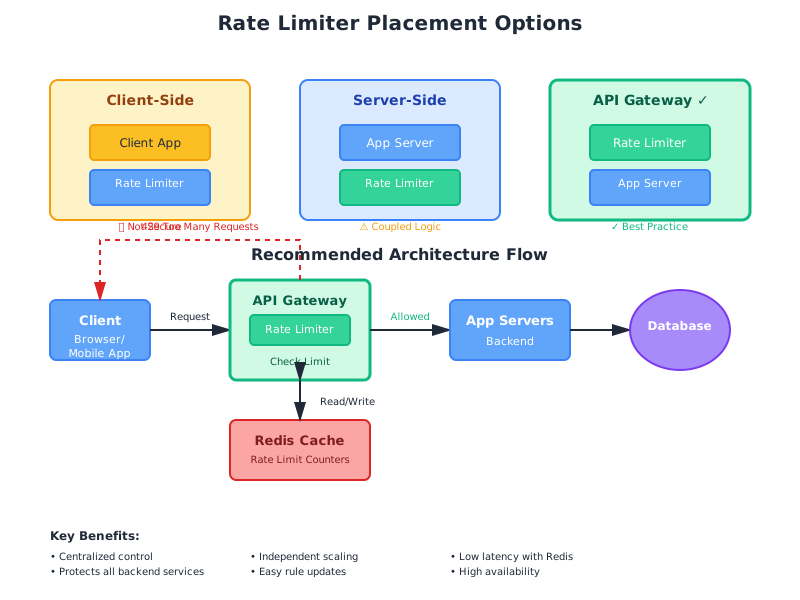
High-Level Architecture Components
Our rate limiter system consists of these key components:
API Gateway: Entry point for all requests. Routes traffic and enforces rate limits.
Rate Limiter Service: Core logic that checks if requests should be allowed or rejected.
Rules Engine: Stores and manages rate limiting rules (who gets what limits).
Counter Storage: Fast data store (Redis) that tracks request counts per user/IP.
Configuration Service: Manages rate limit configurations and allows dynamic updates.
Monitoring & Alerting: Tracks rate limiter performance and alerts on issues.
Algorithms for Rate Limiting
Choosing the right algorithm is crucial. Each has different trade-offs in terms of accuracy, memory usage, and implementation complexity. Let’s explore the main algorithms with detailed explanations, diagrams, and pros/cons.
Algorithm 1: Token Bucket
The token bucket algorithm is one of the most popular rate limiting algorithms used by companies like Amazon and Stripe.
How It Works:
Imagine a bucket that holds tokens. Each token represents permission to make one request.
- The bucket has a maximum capacity (e.g., 100 tokens)
- Tokens are added to the bucket at a fixed rate (e.g., 10 tokens per second)
- When a request arrives, we try to take one token from the bucket
- If a token is available, the request is allowed and the token is removed
- If no tokens are available, the request is rejected
- The bucket never exceeds its maximum capacity
Visual Representation:
Time: 0s          Time: 1s          Time: 2s
Bucket: 100       Bucket: 95        Bucket: 90
(Full)            (5 requests)      (10 requests)
                  +10 tokens        +10 tokens
                  -15 requests      -20 requests
Here’s how the token bucket works visually:
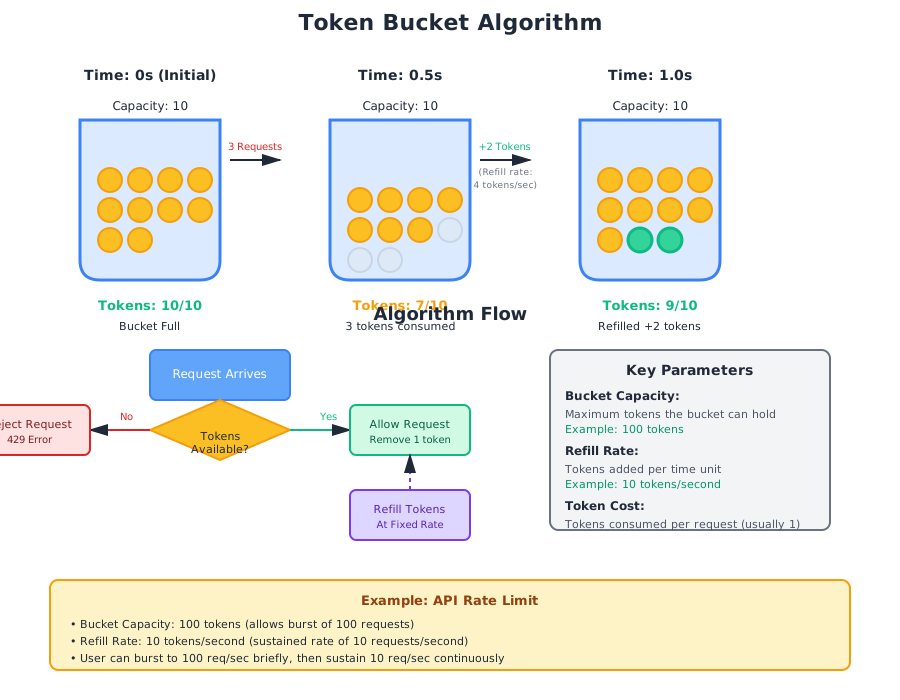
How to Implement It:
The logic is straightforward: keep track of how many tokens are in the bucket and when you last refilled it. When a request comes in, check if there’s a token available. If yes, take one and allow the request. If no, reject it. Every second (or whatever your refill rate is), add tokens back to the bucket up to the maximum capacity.
The beauty of this approach is that it naturally handles bursts. If a user hasn’t made requests for a while, their bucket fills up, and they can make a bunch of requests quickly when they need to.
Pros:
- ✓ Allows burst traffic (users can consume all tokens at once)
- ✓ Memory efficient (only stores token count and timestamp)
- ✓ Smooth traffic flow over time
- ✓ Easy to understand and implement
- ✓ Used by major companies (Amazon, Stripe)
Cons:
- ✗ Requires tuning two parameters (capacity and refill rate)
- ✗ Can be challenging to set optimal values
- ✗ Burst allowance might not be desired in all scenarios
Best Use Cases:
- APIs that need to allow occasional bursts
- Systems where smooth traffic flow is important
- When you want to be lenient with temporary spikes
Real-World Example: Amazon and Stripe both use token bucket algorithms. It’s particularly great for payment APIs where merchants might need to process a batch of transactions quickly during a flash sale, but you still want to prevent abuse over longer time periods.
Algorithm 2: Leaky Bucket
The leaky bucket algorithm processes requests at a constant rate, like water dripping from a bucket with a hole.
How It Works:
Imagine a bucket with a small hole at the bottom. Water (requests) pours in at the top and leaks out at a constant rate.
- Requests enter a queue (the bucket)
- Requests are processed at a fixed rate (the leak)
- If the bucket is full, new requests are rejected
- The bucket processes requests at a constant rate regardless of input rate
Key Difference from Token Bucket: Leaky bucket processes requests at a fixed rate, while token bucket allows bursts.
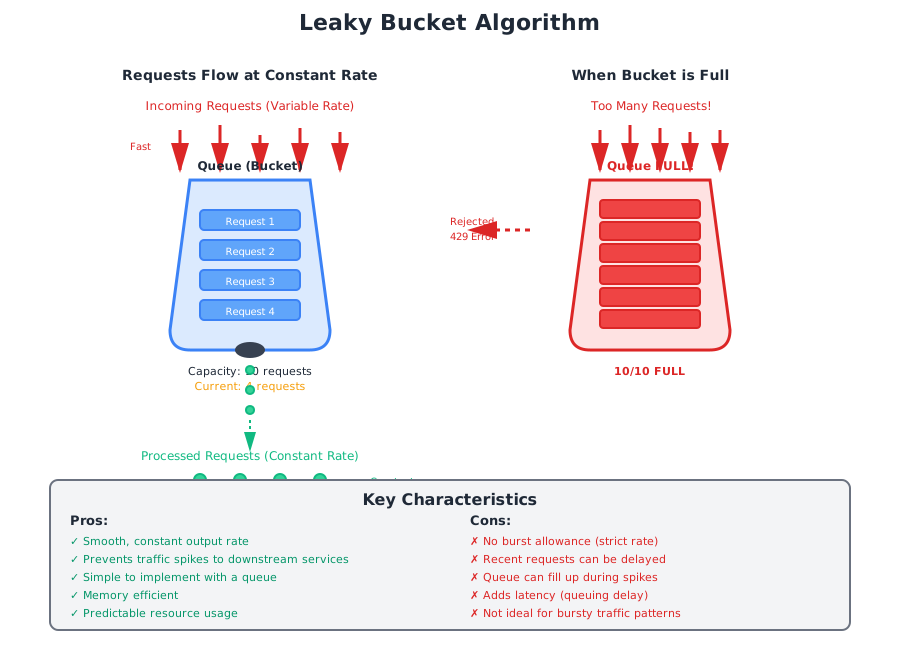
How to Implement It:
Think of it as a queue with a maximum size. Requests come in and get added to the queue. Then, at a fixed rate, you process requests from the queue. If the queue is full when a new request arrives, you reject it.
The key difference from token bucket is that this processes requests at a constant rate, no matter how fast they come in. This makes your output traffic very predictable, which is great for protecting downstream services.
Pros:
- ✓ Smooth, constant output rate
- ✓ Prevents traffic spikes to downstream services
- ✓ Simple to implement with a queue
- ✓ Memory efficient
- ✓ Predictable resource usage
Cons:
- ✗ No burst allowance (strict rate)
- ✗ Recent requests can be delayed
- ✗ Queue can fill up during spikes
- ✗ Adds latency (queuing delay)
- ✗ Not ideal for bursty traffic patterns
Best Use Cases:
- When you need constant, predictable output rate
- Protecting downstream services from spikes
- Video streaming or data processing pipelines
- When latency is less critical than smooth flow
Algorithm 3: Fixed Window Counter
The fixed window counter divides time into fixed windows and counts requests in each window.
How It Works:
- Divide time into fixed windows (e.g., 1-minute windows)
- Count requests in the current window
- If count exceeds limit, reject request
- Reset counter when window expires
Example:
- Window: 1 minute
- Limit: 100 requests per minute
- Window 1 (00:00-00:59): 95 requests ✓
- Window 2 (01:00-01:59): 103 requests ✗ (3 rejected)
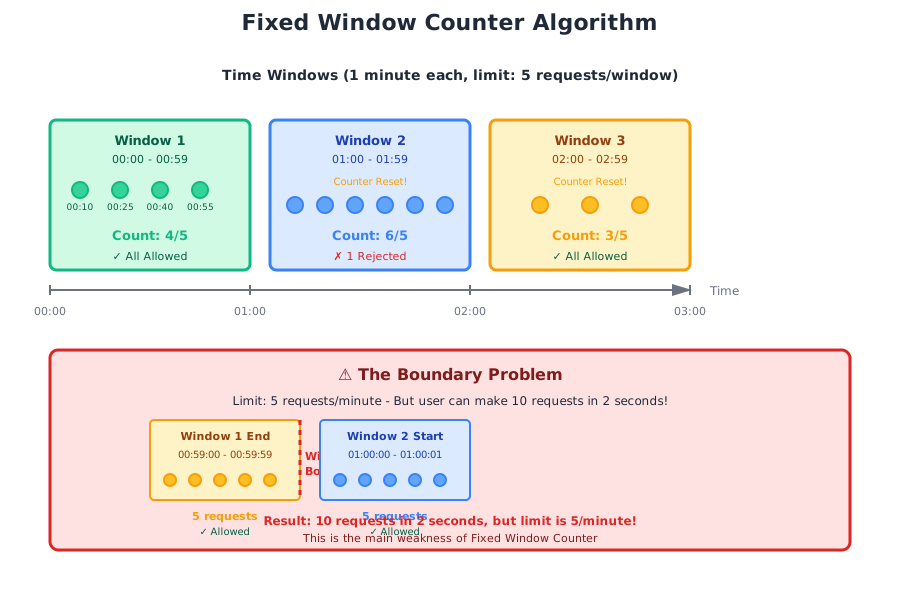
How to Implement It:
Super simple: divide time into fixed chunks (say, 1-minute windows). Count requests in the current window. If the count is under the limit, allow the request. When the window ends, reset the counter to zero.
The problem? There’s a sneaky edge case. Imagine your limit is 100 requests per minute. A clever user could make 100 requests at 12:00:59, then another 100 at 12:01:00. That’s 200 requests in 2 seconds, even though your limit is 100 per minute. This “boundary problem” is why most production systems avoid this algorithm.
Pros:
- ✓ Very simple to implement
- ✓ Memory efficient (only stores counter and timestamp)
- ✓ Easy to understand
- ✓ Low computational overhead
- ✓ Works well with Redis (INCR and EXPIRE commands)
Cons:
- ✗ Boundary problem (can allow 2x limit at window edges)
- ✗ Traffic spike at window reset
- ✗ Not accurate for short time windows
- ✗ Can be gamed by timing requests at boundaries
Best Use Cases:
- When approximate rate limiting is acceptable
- Simple use cases with large time windows
- When memory and performance are critical
- Internal rate limiting where gaming isn’t a concern
Algorithm 4: Sliding Window Log
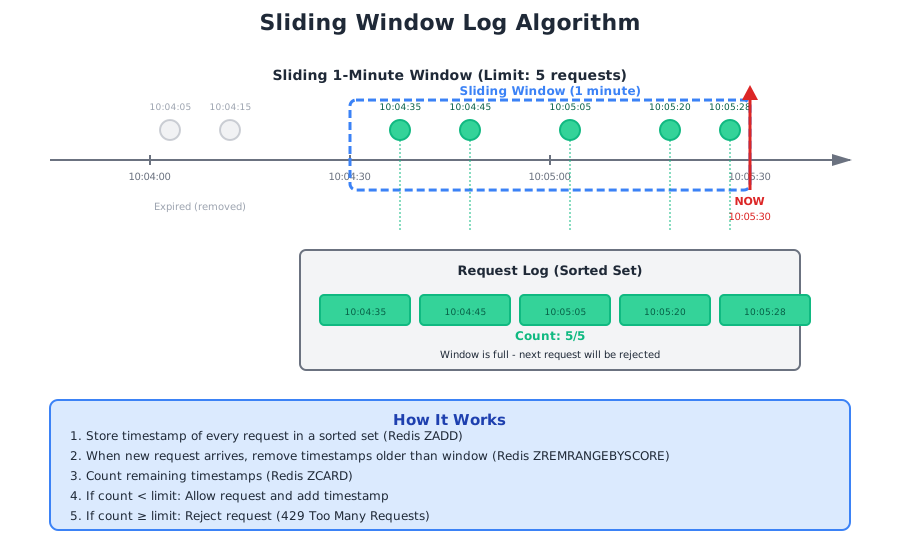
The sliding window log keeps a log of request timestamps and counts requests in a sliding time window.
How It Works:
- Store timestamp of each request in a log (sorted set)
- When new request arrives, remove timestamps older than the window
- Count remaining timestamps
- If count < limit, allow request and add timestamp
- If count >= limit, reject request
Example:
- Window: 1 minute
- Limit: 5 requests per minute
- Current time: 10:05:30
- Check: Count requests between 10:04:30 and 10:05:30
How to Implement It:
This one’s the perfectionist’s choice. You literally keep a log of every request timestamp. When a new request comes in, you remove all timestamps older than your window (say, 1 minute ago), count what’s left, and decide if you’re under the limit.
It’s perfectly accurate—no boundary problems, no approximations. But there’s a catch: you’re storing every single request timestamp. For a high-traffic API, that’s a lot of data. If you have a user making 10,000 requests per minute, you’re storing 10,000 timestamps just for that one user.
This works great for lower-traffic scenarios or when you absolutely need perfect accuracy (think compliance or security-critical applications). But for high-scale systems, the memory cost becomes prohibitive.
Pros:
- ✓ Very accurate - no boundary problem
- ✓ Sliding window provides smooth rate limiting
- ✓ Works well for any time window
- ✓ Easy to implement with Redis sorted sets
Cons:
- ✗ High memory usage (stores every request timestamp)
- ✗ Expensive for high traffic (need to clean old entries)
- ✗ Not suitable for very high request rates
- ✗ Memory grows with request rate
Best Use Cases:
- When accuracy is critical
- Lower traffic scenarios (< 10K requests/sec per user)
- When you need detailed request history
- Compliance or audit requirements
Algorithm 5: Sliding Window Counter (Hybrid)
The sliding window counter combines fixed window counter’s efficiency with sliding window log’s accuracy.
How It Works:
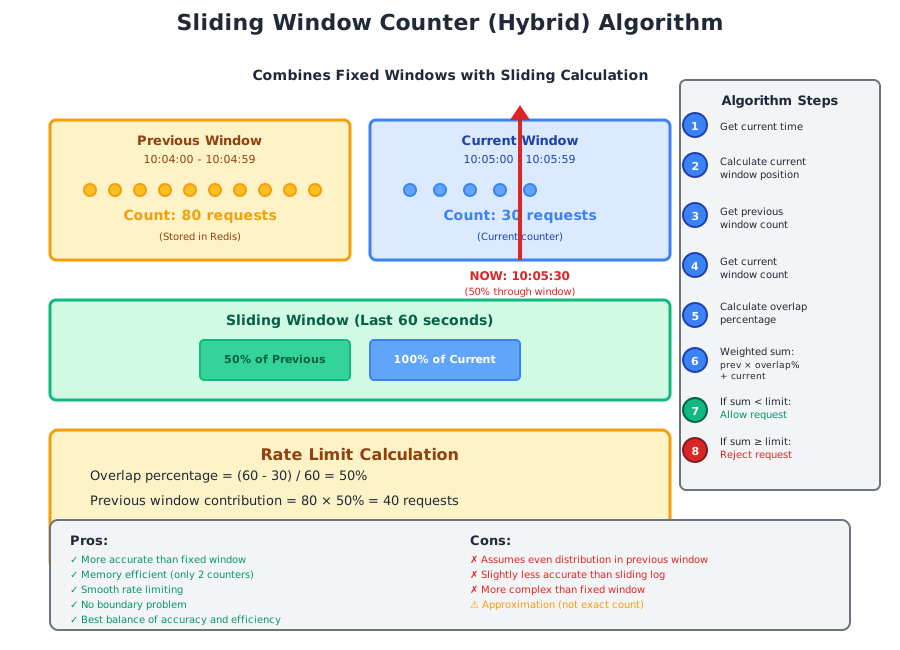
Uses two fixed windows and calculates a weighted count based on the current position in the window.
Formula:
Requests in current window =
  (Requests in previous window × overlap percentage) +
  (Requests in current window)
Example:
- Current time: 10:05:30 (50% through current minute)
- Previous window (10:04-10:05): 80 requests
- Current window (10:05-10:06): 30 requests
- Estimated count: (80 × 50%) + 30 = 40 + 30 = 70 requests
How to Implement It:
This is the sweet spot—the algorithm that most production systems actually use. It’s a clever hybrid that gives you the accuracy of sliding window log with the efficiency of fixed window counter.
Here’s the trick: instead of storing every timestamp, you just keep two counters—one for the current window and one for the previous window. When a request comes in, you calculate where you are in the current window (say, 30% through) and estimate the count by taking 70% of the previous window’s count plus 100% of the current window’s count.
Is it perfectly accurate? No—it assumes requests were evenly distributed in the previous window. But in practice, it’s accurate enough (within 1-2%), and it only stores two numbers per user instead of thousands of timestamps.
Real-World Example: Cloudflare uses this algorithm to rate limit millions of websites. It’s battle-tested at massive scale.
Pros:
- ✓ More accurate than fixed window
- ✓ Memory efficient (only 2 counters)
- ✓ Smooth rate limiting
- ✓ No boundary problem
- ✓ Best balance of accuracy and efficiency
- ✓ Used by Cloudflare and other major platforms
Cons:
- ✗ Assumes even distribution in previous window
- ✗ Slightly less accurate than sliding log
- ✗ More complex than fixed window
- ✗ Approximation (not exact count)
Best Use Cases:
- Production systems requiring accuracy and efficiency
- High traffic scenarios (millions of requests/sec)
- When memory is a concern
- Most general-purpose rate limiting needs
So Which Algorithm Should You Choose?
Here’s the honest truth: for most production systems, go with Sliding Window Counter. It’s what companies like Cloudflare use, and for good reason—it’s accurate enough, memory efficient, and blazingly fast.
Use Token Bucket if you need to allow bursts (like payment processing during flash sales).
Use Leaky Bucket if you’re protecting a downstream service that can’t handle spikes (like a legacy database).
Avoid Fixed Window unless you’re okay with the boundary problem (maybe for internal rate limiting where it doesn’t matter much).
Only use Sliding Window Log if you absolutely need perfect accuracy and have low traffic volumes.
| Algorithm | Accuracy | Memory | Performance | Burst Support | Best For |
|---|---|---|---|---|---|
| Token Bucket | Good | Low | Excellent | Yes | APIs with burst needs |
| Leaky Bucket | Good | Low | Good | No | Protecting downstream |
| Fixed Window | Poor | Very Low | Excellent | No | Internal use only |
| Sliding Log | Perfect | High | Poor | No | Low traffic, compliance |
| Sliding Counter | Very Good | Low | Excellent | No | Most production systems |
High-Level Architecture
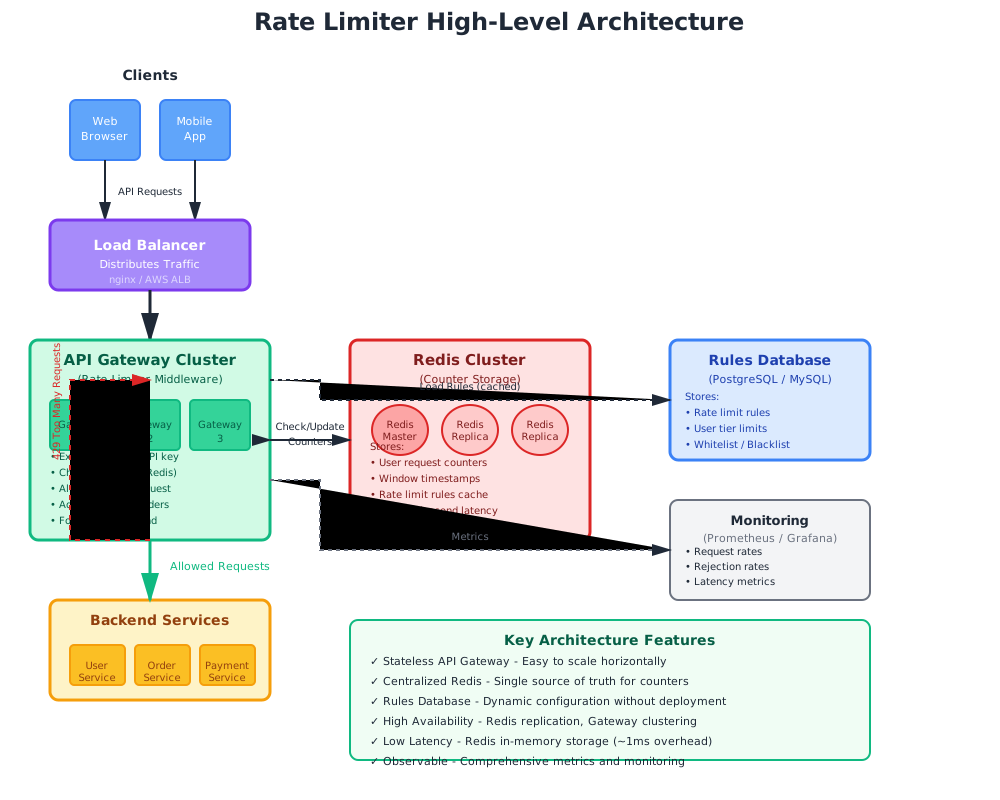
Now that we’ve chosen our algorithm (Sliding Window Counter), let’s design the complete system architecture.
Architecture Components Explained
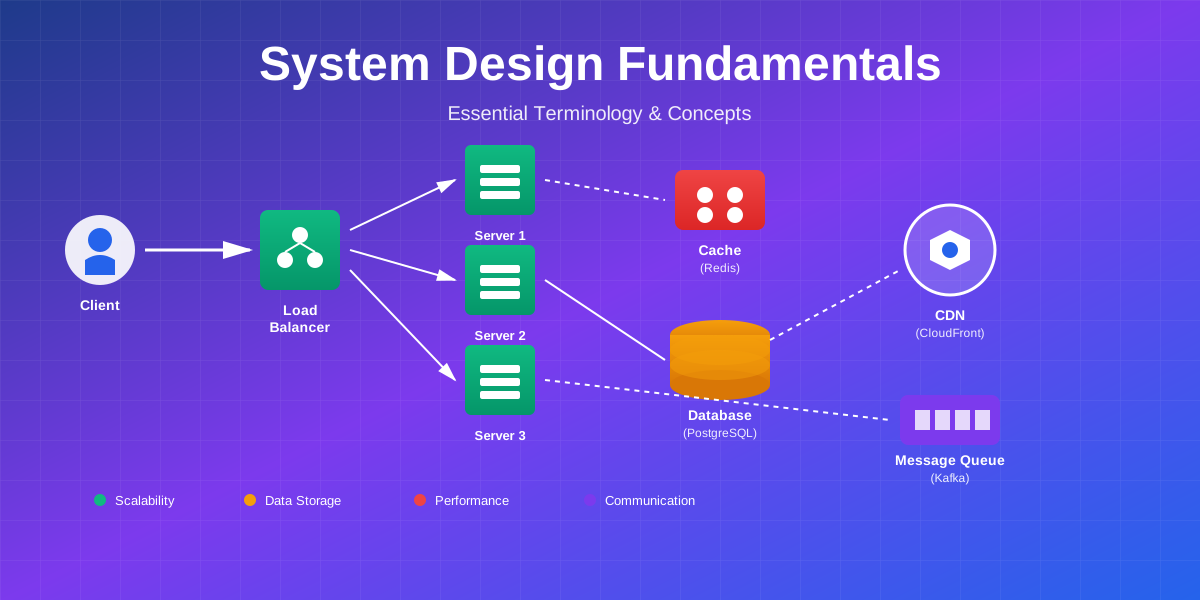
Load Balancer: Distributes incoming traffic across multiple API Gateway instances. Provides high availability and horizontal scaling.
API Gateway Cluster: Stateless middleware that enforces rate limits. Each instance can handle rate limiting independently by querying Redis. Easy to scale by adding more instances.
Redis Cluster: In-memory data store that holds rate limit counters. Provides sub-millisecond latency for counter operations. Replicated for high availability.
Rules Database: Stores rate limiting rules, user tiers, and configurations. Cached in Redis for fast access. Updated without redeploying code.
Backend Services: Protected services that only receive requests that pass rate limiting. Isolated from abuse and overload.
Monitoring System: Tracks metrics like request rates, rejection rates, and latency. Enables alerting and capacity planning.
Request Flow
- Client sends API request
- Load balancer routes to API Gateway instance
- Gateway extracts user identifier (API key, user ID, IP)
- Gateway queries Redis for current counter values
- Gateway calculates if request should be allowed (sliding window algorithm)
- If allowed: Increment counter, add headers, forward to backend
- If rejected: Return 429 status code with retry-after header
- Metrics sent to monitoring system
Step 3 - Design Deep Dive
Now let’s dive into the detailed design decisions and implementation specifics.
Rate Limiting Rules
Here’s where things get interesting. Not all users should have the same limits, right? Your free tier users might get 100 requests per hour, while premium users get 10,000. Your search endpoint might be more expensive than a simple GET request.
You need a flexible rules system that can handle:
- Global rules (everyone gets this baseline)
- Tier-based rules (free vs premium vs enterprise)
- Endpoint-specific rules (search is limited more strictly than reads)
- User-specific rules (that one VIP customer who negotiated custom limits)
When multiple rules apply, use the most specific one. If a user has a custom rule, that overrides their tier rule, which overrides the global rule.
The key is making these rules configurable without redeploying your code. Store them in a database, cache them in Redis, and allow your ops team to update them on the fly when needed.
When Someone Hits the Limit
This is where good API design shines. Don’t just return a cryptic error—help your users understand what happened and what to do about it.
Return a 429 status code (Too Many Requests) with clear headers:
- How many requests they’re allowed
- How many they have left
- When their limit resets
Include a helpful error message in the response body. Something like “You’ve used all 1000 requests for this hour. Your limit resets at 3:00 PM.” is way better than “Rate limit exceeded.”
And please, include a Retry-After header so clients know when to try again. This prevents them from hammering your API with retries, which just makes things worse.
Rate Limiter Headers
Include these headers on every response, not just when someone hits the limit. This lets developers build smarter clients that can pace themselves.
The essential headers:
- X-RateLimit-Limit: Your total allowance
- X-RateLimit-Remaining: How many you have left
- X-RateLimit-Reset: When your limit resets (as a Unix timestamp)
Why bother? Because good developers will use these headers to implement smart retry logic. They’ll see they have 10 requests left and slow down. They’ll see the reset time and schedule their batch job accordingly. It’s a win-win—less load on your system, better experience for users.
The Core Logic
Here’s where Redis becomes your best friend. We store two simple counters per user: one for the current time window and one for the previous window. That’s it.
When a request comes in, we:
- Grab both counters from Redis (super fast, sub-millisecond)
- Calculate where we are in the current window (30% through? 70%?)
- Do the weighted math (70% of previous + 100% of current)
- If under the limit, increment the current counter and allow the request
- If over the limit, reject with a helpful error message
The beauty of this approach is that Redis handles all the hard parts—atomic operations, expiration, replication. You just focus on the business logic.
One critical detail: use Redis pipelines to batch your commands. Instead of making 3 round trips to Redis (get previous, get current, increment), make one. At scale, this matters.
The Distributed System Challenge
Here’s where things get tricky. You have multiple API gateway servers all checking and updating counters in Redis. What happens when two servers try to increment the same counter at the exact same time?
The Race Condition Problem:
Server A reads the counter: 99 requests Server B reads the counter: 99 requests (at the same time) Both think “okay, we’re under 100, let’s allow this” Both increment the counter Result: 101 requests allowed when the limit was 100
The Solution: Atomic Operations
Redis has a superpower—Lua scripts that run atomically. You can write a script that reads the counters, does the math, checks the limit, and increments—all as one atomic operation. No race conditions possible.
The alternative is using Redis transactions with WATCH/MULTI/EXEC, but honestly, Lua scripts are cleaner and faster.
The Sharding Problem:
If you’re using multiple Redis instances (sharding for scale), you need to make sure all of a user’s counters live on the same Redis node. Otherwise, you might check one counter on Server A and increment a different counter on Server B.
The fix? Use consistent hashing to route all requests for a given user to the same Redis instance. Or use Redis Cluster with hash tags to keep related keys together. The key insight is: keep a user’s data together, always.
Making It Fast
At scale, every millisecond counts. Here’s how to keep your rate limiter blazing fast:
Connection Pooling: Don’t create a new Redis connection for every request. That’s insane. Use a connection pool and reuse connections. This alone can save you 5-10ms per request.
Pipeline Everything: Instead of making 3 separate calls to Redis (get previous counter, get current counter, increment), batch them into one round trip using Redis pipelines. Network latency is your enemy.
Cache the Rules: Don’t hit your database to fetch rate limit rules on every request. Cache them in memory or in Redis. Rules don’t change that often—maybe once a day or when you update a user’s subscription tier.
Use Read Replicas: If you have Redis replicas, read from them and write to the master. This distributes the load and keeps your master Redis instance from becoming a bottleneck.
Go Async: If your stack supports it, use async Redis clients. Non-blocking I/O means you can handle more concurrent requests with the same hardware.
The goal is to keep the rate limiter overhead under 5ms. Any more than that and users will notice.
Watch It Like a Hawk
You can’t improve what you don’t measure. Here’s what you need to track:
The Basics:
- How many requests are you getting per second?
- How many are you rejecting?
- What’s your rejection rate? (If it’s over 10%, something’s wrong—either your limits are too strict or you’re under attack)
Performance Metrics:
- How long does the rate limit check take? (Should be under 5ms at p99)
- What’s your Redis latency looking like?
- Are your API gateways keeping up?
Business Intelligence:
- Which users are hitting their limits most often? (Maybe they need an upgrade)
- Which endpoints are getting rate limited? (Maybe you need endpoint-specific limits)
- What’s this costing you? (Redis isn’t free at scale)
Set up alerts for the important stuff: rejection rate spikes, latency increases, Redis memory getting full. You want to know about problems before your users start complaining.
And please, build a dashboard. When something goes wrong at 2 AM, you’ll thank yourself for having all the key metrics in one place.
Wrapping It All Up
We’ve covered a lot of ground here. Let’s bring it home.
The core decisions we made:
- Sliding Window Counter algorithm (accurate enough, fast enough, memory efficient)
- API Gateway architecture (centralized, easy to scale, protects all your services)
- Redis for storage (fast, reliable, battle-tested)
- Lua scripts for atomicity (no race conditions)
- Comprehensive monitoring (because you can’t fix what you can’t see)
The Big Lessons
Pick the right algorithm for your needs. Don’t just copy what someone else did. Token bucket if you need bursts, leaky bucket if you need constant output, sliding window counter for most everything else.
Distributed systems are hard. Race conditions will bite you. Use atomic operations. Keep related data together. Test under load.
Performance matters. Connection pooling, pipelining, caching—these aren’t optional at scale. Every millisecond adds up when you’re handling millions of requests.
Monitor everything. You need visibility into what’s happening. Rejection rates, latency, resource usage—track it all. Set up alerts. Build dashboards.
Be flexible. Your rate limiting needs will change. Make rules configurable. Support different limits for different users and endpoints. Don’t hardcode anything.
Don’t Forget About…
Security: Encrypt your Redis connections. Authenticate everything. And yes, you might need to rate limit your rate limiter—attackers will try to abuse even your protection mechanisms.
Cost: Redis at scale isn’t cheap. Use TTLs on all your keys so old data expires. Monitor memory usage. Consider if you really need to track every user or if you can get away with IP-based limiting for anonymous users.
Reliability: What happens when Redis goes down? Do you fail open (allow all requests) or fail closed (reject everything)? There’s no right answer—it depends on whether availability or security is more important to you. Just make sure you’ve thought about it before 3 AM on a Saturday.
The Future: Once you have the basics working, you can get fancy. Machine learning to detect abuse patterns. Dynamic limits that adjust based on system load. Quota management for monthly limits. But get the fundamentals right first.
The Bottom Line
Building a rate limiter is about finding the right balance. You want it accurate enough to be fair, fast enough to not slow down your API, and simple enough that your team can maintain it when things go wrong.
The sliding window counter algorithm with Redis is a solid choice for most systems. It’s what the big players use, and for good reason—it works.
But remember: the best rate limiter is one that you never notice. It should quietly protect your infrastructure, keep costs under control, and ensure everyone gets fair access. When it’s working well, nobody thinks about it. When it’s not, everyone knows.
Start simple. Get it working. Monitor it. Then optimize. Don’t try to build the perfect rate limiter on day one—build one that solves your immediate problem, then iterate.
Need help designing a rate limiter for your specific use case? Let’s talk about your requirements.
Comments & Discussion
Join the conversation! Share your thoughts, ask questions, or provide feedback below.