System Design Fundamentals: Building Twitter from Scratch
You’re in a system design interview. The interviewer says: “Design Twitter.”
Your mind races. Where do you even start? Do you jump straight to microservices? Talk about Kafka? Mention sharding? The problem isn’t that you don’t know these terms—it’s that you don’t know when to use them.
I’ve been there. Early in my career, I’d throw every buzzword I knew at system design problems. “We’ll use microservices with Kafka and Redis and shard the database!” The interviewer would ask, “Why?” I had no answer.
Here’s what changed everything for me: Stop memorizing solutions. Start understanding the journey.
Every massive system started simple. Twitter began as a basic web app. Instagram was just photo uploads. Netflix started by mailing DVDs. They didn’t architect for a billion users on day one—they evolved as problems emerged.
In this guide, we’re going to build Twitter together. We’ll start with the simplest possible design, then watch it break. Each time it breaks, we’ll introduce exactly one new concept to fix it. By the end, you’ll understand not just what each system design pattern is, but when and why you need it.
This is how you learn system design—by seeing problems emerge and solving them, one step at a time.
The Problem: Design Twitter
Let’s define what we’re building. Twitter lets users:
- Post tweets (280 characters)
- Follow other users
- See a timeline of tweets from people they follow
- Like and retweet
Non-functional requirements:
- Fast timeline loading (under 1 second)
- Handle millions of users
- High availability (always accessible)
Let’s start building.
Version 1: The Simplest Possible Design
When you’re starting, always begin with the absolute simplest architecture that could work.
Architecture:
- One web server running your application code
- One database (PostgreSQL) storing everything
- Users connect directly to your server
Database Schema:
users: id, username, email, created_at
tweets: id, user_id, content, created_at
follows: follower_id, following_id
How timeline works: When a user loads their timeline, you query:
SELECT tweets.* FROM tweets
JOIN follows ON tweets.user_id = follows.following_id
WHERE follows.follower_id = current_user_id
ORDER BY created_at DESC
LIMIT 50
This works! You launch. You get 1,000 users. Everything is fast. Life is good.
Then you hit 10,000 users. The server starts slowing down. Timeline queries take 3 seconds. Users complain.
Problem #1: Single server can’t handle the load.
Concept #1: Vertical Scaling
Your first instinct: make the server more powerful.
Vertical Scaling means upgrading your existing server—more CPU, more RAM, faster disk.
Real-world example: Stack Overflow ran on a single powerful server for years. They vertically scaled before needing multiple servers.
Pros:
- Simple—no code changes needed
- No complexity added
- Works immediately
Cons:
- There’s a ceiling—you can’t infinitely upgrade one machine
- Expensive at high end
- Single point of failure
You upgrade. Now you handle 50,000 users. But you’re hitting the limits. The biggest server you can buy costs $10,000/month and you’re still seeing slowdowns.
Problem #2: One server has physical limits.
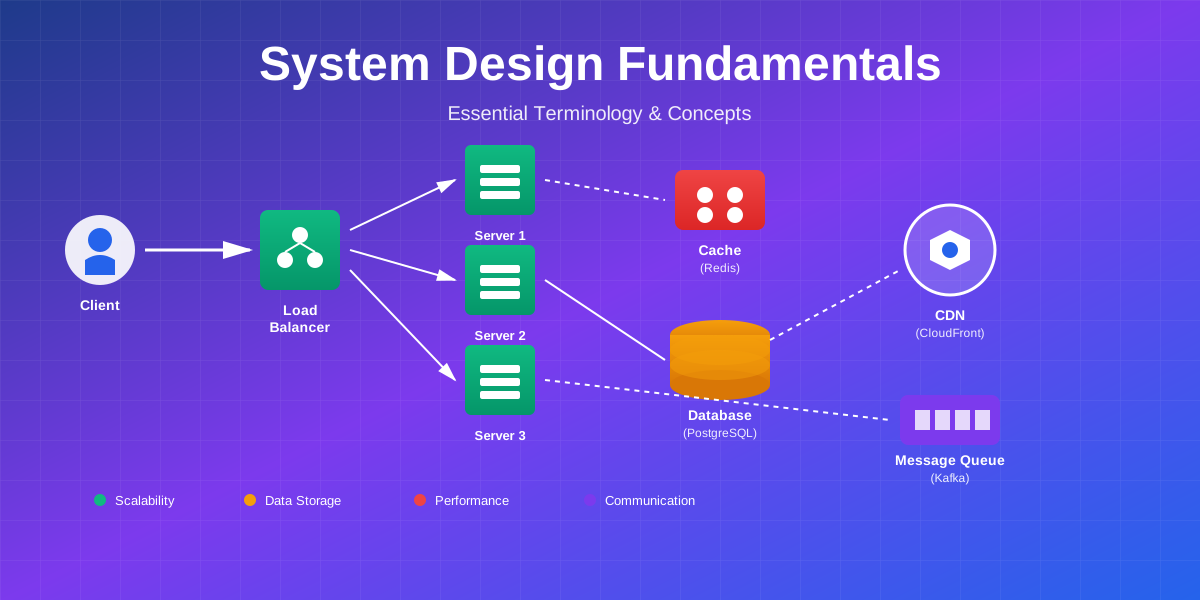
Concept #2: Horizontal Scaling & Load Balancing
Instead of one big server, use many small servers.
Horizontal Scaling means adding more servers. But now you need something to distribute traffic between them.
Load Balancer sits in front of your servers and routes each request to an available server.
Load Balancing Algorithms:
- Round Robin: Send request 1 to server A, request 2 to server B, request 3 to server C, repeat
- Least Connections: Send to server with fewest active connections
- IP Hash: Same user always goes to same server (useful for sessions)
Real-world example: Netflix uses Elastic Load Balancing (AWS) to distribute traffic across thousands of servers. During peak hours, they automatically add more servers.
Pros:
- Nearly unlimited scaling—just add more servers
- Redundancy—if one server dies, others keep working
- Cost-effective—use many cheap servers instead of one expensive one
Cons:
- More complex—need to manage multiple servers
- Stateless servers required (we’ll fix this)
You now have 3 servers behind a load balancer. You handle 500,000 users. But there’s a problem: users keep getting logged out randomly.
Problem #3: User sessions are lost when load balancer sends them to different servers.
Concept #3: Stateless Servers & Session Storage
Your servers are stateful—they store user session data in memory. When a user logs in on Server 1, their session is stored there. If their next request goes to Server 2, they appear logged out.
Solution: Make servers stateless. Store session data externally where all servers can access it.
Session Store is a fast database (usually Redis or Memcached) that stores temporary data like user sessions.
How it works:
- User logs in on Server 1
- Server 1 stores session in Redis with a key (session ID)
- Server 1 sends session ID to user as a cookie
- User’s next request goes to Server 2
- Server 2 reads session from Redis using the session ID
- User stays logged in!
Real-world example: Instagram uses Redis for session storage. With millions of concurrent users, any server can handle any request because sessions are centralized.
Why Redis?
- In-memory = extremely fast (microseconds)
- Built-in expiration (sessions auto-delete after timeout)
- Simple key-value storage
You’re now handling 1 million users. Timelines load fast. But you notice the database is struggling. Queries are slow.
Problem #4: Database is the bottleneck.
Concept #4: Database Indexing
Your timeline query scans millions of tweets to find the right ones. That’s slow.
Database Index is like a book’s index—instead of reading every page to find “Redis,” you look it up in the index and jump to the right page.
Indexes to create for Twitter:
CREATE INDEX idx_tweets_user_id ON tweets(user_id);
CREATE INDEX idx_tweets_created_at ON tweets(created_at);
CREATE INDEX idx_follows_follower ON follows(follower_id);
Real-world example: LinkedIn indexes user profiles by name, company, location, skills. Without indexes, searching “software engineer at Google” would scan 800 million profiles. With indexes, it’s instant.
Trade-offs:
- Faster reads (queries)
- Slower writes (must update index)
- More storage space
Indexes help, but you’re still hitting the database for every timeline request. With 10 million users, that’s millions of database queries per minute.
Problem #5: Database can’t handle read traffic.
Concept #5: Caching
Most users see the same tweets repeatedly. Why query the database every time?
Cache stores frequently accessed data in memory (RAM) for instant retrieval.
Caching Strategy for Twitter:
- Cache user timelines: Key =
timeline:user_123, Value = list of tweet IDs - Cache tweet content: Key =
tweet:456, Value = tweet data - Set expiration: Timelines expire after 5 minutes
Cache Hit Ratio: Percentage of requests served from cache. Aim for 80%+.
Real-world example: Reddit caches the front page in Redis. Instead of querying the database for every visitor, they serve cached results. This handles millions of requests per minute with just a few database queries.
Cache Invalidation (the hard part):
- When user posts a tweet, invalidate their followers’ timeline caches
- When tweet is deleted, remove from cache
- Use TTL (time-to-live) to auto-expire stale data
You’re now handling 50 million users. But you notice writes are slow. Every new tweet takes 500ms to save.
Problem #6: Single database can’t handle write traffic.
Concept #6: Database Replication
Your database is doing two things: handling reads (timeline queries) and writes (new tweets). Reads are 100x more frequent than writes.
Database Replication creates copies of your database. One primary handles writes, multiple replicas handle reads.
How it works:
- All writes go to primary database
- Primary replicates changes to replicas (usually async)
- All reads go to replicas
- If primary fails, promote a replica to primary
Real-world example: YouTube uses primary-replica replication. Video metadata writes go to primary. Billions of video views query replicas. This separates write and read traffic.
Replication Lag: Replicas might be slightly behind primary (milliseconds to seconds). This is eventual consistency—data will be consistent eventually, but might be temporarily out of sync.
Trade-offs:
- Scales reads horizontally (add more replicas)
- Doesn’t scale writes (still one primary)
- Introduces consistency challenges
You’re now at 100 million users. But you hit another wall: the primary database can’t handle write traffic. You need to split the data.
Problem #7: Single primary database can’t handle all writes.
Concept #7: Database Sharding
Sharding splits your database across multiple machines. Each shard holds a subset of data.
Sharding Strategies:
- Hash-based:
shard = user_id % num_shards(what we’re using) - Range-based: Users 0-100M on shard 1, 100-200M on shard 2
- Geographic: US users on US shard, EU users on EU shard
Real-world example: Instagram shards by user ID. Each shard stores photos for a subset of users. This lets them scale writes horizontally—more shards = more write capacity.
Challenges:
- Cross-shard queries are expensive (avoid if possible)
- Rebalancing shards is complex
- Hotspots if data isn’t evenly distributed
Problem #8: Users want to see tweets from people they follow, but those users might be on different shards.
This is where things get interesting. You can’t efficiently query across shards. You need a different approach.
Concept #8: Denormalization & Fan-out
Instead of querying for timeline on-demand, pre-compute it.
Fan-out on Write: When user posts a tweet, immediately push it to all followers’ timelines.
Real-world example: Twitter uses fan-out on write for most users. When you tweet, it’s pushed to your followers’ timelines. When they load Twitter, their timeline is already computed—instant load.
Celebrity Problem: What if you have 100 million followers? Fan-out would take forever. Twitter uses hybrid: fan-out for normal users, on-demand for celebrities.
You’re now at 200 million users. System is working well. But you notice: when a server crashes, some requests fail.
Problem #9: System isn’t fault-tolerant.
Concept #9: Redundancy & Failover
Redundancy means having backup components. Failover means automatically switching to backups when primary fails.
Health Checks: Load balancer pings each server every few seconds. If a server doesn’t respond, it’s removed from rotation.
Database Failover: If primary database fails, automatically promote a replica to primary.
Real-world example: Netflix’s Chaos Monkey randomly kills servers in production to test failover. This ensures their system can handle failures gracefully.
Concept #10: Content Delivery Network (CDN)
Users are global. A user in Tokyo shouldn’t wait for data to travel from a US server.
CDN caches static content (images, videos, CSS) on servers worldwide.
Real-world example: Netflix stores popular shows on CDN servers in every major city. When you watch Stranger Things, you’re streaming from a server 20 miles away, not from Netflix’s data center.
CDN for Twitter:
- Profile pictures
- Tweet images/videos
- Static assets (CSS, JavaScript)
Concept #11: Asynchronous Processing & Message Queues
Some tasks don’t need to happen immediately. When a user posts a tweet, you need to:
- Save tweet to database (immediate)
- Fan-out to followers (can be async)
- Send notifications (can be async)
- Update analytics (can be async)
Message Queue buffers tasks for background processing.
Real-world example: When you upload a video to YouTube, it returns immediately. Video processing (transcoding, thumbnail generation) happens asynchronously via message queues.
Benefits:
- Fast user-facing responses
- Decouples services
- Handles traffic spikes (queue buffers requests)
- Retry failed tasks automatically
The Final Architecture
Let’s see how all these concepts come together for Twitter at scale.
What we built:
- CDN - Fast global content delivery
- Load Balancer - Distributes traffic
- Stateless Servers - Horizontally scalable
- Redis Cache - Fast timeline reads
- Message Queue - Async processing
- Database Shards - Horizontal write scaling
- Replication - Read scaling + redundancy
- Workers - Background task processing
Key Takeaways
Start Simple: Every system starts with one server and one database. Add complexity only when you have a specific problem to solve.
Scale Incrementally: Don’t architect for a billion users on day one. Scale as problems emerge.
Understand Trade-offs: Every decision has pros and cons. Caching speeds up reads but complicates invalidation. Sharding scales writes but makes cross-shard queries expensive.
Real Problems Drive Solutions: We didn’t add load balancing because it’s cool—we added it because one server couldn’t handle the load. Each concept solved a specific problem.
Patterns Repeat: The patterns you learned here (caching, sharding, replication, queues) apply to almost every large-scale system. Instagram, Uber, Netflix—they all use these same building blocks.
What’s Next?
This guide covered the fundamentals, but each concept deserves deep exploration. In upcoming posts, we’ll dive into:
- Caching Strategies: Cache invalidation, eviction policies, distributed caching
- Database Sharding: Consistent hashing, rebalancing, handling hotspots
- Message Queues: Kafka vs RabbitMQ, exactly-once delivery, dead letter queues
- Microservices: Service discovery, API gateways, distributed tracing
- Real-Time Systems: WebSockets, server-sent events, long polling
The best way to learn is to practice. Pick a system you use daily—YouTube, Spotify, Airbnb—and try designing it. Start simple, identify bottlenecks, add complexity one piece at a time.
Let’s Connect
System design is a journey. I’m constantly learning from real-world systems and sharing what I discover.
Have questions about specific concepts? Designing a system and want feedback? Reach out—I love discussing architecture and trade-offs.
Remember: every massive system started as a simple idea. Twitter began as a basic web app. Instagram was just photo uploads. They evolved by solving one problem at a time.
You now have the vocabulary and mental models to design scalable systems. Start simple, solve real problems, and scale incrementally.
Happy designing!
Comments & Discussion
Join the conversation! Share your thoughts, ask questions, or provide feedback below.