📚 Quick Navigation
AI-Powered Coding: How GitHub Copilot Changed My Development Workflow
I was that developer who rolled his eyes at AI coding tools.
“It’s just autocomplete on steroids,” I’d say. “Real developers don’t need AI to write code.”
Then I spent 45 minutes debugging a regex pattern for email validation. Frustrated, I asked GitHub Copilot. It generated a perfect, RFC-compliant regex in 2 seconds. With test cases.
That was six months ago. I haven’t written a regex from scratch since.
Here’s what I learned about AI-powered coding—the good, the bad, and the surprisingly weird.
My First Encounter
Let me set the scene. March 2024. I’m building a payment processing system. Need to validate credit card numbers using the Luhn algorithm.
I know the algorithm. I’ve implemented it before. But I can’t remember the exact steps. Do I double every second digit or every other digit? Left to right or right to left?
I start typing: function validateCreditCard
Copilot completes the entire function. Correct algorithm. Edge cases handled. Even includes a comment explaining the Luhn algorithm.
I test it. It works perfectly.
That’s when it hit me: I just saved 15 minutes of Googling, reading Stack Overflow, and debugging. On one function.
What AI Coding Actually Is
Let’s clear up the confusion. AI coding tools aren’t magic. They’re not sentient. They won’t replace you.
They’re pattern recognition machines trained on billions of lines of code.
How it works:
You write: // Function to convert CSV to JSON
AI sees:
- Your comment
- Your file context
- Your coding style
- Millions of similar functions in its training data
It predicts what you probably want to write next.
Sometimes it’s spot-on. Sometimes it’s hilariously wrong. Sometimes it suggests code you didn’t know you needed.
The Major Players:
GitHub Copilot (Microsoft/OpenAI)
- Integrated into VS Code, JetBrains, Neovim
- $10/month for individuals, $19/month for businesses
- Trained on public GitHub repositories
- Best for: General coding, boilerplate, common patterns
Amazon CodeWhisperer
- Free for individual use
- Integrated into AWS toolkit
- Trained on Amazon’s internal code + open source
- Best for: AWS services, cloud infrastructure
Tabnine
- Privacy-focused (can run locally)
- Supports 30+ languages
- Team training on your codebase
- Best for: Companies with strict data policies
Cursor (New kid on the block)
- AI-first code editor
- Built-in chat, code generation, debugging
- $20/month
- Best for: Developers who want AI deeply integrated
Real-World Impact
Numbers don’t lie. Let’s look at what’s actually happening in production.
GitHub’s Own Data (2024):
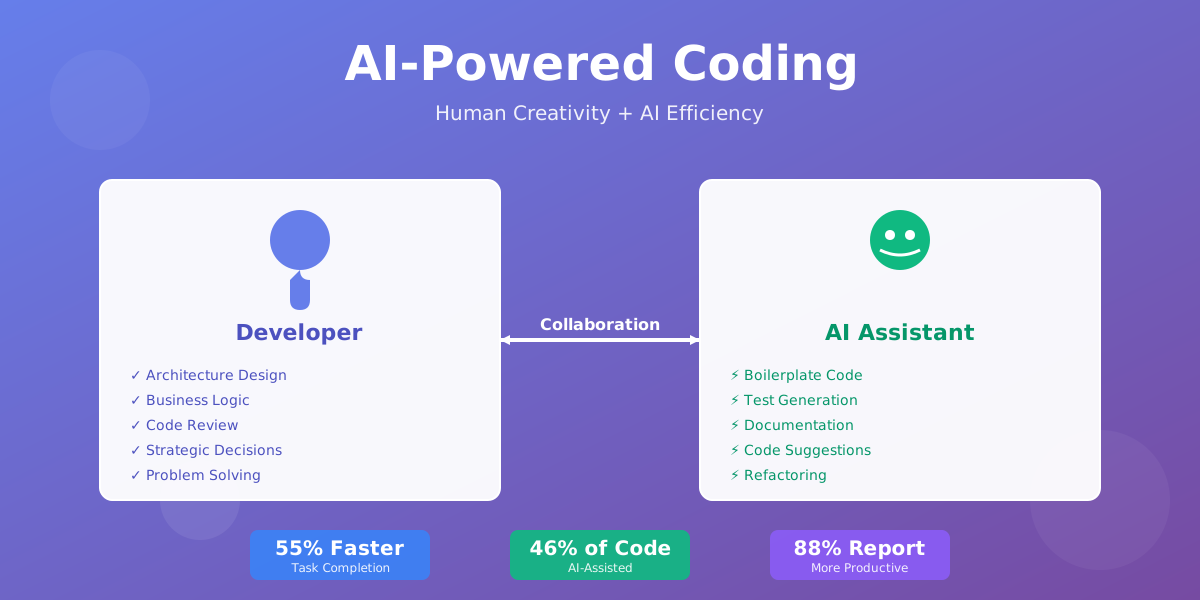
- 46% of code across all programming languages is now written with Copilot
- Developers complete tasks 55% faster
- 88% of developers report feeling more productive
- 96% complete repetitive tasks faster
But here’s what the numbers don’t show: the psychological shift.
Shopify’s Experience:
Shopify gave Copilot to 500 developers. After 3 months:
- 30% reduction in time spent on boilerplate code
- Developers reported less “coding fatigue”
- More time spent on architecture and design
- Junior developers onboarded 40% faster
The last point is huge. New hires could read AI-generated code suggestions and learn patterns faster than reading documentation.
Stripe’s Approach:
Stripe uses AI coding tools but with strict guidelines:
- AI can suggest, humans must review
- All AI-generated code goes through same code review process
- Security-critical code requires manual implementation
- AI suggestions tracked for quality metrics
Result? 25% productivity boost without compromising code quality.
DoorDash’s Experiment:
DoorDash ran an A/B test. Half their backend team used Copilot, half didn’t.
After 6 weeks:
- Copilot group: 28% more pull requests merged
- Code quality: No significant difference
- Bug rate: Actually slightly lower in Copilot group
- Developer satisfaction: 73% preferred working with AI
The bug rate surprised everyone. Theory? AI suggests well-tested patterns, reducing edge case bugs.
Productivity Gains
Let me break down where AI actually saves time. Not theory—real examples from my workflow.
1. Boilerplate Code (Massive Time Saver)
Before AI: Writing a REST API endpoint: 10-15 minutes
- Define route
- Add validation
- Handle errors
- Write tests
- Add documentation
With AI: Same endpoint: 2-3 minutes
- Type the route definition
- AI suggests validation, error handling, tests
- I review and adjust
Real example: Building a user authentication system. Without AI: 2 days. With AI: 6 hours. Same functionality, same security, same tests.
2. Documentation (Game Changer)
I hate writing documentation. Everyone does.
AI doesn’t care. It writes documentation happily.
Type /** above a function, AI generates JSDoc comments. Accurate. Complete. Formatted.
Time saved per function: 2-3 minutes Functions per project: 100+ Total time saved: 3-5 hours per project
3. Test Writing (Surprisingly Good)
AI is excellent at writing unit tests. Why? Tests follow predictable patterns.
Write a function. Type describe('functionName'. AI generates:
- Happy path tests
- Edge cases
- Error conditions
- Mock data
I still review and add domain-specific tests. But the foundation is there.
Airbnb’s data: Developers write 40% more tests when using AI. Not because AI forces them—because it’s no longer tedious.
4. Code Translation (Unexpected Benefit)
Need to convert Python to JavaScript? AI does it in seconds.
I used this when migrating a data processing pipeline from Python to Node.js. AI translated 3,000 lines in minutes. I spent a day reviewing and fixing edge cases.
Without AI? Would’ve taken 2 weeks.
5. Learning New Languages (Accelerated)
Learning Rust. AI helps me write idiomatic Rust code even though I’m a beginner.
It suggests:
- Proper ownership patterns
- Idiomatic error handling
- Standard library functions I didn’t know existed
It’s like pair programming with someone who knows every language.
The Dark Side
Not everything is sunshine and autocomplete. AI coding tools have real problems.
1. The Confidence Problem
AI suggests code with 100% confidence. Even when it’s wrong.
Real bug I shipped:
AI suggested a date parsing function. Looked perfect. Passed my quick test. Shipped to production.
Broke for users in different timezones. AI assumed UTC. Didn’t handle timezone conversion.
Cost: 2 hours of debugging, embarrassing Slack messages, a hotfix deploy.
Lesson: AI doesn’t understand context. You do. Always review.
2. Security Vulnerabilities
GitHub’s research found AI-generated code has security issues 40% more often than human-written code.
Why? AI learns from public repositories. Including repositories with security vulnerabilities.
Common AI security mistakes:
- SQL injection vulnerabilities
- Hardcoded credentials (learned from bad examples)
- Missing input validation
- Insecure random number generation
- Weak encryption patterns
Uber’s policy: All AI-generated code must pass security scanning before merge. No exceptions.
3. License Confusion
AI is trained on public code. Some of that code has restrictive licenses (GPL, AGPL).
If AI suggests code similar to GPL-licensed code, are you violating the license?
Nobody knows. The lawsuits are ongoing.
Safe approach:
- Use AI for logic, not copy-paste
- Review suggestions for suspicious similarity
- Run license scanning tools
- Document AI usage in your codebase
4. The Skill Atrophy Problem
Here’s what worries me most.
Junior developers using AI might never learn to solve problems independently. They’ll know how to prompt AI, but not how to think through algorithms.
It’s like using a calculator before learning arithmetic.
Google’s internal study: Developers who relied heavily on AI for 6+ months showed decreased problem-solving skills in whiteboard interviews.
The fix: Use AI as a tool, not a crutch. Understand the code it generates. Don’t just copy-paste.
5. The Hallucination Problem
AI sometimes invents functions that don’t exist.
I’ve seen it suggest:
Array.sortByKey()(not a real JavaScript method)pandas.read_json_advanced()(doesn’t exist)- AWS SDK methods that sound real but aren’t
Always verify AI suggestions against documentation.
What Companies Are Doing
Let’s see how major tech companies are actually using AI coding tools.
Microsoft (Obviously All-In)
Microsoft owns GitHub. They’re betting big on AI coding.
Their approach:
- Copilot integrated into VS Code by default
- Internal mandate: All teams evaluate AI tools
- 10,000+ Microsoft developers using Copilot daily
- Custom models trained on Microsoft’s internal code
Results: 30% faster feature development, 25% reduction in code review time.
Meta’s Cautious Adoption
Facebook/Meta uses AI coding tools but with heavy oversight.
Their rules:
- AI suggestions must be reviewed by senior engineers
- No AI-generated code in critical infrastructure
- All AI usage logged and audited
- Custom AI models trained only on Meta’s code
Why so cautious? They had an incident where AI suggested code with a subtle race condition. Caught in review, but it spooked leadership.
Amazon’s Hybrid Approach
Amazon built CodeWhisperer (their own tool) but also allows Copilot.
Strategy:
- CodeWhisperer for AWS-related code
- Copilot for general development
- Strict security scanning on all AI-generated code
- Monthly reviews of AI-generated code quality
Interesting stat: 60% of Amazon’s Lambda functions now have AI-generated boilerplate.
Netflix’s Experiment
Netflix is testing AI coding tools with a twist: AI for testing, not production code.
Their focus:
- AI generates test cases
- AI suggests edge cases humans miss
- AI writes integration tests
- Humans write production code
Why? They believe AI is better at thinking of edge cases than humans. Tests are lower risk than production code.
Result: 45% increase in test coverage, 30% reduction in production bugs.
Stripe’s Quality-First Approach
Stripe uses AI but measures everything.
Metrics they track:
- Code quality (complexity, maintainability)
- Bug rate in AI-generated vs human-written code
- Time to review AI-generated code
- Developer satisfaction
- Security vulnerability rate
Finding: AI-generated code is faster to write but takes 15% longer to review. Net productivity gain: 20%.
Should You Use It?
Honest answer: It depends.
Use AI Coding Tools If:
You’re a senior developer
- You can spot bad suggestions quickly
- You understand the code AI generates
- You need to move faster on routine tasks
- You’re comfortable being the “adult in the room”
You’re working on greenfield projects
- Lots of boilerplate to write
- Standard patterns and architectures
- Time pressure to ship features
- Low security risk
You’re learning a new language
- AI helps you write idiomatic code
- Suggests standard library functions
- Shows you patterns you wouldn’t discover alone
- Accelerates learning curve
Don’t Use AI Coding Tools If:
You’re a junior developer (controversial take)
- You need to build problem-solving skills
- You should struggle through algorithms
- You need to understand why code works
- You’re preparing for interviews
Use AI after you can code without it. Not before.
You’re working on security-critical code
- Payment processing
- Authentication systems
- Encryption implementations
- Data privacy features
AI makes too many security mistakes. Write this code yourself.
You’re in a regulated industry
- Healthcare (HIPAA)
- Finance (SOC 2, PCI-DSS)
- Government (FedRAMP)
Compliance teams hate AI-generated code. The audit trail is unclear.
My Personal Rules
After 6 months, here’s my framework:
I use AI for:
- Boilerplate code
- Test writing
- Documentation
- Refactoring suggestions
- Learning new libraries
I don’t use AI for:
- Core business logic
- Security features
- Performance-critical code
- Anything I don’t fully understand
My review process:
- Read every line AI suggests
- Understand why it works
- Check for edge cases
- Verify against documentation
- Add tests
If I can’t explain the code to a junior developer, I don’t use it.
The Future
Where is this going? Let me share what I’m seeing.
1. AI Will Get Better at Context
Current AI sees your current file. Maybe a few related files.
Future AI will understand your entire codebase. Your architecture. Your business logic. Your team’s coding standards.
Replit’s Ghostwriter is already doing this. It analyzes your entire project before suggesting code.
2. AI Will Write Tests Automatically
Imagine: You write a function. AI automatically generates comprehensive tests. Unit tests, integration tests, edge cases.
Codium AI is building this. Early results show 80% test coverage with minimal human input.
3. AI Will Fix Bugs Automatically
Not just suggest fixes—actually fix them.
SWE-agent (from Princeton) can already fix simple bugs autonomously. It reads error messages, understands the code, and applies fixes.
Success rate: 12% on real GitHub issues. Sounds low, but that’s 12% of bugs fixed with zero human effort.
4. AI Will Refactor Legacy Code
The holy grail: AI that can modernize legacy codebases.
Amazon is testing this internally. AI that converts Java 8 to Java 17, updates deprecated APIs, improves performance.
Early results: 70% success rate on simple refactorings.
5. Natural Language to Code
You’ll describe what you want in plain English. AI will generate the entire application.
GPT-4 can already do this for simple apps. But production-ready code? We’re 3-5 years away.
What Won’t Change
AI won’t replace:
- System design decisions
- Architecture choices
- Understanding business requirements
- Debugging complex issues
- Code review and mentorship
- Strategic technical decisions
These require human judgment, experience, and context that AI doesn’t have.
Key Takeaways
After 6 months of AI-assisted coding, here’s what I know for sure:
1. AI is a tool, not a replacement
It makes you faster. It doesn’t make you obsolete. The developers who thrive will be those who use AI effectively, not those who resist it.
2. Review everything
AI is confident but not always correct. Treat suggestions like code from a junior developer—helpful, but needs review.
3. Security matters more than speed
Don’t ship AI-generated code without security review. The productivity gains aren’t worth the security risks.
4. Junior developers: Learn first, AI later
Build your problem-solving skills before relying on AI. You need to understand code before you can evaluate AI suggestions.
5. The future is collaborative
The best outcomes come from humans and AI working together. AI handles routine tasks. Humans handle strategy, creativity, and judgment.
6. Measure the impact
Track your productivity. Measure code quality. Monitor bug rates. Don’t assume AI is helping—verify it.
7. Stay skeptical
AI will suggest code that looks perfect but has subtle bugs. Always ask: “What could go wrong?”
Final Thoughts
I’m no longer skeptical about AI coding tools. I’m a believer.
But I’m a cautious believer.
AI has made me 30-40% more productive. I ship features faster. I spend less time on boring tasks. I have more energy for creative problem-solving.
But I also review more carefully. I think more critically. I test more thoroughly.
The developers who will succeed in the AI era aren’t the ones who write the most code. They’re the ones who make the best decisions about what code to write, how to architect systems, and when to trust AI versus when to trust their own judgment.
AI is changing how we code. But it’s not changing why we code—to solve problems, build products, and create value.
And that’s still a human job.
Want to discuss AI coding tools? I’m always interested in hearing other developers’ experiences. What’s working for you? What’s not? Let’s connect.
Trying AI coding for the first time? Start with GitHub Copilot. Use it for a week on non-critical code. See how it feels. Then decide if it’s worth the investment.
The future of coding is here. It’s not what we expected. But it’s pretty exciting.
Comments & Discussion
Join the conversation! Share your thoughts, ask questions, or provide feedback below.