Designing YouTube: A Complete System Design Deep Dive
Ever wonder what happens the moment you hit “Upload” on a 4K video? Or how YouTube serves a billion hours of video every single day without breaking a sweat? Or why that video starts playing in under two seconds even when you’re on a shaky café wifi halfway around the world?
I’ve spent years designing large-scale distributed systems, and YouTube remains one of the most fascinating and humbling challenges in software architecture. It’s not just about storing videos — it’s about solving about 15 hard distributed systems problems simultaneously, at a scale most engineers will never encounter.
In this deep dive, we’re going to design YouTube from scratch. We’ll make real engineering decisions, discuss real trade-offs, and I’ll tell you where the actual complexity hides. Spoiler: it’s not where most people think.
Step 1 — Understand the Problem and Establish Design Scope
Before we draw a single box in an architecture diagram, we need to understand what we’re actually building.
The Scale We’re Dealing With
This isn’t a small problem. Let’s look at the real numbers before we get into design:
- 2 billion monthly active users
- 500 hours of video uploaded every single minute
- 1 billion hours of video watched every day
- Videos available in 100+ countries, on every device you can think of
- Storage measured in exabytes (that’s millions of terabytes)
- Average startup time target: under 2 seconds from click to first frame
The read-to-write ratio is roughly 200:1. People consume vastly more than they upload. This is one of the most important facts shaping the entire architecture — we need to be extremely read-optimized.
What We’re Building (and What We’re Not)
Let’s nail down the core features:
We need to build:
- Video upload and processing pipeline
- Video streaming (to every device, everywhere, in any quality)
- Video metadata storage (titles, descriptions, likes, views)
- Search within YouTube’s library
- Recommendations and personalized feeds
- Comments and engagement features
Out of scope for this session:
- Live streaming (that’s a separate, very different problem)
- Monetization and ads infrastructure
- Content moderation at ML scale
- Creator analytics dashboard
The questions you should ask in an interview: Who are the users — uploaders or viewers? What’s the geographic distribution? Are we prioritizing availability or consistency? What’s the video resolution support? For YouTube, the answers are obvious, but for a system design interview, always clarify.
Back-of-the-Envelope Calculations
Let’s do some quick math because this affects every design decision:
Storage:
- 500 hours of video per minute = 30,000 hours per hour
- At 10 GB per hour of HD video: 300 TB of raw video per hour
- With compression and multiple quality variants (360p, 720p, 1080p, 4K): roughly 5x the original size
- Daily storage addition: ~36 PB/day
Bandwidth for streaming:
- 1 billion hours watched daily = ~41 million concurrent viewers
- At an average bitrate of 5 Mbps: ~200 Tbps of outbound bandwidth
- No company owns enough servers to serve this directly — this is why CDNs exist
Read QPS (videos served):
- About 120 million videos served per day
- About 1,400 video plays per second on average
- Peak: easily 5-10x that during major events
These numbers tell you immediately: this system must rely heavily on CDNs, distributed storage, and aggressive caching.
Step 2 — The High-Level Architecture
Here’s the full picture before we dive into each component:
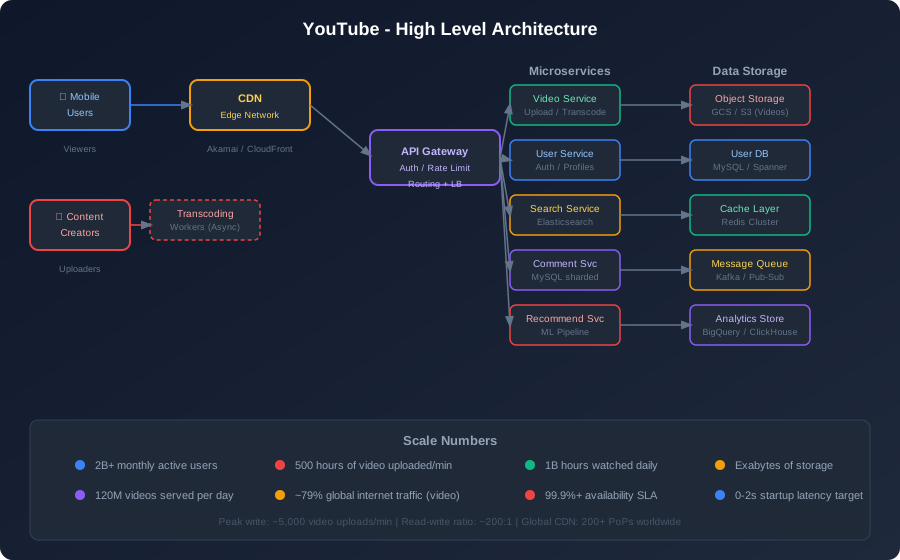
At a glance, the system breaks into four major slices:
Serving the viewers: CDN → API Gateway → Microservices → Storage
Processing uploads: Upload Service → Kafka → Transcoding Workers → Object Storage → CDN
Powering discovery: Search Service (Elasticsearch) + Recommendation Engine (ML)
Storing everything: Polyglot persistence — the right database for each type of data
Let me walk you through each piece and explain why it’s designed the way it is.
The Video Upload Pipeline — Where the Magic Starts
Uploading a video to YouTube sounds simple. It’s not.
Here’s what actually happens when a creator hits “Upload”:
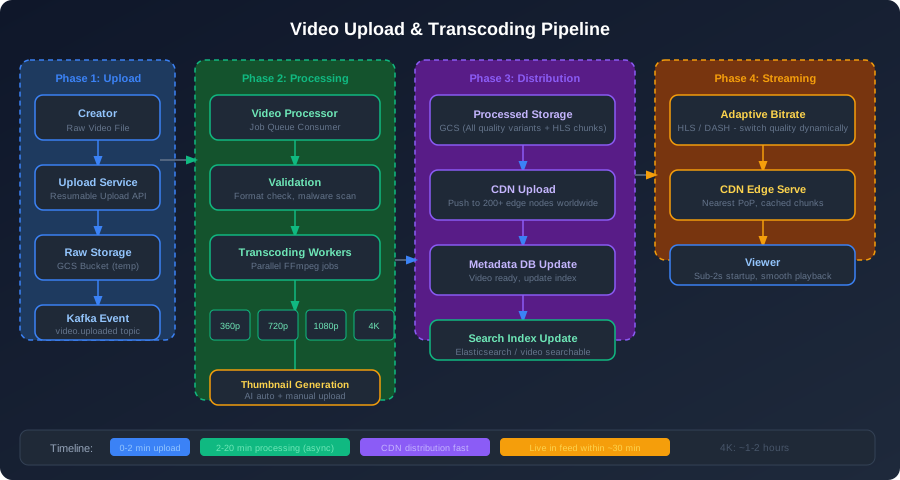
Step 1: Resumable Upload
The first problem is reliability. A 4K video might be 50 GB. Uploading that on a flaky connection and having it fail at 99% is a nightmare. YouTube uses resumable uploads — the client uploads in chunks, and if the connection drops, it picks up from where it left off.
The upload goes to a dedicated Upload Service, not directly to storage. This service handles chunking, validation, and progress tracking. It stores the raw video in a temporary GCS bucket.
Step 2: The “Video Uploaded” Event
Once the raw video is stored, the Upload Service publishes a video.uploaded event to Kafka. This is the key architectural decision: the upload and the processing are completely decoupled.
The user gets a “Video uploaded, processing in progress” message immediately. Meanwhile, Kafka triggers the heavy lifting asynchronously. This means the user doesn’t wait 20 minutes staring at a spinner.
Step 3: Transcoding (The Expensive Part)
The Video Processor service consumes the Kafka event and kicks off transcoding workers. This is where most of the compute cost lives.
Transcoding takes the original video (could be shot in any format — ProRes, H.265, AV1, you name it) and converts it into multiple standardized resolutions:
- 360p (for slow connections)
- 480p
- 720p HD
- 1080p Full HD
- 1440p / 4K (for premium hardware)
Each quality level is encoded independently, in parallel. A 10-minute video might spin up 8 parallel workers. For 4K, this can take 1-2 hours of compute time per video.
The output is chunked into small segments (typically 2-10 seconds each) in HLS or DASH format. Why chunks? Because that’s what enables seamless quality switching while you watch, which we’ll cover when we get to streaming.
Step 4: Distribution and Search
Once transcoding completes:
- Processed segments are moved to permanent GCS buckets
- CDN nodes worldwide are populated (or pull-on-demand)
- Video metadata is written to the database
- Search index (Elasticsearch) is updated — video is now searchable
- Creator’s subscribers get notified
The whole pipeline, from upload to “your video is live,” typically takes 20-60 minutes for standard quality and up to a few hours for 4K. YouTube is transparent about this—they show processing status right on the upload page.
Video Streaming — Delivering to 2 Billion Devices
This is where YouTube is genuinely impressive. Serving a billion hours of video daily without buffering is an engineering feat. Let’s break it down.
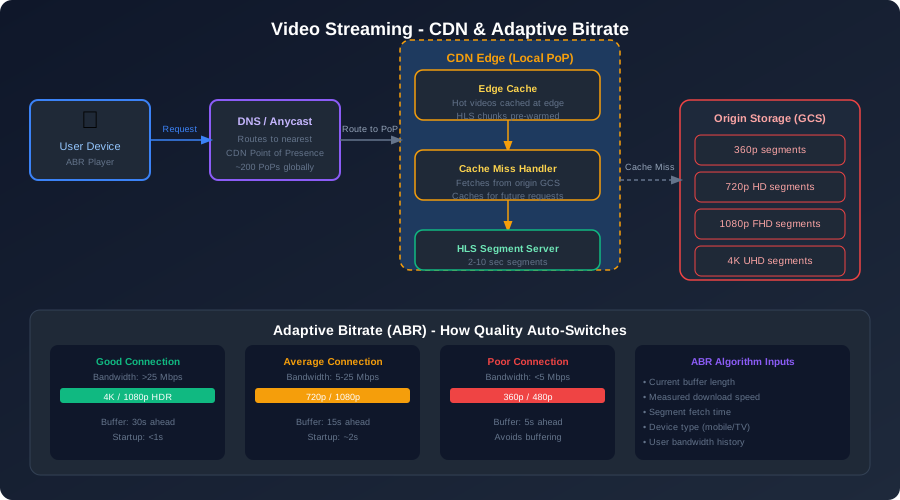
Why CDNs Are Non-Negotiable
Let’s say you’re in Mumbai watching a video. If your video request had to travel to a YouTube data center in the US, you’re looking at 200ms+ of round-trip latency just for network time alone. Every video chunk. You’d never stop buffering.
YouTube (and Google) operate one of the world’s largest CDN networks — hundreds of Points of Presence (PoPs) around the world. When you click play, DNS routes you to the nearest edge node. The video chunks are either already cached there, or fetched from origin and cached for the next viewer.
The economics are compelling: once a popular video is cached at an edge node, serving it to 10,000 viewers costs almost nothing compared to serving 10,000 requests from origin.
Adaptive Bitrate Streaming (The Secret to Smooth Video)
Here’s a problem: your internet connection isn’t stable. You start on WiFi, walk out of range, switch to 4G, hit a tunnel. How does YouTube keep playing without freezing?
Adaptive Bitrate (ABR) streaming. This is how it works:
The video is stored as small chunks (5-10 seconds each) at every quality level. Your player continuously measures your actual download speed and buffer level. When things are going well, it requests higher-quality chunks. When your connection degrades, it silently switches to lower-quality chunks — no pause, just a slight quality drop.
This is why YouTube uses HLS (HTTP Live Streaming) or DASH. The player downloads a manifest file that lists all available quality levels and chunk URLs. It picks the right one in real time, every few seconds, based on network conditions.
The result: You almost never buffer. The quality might drop for a moment if you’re in a bad spot, then recover automatically. This is objectively better than the old approach of picking one quality upfront and either over-buffering or constantly pausing.
The Video Startup Latency Problem
Getting that first frame on screen in under 2 seconds is hard when you consider the chain: DNS lookup → find nearest CDN → request manifest → request first chunk → decode first frame. That’s a lot of steps.
YouTube’s tricks:
- DNS pre-fetching: Start resolving CDN hostnames before you click play
- Pre-loading thumbnail and manifest: When you hover over a video in search results, start loading metadata
- Edge caching the first chunk: Popular videos have their first chunk pre-warmed at every major edge node
- Prefetching next chunks: While you watch the first 10 seconds, your client quietly downloads the next 30 seconds in the background
The Database Strategy — Polyglot Persistence
This is where I see the most confusion in system design interviews. Everybody wants to pick one database and fit everything into it. YouTube is the perfect example of why that’s wrong.
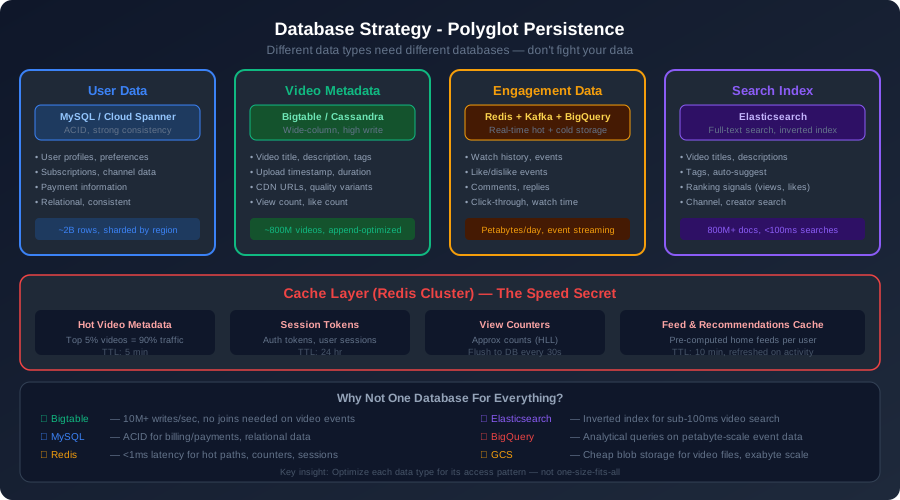
Different types of data have wildly different access patterns. Let’s walk through each:
User Data → MySQL / Cloud Spanner
User accounts, subscriptions, channel information — this is relational data that changes infrequently and needs strong consistency. You can’t afford to show a user the wrong subscription list or let two people create the same username simultaneously.
MySQL (or Cloud Spanner for global reads) handles this. At YouTube’s scale, this data is sharded by user ID across many MySQL instances. The data set isn’t that large compared to video data — a few billion rows is very manageable for a modern MySQL cluster.
Video Metadata → Bigtable / Cassandra
Video titles, descriptions, view counts, upload times, CDN URLs — this data has an enormous write volume (500 hours of uploads per minute) and needs to be read fast. There’s very little need for joins or complex queries.
Google Bigtable (or Cassandra if you’re cloud-agnostic) is perfect here. Wide-column stores are optimized for high-throughput sequential reads and writes. The key is usually video_id, and you design your schema around the access patterns, not normalization theory.
Engagement Data → Kafka + BigQuery + Redis
Likes, views, watch time, comments — this is the highest-volume data in the system. Hundreds of millions of events per second. You never batch insert billions of view events into MySQL — you’ll grind it to a halt.
The pattern here is:
- Write view events to Kafka (a message queue) in real time
- Aggregate and process asynchronously in batch jobs
- Store aggregates in BigQuery (or ClickHouse) for analytics
- Cache frequently-read aggregates (view count, like count) in Redis for fast serving
For view counts specifically, YouTube uses approximate counting with HyperLogLog data structures in Redis. The count displayed might be slightly off, but it’s fast and consistent enough. They correct it in batch jobs every few minutes.
Search Index → Elasticsearch
Video search needs completely different treatment. You need full-text matching, ranking by relevance, auto-suggestions, and multi-language support. None of the above databases handle this well.
Elasticsearch builds an inverted index over video titles, descriptions, and tags. When a video goes live, the search index gets updated asynchronously (a few minutes delay is acceptable for search). Queries return results in under 100ms even with 800 million documents in the index.
The Cache Layer
Redis Cluster sits in front of everything that gets read frequently:
- Hot video metadata: Top 5% of videos drive 90% of traffic — cache their metadata aggressively
- User session tokens: Auth on every API call without hitting the database
- View counters: Serve the approximate count from Redis, batch-sync to databases
- Pre-computed recommendation feeds: Generate each user’s home feed ahead of time, cache for 10 minutes
The cache hit rate for video metadata at YouTube’s scale is probably > 95%. That’s millions of database queries per second that just never happen.
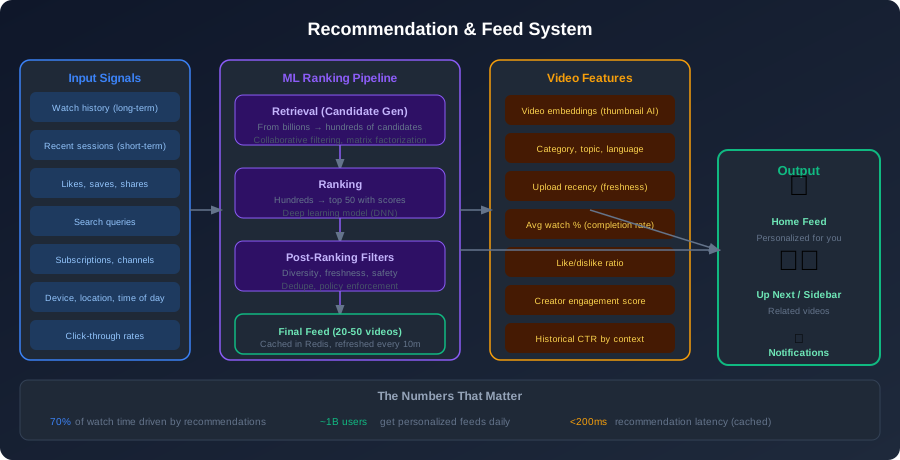
The Recommendation System — The 70% Problem
Here’s a number that should stop you in your tracks: 70% of YouTube’s watch time comes from recommendations. Not from search. Not from subscriptions. From the algorithm.
This means the recommendation system isn’t a nice-to-have feature — it’s the core of YouTube’s business.
Why This Is Hard
You have 2 billion users and 800 million videos. Finding the right 20 videos for each user isn’t a search problem — there’s no query. You need to predict what someone wants to watch based on implicit signals: what they watched, how long they watched it, what they skipped, what time of day it is, what device they’re on.
And you need to do this in under 200ms, for a billion users, every time they open the app.
The Two-Stage Approach
No production recommendation system tries to score all 800 million videos for every user. That’s computationally insane. Instead, YouTube (and most large systems) use a two-stage pipeline:
Stage 1: Candidate Retrieval (Billions → Hundreds)
This stage narrows the field fast. It uses fast, approximate methods — collaborative filtering (people similar to you also liked X), matrix factorization (embed users and videos in the same vector space), and subscription signals (latest videos from channels you follow).
The output is a set of maybe 500 candidates that have some plausible chance of being relevant. This runs in milliseconds.
Stage 2: Ranking (Hundreds → Top 20)
Now you take those 500 candidates and score each one carefully. This is where the deep learning model comes in. It looks at:
- How likely you are to click this thumbnail (CTR prediction)
- How long you’ll watch it (watch time prediction)
- Whether you’ll like or share it
- Diversity (don’t show 10 cooking videos in a row)
- Freshness (balance new content with proven content)
The model has hundreds of features per (user, video) pair. This stage generates the final ranked list.
Post-Ranking Filters: Safety filters, deduplication, and policy enforcement run last. You don’t want to recommend conspiracy theories or duplicate content regardless of what the model says.
The Cold Start Problem
What happens when a new video uploads? Nobody has watched it yet. No history, no engagement signals. The model has nothing to go on.
YouTube solves this through early exposure: new videos from established creators get small amounts of traffic immediately after going live. The system measures engagement (CTR, watch time) in real time and adjusts — if the video is performing well in early views, it gets more distribution. If it’s not, it gets deprioritized.
This is why “the algorithm” seems to reward consistency — established channels have lots of historical data, so the model can predict their new videos will perform well even before anyone watches them.
Step 3 — The Deep Dives
Handling Video View Counts at Scale
This sounds trivial until you think about it. A viral video might get 50 million views in an hour. If you’re doing a UPDATE videos SET view_count = view_count + 1 on every view, your database is toast within minutes.
The real approach:
- View events go to Kafka immediately — fire and forget, sub-millisecond
- Stream processors (like Dataflow) aggregate views in short windows (say, 30 seconds)
- Batch writes update the database with aggregated counts
- Redis caches the approximate count and serves it for reads
The displayed count might be a minute or two behind reality during a viral spike. That’s fine. Users don’t notice or care.
The Comment System
Comments are a sneaky hard problem. You have:
- Potentially millions of comments on a single video
- Nested replies
- Voting/liking on comments
- Real-time ordering (new first, top first, etc.)
- Spam and moderation challenges
YouTube stores comments in MySQL, sharded by video_id. The top-level comments for a video all live on the same shard. Replies are stored with their parent ID. Fetching the first page of comments is a simple indexed query.
For spam filtering, every comment goes through a machine learning classifier before it’s publicly visible. YouTube uses a combination of user reports and automated classifiers to surface genuine comments.
Thumbnails — The Sneaky Bottleneck
Thumbnails might seem boring, but think about what happens on the home page. You’re loading 20+ thumbnails simultaneously. If each thumbnail fetch is slow, your page load feels sluggish even if videos play fast.
YouTube aggressively optimizes thumbnails:
- Separate CDN service just for images
- Multiple resolutions (for different devices and contexts)
- WebP format for 30% smaller size vs PNG
- Preloaded when you hover — by the time you click, the thumbnail CDN is already warm
YouTube also generates multiple auto-thumbnails using ML (detecting faces, high-contrast frames) and lets creators A/B test which thumbnail drives higher CTR. This alone can double a video’s views.
Handling the Long Tail
The top 5% of videos drive about 90% of traffic. The remaining 95% — call it the “long tail” — rarely gets watched. Naively caching everything wastes CDN disk. Not caching anything kills your origin servers.
YouTube’s approach: hot videos are aggressively cached at CDN edge nodes. Cold videos are kept on cheaper origin storage (GCS) and served on-demand with slower startup times. If a cold video suddenly goes viral (think: a news event referencing an old video), the CDN automatically warms it up as demand spikes.
The storage tiers look something like this:
- Hot (< 7 days old, trending): Full CDN caching at every major PoP
- Warm (popular but older): Cached at regional PoPs, not every edge
- Cold (rarely watched): On-demand from origin, long cache TTL once fetched
- Archive (very old, near-zero views): Tape storage for cost efficiency
What Makes This Genuinely Hard
I want to be honest: the architecture I’ve described is conceptually clear but operationally brutal. Here’s what keeps YouTube engineers up at night:
Consistency vs. Availability: When you have hundreds of database replicas across dozens of regions, keeping them synchronized is hard. YouTube mostly embraces eventual consistency — your like shows up immediately to you, but might take a second to propagate globally. They pick availability over strict consistency in most cases.
Dealing with the 80/20 Load: Traffic isn’t uniformly distributed. A major event (say, a championship game highlights clip going viral) can generate 50x normal traffic in minutes. The CDN usually absorbs this gracefully, but origin infrastructure needs to handle sudden spikes in cache misses. Auto-scaling helps, but there’s always a lag.
Creator vs. Viewer Latency: Creators care about upload speed. Viewers care about playback speed. These want different things from the network — upload to data centers, download from edge nodes. Managing both optimally requires global anycast networking and careful load balancing.
The Moderation Scale Problem: 500 hours of video per minute. You can’t have humans review everything. ML classifiers run on every upload, but they make mistakes. This is an ongoing, never-finished problem.
Key Takeaways
Let me distill what matters most from this design:
Separate reads from writes architecturally. The read-write ratio of 200:1 means your entire architecture should be skewed toward read optimization — CDNs, caches, read replicas everywhere.
Decouple upload from processing. Using Kafka to separate the upload signal from the transcoding pipeline is what allows creators to upload once and not wait for processing. Async pipelines are a superpower for user experience.
Different data, different databases. There’s no magic database that handles exabytes of video files, billions of relational user records, petabytes of event data, and full-text search equally well. Use the right tool for each job.
CDNs are the product. Without a global CDN, YouTube doesn’t work at all. The CDN isn’t infrastructure — it’s the core of what makes global video delivery possible.
Recommendations are the business. 70% of watch time from the algorithm means recommendations aren’t a feature, they’re the product. Designing the two-stage retrieval + ranking system is non-negotiable at this scale.
Embrace eventual consistency. At 2 billion users, strict consistency is often too expensive. View counts being 60 seconds stale, comments taking a few seconds to appear — these are acceptable trade-offs for availability and performance.
Cache the hot path aggressively. The top 5% of content serving 90% of traffic means cache hit rates above 90% are achievable and absolutely necessary. Every cache miss at YouTube’s scale represents real money and real latency.
The Bottom Line
Designing YouTube is really about solving five distinct hard problems at once: reliable video ingestion, global video delivery, smart video discovery, scalable data storage, and real-time engagement features. Miss any one of them and the product breaks.
The architecture we’ve walked through — CDN-first delivery, async transcoding pipelines, polyglot persistence, two-stage recommendation systems — isn’t overcomplicated for the sake of it. Every piece exists because a simpler version breaks under real-world load.
Here’s the most important lesson I’ve taken from years of designing systems at scale: start with your access patterns, not your databases. Know exactly how your data will be read and written before you pick any technology. YouTube’s architecture is a masterclass in matching technology choices to data shapes and access patterns.
Start simple on paper, understand the bottlenecks, then introduce complexity only where the problem demands it. That’s the discipline that separates great system designers from people who just draw lots of boxes.
Designing a similar system and hitting scaling challenges? Let’s talk — I’d love to dig into the specifics with you.
Comments & Discussion
Join the conversation! Share your thoughts, ask questions, or provide feedback below.