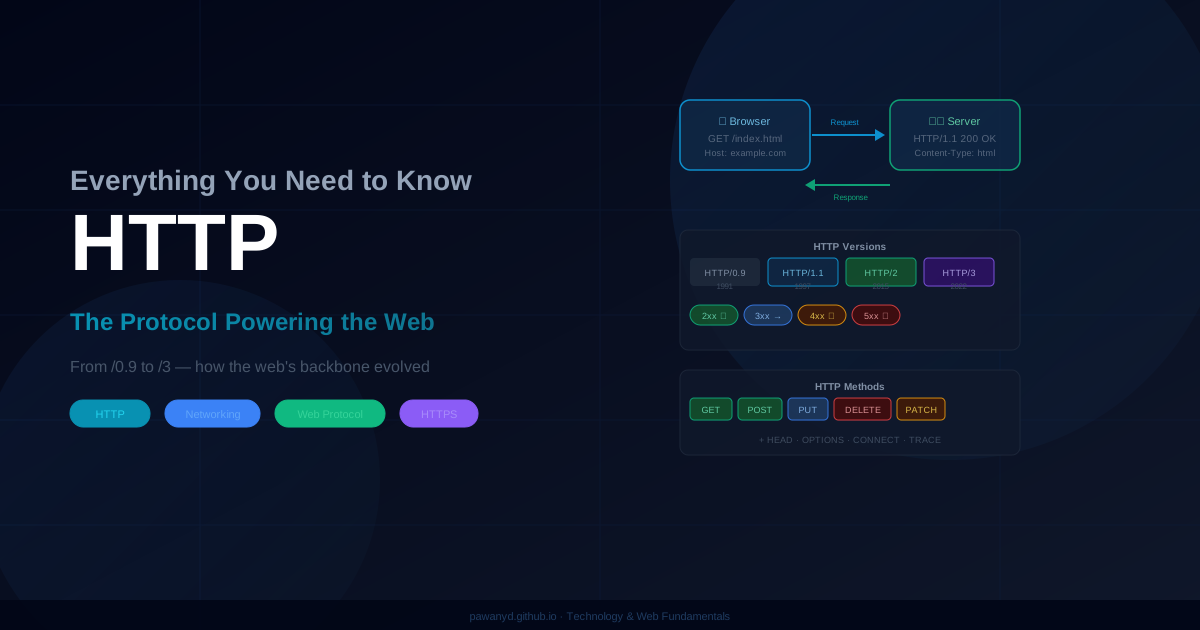
HTTP Explained: Everything You Need to Know About the Web’s Most Important Protocol
Let me tell you a story from early in my career. I was debugging a production issue late at night — users were complaining that our API was returning data from two weeks ago. I checked the database. Fresh data. I checked our app servers. Fine. I redeployed. Nothing changed.
Two hours later, I found it: a single header. Cache-Control: max-age=1209600. Two weeks, in seconds. A misconfigured response header was making browsers and proxies cache our “live” data for 14 days.
That night taught me that HTTP isn’t just plumbing. It’s logic. Every header is a decision. Every status code is a contract. Every version of the protocol represents a hard-learned lesson from millions of developers hitting the same walls.
After building web systems across APIs, microservices, real-time platforms, and payment systems — here’s everything about HTTP that actually matters.
What HTTP Actually Is
HTTP stands for Hypertext Transfer Protocol. Strip away the acronym expand and here’s what it really is: a text-based agreement between a client and a server on how to ask for things and how to respond to those asks.
Before HTTP, getting information from a different computer was genuinely hard. You needed to know the specific network protocol of the remote system, handle connection management yourself, and deal with raw bytes. HTTP abstracted all of that into something human-readable: a request that literally says GET /page.html and a response that says 200 OK followed by the content.
That simplicity is why the web exploded. Any developer could understand what was happening on the wire. You could open Netcat and speak HTTP with your fingers if you wanted to.
Of course, simplicity was just the starting point. Fifteen years later, HTTP has evolved into something far more sophisticated — but the core model hasn’t changed. A client asks. A server responds.
The Request-Response Cycle — What Really Happens
You type a URL and press Enter. Here’s what actually happens before the first pixel renders:
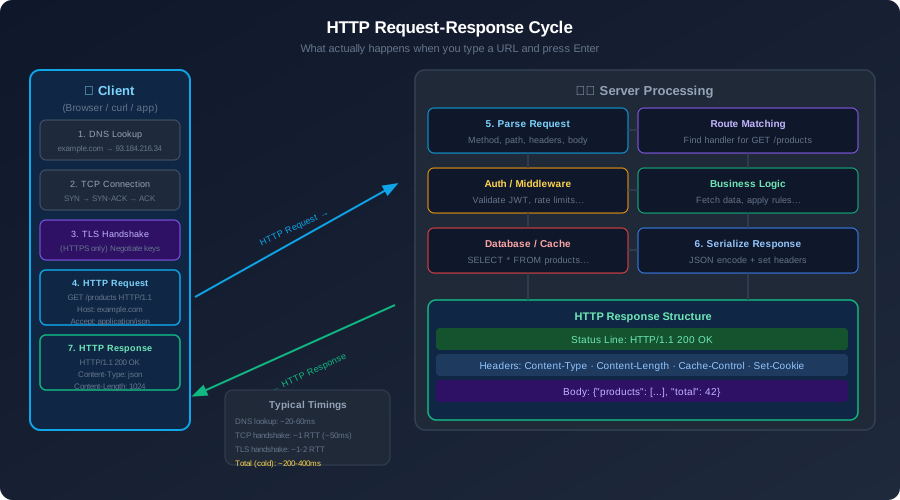
Step 1: DNS lookup. Your browser doesn’t know what 93.184.216.34 is — it knows example.com. DNS is the internet’s phone book. It translates human-readable names to IP addresses. This lookup is often cached locally, but a cold lookup adds 20-100ms before a single byte of HTTP happens.
Step 2: TCP connection. HTTP rides on TCP. Before sending any HTTP data, client and server must complete a three-way handshake — SYN, SYN-ACK, ACK. This takes one full round trip. On a connection to a server on the other side of the world, that round trip could be 200ms alone.
Step 3: TLS handshake (HTTPS only). If you’re on HTTPS (and you should always be on HTTPS), add another one or two round trips to negotiate encryption. We’ll get into this in detail shortly.
Step 4: HTTP request. Finally, the actual request goes out. It’s just text:
GET /products HTTP/1.1
Host: api.example.com
Authorization: Bearer eyJhbGci...
Accept: application/json
Accept-Encoding: gzip, br
The server reads this, routes it to the right handler, runs business logic, queries a database, and sends back an HTTP response — which is also just text with some structure.
Step 5: HTTP response. A status line, headers, and a body come back:
HTTP/1.1 200 OK
Content-Type: application/json
Content-Length: 1842
Cache-Control: max-age=60, public

{"products": [...], "total": 42}
And that’s it. The response body is rendered, and you see your page.
The key insight: all that setup (DNS, TCP, TLS) happens before HTTP even starts. For a page loading 50 resources, doing this setup 50 times would be catastrophically slow. Which is why HTTP evolved.
HTTP Methods — CRUD on the Web
HTTP gives you a vocabulary for what you want to do to a resource, not just what resource you want.
GET — retrieve something. It should never change state. A GET request should be safe to repeat a hundred times and the server state should be identical each time. Never put sensitive data in a GET URL — it ends up in server logs, browser history, and Referer headers.
POST — create something new. Post a form, create a user, upload a file. POST is not idempotent — posting the same order twice could create two orders. This matters when you’re handling network timeouts.
PUT — replace a resource with what I’m sending. PUT /users/42 with a full user object replaces user 42 entirely. PUT is idempotent — doing it ten times should produce the same result as doing it once.
PATCH — update part of a resource. Where PUT replaces the whole thing, PATCH changes only what you specify. PATCH /users/42 with {"email": "new@email.com"} changes just the email. In REST APIs, I use PATCH far more than PUT in practice.
DELETE — remove a resource. DELETE /orders/456 deletes that order. Also idempotent — deleting something that’s already deleted should return 404, but it shouldn’t explode.
HEAD — same as GET, but returns only headers, no body. Use this to check if a resource exists, or to get metadata without downloading the full content. Browsers use HEAD to check cache freshness.
OPTIONS — ask the server what methods it supports. This is what browsers send as a CORS preflight request before a cross-origin POST. If you’ve ever debugged CORS issues, you’ve met OPTIONS.
The idempotency property matters enormously in distributed systems. If a network request times out and you don’t know if the server received it, you can safely retry a GET or DELETE. You cannot blindly retry a POST — that’s how you charge someone twice.
HTTP Status Codes — The Language of Responses
Status codes are arguably the most misused part of HTTP. I’ve seen production APIs return 200 with {"error": "user not found"} in the body. I’ve seen 500 returned when the user sent bad input. Every one of these is a lie to the client.
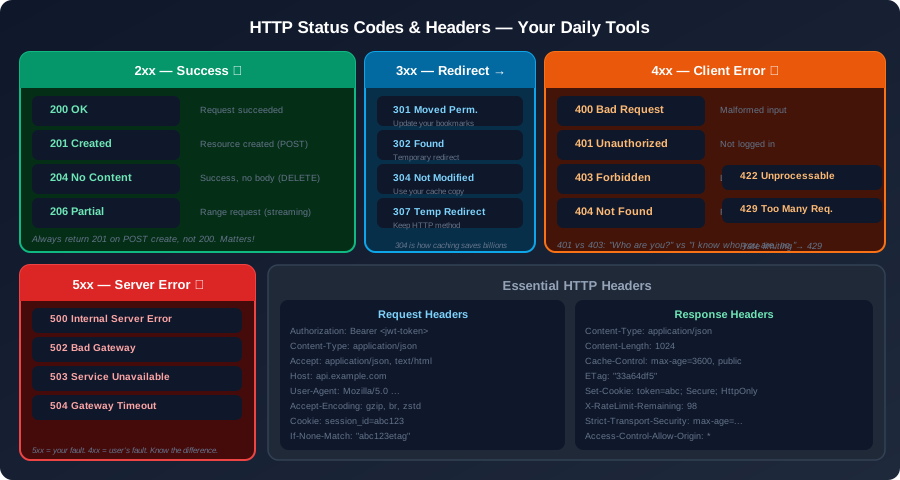
The 2xx family: success. 200 OK is the workhorse. 201 Created should be returned when a POST successfully creates a new resource — along with a Location header pointing to the new resource URL. 204 No Content is for operations that succeed but have nothing to return, like a DELETE. 206 Partial Content is what video streaming uses — serving chunks of a file in response to Range requests.
The 3xx family: redirection. 301 Moved Permanently tells clients to update their bookmarks — and importantly, tells search engines to transfer SEO ranking. 302 Found is a temporary redirect. 304 Not Modified is one of the most important codes for performance — it means “the resource hasn’t changed since you last fetched it, use your cached copy.” No body is returned, saving bandwidth. 307 and 308 are the method-preserving versions of 302 and 301 respectively.
The 4xx family: client error. This is your fault. 400 Bad Request means your input is malformed. 401 Unauthorized means “I don’t know who you are — please authenticate.” 403 Forbidden means “I know who you are — you’re just not allowed to do this.” The distinction matters: 401 means re-auth might work, 403 means it won’t. 404 Not Found is self-explanatory. 422 Unprocessable Entity is ideal for validation errors — the request was well-formed and authenticated, but the data didn’t pass business rules. 429 Too Many Requests is what your rate limiter should return, along with Retry-After header.
The 5xx family: server error. This is your problem to fix. 500 Internal Server Error is the generic catch-all — something unexpected blew up on the server. 502 Bad Gateway means a proxy or load balancer received an invalid response from an upstream server. 503 Service Unavailable means “I’m temporarily overloaded or down for maintenance” — this is what you return when you’re doing graceful degradation. 504 Gateway Timeout means an upstream request timed out.
One pattern I enforce on every API I build: never return 200 for errors. The HTTP status code is the API’s primary communication channel. Returning 200 with error details in the body defeats the purpose of the status code and breaks every client library, monitoring tool, and proxy in the chain.
The Evolution of HTTP — From 1.0 to 3
This is where it gets genuinely interesting. HTTP has gone through four major versions, and understanding why each version changed what it changed tells you a lot about what makes web performance hard.
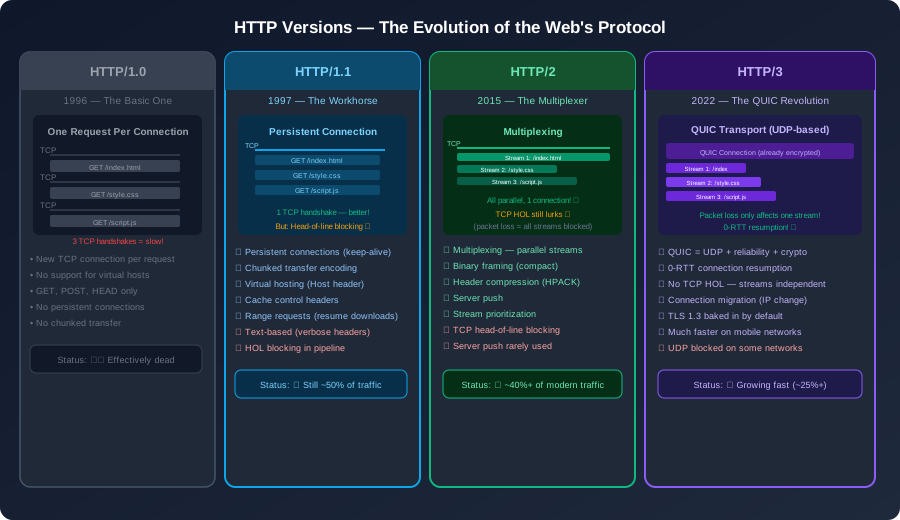
HTTP/1.0 — The Simple Beginning (1996)
HTTP/1.0 was refreshingly simple: one TCP connection per request, one request per connection. You want to load an HTML file? Open a connection. You want to load the CSS? Open another connection. Three images? Three more connections.
This was fine in 1996 when web pages were a handful of text files. It became catastrophic as pages grew to load 50, 100, 200 resources. The overhead of establishing a new TCP connection for every single asset was crushing latency.
HTTP/1.1 — The Workhorse (1997–Present)
HTTP/1.1 fixed the most urgent problem: persistent connections. You could send multiple requests over the same TCP connection, tearing it down only after some period of inactivity. This alone cut page load times dramatically.
It also added chunked transfer encoding (server can start sending a response before it knows the total size), the Host header (allowing multiple websites on a single IP address — this is what made shared hosting possible), and better cache control headers.
But HTTP/1.1 had a fundamental flaw: head-of-line (HOL) blocking. Even with pipelining enabled, responses had to be delivered in order. If the first request was for a large, slow-to-generate resource, every subsequent resource in the pipeline would wait. Browsers worked around this by opening up to 6-8 parallel TCP connections per domain — which is wasteful and has its own problems.
HTTP/2 — The Multiplexer (2015)
HTTP/2 tackled HOL blocking head-on with multiplexing. Instead of sending requests one at a time and waiting, HTTP/2 can send multiple requests simultaneously over a single connection, with each request in its own logical stream. Responses can arrive in any order — the client reassembles them by stream ID.
It also introduced HPACK header compression, which mattered more than you’d expect. Headers in HTTP/1.1 are repeated verbatim on every request — the User-Agent, Accept-Encoding, Authorization, and Cookie headers could easily add 1-2KB of overhead per request. HPACK maintains a shared header table between client and server, sending only the delta.
Server Push was HTTP/2’s most ambitious feature: the server could proactively send resources before the client requested them. In theory, perfect. In practice, it was difficult to implement correctly, often sent resources the client already had cached, and has been largely abandoned. Chrome removed it in 2022.
HTTP/2 made the web meaningfully faster, but it had one foot in the old world: it still ran on TCP. And TCP has an inherent problem when packets are lost — TCP HOL blocking. When a single TCP packet is lost, all streams on that connection stall until the packet is retransmitted. With complex multiplexed connections, a single lost packet could freeze every request.
HTTP/3 — The QUIC Revolution (2022)
HTTP/3 does something radical: it abandons TCP entirely. It runs on QUIC, a new transport protocol built on UDP.
UDP by itself is unreliable — there’s no guarantee packets arrive or arrive in order. QUIC adds reliability, congestion control, and ordering at the stream level, not the connection level. This is the key difference: if a packet for stream 1 is lost, only stream 1 stalls. Streams 2 and 3 keep flowing.
QUIC also has TLS 1.3 baked in from the ground up — there’s no separate TLS layer negotiation. And connection migration is built in: if your IP address changes (you walk from WiFi to 4G), a QUIC connection can survive that transition. TCP connections die when the IP changes.
For mobile users, where packet loss and network switching are common, HTTP/3 is a significant improvement. Cloudflare and Google report 10-30% latency improvements for users on lossy networks. Whether you’re serving HTTP/3 today depends on your infrastructure, but it’s the direction everything is heading.
HTTPS and TLS — How Encryption Actually Works
Every website should be on HTTPS. This isn’t a matter of debate in 2025. But do you actually know what happens during that TLS handshake? Most developers don’t, and they should.
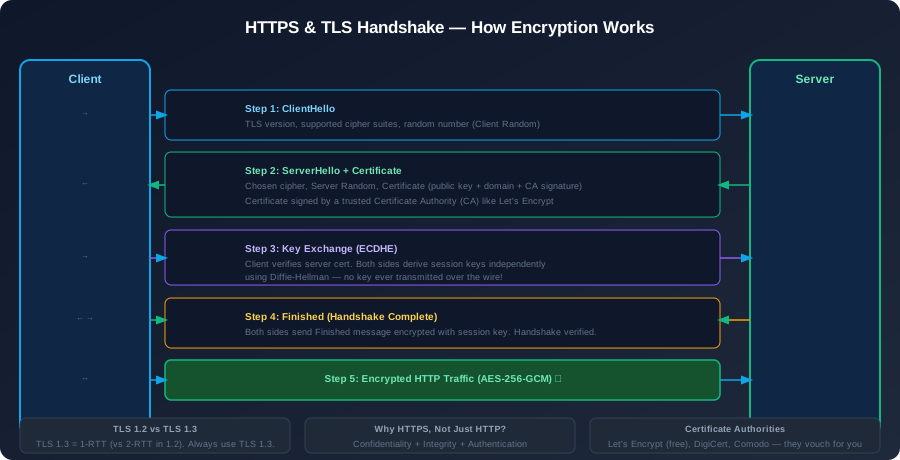
The problem HTTP/TLS solves: three things simultaneously.
Confidentiality — nobody intercepting the traffic between you and the server can read it. That coffee shop WiFi is not a threat if you’re on HTTPS.
Integrity — nobody can tamper with the content in transit without the tampering being detected. A router between you and the bank’s server cannot inject JavaScript into the response.
Authentication — you know you’re talking to the actual yourbank.com, not an attacker who intercepted your DNS query.
How TLS does it (simplified):
When you connect to an HTTPS server, a handshake happens before any application data flows. The server presents a digital certificate — a document that says “I am example.com, and a trusted Certificate Authority (CA) has verified this.” Your browser has a baked-in list of trusted CAs (like DigiCert, Let’s Encrypt, Comodo). If the certificate chains up to one of those trusted CAs, and the domain matches, the browser trusts it.
Then both sides use a key exchange algorithm (modern TLS uses ECDHE — Elliptic Curve Diffie-Hellman Ephemeral) to derive a shared secret without ever transmitting the secret over the wire. This is Diffie-Hellman magic: two parties can agree on a shared secret over a public channel without an eavesdropper being able to determine what the secret is. Every session gets ephemeral keys — even if an attacker records all your encrypted traffic and later compromises the server’s private key, they still can’t decrypt old sessions. This is called Perfect Forward Secrecy.
The symmetric session key derived from this exchange is then used for all subsequent application data encryption, typically AES-256-GCM.
TLS 1.2 vs TLS 1.3 — TLS 1.3 reduced the handshake from 2 round trips to 1, cut the cipher suite negotiation to only the secure modern options, and made 0-RTT resumption possible for repeat connections. If you’re configuring a web server today, there’s no reason to support TLS 1.2 or below. Disable it.
One practical thing: Let’s Encrypt changed the HTTPS landscape entirely. Before it, TLS certificates cost money and were painful to manage. Let’s Encrypt provides free, automatically renewable certificates. There’s no excuse for HTTP in 2025.
Caching — The Single Biggest Performance Win
If I had to pick one thing to get right for HTTP performance, it would be caching headers. Done well, caching eliminates entire categories of server load. Done wrong, it’s the reason your users see stale data for two weeks (see my opening story).
Cache-Control is the main instrument. max-age=3600 means “this response is valid for 3600 seconds — don’t hit the server again until then.” public means CDNs and proxies can cache it. private means only the user’s browser can cache it (use this for user-specific data). no-store means don’t cache at all. no-cache is the confusing one — it means you can cache it, but you must revalidate with the server before using the cached copy.
ETags and conditional requests are where caching gets elegant. When a server returns a response, it can include an ETag header — a fingerprint of the response content. Next time the client requests the same resource, it sends If-None-Match: "the-etag-value". If the content hasn’t changed, the server returns 304 Not Modified with no body — saving bandwidth while confirming freshness. If it has changed, it returns 200 OK with the new content and a new ETag.
This is how browser caches can be both aggressive (no unnecessary requests) and correct (always freshness-aware) simultaneously.
CDN caching at the network edge is the extreme version of this. Popular CDNs like Cloudflare and CloudFront cache responses at hundreds of Points of Presence worldwide. When your Cache-Control headers are right, your origin server might serve a popular resource to 1,000 people whose browsers have all expired their local caches — but the CDN edge node serves them all, and only asks your origin once to refresh. That’s the economics of edge caching.
CORS — The Security Model Nobody Enjoys
Cross-Origin Resource Sharing (CORS) is the mechanism that controls which websites can make HTTP requests to your server from their JavaScript. It exists because without it, malicious websites could make authenticated requests to your bank’s API from a user’s browser and steal their data.
The browser enforces the same-origin policy by default: JavaScript on site-a.com cannot make AJAX requests to api.site-b.com. CORS is the opt-in mechanism for api.site-b.com to say “I trust these origins.”
The Access-Control-Allow-Origin response header is the main knob. * allows any origin — fine for public APIs. https://app.example.com allows only that specific origin — correct for private APIs. Most developers set * everywhere and then wonder why their cookies aren’t working on cross-origin requests. (Cookies require Access-Control-Allow-Credentials: true and a specific origin, not *.)
The OPTIONS preflight is your framework doing its job. Before a cross-origin POST or DELETE, the browser sends an OPTIONS request to check if the server allows it. If it does, the actual request follows. This costs one round trip — optimize by ensuring your server returns the right Access-Control-Max-Age header to cache the preflight result.
HTTP and APIs — Practical Lessons
Building REST APIs over HTTP is where I’ve spent the bulk of my career. Here’s what actually matters:
Versioning. Put the version in the URL: /api/v1/users, /api/v2/users. I’ve seen companies try header-based versioning (Accept: application/vnd.myapp.v2+json) — it’s elegant in theory and painful in practice (browser can’t navigate to it, harder to debug, harder to document). URL versioning is boring and it works.
Always return consistent error shapes. Every error response should have the same structure: {"error": "validation_failed", "message": "Email is required", "code": 4001}. Clients should never need to special-case individual error formats. Pick a structure and use it everywhere, every time.
Compression. If your client sends Accept-Encoding: gzip, your server should gzip the response. For JSON APIs, gzip typically reduces payload size by 70-90%. That’s not a minor optimization — it’s cutting data transfer by 4-10x. Most frameworks do this automatically, but verify it’s actually enabled in production.
Timeouts everywhere. Set connection timeouts, read timeouts, and write timeouts on every outbound HTTP call you make. A slow dependency that never times out will hold your thread/goroutine/connection forever. At scale, a single slow external service can exhaust your connection pool and bring down your entire service. Circuit breakers and timeouts are how you prevent cascading failures.
Idempotency keys for POST requests. For operations that shouldn’t be duplicated (payments, orders), accept an Idempotency-Key header. If you see the same key twice within a window, return the result of the first request. This lets clients safely retry POST requests when they’re unsure if the first request made it through.
What Experience Taught Me About HTTP
Here’s the distilled version of what I’ve learned spending a career working on HTTP-based systems:
Read the spec, at least once. RFC 9110 (the current HTTP semantics specification) is actually readable. Spending three hours with it will prevent ten hours of debugging over the next year. The spec defines what things mean, and violations cause subtle bugs.
Get your status codes right. Wrong status codes erode trust with API consumers, break client libraries, and make debugging harder for everyone. 200 OK for errors is a lie. 500 for validation failures is a misattribution of blame. Spend time getting the semantics right — it pays dividends.
Cache aggressively, invalidate carefully. Too little caching means slower sites and overloaded servers. Too much (or wrong) caching means stale data. The rule: cache as much as you can, but design your cache keys and expiration with the same rigor you design your database schema. Understand the difference between browser caches, CDN caches, and application caches — they have different characteristics and failure modes.
HTTPS is not optional. Beyond security, Google gives ranking preference to HTTPS sites, browsers mark HTTP sites as “Not Secure,” and modern web APIs (service workers, geolocation, WebAuthn) require HTTPS. Let’s Encrypt is free and automated. There is no excuse.
HTTP/2 for everything, HTTP/3 where you can. HTTP/2 is supported by virtually every modern client and server. The multiplexing alone makes it worth enabling. HTTP/3 is worth testing — if your users are on mobile or lossy networks, the gains can be significant.
Learn your tools. curl -v shows you exactly what HTTP headers are going over the wire. Browser DevTools Network tab shows you every request, its timing waterfall, its headers, and its size. Learning to read a network waterfall chart will help you find performance problems in 10 minutes that would otherwise take days. These tools are worth mastering.
The Bottom Line
HTTP is 35 years old and it’s still the foundation of almost everything we build on the web. It’s been extended, optimized, and revolutionized multiple times — but the core model of “client asks, server responds” has never changed.
The reason so many developers treat HTTP as a black box is that it usually works without much thought. But when things go wrong — mysterious caching bugs, failed CORS requests, intermittent 502s, API clients getting unexpected status codes — not understanding HTTP turns a 10-minute fix into a 10-hour investigation.
Understanding HTTP is one of those skills that pays compound interest. Every hour you spend understanding request headers, cache semantics, TLS mechanics, and status code conventions makes every future hour of debugging, API design, and performance optimization faster.
The web is HTTP. Know your protocol.
Hit an HTTP mystery in your production system? Let’s talk — I’ve most likely seen it before.
Comments & Discussion
Join the conversation! Share your thoughts, ask questions, or provide feedback below.