How SSL Works: The Complete Guide to Secure Web Communication
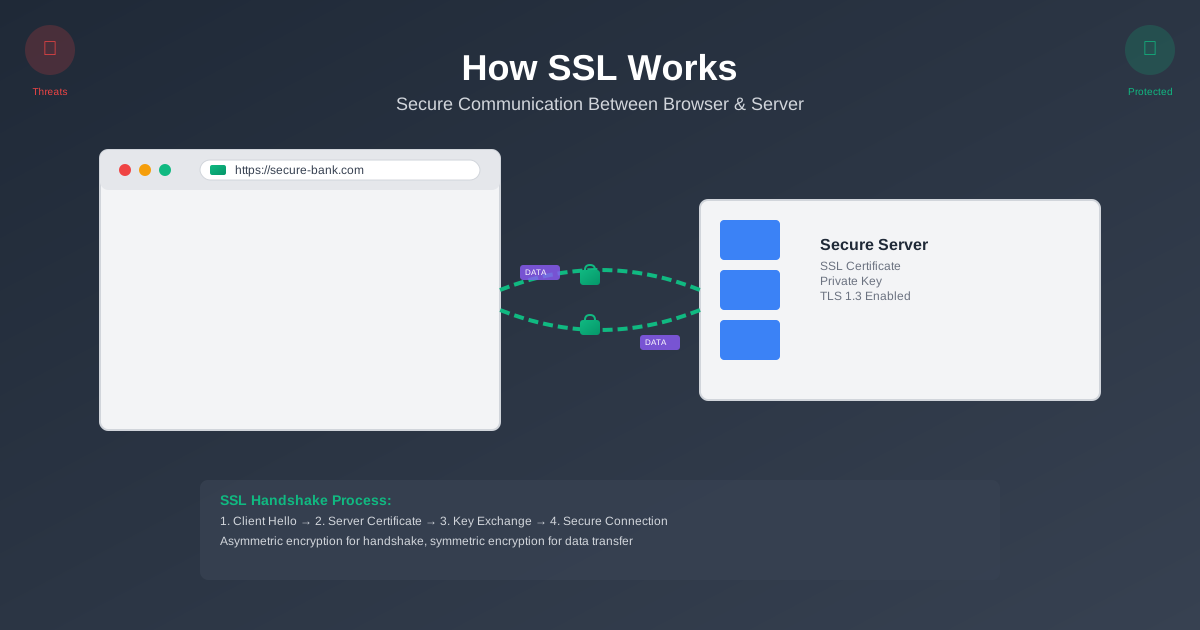
Ever noticed that little lock icon in your browser’s address bar? You know, the one that appears when you’re shopping online or logging into your bank account? That tiny symbol represents one of the most crucial security technologies keeping the internet safe: SSL/TLS.
But here’s the thing—most developers treat SSL like magic. They know they need it, they know it “encrypts stuff,” but ask them to explain exactly how it works, and you’ll get a lot of hand-waving. That’s a problem, especially when you’re building systems that handle sensitive data.
SSL isn’t just about slapping a certificate on your server and calling it a day. It’s a sophisticated dance between your browser and the server, involving multiple types of encryption, digital signatures, and trust verification. Understanding this dance isn’t just academic—it’ll make you a better developer and help you debug those mysterious SSL errors that pop up at 3 AM.
The Problem SSL Solves
Picture this: you’re sitting in a coffee shop, connected to their free WiFi, trying to log into your online banking. Without SSL, here’s what would happen:
Your username and password would travel across the network in plain text. Anyone with a packet sniffer (and there are plenty of free tools for this) could intercept your credentials. Worse, they could modify the data in transit—maybe changing your transfer amount from $100 to $10,000.
This isn’t theoretical. Before HTTPS became widespread, this stuff happened all the time. Coffee shop WiFi was a goldmine for attackers.
SSL solves three fundamental problems:
Confidentiality: Your data is encrypted, so even if someone intercepts it, they can’t read it.
Integrity: The data can’t be modified in transit without detection.
Authentication: You can verify you’re actually talking to your bank, not some imposter.
The Trust Problem
But there’s a deeper issue here. How do you know that certificate claiming to be from “bank.com” is actually from your bank? This is where the whole certificate authority (CA) system comes in—a web of trust that most people never think about but absolutely depends on.
Understanding SSL/TLS (Yes, They’re Different)
Let’s clear up some confusion first. When people say “SSL,” they usually mean TLS (Transport Layer Security). SSL (Secure Sockets Layer) was the original protocol, but it’s been deprecated for years due to security vulnerabilities.
Think of it like this: SSL was the prototype, TLS is the production version. We’re currently on TLS 1.3, which is what modern browsers use. But everyone still calls it “SSL” because old habits die hard.
The core concept remains the same: create a secure tunnel between your browser and the server so your data can travel safely across the hostile internet.
The SSL Handshake: A Step-by-Step Breakdown
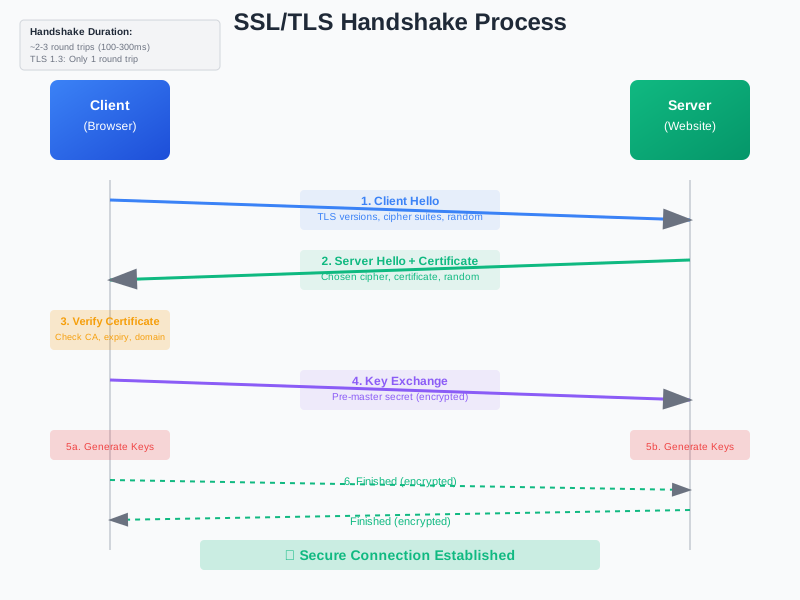
Here’s where things get interesting. Before any actual data gets transmitted, your browser and the server need to agree on how they’re going to encrypt everything. This negotiation is called the SSL handshake, and it’s more complex than you might think.
Step 1: Client Hello
Your browser kicks things off by sending a “Client Hello” message. This isn’t just a polite greeting—it’s packed with information:
- Which TLS versions the browser supports
- A list of cipher suites (encryption algorithms) it can handle
- A random number (this becomes important later)
- Any server names it’s trying to reach (for servers hosting multiple sites)
Think of this as your browser saying, “Hey server, here’s what I can do. What works for you?”
Step 2: Server Hello and Certificate
The server responds with its own “Server Hello” containing:
- The TLS version it wants to use
- The chosen cipher suite from the client’s list
- Its own random number
- The server’s SSL certificate
This is where the server says, “Great, let’s use TLS 1.3 with AES-256 encryption. And here’s my ID to prove I’m legit.”
Step 3: Certificate Verification
Now your browser becomes a detective. It examines the server’s certificate to verify:
- Is it signed by a trusted Certificate Authority?
- Is it valid (not expired)?
- Does the domain name match what you’re trying to reach?
- Has it been revoked?
If any of these checks fail, you get that scary “Your connection is not private” warning.
Step 4: Key Exchange
Here’s where the cryptographic magic happens. The browser and server need to agree on a shared secret key for encrypting the actual data. But they can’t just send this key in plain text—that would defeat the whole purpose.
Instead, they use asymmetric cryptography (public/private key pairs) to securely exchange the information needed to generate symmetric keys. It’s like passing notes in class, but with math that would take centuries to crack.
Step 5: Finished Messages
Both sides send encrypted “Finished” messages using the newly established keys. This serves as a final verification that everything worked correctly and both sides can encrypt/decrypt properly.
The whole handshake typically takes 2-3 round trips between client and server. That’s why SSL can add latency to your connections—there’s overhead to establishing that secure tunnel.
The Two Types of Encryption at Play
SSL uses both asymmetric and symmetric encryption, and understanding why is crucial to grasping how the whole system works.
Asymmetric Encryption: The Key Exchange
Asymmetric encryption uses a pair of mathematically related keys: one public, one private. Data encrypted with the public key can only be decrypted with the private key, and vice versa.
This solves the key distribution problem. The server can publish its public key for everyone to see, but only it has the private key. When your browser wants to send a secret, it encrypts it with the server’s public key. Only the server can decrypt it.
The downside? Asymmetric encryption is computationally expensive. It’s great for small amounts of data (like exchanging keys), but terrible for encrypting large amounts of data like web pages or file uploads.
Symmetric Encryption: The Bulk Data
Once the handshake is complete, SSL switches to symmetric encryption for the actual data transfer. Both sides use the same key to encrypt and decrypt data. This is much faster than asymmetric encryption.
The beauty of the SSL handshake is that it uses asymmetric encryption to securely establish the symmetric keys. Best of both worlds: security and performance.

Certificate Authorities: The Web of Trust
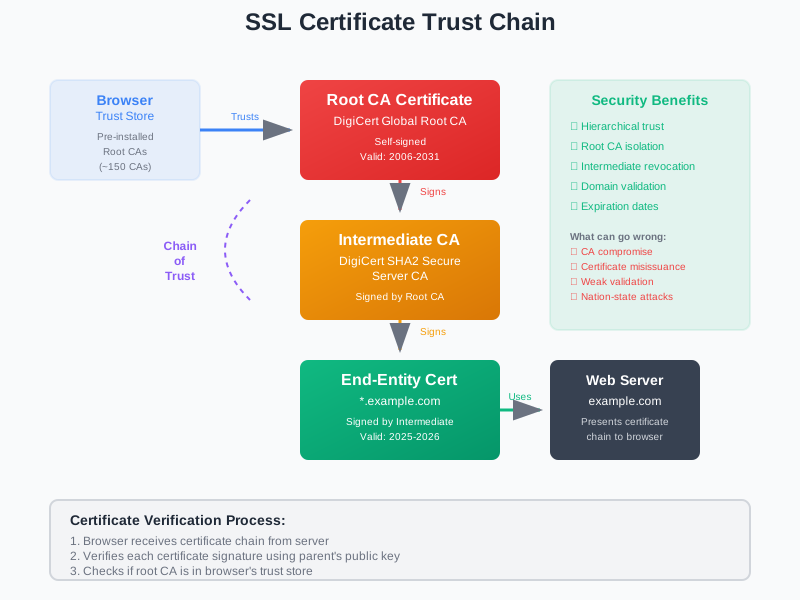
Here’s where things get philosophical. How do you trust a certificate? The answer is Certificate Authorities (CAs)—organizations that vouch for the identity of websites.
When a CA issues a certificate, they’re essentially saying, “We’ve verified that this certificate really belongs to this organization.” Your browser comes pre-loaded with a list of trusted CAs, so when it sees a certificate signed by one of them, it trusts it.
The CA Hierarchy
It’s actually more complex than that. There’s usually a chain of trust:
- Root CA (stored in your browser)
- Intermediate CA (signed by the root)
- End-entity certificate (signed by the intermediate)
This hierarchy allows CAs to delegate signing authority without exposing their root keys. If an intermediate CA gets compromised, they can revoke it without affecting the entire trust chain.
What Could Go Wrong?
The CA system has some inherent weaknesses. If a CA gets compromised or goes rogue, they could issue certificates for any domain. This has happened before—DigiNotar, a Dutch CA, was caught issuing fraudulent certificates for major sites like Google and Facebook.
Modern browsers have implemented additional protections like Certificate Transparency logs and HTTP Public Key Pinning to detect and prevent these attacks.
SSL in the Real World: Performance and Optimization
SSL isn’t free from a performance perspective. The handshake adds latency, and encryption/decryption requires CPU cycles. But modern implementations have gotten incredibly efficient.
TLS 1.3 Improvements
TLS 1.3 made significant improvements over earlier versions:
- Reduced handshake from 2 round trips to 1
- Removed support for weak cipher suites
- Forward secrecy by default
- 0-RTT resumption for repeat connections
These changes make TLS 1.3 not just more secure, but actually faster than earlier versions in many cases.
Session Resumption
One clever optimization is session resumption. Instead of doing a full handshake every time, the client and server can resume a previous session using cached parameters. This dramatically reduces the overhead for repeat connections.
Hardware Acceleration
Modern servers often include dedicated hardware for cryptographic operations. Intel’s AES-NI instructions, for example, can accelerate AES encryption by 3-10x compared to software implementations.
Common SSL Pitfalls and How to Avoid Them
Mixed Content Issues
One of the most common problems developers face is mixed content warnings. This happens when an HTTPS page tries to load HTTP resources (images, scripts, stylesheets). Browsers block this because it creates a security hole.
The fix is simple: make sure all resources are loaded over HTTPS. Use protocol-relative URLs (//example.com/script.js) or always specify HTTPS.
Certificate Chain Problems
Sometimes you’ll get SSL errors even though your certificate is valid. Often, this is because the intermediate certificates aren’t properly configured. The server needs to send the entire certificate chain, not just the end-entity certificate.
SNI and Multiple Domains
Server Name Indication (SNI) allows a single server to host multiple SSL certificates for different domains. But older clients (like Internet Explorer on Windows XP) don’t support SNI, which can cause compatibility issues.
Certificate Expiration
SSL certificates expire, usually after 1-2 years. Set up monitoring to alert you before certificates expire. Nothing ruins your day like discovering your production site is showing SSL warnings to users.
The Future of SSL/TLS
The SSL/TLS ecosystem continues to evolve. Here are some trends to watch:
Shorter Certificate Lifespans
CAs are moving toward shorter certificate lifespans—some now issue certificates valid for only 90 days. This reduces the window of exposure if a certificate is compromised, but requires better automation for renewal.
Post-Quantum Cryptography
Current SSL encryption relies on mathematical problems that are hard for classical computers to solve. But quantum computers could potentially break these algorithms. The industry is already working on quantum-resistant encryption methods.
Certificate Transparency
All publicly trusted certificates are now logged in Certificate Transparency logs. This creates a public audit trail that makes it much harder for CAs to issue fraudulent certificates without detection.
Key Takeaways
SSL/TLS is more than just “encryption”—it’s a sophisticated protocol that solves multiple security problems through clever use of both asymmetric and symmetric cryptography.
The handshake process might seem complex, but each step serves a purpose: establishing identity, agreeing on encryption methods, and securely exchanging keys.
Certificate Authorities create a web of trust, but this system has inherent vulnerabilities that the industry continues to address through technologies like Certificate Transparency.
Modern TLS implementations are both more secure and more performant than earlier versions, making the “SSL is slow” argument largely obsolete.
The Bottom Line
Understanding SSL isn’t just academic—it makes you a better developer. You’ll debug SSL issues faster, make better architectural decisions, and build more secure systems.
The next time you see that little lock icon, you’ll know exactly what’s happening behind the scenes: a carefully orchestrated dance of cryptography that keeps your data safe as it travels across the hostile internet.
Need help implementing SSL/TLS in your applications? Let’s talk about your security requirements.
Comments & Discussion
Join the conversation! Share your thoughts, ask questions, or provide feedback below.