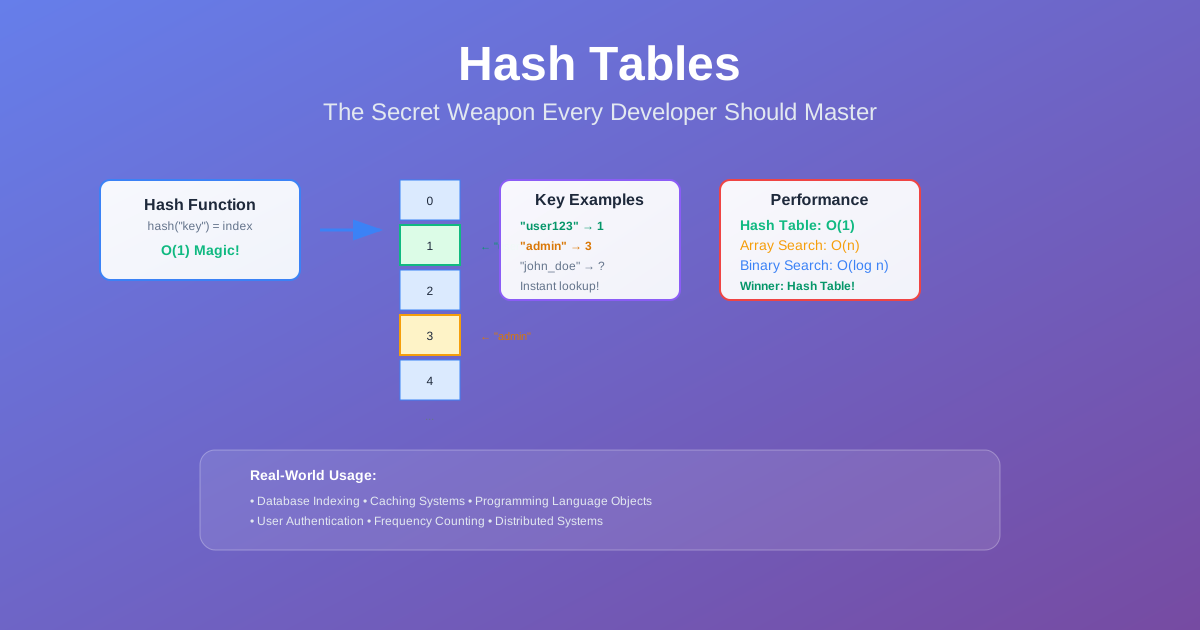
Hash Tables: The Secret Weapon Every Developer Should Master
Picture this: You’re building a user authentication system, and you need to check if a username already exists. You have 10 million users. With an array, you’d potentially check all 10 million entries — that’s 10 million operations in the worst case. With a hash table? One operation. Just one.
That’s the magic of hash tables. They turn what should be expensive operations into nearly free ones. And the best part? You probably use them every day without even thinking about it. JavaScript objects, Python dictionaries, Java HashMaps — they’re all hash tables under the hood.
But here’s what most developers don’t realize: understanding how hash tables actually work doesn’t just make you better at interviews. It makes you better at solving real problems. When you truly get hash tables, you start seeing elegant solutions everywhere.
The Problem: Why Linear Search Isn’t Enough
Let’s start with a scenario every developer faces. You’re building a system that needs to:
- Check if a user ID exists (authentication)
- Count word frequencies in a document (analytics)
- Cache expensive API responses (performance)
- Detect duplicate entries in a dataset (data cleaning)
With arrays or lists, these operations are slow. Really slow. Here’s why:
Finding an element in an unsorted array: O(n) — you might have to check every single element. Finding an element in a sorted array: O(log n) — better, but still not great at scale.
When you’re dealing with millions of records, even O(log n) starts to hurt. You need something faster. You need O(1).
The Real-World Impact
I’ve seen production systems grind to a halt because someone used the wrong data structure. A startup I worked with had their user lookup taking 2 seconds because they were scanning through a list of 500,000 users. Two seconds doesn’t sound like much, but when every login takes 2 seconds, users leave.
The fix? Replace the array with a hash table. Login time dropped to 50 milliseconds. Same data, same logic, different data structure. That’s the power we’re talking about.
Understanding Hash Tables: The Big Picture
Think of a hash table like a giant filing cabinet with a very smart filing system. Instead of organizing files alphabetically (which would require searching), you have a magical filing clerk who can instantly tell you exactly which drawer contains any file you need.
That “magical filing clerk” is the hash function. It takes your key (like a username) and instantly tells you exactly where to look for the associated value (like user data).
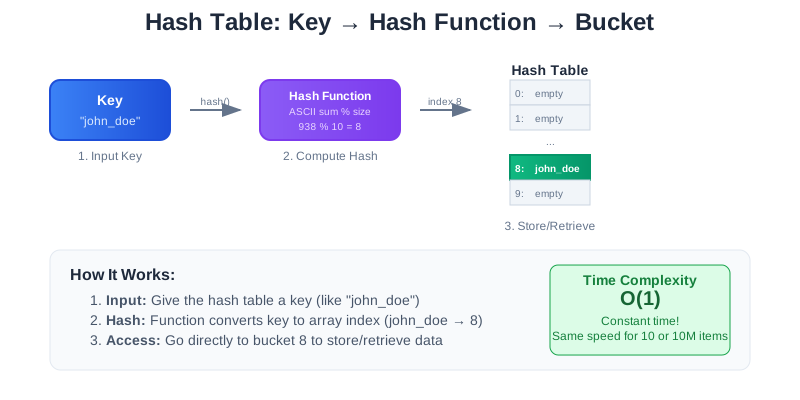
Here’s the basic idea:
- You give it a key (like “john_doe”)
- Hash function does its magic (converts “john_doe” to a number, say 42)
- You look in bucket 42 (and find John’s user data)
The beauty? This process is always the same speed, whether you have 10 users or 10 million users. That’s O(1) — constant time.
How Hash Functions Work: The Magic Behind the Scenes
A hash function is just a mathematical formula that converts any input into a number. But not just any number — it needs to be a good number. Here’s what makes a hash function “good”:
The Properties of a Great Hash Function
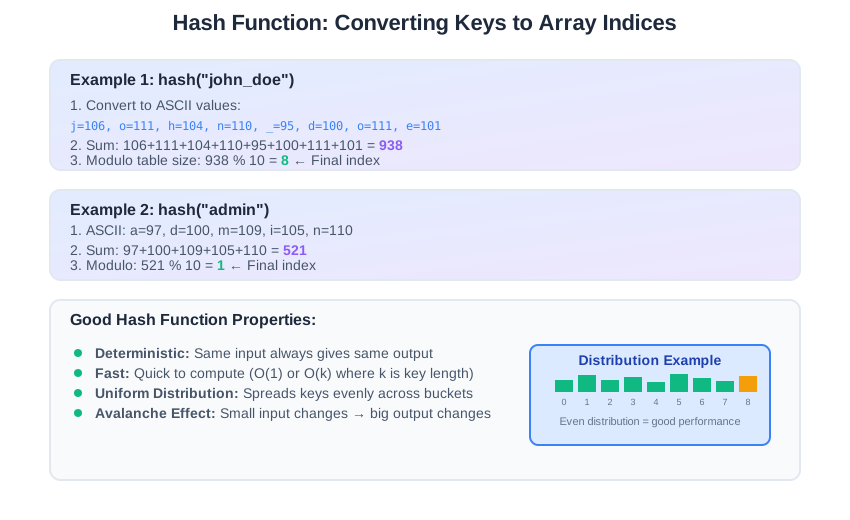
Deterministic: The same input always produces the same output. “john_doe” always maps to the same bucket.
Fast to compute: If the hash function itself is slow, you’ve defeated the purpose.
Uniform distribution: It spreads keys evenly across all available buckets. You don’t want all your users ending up in bucket 1.
Avalanche effect: Small changes in input create big changes in output. This is crucial for security and performance.
Here’s a concrete example with a simple hash function:
- hash(“john”) = 106+111+104+110 = 431 → 431 % 100 = 31
- hash(“john1”) = 106+111+104+110+49 = 480 → 480 % 100 = 80
Just adding one character completely changed the bucket (31 → 80). A good hash function amplifies small differences into large ones, preventing predictable clustering.
A Simple Hash Function Example
Here’s a basic hash function to illustrate the concept:
hash("john_doe") = (sum of ASCII values) % table_size
For “john_doe”:
- j=106, o=111, h=104, n=110, _=95, d=100, o=111, e=101
- Sum = 938
- If table_size = 100, then hash = 938 % 100 = 38
- So “john_doe” goes in bucket 38
Real hash functions are much more sophisticated, but the principle is the same: deterministic conversion from key to bucket number.
The Collision Problem: When Two Keys Want the Same Bucket
Here’s where things get interesting. What happens when two different keys hash to the same bucket? This is called a collision, and it’s inevitable.
Think about it: if you have 1000 buckets but 10,000 keys, some buckets must contain multiple keys. It’s basic math — the pigeonhole principle.
Why Collisions Are Inevitable
Even with a perfect hash function, collisions happen because:
- Limited bucket space: You can’t have infinite buckets
- Birthday paradox: With just 23 people, there’s a 50% chance two share a birthday. With hash functions, collisions happen sooner than you’d expect
- Real-world constraints: Memory and performance limits mean finite bucket arrays
The question isn’t how to avoid collisions — it’s how to handle them gracefully.
Collision Resolution: Two Strategies That Actually Work
Strategy 1: Chaining (The Linked List Approach)
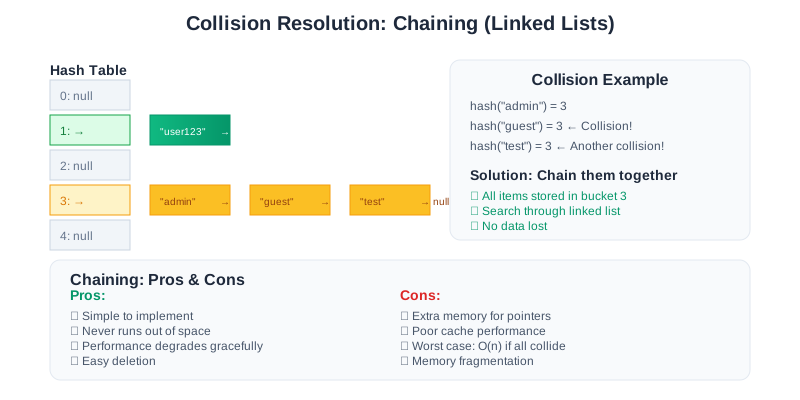
Imagine each bucket is not just a single slot, but a small container that can hold multiple items. When two keys hash to the same bucket, you just add both to that container.
How it works:
- Each bucket contains a linked list (or dynamic array)
- When collision occurs, add the new key-value pair to the list
- When searching, hash to the bucket, then search through the list
The good:
- ✓ Simple to implement and understand
- ✓ Never runs out of space (as long as you have memory)
- ✓ Performance degrades gracefully
The not-so-good:
- ✗ Extra memory overhead for storing pointers
- ✗ Cache performance can suffer (linked lists aren’t cache-friendly)
- ✗ Worst case is still O(n) if everything hashes to one bucket
Strategy 2: Open Addressing (The “Find Another Spot” Approach)
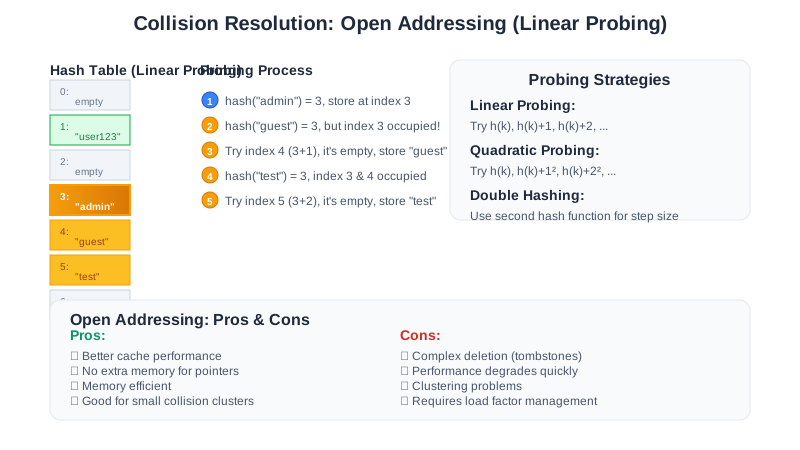
Instead of storing multiple items in one bucket, find another empty bucket. It’s like musical chairs — if your preferred seat is taken, find the next available one.
Linear Probing: If bucket 5 is occupied, try bucket 6, then 7, then 8, until you find an empty spot.
Quadratic Probing: If bucket 5 is occupied, try bucket 5+1², then 5+2², then 5+3², etc.
Double Hashing: Use a second hash function to determine the step size for probing.
The good:
- ✓ Better cache performance (everything stays in the main array)
- ✓ No extra memory for pointers
- ✓ Can be faster than chaining for small collision clusters
The not-so-good:
- ✗ More complex deletion (you can’t just remove an item)
- ✗ Performance degrades quickly as table fills up
- ✗ Requires careful load factor management
Load Factor: The Critical Performance Metric
Here’s the thing about collision resolution strategies: they all have a breaking point. Chaining works great until your linked lists get too long. Open addressing works great until you’re probing half the table to find an empty slot. That breaking point is determined by one crucial metric: load factor.
Load factor is the percentage of buckets that are occupied. It’s the single most important metric for hash table performance, and it affects different collision strategies differently.
Load Factor = Number of Elements / Number of Buckets
Why Load Factor Matters
Low load factor (< 0.5): Fast operations, but wasted memory Medium load factor (0.5 - 0.75): Good balance of speed and memory usage High load factor (> 0.75): Memory efficient, but operations slow down
The Performance Cliff
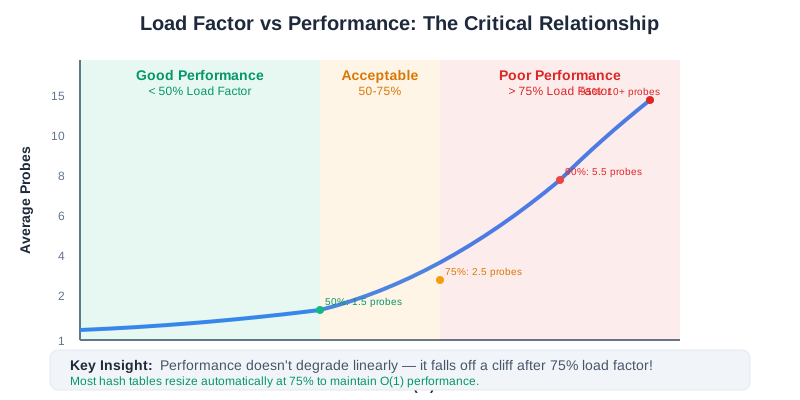
Here’s what most people don’t realize: hash table performance doesn’t degrade linearly. It falls off a cliff.
- At 50% load factor: Average 1.5 probes per operation
- At 75% load factor: Average 2.5 probes per operation
- At 90% load factor: Average 5.5 probes per operation
- At 95% load factor: Average 10+ probes per operation
This is why most hash table implementations automatically resize when the load factor hits 0.75. They double the table size and rehash everything. It’s expensive when it happens, but it keeps operations fast.
The Resizing Process: A Necessary Evil
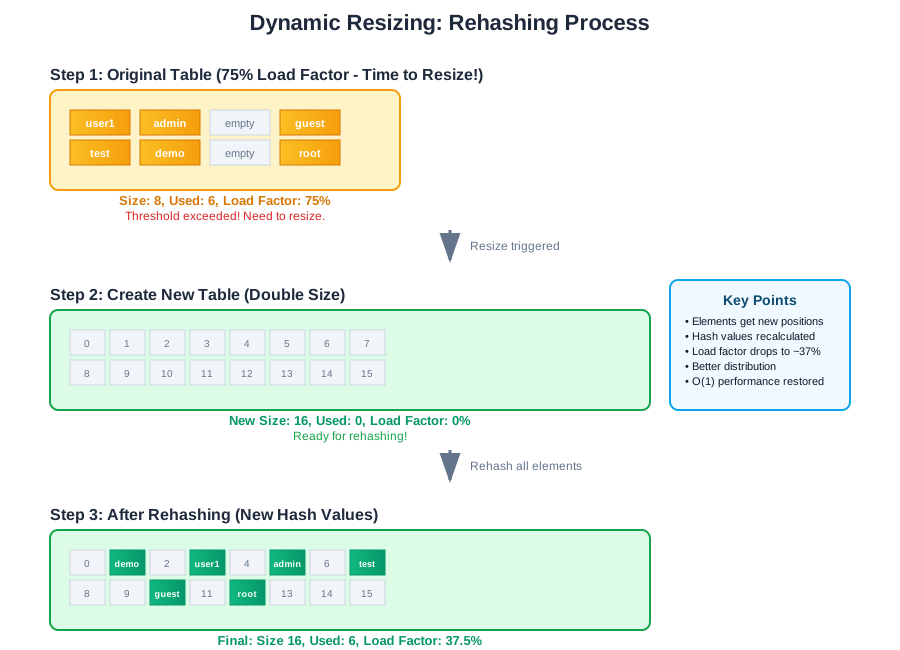
When your hash table gets too full, you need to resize it. This isn’t just about adding more buckets — you have to rehash every single element because the hash function depends on the table size.
Dynamic Resizing: Keeping Performance Consistent
When your hash table gets too full, you need to resize it. This isn’t just about adding more buckets — you have to rehash every single element because the hash function depends on the table size.
The Resizing Process
- Create a new, larger table (usually double the size)
- Rehash every element from the old table into the new table
- Update the table reference to point to the new table
- Clean up the old table (garbage collection handles this in most languages)
Amortized Analysis: Why Resizing Doesn’t Kill Performance
Resizing is expensive — O(n) to rehash everything. But it happens rarely. If you double the size each time, you resize after inserting 1, 2, 4, 8, 16, 32… elements.
The math works out to an amortized O(1) cost per insertion. Most insertions are fast, and occasionally you pay a higher cost to keep future insertions fast.
Hash Tables in the Wild: Real-World Applications
Redis: The Hash Table That Powers the Internet
Redis is essentially a giant, distributed hash table with persistence. Here’s how they do it:
Hash Function: Redis uses SipHash for string keys - a cryptographically secure hash function that prevents hash flooding attacks. For integer keys, they use a simple but effective multiplication-based hash.
Collision Resolution: Redis uses chaining with a twist. Instead of linked lists, they use “dictionaries” (their term for hash tables) that can dynamically switch between different internal representations based on size:
- Small dictionaries use arrays for better cache performance
- Large dictionaries use traditional hash tables
- They automatically rehash when load factor exceeds 1.0
Dynamic Resizing: This is where Redis gets clever. Instead of rehashing everything at once (which would block operations), they use “progressive rehashing”:
- Keep both old and new hash tables simultaneously
- Gradually move entries from old to new during normal operations
- New insertions go to the new table
- Lookups check both tables until migration is complete
The result: Redis can handle millions of operations per second while maintaining consistent O(1) performance. Their hash table implementation is so good that many applications use Redis purely as a hash table service.
Database Indexing
Every database uses hash tables for indexing. When you run SELECT * FROM users WHERE email = 'john@example.com', the database uses a hash table to instantly find the right row instead of scanning the entire table.
PostgreSQL uses hash indexes for equality lookups. MongoDB uses hash-based sharding to distribute data across servers. Redis is essentially a giant hash table with persistence.
Caching Systems
Memcached and Redis are distributed hash tables. Your web application stores expensive computation results with a key, and retrieves them instantly later.
cache.set("user:123:profile", user_data)  // Store
user_data = cache.get("user:123:profile")  // Retrieve in O(1)
Programming Language Internals
JavaScript objects are hash tables. When you write obj.property, JavaScript hashes “property” to find the value.
Python dictionaries are highly optimized hash tables. Python 3.7+ even maintains insertion order while keeping O(1) operations.
Java HashMap is the go-to data structure for key-value storage, used in everything from Spring Framework to Android apps.
Distributed Systems
Consistent hashing (used by Amazon DynamoDB, Apache Cassandra) is a special hash table technique that minimizes data movement when servers are added or removed.
Load balancers use hash tables to route requests to servers based on client IP or session ID.
Building an LRU Cache: Hash Tables + Doubly Linked List
Let me walk you through building one of the most elegant data structures: an LRU (Least Recently Used) cache. This combines hash tables with doubly linked lists to achieve O(1) for all operations.
The Problem: Build a cache that stores key-value pairs with a maximum capacity. When capacity is exceeded, remove the least recently used item.
The Insight: You need two things:
- Fast lookup by key → Hash table
- Fast removal from middle of sequence → Doubly linked list
The Design:
- Hash table maps keys to linked list nodes
- Doubly linked list maintains access order (most recent at head)
- When accessing an item: move it to head of list
- When adding new item: add to head, remove from tail if over capacity
Step-by-step walkthrough:
Step 1: Create the node structure Each node contains: key, value, prev pointer, next pointer
Step 2: Initialize the cache
- Hash table for O(1) key lookup
- Dummy head and tail nodes (simplifies edge cases)
- Current size counter
Step 3: Implement get(key)
- Look up node in hash table
- If found: move node to head (mark as recently used)
- Return value
Step 4: Implement put(key, value)
- If key exists: update value, move to head
- If new key: create node, add to head, add to hash table
- If over capacity: remove tail node from both list and hash table
Why this works: Hash table gives O(1) lookup, doubly linked list gives O(1) insertion/deletion anywhere. Together, they solve a problem that would be O(n) with any single data structure.
Real-world usage: This exact pattern is used in CPU caches, web browser caches, database buffer pools, and CDN systems.
Common Hash Table Patterns in Interviews
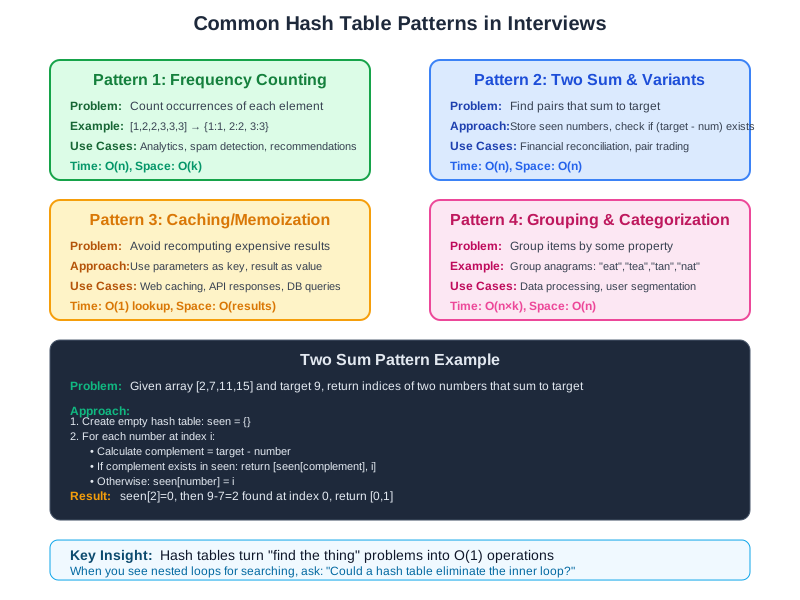
Understanding these patterns will make you dangerous in coding interviews:
Pattern 1: Frequency Counting
Problem: Count occurrences of each element in an array.
Hash table approach: Use element as key, count as value. One pass through the array, O(n) time.
Real-world use: Analytics dashboards, spam detection, recommendation systems.
Pattern 2: Two Sum and Variants
Problem: Find two numbers in an array that sum to a target.
Hash table approach: Store each number and its index. For each element, check if (target - element) exists in the hash table.
Real-world use: Financial reconciliation, matching algorithms, pair trading.
Pattern 3: Caching/Memoization
Problem: Avoid recomputing expensive function results.
Hash table approach: Use function parameters as key, result as value. Check cache before computing.
Real-world use: Web caching, database query caching, API response caching.
Pattern 4: Grouping and Categorization
Problem: Group anagrams together, or categorize data by some property.
Hash table approach: Use the “canonical form” as key (sorted string for anagrams), list of items as value.
Real-world use: Data processing pipelines, user segmentation, content organization.
Implementation Considerations: Making It Production-Ready
Choosing the Right Hash Function
For strings: Use a polynomial rolling hash or FNV-1a. Avoid simple additive hashes (they’re too collision-prone).
For integers: Multiplication by a large prime, then modulo table size works well.
For objects: Combine hash values of individual fields using XOR and bit shifting.
Security Considerations
The Great Hash Collision Attack of 2011
I’ll never forget December 2011. A security researcher published a paper showing how to craft inputs that would cause hash collisions in multiple programming languages. Within hours, major websites started going down.
The attack was elegant and devastating. By sending carefully crafted POST parameters to web applications, attackers could force all parameters to hash to the same bucket. A web server that normally handled thousands of requests per second would grind to a halt processing just a few malicious requests.
What happened: Most web frameworks used predictable hash functions for parsing form data. Attackers reverse-engineered these functions and generated thousands of keys that all hashed to bucket 0. Instead of O(1) hash table operations, servers were doing O(n²) work - checking thousands of colliding keys for every request.
The casualties: StackOverflow, Reddit, and countless other sites experienced outages. Some servers became completely unresponsive with just a single malicious request containing 65,000 colliding parameters.
The fix: Languages and frameworks quickly adopted randomized hash seeds. Instead of using the same hash function for everyone, each application instance uses a random seed, making it impossible for attackers to predict which keys will collide.
Hash flooding attacks: Malicious users can craft inputs that all hash to the same bucket, turning your O(1) operations into O(n).
Defense: Use cryptographically secure hash functions for user-controlled input, or implement random hash seeds.
Memory Management
Memory layout: Keep keys and values close together in memory for better cache performance.
Memory pools: Pre-allocate memory for hash table nodes to avoid frequent malloc/free calls.
Garbage collection: In languages with GC, be mindful of creating too many temporary objects during hash computation.
Thread Safety
Read-heavy workloads: Multiple readers can access simultaneously, but writers need exclusive access.
Write-heavy workloads: Consider lock-free hash tables or per-bucket locking for better concurrency.
Resizing coordination: This is the trickiest part — all operations must coordinate during table resize.
Performance Optimization: Getting Every Bit of Speed
Robin Hood Hashing: The Fairness Algorithm
Robin Hood hashing is an elegant twist on linear probing that minimizes the variance in probe distances. The idea is simple: when inserting a new element, if you encounter an element that’s “closer to home” than you are, you swap places with it and continue inserting the displaced element.
How it works:
- Each element tracks its “displacement” (how far it is from its ideal position)
- When inserting, if you meet an element with smaller displacement, you take its spot
- The displaced element continues searching (it’s now farther from home, so it has priority)
Why it’s brilliant:
- Reduces worst-case probe distances
- More predictable performance (lower variance)
- Better cache behavior than standard linear probing
- Still maintains O(1) average case
Real-world usage: Rust’s HashMap uses Robin Hood hashing, and it’s one reason Rust’s hash tables are consistently fast.
Cache-Friendly Design
Linear probing often outperforms chaining because it has better cache locality. Modern CPUs are really good at prefetching sequential memory.
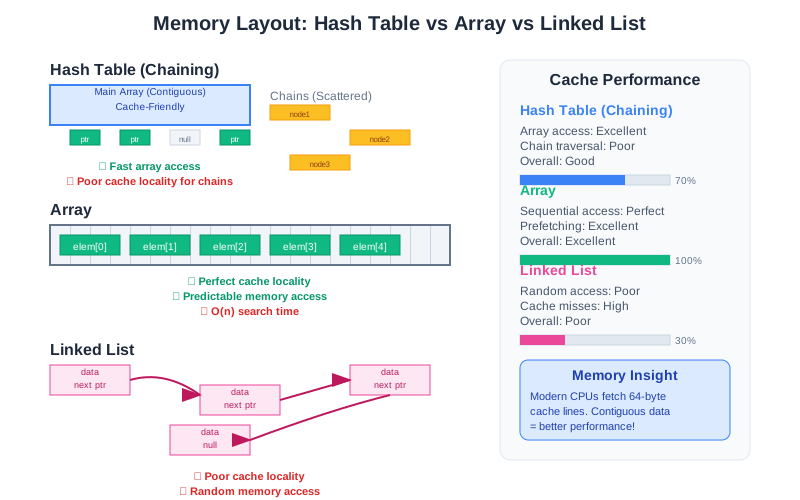
Robin Hood hashing is a variant of linear probing that minimizes variance in probe distances, leading to more predictable performance.
SIMD and Vectorization
Modern hash tables can use SIMD instructions to compare multiple keys simultaneously. Google’s Swiss Table (used in Abseil) is a great example of this approach.
Memory Prefetching
If you know you’ll need to access multiple hash table entries, you can prefetch them to reduce memory latency.
Specialized Hash Tables
Cuckoo hashing guarantees O(1) worst-case lookup time (not just average case).
Hopscotch hashing combines the benefits of chaining and open addressing.
Consistent hashing is essential for distributed systems.
Hash Table Red Flags in Interviews
Before we dive into common pitfalls, let me share the red flags that make interviewers cringe when candidates discuss hash tables:
Red Flag #1: “Hash tables are always O(1)” Reality: They’re O(1) average case, O(n) worst case. Good candidates acknowledge this and discuss load factor management.
Red Flag #2: Using mutable objects as keys
The mistake: map[user_object] = data then modifying user_object later.
Why it breaks: The object’s hash changes, so you can’t find it anymore.
Interviewer thinking: “This person will create impossible-to-debug production bugs.”
Red Flag #3: Ignoring hash collisions entirely The mistake: Assuming hash functions are perfect and collisions won’t happen. Reality: Collisions are inevitable. Good candidates discuss collision resolution strategies.
Red Flag #4: Not considering the hash function The mistake: Treating hash tables as magic without understanding the underlying hash function. Better answer: “For string keys, I’d want a hash function with good avalanche properties, like FNV or SipHash.”
Red Flag #5: Forgetting about resizing costs The mistake: Claiming hash table operations are “always constant time.” Better answer: “Amortized O(1) - most operations are fast, but occasional resizing is O(n).”
Green Flag Responses:
- “I’d monitor the load factor and resize proactively”
- “For user-controlled input, I’d use a cryptographically secure hash function”
- “The choice between chaining and open addressing depends on the expected load factor and cache behavior”
Common Pitfalls and How to Avoid Them
Pitfall 1: Poor Hash Function Choice
The mistake: Using a hash function that doesn’t distribute keys evenly.
The fix: Test your hash function with real data. Measure the distribution across buckets.
Red flag: If any bucket has significantly more items than others, your hash function needs work.
Pitfall 2: Ignoring Load Factor
The mistake: Letting the hash table get too full before resizing.
The fix: Monitor load factor and resize proactively. Most implementations resize at 75% load factor.
Red flag: Operations getting slower as you add more data.
Pitfall 3: Not Handling Collisions Gracefully
The mistake: Assuming collisions won’t happen or handling them poorly.
The fix: Choose an appropriate collision resolution strategy and implement it correctly.
Red flag: Occasional very slow operations (usually means collision chains are too long).
Pitfall 4: Mutable Keys
The mistake: Using objects as keys, then modifying those objects.
The fix: Use immutable keys, or rehash when keys change.
Red flag: Items “disappearing” from your hash table.
Pitfall 5: Hash Function Vulnerabilities
The mistake: Using predictable hash functions for user-controlled input.
The fix: Use cryptographically secure hash functions or random seeds for untrusted input.
Red flag: Performance suddenly degrades when processing user data.
Debugging Hash Table Performance
When hash tables start performing poorly, here’s your systematic debugging approach:
Step 1: Measure Load Factor
Tool: Most languages provide ways to inspect hash table internals
- Python:
sys.getsizeof(dict)andlen(dict) - Java: HashMap doesn’t expose this directly, but you can subclass it
- JavaScript: No built-in tools, but you can track insertions vs capacity
Red flags: Load factor > 0.75, or very low load factor with poor performance
Step 2: Analyze Key Distribution
The test: Insert your keys into buckets manually and count collisions Tool: Write a simple script that applies your hash function to all keys and plots the distribution Red flags: Some buckets have 10x more items than others
Step 3: Profile Hash Function Performance
The test: Time just the hash computation, separate from table operations Tool: Use your language’s profiler (cProfile for Python, JProfiler for Java) Red flags: Hash function takes more than a few nanoseconds per key
Step 4: Check for Collision Patterns
The test: Look for patterns in keys that collide Example: If all keys starting with ‘A’ collide, your hash function isn’t using the first character effectively Tool: Group colliding keys and look for common prefixes, suffixes, or patterns
Step 5: Memory Access Patterns
The test: Use tools like Valgrind (Linux) or Instruments (macOS) to analyze cache misses Red flags: High cache miss rates, especially with chaining-based hash tables
Quick Performance Tests
// Pseudo-code for testing hash table performance
start_time = now()
for i in range(1000000):
    hash_table[random_key()] = random_value()
insert_time = now() - start_time

start_time = now()
for i in range(1000000):
    value = hash_table[random_existing_key()]
lookup_time = now() - start_time
Expected results: Insert and lookup should be roughly the same speed. If lookup is much slower, you have a collision problem.
Language-Specific Hash Table Trade-offs
Different languages make different trade-offs in their hash table implementations:
Python dict (3.7+)
Strengths: Maintains insertion order, compact memory layout, excellent performance Trade-offs: Uses open addressing with random probing, which can have poor worst-case behavior Best for: General-purpose use, when you need insertion order
Java HashMap
Strengths: Mature implementation, switches from chaining to balanced trees when chains get long Trade-offs: No insertion order, requires good hashCode() implementation Best for: When you need guaranteed O(log n) worst-case performance
JavaScript Map
Strengths: Maintains insertion order, allows any type as key (not just strings) Trade-offs: Slower than plain objects for string keys, more memory overhead Best for: When you need non-string keys or guaranteed insertion order
C++ std::unordered_map
Strengths: Highly optimized, customizable hash functions and allocators Trade-offs: Complex API, no insertion order guarantees Best for: Performance-critical applications where you can tune the implementation
Rust HashMap
Strengths: Uses Robin Hood hashing for predictable performance, memory-safe Trade-offs: Requires understanding of ownership and borrowing Best for: Systems programming where you need both performance and safety
The takeaway: Choose your hash table implementation based on your specific needs. There’s no one-size-fits-all solution.
Hash Tables vs. Other Data Structures
Hash Tables vs. Arrays
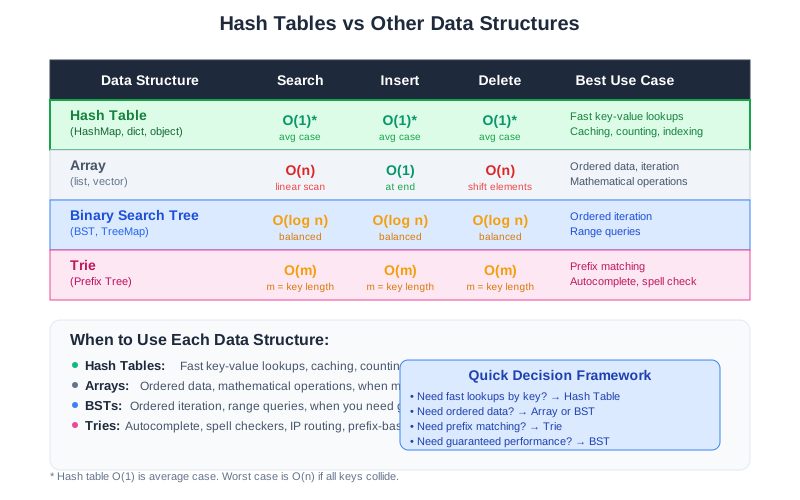
Hash tables win: When you need fast lookups by key, not by index. Arrays win: When you need ordered data or fast iteration. Use hash tables for: User lookups, caching, counting. Use arrays for: Ordered data, mathematical operations, when memory is tight.
Hash Tables vs. Binary Search Trees
Hash tables win: Average case performance (O(1) vs O(log n)). BSTs win: Worst case guarantees, ordered iteration, range queries. Use hash tables for: Fast lookups, caching, frequency counting. Use BSTs for: Ordered data, range queries, when you need guaranteed performance.
Hash Tables vs. Tries
Hash tables win: Memory efficiency, simplicity. Tries win: Prefix matching, autocomplete, string-specific operations. Use hash tables for: General key-value storage. Use tries for: Autocomplete, spell checkers, IP routing tables.
The Big Lessons
Hash tables are everywhere because they solve a fundamental problem: fast key-based lookup. When you understand how they work, you start seeing opportunities to use them everywhere.
The key insights to remember:
Choose your hash function carefully. A bad hash function will kill performance no matter how well you implement everything else.
Monitor your load factor. Keep it under 75% for good performance. Resize proactively, not reactively.
Handle collisions gracefully. They will happen. Plan for them.
Consider your access patterns. If you need ordered iteration, hash tables might not be the right choice.
Security matters. If users control the keys, protect against hash flooding attacks.
Test Your Hash Function Knowledge
Before we wrap up, here’s a quick challenge to test your understanding:
The Hash Function Challenge: Given these three hash functions for strings, which would you choose for a production system?
- Simple Sum: Add ASCII values of all characters
- Polynomial Rolling:
hash = hash * 31 + charfor each character - XOR Shift: XOR all characters, then apply bit shifting
Think about: Distribution quality, collision resistance, performance, security.
Want to test them yourself? Try the VisuAlgo Hash Table Visualizer to see how different hash functions distribute your data.
Interactive Learning Resources:
- Hash Table Animation Tool - See collision resolution in action
- LeetCode Hash Table Problems - Practice with real interview questions
The Bottom Line
Hash tables are the Swiss Army knife of data structures. They’re not always the right tool, but they’re the right tool surprisingly often. Master them, and you’ll find elegant solutions to problems that seemed complex.
Start simple. Use your language’s built-in hash table (HashMap, dict, object) and understand how it behaves. Then, when you need something specialized, you’ll have the foundation to build it.
The next time you’re faced with a “find the thing” problem, ask yourself: could a hash table solve this in O(1)? More often than not, the answer is yes.
Discussion Question: What’s the most creative use of hash tables you’ve seen in production? I’ve seen them used for everything from rate limiting to distributed consensus algorithms. Share your stories in the comments - I’d love to hear about unconventional hash table applications that solved real problems.
Building a system that needs lightning-fast lookups? Let’s talk about the right data structure for your use case.
Comments & Discussion
Join the conversation! Share your thoughts, ask questions, or provide feedback below.