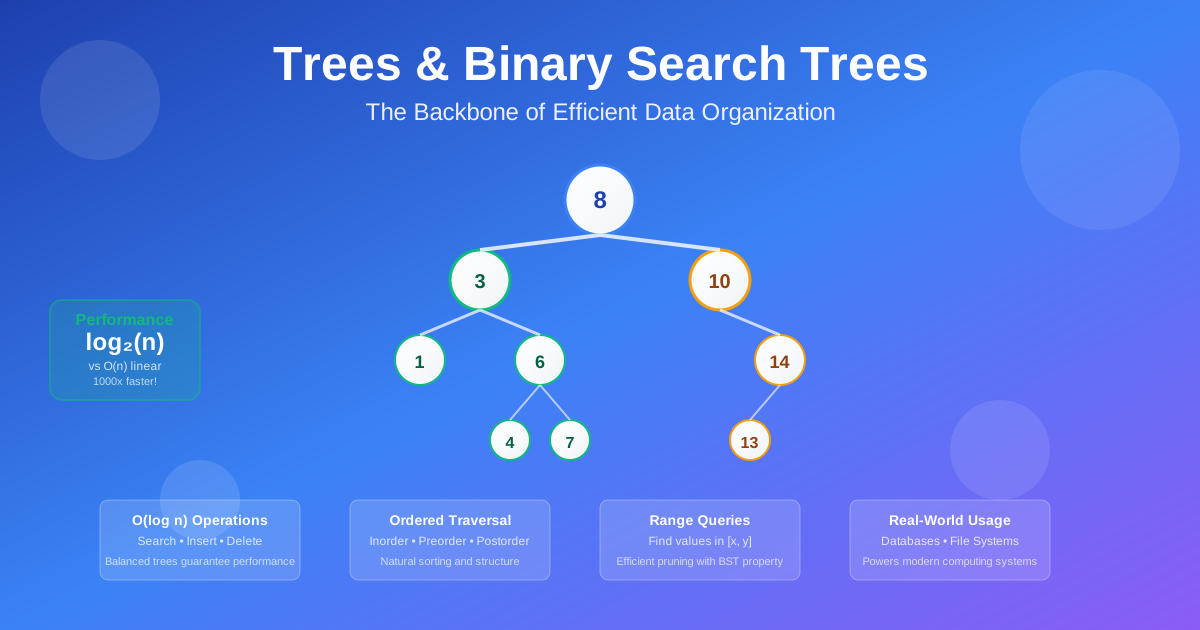
Trees & Binary Search Trees: The Backbone of Efficient Data Organization
Picture this: You’re browsing files on your computer, navigating through folders within folders. Or you’re watching Netflix decide which movie to recommend based on your viewing history. Behind both experiences? Trees. Not the leafy kind, but the data structure that organizes information hierarchically, making complex operations lightning-fast.
Trees aren’t just academic concepts — they’re the invisible backbone of modern computing. Your file system is a tree. Database indexes are trees. The DOM in your web browser is a tree. Even the decision-making process in AI systems often uses tree structures.
But here’s what makes trees truly powerful: they give you the best of both worlds. Unlike arrays where you search linearly (potentially checking every element), and unlike hash tables where you lose ordering, trees maintain sorted data while providing O(log n) search, insertion, and deletion. That’s the difference between checking 1,000 elements versus just 10 elements in a dataset of 1,000 items.
The Problem: Why Linear Isn’t Always Better
Let’s start with a scenario every developer faces. You’re building a user management system that needs to:
- Find users by ID quickly
- List users in alphabetical order
- Insert new users while maintaining order
- Handle range queries (“show me all users with IDs between 100 and 200”)
With an array, finding a user means potentially scanning every element — O(n) time. With a hash table, you get fast lookups but lose the ability to maintain order or do range queries efficiently.
The Real-World Impact
I once worked on a system that stored customer records in a simple array. With 10,000 customers, finding a specific customer took an average of 5,000 comparisons. During peak hours, the system crawled. The solution? We restructured the data using a Binary Search Tree. Suddenly, finding any customer took at most 14 comparisons (log₂ 10,000 ≈ 13.3). Same data, same logic, different structure. Response time dropped from seconds to milliseconds.
Understanding Trees: The Big Picture
Think of a tree like a family tree or an organizational chart. There’s a top-level element (the root), and everything branches out from there. But unlike real trees, computer science trees grow upside down — the root is at the top, and the leaves are at the bottom.
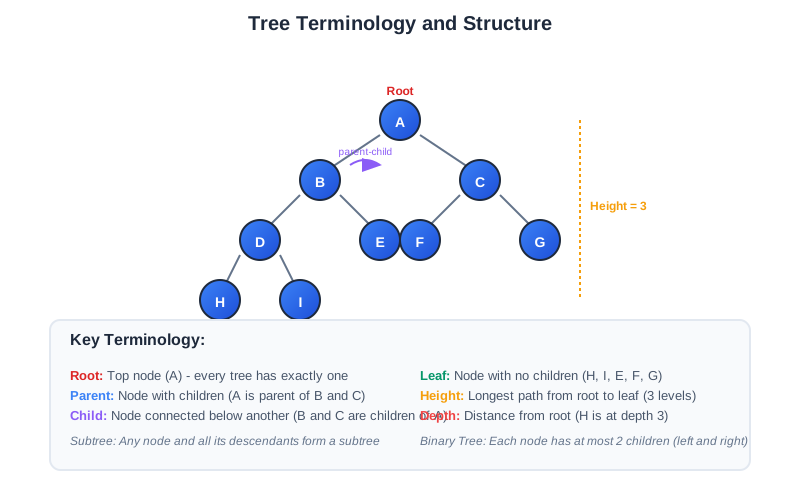
Here’s the basic vocabulary:
Root: The top node (every tree has exactly one) Parent: A node that has children Child: A node connected below another node Leaf: A node with no children Height: The longest path from root to any leaf Depth: How far a node is from the root
Why Trees Work So Well
Trees solve the fundamental trade-off between search speed and maintaining order. Here’s the magic:
- Hierarchical organization naturally reduces search space
- Balanced structure ensures consistent performance
- Ordered arrangement enables range queries and sorted traversal
- Dynamic sizing handles growth without restructuring
Binary Trees: The Foundation
A binary tree is simply a tree where each node has at most two children, typically called “left” and “right.” It’s the simplest form of tree, but don’t let that fool you — binary trees are incredibly powerful.
Tree Traversals: Different Ways to Visit Nodes
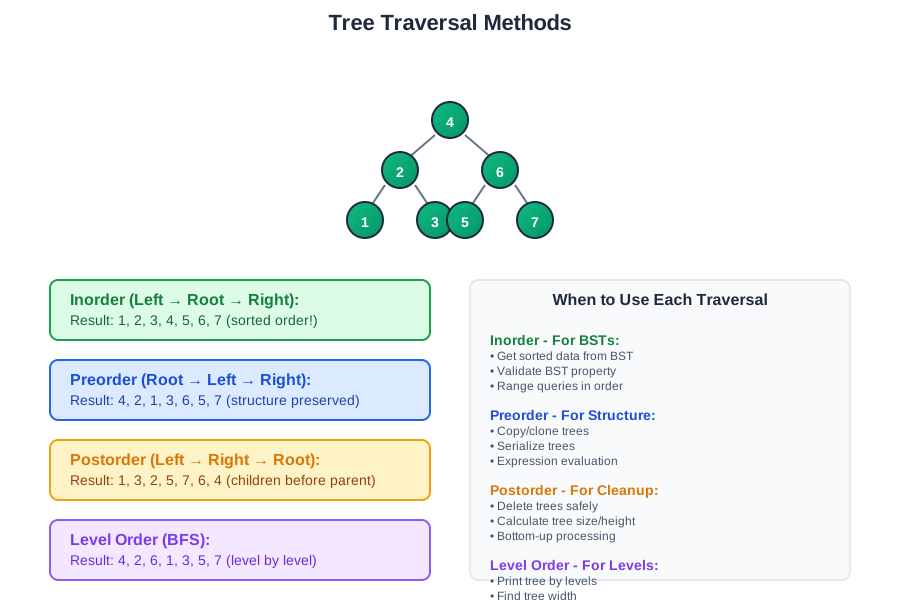
There are several ways to visit every node in a tree, each useful for different purposes:
Inorder Traversal (Left → Root → Right): Visits nodes in sorted order for BSTs Preorder Traversal (Root → Left → Right): Useful for copying or serializing trees Postorder Traversal (Left → Right → Root): Great for deleting trees or calculating sizes Level Order Traversal (BFS): Visits nodes level by level
When to Use Each Traversal
- Inorder: When you need sorted data from a BST
- Preorder: When you need to recreate the tree structure
- Postorder: When you need to process children before parents
- Level order: When you need to process nodes by depth
Binary Search Trees: Ordered Efficiency
A Binary Search Tree (BST) is a binary tree with a special property: for every node, all values in the left subtree are smaller, and all values in the right subtree are larger. This simple rule creates a powerful data structure.
The BST Property in Action
Consider inserting the values [8, 3, 10, 1, 6, 14, 4, 7] into a BST:
- 8 becomes the root
- 3 goes left (3 < 8)
- 10 goes right (10 > 8)
- 1 goes left of 3 (1 < 3)
- 6 goes right of 3 (6 > 3)
- And so on…
The result? A structure where finding any value takes at most log₂(n) steps, because you eliminate half the remaining possibilities with each comparison.

BST Operations: The Big Three
Search: Start at root, go left if target is smaller, right if larger. O(log n) average case.
Insert: Find where the new value should go, add it as a leaf. O(log n) average case.
Delete: The trickiest operation, with three cases:
- Leaf node: Just remove it
- One child: Replace node with its child
- Two children: Replace with inorder successor (or predecessor)
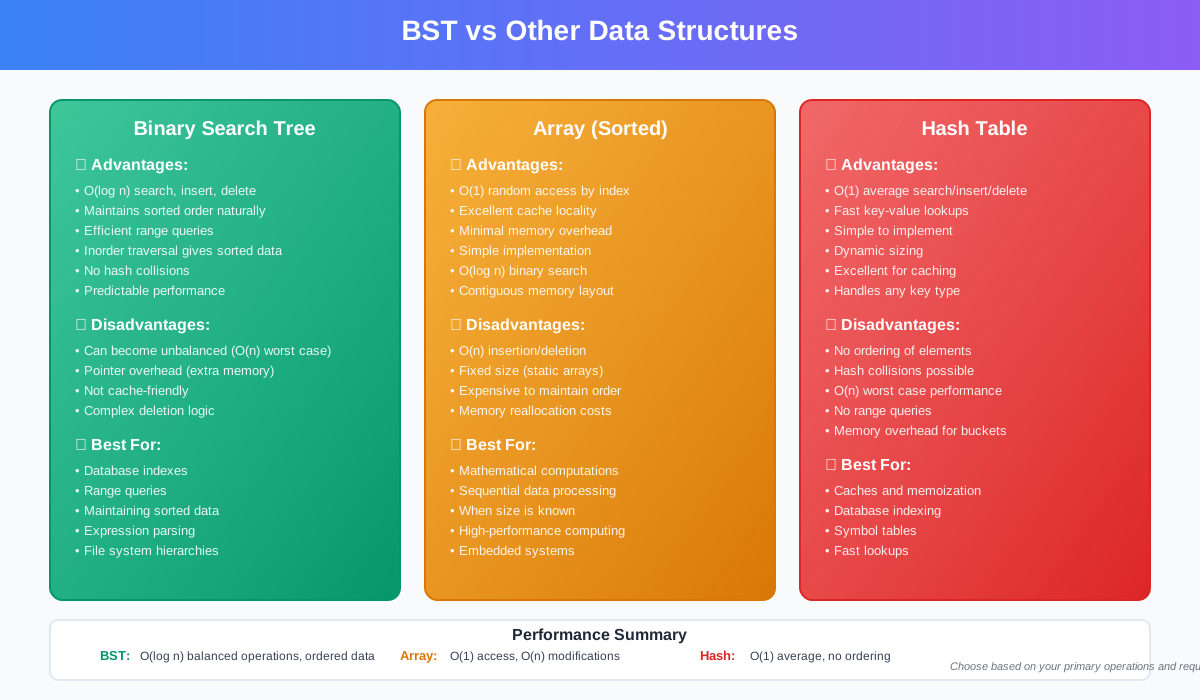
Why BSTs Beat Arrays and Hash Tables
vs Arrays:
- BST search: O(log n) vs Array search: O(n)
- BST maintains order naturally
- BST insertion doesn’t require shifting elements
vs Hash Tables:
- BST provides ordered traversal
- BST supports range queries efficiently
- BST doesn’t need to handle collisions
- BST memory usage is predictable
Real-World Applications: Trees Everywhere
Database Indexes: The Performance Secret
Every major database uses tree structures for indexing. When you run SELECT * FROM users WHERE age > 25, the database doesn’t scan every row. Instead, it uses a B-tree index to jump directly to the relevant records.
PostgreSQL uses B-trees for most indexes. MySQL uses B+ trees. MongoDB uses B-trees for compound indexes. The principle is the same: hierarchical organization for fast lookups.
MongoDB’s B-Tree Indexing: Production-Scale Trees
MongoDB uses a sophisticated B-tree implementation for its indexes that handles millions of operations per second. Here’s how they do it:
WiredTiger Storage Engine: MongoDB’s default storage engine uses B+ trees for indexes, where:
- Internal nodes store only keys and pointers (no data)
- Leaf nodes store actual data and are linked together for range queries
- Page size is typically 32KB, optimized for disk I/O
- Compression reduces storage by 60-80% using snappy or zlib
Index Structure: When you create an index on a field like user_id, MongoDB builds a B+ tree where:
- Each internal node can have 100-1000 children (much higher branching than binary trees)
- Tree height stays very low even with billions of documents
- Range queries traverse linked leaf nodes without going back to root
Performance Characteristics:
- Search: O(log n) with base 100-1000 instead of base 2
- Insert: Batched insertions with write-ahead logging
- Memory management: Hot pages cached in RAM, cold pages on disk
- Concurrency: Document-level locking with optimistic concurrency control
Real numbers: A MongoDB collection with 100 million documents typically has an index tree height of just 3-4 levels, meaning any lookup requires at most 4 disk reads.
File Systems: Navigating Your Data
Your computer’s file system is a tree. The root directory branches into subdirectories, which branch into more subdirectories and files. When you navigate to /home/user/documents/project/file.txt, you’re traversing a tree path.
UNIX file systems use inodes organized in tree structures. Windows NTFS uses B+ trees for file allocation. Git represents your project history as a tree of commits and file changes.
Expression Parsing: Making Sense of Code
Compilers and interpreters use Abstract Syntax Trees (ASTs) to understand code. The expression (3 + 4) * 2 becomes a tree where:
- The root is the multiplication operator
- Left child is the addition subtree (3 + 4)
- Right child is the value 2
JavaScript engines like V8 parse your code into ASTs. Babel transforms JavaScript by manipulating ASTs. ESLint analyzes code by walking ASTs.
Decision Trees: AI That You Can Understand
Machine learning often uses decision trees for classification. Each internal node represents a decision (like “age > 30?”), and each leaf represents a classification result.
Random Forests combine multiple decision trees. Gradient boosting builds trees sequentially to improve predictions. XGBoost uses optimized tree algorithms for competitions.
Building an Autocomplete System: Tries in Action
Let me walk you through building a production-ready autocomplete system using Trie (Prefix Tree) data structures.
The Problem: Build a search suggestion system that can handle millions of queries with sub-millisecond response times.
Why Tries Work: Unlike BSTs that compare entire strings, tries share common prefixes, making them incredibly efficient for string operations.
Step-by-step Implementation:
Step 1: Build the Trie Structure
- Each node represents a character
- Paths from root to leaves represent complete words
- Store top suggestions at each node for instant retrieval
Step 2: Optimize for Performance
- Prefix caching: Store top 3 suggestions at each node during insertion
- Memory efficiency: Use compressed tries for production
- Update strategy: Rebuild tries periodically with fresh popularity data
Step 3: Handle Scale
- Distributed tries: Shard by first character or hash
- Caching layer: Redis for hot prefixes
- Fallback strategy: Elasticsearch for complex queries
Real-world Performance:
- Google’s autocomplete: Handles billions of queries using distributed tries
- Amazon’s search: Combines tries with machine learning for personalization
- Spotify’s search: Uses tries for artist/song name completion with real-time updates
Production Considerations:
- Memory usage: 1M words ≈ 50MB for optimized trie
- Update frequency: Batch updates every few hours
- Personalization: User-specific tries for better suggestions
Building a BST: Step-by-Step Implementation
Let me walk you through the core operations of a BST, focusing on the logic rather than the code:
Search Operation
The Process:
- Start at the root
- Compare target with current node
- If equal: found it!
- If target is smaller: go left
- If target is larger: go right
- If you reach null: not found
Why it’s fast: Each comparison eliminates half the remaining possibilities.
Insert Operation
The Process:
- Start at root (if tree is empty, new node becomes root)
- Compare new value with current node
- Go left if smaller, right if larger
- When you reach a null position, insert the new node there
Key insight: New nodes always become leaves initially.
Delete Operation: The Complex Case
Deletion has three scenarios:
Case 1 - Leaf Node: Simply remove it Case 2 - One Child: Replace node with its child Case 3 - Two Children: Replace with inorder successor
The inorder successor is the smallest value in the right subtree — it’s guaranteed to be larger than everything in the left subtree but smaller than everything else in the right subtree.

Tree Balancing: Keeping Performance Consistent
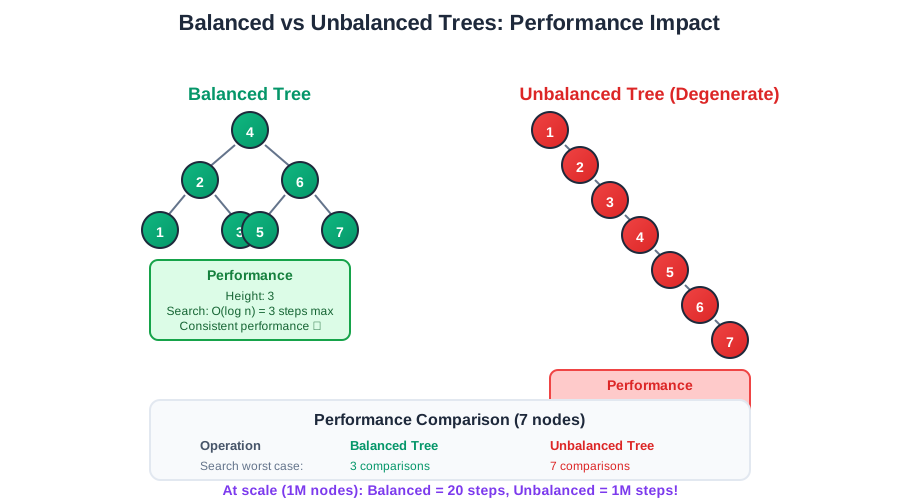
Here’s the catch with basic BSTs: they can become unbalanced. If you insert sorted data (1, 2, 3, 4, 5…), your “tree” becomes a linked list, and performance degrades to O(n).
The Degenerate Case
Inserting [1, 2, 3, 4, 5] into a BST creates:
1
 \
  2
   \
    3
     \
      4
       \
        5
This isn’t a tree anymore — it’s a linked list with O(n) operations.
The Production Debugging Story
I’ll never forget the day our user search system started timing out. We had a BST storing user profiles, and everything worked fine during development with our small test dataset. But in production, with real user data, search times went from milliseconds to seconds.
The culprit? Our user IDs were sequential integers, and new users were being inserted in order: 1000001, 1000002, 1000003… Our “tree” had become a 50,000-node linked list. Every search had to traverse from the root all the way down to the leaves.
The investigation revealed:
- Development data: Random user IDs created a balanced tree
- Production data: Sequential IDs created a degenerate tree
- Performance impact: Search time grew from O(log n) to O(n)
- User impact: Login timeouts, frustrated customers
The fix: We switched to a self-balancing Red-Black tree. Same data, same operations, but guaranteed O(log n) performance regardless of insertion order. Response times dropped back to milliseconds.
The lesson: Always consider your data patterns. Sorted input is the enemy of basic BSTs.
Self-Balancing Trees: The Solution
AVL Trees: Maintain height balance by rotating nodes when imbalance is detected Red-Black Trees: Use color coding and rotation rules to maintain approximate balance Splay Trees: Move frequently accessed nodes toward the root
Most production systems use self-balancing variants:
- Java’s TreeMap: Red-Black Tree
- C++ std::map: Usually Red-Black Tree
- Python’s sorted containers: B-trees
When Balance Matters
Balanced tree: Search, insert, delete all O(log n) Unbalanced tree: Can degrade to O(n) in worst case Real-world impact: The difference between milliseconds and seconds at scale
Common Tree Patterns in Interviews
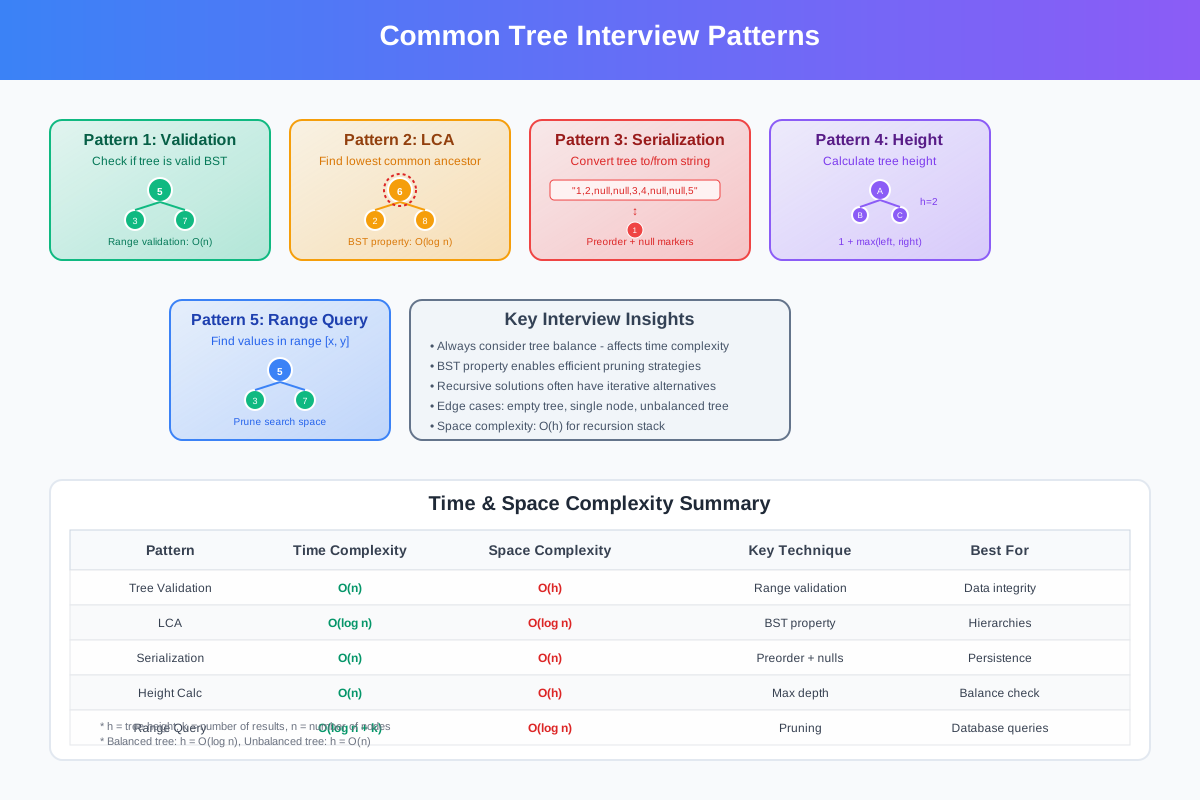
Understanding these patterns will make you dangerous in coding interviews:
Pattern 1: Tree Validation
Problem: Determine if a binary tree is a valid BST.
Tree approach: Use BST validation with range checking — recursively ensure each node’s value is within the valid range for its position.
Real-world use: Data integrity checks, debugging corrupted tree structures.
Pattern 2: Lowest Common Ancestor
Problem: Find the lowest common ancestor of two nodes in a BST.
Tree approach: Use the BST property — if both nodes are smaller than current, go left; if both are larger, go right; otherwise, current node is the LCA.
Real-world use: Version control systems, organizational hierarchies, network routing.
Pattern 3: Tree Serialization
Problem: Convert a tree to a string and back.
Tree approach: Use preorder traversal with null markers for serialization, then reconstruct using the same order.
Real-world use: Caching tree structures, network transmission, database storage.
Pattern 4: Tree Height Calculation
Problem: Calculate the height of a binary tree efficiently.
Tree approach: Use tree height calculation with recursive approach — height is 1 + max(left_height, right_height).
Real-world use: Balancing checks, performance analysis, tree optimization.
Pattern 5: Range Queries
Problem: Find all values in a BST within a given range.
Tree approach: Use the BST property to prune search space — only explore subtrees that could contain values in range.
Real-world use: Database range queries, filtering datasets, analytics.
Performance Analysis: When Trees Shine
Time Complexity Breakdown
Balanced BST:
- Search: O(log n)
- Insert: O(log n)
- Delete: O(log n)
- Inorder traversal: O(n)
Unbalanced BST (worst case):
- Search: O(n)
- Insert: O(n)
- Delete: O(n)
Space Complexity:
- Storage: O(n)
- Recursion depth: O(log n) balanced, O(n) unbalanced
Comparison with Other Structures
BST vs Array (sorted):
- BST insert: O(log n) vs Array insert: O(n)
- BST search: O(log n) vs Array search: O(log n) with binary search
- BST delete: O(log n) vs Array delete: O(n)
BST vs Hash Table:
- BST maintains order, hash table doesn’t
- BST supports range queries, hash table doesn’t
- Hash table has O(1) average case, BST has O(log n)
- BST has predictable performance, hash table can have O(n) worst case
BST vs Linked List:
- BST search: O(log n) vs Linked List search: O(n)
- Both have O(1) insertion if you know the position
- BST provides structure, linked list is purely sequential
Implementation Considerations: Making It Production-Ready
Memory Management
Node allocation: Consider using memory pools for frequent insertions/deletions Garbage collection: In languages with GC, be mindful of creating too many temporary objects Memory layout: For cache efficiency, consider breadth-first storage in arrays
Thread Safety
Read-heavy workloads: Multiple readers can traverse simultaneously Write operations: Need synchronization for insertions and deletions Copy-on-write: Create new tree versions for concurrent access
Choosing the Right Tree Type
Basic BST: Good for learning, not for production AVL Tree: Strict balancing, good for read-heavy workloads Red-Black Tree: Relaxed balancing, good for mixed workloads B-Tree: Great for disk-based storage (databases) Trie: Specialized for string operations
Error Handling
Invalid operations: Handle attempts to delete non-existent nodes Memory allocation failures: Graceful degradation when out of memory Corruption detection: Validate tree properties during operations
Tree Red Flags in Interviews
Before we dive into common pitfalls, let me share the red flags that make interviewers cringe when candidates discuss trees:
Red Flag #1: “Trees are always O(log n)” Reality: Only balanced trees guarantee O(log n). Unbalanced trees can degrade to O(n). Better answer: “Balanced trees provide O(log n) operations, but we need to consider balancing strategies.”
Red Flag #2: Confusing BST property The mistake: Thinking each node is just larger than its left child and smaller than its right child. Reality: Each node must be larger than ALL nodes in its left subtree and smaller than ALL nodes in its right subtree.
Red Flag #3: Ignoring the null case The mistake: Not handling empty trees or null nodes in recursive solutions. Better approach: Always check for null before accessing node properties.
Red Flag #4: Forgetting about tree traversal options The mistake: Always using the same traversal method regardless of the problem. Better answer: “For this problem, I’d use inorder traversal because we need sorted output.”
Red Flag #5: Not considering balance The mistake: Implementing basic BST without discussing balance implications. Better answer: “In production, I’d use a self-balancing tree like Red-Black or AVL.”
Red Flag #6: Forgetting about edge cases The mistake: Not handling empty trees, single nodes, or duplicate values. Better answer: “I need to handle the base cases: empty tree, single node, and define duplicate handling strategy.”
Red Flag #7: Inefficient tree operations The mistake: Using O(n) operations when O(log n) is possible. Better answer: “I can leverage the BST property to eliminate half the search space at each step.”
Red Flag #8: Poor space complexity awareness The mistake: Not mentioning recursion stack space or iterative alternatives. Better answer: “The recursive solution uses O(h) space for the call stack, where h is tree height.”
Green Flag Responses:
- “I need to validate the BST property for the entire subtree, not just immediate children”
- “For frequent insertions, I’d consider the balancing overhead”
- “The choice of traversal depends on whether we need sorted output”
- “I should handle the edge case where the tree is empty or has only one node”
- “In production, I’d use a self-balancing tree to guarantee O(log n) performance”
Common Pitfalls and How to Avoid Them
Pitfall 1: Incorrect BST Validation
The mistake: Only checking immediate parent-child relationships.
The fix: Use range-based validation or inorder traversal to ensure global BST property.
Red flag: A tree where each node is greater than its left child but violates the global property.
Pitfall 2: Memory Leaks in Tree Deletion
The mistake: Not properly deallocating memory when deleting nodes.
The fix: Use postorder traversal to delete children before parents, or implement proper garbage collection.
Red flag: Memory usage growing over time even with deletions.
Pitfall 3: Stack Overflow with Deep Trees
The mistake: Using recursion without considering maximum tree depth.
The fix: Implement iterative versions of tree operations or use tail recursion optimization.
Red flag: Program crashes with “stack overflow” on large datasets.
Pitfall 4: Ignoring Duplicate Values
The mistake: Not defining how to handle duplicate values in BST.
The fix: Decide whether to allow duplicates and implement consistently (usually go right for duplicates).
Red flag: Inconsistent behavior when inserting the same value multiple times.
Pitfall 5: Inefficient Tree Copying
The mistake: Using inorder traversal to copy trees, losing structure.
The fix: Use preorder traversal to maintain tree structure during copying.
Red flag: Copied trees have different structure than originals.
Debugging Tree Performance: Tools and Techniques
When trees start misbehaving in production, you need the right tools and techniques to diagnose the problem quickly.
Performance Monitoring Tools
Tree Visualization Tools:
- GraphViz: Generate tree structure diagrams from your data
- Tree visualizers: Online tools to see your tree structure
- Custom logging: Print tree structure with indentation
Profiling Techniques:
- Height measurement: Track tree height over time
- Operation timing: Measure search/insert/delete times
- Memory usage: Monitor node allocation patterns
- Balance metrics: Calculate balance factor for nodes
Common Performance Issues
Symptom: Slow searches
- Diagnosis: Measure tree height vs log(n)
- Root cause: Usually unbalanced tree (height approaching n)
- Fix: Switch to self-balancing tree or rebalance periodically
Symptom: Memory leaks
- Diagnosis: Track node allocation vs deallocation
- Root cause: Improper deletion or circular references
- Fix: Implement proper cleanup in postorder traversal
Symptom: Stack overflow
- Diagnosis: Deep recursion in unbalanced trees
- Root cause: Tree height exceeding stack limits
- Fix: Convert recursive operations to iterative
Production Debugging Checklist
When tree performance degrades:
- Measure tree height: Should be close to log₂(n)
- Check insertion patterns: Sequential inserts create degenerate trees
- Monitor operation times: Should stay consistent with tree size
- Validate tree properties: Ensure BST property isn’t violated
- Profile memory usage: Look for leaks or excessive allocation
Quick diagnostic queries:
- Height check:
tree_height(root) vs log2(node_count) - Balance check:
abs(left_height - right_height) <= 1for each node - Property check: Inorder traversal should be sorted for BST
Language-Specific Tree Implementations
Different languages handle trees differently. Here’s what you need to know:
Java TreeMap vs C++ std::map vs Python
Java TreeMap (Red-Black Tree):
- Pros: Guaranteed O(log n), rich API, thread-safe variants available
- Cons: Object overhead, garbage collection pressure
- Best for: Enterprise applications, when you need sorted maps
- Example use:
TreeMap<String, User> users = new TreeMap<>();
C++ std::map (Usually Red-Black Tree):
- Pros: Excellent performance, minimal memory overhead, deterministic
- Cons: Manual memory management, steeper learning curve
- Best for: High-performance systems, embedded applications
- Example use:
std::map<int, std::string> users;
Python (No built-in BST):
- Pros: Simple dict for most use cases, external libraries available
- Cons: No built-in balanced tree, dict is hash-based (no ordering)
- Best for: Rapid prototyping, when ordering isn’t critical
- Alternatives: Use
sortedcontainerslibrary for balanced trees
Performance Comparison:
- C++: Fastest, ~10-50ns per operation
- Java: Good performance, ~50-200ns per operation
- Python: Slower but sufficient for most use cases, ~100-500ns
When to use each:
- High-frequency trading: C++ std::map
- Web applications: Java TreeMap
- Data analysis: Python with sortedcontainers
- Mobile apps: Platform-specific balanced trees
Interactive Tree Challenge
Test your understanding with this practical scenario:
The Challenge: You’re building a user ranking system that needs to:
- Insert new users with scores (frequent)
- Find users by exact score (occasional)
- Get top 10 users (frequent)
- Get users in score range (occasional)
- Handle 1M+ users efficiently
Think about:
- Which tree structure would you choose?
- How would you handle duplicate scores?
- What about concurrent access?
- How would you optimize for the “top 10” query?
Hint: Consider that “top 10” is queried much more frequently than other operations.
Advanced consideration: What if user scores change frequently? How would you handle updates efficiently?
Want to practice? Try implementing this system and measure performance with different tree types. Start with a basic BST, then try a balanced variant, then consider specialized structures like a combination of hash table + balanced tree.
Trees vs. Other Data Structures
Understanding when to choose trees over other data structures is crucial for system design and optimization.
Trees vs. Arrays
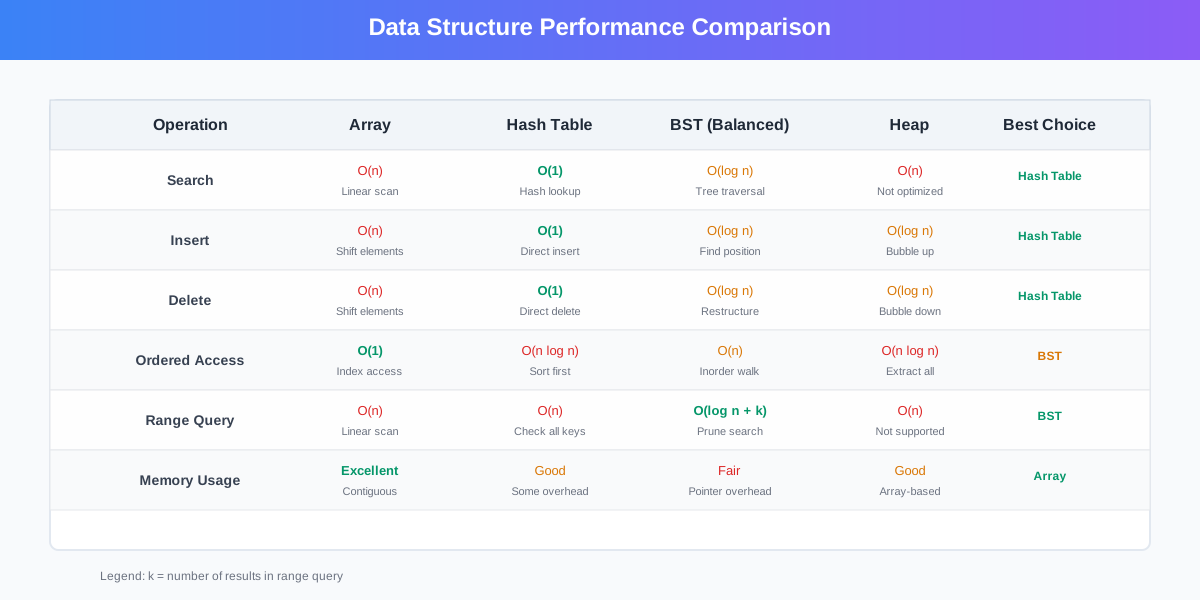
Trees win: Dynamic sizing, O(log n) insertion/deletion, natural hierarchy Arrays win: Cache locality, O(1) random access, simpler implementation Use trees for: Hierarchical data, frequent insertions/deletions, range queries Use arrays for: Mathematical operations, when size is known, simple iteration
Trees vs. Hash Tables
Trees win: Ordered traversal, range queries, predictable performance Hash tables win: O(1) average case operations, simpler for key-value storage Use trees for: Ordered data, range queries, when you need sorting Use hash tables for: Fast lookups, caching, when order doesn’t matter
Trees vs. Heaps
Trees win: General-purpose structure, supports all operations efficiently Heaps win: Specialized for priority operations, more compact Use trees for: General hierarchical data, BST operations Use heaps for: Priority queues, finding min/max efficiently
The Decision Matrix:
Choose Arrays when:
- You need cache-friendly sequential access
- Size is relatively fixed
- You’re doing mathematical computations
- Memory is extremely constrained
Choose Hash Tables when:
- You need fastest possible lookups
- Order doesn’t matter
- You’re building caches or indexes
- Key-value relationships are primary
Choose Trees when:
- You need both fast access AND ordering
- Range queries are common
- Data has natural hierarchy
- You need predictable performance
Choose Heaps when:
- Priority operations dominate
- You need min/max efficiently
- Memory usage must be minimal
- You’re implementing priority queues
The Big Lessons
Trees are everywhere because they solve a fundamental problem: organizing data hierarchically while maintaining efficient access patterns. When you understand trees, you start seeing opportunities to use them everywhere.
The key insights to remember:
Structure matters. The BST property isn’t just a rule — it’s what makes O(log n) operations possible.
Balance is crucial. An unbalanced tree is just an expensive linked list. Always consider balancing strategies.
Traversal choice matters. Different problems need different traversal patterns. Inorder for sorted data, preorder for structure copying, postorder for cleanup.
Trees are recursive by nature. Most tree operations are naturally recursive, making them elegant to implement and reason about.
Real-world trees are usually balanced. Production systems use AVL, Red-Black, or B-trees, not basic BSTs.
Test Your Tree Knowledge
Before we wrap up, here’s a quick challenge to test your understanding:
The Tree Challenge: You need to store a million user records that support:
- Fast lookup by user ID
- List users in ID order
- Find all users with IDs in a range
- Handle frequent insertions and deletions
Which data structure would you choose and why?
Think about: Search performance, memory usage, implementation complexity, balancing requirements.
Want to practice? Try the VisuAlgo BST Visualizer to see tree operations in action.
Interactive Learning Resources:
- BST Animation Tool - Watch insertions and deletions step by step
- LeetCode Tree Problems - Practice with real interview questions
- HackerRank Tree Challenges - Skill-building exercises with detailed explanations
- GeeksforGeeks BST Guide - Comprehensive tutorials and practice problems
The Bottom Line
Trees are the Swiss Army knife of hierarchical data organization. They’re not always the right tool, but they’re the right tool surprisingly often. Master them, and you’ll find elegant solutions to problems that seemed complex.
Start with understanding the BST property and tree traversals. Practice the common patterns. Then, when you encounter a problem involving hierarchical data, ordered access, or range queries, ask yourself: could a tree solve this efficiently?
The next time you’re faced with organizing data that needs both fast access and ordering, remember that trees have been solving this problem for decades. There’s probably a tree-based solution that’s both elegant and efficient.
Discussion Question: What’s the most creative use of trees you’ve seen in production? I’ve seen them used for everything from decision engines to UI component hierarchies. Share your stories in the comments - I’d love to hear about unconventional tree applications that solved real problems.
Building a system that needs hierarchical data organization? Let’s talk about the right tree structure for your use case.
Comments & Discussion
Join the conversation! Share your thoughts, ask questions, or provide feedback below.