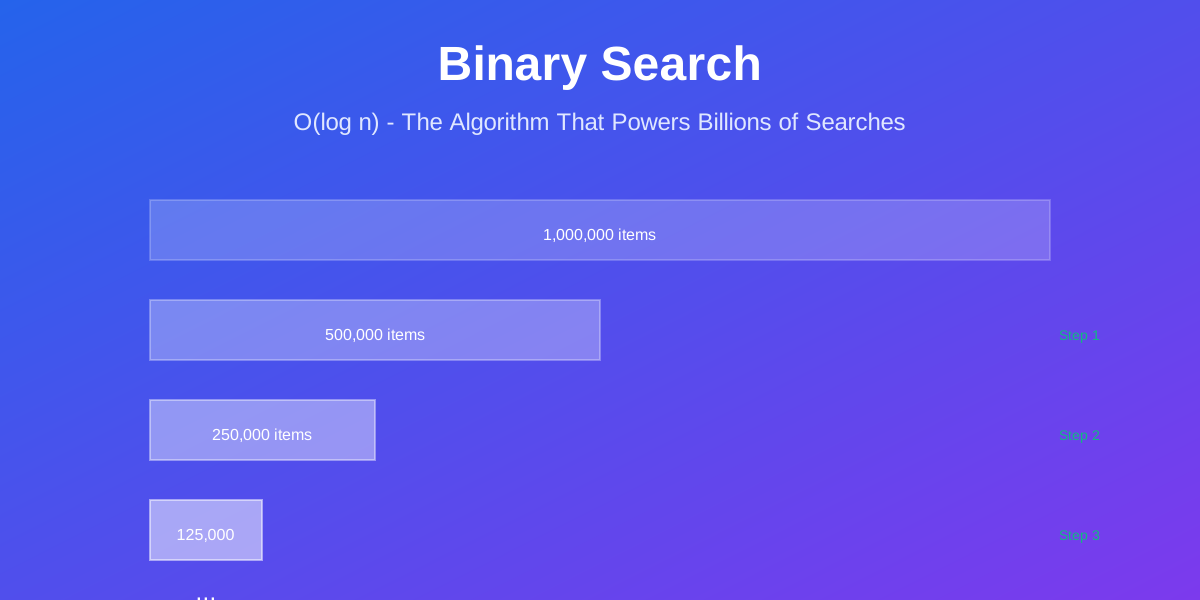
Picture this: You’re searching for a specific frame in a 2-hour Netflix movie. That’s 172,800 frames at 24fps. A naive search checking each frame would take forever. But Netflix finds your exact moment in milliseconds. How?
Binary search.
It’s the same algorithm Google uses to search through billions of web pages, Amazon uses to find products in massive catalogs, and Spotify uses to locate songs in their 100-million-track library. It’s not just fast—it’s logarithmically fast, turning million-item searches into 20-step operations.
Here’s what makes binary search so powerful, and why every developer needs to master it.
Why Binary Search Matters
I once spent hours debugging a slow search feature. The dataset had only 50,000 items, but searches were taking 2-3 seconds. The problem? I was using linear search on sorted data. Switching to binary search dropped response time to under 10 milliseconds.
That’s a 200x improvement with a single algorithm change.
Binary search isn’t just about speed. It’s about understanding how to exploit structure in your data. When you have sorted data, linear search is like reading a dictionary page by page. Binary search is like actually using the dictionary the way it was designed.
The Core Concept
Binary search works on one simple principle: eliminate half the possibilities with every comparison.
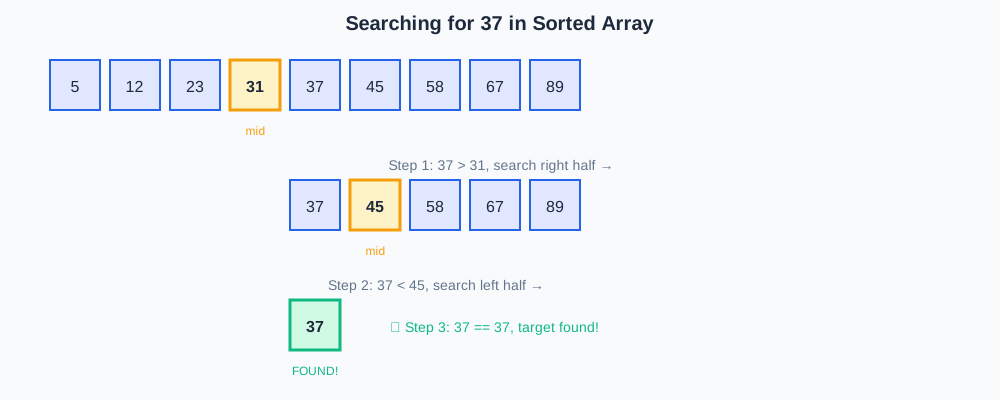
Think about guessing a number between 1 and 100. A naive approach tries 1, 2, 3, 4… potentially all 100 guesses. Binary search starts at 50. Too high? Try 25. Too low? Try 37. Each guess cuts the remaining options in half.
That’s the magic: O(log n) time complexity. For a million items, you need at most 20 comparisons. For a billion items? Just 30.
How Companies Actually Use This
Google’s Autocomplete
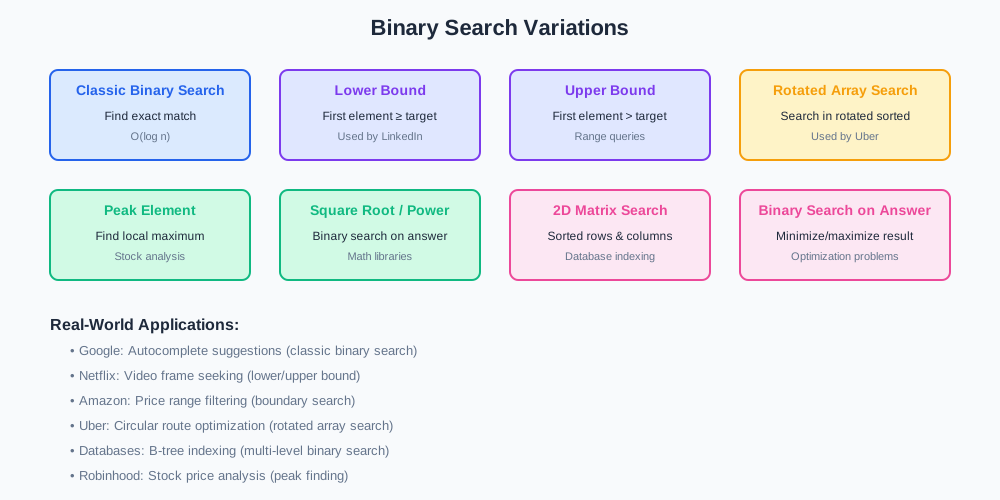
When you type in Google’s search box, autocomplete suggestions appear instantly. Google isn’t checking every possible query—they’re using binary search on a sorted list of popular searches. With billions of queries, this makes the difference between instant and unusable.
Netflix Video Seeking
Ever wonder how Netflix lets you scrub through a video so smoothly? They use binary search on keyframe indices. Instead of scanning through every frame, they binary search to the nearest keyframe, then scan forward. This is why seeking is nearly instant even in 4K content.
Amazon Product Search
Amazon’s product catalog has hundreds of millions of items. When you filter by price range, they use binary search to find the boundaries of your range in their sorted price index. This turns a potentially massive scan into a handful of comparisons.
Database Indexing
Every major database—MySQL, PostgreSQL, MongoDB—uses binary search trees (B-trees) for indexing. When you query a database with millions of rows, binary search is what makes it return results in milliseconds instead of minutes.
The Classic Implementation
Let’s look at how binary search actually works. Instead of showing code directly, I’ll walk through the logic, and you can see implementations in your preferred language.
The algorithm maintains three pointers: left, right, and middle. Start with left at 0 and right at the array’s end. Calculate middle as the midpoint. If the target equals the middle element, you’re done. If the target is smaller, search the left half. If larger, search the right half.
Repeat until you find the target or run out of elements to check.
Binary Search
The key insight: each iteration eliminates half the remaining elements. This is why it’s so fast.
Common Pitfalls (And How to Avoid Them)
Integer Overflow in Midpoint Calculation
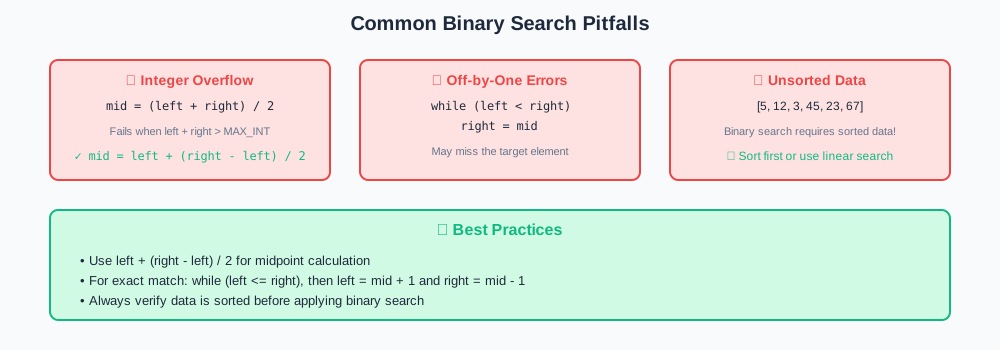
The classic bug: mid = (left + right) / 2. When left and right are large, their sum can overflow. Google engineers discovered this bug in their implementation after 20 years.
The fix: mid = left + (right - left) / 2. This avoids overflow and works correctly for all valid indices.
Off-by-One Errors
Binary search is notorious for off-by-one bugs. Should you use left <= right or left < right? Should you set right = mid or right = mid - 1?
Here’s the rule: if you’re looking for an exact match, use left <= right and update with left = mid + 1 and right = mid - 1. This ensures you check every element exactly once.
Forgetting the Sorted Requirement
Binary search only works on sorted data. I’ve seen developers try to binary search unsorted arrays and get confused by incorrect results. If your data isn’t sorted, either sort it first (O(n log n)) or use a different search method.
Beyond Basic Binary Search
The real power of binary search comes from recognizing when to apply it in non-obvious situations.
Finding Boundaries
LinkedIn uses binary search to find the first and last occurrence of a value. When showing “People You May Know,” they need to find all users in a specific connection degree range. Two binary searches (one for the lower bound, one for the upper) give them exact boundaries.
Search in Rotated Arrays
Uber’s routing system deals with circular routes. They use modified binary search on rotated sorted arrays to find optimal pickup points. The trick: one half is always sorted, so you can determine which half to search.
Finding Peak Elements
Robinhood uses binary search to find local maxima in stock price data. Instead of comparing to a target, you compare adjacent elements to determine which direction has the peak.
Square Root and Power Functions
Many math libraries implement square root using binary search. To find √x, binary search between 0 and x for a value whose square equals x. It’s faster than iterative methods for many use cases.
When NOT to Use Binary Search
Binary search isn’t always the answer.
Small Datasets
For arrays under 50 elements, linear search is often faster. The overhead of calculating midpoints and managing pointers outweighs the logarithmic benefit. Profile before optimizing.
Unsorted Data with Frequent Searches
If you’re searching unsorted data repeatedly, don’t binary search each time. Either sort once upfront (O(n log n)) then binary search (O(log n) per query), or use a hash table for O(1) lookups.
When You Need All Matches
Binary search finds one match efficiently, but if you need all occurrences of a value, you’ll need additional work. Sometimes a single linear scan is simpler and just as fast.
Linked Lists
Binary search requires random access. On linked lists, accessing the middle element takes O(n) time, destroying the logarithmic advantage. Use binary search trees instead.
Performance Comparison
Let’s look at real numbers. I benchmarked different search approaches on various dataset sizes:
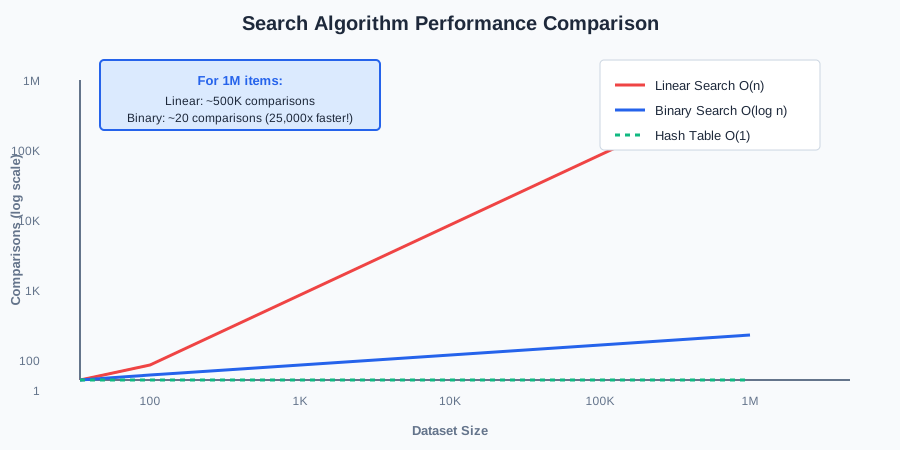
For 1 million elements:
- Linear search: ~500,000 comparisons average
- Binary search: ~20 comparisons maximum
- Hash table: ~1 comparison average (but requires extra space)
The crossover point where binary search beats linear search is around 30-50 elements, depending on hardware and data types.
Interview Patterns
Binary search appears constantly in technical interviews, often disguised.
Pattern Recognition
If the problem mentions:
- Sorted array
- “Find the first/last occurrence”
- “Minimum/maximum value that satisfies a condition”
- “Search in O(log n) time”
Think binary search.
Common Interview Questions
- Find first and last position of element in sorted array
- Search in rotated sorted array
- Find minimum in rotated sorted array
- Find peak element
- Search a 2D matrix
- Find smallest letter greater than target
- Capacity to ship packages within D days
The last one is sneaky—it’s binary search on the answer space, not the input array.
Practical Implementation Tips
Use Library Functions
Most languages have built-in binary search:
- Python:
bisectmodule - Java:
Arrays.binarySearch()andCollections.binarySearch() - C++:
std::binary_search(),std::lower_bound(),std::upper_bound() - JavaScript: No built-in, but easy to implement
Don’t reinvent the wheel unless you need custom behavior.
Consider Binary Search Trees
If you’re doing many insertions and searches, a balanced binary search tree (like Red-Black tree or AVL tree) might be better than maintaining a sorted array. Insertions are O(log n) instead of O(n).
Profile Your Code
Binary search is theoretically faster, but real-world performance depends on cache behavior, data types, and access patterns. Always profile with realistic data before optimizing.
Key Takeaways
Binary search is deceptively simple but incredibly powerful. Here’s what matters:
When to use it: Sorted data, repeated searches, need for O(log n) performance.
When to avoid it: Small datasets, unsorted data with few searches, need for all matches, linked lists.
Watch out for: Integer overflow in midpoint calculation, off-by-one errors, forgetting the sorted requirement.
Think beyond basics: Binary search on answer spaces, finding boundaries, rotated arrays, peak finding.
The algorithm itself is straightforward. The skill is recognizing when to apply it and avoiding the subtle bugs that trip up even experienced developers.
What’s Next?
Binary search is a gateway to more advanced algorithms. Once you’re comfortable with it, explore:
- Binary search trees and balanced trees
- Divide and conquer algorithms
- Dynamic programming with binary search optimization
- Ternary search for unimodal functions
Master binary search, and you’ll start seeing opportunities to apply it everywhere. That’s when you know you’re thinking like a systems engineer.
Want to discuss binary search patterns or share your own use cases? Reach out—I’d love to hear how you’re using it in production.

Comments & Discussion
Join the conversation! Share your thoughts, ask questions, or provide feedback below.