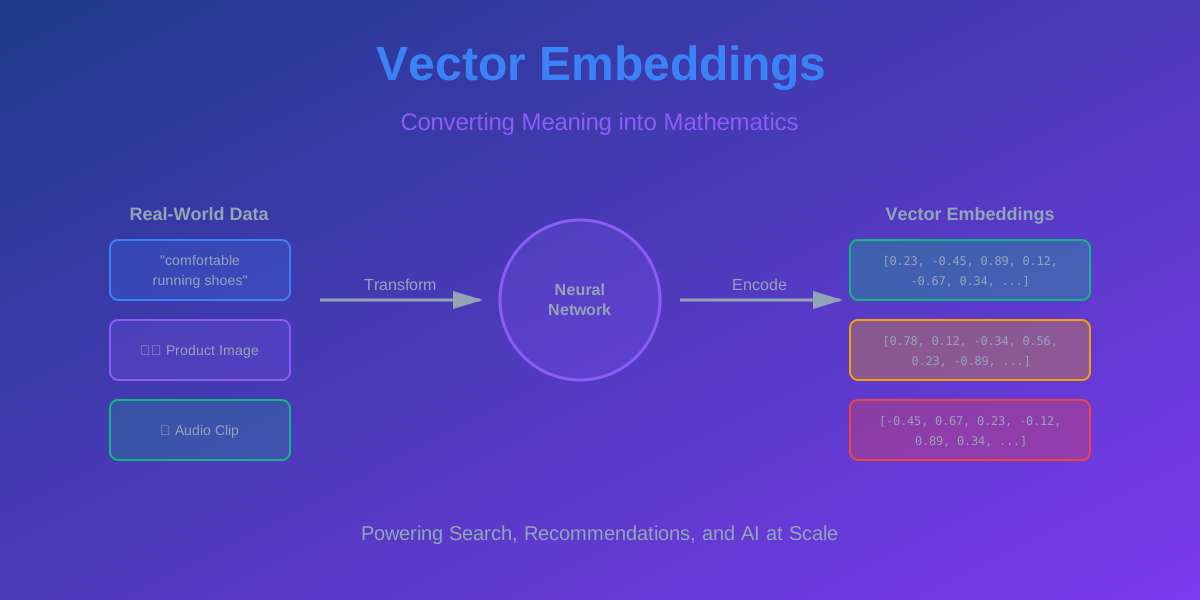
Vector Embeddings: How AI Understands Meaning at Scale
Your users type “comfortable running shoes for beginners” into your search bar. With traditional keyword search, you’d match products containing those exact words. But what about that perfect pair of “cushioned athletic footwear for novice joggers”? Same meaning, different words. Your search misses it.
This is the problem that cost e-commerce companies billions in lost sales—until vector embeddings changed everything.
Now? Google processes 8.5 billion searches per day using embeddings. Spotify’s recommendation engine understands that fans of Radiohead might love Thom Yorke’s solo work. Netflix knows that if you binged Stranger Things, you’ll probably dig The Umbrella Academy. Not because of keywords, but because they understand meaning.
Let me show you how this works and why it’s revolutionizing everything from search to recommendations to fraud detection.
What Actually Is a Vector?
Before we dive into embeddings, let’s get crystal clear on vectors. And no, I’m not talking about the villain from Despicable Me.
A vector is just a list of numbers. That’s it. Seriously.
Think of it as coordinates in space. In 2D space, the vector [3, 5] means “go 3 units right, 5 units up.” In 3D space, [3, 5, 2] adds “2 units forward.” But here’s where it gets interesting—vectors can have any number of dimensions. 10 dimensions. 100 dimensions. Even 1,536 dimensions (that’s what OpenAI’s embeddings use).
You can’t visualize 1,536-dimensional space (and anyone who says they can is lying), but mathematically, it works exactly the same way. Each dimension captures some aspect of meaning.
Vectors in Plain English
Think of a vector as a point in space. The numbers tell you where that point is located. Two points close together in space are similar. Two points far apart are different.
That’s the entire foundation of how AI understands meaning. Convert things to vectors, measure distances, find similar items. Simple concept, powerful results.
What Are Vector Embeddings?
Now here’s where it gets really interesting. An embedding is a vector representation of something—text, images, audio, user behavior, anything really. It’s a way to convert complex, messy real-world data into clean numerical vectors that machines can work with.
The magic? Items with similar meanings end up close together in vector space.
The Breakthrough Insight
Think about the words “king” and “queen.” They’re related, right? Both are royalty, both are leaders, both are powerful. In vector space, they should be close together.
Now think about “king” and “pizza.” Not related at all. In vector space, they should be far apart.
That’s what embeddings do—they place similar things close together and dissimilar things far apart. The distance between vectors becomes a measure of similarity.
From Words to Vectors: The Transformation
So how do we actually convert a word like “dog” into a vector? This is where machine learning comes in.
The Old Way: One-Hot Encoding
The simplest approach is one-hot encoding. If you have a vocabulary of 10,000 words, each word becomes a vector of 10,000 dimensions with a single 1 and 9,999 zeros.
“dog” might be [0, 0, 0, 1, 0, 0, …, 0] (1 in position 3) “cat” might be [0, 0, 0, 0, 1, 0, …, 0] (1 in position 4)
The problem? Every word is equally distant from every other word. “dog” and “cat” are just as different as “dog” and “pizza.” The encoding captures no meaning whatsoever.
This is useless for understanding similarity.
The Modern Way: Learned Embeddings
Modern embeddings are learned by neural networks trained on massive amounts of data. The network learns to place similar words close together in vector space.
How? By learning from context. Words that appear in similar contexts get similar vectors. “dog” and “cat” both appear near words like “pet,” “animal,” “fur,” so they end up close together. “dog” and “pizza” never appear in similar contexts, so they’re far apart.
The result? Dense vectors (typically 128 to 1,536 dimensions) where every dimension captures some aspect of meaning. You can’t point to dimension 47 and say “this is the animal dimension,” but collectively, all dimensions work together to represent meaning.
The Famous Word2Vec Example
There’s this mind-blowing example that everyone talks about when explaining embeddings. It’s worth understanding because it shows just how much meaning these vectors capture.
In vector space, you can do math with words:
king - man + woman ≈ queen
Wait, what? You can subtract “man” from “king” and add “woman” and get “queen”? Yes, actually.
Here’s what’s happening: The vector for “king” contains information about royalty and maleness. When you subtract the “man” vector, you remove the maleness component. When you add the “woman” vector, you add femaleness. What’s left? A royal female—a queen.
This isn’t a trick or cherry-picked example. It works for tons of relationships:
- Paris - France + Italy ≈ Rome
- Walking - Walk + Swim ≈ Swimming
- Bigger - Big + Small ≈ Smaller
The vectors have learned the underlying structure of language. They understand relationships, analogies, and semantic patterns.
How Embeddings Are Created
You might be wondering: how does a neural network actually learn these embeddings? Let’s break it down without getting too deep into the math.
The Training Process
The core idea is simple: train a model to predict words from context. If the model can predict that “dog” appears near “bark,” “pet,” and “animal,” then it must have learned something about what “dog” means.
Word2Vec (2013): Google’s breakthrough. Two approaches—predict the center word from surrounding words (CBOW), or predict surrounding words from the center word (Skip-gram). Trained on billions of words from Google News.
GloVe (2014): Stanford’s approach. Instead of predicting words, it learns from word co-occurrence statistics. If “dog” and “bark” appear together often, their vectors should be similar.
Transformer-based (2017+): BERT, GPT, and modern models. These use attention mechanisms to understand context better. The word “bank” gets different embeddings depending on whether you’re talking about a river bank or a financial bank.
The key insight across all these methods: you don’t manually design the embeddings. You set up a learning task, feed in massive amounts of data, and let the neural network figure out the best way to represent meaning as vectors.
What Makes a Good Embedding?
A good embedding has these properties:
Semantic Similarity: Similar items are close together. “happy” and “joyful” should have similar vectors.
Relationship Preservation: Analogies work. If A:B :: C:D, then the vector relationships should match.
Dimensionality: Not too high (expensive to store and compute), not too low (loses information). Sweet spot is usually 128-768 dimensions.
Generalization: Works on data it hasn’t seen before. An embedding trained on news articles should still work reasonably well on tweets.
Measuring Similarity: Distance Metrics
Once you have vectors, you need to measure how similar they are. There are several ways to do this, and choosing the right one matters.
Cosine Similarity
This measures the angle between two vectors, ignoring their magnitude. It’s the most popular choice for text embeddings.
| Formula: similarity = (A · B) / ( | A | × | B | ) |
The result is a number between -1 and 1:
- 1 means identical direction (very similar)
- 0 means perpendicular (unrelated)
- -1 means opposite direction (opposite meaning)
Why cosine instead of regular distance? Because we care about direction (meaning) more than magnitude (intensity). “I love this” and “I absolutely love this” should be similar even though one is more intense.
Euclidean Distance
This is the straight-line distance between two points. It’s what you learned in geometry class.
Formula: distance = √((A₁-B₁)² + (A₂-B₂)² + … + (Aₙ-Bₙ)²)
Smaller distance means more similar. This works well when magnitude matters—like in image embeddings where brightness and intensity are meaningful.
Dot Product
This is the simplest: just multiply corresponding dimensions and sum them up.
Formula: similarity = A₁×B₁ + A₂×B₂ + … + Aₙ×Bₙ
Fast to compute, but sensitive to vector magnitude. Often used when vectors are normalized (all have length 1).
Real-World Applications: Where Embeddings Shine
This is where theory meets practice. Let’s look at how major companies use vector embeddings to solve real problems.
Search & Information Retrieval
Google Search: When you search for “how to fix a leaky faucet,” Google doesn’t just match keywords. It understands you’re looking for plumbing repair instructions. It converts your query to a vector, compares it to billions of web page vectors, and returns the most semantically similar results.
The breakthrough? Google’s BERT model (2019) uses embeddings to understand context. It knows “bank” in “river bank” is different from “bank” in “savings bank.” Search quality improved by 10% overnight—the biggest leap in years.
Elasticsearch: Added vector search capabilities in 2019. Now you can search documents by meaning, not just keywords. Companies use this for internal knowledge bases where employees search using natural language and find relevant documents even when they don’t know the exact terminology.
Recommendation Systems
Netflix: They don’t just track what you watched—they create embeddings for every show and every user. Your viewing history becomes a vector. Each show is a vector. Finding recommendations is just finding shows whose vectors are close to your vector.
The result? 80% of content watched on Netflix comes from recommendations. That’s billions of hours of engagement driven by vector similarity.
Spotify: Similar approach for music. They create embeddings from audio features (tempo, key, energy) combined with user behavior (what songs are played together). This is how Discover Weekly works—it finds songs whose vectors are similar to songs you like but haven’t heard yet.
Over 40 million users engage with Discover Weekly every week. That’s the power of embeddings at scale.
Amazon: Product recommendations using item embeddings. Products frequently bought together get similar vectors. “Customers who bought this also bought…” is essentially a nearest neighbor search in vector space.
This drives 35% of Amazon’s revenue. Not bad for some vectors.
Semantic Search
Notion: Their search understands meaning. Search for “meeting notes from last week” and it finds documents titled “Weekly Sync - March 22” even though the words don’t match. The query vector is similar to the document vector.
GitHub Copilot: When you write a comment like “function to validate email addresses,” Copilot searches through millions of code snippets to find similar patterns. It’s using embeddings to understand what kind of code you need.
Pinecone & Weaviate: These are entire databases built around vector search. Companies use them to build semantic search for customer support, documentation, and knowledge bases. Query response time? Under 50ms even with billions of vectors.
Fraud Detection & Security
Stripe: They create embeddings for transaction patterns. Normal transactions cluster together. Fraudulent transactions are outliers—their vectors are far from the normal cluster. This catches fraud that rule-based systems miss.
PayPal: Similar approach. They process 19 billion transactions per year and use embeddings to detect anomalies in real-time. A transaction that looks normal by individual features might have a vector that’s suspiciously far from typical patterns.
Content Moderation
Facebook: They use image and text embeddings to detect harmful content. Instead of maintaining lists of banned content (which bad actors can easily modify), they create embeddings. Content similar to known harmful content gets flagged, even if it’s never been seen before.
YouTube: Video embeddings help detect copyright violations and inappropriate content. They can find videos that are similar to banned content even if they’ve been edited or modified.
Personalization
LinkedIn: Your profile, your activity, your connections—all converted to vectors. Job recommendations are jobs whose vectors are close to your vector. “People You May Know” is finding user vectors near yours.
Twitter (X): Your timeline isn’t chronological anymore. It’s ranked by relevance using embeddings. Tweets similar to what you’ve engaged with before get higher scores and appear first.
How Vector Search Actually Works
Let’s get practical. You have a database with 10 million product embeddings. A user searches for “wireless headphones.” How do you find the most similar products in milliseconds?
The Naive Approach: Brute Force
Calculate the similarity between the query vector and every single product vector. Sort by similarity. Return the top 10.
This works… for small datasets. But with 10 million products and 384-dimensional vectors, you’re doing 10 million × 384 = 3.84 billion floating-point operations per search. Even on modern hardware, that’s too slow.
You need something smarter.
The Smart Approach: Approximate Nearest Neighbor (ANN)
This is where algorithms like HNSW (Hierarchical Navigable Small World) come in. Instead of checking every vector, they build an index that lets you quickly navigate to the approximate nearest neighbors.
Think of it like this: instead of checking every house in a city to find your friend, you use a map. You know the neighborhood, then the street, then the house number. You never check 99.9% of the houses.
HNSW builds a multi-layer graph where each layer is a “map” at different zoom levels. You start at the top layer (zoomed out), quickly navigate to the right region, then zoom in layer by layer until you find the nearest neighbors.
The trade-off? You might miss the absolute closest vector, but you’ll find something very close (99%+ accuracy) in a fraction of the time. For most applications, that’s perfect.
Building Your Own Embedding System
Let’s get practical. Say you want to build a semantic search for your product catalog. Here’s what you need to do.
Step 1: Choose an Embedding Model
You have options:
OpenAI Embeddings (text-embedding-3-small): 1,536 dimensions, excellent quality, costs $0.02 per 1M tokens. Easy to use via API. This is what most startups use.
Sentence Transformers (open source): Free, runs on your hardware, good quality. Models like “all-MiniLM-L6-v2” give you 384 dimensions and work great for most use cases.
Cohere Embeddings: Multilingual support, 1,024 dimensions, competitive pricing. Good if you need multiple languages.
Google’s Universal Sentence Encoder: 512 dimensions, optimized for semantic similarity. Free but requires TensorFlow.
For most projects, start with Sentence Transformers. It’s free, fast, and good enough. You can always upgrade to OpenAI later if you need better quality.
Step 2: Generate Embeddings
Convert all your products to vectors. This is a one-time batch job (though you’ll need to update when you add new products).
The process is straightforward: take each product’s text (title, description, features), pass it through the embedding model, get back a vector, store it in your database.
For 10 million products, this might take a few hours on a decent GPU. But you only do it once. After that, you just generate embeddings for new products as they’re added.
Step 3: Choose a Vector Database
You need a database optimized for vector search. Regular databases like PostgreSQL can store vectors, but they’re slow at similarity search.
Pinecone: Fully managed, easy to use, scales automatically. Costs money but saves you operational headaches. Great for startups that want to move fast.
Weaviate: Open source, feature-rich, good performance. You host it yourself. Good middle ground between control and convenience.
Milvus: Open source, highly scalable, used by companies like Walmart and NVIDIA. More complex to set up but powerful.
Qdrant: Rust-based, very fast, good for high-performance needs. Open source with managed option.
pgvector: PostgreSQL extension. If you’re already using Postgres and have moderate scale (< 1M vectors), this is the easiest path.
For most projects under 1 million vectors, pgvector is perfect. For larger scale or if you want managed infrastructure, go with Pinecone.
Step 4: Build the Search Pipeline
The flow is simple:
- User enters search query
- Convert query to vector using the same embedding model
- Query vector database for nearest neighbors
- Return top K results (usually 10-50)
- Optionally re-rank results using additional signals (popularity, recency, etc.)
The entire pipeline should take under 100ms. Embedding generation is usually 10-20ms, vector search is 20-50ms, the rest is network and application overhead.
The Challenges Nobody Talks About
Building with embeddings isn’t all sunshine and rainbows. Here are the real problems you’ll face and how to deal with them.
The Cold Start Problem
You just launched your product. You have 100 items in your catalog. Embeddings work, but recommendations are mediocre because you don’t have enough data to learn good patterns.
The fix? Start with pre-trained embeddings. Models trained on billions of documents already understand general semantic relationships. They won’t be perfect for your specific domain, but they’re way better than nothing.
As you collect more data, you can fine-tune the embeddings on your specific use case. But pre-trained embeddings give you a solid starting point.
The Dimensionality Curse
More dimensions mean more information, right? Not always. Beyond a certain point, high-dimensional spaces become weird. Distances become less meaningful. Everything starts looking equally far apart.
This is called the “curse of dimensionality.” It’s why most production systems use 128-768 dimensions, not 10,000.
The sweet spot depends on your data:
- Simple text: 128-384 dimensions
- Complex documents: 384-768 dimensions
- Multimodal (text + images): 512-1,536 dimensions
More isn’t always better. Test different dimensions and measure actual search quality.
The Update Problem
Your embeddings are static, but your data changes. New products get added. Descriptions get updated. How do you keep embeddings fresh?
Option 1: Batch Updates: Regenerate all embeddings nightly. Simple but wasteful—you’re re-computing embeddings for items that haven’t changed.
Option 2: Incremental Updates: Only generate embeddings for new or modified items. More efficient but requires tracking what changed.
Option 3: Lazy Updates: Generate embeddings on-demand when items are accessed. Saves computation but means first access is slow.
Most production systems use Option 2 with a nightly batch job as backup. Track changes in your database, generate embeddings for modified items, and run a full regeneration weekly to catch anything you missed.
The Cost Problem
Embeddings aren’t free. Storage costs, compute costs, API costs—they add up.
Storage: 10 million vectors × 384 dimensions × 4 bytes per float = 15 GB. That’s manageable. But if you’re storing embeddings for billions of items, you’re looking at terabytes.
Compute: Generating embeddings requires GPU time. If you’re using OpenAI’s API, you’re paying per token. At scale, this can be thousands of dollars per month.
Search: Vector databases charge based on queries per second and index size. Pinecone’s pricing starts at $70/month for 1 million vectors.
The optimization strategies:
- Use smaller dimensions (384 instead of 1,536) if quality is acceptable
- Quantize vectors (use int8 instead of float32) to reduce storage by 75%
- Cache popular queries to avoid redundant searches
- Use open-source models to avoid API costs
- Implement tiered storage (hot vectors in memory, cold vectors on disk)
Advanced Techniques: Beyond Basic Embeddings
Once you have the basics working, here are some advanced techniques that can significantly improve quality.
Fine-Tuning for Your Domain
Pre-trained embeddings are general-purpose. They know “dog” and “cat” are similar, but they don’t know that in your e-commerce site, “wireless” and “bluetooth” are essentially synonyms.
Fine-tuning means taking a pre-trained model and training it further on your specific data. You need:
- Pairs of similar items (products bought together, documents on similar topics)
- A few thousand examples minimum
- GPU time for training (a few hours to a few days)
The result? Embeddings that understand your domain’s specific vocabulary and relationships. Search quality can improve by 20-30%.
Companies like Airbnb and Instacart fine-tune embeddings on their specific catalogs. It’s worth the effort at scale.
Hybrid Search: Best of Both Worlds
Pure vector search is great for semantic similarity, but sometimes you actually want exact keyword matches. If someone searches for “iPhone 15 Pro,” you don’t want to show them “Samsung Galaxy” just because the embeddings are similar.
The solution? Hybrid search that combines:
- Vector search for semantic similarity (70% weight)
- Keyword search for exact matches (30% weight)
Elasticsearch and Weaviate both support this out of the box. You get the semantic understanding of embeddings with the precision of keyword matching.
Multi-Vector Representations
Sometimes one vector isn’t enough. A product might have:
- Title embedding
- Description embedding
- Image embedding
- User review embedding
Instead of concatenating everything into one giant text blob, you can maintain separate embeddings and search across all of them. This is called “multi-vector search.”
When a query comes in, you search each embedding space and combine the results. A product might rank high on title similarity but low on image similarity—you can weight these differently based on what matters for your use case.
Contextual Embeddings
Modern models like BERT create different embeddings for the same word based on context. “Apple” in “Apple iPhone” gets a different vector than “Apple” in “apple pie.”
This is huge for disambiguation. Traditional embeddings would give “bank” the same vector whether you mean financial institution or river bank. Contextual embeddings understand the difference.
The trade-off? They’re more expensive to compute because you can’t pre-compute embeddings—you need to generate them on the fly based on the full context.
Performance Optimization: Making It Fast
At scale, performance becomes critical. Here’s how to make your embedding system blazing fast.
Index Optimization
The HNSW index has parameters you can tune:
- M: Number of connections per node (higher = better accuracy, more memory)
- efConstruction: Search quality during index building (higher = better index, slower build)
- efSearch: Search quality during queries (higher = better results, slower search)
Typical production values:
- M = 16-32
- efConstruction = 100-200
- efSearch = 50-100
Test with your actual data to find the sweet spot. A 10% accuracy improvement isn’t worth it if search time doubles.
Caching Strategies
Cache aggressively:
- Popular query embeddings (avoid re-computing for common searches)
- Search results for frequent queries (TTL of 5-10 minutes)
- User embeddings (if you’re doing personalized search)
A good cache can reduce your embedding API costs by 80% and cut latency in half.
Batch Processing
If you’re generating embeddings for millions of items, batch them. Most embedding models can process 32-128 items at once with minimal overhead. This is 10-20x faster than processing one at a time.
For OpenAI’s API, batching also reduces costs because you’re making fewer API calls.
Quantization
Store vectors as int8 instead of float32. This reduces storage by 75% and speeds up similarity calculations. The accuracy loss is typically under 1%.
Most vector databases support quantization out of the box. Enable it unless you have a specific reason not to.
Multimodal Embeddings: Beyond Text
Text embeddings are just the beginning. Modern systems create embeddings for images, audio, video—anything really.
Image Embeddings
Models like CLIP (from OpenAI) create embeddings where images and text live in the same vector space. This means you can:
- Search images using text queries (“red sports car at sunset”)
- Find similar images without any text labels
- Do reverse image search (upload an image, find similar ones)
Pinterest: Uses image embeddings to power visual search. Upload a photo of a dress you like, find similar dresses. Over 600 million visual searches per month.
Google Photos: Search your photos using natural language. “Photos of my dog at the beach” works even though you never tagged or labeled anything. It’s all embeddings.
Audio Embeddings
Shazam: Creates audio fingerprints (embeddings) for songs. When you play a song, it generates an embedding and searches a database of millions of song embeddings. Match found in under 3 seconds.
Spotify: Audio embeddings capture musical features—tempo, key, energy, mood. This powers their radio feature and helps find songs that “sound similar” even if they’re different genres.
Video Embeddings
YouTube: Creates embeddings for video content, not just metadata. This helps with recommendations, copyright detection, and content moderation.
TikTok: Video embeddings power their “For You” feed. They understand what makes videos similar beyond just hashtags or audio—visual style, pacing, content themes.
The Unified Embedding Space
The cutting edge? Models that create embeddings for text, images, and audio in the same vector space. This means:
- Search videos using text queries
- Find images similar to audio descriptions
- Recommend products based on images users liked
Meta’s ImageBind and Google’s Gemini are pushing this direction. It’s the future of multimodal AI.
Common Pitfalls and How to Avoid Them
I’ve seen teams make these mistakes. Learn from their pain.
Mistake 1: Not Normalizing Vectors
If you’re using cosine similarity, normalize your vectors to unit length. This lets you use dot product instead, which is 2-3x faster and gives identical results.
Most embedding models return normalized vectors, but if you’re doing any arithmetic (like averaging embeddings), you need to re-normalize.
Mistake 2: Ignoring Data Quality
Garbage in, garbage out. If your product descriptions are poorly written or inconsistent, your embeddings will be too. Clean your data first.
Remove HTML tags, fix typos, standardize formatting. The embedding model can’t fix bad data—it just learns to represent it accurately, warts and all.
Mistake 3: Using the Wrong Similarity Metric
Cosine similarity for text, Euclidean distance for images (usually), dot product for speed when vectors are normalized. Using the wrong metric can tank your search quality.
Test different metrics with your actual data. What works for someone else might not work for you.
Mistake 4: Not Monitoring Embedding Drift
Your embedding model is fixed, but your data changes. Over time, new products, new terminology, new patterns emerge. Your embeddings might become less effective.
Monitor search quality metrics over time. If you see degradation, it might be time to regenerate embeddings with a newer model or fine-tune on recent data.
Mistake 5: Forgetting About Explainability
Embeddings are black boxes. When a search returns unexpected results, it’s hard to explain why. Users (and your team) want to understand the reasoning.
Add explainability features:
- Show which parts of the query matched which parts of the result
- Display similarity scores
- Provide “why this result” explanations
- Allow users to give feedback (thumbs up/down)
This feedback is gold—use it to improve your embeddings over time.
The Technology Stack
Here’s what a production embedding system typically looks like:
Embedding Generation:
- Sentence Transformers (open source, free)
- OpenAI API (easy, high quality, costs money)
- Cohere API (multilingual, good pricing)
Vector Databases:
- Pinecone (managed, easy, scales automatically)
- Weaviate (open source, feature-rich)
- Milvus (open source, high performance)
- Qdrant (Rust-based, very fast)
- pgvector (PostgreSQL extension, good for small scale)
Search Infrastructure:
- Elasticsearch with vector search plugin
- Algolia with neural search
- Custom solution with FAISS library
Monitoring:
- Track search latency (p50, p95, p99)
- Monitor cache hit rates
- Measure search quality (click-through rate, user satisfaction)
- Alert on embedding generation failures
When NOT to Use Embeddings
Let’s be real—embeddings aren’t always the answer.
Don’t use embeddings when:
You need exact matches. If someone searches for a specific product SKU or order number, keyword search is better.
Your data is highly structured. If you’re searching a database of financial transactions by date and amount, SQL queries are faster and more accurate.
You have very little data. With under 1,000 items, the complexity of embeddings isn’t worth it. Simple keyword search works fine.
Latency is critical and you can’t afford the overhead. Embedding generation and vector search add 50-100ms. For some applications, that’s too much.
Your users expect exact keyword matching. Some domains (legal, medical) require precise terminology matching, not semantic similarity.
The Future of Embeddings
Where is this technology heading? Here’s what’s coming.
Smaller, Faster Models
Current trend is toward more efficient models. OpenAI’s text-embedding-3-small is 5x cheaper than previous versions with similar quality. Expect this to continue—better embeddings at lower cost.
Domain-Specific Models
Instead of one general-purpose model, we’ll see specialized models for specific domains: medical embeddings, legal embeddings, code embeddings. These will understand domain-specific terminology and relationships better than general models.
Real-Time Learning
Current embeddings are static—you train once and use them. Future systems will update embeddings in real-time based on user behavior. If users consistently click on certain results, the system learns and adjusts embeddings accordingly.
Multimodal by Default
Text-only embeddings will become rare. Most systems will use multimodal embeddings that understand text, images, and audio together. This enables richer search and recommendation experiences.
Edge Deployment
Running embedding models on-device (phones, IoT devices) instead of in the cloud. This enables privacy-preserving search and reduces latency. Apple’s on-device ML and Google’s TensorFlow Lite are pushing this direction.
Practical Decision Framework
You’re building a new feature. Should you use embeddings? Here’s how to decide.
Use embeddings if:
- You need semantic search (meaning-based, not keyword-based)
- You’re building recommendations based on similarity
- You have enough data (10,000+ items minimum)
- You can tolerate approximate results (99% accuracy is fine)
- Latency under 100ms is acceptable
Stick with traditional approaches if:
- You need exact matching (SKUs, IDs, specific terms)
- You have very little data (< 1,000 items)
- Your data is highly structured (dates, numbers, categories)
- You need sub-10ms latency
- Explainability is critical (regulatory requirements)
The hybrid approach:
- Use embeddings for discovery and exploration
- Use keyword search for precise lookups
- Combine both for best results
Most production systems end up with hybrid approaches. Embeddings for the “fuzzy” stuff, traditional search for the precise stuff.
Getting Started: Your First Embedding Project
Ready to build something? Here’s a simple project to get your hands dirty.
Project: Build a Semantic FAQ Search
You have 500 frequently asked questions. Users should be able to ask questions in their own words and find relevant FAQs.
What you need:
- Python with sentence-transformers library
- PostgreSQL with pgvector extension
- 500 FAQ entries (questions and answers)
The implementation:
Generate embeddings for all FAQ questions using a pre-trained model. Store them in PostgreSQL with pgvector. When a user asks a question, generate an embedding for their query, search for the most similar FAQ embeddings, return the top 3 matches.
Total development time? A few hours if you’re new to this, under an hour if you’ve done it before.
The result? Users can ask “How do I reset my password?” and find the FAQ titled “Password Recovery Process” even though the words don’t match. That’s the power of embeddings.
Next Steps
Once you have the basics working:
- Add hybrid search (combine with keyword matching)
- Implement caching for popular queries
- Fine-tune embeddings on your specific FAQs
- Add user feedback to improve results over time
- Monitor search quality and iterate
Start simple, measure results, iterate. That’s how you build production-quality systems.
Key Takeaways
Let’s wrap this up with the essential insights.
Vectors are just lists of numbers that represent points in high-dimensional space. Distance between vectors measures similarity.
Embeddings convert real-world data (text, images, audio) into vectors where similar items are close together. This is how AI understands meaning.
The magic is in the training. Neural networks learn to create embeddings by training on massive datasets. They discover patterns and relationships that humans never explicitly programmed.
Production systems use approximate search (ANN algorithms like HNSW) to find similar vectors quickly. Perfect accuracy isn’t necessary—99% is good enough and 100x faster.
Real companies use this at massive scale. Google’s search, Netflix’s recommendations, Spotify’s Discover Weekly—all powered by embeddings. This isn’t experimental technology; it’s battle-tested in production.
Start simple, then optimize. Use pre-trained models, start with pgvector, measure results. Only add complexity when you need it.
Hybrid approaches win. Combine embeddings with traditional search. Use embeddings for semantic similarity, keywords for precision. Best of both worlds.
The Bottom Line
Vector embeddings are transforming how we build search, recommendations, and AI systems. They let machines understand meaning, not just match keywords. And the best part? The technology is mature, accessible, and ready to use.
You don’t need a PhD or a massive budget to get started. Pre-trained models are free. Vector databases have generous free tiers. The tools are there—you just need to use them.
The companies winning in AI aren’t using secret algorithms. They’re using embeddings effectively. Understanding semantic similarity. Building systems that understand what users actually mean, not just what they type.
Now you know how it works. Time to build something.
Got questions about implementing embeddings in your system? Want to discuss trade-offs for your specific use case? Reach out—I’d love to hear what you’re building.


Comments & Discussion
Join the conversation! Share your thoughts, ask questions, or provide feedback below.