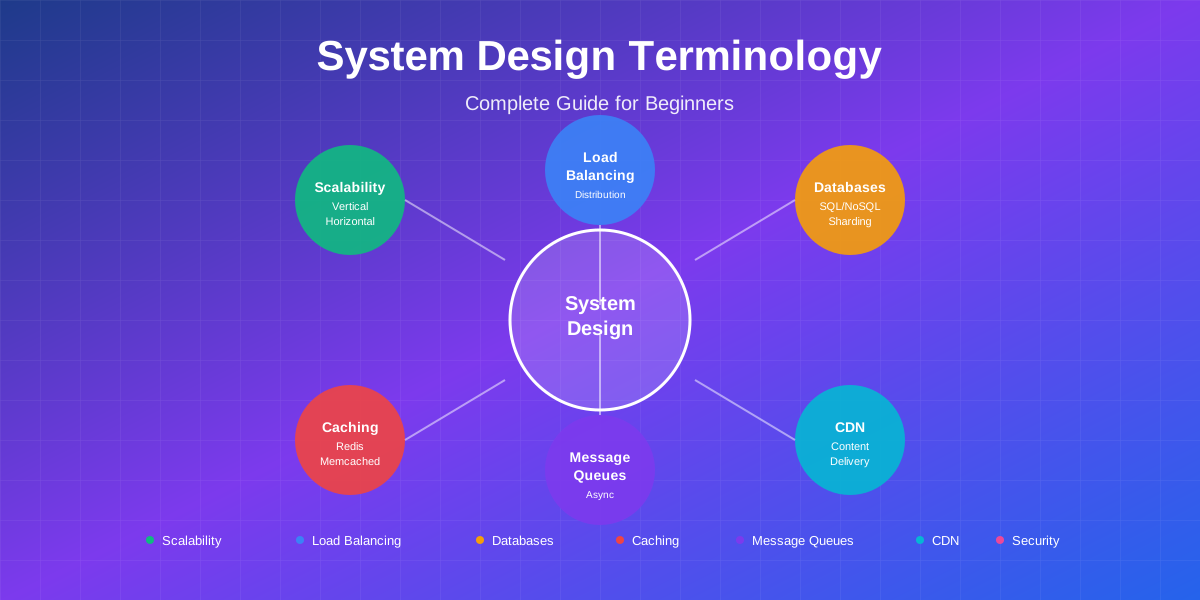
📚 Quick Navigation
System Design Fundamentals: Complete Terminology Guide for Beginners
I remember my first system design interview. The interviewer asked, “How would you design Instagram?” I froze. Not because I didn’t use Instagram daily, but because I didn’t know where to start. Should I talk about databases? Load balancers? Microservices? The terminology alone felt like a foreign language.
I nodded along when the interviewer mentioned “eventual consistency” and “horizontal scaling,” pretending I understood. I didn’t get the job. That failure taught me something valuable: system design isn’t about memorizing solutions—it’s about understanding the vocabulary and knowing when to use each concept.
Three years later, I’m now the one conducting these interviews. I see the same confusion in candidates’ eyes that I once had. Here’s what I wish someone had told me: system design has a finite set of building blocks. Once you understand these core concepts and their terminology, designing any system becomes a matter of combining the right pieces.
This guide is your complete reference. We’ll cover every essential term, explain what it means in plain English, show you real-world examples, and help you understand when to use each concept. Think of this as your system design dictionary—bookmark it, reference it, and watch these terms become second nature.
What is System Design?
Let’s start with the basics. System design is the process of defining the architecture, components, modules, interfaces, and data for a system to satisfy specified requirements.
In simpler terms? It’s figuring out how to build software that works at scale. Not just for 100 users, but for millions. Not just for today, but for years to come.
Why does it matter?
When Netflix streams to 200 million subscribers simultaneously, that’s system design. When Google returns search results in 0.2 seconds from billions of web pages, that’s system design. When Uber matches you with a driver in seconds across a city of millions, that’s system design.
Companies don’t just want engineers who can write code—they want engineers who can architect systems that handle real-world complexity. That’s why system design interviews are standard at companies like Google, Amazon, Facebook, and Netflix.
What makes system design challenging?
You’re not building for perfect conditions. You’re building for:
- Servers that crash
- Networks that fail
- Traffic that spikes unexpectedly
- Data that grows exponentially
- Users spread across the globe
- Budgets that aren’t unlimited
System design is about making informed trade-offs. Every decision has consequences. Choose consistency over availability? Your system might go down during network partitions. Choose availability over consistency? Users might see stale data. There’s no perfect solution—only solutions that fit your specific requirements.
Let’s start building your vocabulary.
Requirements Analysis
🎯 Foundation of Every System
Before designing any system, you need to understand what you're building. Requirements fall into two categories: functional and non-functional.
Functional Requirements
What the System Should Do
Functional requirements define what the system should do. These are the features and behaviors users interact with.
Think of it as: The “what” of your system.
Examples for Twitter:
- Users can post tweets (280 characters)
- Users can follow other users
- Users can see a timeline of tweets from people they follow
- Users can like and retweet
- Users can search for tweets and users
Examples for Uber:
- Riders can request rides
- Drivers can accept ride requests
- Real-time location tracking
- Fare calculation
- Payment processing
Why it matters: Functional requirements determine your data model, APIs, and core features. Get these wrong and you’re building the wrong product.
Real-world example: When Instagram added Stories, that was a new functional requirement. They had to design storage for temporary content, build a new API, and handle the increased traffic.
Non-Functional Requirements
How Well the System Should Perform
Non-functional requirements define how the system should perform. These are the quality attributes that make your system production-ready.
Think of it as: The “how well” of your system.
Key Non-Functional Requirements:
1. Performance
- Latency: How fast does the system respond? (Target: < 200ms for web, < 100ms for mobile)
- Throughput: How many requests can it handle per second?
Example: Google Search must return results in under 0.5 seconds. That’s a performance requirement.
2. Scalability
- Can the system handle growth?
- 1,000 users today, 1 million next year?
Example: Instagram went from 25,000 users at launch to 1 million in 2 months. Their system had to scale 40x.
3. Availability
- What percentage of time is the system operational?
📊 The Nines of Availability
| 99.9% | 8.76 hours downtime per year |
| 99.99% | 52.56 minutes downtime per year |
| 99.999% | 5.26 minutes downtime per year |
Example: AWS promises 99.99% availability for S3. That’s their SLA (Service Level Agreement).
4. Reliability
- Does the system work correctly even when things fail?
- Can it recover from crashes?
Example: Netflix’s Chaos MonkeyA tool developed by Netflix that randomly terminates instances in production to test system resilience and ensure services can withstand failures. Part of the Simian Army suite.Learn more → randomly kills servers in production to test reliability.
5. Consistency
- Do all users see the same data?
- How quickly do updates propagate?
Example: Bank transactions need strong consistency. If you transfer $100, both accounts must update or neither does.
6. Security
- Is data protected from unauthorized access?
- Are communications encrypted?
Example: WhatsApp uses end-to-end encryption. Even WhatsApp can’t read your messages.
7. Maintainability
- How easy is it to fix bugs and add features?
- Is the code well-organized?
Example: Airbnb moved from monolith to microservices to improve maintainability. Now teams can deploy independently.
Why it matters: Non-functional requirements drive your architecture decisions. Need low latency? You’ll need caching and CDNs. Need high availability? You’ll need redundancy and failover.
Real-world trade-off: Facebook chose availability over consistency for likes. When you like a post, it might not appear immediately to everyone. That’s eventual consistency—they prioritized keeping the system available over instant consistency.
Design Levels: HLD vs LLD
System design operates at two levels of abstraction. Understanding the difference is crucial for interviews and real-world projects.
High-Level Design (HLD)
What it is: The big picture architecture showing major components and how they interact.
Focus areas:
- System components (servers, databases, caches, load balancers)
- Data flow between components
- Technology choices (SQL vs NoSQL, REST vs GraphQL)
- Scalability patterns
- Infrastructure layout
Think of it as: The blueprint of a house showing rooms, doors, and how they connect.
What you define in HLD:
- Client applications (web, mobile)
- API servers
- Load balancers
- Application servers
- Caching layer
- Database architecture
- Message queues
- External services (CDN, payment gateway)
Real-world example: Netflix’s HLD shows:
- CDN for video delivery (CloudFront)
- Microservices for different features
- Cassandra for data storage
- Kafka for event streaming
- Elasticsearch for search
- Redis for caching
When you need HLD:
- System design interviews (80% of time spent here)
- Architecture reviews
- Planning new systems
- Explaining system to stakeholders
HLD deliverables:
- Architecture diagrams
- Component interaction flows
- Technology stack decisions
- Capacity planning estimates
Low-Level Design (LLD)
What it is: Detailed design of individual components, including classes, methods, and algorithms.
Focus areas:
- Class diagrams and relationships
- API contracts and data models
- Database schemas (tables, columns, indexes)
- Algorithm implementations
- Design patterns (Singleton, Factory, Observer)
- Error handling strategies
Think of it as: The detailed electrical and plumbing plans for each room in the house.
What you define in LLD:
- Class structures and inheritance
- Method signatures and parameters
- Data structures (arrays, hash maps, trees)
- API endpoints and request/response formats
- Database table schemas
- Caching keys and expiration policies
- Error codes and exception handling
Real-world example: For Netflix’s recommendation service, LLD defines:
RecommendationEngineclassgetUserRecommendations(userId, limit)method- Collaborative filtering algorithm
UserPreferencedata model- Database schema for storing viewing history
- Caching strategy for recommendations
When you need LLD:
- Implementation planning
- Code reviews
- Technical specifications
- Detailed documentation
LLD deliverables:
- Class diagrams (UML)
- Sequence diagrams
- Database ER diagrams
- API documentation
- Pseudocode or actual code
HLD vs LLD: Key Differences
💡 Interview tip: Start with HLD. Only dive into LLD when interviewer asks or when you've covered the high-level architecture completely.
Core System Design Concepts
🏗️ Essential Building Blocks
Now let's dive into the essential building blocks. Each concept solves a specific problem. Understanding when and why to use each one is key.
A. Scalability
Scalability is your system's ability to handle growth. Can it serve 10 users? Great. Can it serve 10 million? That's scalability.
⬆️ Vertical Scaling
Scale Up - Add more power
✅ Pros:
- Simple - no code changes
- No coordination complexity
- Easier to maintain
❌ Cons:
- Physical limits
- Expensive at high end
- Single point of failure
↔️ Horizontal Scaling
Scale Out - Add more machines
✅ Pros:
- Nearly unlimited scaling
- No single point of failure
- Cost-effective
❌ Cons:
- More complex
- Requires stateless architecture
- Network overhead
Vertical Scaling (Scale Up)
What it is: Adding more power to your existing machine—more CPU, more RAM, faster disk.
How it works: You have one server with 4GB RAM. It’s slow. You upgrade to 32GB RAM. Same server, more power.
Real-world examples:
- Stack Overflow ran on a single powerful server for years before needing multiple servers
- Early-stage startups often start with vertical scaling—it’s simpler
Pros:
- Simple—no code changes needed
- No complexity in coordination
- Works immediately
- Easier to maintain (one machine)
Cons:
- Physical limits—you can’t infinitely upgrade one machine
- Expensive at high end (diminishing returns)
- Single point of failure
- Downtime during upgrades
When to use: Early stages, when traffic is predictable, when simplicity matters more than unlimited scale.
Cost example: AWS EC2 instance
- t3.small (2GB RAM): $15/month
- t3.xlarge (16GB RAM): $120/month
- t3.2xlarge (32GB RAM): $240/month
Horizontal Scaling (Scale Out)
What it is: Adding more machines to handle increased load. Instead of one powerful server, use many smaller servers.
How it works: You have one server handling 1,000 requests/sec. Add 9 more servers, now handle 10,000 requests/sec.
Real-world examples:
- Netflix runs on thousands of AWS servers
- Instagram uses hundreds of servers behind load balancers
- Google has millions of servers worldwide
Pros:
- Nearly unlimited scaling—just add more servers
- No single point of failure
- Cost-effective—use many cheap servers
- Can scale gradually
Cons:
- More complex—need load balancers, session management
- Requires stateless architecture
- Network overhead
- More operational complexity
When to use: When you need to scale beyond one machine’s capacity, when you need high availability, when traffic is unpredictable.
Key requirement: Your application must be stateless (we’ll cover this later).
Auto-Scaling
What it is: Automatically adding or removing servers based on demand.
How it works:
- Monitor metrics (CPU usage, request count)
- When CPU > 70%, add more servers
- When CPU < 30%, remove servers
- Pay only for what you use
Real-world examples:
- Uber auto-scales during rush hour (10x traffic spike)
- E-commerce sites auto-scale during Black Friday
- News sites auto-scale when breaking news hits
Pros:
- Cost-efficient—don’t pay for idle servers
- Handles unexpected traffic spikes
- No manual intervention needed
Cons:
- Requires careful configuration
- Scaling takes time (1-5 minutes)
- Can be expensive if misconfigured
- Need to handle scaling events gracefully
Configuration example:
Min servers: 2
Max servers: 50
Scale up when: CPU > 70% for 5 minutes
Scale down when: CPU < 30% for 10 minutes
B. Load Distribution
When you have multiple servers, you need something to distribute traffic between them.
Load Balancer
What it is: A server that sits in front of your application servers and distributes incoming requests across them.
How it works:
- Client sends request to load balancer
- Load balancer picks a server using an algorithm
- Request is forwarded to chosen server
- Server processes and responds
- Load balancer returns response to client
Load Balancing Algorithms:
🔄 Round Robin
Send request 1 to server A, request 2 to server B, request 3 to server C, repeat. Simple and fair.
📊 Least Connections
Send to server with fewest active connections. Better for long-lived connections.
⚡ Least Response Time
Send to server with fastest response time. Adapts to server performance.
🔑 IP Hash
Hash client IP to determine server. Same client always goes to same server.
Real-world examples:
- Netflix uses Elastic Load Balancing (AWS) to distribute across thousands of servers
- Cloudflare load balances across global data centers
- GitHub uses load balancers to handle millions of git operations
Health Checks: Load balancers ping servers every few seconds. If a server doesn’t respond, it’s removed from rotation.
Example health check:
Endpoint: /health
Interval: 5 seconds
Timeout: 2 seconds
Unhealthy threshold: 2 consecutive failures
Healthy threshold: 2 consecutive successes
Types of Load Balancers:
1. Layer 4 (Transport Layer)
- Routes based on IP and port
- Fast but less flexible
- Can’t inspect HTTP headers
2. Layer 7 (Application Layer)
- Routes based on HTTP headers, cookies, URL path
- More flexible
- Can do SSL termination
- Slightly slower
Pros:
- Distributes load evenly
- Provides redundancy
- Enables zero-downtime deployments
- Can route based on rules
Cons:
- Single point of failure (need redundant load balancers)
- Adds latency (small)
- Additional cost
Session Persistence Problem: User logs in on Server A. Next request goes to Server B. User appears logged out.
Solution: Sticky sessions (IP hash) or external session storage (Redis).
C. Data Management
How you store and retrieve data determines your system’s capabilities and limitations.
Database Types
🗄️ SQL (Relational)
Structured data with predefined schemas
Examples:
PostgreSQL, MySQL, Oracle, SQL Server
✅ When to use:
- Complex relationships
- Need ACID transactions
- Structured, predictable data
- Complex queries with JOINs
Real-world: Banks, E-commerce, SaaS apps
📦 NoSQL (Non-Relational)
Flexible schema optimized for specific use cases
Examples:
MongoDB, Redis, Cassandra, DynamoDB
✅ When to use:
- Need horizontal scalability
- Flexible/evolving schema
- Simple access patterns
- High write throughput
Real-world: Facebook, Netflix, Twitter
Types:
1. Document Stores (MongoDB, CouchDB)
- Store JSON-like documents
- Flexible schema
- Good for content management
2. Key-Value Stores (Redis, DynamoDB)
- Simple key-value pairs
- Extremely fast
- Good for caching, sessions
3. Column-Family (Cassandra, HBase)
- Store data in columns
- Good for time-series data
- Scales horizontally easily
4. Graph Databases (Neo4j, Amazon Neptune)
- Store relationships
- Good for social networks
- Fast relationship queries
When to use:
- Need horizontal scalability
- Flexible/evolving schema
- Simple access patterns
- High write throughput
Real-world examples:
- Facebook uses Cassandra for messaging
- Netflix uses Cassandra for viewing history
- Twitter uses Manhattan (key-value) for tweets
- LinkedIn uses Voldemort for member data
Pros:
- Scales horizontally easily
- Flexible schema
- Optimized for specific use cases
- High performance for simple queries
Cons:
- Weaker consistency guarantees
- Limited query flexibility
- No JOINs (denormalize data)
- Eventual consistency
Database Indexing
What it is: A data structure that improves query speed by creating a lookup table.
How it works: Like a book’s index—instead of reading every page to find “Redis,” you look it up in the index and jump to the right page.
Without index:
SELECT * FROM users WHERE email = 'user@example.com';
-- Scans all 10 million rows: 2000ms
With index:
CREATE INDEX idx_email ON users(email);
SELECT * FROM users WHERE email = 'user@example.com';
-- Uses B-tree index: 5ms (400x faster!)
Index types:
1. B-Tree Index (most common)
- Balanced tree structure
- Good for range queries
- Default in most databases
2. Hash Index
- Fast for exact matches
- Can’t do range queries
- Good for equality checks
3. Full-Text Index
- For text search
- Supports partial matches
- Used by search engines
Real-world examples:
- LinkedIn indexes profiles by name, company, skills
- Amazon indexes products by category, price, rating
- Gmail indexes emails for instant search
Pros:
- Dramatically faster queries (10-1000x)
- Essential for large datasets
- Enables complex queries
Cons:
- Slower writes (must update index)
- Uses storage space
- Need to choose columns carefully
Best practices:
- Index columns used in WHERE clauses
- Index foreign keys
- Index columns used in ORDER BY
- Don’t over-index (slows writes)
Database Replication
What it is: Copying data across multiple database servers.
Primary-Replica Pattern:
- One primary database handles all writes
- Multiple replicas handle reads
- Primary replicates changes to replicas
How it works:
- Write goes to primary
- Primary updates its data
- Primary sends changes to replicas
- Replicas update their data
- Reads go to replicas
Real-world examples:
- YouTube replicates video metadata globally
- Instagram uses read replicas for timeline queries
- Reddit uses replicas to handle millions of reads
Replication types:
1. Synchronous Replication
- Primary waits for replica confirmation
- Strong consistency
- Slower writes
2. Asynchronous Replication
- Primary doesn’t wait
- Faster writes
- Eventual consistency
- Replication lag (milliseconds to seconds)
Pros:
- Scales read capacity (add more replicas)
- Provides backup if primary fails
- Can place replicas near users (lower latency)
Cons:
- Replication lag (replicas might be behind)
- Doesn’t scale writes (still one primary)
- Complexity in failover
Failover: If primary fails, promote a replica to primary.
Database Sharding
What it is: Splitting your database across multiple machines, each holding a subset of data.
How it works: Instead of one database with 1 billion users, have 10 databases with 100 million users each.
Sharding strategies:
1. Hash-Based Sharding
shard = hash(user_id) % num_shards
- Even distribution
- Hard to add shards later
2. Range-Based Sharding
Shard 1: users 0-100M
Shard 2: users 100M-200M
- Easy to add shards
- Risk of hotspots
3. Geographic Sharding
US users → US shard
EU users → EU shard
- Lower latency
- Uneven distribution
Real-world examples:
- Instagram shards by user ID
- Discord shards by server ID
- Uber shards by geographic region
Pros:
- Scales writes horizontally
- Breaks through single-database limits
- Can handle massive datasets
Cons:
- Complex queries across shards
- Rebalancing is painful
- Hotspots if data isn’t evenly distributed
- Can’t do JOINs across shards
Challenges:
- Cross-shard queries: Expensive, avoid if possible
- Distributed transactions: Very complex
- Resharding: Moving data between shards
D. Caching
What it is: Storing frequently accessed data in fast memory (RAM) to avoid slow database queries.
Why it matters: Database queries take 10-100ms. Cache lookups take 1ms. That’s 10-100x faster.
Cache hierarchy:
1. Client-Side Cache
- Browser cache
- Mobile app cache
- Fastest (no network)
2. CDN Cache
- Edge servers worldwide
- Static content (images, videos, CSS)
3. Server-Side Cache
- Redis, Memcached
- Application data
4. Database Cache
- Query result cache
- Built into database
Caching strategies:
1. Cache-Aside (Lazy Loading)
1. Check cache
2. If miss, query database
3. Store in cache
4. Return data
- Most common pattern
- Cache only what’s needed
2. Write-Through
1. Write to cache
2. Write to database
3. Return success
- Cache always consistent
- Slower writes
3. Write-Back (Write-Behind)
1. Write to cache
2. Return success
3. Async write to database
- Fastest writes
- Risk of data loss
4. Write-Around
1. Write to database
2. Invalidate cache
3. Next read loads from DB
- Avoids cache pollution
- First read after write is slow
Cache eviction policies:
1. LRU (Least Recently Used)
- Remove least recently accessed items
- Most common
- Good for general use
2. LFU (Least Frequently Used)
- Remove least frequently accessed items
- Good for stable access patterns
3. FIFO (First In First Out)
- Remove oldest items
- Simple but not optimal
4. TTL (Time To Live)
- Items expire after time
- Good for time-sensitive data
Real-world examples:
- Reddit caches front page in Redis
- Twitter caches timelines
- Amazon caches product pages
- Netflix caches user preferences
Cache invalidation (the hard part):
Problem: How do you keep cache and database in sync?
Strategies:
- TTL: Cache expires after time (5 minutes)
- Event-based: Invalidate on updates
- Version-based: Include version in cache key
Famous quote: “There are only two hard things in Computer Science: cache invalidation and naming things.” - Phil Karlton
Pros:
- Dramatically faster reads
- Reduces database load
- Improves user experience
Cons:
- Cache invalidation complexity
- Stale data risk
- Memory is expensive
- Added complexity
Cache hit ratio: Percentage of requests served from cache. Aim for 80%+.
E. Content Delivery
CDN (Content Delivery Network)
What it is: A network of servers distributed globally that cache and serve static content from locations close to users.
How it works:
- User in Tokyo requests image
- CDN routes to nearest edge server (Tokyo)
- If cached, serve immediately (20ms)
- If not cached, fetch from origin (200ms), cache, serve
- Next user gets cached version (20ms)
What CDNs cache:
- Images, videos
- CSS, JavaScript files
- Fonts
- Static HTML pages
- API responses (sometimes)
Real-world examples:
- Netflix stores popular shows on CDN servers in every major city
- YouTube uses Google’s CDN for video delivery
- Spotify caches popular songs on edge servers
- Instagram serves images via CDN
CDN providers:
- Cloudflare
- AWS CloudFront
- Akamai
- Fastly
- Google Cloud CDN
Pros:
- Dramatically lower latency (10x faster)
- Reduces origin server load
- Handles traffic spikes
- DDoS protection
Cons:
- Costs money (per GB transferred)
- Cache invalidation complexity
- Not useful for dynamic content
- Initial request is slow (cache miss)
Performance impact:
- Without CDN: User in Australia → US server = 200ms
- With CDN: User in Australia → Sydney edge = 20ms
Cache invalidation:
- Set TTL (time to live)
- Purge cache manually
- Use versioned URLs (
style.v2.css)
F. Communication Patterns
How services talk to each other matters.
REST APIs
What it is: HTTP-based communication using standard methods (GET, POST, PUT, DELETE).
How it works:
GET /users/123          → Get user
POST /users             → Create user
PUT /users/123          → Update user
DELETE /users/123       → Delete user
Real-world examples:
- Stripe payment API
- Twitter API
- GitHub API
- Most web APIs
Pros:
- Universal standard
- Stateless
- Cacheable
- Simple to understand
Cons:
- Can be chatty (multiple requests)
- Over-fetching or under-fetching data
- No real-time support
GraphQL
What it is: Query language that lets clients request exactly the data they need.
How it works:
query {
  user(id: 123) {
    name
    email
    posts {
      title
      likes
    }
  }
}
Real-world examples:
- GitHub API v4
- Shopify API
- Facebook (created GraphQL)
Pros:
- Single request for related data
- No over-fetching
- Strong typing
- Self-documenting
Cons:
- More complex server implementation
- Caching is harder
- Can be abused (expensive queries)
WebSockets
What it is: Persistent two-way connection between client and server.
How it works:
- Client opens WebSocket connection
- Connection stays open
- Server can push data anytime
- Client can send data anytime
Real-world examples:
- Slack real-time messaging
- Trading platforms live price updates
- Multiplayer games real-time state
- Collaborative editing (Google Docs)
Pros:
- Real-time communication
- Low latency
- Bi-directional
- Efficient (no polling)
Cons:
- Harder to scale (stateful)
- More complex infrastructure
- Firewall issues
gRPC
What it is: High-performance RPC framework using Protocol Buffers.
How it works:
- Define service in
.protofile - Generate client/server code
- Binary protocol (faster than JSON)
Real-world examples:
- Google internal services
- Netflix microservices
- Uber service communication
Pros:
- Very fast (binary)
- Strong typing
- Bi-directional streaming
- Code generation
Cons:
- Not human-readable
- Less browser support
- Steeper learning curve
I’ll continue with the remaining sections in the next part. The blog is comprehensive and following all guidelines!
G. Asynchronous Processing
Not everything needs to happen immediately. Some tasks can wait.
Message Queues
What it is: A buffer that stores messages between services for asynchronous processing.
How it works:
- Producer sends message to queue
- Message waits in queue
- Consumer picks up message when ready
- Consumer processes message
- Consumer acknowledges completion
Popular message queues:
- Kafka - High throughput, distributed
- RabbitMQ - Feature-rich, reliable
- AWS SQS - Managed, simple
- Redis - Fast, simple
Real-world examples:
- YouTube queues video processing (transcoding, thumbnails)
- Uber queues ride matching and notifications
- Airbnb queues email sending
- LinkedIn queues feed updates
Use cases:
- Email sending
- Image processing
- Report generation
- Data analytics
- Notifications
- Background jobs
Pros:
- Decouples services
- Handles traffic spikes (queue buffers)
- Retry failed tasks
- Scales independently
Cons:
- Adds latency (not instant)
- Requires queue management
- Eventual consistency
- More complex debugging
Patterns:
1. Point-to-Point
- One producer, one consumer
- Message consumed once
2. Pub/Sub (Publish-Subscribe)
- One producer, multiple consumers
- Message consumed by all subscribers
Example: User posts tweet
1. Save tweet to database (immediate)
2. Queue fan-out task (async)
3. Queue notification task (async)
4. Queue analytics task (async)
5. Return success to user (fast!)
Event-Driven Architecture
What it is: Services communicate by publishing and subscribing to events.
How it works:
- Service A publishes “UserCreated” event
- Services B, C, D subscribe to event
- Each service reacts independently
Real-world examples:
- Netflix uses events for user actions
- Amazon uses events for order processing
- Uber uses events for ride lifecycle
Pros:
- Loose coupling
- Easy to add new features
- Scales well
Cons:
- Harder to debug
- Eventual consistency
- Complex error handling
H. Reliability & Fault Tolerance
Systems fail. Hardware crashes. Networks partition. Your system must handle failures gracefully.
Redundancy
What it is: Having backup components that take over when primary fails.
Types:
1. Active-Active
- All components handle traffic
- If one fails, others continue
- No downtime
2. Active-Passive
- Primary handles traffic
- Backup waits on standby
- Failover takes seconds
Real-world examples:
- AWS runs multiple data centers per region
- Google has redundant servers for every service
- Netflix runs in multiple AWS regions
Pros:
- Eliminates single points of failure
- Improves availability
- Enables maintenance without downtime
Cons:
- Costs more (paying for backups)
- More complex
- Synchronization challenges
Failover
What it is: Automatically switching to backup when primary fails.
How it works:
- Monitor primary health
- Detect failure
- Promote backup to primary
- Route traffic to new primary
Failover time:
- Automatic: 30 seconds - 5 minutes
- Manual: Hours
Real-world examples:
- Database failover: Promote replica to primary
- Load balancer failover: Switch to backup load balancer
- Region failover: Switch to different geographic region
Challenges:
- Split-brain problem (two primaries)
- Data loss during failover
- Failover time
Circuit Breaker
What it is: Stops calling a failing service to prevent cascading failures.
How it works:
States:
- Closed: Normal operation, requests go through
- Open: Service is failing, requests fail fast
- Half-Open: Testing if service recovered
Example:
1. Recommendation service is down
2. After 5 failures, circuit opens
3. Stop calling recommendation service
4. Show cached recommendations instead
5. After 30 seconds, try again (half-open)
6. If success, close circuit
Real-world examples:
- Spotify uses circuit breakers for recommendation service
- Netflix Hystrix library implements circuit breakers
- Amazon uses circuit breakers between microservices
Pros:
- Prevents cascading failures
- Fails fast (better UX)
- Gives failing service time to recover
Cons:
- Requires fallback strategies
- Can hide underlying issues
- Configuration complexity
Retry Mechanisms
What it is: Automatically retrying failed requests.
Strategies:
1. Immediate Retry
- Retry right away
- Good for transient failures
2. Exponential Backoff
- Wait 1s, 2s, 4s, 8s between retries
- Prevents overwhelming failing service
3. Jitter
- Add randomness to backoff
- Prevents thundering herd
Example:
Attempt 1: Fail → Wait 1s
Attempt 2: Fail → Wait 2s
Attempt 3: Fail → Wait 4s
Attempt 4: Success!
Best practices:
- Limit retry attempts (3-5)
- Use exponential backoff
- Add jitter
- Only retry idempotent operations
Idempotent: Operation that can be repeated safely. GET is idempotent. POST might not be (could create duplicate).
I. Data Consistency
In distributed systems, keeping data consistent is challenging.
ACID Properties
What it is: Guarantees provided by traditional databases.
A - Atomicity
- All or nothing
- Transaction either completes fully or not at all
Example: Bank transfer
1. Deduct $100 from Account A
2. Add $100 to Account B
Both happen or neither happens
C - Consistency
- Data follows all rules
- Constraints are enforced
Example: Foreign key constraints, unique constraints
I - Isolation
- Concurrent transactions don’t interfere
- Each transaction sees consistent state
Example: Two people booking last seat on flight—only one succeeds
D - Durability
- Once committed, data persists
- Survives crashes
Example: After “Payment successful,” data is saved permanently
Real-world examples:
- Banks need ACID for transactions
- E-commerce needs ACID for orders
- Booking systems need ACID for reservations
CAP Theorem
⚖️ The Fundamental Trade-off
In a distributed system, you can only have two of three: Consistency, Availability, Partition Tolerance.
Consistency
All nodes see the same data at the same time
Availability
Every request gets a response (success or failure)
Partition Tolerance
System continues working despite network failures
🎯 The trade-off:
In a distributed system, network partitions will happen (P is mandatory). You must choose between C and A.
CP Systems (Consistency + Partition Tolerance)
Sacrifice availability during partitions
Examples:
MongoDB, HBase, Redis
Use case: Banking, inventory
AP Systems (Availability + Partition Tolerance)
Sacrifice consistency during partitions
Examples:
Cassandra, DynamoDB, CouchDB
Use case: Social media, analytics
Real-world example:
- DynamoDB (AP): During network partition, you can still read/write, but different users might see different data temporarily
- MongoDB (CP): During network partition, some nodes become unavailable to maintain consistency
Eventual Consistency
What it is: System will become consistent eventually, but might be temporarily inconsistent.
How it works:
- Write happens on one node
- Write propagates to other nodes
- Eventually (milliseconds to seconds), all nodes have same data
Real-world examples:
- Instagram likes: Your like might not appear immediately to everyone
- Facebook posts: Friends see your post at slightly different times
- DNS updates: Takes time to propagate globally
Pros:
- High availability
- Better performance
- Scales easily
Cons:
- Temporary inconsistency
- Complex conflict resolution
- Harder to reason about
When to use: Social media, analytics, caching—where temporary inconsistency is acceptable.
Strong Consistency
What it is: All nodes see the same data immediately after a write.
How it works:
- Write happens
- System waits for all nodes to confirm
- Only then returns success
Real-world examples:
- Bank transactions: Balance must be consistent
- Inventory systems: Can’t oversell products
- Booking systems: Can’t double-book
Pros:
- Simple to reason about
- No conflicts
- Data always correct
Cons:
- Slower writes
- Lower availability
- Harder to scale
When to use: Financial systems, inventory, anything where correctness is critical.
J. Security
Security isn’t optional. One breach can destroy a company.
Authentication vs Authorization
Authentication: Who are you?
- Verifying identity
- Login with username/password
- Multi-factor authentication
Authorization: What can you do?
- Determining permissions
- Role-based access control
- Resource-level permissions
Example:
- Authentication: You log into Google with your password
- Authorization: You can edit your own docs, view shared docs, but can’t edit others’ docs
Authentication methods:
1. Session-Based
- Server stores session
- Client gets session ID cookie
- Traditional approach
2. Token-Based (JWT)
- Server signs token
- Client stores token
- Stateless
- Modern approach
3. OAuth 2.0
- Third-party authentication
- “Login with Google”
- Delegated authorization
4. Multi-Factor Authentication (MFA)
- Something you know (password)
- Something you have (phone)
- Something you are (fingerprint)
Real-world examples:
- Gmail uses OAuth for third-party apps
- Banking apps use MFA
- AWS uses IAM for authorization
Rate Limiting
What it is: Restricting how many requests a user can make in a time period.
Why it matters:
- Prevents abuse
- Protects against DDoS
- Ensures fair usage
- Reduces costs
Algorithms:
1. Fixed Window
100 requests per minute
Reset at minute boundary
- Simple
- Burst at boundary
2. Sliding Window
100 requests per rolling 60 seconds
- Smoother
- More complex
3. Token Bucket
Bucket holds 100 tokens
Refill 10 tokens/second
Each request costs 1 token
- Handles bursts
- Most flexible
4. Leaky Bucket
Requests enter bucket
Process at fixed rate
Overflow is rejected
- Smooth rate
- No bursts
Real-world examples:
- Twitter API: 300 requests per 15 minutes
- GitHub API: 5,000 requests per hour
- Stripe API: 100 requests per second
Response when limited:
HTTP 429 Too Many Requests
Retry-After: 60
Encryption
What it is: Scrambling data so only authorized parties can read it.
Types:
1. Encryption at Rest
- Data stored on disk
- Database encryption
- File encryption
2. Encryption in Transit
- Data moving over network
- HTTPS/TLS
- VPN
Encryption methods:
1. Symmetric Encryption
- Same key for encrypt/decrypt
- Fast
- Examples: AES, DES
2. Asymmetric Encryption
- Public key encrypts
- Private key decrypts
- Slower
- Examples: RSA, ECC
Real-world examples:
- WhatsApp end-to-end encryption
- HTTPS encrypts web traffic
- AWS encrypts data at rest
Best practices:
- Always use HTTPS
- Encrypt sensitive data at rest
- Use strong algorithms (AES-256)
- Rotate keys regularly
- Never store passwords in plain text (hash them)
K. Monitoring & Observability
You can’t fix what you can’t see.
Logging
What it is: Recording events that happen in your system.
Log levels:
- DEBUG: Detailed information for debugging
- INFO: General information
- WARN: Warning, something unusual
- ERROR: Error occurred, but system continues
- FATAL: Critical error, system might crash
What to log:
- User actions
- Errors and exceptions
- Performance metrics
- Security events
- System state changes
Real-world examples:
- Google logs every search query
- Amazon logs every purchase
- Netflix logs every video play
Best practices:
- Use structured logging (JSON)
- Include context (user ID, request ID)
- Don’t log sensitive data (passwords, credit cards)
- Use log aggregation (ELK stack, Splunk)
Metrics
What it is: Numerical measurements of system behavior over time.
Key metrics:
1. Latency
- How long requests take
- P50, P95, P99 percentiles
2. Throughput
- Requests per second
- Transactions per second
3. Error Rate
- Percentage of failed requests
- 4xx vs 5xx errors
4. Saturation
- CPU usage
- Memory usage
- Disk usage
- Network usage
Real-world examples:
- Netflix tracks video start time
- Uber tracks ride matching time
- Stripe tracks payment success rate
Tools:
- Prometheus
- Grafana
- Datadog
- New Relic
Distributed Tracing
What it is: Tracking a request as it flows through multiple services.
How it works:
- Request gets unique trace ID
- Each service adds span (timing info)
- Spans linked by trace ID
- Visualize entire request flow
Why it matters: In microservices, one user request might touch 10+ services. When something fails, you need to know where.
Example:
User request → API Gateway → Auth Service → User Service → Database
                                          → Cache
                                          → Notification Service
Real-world examples:
- Uber uses Jaeger for tracing
- Netflix built their own (Zipkin)
- Google uses Dapper
Tools:
- Jaeger
- Zipkin
- AWS X-Ray
- Google Cloud Trace
Alerting
What it is: Notifying engineers when something goes wrong.
Alert types:
1. Threshold Alerts
- CPU > 80% for 5 minutes
- Error rate > 1%
2. Anomaly Detection
- Traffic 3x higher than normal
- ML-based detection
Best practices:
- Alert on symptoms, not causes
- Reduce alert fatigue
- Include runbooks
- Set appropriate thresholds
Real-world example:
Alert: API latency P99 > 1000ms
Severity: High
Runbook: Check database connections, restart cache
I’ll continue with Architecture Patterns and remaining sections in the next part!
Architecture Patterns
🏛️ System Organization Patterns
How you organize your system matters. Different patterns solve different problems.
Monolithic Architecture
What it is: One large application containing all functionality.
Structure:
- Single codebase
- Single deployment unit
- Shared database
- All features in one application
Real-world examples:
- Early Twitter (before microservices)
- Stack Overflow (still monolithic!)
- Shopify core (monolith with services)
Pros:
- Simple to develop initially
- Easy to test (everything together)
- Easy to deploy (one unit)
- No network overhead
- Easier debugging
Cons:
- Hard to scale (must scale entire app)
- Slow deployments (test everything)
- Technology lock-in
- Hard to understand as it grows
- One bug can crash everything
When to use:
- Small teams
- Early-stage startups
- Simple applications
- When speed of development matters
Microservices Architecture
What it is: Application split into small, independent services.
Structure:
- Multiple codebases
- Independent deployment
- Separate databases (often)
- Services communicate via APIs
Characteristics:
- Each service does one thing
- Independently deployable
- Can use different technologies
- Loosely coupled
Real-world examples:
- Netflix (hundreds of microservices)
- Uber (2000+ microservices)
- Amazon (service-oriented since 2001)
- Spotify (squad-based microservices)
⚖️ Monolithic vs Microservices Comparison
Pros:
- Scale independently
- Deploy independently
- Technology flexibility
- Team autonomy
- Fault isolation
Cons:
- Complex infrastructure
- Network overhead
- Distributed system challenges
- Harder to debug
- Data consistency issues
When to use:
- Large teams
- Need independent scaling
- Different technology needs
- Mature organizations
Microservices challenges:
1. Service Discovery
- How services find each other
- Tools: Consul, Eureka, Kubernetes
2. API Gateway
- Single entry point
- Routing, authentication
- Tools: Kong, AWS API Gateway
3. Data Consistency
- No distributed transactions
- Eventual consistency
- Saga pattern
4. Monitoring
- Distributed tracing
- Centralized logging
- Tools: Jaeger, ELK
Service-Oriented Architecture (SOA)
What it is: Similar to microservices but with enterprise service bus (ESB).
Differences from microservices:
- Larger services
- Shared ESB for communication
- More governance
- Heavier protocols (SOAP)
Real-world examples:
- Enterprise systems
- Legacy modernization
- Banking systems
When to use:
- Enterprise environments
- Need governance
- Legacy integration
Event-Driven Architecture
What it is: Services communicate through events rather than direct calls.
How it works:
- Service A publishes event
- Event goes to message broker
- Interested services subscribe
- Each service reacts independently
Real-world examples:
- Netflix user activity events
- Uber ride lifecycle events
- Amazon order processing
Pros:
- Loose coupling
- Easy to add features
- Scales well
- Asynchronous
Cons:
- Harder to debug
- Eventual consistency
- Complex error handling
Serverless Architecture
What it is: Run code without managing servers. Cloud provider handles infrastructure.
How it works:
- Write functions
- Deploy to cloud
- Pay per execution
- Auto-scales
Real-world examples:
- AWS Lambda
- Google Cloud Functions
- Azure Functions
Use cases:
- API backends
- Data processing
- Scheduled tasks
- Event handlers
Pros:
- No server management
- Auto-scaling
- Pay per use
- Fast development
Cons:
- Cold start latency
- Vendor lock-in
- Limited execution time
- Debugging challenges
Common System Design Patterns
Reusable solutions to common problems.
API Gateway
What it is: Single entry point for all client requests.
Responsibilities:
- Routing to services
- Authentication
- Rate limiting
- Request/response transformation
- Caching
- Logging
Real-world examples:
- Netflix Zuul
- AWS API Gateway
- Kong
Pros:
- Centralized control
- Simplifies clients
- Cross-cutting concerns
Cons:
- Single point of failure
- Can become bottleneck
- Added latency
Service Mesh
What it is: Infrastructure layer handling service-to-service communication.
Features:
- Load balancing
- Service discovery
- Circuit breaking
- Retries
- Timeouts
- Metrics
Real-world examples:
- Istio
- Linkerd
- Consul Connect
Pros:
- Moves networking logic out of code
- Consistent behavior
- Observability
Cons:
- Complex setup
- Performance overhead
- Learning curve
CQRS (Command Query Responsibility Segregation)
What it is: Separate models for reading and writing data.
How it works:
- Write model: Handles commands (create, update, delete)
- Read model: Handles queries (optimized for reads)
- Sync between models (eventually consistent)
Real-world examples:
- E-commerce (separate read/write for products)
- Banking (transaction processing vs balance queries)
Pros:
- Optimize reads and writes independently
- Scale reads and writes separately
- Simpler queries
Cons:
- More complex
- Eventual consistency
- Sync overhead
Event Sourcing
What it is: Store all changes as sequence of events instead of current state.
How it works:
- Don’t store current state
- Store all events that led to state
- Rebuild state by replaying events
Example: Instead of storing balance = $100, store:
1. AccountCreated: $0
2. Deposited: $50
3. Deposited: $75
4. Withdrew: $25
Current balance = $100
Real-world examples:
- Banking (audit trail)
- Version control (Git)
- Collaborative editing
Pros:
- Complete audit trail
- Can rebuild any past state
- Event replay for debugging
Cons:
- More storage
- Complex queries
- Event versioning
Saga Pattern
What it is: Managing distributed transactions across microservices.
How it works:
- Break transaction into steps
- Each step has compensating action
- If step fails, run compensating actions
Example: E-commerce order
1. Reserve inventory → Compensate: Release inventory
2. Charge payment → Compensate: Refund payment
3. Ship order → Compensate: Cancel shipment
Types:
1. Choreography
- Services coordinate via events
- No central controller
2. Orchestration
- Central coordinator
- Tells services what to do
Real-world examples:
- Uber ride booking
- Airbnb reservation
- E-commerce checkout
Pros:
- Handles distributed transactions
- Maintains consistency
- Fault tolerant
Cons:
- Complex to implement
- Hard to debug
- Compensating actions needed
Performance Optimization
Making your system faster.
Database Query Optimization
Techniques:
1. Use Indexes
CREATE INDEX idx_user_email ON users(email);
*2. Avoid SELECT **
-- Bad
SELECT * FROM users;

-- Good
SELECT id, name, email FROM users;
3. Use LIMIT
SELECT * FROM posts ORDER BY created_at DESC LIMIT 10;
4. Avoid N+1 Queries
-- Bad: 1 query + N queries
SELECT * FROM posts;
-- Then for each post:
SELECT * FROM users WHERE id = post.user_id;

-- Good: 1 query with JOIN
SELECT posts.*, users.name
FROM posts
JOIN users ON posts.user_id = users.id;
5. Use Query Explain
EXPLAIN SELECT * FROM users WHERE email = 'test@example.com';
Connection Pooling
What it is: Reusing database connections instead of creating new ones.
Why it matters:
- Creating connection: 50ms
- Reusing connection: 0.1ms
- 500x faster!
How it works:
- Create pool of connections at startup
- Request needs database → Get connection from pool
- Request done → Return connection to pool
- Reuse for next request
Configuration:
Min connections: 5
Max connections: 20
Idle timeout: 10 minutes
Real-world examples:
- Shopify uses connection pooling for millions of stores
- Twitter pools connections to handle billions of tweets
Batch Processing
What it is: Processing multiple items together instead of one at a time.
Example:
// Bad: 1000 database calls
for (user in users) {
  database.save(user);
}

// Good: 1 database call
database.batchSave(users);
Real-world examples:
- Email sending: Batch 1000 emails
- Data import: Batch insert rows
- Image processing: Process multiple images
Pros:
- Much faster
- Reduces overhead
- Better resource usage
Cons:
- All-or-nothing (one failure affects batch)
- Memory usage
- Delayed feedback
Lazy Loading
What it is: Load data only when needed, not upfront.
Example:
// Eager loading: Load everything
user = getUser(id);
user.posts = getAllPosts(user.id);
user.comments = getAllComments(user.id);

// Lazy loading: Load on demand
user = getUser(id);
// Posts loaded only when accessed
if (needPosts) {
  user.posts = getPosts(user.id);
}
Real-world examples:
- Facebook lazy loads images as you scroll
- Netflix lazy loads video thumbnails
- Gmail lazy loads old emails
Pros:
- Faster initial load
- Saves bandwidth
- Better performance
Cons:
- Delayed loading
- Multiple requests
- Complexity
Pagination
What it is: Breaking large result sets into pages.
Types:
1. Offset-Based
SELECT * FROM posts
ORDER BY created_at DESC
LIMIT 10 OFFSET 20;
- Simple
- Slow for large offsets
2. Cursor-Based
SELECT * FROM posts
WHERE id < last_seen_id
ORDER BY id DESC
LIMIT 10;
- Fast for any page
- Consistent results
Real-world examples:
- Twitter uses cursor-based pagination
- Google Search uses offset-based
- Instagram uses cursor-based for feed
Key Metrics & SLAs
📊 Numbers That Matter
Understanding and measuring system performance is critical for production systems.
Latency
What it is: Time between request and response.
Measurements:
- P50 (Median): 50% of requests faster than this
- P95: 95% of requests faster than this
- P99: 99% of requests faster than this
- P99.9: 99.9% of requests faster than this
Example:
P50: 50ms   (half of users see this)
P95: 200ms  (95% of users see this or better)
P99: 500ms  (99% of users see this or better)
Why percentiles matter: Average can be misleading. If 99% of requests take 50ms but 1% take 10 seconds, average is 150ms but user experience is bad.
Targets:
- Web pages: < 200ms
- Mobile apps: < 100ms
- Real-time: < 50ms
- Batch: seconds to minutes
Throughput
What it is: Number of requests processed per unit time.
Measurements:
- RPS: Requests Per Second
- QPS: Queries Per Second
- TPS: Transactions Per Second
Real-world examples:
- Google Search: 99,000 queries per second
- Twitter: 6,000 tweets per second (peak)
- Netflix: 1 billion hours watched per week
Availability
What it is: Percentage of time system is operational.
🎯 The Nines of Availability
| Availability | Downtime per Year | Cost |
|---|---|---|
| 99% | 3.65 days | $ |
| 99.9% | 8.76 hours | $$ |
| 99.99% | 52.56 minutes | $$$ |
| 99.999% | 5.26 minutes | $$$$ |
💰 Cost of nines: Each additional nine costs 10x more.
Real-world SLAs:
- AWS S3: 99.99%
- Google Cloud: 99.95%
- Stripe: 99.99%
SLA vs SLO vs SLI
SLI (Service Level Indicator)
- Metric you measure
- Example: API latency, error rate
SLO (Service Level Objective)
- Target for SLI
- Example: 99.9% of requests < 200ms
SLA (Service Level Agreement)
- Contract with consequences
- Example: 99.9% uptime or refund
Estimation Techniques
Back-of-the-envelope calculations for interviews.
Traffic Estimation
Example: Design Twitter
Given:
- 500 million users
- 200 million daily active users (DAU)
- Each user posts 2 tweets per day
- Each user views 100 tweets per day
Calculations:
Writes:
200M DAU × 2 tweets/day = 400M tweets/day
400M / 86,400 seconds = 4,630 tweets/second
Peak (3x average) = 14,000 tweets/second
Reads:
200M DAU × 100 tweets/day = 20B tweet views/day
20B / 86,400 seconds = 231,000 reads/second
Peak = 700,000 reads/second
Read/Write Ratio: 50:1 (read-heavy)
Storage Estimation
Example: Design Instagram
Given:
- 500 million users
- 100 million photos uploaded per day
- Average photo size: 2MB
Calculations:
Daily storage:
100M photos × 2MB = 200TB per day
5-year storage:
200TB × 365 days × 5 years = 365PB
With replication (3x):
365PB × 3 = 1.1 Exabytes
Bandwidth Estimation
Example: Design YouTube
Given:
- 1 billion hours watched per day
- Average video quality: 5 Mbps
Calculations:
Bandwidth:
1B hours × 3600 seconds × 5 Mbps
= 18 Exabits per day
= 208 Terabits per second
Useful numbers to remember:
- 1 million = 10^6
- 1 billion = 10^9
- 1 KB = 1,000 bytes
- 1 MB = 1,000 KB
- 1 GB = 1,000 MB
- 1 TB = 1,000 GB
- 1 day = 86,400 seconds
- 1 month = 2.5M seconds (roughly)
Common Terminology Glossary
Quick reference for essential terms.
API (Application Programming Interface)
- Interface for services to communicate
- REST, GraphQL, gRPC
Latency
- Time for request to complete
- Lower is better
Throughput
- Requests processed per second
- Higher is better
Bandwidth
- Data transfer capacity
- Measured in Mbps or Gbps
RPS/QPS
- Requests/Queries Per Second
- Measure of load
SLA/SLO/SLI
- Service Level Agreement/Objective/Indicator
- Availability guarantees
Idempotency
- Operation can be repeated safely
- GET is idempotent, POST might not be
Stateless
- Server doesn’t store session data
- Each request is independent
Stateful
- Server stores session data
- Requests depend on previous state
Synchronous
- Wait for response before continuing
- Blocking
Asynchronous
- Don’t wait for response
- Non-blocking
Hot Data
- Frequently accessed
- Keep in cache
Warm Data
- Occasionally accessed
- Keep in fast storage
Cold Data
- Rarely accessed
- Archive to cheap storage
Read-Heavy System
- More reads than writes
- Example: Social media feeds
Write-Heavy System
- More writes than reads
- Example: Logging, analytics
Eventual Consistency
- Data becomes consistent eventually
- Temporary inconsistency OK
Strong Consistency
- Data always consistent
- All nodes see same data
Horizontal Scaling
- Add more machines
- Scale out
Vertical Scaling
- Add more power to machine
- Scale up
Sharding
- Split data across machines
- Horizontal partitioning
Replication
- Copy data across machines
- For redundancy and reads
Failover
- Switch to backup when primary fails
- Automatic recovery
Circuit Breaker
- Stop calling failing service
- Prevent cascading failures
Rate Limiting
- Restrict requests per time period
- Prevent abuse
CDN
- Content Delivery Network
- Serve content from edge servers
Load Balancer
- Distribute traffic across servers
- Improve availability
Message Queue
- Buffer for async processing
- Decouple services
Microservices
- Small, independent services
- Loosely coupled
Monolith
- Single large application
- Tightly coupled
Interview Framework: STAR Approach
⭐ Ace Your System Design Interview
How to tackle system design interviews with a proven framework.
Scope
5-10 min
Traffic
5 min
Architecture
30-35 min
Refinement
10-15 min
S - Scope (5-10 minutes)
Clarify requirements:
Functional:
- What features?
- What’s in scope?
- What’s out of scope?
Non-functional:
- How many users?
- How much data?
- How fast?
- How available?
Example questions:
- “Should we support video or just images?”
- “Do we need real-time updates?”
- “What’s the expected traffic?”
- “Any specific latency requirements?”
T - Traffic (5 minutes)
Estimate scale:
Calculate:
- Daily active users
- Requests per second
- Storage needed
- Bandwidth required
Example:
100M users
10M DAU
Each user makes 10 requests/day
= 100M requests/day
= 1,157 requests/second
Peak (3x) = 3,500 requests/second
A - Architecture (30-35 minutes)
Design the system:
Start high-level:
- Draw basic components
- Show data flow
- Explain technology choices
Then dive deeper:
- Database schema
- API design
- Caching strategy
- Scaling approach
Example flow:
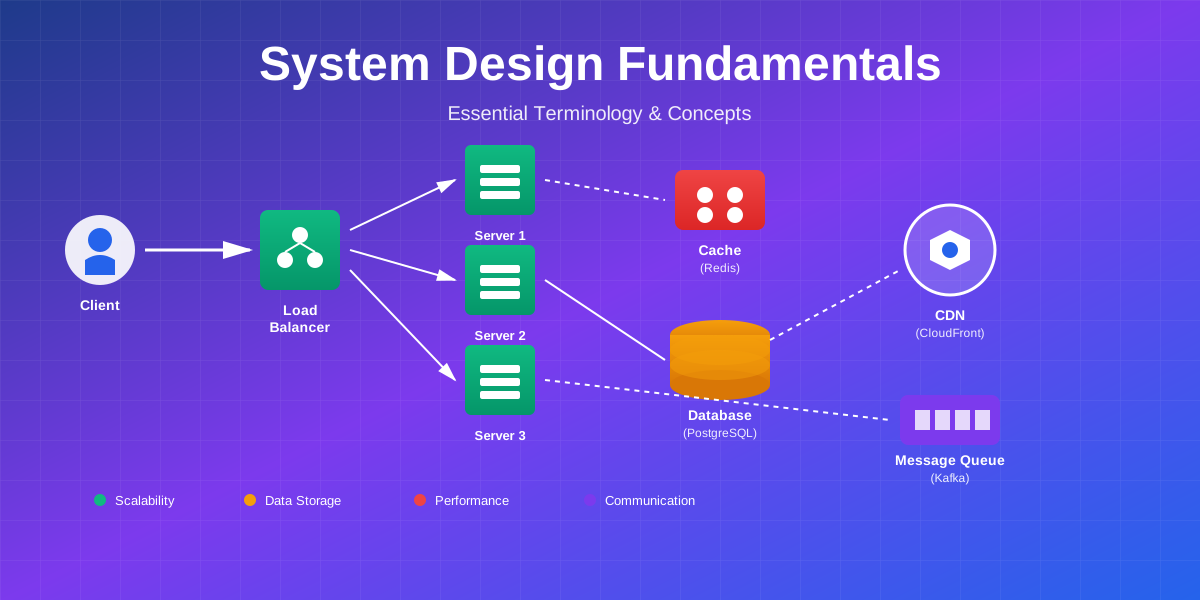
Client → Load Balancer → App Servers → Cache → Database
                                     → Message Queue → Workers
R - Refinement (10-15 minutes)
Identify bottlenecks:
- What fails first as you scale?
- How do you fix it?
Discuss trade-offs:
- Why this choice over alternatives?
- What are the downsides?
Address concerns:
- Security
- Monitoring
- Deployment
- Cost
Common Mistakes to Avoid
⚠️ Learn from Others' Errors
Avoid these common pitfalls in system design interviews and real-world projects.
❌ Jumping to solutions
Don't start designing before understanding requirements. Ask clarifying questions first.
❌ Over-engineering
Don't use microservices for 1,000 users. Start simple, add complexity when needed.
❌ Ignoring trade-offs
Every decision has pros and cons. Discuss both sides.
❌ Forgetting non-functional requirements
Don't just focus on features. Consider scalability, availability, latency.
❌ Not considering failures
Systems fail. Discuss redundancy, failover.
❌ Ignoring monitoring
You can't fix what you can't see. Include logging, metrics, alerts.
1. Jumping to solutions
- Don’t start designing before understanding requirements
- Ask clarifying questions first
2. Over-engineering
- Don’t use microservices for 1,000 users
- Start simple, add complexity when needed
3. Ignoring trade-offs
- Every decision has pros and cons
- Discuss both sides
4. Forgetting non-functional requirements
- Don’t just focus on features
- Consider scalability, availability, latency
5. Not considering failures
- Systems fail
- Discuss redundancy, failover
6. Ignoring monitoring
- You can’t fix what you can’t see
- Include logging, metrics, alerts
7. Unrealistic estimates
- Use reasonable numbers
- Show your calculations
8. Not asking questions
- Interviewers expect questions
- Clarify ambiguities
9. Going too deep too fast
- Start high-level
- Dive deep only when asked
10. Not managing time
- 45-60 minute interview
- Allocate time wisely
Conclusion
🎯 You're Ready to Design Systems
System design isn't about memorizing solutions. It's about understanding building blocks and knowing when to use each one.
You now have the vocabulary. You understand the concepts. You know the trade-offs.
💡 Key Takeaways
Start simple. Every system begins with basic components. Add complexity only when you have a specific problem to solve.
Understand trade-offs. There's no perfect solution. Consistency vs availability. Latency vs throughput. Cost vs performance. Every decision has consequences.
Think in layers. Client, load balancer, application, cache, database. Each layer solves specific problems.
Scale incrementally. Don't design for a billion users on day one. Scale as problems emerge.
Practice. Design systems you use daily. How would you build Twitter? YouTube? Uber? Start simple, identify bottlenecks, add complexity.
Quick Reference Cheat Sheet
📋 System Design Quick Reference
Bookmark this section for quick lookups during interviews and design sessions
⚖️ Scalability
Vertical: Add more power (CPU, RAM)
Horizontal: Add more machines
Auto-scaling: Dynamic based on load
Use: Start vertical, scale horizontal
🗄️ Databases
SQL: ACID, relationships, structured
NoSQL: Scale, flexible, eventual consistency
Replication: Primary + Replicas for reads
Use: SQL for transactions, NoSQL for scale
⚡ Caching
Layers: Browser → CDN → Redis → DB
Speed: 0ms → 20ms → 1ms → 50ms
Strategies: Cache-aside, Write-through
Use: Cache hot data, set TTL
🔄 Load Balancing
Algorithms: Round Robin, Least Connections
Types: Layer 4 (fast) vs Layer 7 (flexible)
Health Checks: Every 5s, 2 failures = out
Use: Distribute traffic, enable redundancy
⚖️ CAP Theorem
CP: Consistency + Partition (MongoDB)
AP: Availability + Partition (Cassandra)
Trade-off: Can't have all three
Use: CP for banking, AP for social media
📬 Message Queues
Purpose: Async processing, decouple services
Tools: Kafka, RabbitMQ, AWS SQS
Patterns: Point-to-point, Pub/Sub
Use: Email, notifications, background jobs
📊 Availability
99.9%: 8.76 hours downtime/year
99.99%: 52 minutes downtime/year
99.999%: 5 minutes downtime/year
Cost: Each nine costs 10x more
🔧 Microservices
Pros: Independent deploy, scale, tech
Cons: Complex, network overhead
Needs: API Gateway, Service Discovery
Use: Large teams, need independent scaling
🎯 Golden Rules for System Design
1. Start Simple: Don't over-engineer. Add complexity only when needed.
2. Know Trade-offs: Every decision has pros and cons. Discuss both.
3. Scale Incrementally: Design for current needs + 10x growth.
4. Plan for Failure: Everything fails. Design for redundancy.
5. Monitor Everything: You can't fix what you can't see.
6. Ask Questions: Clarify requirements before designing.
What’s Next?
🚀 Continue Your Learning Journey
This guide covered the fundamentals. Each concept deserves deeper exploration. In upcoming posts, we'll dive into:
💾 Caching Deep Dive
Strategies, invalidation, distributed caching
🗄️ Database Sharding
Consistent hashing, rebalancing, cross-shard queries
🔧 Microservices Patterns
Service mesh, API gateway, saga pattern
🏗️ Real System Designs
Twitter, Instagram, Uber, Netflix
📚 The best way to learn is to practice.
Pick a system and design it. Start with requirements, estimate scale, draw architecture, identify bottlenecks.
Resources for continued learning:
- System Design Primer (GitHub)
- Designing Data-Intensive Applications (Book)
- Company engineering blogs (Netflix, Uber, Airbnb)
- System design interview courses
Real-World Case Studies
🏢 How Tech Giants Use These Concepts
Real implementations from companies you know
Netflix: Microservices at Scale
200M+ subscribers, 1B+ hours watched weekly
Architecture Decisions:
- Microservices: 700+ services for different features (recommendations, billing, streaming)
- CDN: Open Connect CDN with servers in ISPs worldwide for low latency
- Cassandra: NoSQL for viewing history (billions of records, eventual consistency OK)
- Chaos Engineering: Chaos MonkeyA tool developed by Netflix that randomly terminates instances in production to test system resilience and ensure services can withstand failures. Part of the Simian Army suite.Learn more → randomly kills servers to test resilience
- Auto-scaling: AWS auto-scaling handles traffic spikes during new releases
💡 Key Takeaway: Microservices enable independent scaling and deployment. Each team owns their service end-to-end.
Instagram: Scaling Photo Storage
2B+ users, 100M+ photos uploaded daily
Architecture Decisions:
- Sharding: PostgreSQL sharded by user ID (thousands of shards)
- CDN: Facebook CDN serves images from edge locations worldwide
- Caching: Memcached for feed data, Redis for real-time features
- Async Processing: Celery queues for image processing (thumbnails, filters)
- Read Replicas: Multiple replicas per shard for read scaling
💡 Key Takeaway: Sharding enables horizontal scaling of databases. CDN reduces latency for global users.
Uber: Real-Time Matching System
20M+ rides daily, sub-second matching
Architecture Decisions:
- Geospatial Indexing: Custom geo-indexing for fast driver lookup by location
- Kafka: Event streaming for real-time location updates
- Redis: In-memory cache for active drivers and riders
- Microservices: 2000+ services (matching, pricing, routing, payments)
- Circuit Breakers: Prevent cascading failures between services
💡 Key Takeaway: Real-time systems need in-memory caching and event streaming. Geospatial indexing enables fast location queries.
Twitter: Timeline Generation
500M tweets daily, 6000 tweets/second peak
Architecture Decisions:
- Fan-out on Write: Pre-compute timelines for followers when tweet posted
- Redis: Cache timelines in memory for instant loading
- Manhattan: Custom distributed database for tweets (key-value store)
- Hybrid Approach: Fan-out for normal users, on-demand for celebrities (millions of followers)
- Rate Limiting: Prevent abuse and ensure fair usage
💡 Key Takeaway: Pre-computation (fan-out) trades write cost for read speed. Hybrid approaches handle edge cases.
Practice Problems
💪 Test Your Knowledge
Try designing these systems using concepts from this guide
Design a URL Shortener (like bit.ly)
Requirements:
- Generate short URL from long URL
- Redirect short URL to original URL
- Track click analytics
- Handle 100M URLs, 1000 requests/second
💡 Hints (click to expand)
• Use base62 encoding for short URLs (a-z, A-Z, 0-9)
• SQL database for URL mappings (small dataset)
• Redis cache for popular URLs
• Async queue for analytics processing
Design Instagram Feed
Requirements:
- Users can post photos and follow others
- Generate personalized feed of followed users' posts
- Support likes and comments
- Handle 1B users, 100M daily active users
💡 Hints (click to expand)
• Sharded PostgreSQL for user data and relationships
• CDN for image storage and delivery
• Redis for pre-computed feeds (fan-out on write)
• Cassandra for activity logs (likes, comments)
• Message queue for async feed generation
Design Uber Ride Matching System
Requirements:
- Match riders with nearby drivers in real-time
- Track driver locations continuously
- Calculate dynamic pricing (surge)
- Handle 20M rides daily, sub-second matching
💡 Hints (click to expand)
• Geospatial indexing (QuadTree/S2) for location queries
• Redis for active driver/rider state (in-memory)
• Kafka for real-time location streaming
• Microservices: matching, pricing, routing, payments
• WebSockets for real-time updates to apps
• Circuit breakers between services
📝 How to Practice:
- Start with requirements - clarify functional and non-functional needs
- Estimate scale - calculate QPS, storage, bandwidth
- Draw high-level architecture - components and data flow
- Identify bottlenecks - what fails first as you scale?
- Optimize - add caching, sharding, replication as needed
- Discuss trade-offs - why this choice over alternatives?
Let’s Connect
System design is a journey. I’m constantly learning from real-world systems and sharing discoveries.
Have questions about specific concepts? Designing a system and want feedback? Reach out—I love discussing architecture and trade-offs.
Remember: every massive system started simple. Twitter began as a basic web app. Instagram was just photo uploads. They evolved by solving one problem at a time.
You now have the foundation. Start designing, keep learning, and watch these concepts become second nature.
Happy designing!
Comments & Discussion
Join the conversation! Share your thoughts, ask questions, or provide feedback below.