RAG Explained: Traditional vs Vectorless Retrieval-Augmented Generation
You built a chatbot using GPT-4. It’s impressive—until a customer asks about your latest product launch from last week. The bot confidently makes up features that don’t exist. Your support team is now spending hours correcting AI hallucinations.
This is the problem that nearly killed enterprise AI adoption. LLMs are brilliant, but they only know what they were trained on. Ask about anything after their training cutoff date, or anything specific to your business, and they’ll either admit ignorance or worse—hallucinate convincingly wrong answers.
RAG (Retrieval-Augmented Generation) solved this. Now ChatGPT can browse the web. Perplexity AI cites sources. Your enterprise chatbot can answer questions using your company’s internal docs. The AI doesn’t need to memorize everything—it just needs to know where to look.
In this guide, I’ll show you how RAG works, why traditional vector-based RAG isn’t always the answer, and how vectorless RAG is opening new possibilities. Real examples, real trade-offs, no fluff.
What Is RAG and Why Does It Matter?
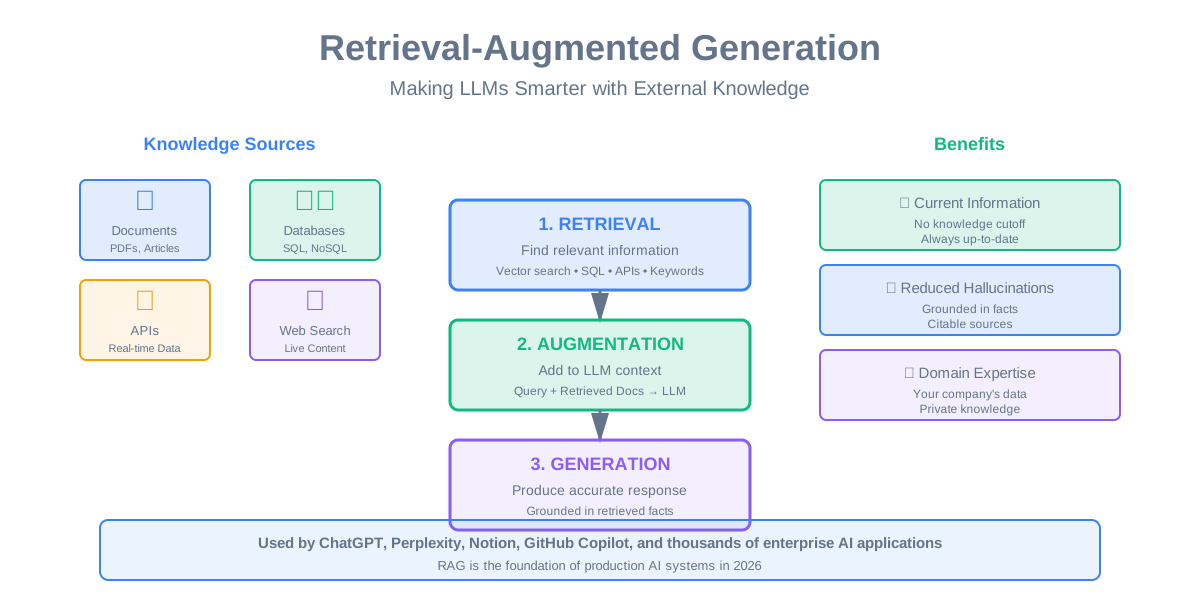
RAG stands for Retrieval-Augmented Generation. Break that down:
Retrieval: Find relevant information from external sources (documents, databases, APIs) Augmented: Add that information to the AI’s context Generation: Let the AI generate a response using both its training and the retrieved info
Think of it like an open-book exam versus a closed-book exam. Without RAG, your AI is taking a closed-book exam—it can only use what it memorized during training. With RAG, it gets to look things up, cite sources, and give accurate answers based on current information.
The Problem RAG Solves
LLMs have three fundamental limitations:
Knowledge Cutoff: GPT-4’s training data ends in April 2023. Ask it about events after that, and it’s clueless. Your business changes daily—product updates, policy changes, new documentation. The AI needs access to current information.
Hallucinations: When LLMs don’t know something, they often make stuff up. And they do it confidently. This is catastrophic for customer support, medical advice, legal information, or anything where accuracy matters.
Domain-Specific Knowledge: GPT-4 knows general information, but it doesn’t know your company’s internal processes, your codebase, your customer data. You need a way to give it access to your specific knowledge.
RAG fixes all three problems. The AI retrieves current, accurate, domain-specific information and uses it to generate responses. No hallucinations (or at least, far fewer). No outdated information. No generic answers.
Real-World Impact
OpenAI’s ChatGPT: Added browsing capability in 2023. Now it can search the web, read articles, and cite sources. This transformed it from a knowledge snapshot into a research assistant.
Perplexity AI: Built entirely around RAG. Every answer includes citations to sources. It’s like having a research assistant that reads dozens of articles and summarizes them for you. Over 10 million monthly users.
Microsoft Copilot: Uses RAG to access your emails, documents, and calendar. It can answer “What did Sarah say about the Q4 budget?” by actually reading your emails, not guessing.
Notion AI: Searches your workspace to answer questions. “What were the action items from last week’s standup?” It finds the meeting notes and extracts the answer.
GitHub Copilot: Uses RAG to search your codebase and relevant documentation. It suggests code that matches your project’s patterns and conventions, not just generic examples.
The pattern is clear: RAG is how you make LLMs useful for real-world applications.
How Traditional RAG Works
Let’s break down the classic RAG pipeline that powers most AI applications today.
The Basic Flow
When a user asks a question, here’s what happens:
- Convert the question to a vector using an embedding model
- Search your knowledge base for documents with similar vectors
- Retrieve the top K most relevant documents (usually 3-10)
- Stuff those documents into the LLM’s context along with the question
- Generate an answer using both the retrieved docs and the LLM’s knowledge
The magic is in step 2—semantic search using vector embeddings. This finds documents that are conceptually similar to the question, even if they don’t share exact keywords.
A Concrete Example
Let’s say you’re building a customer support chatbot for an e-commerce company. A customer asks: “How long does shipping take to Canada?”
Without RAG: The LLM might say “Typically 5-7 business days” based on general knowledge. But your company actually offers 2-day shipping to Canada. Wrong answer, unhappy customer.
With RAG:
- Question gets converted to a vector
- System searches your knowledge base (shipping policies, FAQ docs, etc.)
- Finds the document: “Canada Shipping Policy - 2-day express available”
- Passes both the question and the retrieved document to the LLM
- LLM generates: “We offer 2-day express shipping to Canada. You can select this option at checkout.”
Accurate answer. Happy customer. That’s the power of RAG.
Building a Traditional RAG System
Let’s get practical. Here’s what you need to build a production RAG system.
Step 1: Prepare Your Knowledge Base
You need documents to retrieve from. This could be:
- Product documentation
- Customer support articles
- Internal wikis
- API documentation
- Past conversations
- Database records
The key is chunking—breaking documents into smaller pieces. Why? Because you can’t stuff an entire 50-page manual into the LLM’s context. You need to find the relevant sections.
Chunking strategies:
Fixed-size chunks: Split every 500 tokens. Simple but can break mid-sentence or mid-concept.
Semantic chunks: Split at natural boundaries (paragraphs, sections, topics). Better quality but requires more processing.
Sliding window: Overlapping chunks so context isn’t lost at boundaries. A sentence that ends chunk 1 also starts chunk 2.
Most production systems use semantic chunking with some overlap. Aim for 200-500 tokens per chunk—small enough to be specific, large enough to have context.
Step 2: Generate Embeddings
Convert each chunk to a vector using an embedding model. This is the same process we covered in the vector embeddings post—you’re creating numerical representations that capture meaning.
Popular embedding models:
- OpenAI text-embedding-3-small (1,536 dimensions, $0.02 per 1M tokens)
- Sentence Transformers (free, open source, 384 dimensions)
- Cohere embeddings (multilingual, 1,024 dimensions)
- Google’s Vertex AI embeddings (768 dimensions)
For most applications, Sentence Transformers is a solid starting point. It’s free, fast, and good enough. You can always upgrade later.
Step 3: Store in a Vector Database
You need a database optimized for similarity search. Regular databases can’t efficiently find “documents similar to this vector.”
Vector database options:
- Pinecone: Managed, easy, scales automatically ($70/month for 1M vectors)
- Weaviate: Open source, feature-rich, self-hosted
- Qdrant: Rust-based, very fast, open source with managed option
- Chroma: Simple, embedded, great for prototypes
- pgvector: PostgreSQL extension, good if you’re already using Postgres
For prototyping, use Chroma—it’s dead simple. For production, Pinecone if you want managed, Qdrant if you want to self-host.
Step 4: Build the Retrieval Logic
When a query comes in:
- Embed the query using the same model you used for documents
- Search the vector database for top K similar chunks (K = 3-10 typically)
- Optionally re-rank results using additional signals (recency, popularity, user permissions)
- Return the most relevant chunks
The retrieval should take under 50ms. Any slower and your chatbot feels laggy.
Step 5: Augment and Generate
Now comes the LLM part. You construct a prompt that includes:
- System instructions (“You are a helpful customer support agent”)
- Retrieved documents (“Here are relevant docs: [doc1], [doc2], [doc3]”)
- User question (“How long does shipping take to Canada?”)
- Instructions (“Answer based on the provided documents. Cite sources.”)
The LLM reads everything and generates a response. Because it has the actual shipping policy in context, it gives an accurate answer.
Real-World RAG Implementations
Let’s look at how companies actually use RAG in production.
ChatGPT with Browsing
When you enable browsing in ChatGPT, here’s what happens behind the scenes:
- You ask a question that requires current information
- ChatGPT decides it needs to search (using a classifier or heuristic)
- It generates search queries and uses Bing API to search the web
- Retrieves top search results and fetches their content
- Reads the web pages (with rate limiting and politeness)
- Summarizes findings and generates a response with citations
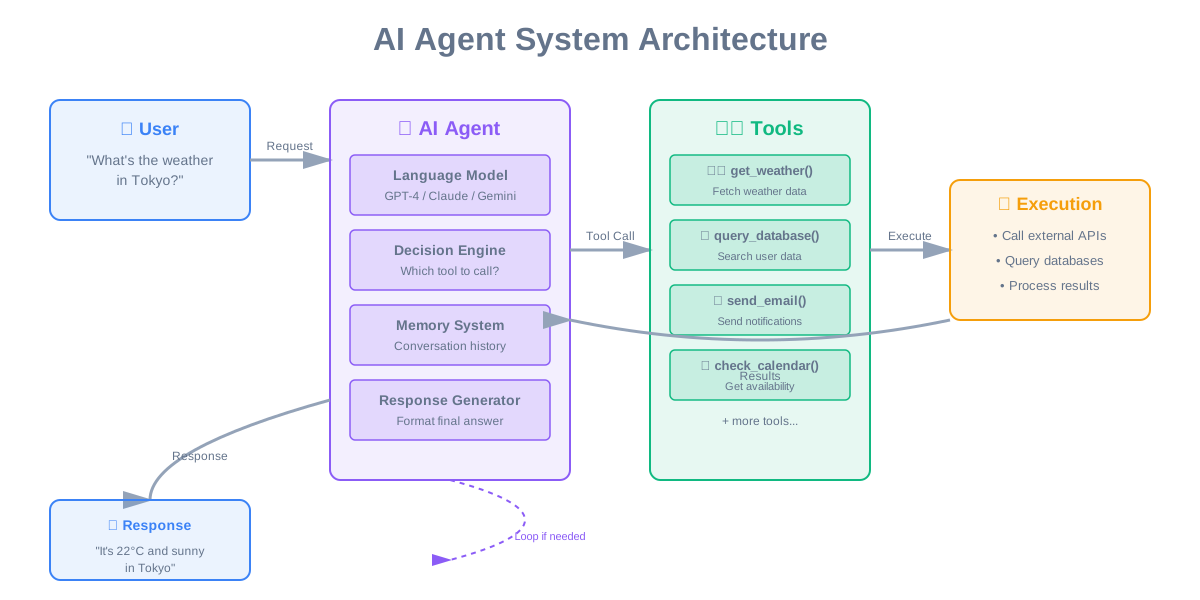
The clever part? ChatGPT decides when to search. Not every question needs retrieval. “What’s 2+2?” doesn’t need a web search. “What’s the weather in Tokyo?” does.
This multi-step reasoning (should I search? what should I search for? how do I synthesize results?) is what makes it feel intelligent.
Perplexity AI: RAG as a Product
Perplexity built their entire product around RAG. Every answer includes citations. Here’s their approach:
- User asks a question
- Perplexity generates multiple search queries (query expansion)
- Searches the web using multiple search engines
- Retrieves and ranks results
- Reads the top 10-20 sources
- Generates a comprehensive answer with inline citations
- Shows sources at the bottom for verification
The key innovation? They don’t just retrieve once. They do iterative retrieval—if the first set of results doesn’t answer the question, they search again with refined queries. This multi-hop retrieval dramatically improves answer quality.
Notion AI: Private Knowledge RAG
Notion’s AI searches your workspace—notes, docs, databases. The challenge? Privacy and permissions.
Their RAG system:
- Only searches documents you have access to (permission-aware retrieval)
- Chunks documents while preserving structure (headings, lists, tables)
- Uses hybrid search (vector similarity + keyword matching)
- Caches frequently accessed chunks for speed
- Updates index in real-time as you edit documents
The result? You can ask “What did we decide about the pricing model?” and it finds the relevant meeting notes, even if they’re from 6 months ago and buried in a nested page.
Stripe Documentation Assistant
Stripe uses RAG to help developers find answers in their extensive API documentation. The interesting part? They combine multiple retrieval strategies:
Vector search: Finds semantically similar docs Keyword search: Matches exact API names and error codes Code search: Finds similar code examples Popularity ranking: Prioritizes frequently accessed docs
This hybrid approach handles different query types. “How do I create a payment intent?” benefits from semantic search. “What’s error code 402?” needs exact keyword matching.
The Limitations of Traditional RAG
Vector-based RAG is powerful, but it’s not perfect. Here are the real problems you’ll face.
Problem 1: The Chunking Dilemma
You need to chunk documents, but how? Too small and you lose context. Too large and you can’t fit enough chunks in the LLM’s context window.
Say you have a 10-page document about shipping policies. You chunk it into 20 pieces. A user asks about Canadian shipping. The relevant information is split across 3 chunks—one mentions the 2-day delivery, another mentions the cost, a third mentions customs.
Do you retrieve all 3? That uses up precious context space. Retrieve just 1? You give an incomplete answer.
There’s no perfect solution. You tune chunk size and overlap based on your specific documents and query patterns.
Problem 2: Semantic Search Isn’t Always Right
Vector search finds semantically similar content. But sometimes you need exact matches.
A user asks: “What’s the error code for invalid API key?” The answer is “401”. But vector search might return documents about “authentication errors” or “API security” that mention 401 in passing. The exact, direct answer gets buried.
This is why hybrid search (vectors + keywords) performs better than pure vector search. You need both semantic understanding and exact matching.
Problem 3: The Context Window Limit
LLMs have limited context windows. GPT-4 Turbo has 128K tokens, but that’s still finite. If you retrieve 10 documents of 1,000 tokens each, you’ve used 10K tokens just for context. That leaves less room for conversation history and the actual response.
You’re constantly making trade-offs: retrieve more documents for better coverage, or retrieve fewer to leave room for longer conversations?
Problem 4: Retrieval Latency
Every retrieval adds latency. Embedding the query takes 10-20ms. Vector search takes 20-50ms. Fetching document content takes another 10-30ms. That’s 40-100ms before you even call the LLM.
For a chatbot, that’s noticeable. Users expect instant responses. Every millisecond of latency hurts the experience.
Problem 5: The Cold Start Problem
Your RAG system is only as good as your knowledge base. If you don’t have documents covering a topic, retrieval returns nothing useful, and the LLM falls back to its training data (which might be outdated or wrong).
Building a comprehensive knowledge base takes time. You need to identify gaps, create missing documentation, and continuously update as things change.
Enter Vectorless RAG
Here’s a controversial take: you don’t always need vector embeddings for RAG. Sometimes simpler approaches work better, cost less, and are easier to maintain.
Vectorless RAG uses traditional retrieval methods—keyword search, SQL queries, API calls—instead of vector similarity search. And for many use cases, it’s actually superior.
What Is Vectorless RAG?
Instead of converting everything to vectors and doing similarity search, you use:
Keyword search: Good old Elasticsearch or PostgreSQL full-text search SQL queries: Direct database lookups based on structured data API calls: Fetch data from external services in real-time Graph traversal: Follow relationships in knowledge graphs Hybrid approaches: Combine multiple retrieval methods
The key insight: not all retrieval needs semantic understanding. Sometimes you just need to find the right record in a database or call the right API.
When Vectorless RAG Wins
Structured data queries: User asks “What’s my order status for order #12345?” You don’t need semantic search—you need a SQL query: SELECT status FROM orders WHERE id = 12345. Done in 5ms, no embeddings needed.
Exact matching: “What’s the error code for timeout?” You want documents containing “timeout” and “error code”, not semantically similar documents about “delays” or “failures”. Keyword search is faster and more accurate.
Real-time data: “What’s the current price of Bitcoin?” You don’t search documents—you call an API. The data changes every second; no point in indexing it.
Hierarchical navigation: “Show me all products in the Electronics > Laptops > Gaming category.” This is a tree traversal, not a similarity search. SQL or a graph database handles this better than vectors.
Multi-step reasoning: “Find customers who bought product A but not product B in the last 30 days.” This requires complex SQL joins and filters. Vectors can’t express this kind of logic.
A Concrete Vectorless RAG Example
Let’s build a customer support bot for an e-commerce site using vectorless RAG.
User asks: “Where’s my order?”
The system:
- Extracts the user ID from the session
- Runs SQL query:
SELECT * FROM orders WHERE user_id = ? ORDER BY created_at DESC LIMIT 5 - Gets the user’s recent orders
- Formats the data as context for the LLM
- LLM generates: “Your most recent order (#12345) shipped yesterday and will arrive March 31. Tracking: [link]”
No embeddings. No vector database. Just a SQL query and an LLM. Total latency? 10ms for the query + 1-2s for LLM generation. That’s faster than vector-based RAG.
User asks: “Can I return this?”
The system:
- Identifies the product from context (order #12345, product ID 789)
- Runs SQL:
SELECT return_policy FROM products WHERE id = 789 - Also queries:
SELECT days_since_delivery FROM orders WHERE id = 12345 - Retrieves: “30-day return policy” and “delivered 5 days ago”
- LLM generates: “Yes, you can return this item. You have 25 days left in your 30-day return window. Here’s how: [instructions]”
Again, no vectors. Just structured data queries. The LLM gets exactly the information it needs, nothing more, nothing less.
Traditional RAG vs Vectorless RAG: The Showdown
Let’s compare these approaches across different scenarios.
Scenario 1: Customer Support
Question: “What’s my account balance?”
Traditional RAG:
- Embed the question
- Search vector database for similar documents
- Might retrieve: FAQ about checking balances, documentation about account types
- LLM generates generic answer
- Latency: 50ms retrieval + 2s generation
- Accuracy: Medium (no actual balance data)
Vectorless RAG:
- Extract user ID from session
- SQL query:
SELECT balance FROM accounts WHERE user_id = ? - Get actual balance: $1,234.56
- LLM generates: “Your current balance is $1,234.56”
- Latency: 5ms query + 1s generation
- Accuracy: Perfect (real data)
Winner: Vectorless RAG. Faster, more accurate, simpler.
Scenario 2: Documentation Search
Question: “How do I authenticate API requests?”
Traditional RAG:
- Embed the question
- Search documentation vectors
- Retrieve relevant sections about authentication
- LLM synthesizes answer from multiple docs
- Latency: 40ms retrieval + 2s generation
- Accuracy: High (finds conceptually related docs)
Vectorless RAG:
- Keyword search for “authenticate” AND “API”
- Might miss docs that use “authorization” instead
- Retrieves fewer relevant results
- Latency: 20ms search + 2s generation
- Accuracy: Medium (keyword matching limitations)
Winner: Traditional RAG. Semantic understanding matters for documentation.
Scenario 3: Real-Time Data
Question: “What’s the weather in Tokyo right now?”
Traditional RAG:
- Embed the question
- Search for weather-related documents
- Retrieves old weather reports or general info about Tokyo weather
- LLM generates outdated answer
- Latency: 40ms retrieval + 2s generation
- Accuracy: Low (stale data)
Vectorless RAG:
- Detect this is a weather query
- Call weather API with location=”Tokyo”
- Get current weather: 18°C, partly cloudy
- LLM generates: “It’s currently 18°C and partly cloudy in Tokyo”
- Latency: 100ms API call + 1s generation
- Accuracy: Perfect (real-time data)
Winner: Vectorless RAG. Real-time data needs API calls, not document search.
Scenario 4: Complex Research
Question: “Compare the security features of AWS, Azure, and Google Cloud for healthcare applications.”
Traditional RAG:
- Embed the question
- Search for documents about cloud security and healthcare
- Retrieves relevant sections from multiple sources
- LLM synthesizes comprehensive comparison
- Latency: 60ms retrieval + 5s generation
- Accuracy: High (finds nuanced information across sources)
Vectorless RAG:
- Keyword search for “AWS security healthcare”
- Misses documents that discuss concepts without exact keywords
- Retrieves fewer relevant results
- LLM has less context to work with
- Latency: 30ms search + 4s generation
- Accuracy: Medium (misses semantic connections)
Winner: Traditional RAG. Complex research benefits from semantic understanding.
Hybrid RAG: The Best of Both Worlds
Here’s the truth: most production systems don’t choose one approach. They use both.
The Hybrid Approach
Build a query router that decides which retrieval method to use:
Structured data queries → SQL Real-time data → API calls Exact matching → Keyword search Semantic search → Vector embeddings Complex research → Multiple methods combined
The router can be rule-based (pattern matching) or ML-based (classifier that predicts query type). Most systems start with rules and add ML later.
Example: E-commerce Support Bot
Query: “Where’s my order?”
- Router detects: order status query
- Method: SQL lookup
- Retrieval: 5ms
Query: “Do you have waterproof hiking boots?”
- Router detects: product search
- Method: Vector search + filters
- Retrieval: 40ms
Query: “What’s your return policy?”
- Router detects: policy question
- Method: Keyword search in FAQ docs
- Retrieval: 15ms
Query: “Compare your shipping options”
- Router detects: comparison query
- Method: Retrieve all shipping docs (keyword) + synthesize
- Retrieval: 25ms
Each query type gets the optimal retrieval method. This is how you build production-quality RAG systems.
Real-World Hybrid Systems
Intercom: Their customer support AI uses SQL for user data, vector search for help articles, and API calls for real-time metrics. The router decides based on query intent.
Zendesk AI: Combines ticket history (SQL), knowledge base (vectors), and external integrations (APIs). They report 30% faster resolution times compared to pure vector RAG.
Salesforce Einstein: Uses graph traversal for relationship queries (“Show me all contacts at companies in the tech industry”), vector search for finding similar cases, and SQL for structured data. The hybrid approach handles the complexity of CRM data.
Advanced RAG Techniques
Once you have the basics working, here are techniques that significantly improve quality.
Query Expansion
Don’t just search with the user’s exact question. Generate multiple variations:
Original: “How do I reset my password?” Expansions:
- “password reset process”
- “forgot password recovery”
- “change account password”
- “reset login credentials”
Search with all variations and combine results. This catches documents that use different terminology.
LLMs are great at query expansion. Ask GPT-4 to generate 5 variations of a query, then search with all of them. Retrieval quality improves by 20-30%.
Hypothetical Document Embeddings (HyDE)
Here’s a clever trick: instead of embedding the query, have the LLM generate a hypothetical answer, then embed that answer and search for similar documents.
Why does this work? Because the hypothetical answer uses the same vocabulary and structure as actual documents. It’s more similar to what you’re looking for than the question itself.
Example:
- Query: “How do I optimize database queries?”
- Hypothetical answer: “To optimize database queries, use indexes on frequently queried columns, avoid SELECT *, use EXPLAIN to analyze query plans…”
- Embed the hypothetical answer and search
This finds documents that actually explain query optimization, not just documents that mention “database” and “optimize.”
Re-Ranking
Don’t just use the top K results from vector search. Re-rank them using additional signals:
Recency: Newer documents might be more relevant Popularity: Frequently accessed docs are often higher quality User feedback: Docs with positive ratings rank higher Source authority: Official docs rank higher than community posts Cross-encoder scoring: Use a specialized model to score query-document pairs
The initial vector search is fast but approximate. Re-ranking with a more sophisticated model improves precision.
Cohere’s Rerank API is purpose-built for this. It takes your query and candidate documents, scores each pair, and returns them sorted by relevance. It’s slower than vector search alone but much more accurate.
Multi-Hop Retrieval
Sometimes one retrieval isn’t enough. You need to retrieve, read, then retrieve again based on what you learned.
Example:
- Query: “What’s the recommended tire pressure for a 2023 Tesla Model 3?”
- First retrieval: Find the Model 3 manual
- Read: “Tire pressure specifications are in the vehicle placard”
- Second retrieval: Search for “vehicle placard location Model 3”
- Find: “The placard is on the driver’s door jamb”
- Third retrieval: Get the actual pressure specs
- Generate answer with all context
This iterative retrieval mimics how humans research—you find one piece of info, which leads you to the next, until you have everything you need.
Contextual Compression
You retrieved 10 documents, but they’re full of irrelevant information. Instead of passing all 10,000 tokens to the LLM, compress them first.
Use a smaller, faster LLM to extract only the relevant sentences from each document. Then pass the compressed context to the main LLM.
Before compression: 10 documents × 1,000 tokens = 10,000 tokens After compression: 10 documents × 200 tokens = 2,000 tokens
You’ve saved 8,000 tokens of context space. That’s room for more retrieved documents or longer conversation history.
LangChain’s ContextualCompressionRetriever does this automatically. It’s a game-changer for long documents.
Building Your First RAG System
Let’s get practical. Here’s how to build a simple RAG system in an afternoon.
The Minimal Setup
What you need:
- Python with LangChain library
- OpenAI API key (or use local LLM)
- Chroma vector database (embedded, no setup needed)
- Your documents (PDFs, text files, whatever)
The implementation:
Load your documents, split them into chunks, generate embeddings, store in Chroma. When a query comes in, retrieve relevant chunks, pass them to the LLM with the question, get an answer.
Total code? About 50 lines. Total time? 2-3 hours including testing.
The Production Setup
For production, you need more:
Infrastructure:
- Managed vector database (Pinecone or Qdrant)
- Caching layer (Redis for query results)
- Monitoring (track latency, costs, quality)
- Rate limiting (prevent abuse)
Quality improvements:
- Hybrid search (vectors + keywords)
- Query expansion
- Re-ranking
- Contextual compression
- User feedback loop
Operational concerns:
- Document update pipeline (how do you keep embeddings fresh?)
- Permission handling (who can access what?)
- Cost optimization (caching, batching)
- Failure handling (what if vector DB is down?)
This takes weeks to build properly. But start simple and iterate.
Common Pitfalls and How to Avoid Them
I’ve seen teams waste months on RAG implementations that don’t work. Here are the mistakes to avoid.
Pitfall 1: Over-engineering from day one
You don’t need a sophisticated hybrid system with re-ranking and compression on day one. Start with basic vector search. Get it working. Then optimize based on actual problems you encounter.
I’ve seen teams spend 3 months building the perfect RAG system before testing it with real users. When they finally launched, they discovered their chunking strategy was completely wrong for their documents. Start simple, iterate fast.
Pitfall 2: Ignoring retrieval quality
Your RAG system is only as good as your retrieval. If you’re retrieving irrelevant documents, the LLM will generate garbage answers.
Monitor retrieval metrics: precision (are retrieved docs relevant?), recall (are you finding all relevant docs?), and latency. Set up logging to see what’s being retrieved for each query. You’ll quickly spot patterns and problems.
Pitfall 3: Chunk size guessing
Don’t just pick 500 tokens because that’s what the tutorial used. Test different chunk sizes with your actual documents and queries. I’ve seen optimal chunk sizes range from 200 to 2,000 tokens depending on document structure.
Run experiments: try 200, 500, 1,000, and 2,000 token chunks. Measure retrieval quality for each. Pick the winner.
Pitfall 4: Forgetting about cost
Embeddings cost money. If you’re embedding millions of documents, that adds up. OpenAI charges $0.02 per 1M tokens for embeddings. Sounds cheap until you’re processing 100M tokens.
Calculate costs before you build. Consider using smaller embedding models (384 dimensions instead of 1,536) or open-source alternatives. The quality difference is often negligible.
Pitfall 5: No fallback strategy
What happens when retrieval returns nothing useful? Your LLM falls back to its training data and might hallucinate.
Build a confidence threshold. If retrieval scores are below 0.7, tell the user “I don’t have enough information to answer that” instead of making something up. Honesty beats hallucination.
Evaluating RAG Performance
You can’t improve what you don’t measure. Here’s how to evaluate your RAG system.
Retrieval Metrics
Precision: Of the documents you retrieved, how many were actually relevant? Recall: Of all relevant documents, how many did you retrieve? MRR (Mean Reciprocal Rank): How high up is the first relevant document? NDCG (Normalized Discounted Cumulative Gain): Measures ranking quality
For most applications, focus on precision. Better to retrieve 3 highly relevant docs than 10 docs where only 3 are relevant.
Generation Metrics
Faithfulness: Does the answer stick to the retrieved documents, or does it hallucinate? Answer relevance: Does the answer actually address the question? Context relevance: Were the retrieved documents relevant to the question?
You can measure these automatically using LLM-as-a-judge. Have GPT-4 evaluate each answer on a 1-5 scale for faithfulness and relevance. It’s not perfect, but it’s better than nothing.
End-to-End Metrics
Latency: Total time from query to response (target: under 3 seconds) Cost per query: Embedding + retrieval + LLM generation costs User satisfaction: Thumbs up/down, explicit feedback Task completion rate: Did the user get what they needed?
The metric that matters most? User satisfaction. If users are happy, your RAG system is working.
Building a Test Set
Create a golden dataset of 100-200 question-answer pairs. For each:
- The question
- The expected answer
- The documents that should be retrieved
- The evaluation criteria
Run your RAG system against this test set regularly. Track metrics over time. This catches regressions when you make changes.
Pro tip: Start with 20 examples. Add more as you encounter edge cases in production. Your test set should evolve with your system.
The Decision Framework: Which RAG Approach to Use?
Here’s how to decide between traditional RAG, vectorless RAG, or hybrid.
Use Traditional RAG (Vector-Based) When:
✓ You have unstructured text (documentation, articles, support tickets) ✓ Questions can be phrased many different ways ✓ You need semantic understanding, not just keyword matching ✓ You’re doing research or analysis across many documents ✓ Your knowledge base is large (10,000+ documents)
Examples: Documentation search, research assistants, content discovery, semantic Q&A
Use Vectorless RAG When:
✓ You have structured data (databases, APIs) ✓ Questions require exact matching (IDs, codes, names) ✓ You need real-time data (prices, inventory, weather) ✓ Latency is critical (need sub-50ms retrieval) ✓ You want to minimize infrastructure complexity
Examples: Customer support (order status, account info), real-time data queries, database Q&A, transactional systems
Use Hybrid RAG When:
✓ You have both structured and unstructured data ✓ Different query types need different retrieval methods ✓ You need maximum accuracy and flexibility ✓ You have the engineering resources to build and maintain it
Examples: Enterprise chatbots, complex support systems, multi-source knowledge bases, production AI applications
The Practical Reality
Most successful RAG systems start simple and evolve:
Month 1: Basic vector RAG with Chroma and OpenAI embeddings Month 3: Add keyword search for exact matching Month 6: Implement query routing and hybrid retrieval Month 12: Add re-ranking, compression, and advanced techniques
Don’t try to build the perfect system on day one. Build something that works, measure it, improve it.
RAG in 2026: What’s Next?
The RAG landscape is evolving fast. Here’s what’s happening now.
Multimodal RAG
RAG isn’t just for text anymore. Companies are building systems that retrieve images, videos, audio, and code.
Google’s Gemini can search across text, images, and videos. Ask “Show me examples of modern kitchen designs” and it retrieves relevant images, analyzes them, and generates design suggestions.
GitHub Copilot uses RAG to search your codebase and relevant repositories. It retrieves code snippets, not just documentation, and suggests implementations that match your project’s patterns.
Agentic RAG
Instead of a single retrieve-and-generate step, AI agents decide what to retrieve, when to retrieve, and how to combine information from multiple sources.
Anthropic’s Claude with tool use can decide to search the web, query a database, call an API, or use its training data—all in a single conversation. It’s RAG with reasoning about retrieval strategy.
Fine-Tuned Retrieval Models
Generic embedding models are good, but domain-specific models are better. Companies are fine-tuning embedding models on their own data.
Cohere offers fine-tuning for their embedding models. Train on your documents and queries, and retrieval quality improves by 30-40%. The cost? A few hundred dollars and a day of compute time.
RAG + Long Context Windows
GPT-4 Turbo has 128K tokens. Claude 3 has 200K. Gemini 1.5 has 1M tokens. With these massive context windows, do we still need RAG?
Yes, but differently. Instead of retrieving 5 documents, you can retrieve 50. Instead of compressing context, you can include full documents. RAG becomes less about fitting information into limited space and more about finding the right information in the first place.
Key Takeaways
Let’s wrap this up with what actually matters.
RAG solves the fundamental problem of LLM knowledge limitations. It gives AI access to current, accurate, domain-specific information. This transforms LLMs from knowledge snapshots into dynamic research assistants.
Traditional RAG (vector-based) excels at semantic search. Use it for documentation, research, and any scenario where understanding meaning matters more than exact matching. The trade-off is higher latency and cost.
Vectorless RAG excels at structured data and exact matching. Use it for database queries, real-time data, and scenarios where speed and simplicity matter. The trade-off is no semantic understanding.
Hybrid RAG gives you the best of both worlds. Build a query router that picks the right retrieval method for each query type. This is how production systems work, but it requires more engineering effort.
Start simple, iterate based on real usage. Don’t over-engineer on day one. Build basic RAG, test with real users, measure what matters, then optimize. Most teams waste time building sophisticated systems for problems they don’t have yet.
Measure everything. Track retrieval quality, generation accuracy, latency, cost, and user satisfaction. You can’t improve what you don’t measure. Build a test set and run it regularly.
The future of AI applications isn’t just better LLMs—it’s better retrieval. RAG is how you make AI useful for real-world problems. Master it, and you’ll build AI that people actually want to use.
What’s Your RAG Challenge?
I’ve built RAG systems for documentation search, customer support, and internal knowledge bases. Each one taught me something new about what works and what doesn’t.
What are you building? Struggling with retrieval quality? Dealing with latency issues? Trying to decide between vector and vectorless approaches?
Let’s talk. Drop me a message—I’d love to hear about your RAG challenges and share what I’ve learned.
Connect with me:
- Email: [your-email]
- LinkedIn: [your-linkedin]
- Twitter: [your-twitter]
Building AI that actually works is hard. But it’s also incredibly rewarding when you get it right. Let’s figure it out together.
Comments & Discussion
Join the conversation! Share your thoughts, ask questions, or provide feedback below.