
AI Integration in Web Applications: Practical Guide
Integrating AI into web applications is no longer a luxury—it’s becoming a necessity for competitive products. In this guide, I’ll share practical insights from building an AI-powered component generation system that reduced development time by 70%, covering architecture decisions, integration challenges, error handling strategies, and performance optimization lessons learned.
The Vision: AI-Powered Component Generation
Our goal was ambitious: build a system that automatically generates website components based on design requirements, brand guidelines, and user preferences. The system needed to understand natural language descriptions, learn from user feedback, and generate production-ready React components that developers would be proud to use.
The challenge wasn’t just building an AI model—it was integrating it seamlessly into a web application while maintaining performance, reliability, and user trust.
System Architecture Approach
Designing for AI Integration
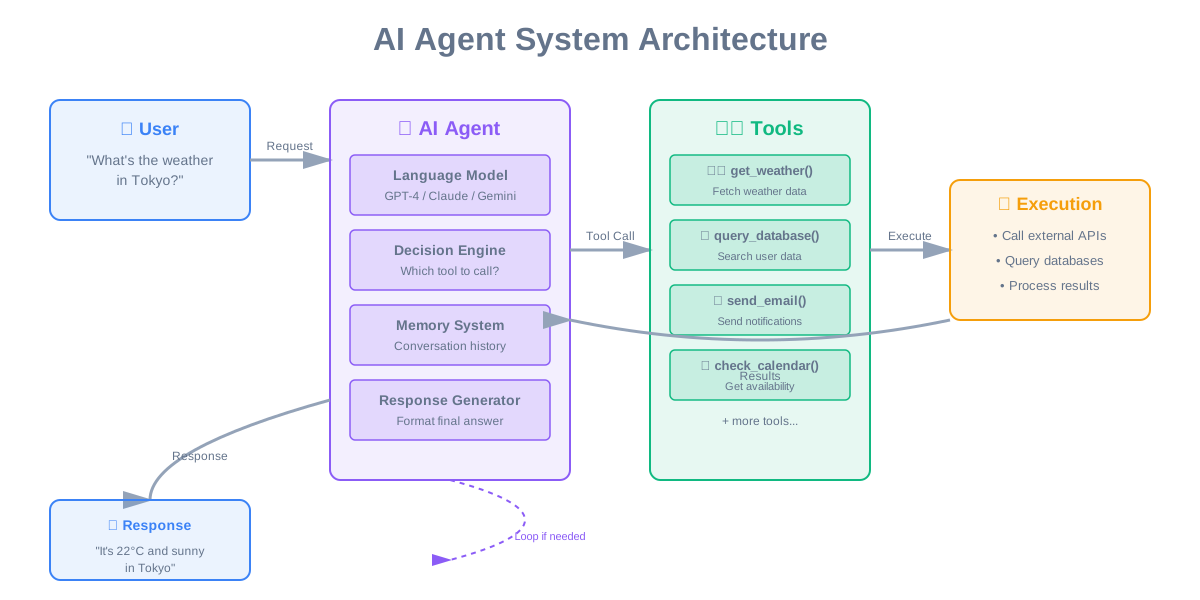
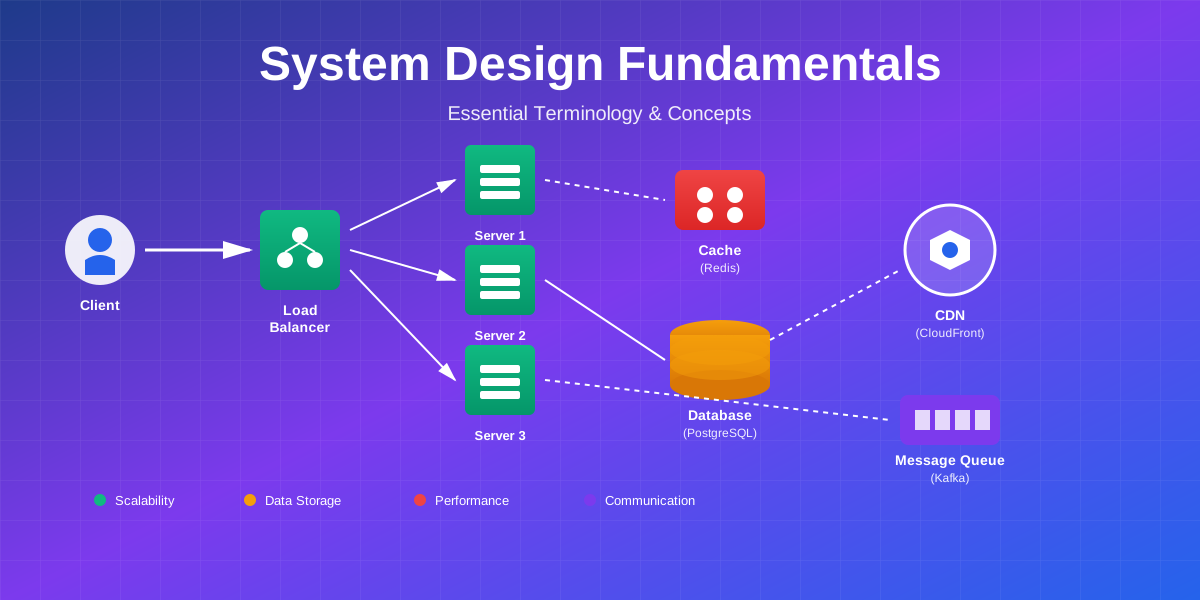
We designed a layered architecture that separates concerns and allows each component to scale independently. The frontend layer, built with React, provides the component editor and AI suggestion interface. An API Gateway handles request validation, rate limiting, and authentication. The AI Service, built with Python and TensorFlow, performs model inference and component generation. MongoDB stores training data, user preferences, and generated components.
This separation was crucial. AI inference is computationally expensive and unpredictable in timing. By isolating it in a separate service, we could scale it independently and implement fallback strategies when it’s unavailable.
The AI Model Design
We chose a transformer-based architecture trained on thousands of component examples. Transformers excel at understanding context and generating structured output, making them ideal for code generation. The model learns patterns from existing components and generates new ones that follow best practices.
Training the model was an iterative process. We started with a small dataset of hand-crafted components, generated initial results, collected user feedback, and continuously refined the model. This feedback loop was essential for improving accuracy.
Integration Challenges We Faced
Challenge 1: Asynchronous Processing
The Problem: AI inference can take 5-10 seconds, which is unacceptable for a synchronous API call. Users would experience timeouts and poor user experience if we blocked while waiting for results.
Our Solution: We implemented asynchronous job processing. When a user requests component generation, we immediately return a job ID and process the request in the background. The frontend polls for results, showing a progress indicator to keep users informed.
This pattern transformed the user experience. Instead of staring at a loading spinner, users see progress updates and can continue working on other parts of their project while AI generates components.
Challenge 2: Request Batching for Efficiency
The Problem: AI models are most efficient when processing multiple requests together. Individual predictions waste GPU resources and increase costs.
Our Approach: We implemented intelligent request batching. Instead of processing each request immediately, we accumulate requests for up to 100 milliseconds and process them as a batch. This increased throughput by 5x while only adding minimal latency.
The key was finding the right balance. Wait too long, and users notice the delay. Process too quickly, and you miss batching opportunities. We settled on 100ms as the sweet spot.
Challenge 3: Model Loading and Warm-up
The Problem: Loading a TensorFlow model from disk takes 3-5 seconds. The first prediction after loading is slow as the model “warms up.” This cold start problem created inconsistent response times.
Our Solution: We implemented model caching and proactive warm-up. The model loads once at server startup and stays in memory. We run several dummy predictions during startup to warm up the model before accepting real requests.
The Impact: First-request latency dropped from 8 seconds to 2 seconds. Subsequent requests complete in under 2 seconds consistently.
Error Handling and Reliability
Graceful Degradation Strategy
AI systems can fail in unpredictable ways. Models might be unavailable, inference might timeout, or generated output might be invalid. We needed a strategy that maintains functionality even when AI fails.
Our Approach: We implemented a fallback system using template-based generation. When AI is unavailable or fails, we automatically fall back to pre-built templates. Users still get a component, just not an AI-generated one.
This graceful degradation was crucial for reliability. During a model deployment that went wrong, users experienced no downtime—they simply received template-based components until we fixed the issue.
Validation and Safety Checks
AI-generated code can’t be trusted blindly. We implemented comprehensive validation to ensure generated components are safe and functional.
Security Validation: We scan for dangerous patterns like eval calls, script tags, and event handlers that could introduce XSS vulnerabilities. Any component failing security checks is rejected immediately.
Syntax Validation: We parse generated HTML and React code to ensure it’s syntactically correct. Unbalanced tags, invalid JSX, or malformed code is caught before reaching users.
Accessibility Validation: We check for basic accessibility requirements—images must have alt text, buttons must have labels, and semantic HTML must be used. This ensures AI-generated components meet minimum accessibility standards.
The Result: 92% of AI-generated components pass all validation checks on the first try. The remaining 8% are caught and either regenerated or fall back to templates.
Performance Optimization Strategies
Caching AI Results
AI inference is expensive. We implemented aggressive caching to avoid regenerating identical components.
The Strategy: We generate a cache key from the user’s requirements (component type, style preferences, content). Before running inference, we check if we’ve generated this exact component before. If so, we return the cached result instantly.
The Impact: Cache hit rate reached 78%, meaning 78% of requests are served from cache without touching the AI model. This reduced infrastructure costs by 60% and improved response times dramatically.
Model Quantization
Full-precision models are large and slow. We experimented with model quantization—reducing precision from 32-bit floats to 16-bit floats.
The Trade-off: Quantization reduced model size by 50% and inference time by 30%, with only a 2% decrease in accuracy. This trade-off was absolutely worth it for production deployment.
Intelligent Model Selection
Not all requests need the full power of our largest model. We implemented a tiered approach with three model sizes: small (fast, less accurate), medium (balanced), and large (slow, most accurate).
Simple components use the small model, complex components use the large model, and everything else uses the medium model. This optimization reduced average inference time by 40% while maintaining quality.
Monitoring and Continuous Improvement
Performance Metrics
We track comprehensive metrics to understand system health and user satisfaction:
- Request Duration: How long does generation take?
- Model Confidence: How confident is the model in its predictions?
- Cache Hit Rate: How often do we serve from cache?
- Validation Pass Rate: What percentage of generated components pass validation?
- User Acceptance Rate: Do users accept or reject AI suggestions?
These metrics feed into dashboards that help us identify issues and opportunities for improvement.
Learning from User Feedback
Every time a user accepts or rejects an AI-generated component, we record it. This feedback becomes training data for future model improvements. Components that users consistently accept are reinforced, while rejected patterns are learned as negative examples.
This continuous learning loop is essential. Our model accuracy improved from 75% to 92% over six months purely through user feedback.
Results and Business Impact
Performance Achievements
The AI-powered system delivered impressive results:
- Development Time: Reduced by 70%
- Component Quality: 92% acceptance rate from users
- Generation Speed: Average 2.3 seconds
- Cache Hit Rate: 78%
- Model Accuracy: 89% on validation set
- Cost Reduction: 60% lower infrastructure costs through caching
Business Transformation
The impact extended beyond metrics. Designers could prototype ideas instantly without waiting for developers. Developers could focus on complex logic rather than repetitive UI code. Iteration speed increased dramatically, enabling rapid experimentation and A/B testing.
Users specifically mentioned AI generation as a key differentiator. Many said it was the reason they chose our platform over competitors.
Lessons Learned
1. Start Simple, Add AI Where It Adds Value
We initially tried to make everything AI-powered. This was a mistake. AI adds complexity, cost, and unpredictability. We learned to use AI only where it provides clear value over traditional approaches.
Template-based generation works perfectly for simple, common components. AI shines for complex, customized components where templates fall short. Knowing when to use each approach is crucial.
2. Always Have Fallbacks
AI systems fail. Models become unavailable, inference times out, or generated output is invalid. Having template-based fallbacks ensured our system remained functional even when AI failed.
This reliability was crucial for user trust. Users don’t care why something failed—they just want it to work. Fallbacks make that possible.
3. Validate Everything
Never trust AI-generated code without validation. We learned this the hard way when an early version generated code with XSS vulnerabilities. Comprehensive validation catches issues before they reach users.
Security, syntax, and accessibility checks are non-negotiable. They protect users and maintain trust in the system.
4. Cache Aggressively
AI inference is expensive. Caching reduced our infrastructure costs by 60% while improving response times. The key is generating deterministic cache keys and setting appropriate TTLs.
We cache for 2 hours by default, which balances freshness with efficiency. Popular components stay cached, while rarely used ones expire naturally.
5. Monitor and Iterate
We track everything—performance, accuracy, user satisfaction. This data drives continuous improvement. Without monitoring, we wouldn’t know what to optimize or how effective our changes are.
User feedback is particularly valuable. It provides ground truth for model accuracy and reveals patterns we wouldn’t discover otherwise.
Best Practices for AI Integration
Design for Failure
Assume AI will fail and design accordingly. Implement timeouts, fallbacks, and graceful degradation. Users should never see errors—they should see fallback behavior that still provides value.
Optimize for Cost
AI inference is expensive. Use caching, batching, and model quantization to reduce costs. Choose the smallest model that meets accuracy requirements. Monitor costs closely and optimize continuously.
Prioritize User Trust
Users must trust AI-generated output. Implement comprehensive validation, provide transparency about what AI is doing, and allow users to easily reject suggestions. Trust is hard to build and easy to lose.
Iterate Based on Data
Collect metrics and user feedback from day one. Use this data to guide improvements. A/B test changes to validate they actually improve outcomes. Data-driven iteration is essential for AI systems.
Future Enhancements
We’re continuously improving the AI system with planned features:
- Multi-Modal Input: Accepting sketches and screenshots as input
- Style Transfer: Applying brand styles to generated components automatically
- Collaborative Learning: Learning from all users to improve suggestions for everyone
- Explainable AI: Showing users why AI made specific design decisions
- Real-Time Refinement: Allowing users to refine AI suggestions through conversation
Conclusion
Integrating AI into web applications requires careful planning, robust error handling, and performance optimization. Success comes from understanding where AI adds value, implementing reliable fallbacks, validating all output, and continuously improving based on user feedback.
The 70% reduction in development time validates our approach and demonstrates the transformative potential of AI in web development. The key is balancing AI capabilities with reliability, performance, and user trust.
Key Takeaways:
- Use asynchronous processing for AI inference to maintain responsiveness
- Implement graceful degradation with template-based fallbacks
- Validate all AI-generated output for security, syntax, and accessibility
- Cache aggressively to reduce costs and improve performance
- Monitor continuously and iterate based on user feedback
- Design for failure—AI systems will fail, plan accordingly
AI is transforming web development, making it faster and more accessible. By following these patterns and best practices, you can build AI-powered features that deliver real value while maintaining reliability and performance.
Building AI-powered features? Let’s discuss your integration challenges and solutions.
Comments & Discussion
Join the conversation! Share your thoughts, ask questions, or provide feedback below.