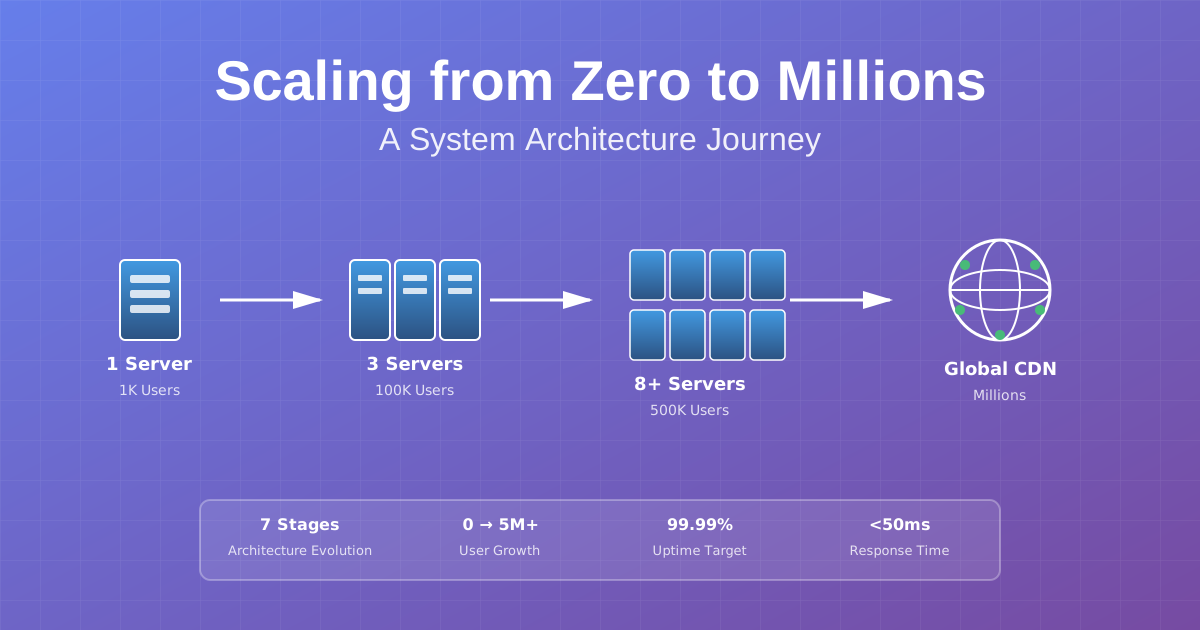
Scaling from Zero to Millions of Users: A Practical Journey
Your app just hit 10,000 users. Congratulations! Your server is also melting. Response times are crawling, the database is gasping for air, and you’re getting alerts at 3 AM. Sound familiar?
Scaling from zero to millions isn’t a straight line—it’s a series of “oh crap” moments followed by architectural evolution. I’ve been through this journey multiple times, from building stock trading platforms handling millions of concurrent users to emotion detection systems for Marvel. Each time, the challenges are different, but the patterns are the same.
Here’s the thing: you don’t need to architect for a million users on day one. In fact, you shouldn’t. But you do need to know what’s coming and when to evolve. This is that roadmap—the one I wish I had when I started.
The Journey: Seven Stages of Scaling
Think of scaling like leveling up in a video game. Each stage unlocks new challenges and requires different strategies. You can’t skip levels, and trying to play level 7 when you’re at level 1 just wastes time and money.
Here’s the progression:
- 0-1K users: Single server (keep it simple)
- 1K-10K users: Separate database (first major split)
- 10K-100K users: Load balancing (horizontal scaling begins)
- 100K-500K users: Caching layer (speed becomes critical)
- 500K-1M users: Database scaling (reads and writes diverge)
- 1M-5M users: CDN & global distribution (geography matters)
- 5M+ users: Microservices (if you really need them)
Stage 1: Single Server - Keep It Stupid Simple
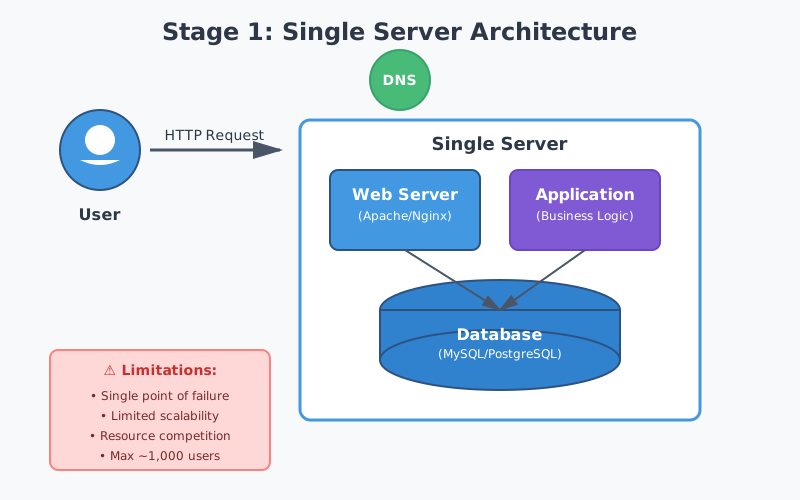
Every successful app starts here. One server. One database. Everything running on the same machine. And you know what? That’s perfect.
Your web server handles requests, your app processes them, your database stores data. Users connect, stuff happens, life is good. Don’t let anyone tell you this is “wrong” or “not scalable.” It’s exactly what you need when you’re validating your idea and building your first thousand users.
When it works great:
- You’re under 1,000 active users
- Traffic is predictable
- You’re iterating fast on features
- You’re watching your burn rate
When you’ll know it’s time to move on: Your server will tell you. CPU spikes during peak hours. Database queries taking forever. Response times climbing. The database and application fighting over the same resources.
The lesson? Start simple. Don’t over-engineer for problems you don’t have. Focus on building something people actually want to use. You’ll have plenty of time to scale later—trust me.
Stage 2: Separate Database - The First Big Split
Here’s where things get interesting. Your single server is struggling, and you need to make your first architectural decision. The answer? Split the database onto its own server.
This one change can buy you 10x more capacity. Why? Because now both components can breathe. Your app server focuses on handling requests and business logic. Your database server optimizes for data storage and retrieval. No more fighting over CPU and memory.
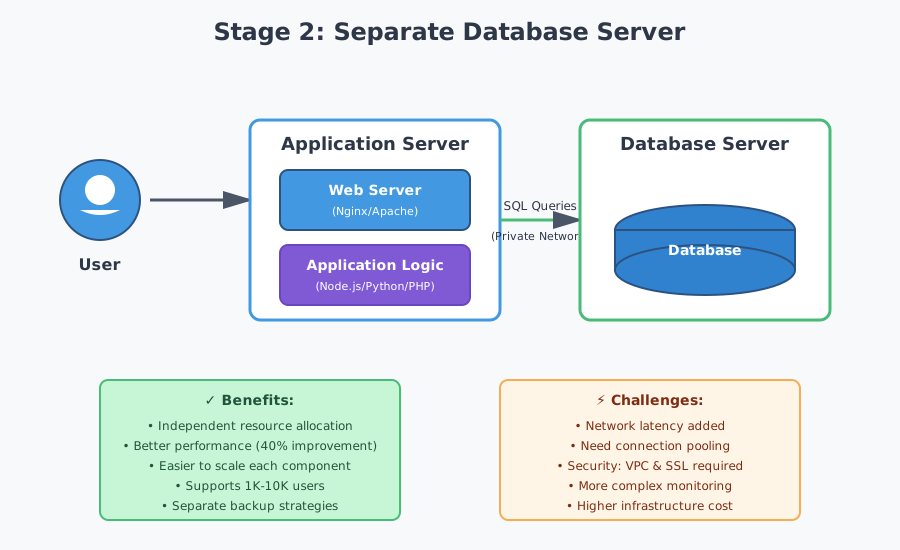
We gave the database server more RAM for caching, faster SSDs for disk I/O, and optimized configuration for database workloads. The app server got to focus on what it does best—serving requests.
But here’s what nobody tells you about this split: you just introduced network latency. Database calls that used to be localhost are now crossing the network. It’s not huge—maybe a few milliseconds—but it adds up.
The fixes? Connection pooling (reuse connections instead of creating new ones) and reducing unnecessary queries (stop doing N+1 queries, seriously). We also had to think about security differently. Database traffic now crosses network boundaries, so we implemented VPC to keep it private and added SSL for connections.
The result? Response times improved by 40%. We could handle 10x more concurrent users. And most importantly, we could scale each component independently. Need more database power? Upgrade the database server. Need more request handling? Upgrade the app server.
Stage 3: Load Balancing - Going Horizontal
Eventually, even the beefiest application server hits its limit. You can only scale vertically (bigger servers) so far before you hit physics and your budget. The answer? Horizontal scaling—add more servers instead of bigger ones.
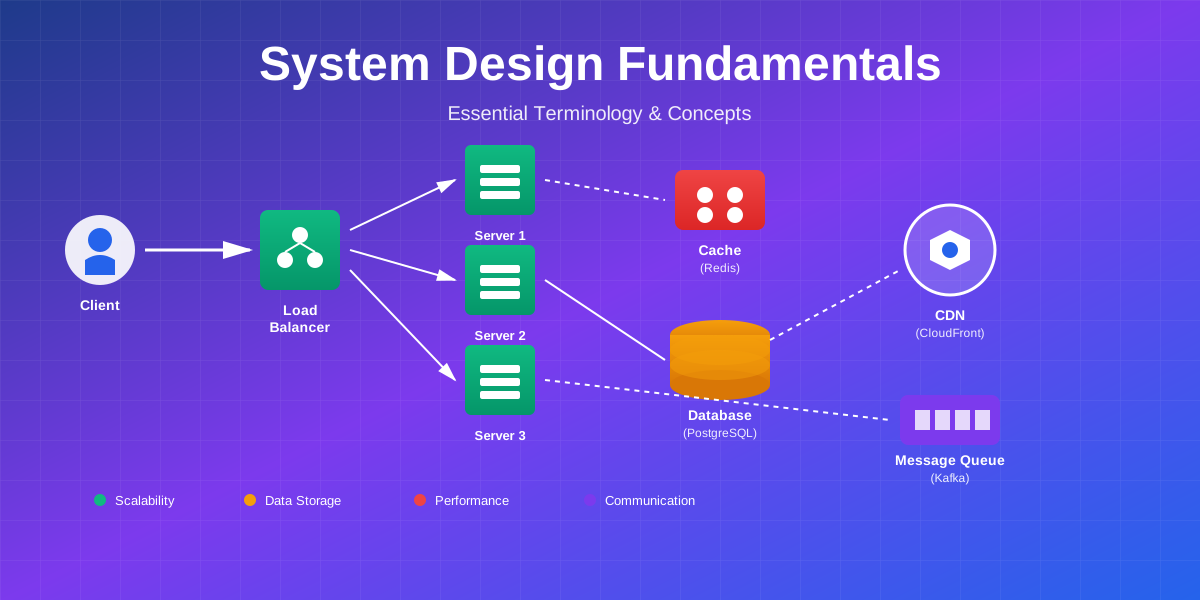
This is where load balancers come in. Think of a load balancer as a traffic cop standing between users and your servers, directing each request to an available server. If one server crashes, the load balancer routes around it automatically. No downtime, no drama.
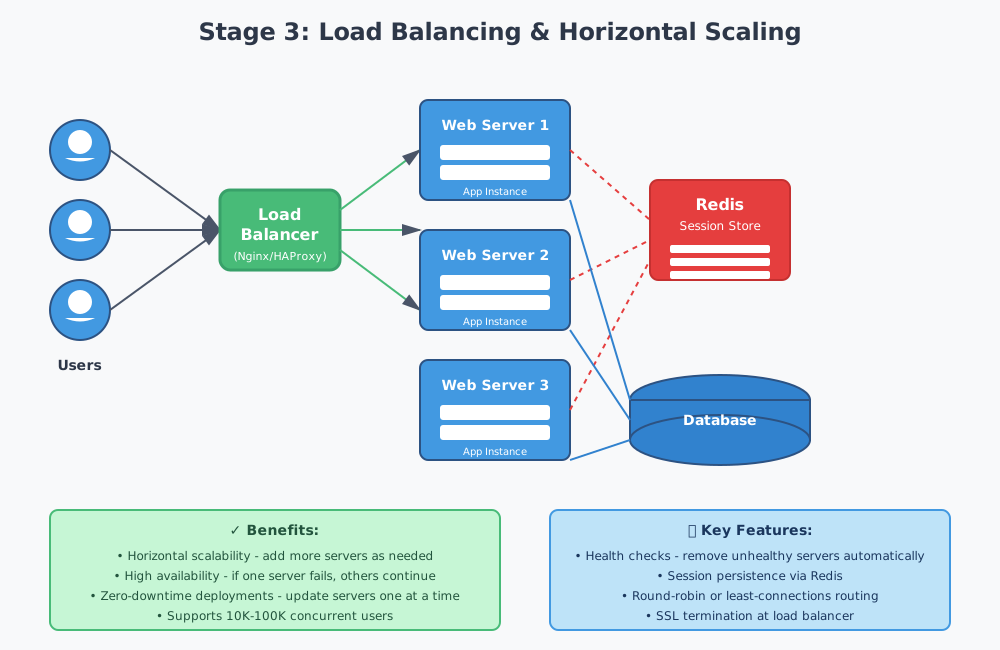
There are different strategies for distributing traffic. Round robin sends requests evenly across all servers—simple and effective. Least connections routes to the server with the fewest active connections—better when requests take varying amounts of time. IP hash routes users to the same server based on their IP—useful for session affinity.
We started with round robin because it’s dead simple. Later moved to least connections as our app got more complex.
But here’s the gotcha that’ll bite you: sessions. User logs in on Server 1, their next request goes to Server 2, which has no idea they’re logged in. Oops.
We tried three solutions:
Sticky sessions (load balancer always sends a user to the same server) seemed easy but was a trap. If that server dies, the user loses their session. Not great.
Session replication (servers share session data with each other) worked but added complexity and network overhead. Meh.
Centralized session store (Redis) was the winner. All servers read from the same Redis instance. Fast, reliable, scalable. This is what we stuck with.
We also had to implement health checks—endpoints that verify the app is responding, database connection works, and critical services are available. Unhealthy servers get pulled from rotation automatically.
The payoff? We could handle 100K concurrent users by just adding more app servers. Deployments became safer—update servers one at a time, no downtime. And system reliability shot up with automatic failover.
Stage 4: Caching Layer - Speed Becomes Everything
Even with multiple app servers and a separate database, guess what becomes the bottleneck again? Yep, the database. Every request hitting the database creates load, and some queries are expensive as hell.
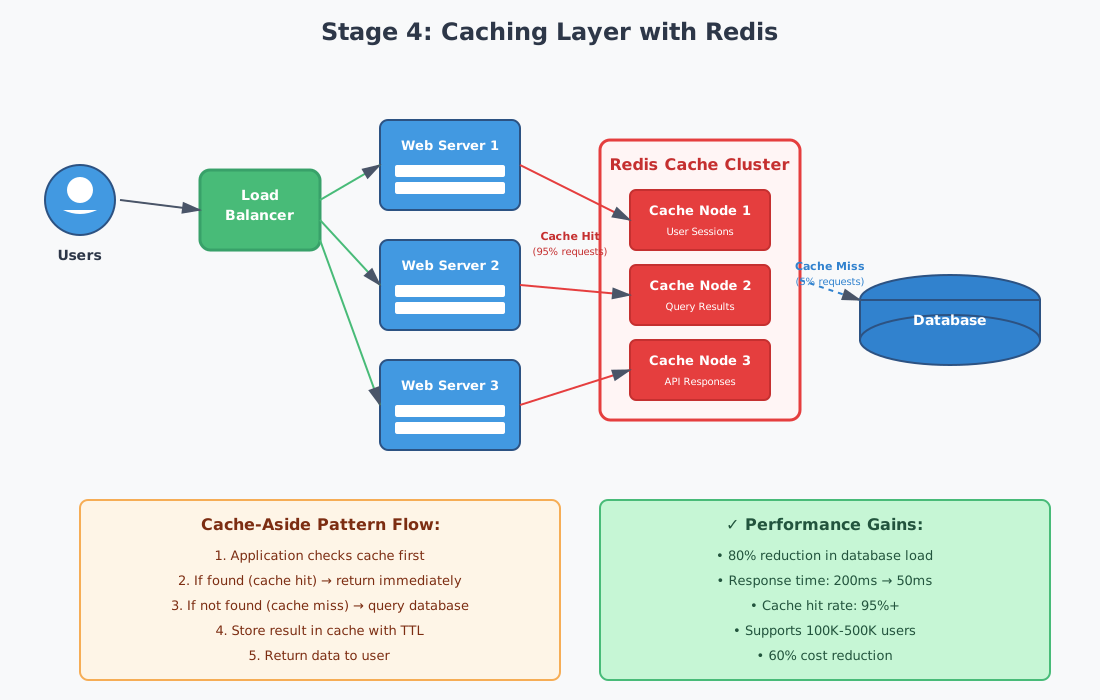
Enter Redis. It’s an in-memory data store that’s stupid fast—sub-millisecond response times. We started caching everything we could:
Database query results (user profiles, product catalogs, config settings), computed values (expensive calculations, analytics, reports), session data (moved from database to Redis), and API responses (external API calls that don’t change often).
The caching strategy matters. We used cache-aside for most things: check cache first, if miss then query database, store result in cache, return data. Simple and works great for read-heavy workloads.
For critical data requiring consistency, we used write-through: write to cache and database simultaneously. Slower writes but guaranteed consistency.
Now here’s the hard part—cache invalidation. Phil Karlton famously said there are only two hard things in computer science: cache invalidation and naming things. He wasn’t kidding.
How do you know when cached data is stale? We used three approaches:
Time-based expiration (TTL): User profiles expire after 1 hour. Product prices after 5 minutes. Static content after 24 hours.
Event-based invalidation: User updates profile → clear user cache. Product price changes → clear product cache.
Cache versioning: Include version numbers in cache keys. When data structure changes, increment version. Old cache entries naturally expire.
There’s also the cache stampede problem. Popular cache key expires. Suddenly 1,000 requests hit the database simultaneously trying to rebuild the cache. Our solution? Cache locking. First request to detect a miss acquires a lock, fetches data, updates cache. Other requests wait briefly then read from the newly populated cache.
The results were dramatic. Database load dropped 80%. Response times improved from 200ms to 50ms for cached requests. We could handle 500K concurrent users. And infrastructure costs actually decreased because we needed fewer database resources.
Stage 5: Database Scaling - Reads and Writes Diverge
Even with aggressive caching, the database eventually needs to scale. Write operations can’t be cached, and cache misses still hit the database. This is where things get interesting.
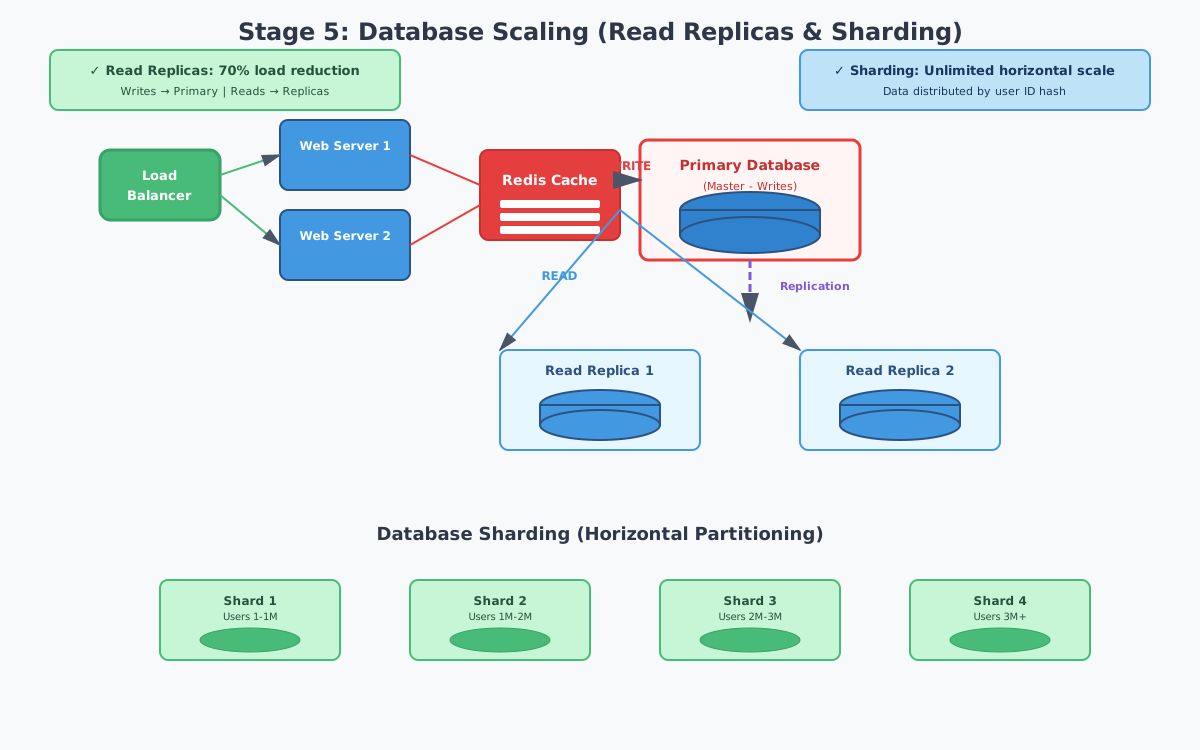
Read replicas are your first move. Create read-only copies of your primary database. Writes go to the primary, reads distribute across replicas. We started with one primary and two read replicas.
But here’s the catch: replication lag. Asynchronous replication means replicas are slightly behind the primary—usually milliseconds, sometimes seconds during high load.
The problem? User updates their profile. Next request reads from a replica that hasn’t received the update yet. User sees old data and thinks the update failed.
Our solution: read-your-writes consistency. After a write, route that user’s reads to the primary for 5 seconds. After that, back to replicas. Users always see their own changes. For critical data (payment status, inventory counts), we always read from primary.
When read replicas aren’t enough, you need sharding—splitting data across multiple databases. We implemented horizontal sharding by user ID. Each user’s data lives on one shard, determined by hashing their user ID.
Sharding is powerful but comes with challenges. Cross-shard queries (queries spanning multiple shards) are complex and slow—we redesigned features to avoid them. Rebalancing (adding new shards) requires redistributing data—we built tools to migrate with zero downtime. Distributed transactions across shards are complicated—we moved to eventual consistency where possible.
The payoff? Database could handle 10x more load. Read replicas reduced primary load by 70%. Sharding gave us unlimited horizontal scalability. We successfully scaled to 1M concurrent users.
Stage 6: CDN & Global Distribution - Geography Matters
As your user base grows globally, physics becomes your enemy. A user in Australia connecting to a US server faces 200-300ms latency just for the network round trip. No amount of optimization fixes that.
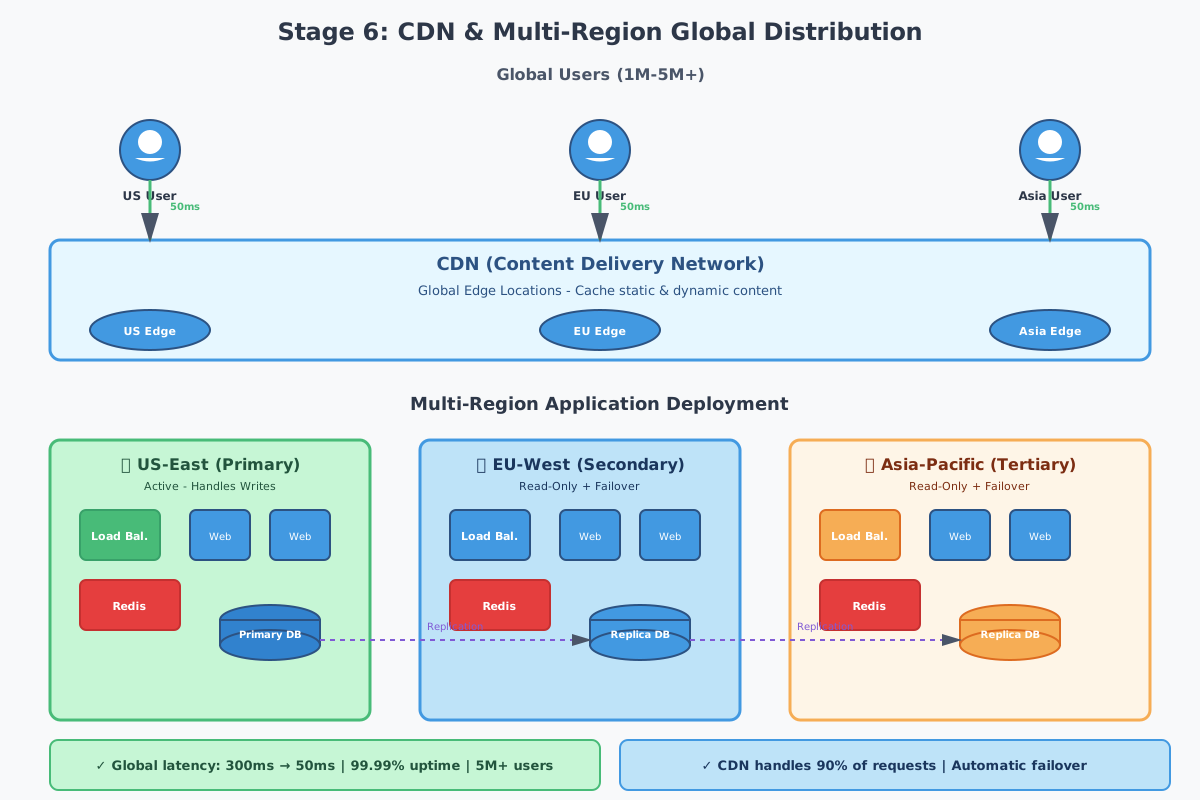
CDN (Content Delivery Network) solves this. It’s a globally distributed network of servers that cache your content close to users. User in Australia requests your site, they connect to a CDN server in Australia instead of your US server.
We put static assets (images, CSS, JavaScript, fonts) on the CDN first—these rarely change and benefit most. Then dynamic content with edge caching (even dynamic content can be cached for 5-60 seconds). Even some API responses that don’t change often.
But CDN alone isn’t enough for truly global scale. We deployed our application in multiple regions: US-East (primary, handles all writes), EU-West (handles EU reads, serves as failover), and Asia-Pacific (handles APAC reads, serves as failover).
The challenge? Keeping data synchronized across regions while maintaining low latency. We used active-passive: one region handles writes (active), others handle reads (passive). Writes replicate to passive regions asynchronously. Users route to nearest region for reads, but writes always go to the active region.
The results were dramatic. Global latency reduced from 300ms to 50ms for international users. CDN handled 90% of requests, dramatically reducing origin server load. Multi-region deployment provided 99.99% uptime with automatic failover. We successfully scaled to 5M concurrent users globally.
Stage 7: Microservices - Only If You Really Need Them
Here’s the truth about microservices: they’re not a silver bullet. They add significant complexity. Don’t start with them. Don’t rush to them. Only consider them when your monolith is genuinely holding you back.
When does that happen? When your team is large (50+ engineers), different features have vastly different scaling needs, you need independent deployment of features, and you have the infrastructure and expertise to manage distributed systems.
We broke our monolith into services: User Service (auth, profiles), Product Service (catalog, inventory), Order Service (cart, checkout), Payment Service (processing, refunds), Notification Service (email, SMS, push), and Search Service (product search, recommendations).
Services communicate synchronously (REST/gRPC) for real-time operations and asynchronously (message queues) for operations that can happen eventually. Order placed → queue message → notification service sends email.
The challenges are real. Distributed transactions require saga patterns—each service completes its part and publishes events. If something fails, compensating transactions undo previous steps. Service discovery requires a registry where services register their location. Monitoring and debugging across services requires distributed tracing. Data consistency across services requires careful design and eventual consistency patterns.
But when done right, teams can deploy independently, services scale based on their specific needs, development velocity increases, and system resilience improves—one service failing doesn’t bring down everything.
The Big Lessons
Scale when you need to, not before. Premature optimization wastes time and resources. Start simple and evolve as actual needs emerge.
Measure everything. You can’t optimize what you don’t measure. Track response times, error rates, database performance, cache hit rates, and user experience metrics from day one.
Caching is your best friend. Aggressive caching at every layer dramatically reduces load and improves performance. Just remember—cache invalidation is hard.
The database is usually the bottleneck. No matter how fast your application code is, the database eventually becomes the problem. Optimize queries, add indexes, implement caching, use read replicas, consider sharding.
Horizontal scaling beats vertical scaling. Adding more servers is more reliable and cost-effective than buying bigger servers. Design for horizontal scaling from the start.
Plan for failure. Servers fail, networks fail, databases fail. Design your system to handle failures gracefully with health checks, automatic failover, circuit breakers, and retry logic.
The Bottom Line
Scaling from zero to millions is one of the most rewarding challenges in software engineering. Each stage brings new problems and new lessons. The key is understanding that scaling is a journey—you don’t need to solve every problem on day one.
Start with a simple architecture. Monitor closely. When bottlenecks emerge, address them systematically. Make data-driven decisions. And most importantly, focus on building a product users love—that’s the only way you’ll get to millions of users in the first place.
The journey is challenging, but with the right approach and mindset, it’s absolutely achievable.
Scaling your application and need architecture advice? Let’s talk about your specific challenges.
Comments & Discussion
Join the conversation! Share your thoughts, ask questions, or provide feedback below.