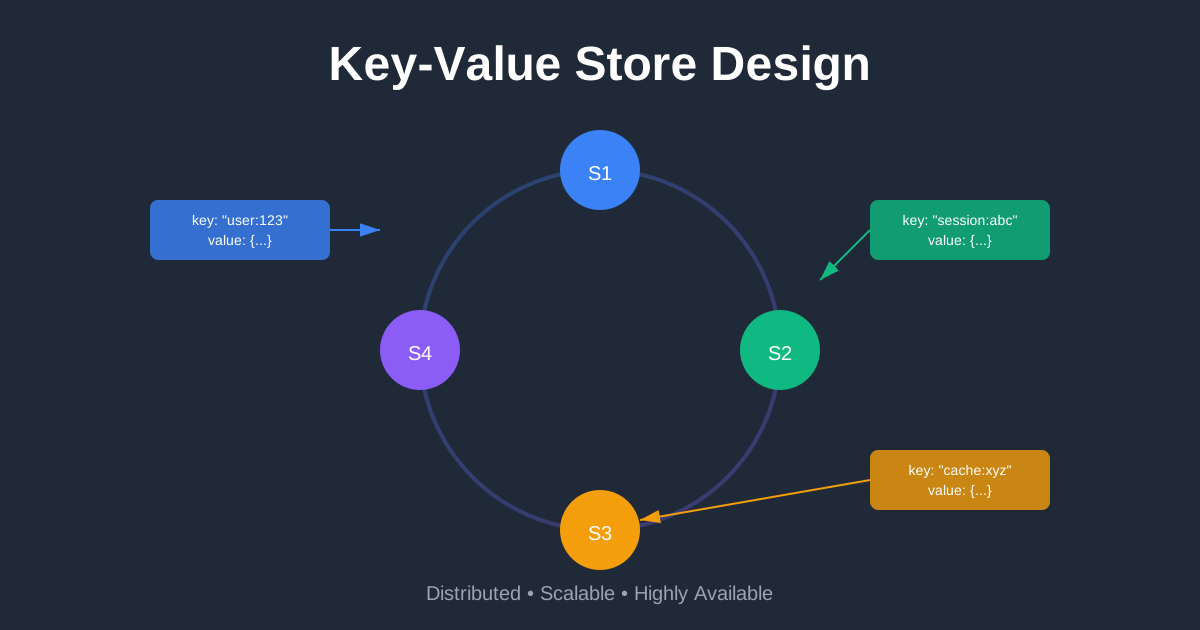
Designing a Key-Value Store: Building the Foundation of Modern Databases
You’re building the next big app. Users are signing up like crazy. Your relational database is starting to sweat. Queries that used to take milliseconds now take seconds. Your DBA is talking about sharding, and you’re Googling “NoSQL” at 2 AM.
Sound familiar? This is where key-value stores shine. They’re the secret sauce behind systems like Redis, DynamoDB, and Memcached—databases that can handle millions of operations per second without breaking a sweat. But here’s the thing: they’re not magic. They’re just really well-designed distributed systems that make smart trade-offs.
In this guide, we’ll design a production-ready key-value store from scratch. We’ll tackle the hard problems: how to distribute data across servers, what happens when things fail, and how to balance consistency with availability. Real talk, no fluff.
What’s a Key-Value Store Anyway?
Think of it like a giant hash map that lives across multiple servers. You have keys (unique identifiers) and values (the data you want to store). That’s it. No complex queries, no joins, no schema—just blazing fast lookups.
The interface is dead simple:
put(key, value)- Store somethingget(key)- Retrieve it later
Your key might be “user:12345” and the value might be a JSON blob with user data. Or the key could be “session:abc123” with session information. The value is opaque—the database doesn’t care what’s in it.
Companies like Amazon (DynamoDB), Facebook (Memcached), and Twitter (Redis) use key-value stores to power their most critical features. Why? Because when you need to serve millions of requests per second, simplicity wins.
The Problem We’re Solving
Here’s what we need to build:
The basics: Store and retrieve data fast. We’re talking sub-millisecond latency for most operations.
Handle scale: Not just thousands of operations per second—millions. With terabytes of data spread across hundreds of servers.
Stay available: When servers crash (and they will), the system keeps running. No downtime during deployments or hardware failures.
Automatic scaling: Add or remove servers without taking the system down or manually reshuffling data.
Tunable consistency: Sometimes you need strong consistency (bank balances). Sometimes eventual consistency is fine (social media likes). Let users choose.
The tricky part? You can’t have everything. This is where the famous CAP theorem comes in, and where things get interesting.
Let’s Talk Numbers
Say you’re building a system that needs to handle:
- 10 million active users
- 1 billion read operations per day
- 100 million write operations per day
- Each key-value pair is around 1 KB
That’s about 11,600 reads per second on average, but during peak hours you might see 5-10x that. You’re looking at 60,000-120,000 reads per second and 6,000-12,000 writes per second.
For storage, 1 billion key-value pairs at 1 KB each is about 1 TB of data. With replication (you’ll want 3 copies for reliability), that’s 3 TB. Totally manageable with modern hardware, but you can’t fit it on a single server.
Single Server: The Starting Point
Before we go distributed, let’s start simple. A key-value store on one server is just a hash table in memory. Lookups are O(1), writes are O(1), life is good.
The problem? Memory is expensive and limited. Even a beefy server with 256 GB of RAM can only hold so much. And if that server dies, all your data is gone.
You can optimize a bit:
- Compress the data to fit more in memory
- Keep hot data in memory, cold data on disk
- Use an SSD for faster disk access
But eventually, you hit a wall. One server can only scale so far. Time to go distributed.
Going Distributed: The Real Challenge
A distributed key-value store spreads data across multiple servers. Sounds simple, right? Just split the data up and you’re done.
Not quite. Now you have to solve:
- How do you decide which server stores which key?
- What happens when you add or remove servers?
- How do you keep data consistent across replicas?
- What happens when servers can’t talk to each other?
- How do you detect and recover from failures?
This is where system design gets fun (and complicated).
The CAP Theorem: Pick Two
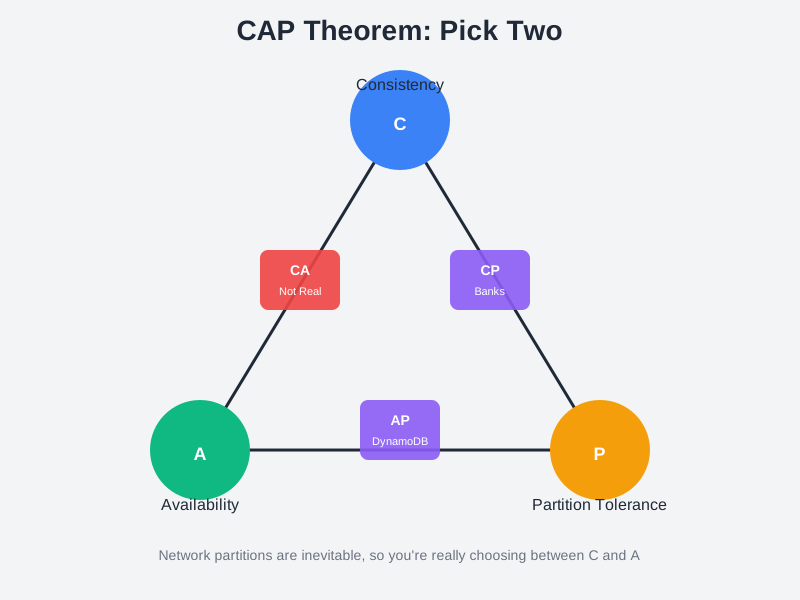
Here’s the fundamental trade-off in distributed systems. The CAP theorem says you can only have two of these three properties:
Consistency: Every read gets the most recent write. All nodes see the same data at the same time.
Availability: Every request gets a response, even if some nodes are down.
Partition Tolerance: The system keeps working even when network connections between nodes fail.
Here’s the kicker: network partitions are inevitable. Cables get unplugged, switches fail, data centers lose connectivity. So partition tolerance isn’t optional—you have to have it.
That means you’re really choosing between consistency and availability.
CP Systems: Consistency + Partition Tolerance
When a network partition happens, CP systems block writes to maintain consistency. All nodes must agree before accepting a write.
Think bank accounts. If you can’t guarantee that all replicas have the same balance, you’d rather return an error than show incorrect data. Better to be unavailable for a few seconds than to let someone withdraw money twice.
Examples: Traditional databases with strong consistency, HBase, MongoDB (with certain configurations)
AP Systems: Availability + Partition Tolerance
AP systems keep accepting reads and writes even during network partitions. They’ll sync up eventually, but in the meantime, different nodes might have different data.
Think social media likes. If you like a post and your friend doesn’t see it for a few seconds, no big deal. The system stays responsive, and eventually everyone sees the same count.
Examples: DynamoDB, Cassandra, Riak
CA Systems: Don’t Exist in Reality
You can’t have consistency and availability without partition tolerance in a distributed system. Network failures happen. Anyone claiming to have a CA system either hasn’t hit a partition yet or is lying.
For our key-value store, we’ll design an AP system with tunable consistency. Most use cases prefer availability, but we’ll let users dial up consistency when they need it.
Data Partitioning: Splitting the Load
You’ve got terabytes of data and millions of keys. How do you decide which server stores what?
The naive approach: hash the key and mod by the number of servers. Key “user:123” hashes to 456, and 456 % 4 = 0, so it goes to server 0.
The problem? When you add or remove a server, almost every key needs to move to a different server. Add a 5th server and suddenly 456 % 5 = 1, so the key moves to server 1. Multiply that by millions of keys and you’re reshuffling your entire database.
Consistent Hashing: The Smart Solution
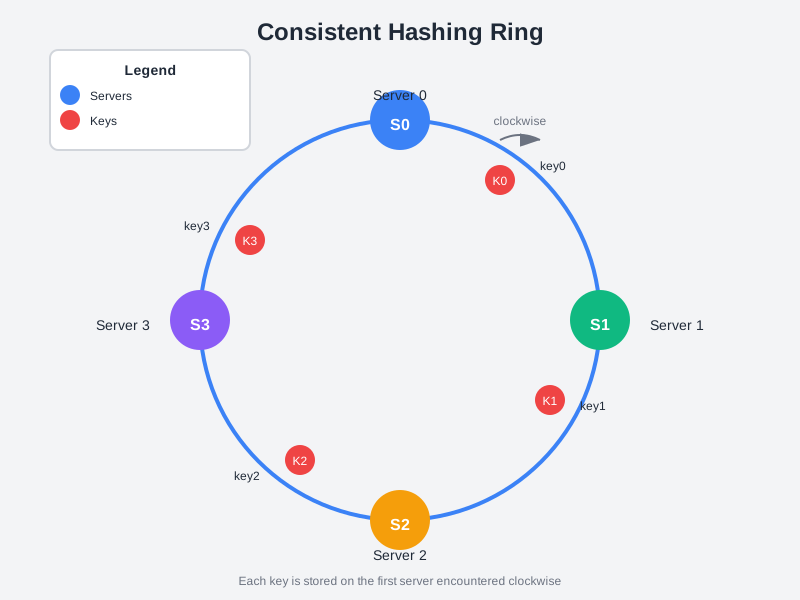
Consistent hashing solves this beautifully. Imagine a clock face (a hash ring). Both servers and keys get hashed onto this ring. Each key is stored on the first server you encounter walking clockwise from the key’s position.
When you add a server, only the keys between the new server and the previous server need to move. When you remove a server, only its keys need to move to the next server. Most of your data stays put.
Even better: use virtual nodes. Instead of placing each physical server once on the ring, place it multiple times (say, 150 virtual nodes per server). This distributes the load more evenly and makes it easier to handle servers with different capacities.
Amazon’s Dynamo paper popularized this approach, and now it’s used everywhere—Cassandra, Riak, DynamoDB, you name it. It’s one of those ideas that seems obvious in hindsight but was genuinely brilliant when first introduced.
Data Replication: Don’t Put All Your Eggs in One Basket
Single server goes down? Your data is gone. That’s not acceptable for a production system.
The solution: replicate each key across multiple servers. The standard is N=3 replicas. When you write a key, it gets stored on three different servers. When one fails, you still have two copies.
Here’s how it works with consistent hashing: after you find the server for a key, keep walking clockwise and store copies on the next N-1 servers. So if key0 maps to server S1, you also store it on S2 and S3.
One gotcha: with virtual nodes, those next servers might actually be the same physical server. You need to make sure you’re picking N unique physical servers, not just N virtual nodes.
Another consideration: put replicas in different data centers. If your entire data center loses power (it happens), you want copies elsewhere. The trade-off is higher latency for writes since you’re sending data across the internet, but it’s worth it for reliability.
Consistency Models: How Strict Do You Need to Be?
Here’s where things get philosophical. When you write data to three replicas, how many need to acknowledge the write before you tell the client “success”?
Quorum Consensus: The Goldilocks Solution
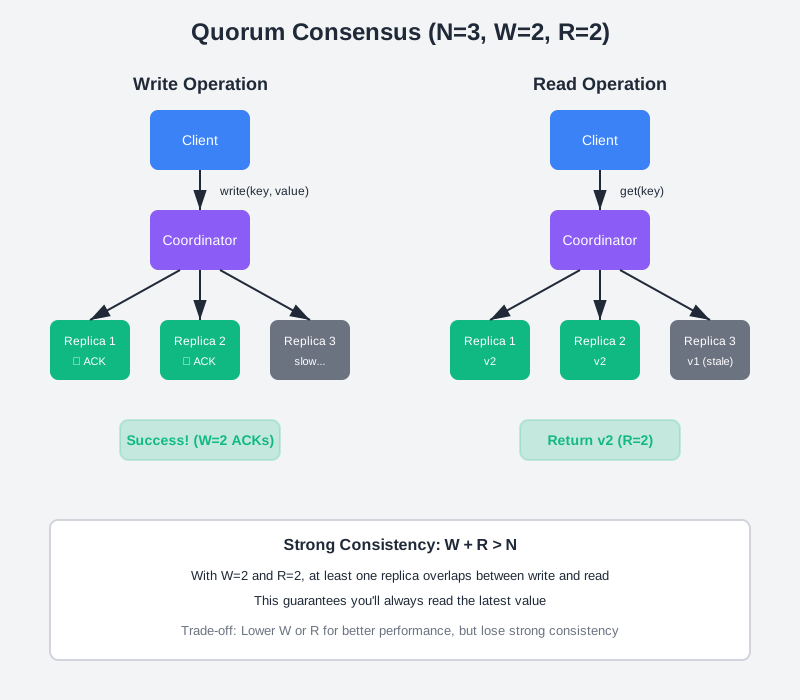
This is where quorum consensus comes in. You define three numbers:
- N = number of replicas (usually 3)
- W = write quorum (how many replicas must acknowledge a write)
- R = read quorum (how many replicas must respond to a read)
The magic formula: if W + R > N, you get strong consistency. There’s guaranteed to be at least one overlapping replica that has the latest data.
Fast reads: Set R=1, W=N. Reads are blazing fast (only need one replica), but writes are slow (need all replicas).
Fast writes: Set W=1, R=N. Writes are fast, reads are slower.
Balanced: Set W=2, R=2 with N=3. Good balance of speed and consistency.
Eventual consistency: Set W=1, R=1. Super fast, but you might read stale data. It’ll be consistent eventually, just not immediately.
DynamoDB and Cassandra both use this model, and they let you tune W and R per request. Need strong consistency for this particular read? Crank up R. Don’t care about this write being immediately visible? Drop W to 1.
Eventual Consistency: The Reality Check
Here’s the thing about eventual consistency: it’s not a bug, it’s a feature. Most applications don’t actually need strong consistency.
Think about it. When you like a post on Instagram, does it matter if your friend sees 99 likes while you see 100? Not really. Eventually (usually within milliseconds), everyone sees the same count.
The benefit? Your system stays fast and available even when things go wrong. Network partition between data centers? No problem, keep accepting writes. They’ll sync up when the network heals.
Amazon’s shopping cart is a famous example. They chose availability over consistency because it’s better to let you add items to your cart (even if there’s a brief inconsistency) than to show you an error page.
Handling Conflicts: When Replicas Disagree
With eventual consistency, you’ll have conflicts. Two users update the same key at the same time on different replicas. Now what?
Vector Clocks: Tracking Causality
Vector clocks are a clever way to track which version of data came from where. Each replica maintains a counter, and every write increments that replica’s counter.
When you read a value, you get its vector clock: something like [S1:2, S2:1, S3:1]. This tells you the value was written twice on S1, once on S2, and once on S3.
If one vector clock is strictly greater than another (all counters are ≥), you know which version is newer. But if the counters diverge (S1 has a higher counter in one, S2 has a higher counter in the other), you have a conflict.
Who resolves the conflict? Usually the client. You return both versions and let the application decide. For a shopping cart, you might merge them (union of items). For a counter, you might take the max. For text, you might show a diff and let the user choose.
The downside? Vector clocks can grow large if you have many replicas. Amazon’s Dynamo paper mentions they set a threshold and prune old entries, which can lead to false conflicts, but in practice it works fine.
Failure Detection: Knowing When Things Break
In a distributed system, you can’t just check if a server is down. You need multiple sources of information.
Gossip Protocol: The Rumor Mill
Gossip protocol is brilliant in its simplicity. Each server maintains a list of all other servers and their heartbeat counters. Periodically, each server:
- Increments its own heartbeat counter
- Sends its list to a few random servers
- Receives lists from other servers and updates its view
If a server’s heartbeat hasn’t increased in a while, mark it as down. The gossip spreads through the cluster, and eventually everyone knows.
It’s decentralized (no single point of failure), scalable (each server only talks to a few others), and robust (even if some messages are lost, the gossip still spreads).
Handling Temporary Failures: Sloppy Quorum
What happens when a replica is temporarily down? With strict quorum, you’d block writes until it comes back. That’s not great for availability.
Sloppy quorum says: pick the first W healthy servers on the hash ring, even if they’re not the “correct” replicas. When the down server comes back, sync the data back to it (this is called hinted handoff).
It’s a bit like leaving a package with a neighbor when you’re not home. The package isn’t at the right house, but it’s safe, and you’ll get it when you return.
Handling Permanent Failures: Merkle Trees
For permanent failures (or just to catch inconsistencies), you need to compare replicas and sync them up. But you can’t compare every key—that’s too expensive.
Merkle trees let you efficiently find differences. You hash your keys into buckets, hash each bucket, then build a tree of hashes. To compare two replicas, start at the root. If the root hashes match, you’re done. If not, recurse into the children until you find the differing buckets.
This is way more efficient than comparing every key. You only transfer the data that’s actually different.
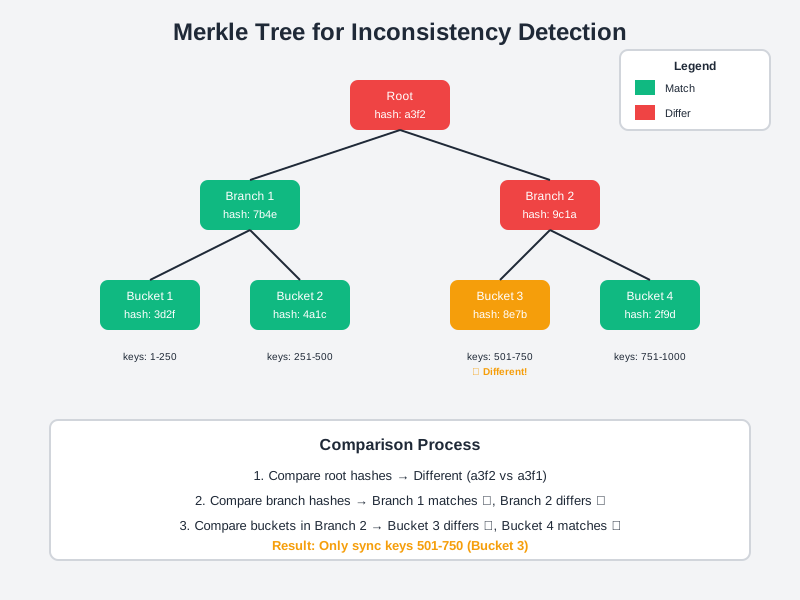
Cassandra uses Merkle trees for anti-entropy repair. It’s one of those techniques that seems complex but is actually quite elegant once you understand it.
The Complete Architecture
Let’s put it all together. Here’s what our distributed key-value store looks like:
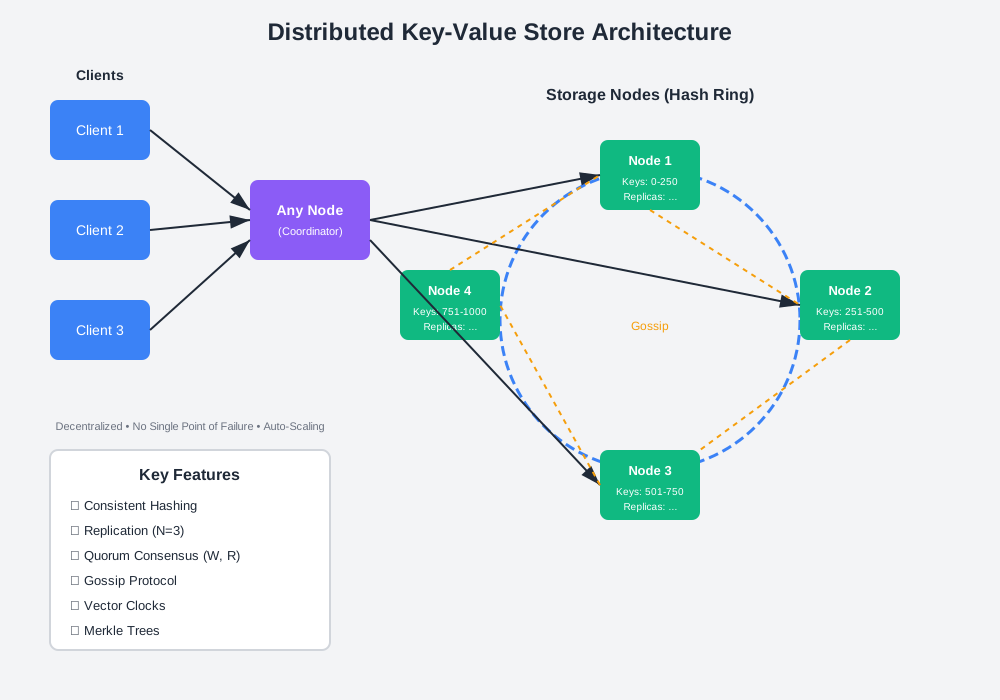
Client Layer: Applications talk to any node in the cluster. There’s no special “master” node—every node can handle requests.
Coordinator Node: The node that receives a request acts as the coordinator. It figures out which replicas should store the data (using consistent hashing), sends the request to those replicas, and waits for quorum responses.
Storage Nodes: Each node stores a portion of the data (determined by consistent hashing) and maintains replicas for other nodes’ data. They use local storage (SSD or memory) for fast access.
Membership & Failure Detection: Nodes gossip with each other to maintain a view of the cluster. They detect failures and route around them automatically.
Anti-Entropy: Background processes use Merkle trees to find and fix inconsistencies between replicas.
The beauty of this architecture is that it’s completely decentralized. No single point of failure. Add a node, and it automatically joins the ring and starts taking load. Remove a node, and its data gets redistributed. The system heals itself.
Write Path: What Happens When You Store Data
Here’s the journey of a write request:
- Client sends
put("user:123", {...})to any node - That node becomes the coordinator
- Coordinator hashes the key to find its position on the ring
- Coordinator identifies N replicas (next N servers clockwise)
- Coordinator sends the write to all N replicas in parallel
- Each replica writes to a commit log (for durability)
- Each replica updates its in-memory cache
- Replicas send acknowledgments back to coordinator
- Once W replicas acknowledge, coordinator tells client “success”
- Eventually, data gets flushed from memory to disk (SSTables)
The commit log is crucial. It’s an append-only file that ensures durability. Even if the server crashes before flushing to disk, you can replay the commit log on restart.
SSTables (Sorted String Tables) are the on-disk format. They’re immutable, sorted files that make reads efficient. When you have multiple SSTables, you periodically compact them to remove old versions and deleted keys.
Read Path: Retrieving Your Data
Reads are a bit more complex because data might be in memory or on disk:
- Client sends
get("user:123")to any node - Coordinator hashes the key to find replicas
- Coordinator sends read request to R replicas
- Each replica checks its memory cache first
- If not in memory, replica checks a Bloom filter (probabilistic data structure that tells you if a key might b
Comments & Discussion
Join the conversation! Share your thoughts, ask questions, or provide feedback below.